Overview

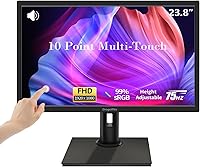
The Dragolftie FHD-238 23.8-inch Touchscreen Monitor enters the market as a practical option for home office workers and students who want touch interaction without a heavy investment. Launched in April 2025, it pairs a Full HD 1920x1080 panel with 10-point capacitive touch — a combination that covers most everyday productivity needs comfortably. The stand is genuinely versatile, offering height, pivot, swivel, and tilt adjustments that let you configure it for sitting, standing, or even portrait orientation. One thing worth knowing upfront: this touchscreen monitor is not compatible with macOS, Linux, or gaming consoles, so Windows PC users are the clear intended audience here.
Features & Benefits

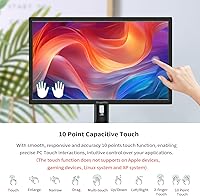
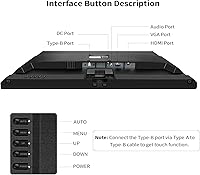
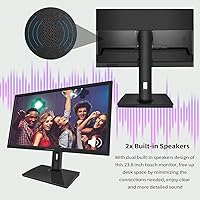
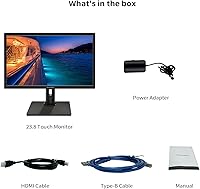
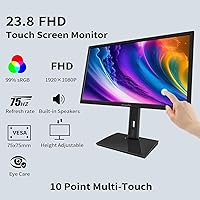
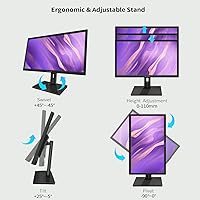
The touch functionality runs through a Type-B USB connection, meaning you need that cable plugged in alongside your video source — skip it and the screen becomes non-touch entirely. The stand covers a 110mm height range, a -90° to 0° pivot, 45° of swivel in either direction, and -5° to 25° of tilt, giving you real flexibility across different work setups. Audio is built-in but tied specifically to the HDMI port — handy for video calls or background music, though the speakers won't replace a dedicated audio setup. 99% sRGB coverage and a 75Hz refresh rate handle color-sensitive tasks and general desktop use well, with a low blue light filter adding some relief during extended sessions.

Best For

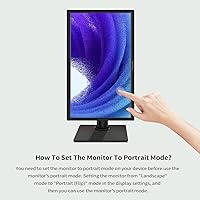
This touch-enabled desktop screen is a strong fit for Windows-based home office users who want to annotate documents, sign PDFs, or simply navigate with their fingers rather than a mouse. Students will find it practical for note-taking on a desktop setup, particularly on a Windows machine. Small businesses running kiosk or point-of-sale setups should also take note — the compact footprint and touch capability work well in that context. Portrait mode is achievable, but it requires manually changing your OS display settings before rotating the stand, so factor that extra step in if vertical orientation is a regular priority for you.

User Feedback

Early buyers frequently praise the touch responsiveness and stand flexibility, with several noting that four-way adjustability makes a tangible difference during long work sessions. On the downside, the glossy panel draws consistent complaints in rooms with strong overhead or natural lighting, and the built-in speakers — while convenient — are described as thin at higher volumes. A recurring frustration is the portrait mode setup, which catches users off guard since the display does not rotate automatically when the stand is turned. It is worth being transparent: the Dragolftie display only launched in 2025, so the review pool remains small and meaningful long-term reliability data simply does not exist yet.

Pros

  • 10-point capacitive touch responds accurately for everyday tapping, swiping, and annotation tasks.
  • The four-way adjustable stand — height, pivot, swivel, and tilt — is genuinely practical and well-built for the price.
  • 99% sRGB color coverage produces vibrant, accurate colors that hold up well for photo editing and creative work.
  • Built-in speakers remove the need for a separate audio device, keeping your desk cleaner.
  • VESA 75x75mm support means you can mount this touch-enabled desktop screen on a wall or monitor arm.
  • The low blue light filter makes extended work or study sessions noticeably more comfortable over time.
  • HDMI, VGA, and Type-B ports cover most common connection setups without needing adapters.
  • A 75Hz refresh rate provides smooth enough motion for productivity use and casual video watching.
  • Portrait mode is achievable with a manual OS setting change, adding useful layout flexibility for reading or coding.

Cons

  • The glossy panel causes significant glare in bright or naturally lit rooms.
  • Touch functionality requires a separate Type-B USB cable — lose it and the touch feature stops working entirely.
  • Built-in speakers are thin and underwhelming at higher volumes, limiting their practical use.
  • Portrait mode does not switch automatically when you rotate the stand, requiring a manual display settings change every time.
  • The brand launched in early 2025, so there is no meaningful long-term durability or reliability data available yet.
  • Touch support is locked out on macOS, Linux, gaming consoles, and Windows XP systems.
  • Audio only works through the built-in speakers when connected via HDMI — other ports do not activate them.
  • The review pool is still small, making it harder to gauge real-world consistency across multiple units.

Ratings

The scores below for the Dragolftie FHD-238 23.8-inch Touchscreen Monitor were generated by our AI rating engine after analyzing verified purchase reviews from buyers worldwide, with spam, bot activity, and incentivized feedback actively filtered out. Each category reflects a balanced synthesis of real user experiences — strengths and frustrations weighted equally — so you get an honest picture of where this display delivers and where it falls short.
Touch Responsiveness
83%
Most Windows users report that 10-point touch registers accurately for everyday tasks like document annotation, web navigation, and tapping through menus — the kind of use it is genuinely built for. Fingers are tracked cleanly without noticeable lag under normal desktop workloads.
A small but consistent group of users notes that precision drops slightly at screen edges, which matters for touch-heavy workflows. The hard dependency on the Type-B USB cable also means a misplaced or faulty cable instantly disables touch entirely, which has caught buyers off guard.
Ergonomic Adjustability
88%
The four-way stand — covering height, tilt, swivel, and pivot — is genuinely one of this display's strongest points and draws frequent praise from home office workers who switch between sitting and standing positions throughout the day. The range on each axis is practical rather than token.
Portrait mode is the one friction point: rotating the stand does not trigger an automatic OS display switch, so users have to manually change orientation settings each time, which annoys anyone who rotates frequently. A few users also mention the pivot mechanism feels slightly stiff initially.
Display Quality
79%
21%
The 1920x1080 FHD panel with 99% sRGB coverage produces colors that look vivid and accurate enough for photo editing, document work, and general media consumption. Text rendering is sharp and comfortable to read at normal desktop distances.
The glossy screen surface is a recurring complaint in bright rooms — natural light from windows or overhead lighting creates visible reflections that interfere with readability. Users working in sun-filled home offices or retail environments consistently flag this as a meaningful daily frustration.
Value for Money
84%
For buyers who need touch functionality, an adjustable stand, and a full HD panel without stretching their budget significantly, this display offers a compelling combination of features at its price tier. Competing touch monitors with comparable stand flexibility tend to cost noticeably more.
The value calculation shifts a bit when you factor in the compatibility restrictions — Mac users, Linux setups, and gaming console owners get essentially a basic display with no touch, which undercuts the core selling point. Brand newness also adds a small risk premium for buyers concerned about long-term support.
Built-in Audio
54%
46%
The built-in speakers remove the need for a separate audio device, which is genuinely convenient for users who mainly need sound for video calls, YouTube, or background music at low to moderate volumes. For kiosk or POS environments where audio is secondary, they are adequate.
At higher volume levels, the speakers produce thin, distorted sound that most buyers find unacceptable for anything beyond casual use. The additional constraint that audio only activates through the HDMI port — not VGA — adds an unwelcome limitation that trips up new users expecting audio to just work.
Connectivity
77%
23%
Having HDMI, VGA, and Type-B USB ports on a single mid-range monitor gives it broad compatibility across older and newer PCs alike, which is practical for small offices running mixed hardware. The VGA port in particular is a welcome inclusion for users still working with older business desktops.
The audio-to-HDMI-only dependency and the touch-to-Type-B-only dependency mean you are managing more cable requirements than expected for a single display. Users who assumed all ports would deliver the full feature set were caught off guard by how modular the functionality actually is.
Eye Comfort
74%
26%
The low blue light filter is a meaningful addition for students and office workers logging six or more hours daily at the screen, and several users report noticeably less eye fatigue compared to their previous monitors. The 75Hz refresh rate also contributes to a smoother, less flickery experience during extended use.
The glossy panel undermines some of the eye comfort gains in bright environments, since reflections and glare can cause more visual strain than blue light alone. Users in naturally lit rooms found themselves repositioning the monitor frequently to avoid reflections, which offsets the benefit of the blue light filter.
Setup & Installation
71%
29%
Most users report that getting the display up and running on a Windows 10 or 11 machine is straightforward — plug in the HDMI for video and audio, add the Type-B USB for touch, and the system recognizes both without driver installation. The physical assembly of the stand is also simple with basic tools.
Portrait mode setup is where the experience breaks down for many buyers — the lack of auto-rotation in the OS catches people off guard and generates a disproportionate share of negative early impressions. Instructions in the box could be significantly clearer about the cable requirements and the portrait mode manual process.
Build Quality
68%
32%
The overall construction feels solid enough for typical desk use, and the stand mechanism does not wobble under normal adjustments. For a monitor at this price point launched by a newer brand, the physical build quality meets reasonable expectations without any glaring assembly issues.
Because the product only launched in April 2025, long-term durability data simply does not exist yet — hinge wear, panel longevity, and component reliability over 12 to 24 months remain unknown. A handful of early users have flagged questions about the plastic finish showing wear, but the sample size is too small to draw firm conclusions.
Compatibility
46%
54%
For Windows 10 and Windows 11 users, compatibility is clean and reliable — touch drivers load automatically, and the display integrates without friction into a standard Windows workflow. It covers the most common desktop OS scenario well.
The exclusion list is long and consequential: macOS, Linux, gaming consoles, and Windows XP are all unsupported for touch functionality. This is not a minor caveat — it disqualifies the Dragolftie display for a large segment of potential buyers who might otherwise find it attractive.
Portrait Mode Usability
61%
39%
The physical capability to rotate to portrait orientation is a genuinely useful option for reading long documents, coding in a vertical layout, or running a kiosk in portrait format. Users who take the time to configure their OS settings properly find the portrait experience functional and stable.
The manual OS rotation requirement before or after physically rotating the stand is a genuine usability stumble that generates outsized frustration relative to how fixable it is. It is the kind of friction that makes an otherwise useful feature feel half-baked compared to monitors that handle auto-rotation natively.
Glare & Reflections
49%
51%
In controlled lighting environments — a dimly lit room or a workspace with no windows directly in the line of sight — the glossy panel actually enhances color saturation and perceived contrast in a way that matte panels cannot match. For evening use or dark-themed interfaces, the visual punch is noticeable.
In any environment with significant ambient light, the glossy surface becomes a persistent problem. Bright office ceilings, windows behind the user, and direct desk lamps all produce mirror-like reflections that force users to adjust screen angle constantly, which partially defeats the purpose of the ergonomic stand.
Speaker Convenience
63%
37%
Having speakers integrated directly into the monitor reduces cable clutter and removes the need for a separate audio device for users whose audio needs are modest — a practical benefit for compact desk setups, student dorms, or small kiosk deployments where desk space is at a premium.
The convenience factor erodes quickly once you realize the speakers only work via HDMI and that their audio quality is genuinely limited. Buyers who use VGA connections get no audio at all from the monitor, and those expecting even mid-range sound fidelity will find themselves shopping for external speakers regardless.

Suitable for:

The Dragolftie FHD-238 23.8-inch Touchscreen Monitor is a solid pick for Windows-based home office workers who want to add touch interaction to their daily workflow without spending a lot. If you annotate documents, fill out forms by hand, or simply prefer tapping and swiping over reaching for a mouse, this display covers those needs reliably at its price tier. Students running Windows laptops or desktops will find it particularly useful for note-taking, PDF markup, and general study tasks. Small businesses setting up a compact point-of-sale terminal or customer-facing kiosk will also get good value here, since the screen size, touch capability, and flexible stand suit that kind of fixed-position use well. Anyone stepping up from a basic non-touch monitor on a moderate budget will notice an immediate and practical improvement in day-to-day usability.
Not suitable for:

If you are a Mac user, this touchscreen monitor is simply not compatible — the touch functionality does not work with Apple devices, full stop, and that is a hard limitation worth knowing before you order. Linux users face the same wall, and anyone hoping to use this as a secondary display for a gaming console or handheld device will be disappointed. The glossy panel is a real issue in bright rooms or near windows, and if your workspace gets a lot of natural light, glare will be a persistent annoyance without additional shading. Portrait mode users need to know that switching orientation requires manually updating display settings on your PC each time — it is not automatic. Those expecting robust long-term brand support should also temper expectations, since this is a newly launched product from a manufacturer with a limited track record in the market.

Specifications

  • Screen Size: The display measures 23.8 inches diagonally, offering a comfortable viewing area for both desk work and kiosk-style setups.
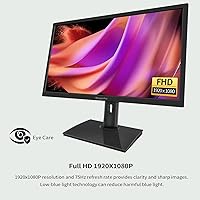
  • Resolution: Native resolution is 1920x1080 Full HD, delivering sharp, clear text and images for everyday productivity and media use.
  • Touch Technology: The panel supports 10-point capacitive touch, allowing multi-finger gestures and simultaneous touch inputs across the screen.
  • Refresh Rate: A 75Hz refresh rate provides smooth screen rendering, reducing motion blur during scrolling and general desktop navigation.
  • Color Gamut: The monitor covers 99% of the sRGB color space, making it suitable for photo editing and color-sensitive creative tasks.
  • Contrast Ratio: A 1000:1 static contrast ratio ensures solid distinction between dark and light areas under typical office lighting conditions.
  • Connectivity: The monitor includes one HDMI port, one VGA port, and one Type-B USB port for video input and touch data transmission.
  • Audio: Two built-in speakers are integrated into the monitor and are activated only when the display is connected via the HDMI port.
  • Height Adjustment: The stand supports a vertical height range of 0 to 110mm, allowing the screen to be raised or lowered to suit different seating positions.
  • Tilt Range: The panel tilts between -5° and 25°, covering both slight backward and forward angles for comfortable viewing ergonomics.
  • Swivel Range: The stand swivels up to 45° in either direction, making it easy to reposition the screen toward another viewer without moving the base.
  • Pivot Range: The monitor pivots from 0° to -90°, enabling portrait orientation when combined with a manual display rotation in your OS settings.
  • VESA Mount: The monitor is compatible with the 75x75mm VESA mounting standard, supporting wall brackets and third-party monitor arms.
  • Panel Surface: The screen uses a glossy panel surface, which enhances color vibrancy but may produce reflections in brightly lit environments.
  • Eye Care: Low blue light technology is built into the display to reduce eye strain during long work or study sessions.
  • Dimensions: The full unit measures 0.86 x 21.85 x 13.97 inches, providing a relatively slim profile that fits well on standard desks.
  • Weight: The monitor weighs 12.72 pounds including the stand, which is typical for a 23.8-inch display with a fully adjustable base.
  • Model Number: The official model designation is FHD-238, manufactured by Guangzhou Yisi Electronic Technology Co. Ltd.

Related Reviews
HP V241ib 23.8″ FHD Monitor
77%
81%
Image Quality
78%
Color Accuracy
84%
Eye Comfort
52%
Ergonomics
74%
Build Quality
More
HP 24mh 23.8-inch IPS Monitor
79%
83%
Image Clarity
81%
Color Accuracy
88%
Ergonomics & Stand
71%
Refresh Rate & Motion
63%
Brightness & Glare Handling
More
Dell SE2425H 24-Inch Full HD Monitor
77%
91%
Value for Money
93%
Eye Comfort
84%
Image Quality
47%
Ergonomics
83%
Build Quality
More
HP Series 5 524sw 23.8-inch FHD Monitor
76%
88%
Image Clarity
91%
Eye Comfort
79%
Color Accuracy
67%
Brightness & Visibility
83%
Refresh Rate & Motion
More
Dell S2425HS 23.8-inch FHD Monitor
84%
88%
Image & Color Accuracy
83%
Refresh Rate & Motion Smoothness
91%
Eye Comfort & Blue Light Reduction
93%
Ergonomics & Stand Adjustability
87%
Build Quality & Materials
More
Prechen HD-123 12.3-inch Portable Touchscreen Monitor
67%
78%
Display Clarity
74%
Touch Responsiveness
61%
Connectivity Setup
88%
AIDA64 Integration
83%
Build Quality
More
Dragolftie HD-190T 19-inch Touchscreen Monitor
67%
78%
Value for Money
67%
Touch Responsiveness
59%
Display Quality
52%
Glare & Screen Surface
71%
Setup & Connectivity
More
InnoView 23.8-inch 144Hz Portable Monitor
79%
88%
Display Quality
83%
Refresh Rate Performance
61%
Portability & Form Factor
86%
Stand & Ergonomics
79%
Connectivity & Compatibility
More
Magedok MG140-FT02 14-Inch Portable Touchscreen Monitor
74%
91%
Portability
74%
Display Quality
77%
Color Accuracy
63%
Touchscreen Responsiveness
79%
Connectivity & Compatibility
More
VisionOwl V-Y23QH 23.8-Inch Portable Monitor
76%
88%
Image Quality
86%
Build Quality
83%
Gaming Performance
62%
Portability
58%
Brightness
More

FAQ

No, it does not. The touch functionality is explicitly incompatible with Apple devices, so while you may be able to use it as a standard display via HDMI or VGA on a Mac, the touch features will not work at all. If touch interaction is important to you, this screen is strictly a Windows-only option.

Yes — touch input runs through a Type-B USB cable, the same connector you typically see on printers. You need to plug this into your PC alongside your video cable. If you only connect the HDMI or VGA and skip the Type-B cable, the screen works as a regular monitor with no touch response.

No, the built-in speakers only activate when the monitor is connected through the HDMI port. VGA carries video only and does not pass audio, so if you use a VGA connection, you will need separate external speakers or headphones for sound.

The stand does physically rotate to -90°, but the display will not automatically switch to portrait orientation when you do that. You need to go into your Windows display settings first, change the orientation to Portrait (Flipped), and then rotate the stand. Doing it in the wrong order can leave your screen upside down or sideways until you adjust the settings.

Yes, it is compatible with Windows 10 and Windows 11. The touch driver is built into those operating systems, so in most cases you just plug in the Type-B USB cable and touch works without installing additional software. Windows XP is not supported.

The manufacturer states that Linux is not a supported operating system for touch functionality. You may get a basic display signal, but touch input will not function. If your setup runs Linux, this touch-enabled desktop screen is not the right choice.

It depends heavily on your environment. In a dimly lit room or one without direct light sources behind you, glare is manageable. In a bright office or near a window, reflections can be quite distracting. If your workspace gets a lot of natural light, you may want to consider a matte-panel alternative or invest in a desk lamp positioned carefully to avoid reflections.

Yes, it supports the 75x75mm VESA standard, which is compatible with most consumer monitor arms and wall brackets. You would need to remove the stand, attach the arm to the back of the display, and run the Type-B USB cable to your PC alongside the video cable to keep touch functionality active.

They are convenient for low-volume tasks like video calls, background music, or watching the occasional video, but they are not powerful speakers by any measure. Expect thin, mid-heavy audio that starts to distort at higher volume levels. For anything more than casual listening, a dedicated speaker or headphones will serve you much better.

It is a reasonable choice for a compact, budget-conscious POS or kiosk display running Windows. The 10-point touch, adjustable stand, and multiple input ports make setup flexible, and the screen size is practical for customer-facing interactions. Just make sure the environment is not too bright, since the glossy screen can be a problem in well-lit retail spaces.