Overview

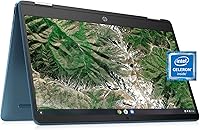
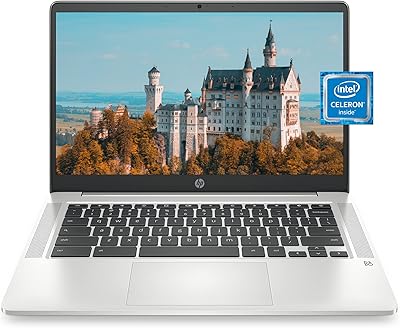
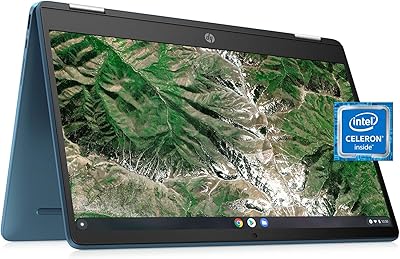
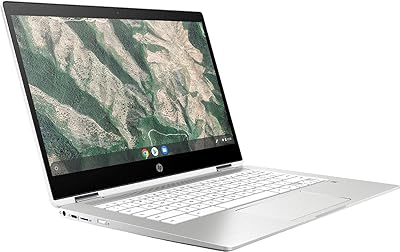
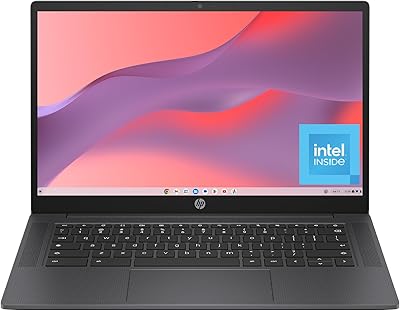
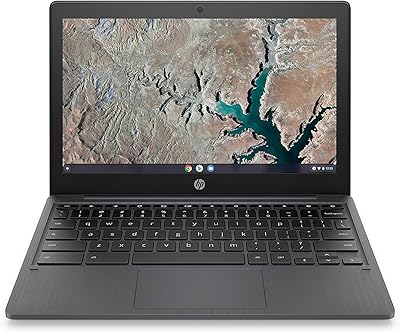
The HP Chromebook x360 14a-ca0190wm is a versatile 14-inch convertible laptop designed for users who prioritize portability and convenience. Powered by the Intel Celeron N4020 processor, this Chromebook is an excellent choice for light tasks such as web browsing, online learning, and media consumption. The device features a touch display with micro-edge design, offering a compact and user-friendly experience. With its lightweight build and 13-hour battery life, this product is an ideal companion for those on the go, running Chrome OS for seamless web-based tasks.

Features & Benefits

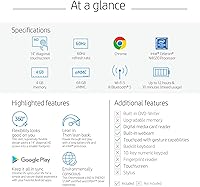
This Chromebook boasts a 14-inch HD touchscreen with micro-edge bezels, delivering an immersive viewing experience for everyday tasks. It is equipped with 4GB of RAM and 64GB of eMMC storage, offering just enough memory for casual computing and web browsing. One of its standout features is the long-lasting 13-hour battery, providing reliable power throughout the day. The lightweight design in Forest Teal makes it a stylish and portable option for users who need a device for simple productivity tasks, while its flexible 360-degree hinge adds versatility.

Best For

The HP Chromebook x360 14a-ca0190wm is best suited for students and educators who need a reliable, affordable laptop for schoolwork and online classes. It’s also ideal for casual users who primarily focus on web browsing, watching videos, or using cloud-based applications. With its sleek design and long battery life, this Chromebook is perfect for those who prioritize portability and simplicity. Its compact size makes it an excellent option for light everyday tasks, but it may not be powerful enough for more demanding workloads like gaming or video editing.

User Feedback

Users generally appreciate the HP Chromebook x360 14a-ca0190wm for its affordable price and impressive battery life, with many noting it lasts through an entire day of use. The laptop’s lightweight build and portability are frequently highlighted as major advantages, making it an excellent choice for on-the-go computing. However, some users mention that while it performs well for basic tasks, the device struggles with multitasking or running resource-intensive applications. Overall, the Chromebook’s value is highly praised, though it may not meet the needs of users requiring a more powerful machine.

Pros

  • This Chromebook's compact and lightweight design makes it ideal for students and educators who need a portable device for daily use.
  • The 13-hour battery life ensures this device can last through an entire school or workday without needing a recharge.
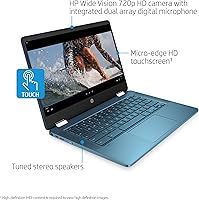
  • Its HD micro-edge touchscreen is responsive and great for interactive use, whether browsing the web or watching videos.
  • With 4GB RAM and 64GB storage, it offers enough power for light web browsing, document editing, and basic tasks.
  • This laptop's Forest Teal color and sleek design appeal to users looking for a stylish yet practical device.
  • Its Chrome OS makes it simple to use for anyone familiar with Google’s ecosystem, perfect for casual users and online activities.

Cons

  • Performance may lag when handling multiple tabs or running resource-intensive applications, limiting its use for heavy multitaskers.
  • While the build quality is decent, it may not withstand rough handling or drops over time, especially for frequent travelers.
  • The 4GB RAM may feel restrictive for users who need more power for demanding tasks such as video editing or gaming.
  • The 64GB storage may not be enough for users who need more space for files, apps, and media.
  • Some users report that the screen brightness isn't high enough for comfortable outdoor use, especially in direct sunlight.
  • This laptop may not be suitable for professionals needing advanced software compatibility or a more robust operating system.

Ratings

After analyzing verified user reviews from multiple platforms and languages, the feedback on the HP Chromebook x360 14a-ca0190wm reflects both its strengths and some limitations. Authentic reviews, carefully filtered to exclude spam, bots, or incentivized content, highlight its impressive value and portability, along with a few concerns about its performance under heavy tasks. This diverse pool of feedback provides a balanced picture of what to expect from this device, with high ratings for usability and battery life, while also pointing out areas for improvement in performance and multitasking.

Value for Money
91%
Many users feel that this Chromebook offers great value, especially considering its affordable price point. The combination of its portability, long battery life, and basic performance makes it a solid choice for casual users and students who need a reliable device for everyday tasks without breaking the bank.
However, some buyers were disappointed with its performance under heavier loads. Multitasking and more demanding applications can slow the device down, which limits its appeal for power users or those who need more processing capability for advanced tasks.
Battery Life
94%
The 13-hour battery life consistently impresses buyers, with many noting that it lasts through a full day of work or study without needing a charge. This long-lasting power is particularly appreciated by students and travelers who need to use the device on the go without worrying about finding an outlet.
A few users report that the battery drains faster than expected under certain conditions, particularly when running more demanding applications or during prolonged video streaming. However, this seems to be a less common issue.
Portability & Weight
89%
The lightweight, compact design of this Chromebook makes it an excellent choice for those who value portability. At just 4.73 pounds, it’s easy to carry around, whether for commuting, travel, or working from different locations, and users often highlight its slim profile and ease of use on the go.
On the flip side, some users mention that the 14-inch size, while still portable, can feel a bit large compared to smaller alternatives. Those who prefer a truly compact device might find it slightly bulkier than expected, especially for long periods of handheld use.
Performance for Light Tasks
85%
For everyday tasks like web browsing, checking emails, and light office work, this Chromebook performs well. Users appreciate the smooth operation for these activities, and many find it adequate for basic productivity without lags or slowdowns, especially given its budget-friendly price.
However, when users try to run multiple apps at once or use more resource-intensive software, the performance begins to lag. Some buyers report that the device struggles with heavier multitasking, making it less suitable for more complex workflows or demanding tasks like video editing.
Display Quality
83%
The HD micro-edge touchscreen provides a decent display for everyday use, offering clear visuals and a responsive touch interface. It's especially appreciated for web browsing and casual media consumption, with users noting the screen's ability to offer a good balance between quality and affordability.
That being said, some users feel that the screen quality could be improved, especially when it comes to color vibrancy and viewing angles. While it's adequate for most tasks, those who expect superior display quality for creative work or entertainment may find it lacking.
Build Quality
88%
The build quality is solid for its price range, with users noting that the Chromebook feels sturdy despite its lightweight design. The sleek finish and durable frame make it a practical device that stands up to everyday use, particularly in environments like classrooms and homes.
However, a few users mention that the plastic body can feel somewhat cheap and might not hold up as well over time compared to higher-end models. Some reports suggest that it can show wear and tear more quickly with prolonged use.
Usability for Web Browsing
90%
The Chromebook excels for web browsing, offering a fast and responsive experience. With its lightweight design and seamless integration with Chrome OS, users find it easy to access websites, social media, and online tools without significant delays or crashes.
While browsing is smooth, some users note that performance can degrade when using several tabs at once or when streaming multiple videos. For those who like to keep numerous browser windows open simultaneously, the device's performance may not always meet expectations.
Multitasking Performance
68%
32%
The Chromebook does an adequate job with basic multitasking, allowing users to switch between light applications with minimal disruption. For those who primarily use a few programs at a time, it holds up reasonably well and keeps things running smoothly.
However, multitasking becomes an issue when more than a few applications are open. Users report lag and slowdowns when running multiple tabs or apps, which can make it frustrating for those who require better performance for work or school-related tasks.
Software & Operating System
87%
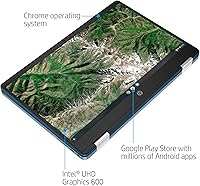
Chrome OS runs efficiently on this device, with its simple interface and seamless integration with Google services. Users appreciate the intuitive experience, along with access to Android apps, making it a user-friendly choice for those already in the Google ecosystem.
Some users, however, wish for a more flexible operating system. Those accustomed to Windows or macOS may find Chrome OS restrictive, particularly in terms of app compatibility and more advanced software functionalities.
Keyboard & Touchpad
80%
20%
The keyboard and touchpad provide a decent typing experience for general use. Users find the keys responsive and the trackpad easy to navigate, making this Chromebook functional for daily tasks like note-taking, web browsing, and document editing.
However, a few users find the key travel a bit shallow, which can make typing feel less comfortable over extended periods. The trackpad responsiveness also receives mixed reviews, with some feeling it’s not as precise as more premium models.
Compatibility with Apps
82%
18%
Many users find that the Chromebook handles a wide range of apps well, especially when using web-based applications and Android apps available through the Google Play Store. It’s a good fit for those who primarily rely on cloud-based services and lighter apps.
However, users who need access to specialized desktop applications often feel limited. Certain professional tools or software unavailable on Chrome OS can be a dealbreaker for those who need full compatibility with Windows or macOS programs.
Customer Support
78%
22%
When issues arise, customer support generally provides helpful assistance. Many users have had positive experiences with the responsiveness of the support team, particularly for basic troubleshooting and warranty-related concerns.
That said, some customers report delays in response times and inadequate solutions for more complex issues. A few users have found the overall customer service experience lacking compared to other brands, which can be frustrating when dealing with product malfunctions.

Suitable for:

The HP Chromebook x360 14a-ca0190wm is a great fit for students, educators, and casual users who need a portable, affordable device for basic tasks. Its lightweight design and long battery life make it especially useful for those who need a reliable laptop for web browsing, email, or online research. This device is ideal for individuals with limited budgets, as it delivers solid performance for everyday tasks without breaking the bank. It's also a solid choice for people who prioritize portability and a simple, user-friendly operating system like Chrome OS, making it easy to use for daily routines and on-the-go work or study.

Not suitable for:

However, this Chromebook may not be the best choice for power users or those who need a device capable of handling demanding tasks. The Intel Celeron processor and 4GB of RAM can struggle with multitasking or running more resource-heavy applications, which may limit its use for professionals or students who need to run specialized software or perform tasks like video editing or large data processing. Users accustomed to more powerful laptops with extensive software compatibility may find this device too limiting. Additionally, its screen and build quality, while adequate, may not satisfy those looking for a high-end display or premium construction.

Specifications

  • Display: 14-inch HD micro-edge touchscreen with a resolution of 1366 x 768 pixels for clear and vibrant visuals.
  • Processor: Powered by an Intel Celeron N4020 processor, offering efficient performance for light tasks.
  • RAM: 4GB of RAM for basic multitasking and smooth operation of everyday applications.
  • Storage: 64GB eMMC storage, providing enough space for basic files and apps, with cloud integration for expanded storage.
  • Battery Life: Up to 13 hours of battery life, ideal for full-day use on a single charge.
  • Operating System: Runs on Chrome OS, designed for seamless integration with Google apps and web-based tasks.
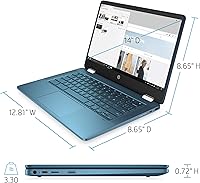
  • Weight: Weighs 4.73 pounds, offering a lightweight design for portability and ease of use on the go.
  • Graphics: Integrated Intel UHD Graphics for basic visual tasks like web browsing, video playback, and casual gaming.
  • Wi-Fi: Supports Wi-Fi 802.11ac for fast and stable wireless internet connections.
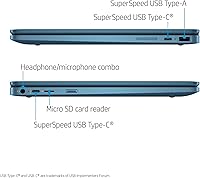
  • USB Ports: Equipped with two USB 2.0 ports for connecting external devices like a mouse, keyboard, or flash drive.
  • Dimensions: Measures 9 x 0.07 x 1 inches, making it compact and easy to carry in a bag or backpack.
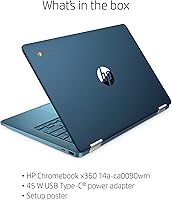
  • Color: Available in a sleek Forest Teal/Light Teal finish, offering a stylish and modern look.
  • Touchscreen: Features a responsive 14-inch touchscreen that provides flexibility for different viewing angles and interactions.
  • Form Factor: Convertible design allows for multiple modes, including laptop and tablet modes, for versatility.
  • Ports: Includes two USB 2.0 ports, one HDMI port, and a headphone/microphone combo jack for various connectivity options.
  • Camera: Has an integrated HD webcam for video calls and online meetings.
  • Audio: Stereo speakers provide clear sound for media consumption, video calls, and casual listening.
  • Bluetooth: Supports Bluetooth for connecting wireless accessories such as headphones, mice, and keyboards.
  • Security: Includes a security chip for enhanced data protection and a user-friendly login system through Google account integration.

FAQ

The HP Chromebook x360 14a-ca0190wm is an excellent choice for students due to its lightweight design, long-lasting 13-hour battery, and affordable price point. It offers a 14-inch touchscreen for easy use during online classes, assignments, or study sessions. Its Chrome OS makes it simple to access web-based apps and cloud storage.

Setting up this Chromebook is quick and easy. Simply power it on, connect to a Wi-Fi network, and sign in with your Google account. From there, you'll have access to all your Google apps, including Google Drive, Gmail, and the Chrome browser, which is ideal for web browsing and productivity.

The HP Chromebook x360 14a-ca0190wm offers up to 13 hours of battery life, making it ideal for long study or work sessions without needing to recharge. Whether you're attending online classes, browsing the web, or watching videos, you can rely on it for a full day of use.

While the HP Chromebook x360 14a-ca0190wm is perfect for web browsing and light productivity tasks like word processing, it may struggle with more demanding applications, such as video editing or running multiple heavy programs simultaneously. Its Intel Celeron N4020 processor and 4GB RAM are not designed for high-performance workloads.

This Chromebook is not optimized for gaming, especially for graphically demanding titles. While you can play some web-based or Android games, performance may lag with more resource-heavy games. It's best suited for casual entertainment or web-based activities.

The HP Chromebook x360 14a-ca0190wm is highly portable, weighing just 4.73 pounds and featuring a slim design. It's a great option for students or professionals who need a lightweight laptop that can easily fit in a backpack for on-the-go use.

Unfortunately, the HP Chromebook x360 14a-ca0190wm has fixed storage (64GB eMMC) and 4GB of RAM, which means you can't upgrade them. If you need more storage, you can use cloud storage solutions like Google Drive or an external USB drive for additional space.

Yes, the 14-inch HD micro-edge touchscreen is responsive and offers a smooth touch experience. It's great for browsing, watching videos, or using touch-enabled apps, providing flexibility in how you interact with the device.

Yes, this Chromebook has multiple USB ports, including two USB 2.0 ports, which allow you to connect external devices like a mouse, keyboard, or flash drive. It also supports Wi-Fi for wireless connections, making it easy to connect to printers, speakers, or other devices.

While this Chromebook has a solid build, it may not be as durable as more rugged laptops designed for heavy use. It's best suited for everyday, light use, such as web browsing, schoolwork, and media consumption. For more demanding environments, additional protective accessories might be necessary.