Overview

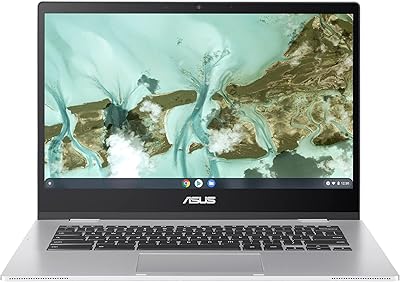
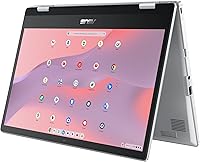
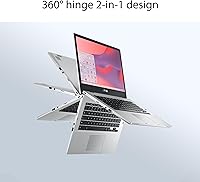
The ASUS Chromebook Flip CX1 14″ 8GB/128GB is a practical, no-nonsense 2-in-1 built for people who need a capable everyday machine without the overhead of Windows or macOS. The 360-degree convertible hinge is the standout feature here — flip it into tent mode for a presentation, stand mode for streaming, or full tablet mode for casual browsing. ChromeOS keeps things simple: it boots fast, stays secure with automatic updates, and works naturally with Google's entire ecosystem. The MIL-STD-810H certification means it can handle the bumps and drops of daily carry, though it won't survive anything extreme. Just don't expect it to run Photoshop.
Features & Benefits

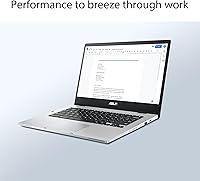
The 14-inch FHD touchscreen has noticeably slim bezels that make the display feel larger than the chassis suggests — a real plus when you're reading documents or watching video. In day-to-day use, the 8GB of RAM keeps things moving when you have a dozen Chrome tabs open alongside a Google Meet call, which is more than most budget Chromebooks can manage. The 128GB eMMC storage boots quickly but fills up fast if you're not leaning on Google Drive. Wi-Fi 6 connectivity and Bluetooth 5.2 are genuinely forward-looking additions at this price point. The bundled three-month Google One plan with 2TB of cloud storage helps ease the local storage limitation right out of the box.

Best For

This convertible Chromebook hits a sweet spot for students who live inside Google Classroom, Docs, and Meet. The lightweight build — under 3.6 lbs — makes it easy to toss in a backpack without thinking twice. Parents shopping for a durable school device will appreciate that ChromeOS requires minimal maintenance: no virus scans, no bloatware, no lengthy update restarts. It also suits remote workers who need a clean, portable secondary machine for travel or coffee-shop sessions. If you're coming from a tablet and miss having a real keyboard, the CX1 bridges that gap well. Just know that power users or anyone running local software beyond Android apps will want to look elsewhere.

User Feedback

Owners of this Chromebook Flip tend to praise the hinge's durability — most report it still feels solid after months of daily use. The display draws mixed reactions: many users find it sharp and bright enough indoors, but outdoor visibility in direct sunlight is a common complaint. The keyboard gets decent marks for a device at this size and price, though people with larger hands sometimes find the layout a little cramped for long writing sessions. Performance under light loads earns consistent praise, but users who push more than 15 tabs or run demanding Android apps do notice slowdown. Storage is the most frequent frustration — several buyers mention hitting the cap within weeks and relying almost entirely on cloud sync.

Pros

  • Handles Google Workspace, video calls, and a dozen open tabs without breaking a sweat.
  • The 360-degree hinge makes tent and tablet modes genuinely useful, not just a gimmick.
  • 8GB of RAM sets it apart from most budget Chromebooks, where 4GB quickly feels tight.
  • Wi-Fi 6 and Bluetooth 5.2 are forward-looking additions rarely found at this price tier.
  • MIL-STD-810H certification gives parents and students real confidence for daily carry.
  • ChromeOS stays fast, secure, and maintenance-free — no virus scans or bloatware to manage.
  • The slim NanoEdge display looks sharp indoors and makes the chassis feel larger than it is.
  • The bundled Google One plan delivers 2TB of cloud storage right out of the box.
  • Real-world battery life consistently gets most users through a full school day or workday.
  • At under 3.6 lbs, the CX1 disappears in a backpack without adding fatigue to long commutes.

Cons

  • Outdoor display visibility is poor in direct sunlight — a recurring and consistent user complaint.
  • 128GB fills up faster than expected once Android apps and offline content start accumulating.
  • The Celeron N4500 shows its limits quickly when multitasking beyond light everyday workloads.
  • No HDMI port means connecting to an external display requires a separate USB-C hub.
  • Built-in speakers sound thin and lack volume headroom for comfortable media sessions.
  • The trackpad surface area feels narrow, making precise cursor work more effortful than it should be.
  • Some Android apps display poorly on the 14-inch screen, with oversized or misaligned interfaces.
  • Keyboard feedback is shallow, which becomes noticeable during extended writing sessions.
  • Port selection is lean — just two USB 3.0 ports and no SD card slot for a device this size.
  • Charging speed is slow enough that a short lunch break won't meaningfully recover a low battery.

Ratings

The ratings below for the ASUS Chromebook Flip CX1 14″ 8GB/128GB are generated by AI after analyzing thousands of verified buyer reviews from multiple global markets, with spam, bot submissions, and incentivized feedback actively filtered out. This convertible Chromebook earned strong marks in portability and value, but real user patterns also reveal honest limitations worth knowing before you buy. Both the highs and the friction points are reflected in every score.
Value for Money
84%
Most buyers feel this Chromebook Flip punches above its weight for the price, particularly given the 8GB RAM, FHD touchscreen, and Wi-Fi 6 — specs you rarely find bundled together at this tier. The included Google One plan adds immediate, practical value that new users notice right away.
A handful of buyers feel the pricing sits just high enough that a slightly more powerful Windows machine enters the conversation, making the value case less clear-cut for users who need broader software compatibility. If ChromeOS doesn't fit your workflow, the savings feel less compelling.
Build Quality & Durability
78%
22%
The MIL-STD-810H certification covers drops, temperature swings, humidity, and vibration — and users report the chassis holds up well through a school year of backpack life. The lid and keyboard deck feel solid for the weight class, with no excessive flex during normal use.
The certification covers specific lab-condition tests, not unlimited real-world abuse, and some owners note the plastic body shows scuffs and surface marks more than expected after a few months. The hinge, while praised overall, develops slight wobble in a minority of units over time.
Display Quality
71%
29%
Indoors, the 14-inch FHD panel is sharp and comfortable for reading documents, attending video lectures, or streaming at the end of the day. The slim NanoEdge bezels give it a noticeably cleaner look than older budget Chromebooks in the same class.
Outdoor visibility is the most frequently mentioned display complaint — in bright sunlight, the screen washes out enough to be genuinely frustrating for anyone working from a patio or campus courtyard. Viewing angles are acceptable but not outstanding; colors shift noticeably when tilted.
Performance & Everyday Speed
67%
33%
For its intended use — Google Classroom, Docs, Sheets, Meet, and casual YouTube — the CX1 handles the load without constant hesitation. The 8GB of RAM makes a real difference over 4GB alternatives when juggling a video call alongside ten or so open tabs.
Push past that everyday sweet spot and the Celeron N4500 makes itself known: loading complex Google Slides decks, running multiple Android apps, or multitasking heavily causes noticeable lag. This is not the right machine for anyone who needs to run demanding local software or edit anything media-intensive.
Storage & Local Capacity
54%
46%
The eMMC storage delivers fast boot times and snappy app launches, and 128GB is a meaningful step up from the 64GB models that still populate the budget Chromebook market. Buyers who lean into cloud storage from day one rarely feel constrained.
Users who don't actively manage files report hitting capacity surprisingly quickly, especially once Android apps, offline content, and downloads accumulate. ChromeOS does not make it easy to add storage without a microSD workaround, and those who expected Windows-style local file management are frequently disappointed.
Battery Life
76%
24%
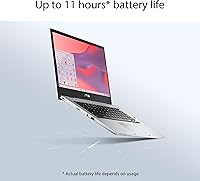
Most users comfortably clear a full school day or workday on a single charge, with moderate brightness and mixed usage. The 11-hour rated figure is optimistic, but real-world results between 7 and 9 hours are common enough to skip packing the charger for shorter outings.
Battery performance drops more noticeably in tablet mode with the screen running at higher brightness, and video-heavy sessions drain it faster than many buyers expect. Charging speed is adequate but not fast by current standards, so topping up from low during a lunch break won't get you back to full.
Keyboard & Typing Experience
69%
31%
For a 14-inch convertible at this price, the keyboard is serviceable and most users adapt to it quickly for routine typing tasks like emails, essays, and chat. Key travel is adequate and the layout is standard enough that there's no real learning curve.
Extended writing sessions reveal some limitations — the keys feel slightly shallow and the overall tactile feedback is soft rather than satisfying. Users with larger hands or those coming from a full-size keyboard sometimes find the layout cramped around the right-side keys and trackpad.
Trackpad Quality
66%
34%
The trackpad handles basic navigation and two-finger scrolling reliably, which covers the majority of what ChromeOS users need day to day. Click registration is consistent and multitouch gestures respond predictably.
The surface area feels narrow compared to mid-range Windows laptops, which limits comfort during longer navigation sessions. Precision tasks like selecting small text or fine cursor placement occasionally require more effort than they should, and palm rejection could be more aggressive.
Touchscreen & Convertible Versatility
81%
19%
The touchscreen is genuinely responsive and adds real utility when flipping into tent or stand mode for media and presentations. Students who annotate PDFs or sketch notes in tablet mode consistently highlight this as one of the CX1's most practical advantages over a standard laptop.
The display attracts fingerprints heavily in tablet mode, and the lack of an included stylus means pen-centric note-takers need to budget for a compatible stylus separately. In tablet mode, the weight — while reasonable for a laptop — is slightly awkward to hold one-handed for long periods.
Wireless Connectivity
88%
Wi-Fi 6 support stands out as a genuine forward-looking inclusion at this price point, delivering noticeably faster and more stable connections on compatible routers. Bluetooth 5.2 pairs reliably with headphones and accessories without the dropout issues reported on older Chromebook models.
The Wi-Fi 6 advantage is only realized if your router supports it, so users on older home networks won't see a practical difference. A small number of users have reported occasional Bluetooth re-pairing issues after sleep, though this appears to be an edge case rather than a systemic problem.
Portability & Form Factor
86%
At under 3.6 lbs and less than three-quarters of an inch thick, this convertible Chromebook is genuinely easy to carry all day. Students and commuters regularly note that it fits in standard backpacks without dominating the bag or causing shoulder fatigue.
The 14-inch size, while comfortable for productivity, puts it at the upper edge of what most people consider truly ultraportable. Buyers who frequently work from cramped spaces — airplane tray tables, tight café tables — occasionally wish they had opted for a 13-inch form factor instead.
Software & ChromeOS Experience
77%
23%
ChromeOS is genuinely well-suited to this hardware — it stays fast, updates silently in the background, and requires almost no ongoing maintenance. Google Workspace integration is tight, and the Android app support adds flexibility that earlier Chromebooks lacked entirely.
Users who expect a Windows or macOS experience regularly hit walls with ChromeOS — particularly around file management, niche software compatibility, and offline functionality. App availability on ChromeOS still lags behind other platforms for specialized tools, and some Android apps are optimized poorly for the larger screen.
Audio Quality
58%
42%
The built-in speakers are adequate for video calls, quick YouTube clips, and occasional background music at low to moderate volume. For a budget device, they're functional enough that most users won't feel urgently compelled to grab headphones for every session.
Volume headroom is limited and bass is virtually absent, which makes longer media sessions on the internal speakers noticeably underwhelming. Users who watch a lot of video or listen to music without external audio will find the output thin and somewhat tinny at higher volumes.
Port Selection
62%
38%
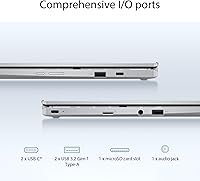
Two USB 3.0 ports cover the basics for most users — plugging in a mouse, a USB drive, or a wired headset without needing a hub. The inclusion of USB-C for charging means users have some flexibility in how and where they top up.
The port layout is lean by any standard — no HDMI, no SD card slot, and no Thunderbolt means buyers who regularly connect external displays or transfer photos will need to invest in a USB-C hub. For a 14-inch device aimed at students and productivity users, this feels like a meaningful omission.

Suitable for:

The ASUS Chromebook Flip CX1 14″ 8GB/128GB is a strong fit for students from middle school through college who spend most of their day inside Google Classroom, Docs, Sheets, and Meet — it handles that workflow comfortably without the maintenance burden of Windows. Parents shopping for a durable, low-fuss school device will appreciate the MIL-STD-810H build and the fact that ChromeOS manages updates silently in the background, meaning kids can't accidentally break the software environment. Remote workers who need a light, portable secondary machine for travel, coworking spaces, or client visits will find the sub-3.6-pound weight and all-day battery genuinely practical. The 360-degree hinge adds flexibility that a standard laptop can't match — tent mode for presentations, stand mode for streaming, and a full tablet mode that works well for annotating PDFs or sketching quick notes with a compatible stylus. If you're already comfortable living inside Google's ecosystem and don't need to run Windows-only software, this convertible Chromebook delivers a well-rounded package for everyday productivity.
Not suitable for:

The ASUS Chromebook Flip CX1 14″ 8GB/128GB is the wrong choice for anyone whose work depends on Windows or macOS software — creative professionals, developers, or researchers relying on tools like Adobe Premiere, AutoCAD, or even Microsoft Office's full desktop version will run into hard walls immediately. The Celeron N4500 processor is built for light workloads, and users who habitually run 20-plus browser tabs, stream while multitasking heavily, or work with large local files will find performance noticeably constrained. The 128GB eMMC storage ceiling is a real limitation for anyone who doesn't want to actively manage cloud sync, and there's no clean upgrade path for local storage without external workarounds. Buyers who regularly present to external monitors or connect multiple peripherals will find the port selection frustrating — there's no HDMI and no SD card slot, so a USB-C hub becomes a near-essential accessory. If you're after a primary machine for a demanding professional or creative workload, this convertible Chromebook simply isn't built for that job.
Specifications

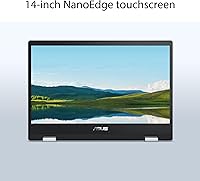
  • Display: 14-inch FHD IPS NanoEdge touchscreen with a 1920x1080 resolution and slim bezels for a cleaner viewing experience.
  • Hinge & Modes: 360-degree convertible hinge supports four use modes: clamshell, tent, stand, and full tablet.
  • Processor: Intel Celeron N4500 dual-core processor running at up to 2.8GHz, built on a 10nm architecture.
  • RAM: 8GB LPDDR4X memory soldered to the board, providing adequate headroom for browser-heavy and Google Workspace tasks.
  • Storage: 128GB eMMC internal storage offering fast boot times, though local capacity requires active cloud storage management.
  • Operating System: Ships with ChromeOS, which receives automatic background updates and is tightly integrated with Google services.
  • Wireless: Wi-Fi 6 (802.11ax) with dual-band support and Bluetooth 5.2 for modern, stable wireless connectivity.
  • Battery: Rated for up to 11 hours of use; real-world battery life typically falls between 7 and 9 hours depending on workload and screen brightness.
  • Weight: 3.59 lbs (approximately 1.63 kg), making it light enough for comfortable all-day carry in a standard backpack.
  • Dimensions: 12.85 x 9.01 x 0.73 inches (326 x 229 x 18.5 mm) closed, keeping the footprint manageable for most bags and desk spaces.
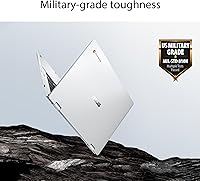
  • Durability: MIL-STD-810H certified, meaning it passed standardized tests for drops, temperature variation, humidity, and vibration resistance.
  • USB Ports: Two USB 3.0 Type-A ports provide standard peripheral connectivity for mice, drives, and accessories.
  • Charging Port: USB-C port used for charging, allowing flexible charging solutions including third-party USB-C chargers and power banks.
  • Graphics: Intel UHD integrated graphics, capable of handling everyday video playback and light visual tasks but not GPU-intensive applications.
  • Audio: Built-in stereo speakers and a 3.5mm headphone jack; audio output is functional for calls and casual media but limited in volume and depth.
  • Webcam: 720p HD webcam positioned above the display, suitable for video calls and online classes via Google Meet or Zoom.
  • Color & Finish: Available in Transparent Silver with a matte plastic chassis that resists minor surface reflections but shows scuffs over extended use.
  • Bundled Software: Includes a complimentary 3-month Google One AI Premium plan with 2TB of cloud storage and access to Gemini Advanced at no additional cost.

Related Reviews
ASUS Chromebook Flip 16-inch, Intel Core i3, 8GB RAM, 128GB SSD
85%
87%
Performance
92%
Battery Life
88%
Build Quality
89%
Display Quality
85%
Portability
More
ASUS ExpertBook CX54 Chromebook Plus 14″, Intel Core i5, 8GB RAM, 128GB SSD
84%
89%
Performance
92%
Display Quality
75%
Battery Life
90%
Build Quality
88%
Portability
More
ASUS Chromebook Flip C433 14″ Touchscreen, Intel Core m3-8100Y, 8GB RAM, 64GB eMMC
84%
88%
Value for Money
92%
Portability
85%
Battery Life
89%
Display Quality
87%
Build Quality
More
ASUS Chromebook CX1 14″, Intel Celeron N3350, 64GB eMMC, 4GB RAM
81%
91%
Battery Life
93%
Portability/Size/Weight
87%
Build Quality/Durability
84%
Display Quality
82%
Performance for Everyday Tasks
More
HP Chromebook 14a-nf0099nr
73%
88%
Value for Money
79%
Performance
63%
Display Quality
71%
Build Quality & Design
74%
Keyboard & Typing Experience
More
ASUS Chromebook CX15 CX1505CKA
74%
83%
Display Quality
67%
Performance & Speed
88%
Storage & Memory
74%
Battery Life
81%
Build Quality & Durability
More
HP Chromebook Plus x360 14-inch Laptop, Intel Core i3-N305, 8GB RAM, 128GB Storage
83%
84%
Overall Performance
91%
Battery Life
88%
Display Quality
79%
Build Quality
93%
Portability
More
Acer Chromebook Vero 514 14″ FHD IPS Intel Core i3-1215U 8GB RAM 128GB SSD
83%
84%
Performance
75%
Display Quality
90%
Battery Life
88%
Build Quality
91%
Eco-friendly Design
More
Acer Chromebook Plus 514 CB514-4HT
79%
83%
Everyday Performance
86%
Display Quality
78%
Touchscreen Responsiveness
81%
Battery Life
77%
Build Quality & Design
More
ASUS Chromebook CM14 (CM1402CM2A-DS44)
72%
83%
Value for Money
88%
Build Quality & Durability
74%
Performance & Speed
58%
Display Quality
84%
Battery Life
More

FAQ

Not natively. The CX1 runs ChromeOS, which means you get access to Google Workspace and Android apps from the Play Store, but traditional Windows software like the full desktop versions of Word, Excel, or Photoshop won't install. Microsoft does offer web-based Office apps that work well in Chrome, and there are Android versions of Office apps available, but they're not as feature-complete as the desktop versions.

It depends on how you work. If you rely on Google Drive for documents, photos, and files — which ChromeOS is designed around — 128GB is manageable. However, users who download a lot of Android apps, store media locally, or work offline frequently tend to hit the ceiling faster than they expect. Planning your storage habits before you buy is genuinely worth doing with this one.

It supports USI (Universal Stylus Initiative) compatible styluses, but one is not included in the box, so you'll need to purchase it separately. In tablet mode, stylus input works well for annotating PDFs and light sketching, and there are several ChromeOS-compatible stylus options at various price points.

The MIL-STD-810H certification covers specific lab tests for drops from defined heights, temperature extremes, humidity, and vibration — so it's more resilient than a typical budget laptop. That said, it's not indestructible; the plastic body will show scuffs over time, and the certification isn't a guarantee against real-world accidents. For a school-age child, it holds up well under normal daily use, but a protective sleeve or case is still a smart addition.

Yes, but you'll need a USB-C to HDMI adapter or a USB-C hub, since there's no built-in HDMI port. Once connected, ChromeOS handles external displays well and supports mirror or extended display modes. Just factor in the cost of a hub if you plan to do this regularly, as the port selection on the CX1 is fairly minimal.

The 720p webcam is adequate for Google Meet, Zoom, and Teams calls in good lighting, though it won't impress in dim conditions. The built-in microphone picks up voice clearly at close range, and most users report that video call quality is perfectly acceptable for school and remote work use. If you're doing professional client calls daily, an external webcam would be an upgrade worth considering.

For most students, yes. At moderate screen brightness with a mix of browsing, video streaming, and document work, most users comfortably get through 7 to 9 hours before needing a charge. The 11-hour rated figure is on the optimistic side and assumes lighter workloads and lower brightness. Tablet mode with the screen running bright will drain it faster, so packing the charger for longer days is still a sensible habit.

For the majority of users, yes — the hinge holds up well through regular daily use including frequent mode-switching. A small proportion of owners do report some loosening after several months of heavy use, particularly if the device is frequently flipped between all four modes. It's not a widespread problem, but it's worth handling the hinge firmly and intentionally rather than forcing it quickly.

This model does not include a built-in microSD card slot, which is one of its more limiting hardware omissions. Your best options for expanding storage are a USB drive, an external SSD connected via one of the USB 3.0 ports, or leaning into Google Drive for cloud-based file access. ChromeOS integrates with Drive well enough that most users adapt without much friction.

It depends heavily on your major and workflow. For students in humanities, education, business, or any field centered on writing, research, presentations, and communication, this convertible Chromebook covers daily needs well. For engineering, design, media production, or software development students who need specialized local software, it will fall short. If your coursework is primarily web-based and Google Workspace-compatible, it's a solid and practical choice.