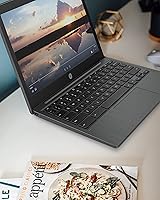
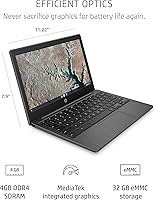
Overview

The HP Chromebook 11a 11.6-inch Laptop is a straightforward, no-fuss device built for students and casual users who spend most of their time in a browser. Chrome OS is central to the experience — it boots fast, stays secure without much effort, and ties neatly into Google's app ecosystem. That said, if you rely on Windows software or need offline-heavy workflows, this budget laptop will frustrate you quickly. Powered by an ARM-based MediaTek processor designed for efficiency rather than raw muscle, it handles light workloads well but was never meant to replace a full-featured computer. Set expectations accordingly and it delivers.

Features & Benefits

The anti-glare touchscreen is one of this Chromebook's more practical assets — it holds up in bright classrooms or near windows without constant squinting. Battery life is where the HP 11a genuinely earns its keep; getting through a full school day without plugging in is entirely realistic. The MediaTek MT8183 keeps browsing, video calls, and Google Docs running without draining the battery quickly. The HP True Vision camera and dual microphones are adequate for remote learning or family calls. One honest caveat: 32 GB storage fills up faster than you might expect, so leaning on Google Drive is less a suggestion and more a requirement.

Best For

This Chromebook is an easy recommendation for K-12 students, especially those already working within Google Classroom or Meet. At 2.36 pounds with up to 15 hours of battery, it also suits frequent travelers who want something light and genuinely low-maintenance. Parents buying a first device for a younger child will appreciate how little there is to configure or worry about. It functions well as a lean secondary machine for remote workers who primarily need a browser for calls and quick communication. Where it falls short is with anyone expecting a traditional laptop, offline software support, or heavy multitasking capability.

User Feedback

Owners of the HP 11a tend to split into two camps fairly clearly. Those using it for browsing, schoolwork, and video calls are generally satisfied, with battery longevity being the most consistently praised quality — many report it lasting comfortably through a full day. On the other side, the limited local storage draws repeated frustration from buyers who underestimated how cloud-dependent Chrome OS really is. Touchscreen accuracy gets mixed marks, described as responsive by some and occasionally laggy by others. Display brightness draws quiet but consistent criticism. Overall, students and light users rate it positively; those who expected a Windows replacement tend to feel let down.

Pros

  • Battery life regularly holds up through a full school or work day without needing a charge.
  • At under 2.5 pounds, this Chromebook is genuinely easy to carry in a backpack all day.
  • Chrome OS boots quickly and stays secure without requiring antivirus software or manual updates.
  • The anti-glare touchscreen makes it usable in bright classrooms or near windows without much eye strain.
  • The HP True Vision camera and dual microphones produce solid results for video calls and remote learning sessions.
  • Wi-Fi 5 connectivity keeps streaming and video conferencing stable on modern home or school networks.
  • Both USB-A and USB-C ports are included, which reduces the need for dongles with common peripherals.
  • Google Drive integration effectively extends storage for users comfortable working in the cloud.
  • Build quality feels sturdy and durable for everyday student use at its price point.
  • Setup is minimal — ideal for non-technical users who just want something that works out of the box.

Cons

  • 32 GB of local storage fills up quickly once Android apps, downloads, or offline files are added.
  • Performance noticeably slows with multiple browser tabs open simultaneously, which disrupts multitasking workflows.
  • The 1366 x 768 display resolution looks soft compared to modern laptops in a similar price range.
  • Screen brightness is frequently cited as insufficient in well-lit outdoor environments.
  • Touchscreen responsiveness is inconsistent — some users report lag that makes touch interaction feel unreliable.
  • This budget laptop does not support Windows software, which catches many first-time Chromebook buyers off guard.
  • The MediaTek processor struggles with anything beyond light tasks, limiting long-term versatility as needs grow.
  • No cellular connectivity option means you are entirely dependent on available Wi-Fi for internet access.
  • The 2020 release date means it will eventually hit Chrome OS end-of-support sooner than newer models.

Ratings

Our scores for the HP Chromebook 11a 11.6-inch Laptop are generated by AI after analyzing thousands of verified global buyer reviews, with spam, bot activity, and incentivized feedback actively filtered out before any scoring takes place. The result is an honest, data-driven snapshot that reflects both what this Chromebook genuinely gets right and where real users consistently run into friction. Strengths and pain points are weighted equally so you can make a confident, eyes-open decision.

Battery Life
91%
This is the category where the HP 11a earns its loudest praise across buyer feedback worldwide. Students and commuters consistently report getting through a full school or work day on a single charge without any anxiety about finding a power outlet, which for a device in this price range is a meaningful real-world advantage.
A small subset of users noted that battery performance degrades noticeably after 12 to 18 months of daily use, which is not unusual for any lithium-based battery but is worth factoring in if you expect to use this Chromebook for several years.
Value for Money
83%
For buyers who understand what Chrome OS is and what it is not, the price-to-functionality ratio holds up well. Getting a touchscreen laptop with solid build quality, long battery life, and a reputable brand name at this price point is genuinely difficult to match in the entry-level market.
Buyers who later realize the storage or performance constraints require workarounds — like paying for expanded Google One storage or purchasing a USB hub — can feel the true cost crept higher than the sticker price suggested. That erodes the value perception for a notable portion of owners.
Performance
62%
38%
For the core use cases this device targets — web browsing, Google Docs, YouTube, and video calls — day-to-day performance is smooth enough that most students and casual users will not feel held back. The MediaTek chip handles light tasks competently and without generating excessive heat.
Open more than six or seven browser tabs simultaneously and the experience deteriorates noticeably, with lag creeping into switching and scrolling. Android apps that are even mildly resource-hungry amplify this problem, and buyers who expected snappy multitasking are consistently disappointed.
Storage Capacity
49%
51%
For users who immediately embrace Google Drive as their primary storage layer, the 32 GB internal limit becomes less of a daily obstacle. The Chrome OS design philosophy leans heavily on the cloud, and buyers who accept that from the start can navigate around the constraint reasonably well.
32 GB is the most common complaint across all buyer feedback, and it surfaces fast — Android apps, offline content, and cached data eat into available space quickly. The fact that storage cannot be expanded via a slot makes this a permanent limitation rather than a solvable one.
Display Quality
67%
33%
The anti-glare coating is a practical feature that genuinely helps in classroom settings and near windows, reducing the eye strain that glossy screens cause in uncontrolled lighting. For streaming videos and casual browsing, the HD panel looks acceptable at normal viewing distances.
At 1366 x 768 resolution the display looks noticeably soft compared to even modestly priced competitors shipping with 1080p panels today. Screen brightness is a recurring complaint — in well-lit environments or outdoor settings, the display struggles to produce enough luminance for comfortable viewing.
Build Quality
76%
24%
For a budget laptop, the HP 11a has a sturdier feel than many buyers expect at this price. The chassis resists flexing better than comparable thin plastic competitors, and parents buying this for younger children report it holds up to daily backpack use and the occasional bump without obvious damage.
The plastic construction is noticeable — it does not feel premium in hand, and the hinge mechanism draws occasional criticism for feeling slightly loose over time. The Ash Gray finish also picks up scratches more visibly than darker matte finishes, which matters to buyers who keep devices long-term.
Portability
88%
At 2.36 pounds and with dimensions compact enough to slide into virtually any bag, this Chromebook is one of the easier devices to carry all day without fatigue. Frequent travelers and students moving between classrooms cite the combination of light weight and long battery as the strongest practical pairing this device offers.
The 11.6-inch screen, while great for portability, can feel cramped when multitasking between two windows side by side. Users who occasionally work at a desk may find themselves wishing for a larger display to avoid constant scrolling and resizing.
Keyboard & Trackpad
71%
29%
The keyboard is full-size relative to the chassis, which is a genuine achievement for an 11-inch form factor — most buyers find typing assignments and emails perfectly manageable. Key travel feels adequate, and the layout follows standard Chrome OS conventions without awkward repositioning.
The trackpad is functional but not precise — fast cursor movements sometimes feel inconsistent, and two-finger scrolling can stutter on certain surfaces. Users who type for extended periods also note that the compact spacing between keys causes minor fatigue during long writing sessions.
Touchscreen Responsiveness
61%
39%
The touch display adds genuine versatility for navigating Chrome OS and interacting with Android apps in portrait-friendly layouts. Some users — particularly younger children — find touch input more intuitive than the trackpad and use it as their primary way to interact with the device.
Responsiveness is inconsistent enough that a meaningful share of buyers stop using the touchscreen entirely after a few weeks. Lag during touch input in Android apps is reported frequently, and the screen occasionally registers unintended taps, which becomes frustrating during anything requiring precision.
Camera & Microphone
69%
31%
For standard video calls on Google Meet, Zoom, or similar platforms, the HP True Vision camera and dual array microphones perform adequately in well-lit spaces. Remote learners and work-from-home users report that call quality is clear enough that participants on the other end rarely raise complaints.
Low-light performance is weak — video quality degrades quickly in dim rooms, producing grainy output that looks unprofessional on calls. The camera hardware is firmly entry-level, and buyers who do frequent video content creation or stream regularly will find its limitations obvious.
Software Experience
78%
22%
Chrome OS is one of the genuinely underrated operating systems for non-technical users — it stays updated automatically, requires no antivirus software, and rarely needs troubleshooting. For buyers already using Gmail, Drive, and Meet, the experience feels immediately familiar and requires almost no learning curve.
Chrome OS remains a dealbreaker for users who need Windows-only applications, and the Android app compatibility layer, while broadly functional, is inconsistent — some apps behave oddly or are not optimized for a laptop screen, creating occasional frustration that is outside HP's control.
Connectivity & Ports
72%
28%
Having both USB-A and USB-C ports on an entry-level device is a practical advantage — most existing accessories plug straight in without needing adapters. Wi-Fi 5 performance is stable for streaming and video calls on modern routers, and Bluetooth 4.2 pairs reliably with wireless headphones and keyboards.
The absence of an HDMI port means connecting to an external monitor requires a USB-C adapter, adding an extra cost and one more thing to carry. USB 2.0 speeds on the Type-A ports also limit how quickly large files transfer to and from external drives, which frustrates users who move data regularly.
Setup & Ease of Use
87%
Out of the box, Chrome OS setup takes minutes — sign in with a Google account and the device is ready to use almost immediately. For parents setting this up for younger children or non-technical family members, the simplicity of the onboarding experience is a genuine relief compared to Windows setup.
Users migrating from Windows sometimes struggle with the absence of familiar software and file management conventions. The dependence on a Google account from the very first step is also a friction point for privacy-conscious buyers who would prefer a more local, account-free experience.

Suitable for:

The HP Chromebook 11a 11.6-inch Laptop is purpose-built for buyers who live inside Google's ecosystem and have no desire to wrestle with complex software setups. It's an excellent fit for K-12 students who spend their school day in Google Classroom, Docs, and Meet, where the device handles everything without complaint. Parents searching for a first laptop for a younger child will appreciate how locked-down and low-maintenance Chrome OS is by nature — there's very little that can go wrong, and even less to configure. At just 2.36 pounds with up to 15 hours of rated battery life, it also suits commuters and light travelers who want a no-stress browsing and communication device that won't weigh down a bag. If your daily routine revolves around web apps, video calls, YouTube, and cloud-stored documents, this budget laptop will meet your needs comfortably.

Not suitable for:

The HP Chromebook 11a 11.6-inch Laptop is a poor match for anyone expecting a Windows or macOS replacement, and that distinction matters more than most buyers realize before purchasing. If you rely on desktop software — Adobe Creative Suite, Microsoft Office desktop apps, specialized business tools, or PC gaming — Chrome OS simply will not accommodate those workflows. The 32 GB of local storage is a hard constraint that becomes genuinely aggravating for users who download media, work offline frequently, or install Android apps heavily. With 4 GB of RAM, opening more than a handful of browser tabs simultaneously noticeably slows things down, which frustrates anyone used to fluid multitasking. Power users, creative professionals, and secondary or higher education students with demanding coursework requirements should look elsewhere for something with more headroom.

Specifications

  • Display Size: The screen measures 11.6 inches diagonally with an HD anti-glare coating that reduces reflections in bright environments.
  • Resolution: Native display resolution is 1366 x 768 pixels, which is standard for entry-level Chromebooks in this size class.
  • Processor: Powered by the MediaTek MT8183 octa-core chip running at 2 GHz, an ARM-based processor optimized for efficiency over raw computing speed.
  • RAM: Equipped with 4 GB of LPDDR4 memory running at 2400 MHz, shared across all active applications and browser tabs.
  • Storage: Includes 32 GB of eMMC internal storage, which is soldered to the board and cannot be upgraded after purchase.
  • Operating System: Runs Chrome OS, Google's cloud-first operating system with built-in support for Android apps via the Google Play Store.
  • Battery Life: HP rates battery life at up to 15 hours of mixed use on a single charge, making it suitable for full-day unplugged use.
  • Weight: The unit weighs 2.36 pounds, placing it among the lighter options in the 11-inch budget laptop category.
  • Dimensions: Physical footprint measures 11.2 x 7.6 x 3 inches, compact enough to fit in most standard school backpacks.
  • Ports: Connectivity includes two USB 2.0 Type-A ports, one USB-C port, and a combined headphone and microphone 3.5mm jack.
  • Wireless: Supports Wi-Fi 5 (802.11ac) for wireless networking and Bluetooth 4.2 for connecting wireless peripherals and headphones.
  • Camera: Features an HP True Vision webcam paired with integrated dual array digital microphones optimized for video calls and online learning.
  • Graphics: Uses MediaTek integrated GPU built into the MT8183 chipset, capable of handling HD video playback and light graphical tasks.
  • Touchscreen: The display is touch-enabled, supporting standard single and multi-touch gestures for navigating Chrome OS and Android apps.
  • Color: Available in Ash Gray, a neutral matte finish that resists visible smudges better than glossy alternatives.
  • Memory Type: System memory uses LPDDR4 SDRAM, a low-power variant well suited to the ARM-based processor architecture in this device.
  • Optical Drive: No optical drive is included, which is standard for ultraportable laptops at this size and price tier.
  • Power: The device is powered via a 24-volt charging input and ships with one included lithium metal battery already installed.

Related Reviews

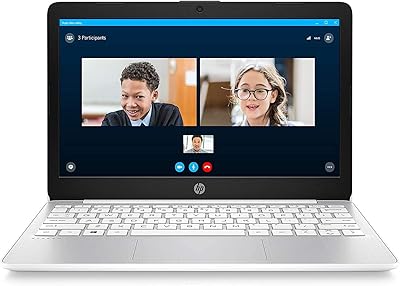
Samsung Chromebook 2 XE500C12-K01US 11.6-inch Laptop
81%
89%
Value for Money
85%
Battery Life
93%
Portability & Weight
80%
Build Quality
78%
Display Quality
More
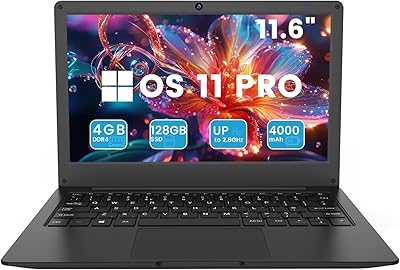
HP Stream 11 11.6-Inch Laptop
66%
83%
Value for Money
91%
Portability
88%
Battery Life
79%
Display Quality
58%
Performance
More
HP Chromebook 14a-nf0009nr 14-inch Laptop
82%
91%
Battery Life
88%
Portability & Weight
92%
Value for Money
80%
Performance for Everyday Tasks
85%
Display Quality
More
Azeyou CG11Q6-US 11.6-inch Laptop

80%
90%
Value for Money
92%
Portability
86%
Battery Life
78%
Build Quality
64%
Display Quality
More
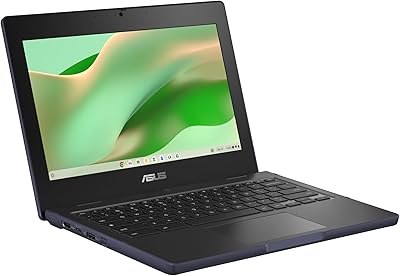
Samsung Chromebook 3 11.6″ Laptop
67%
83%
Value for Money
67%
Performance
72%
Build Quality
78%
Battery Life
58%
Display Quality
More
ASUS Chromebook CR11 11.6-inch Ruggedized Laptop

74%
88%
Build Quality
86%
Durability & Drop Resistance
67%
Performance
61%
Battery Life
63%
Display Quality
More
HP Chromebook 14 AMD A4 Laptop
75%
83%
Value for Money
71%
Performance
67%
Display Quality
74%
Build Quality
88%
Portability
More
HP 15.6-inch Laptop, Intel Core i5-1334U, 8GB RAM, 512GB SSD
84%
86%
Performance for Everyday Tasks
91%
Battery Life
90%
Value for Money
88%
Display Quality
82%
Build Quality
More
HP 15.6-inch Laptop, AMD Ryzen 7 5700U, 8GB RAM, 256GB SSD
81%
89%
Value for Money
91%
Battery Life
88%
Portability
87%
Processor Performance
71%
Display Quality
More
HP 15.6-inch Laptop, AMD Ryzen 7 5825U, 8GB RAM, 512GB SSD
84%
89%
Performance
87%
Display Quality
92%
Privacy Features
80%
Battery Life
85%
Portability
More

FAQ

Not the full desktop versions, no. Chrome OS does not support traditional Windows software. That said, you can use Microsoft Office through a web browser at office.com, which covers most basic document and spreadsheet needs. If your workflow depends on advanced desktop Office features, this may feel limiting.

It depends heavily on how you work. Chrome OS is designed around cloud storage, so most of your files are expected to live in Google Drive rather than locally on the device. If you stream music and video rather than downloading it, and keep documents in the cloud, 32 GB is workable. The problem shows up when you start installing many Android apps or saving large files locally.

Some tasks work offline — Google Docs, Sheets, and Slides can be enabled for offline editing, and certain Android apps function without a connection. However, Chrome OS is fundamentally built around being online, so a reliable Wi-Fi connection at home and school will significantly improve the experience. Extended offline use is possible but limited.

Yes, though setup depends on your printer model. Chrome OS supports Google Cloud Print alternatives and many modern printers connect through the built-in printer management settings. Wireless printers compatible with IPP (Internet Printing Protocol) tend to work with the least friction. Older USB-only printers may not be supported at all.

For general navigation and casual touch interaction it works fine, but it is not as precise or as smooth as a tablet or a premium touchscreen laptop. Some users find it responsive enough for swiping and tapping around Chrome OS; others notice occasional lag, especially in Android apps. It is a nice extra feature rather than a primary input method.

Yes, all Chromebooks have an Auto Update Expiration date, after which Google stops pushing Chrome OS updates including security patches. Given that this model launched in 2020, its support window is finite. You can check the exact end-of-support date on Google's official Chromebook update policy page by searching for the model number.

There is no HDMI port built in, but you can connect an external display using a USB-C to HDMI adapter. The USB-C port on this budget laptop supports display output, so with the right adapter you can extend or mirror your screen to a larger monitor — useful for occasional desk use at home.

It is a full-size keyboard for an 11-inch laptop, which means the keys are reasonably sized and usable, but the layout is more compact than a standard desktop keyboard. For short writing tasks and school assignments it holds up well. Writers or users who type for hours at a stretch may find a larger laptop keyboard more comfortable over time.

The HP True Vision camera is adequate for Google Meet, Zoom, or FaceTime calls in a normally lit room. The dual array microphones pick up voice clearly enough for remote learning and work calls without sounding hollow. Do not expect exceptional low-light performance — strong, direct lighting will noticeably improve call quality.

No. Both the 4 GB of RAM and the 32 GB eMMC storage are soldered directly onto the motherboard and cannot be upgraded or replaced by the user. What you buy is what you get for the life of the device. This makes the decision to lean on Google Drive for extra storage essentially a necessity rather than a choice.