Overview

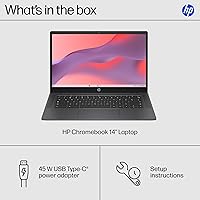
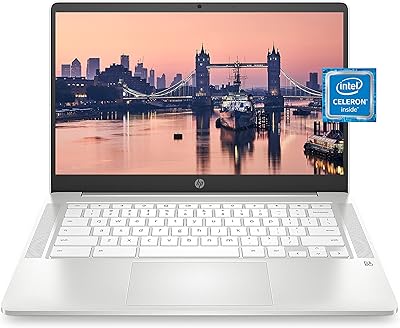
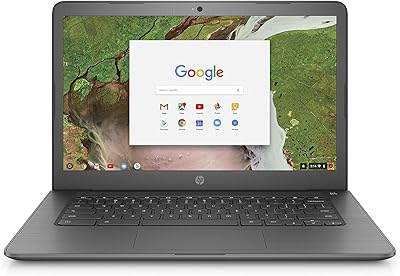
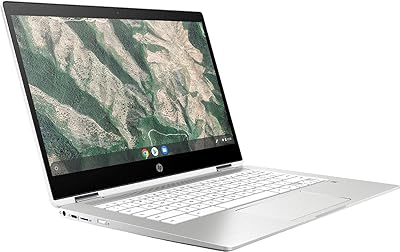
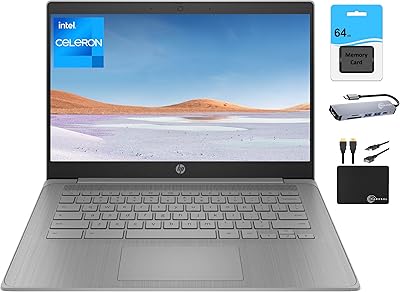
The HP Chromebook 14a-nf0099nr is a straightforward, well-priced laptop built for people who just want things to work. Boot it up and you're in Chrome OS within seconds — no antivirus subscriptions, no update prompts interrupting your workflow. The 14-inch anti-glare display is a genuine highlight at this price; working near a window or under fluorescent lights is noticeably more comfortable than on glossy panels. Under the hood, the Intel N100 chip is a real improvement over the old Celeron processors that plagued budget Chromebooks for years. That said, this is a cloud-first machine — if you need Microsoft Office or offline-heavy software, manage your expectations accordingly.
Features & Benefits

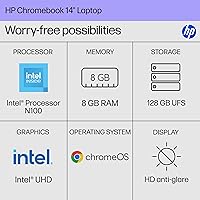
The Intel N100 processor makes a tangible difference day-to-day — pages load quickly, switching between a dozen tabs doesn't stall, and Android apps from the Play Store run without the sluggishness you'd find on older budget chips. Eight gigs of LPDDR5 RAM backs that up nicely. The 128 GB UFS storage is another quiet win; it's noticeably snappier than the eMMC drives common in cheaper Chromebooks, so opening files and launching apps feels crisp. The anti-glare screen won't wow you with sharpness — 1366x768 is honest about its limits — but it's easy on the eyes. Streaming video looks perfectly fine for casual watching.

Best For

This budget HP laptop is an excellent fit for students who live in Google Classroom, Docs, and Drive — the tight Google integration means very little setup friction. Seniors and first-time laptop users also tend to appreciate Chrome OS simplicity; there's almost nothing to configure, and automatic updates happen quietly in the background. At 3.2 pounds, it travels well, making it a solid pick for commuters or anyone shuttling between home and class. Households needing an affordable second machine for video calls and light browsing will find it handles the job without fuss. Just don't expect it to replace a full Windows or Mac setup.

User Feedback

Buyers who've picked up the HP 14-inch Chromebook tend to highlight how fast it boots and how responsive it feels for everyday tasks — that's a recurring theme. The keyboard gets reasonable marks for a budget machine; not premium, but comfortable enough for longer typing sessions. Battery life is generally positive, though some users note it falls a bit short of advertised estimates during heavier use. Port selection draws occasional criticism — just two USB-A ports and no USB-C feels limiting for some. A handful of buyers also mention Wi-Fi feeling inconsistent in weaker signal areas. The resolution trade-off is the most common complaint: fine for casual use, but noticeably soft if you're used to sharper displays.

Pros

  • The Intel N100 processor delivers noticeably snappier performance than older Celeron-based budget Chromebooks.
  • 8 GB of RAM means the HP 14-inch Chromebook handles a full tab-heavy browsing session without grinding to a halt.
  • UFS storage loads files and apps faster than the eMMC drives common in competing budget machines.
  • The anti-glare display coating makes working near windows or under overhead lighting genuinely more comfortable.
  • Chrome OS boots in seconds and stays secure automatically — no antivirus subscriptions or manual update headaches.
  • At 3.2 lbs, this Chromebook is light enough to carry all day in a backpack without noticing the extra weight.
  • 128 GB of local storage gives cloud-first users meaningful breathing room for offline files and downloaded content.
  • Out-of-the-box setup takes only a few minutes — log into Google and the machine is essentially ready to use.
  • Battery life holds up well through a typical school or workday under moderate, real-world usage conditions.

Cons

  • The 1366x768 resolution looks noticeably soft to anyone accustomed to a sharper modern display.
  • No USB-C port means no fast charging, no easy external display output, and growing accessory incompatibility.
  • Wi-Fi performance in weaker signal environments is inconsistent, with some users reporting frustrating dropouts.
  • The hinge can lose tension after months of regular use, which affects the durability outlook long-term.
  • Offline functionality is limited — core workflows stall quickly without a reliable internet connection.
  • The trackpad struggles with precision tasks and attracts fingerprints faster than most users would like.
  • Screen brightness tops out at a level that serious outdoor use can still expose as insufficient on bright days.
  • Android app compatibility is uneven — some apps feel awkward on a laptop display and with keyboard-and-trackpad input.
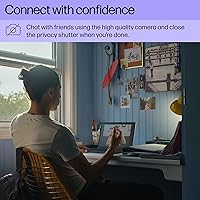
  • The webcam produces grainy footage in low-light settings, which is a real drawback for frequent video callers.

Ratings

Our AI rating engine analyzed thousands of verified global purchases of the HP Chromebook 14a-nf0099nr, actively filtering out incentivized reviews, duplicate submissions, and bot-generated feedback to surface what real everyday users actually experience. The scores below reflect both the genuine strengths that keep buyers satisfied and the recurring pain points that surface across different usage scenarios. Nothing is glossed over — this snapshot is built to help you decide whether this budget HP laptop matches your real-world needs.

Value for Money
88%
For buyers who need a dependable daily driver without spending a lot, this Chromebook consistently punches above its weight. The combination of a modern Intel N100 chip, 8 GB of RAM, and UFS storage at this price point is hard to match in the budget laptop segment.
A small portion of buyers feel the port selection and display resolution hold back the overall value proposition, especially when slightly pricier alternatives offer USB-C or a sharper screen. For users who discover Chrome OS limitations post-purchase, the value perception drops noticeably.
Performance
79%
21%
Day-to-day browsing, video calls, and Google Workspace tasks feel responsive and fluid. Users switching from older Celeron-based Chromebooks specifically call out how much snappier this machine feels when juggling multiple tabs or running a couple of Android apps at the same time.
When users push into heavier multitasking — think 15-plus tabs, screen sharing in Google Meet, and a streaming app running in parallel — the experience starts to soften. It is not a crash, just a noticeable hesitation that reminds you this is still a budget-tier machine.
Display Quality
63%
37%
The anti-glare coating earns consistent praise from students working under harsh classroom lighting or near windows. Reducing eye fatigue during long study sessions is a practical, tangible benefit that many buyers specifically highlight in their feedback.
The 1366x768 resolution is the most frequently cited disappointment. Coming from any modern mid-range laptop or tablet, text and images look noticeably soft. Users who primarily stream video or spend long hours reading on-screen find the lack of sharpness genuinely frustrating over time.
Build Quality & Design
71%
29%
The Chalkboard Gray finish looks clean and professional enough for classroom or office settings without feeling overtly plasticky. At 3.2 lbs, the chassis feels solid enough in hand and survives everyday bag-and-go usage without flexing excessively at the lid.
Long-term durability feedback is mixed — some users report the hinge losing tension after several months of regular use. The plastic build, while acceptable, does not inspire confidence if the machine takes a knock, and the keyboard deck shows minor flex under firm typing pressure.
Keyboard & Typing Experience
74%
26%
For a budget Chromebook, the keyboard gets surprisingly decent marks. Key travel is adequate for extended typing sessions, and students who use this machine for writing assignments or note-taking generally report no major fatigue complaints after an hour or two.
The key spacing feels slightly cramped to users with larger hands, and a few buyers note that the keys develop a subtle rattle over time. It is not a dealbreaker, but those coming from a MacBook or a premium Windows laptop will feel the quality gap almost immediately.
Trackpad Responsiveness
68%
32%
Basic navigation — scrolling, clicking, and two-finger gestures — works reliably for most users. For students taking notes or adults doing light web browsing, the trackpad is accurate enough that reaching for an external mouse rarely feels necessary.
Precision tasks like selecting small text blocks or precise clicking in spreadsheets expose the trackpad's limitations. Some users report occasional erratic cursor movement, and the surface texture attracts fingerprints quickly, which becomes a minor but persistent annoyance.
Battery Life
72%
28%
Under moderate use — browsing, document editing, and occasional video playback — the HP 14-inch Chromebook comfortably gets most users through a full school day on a single charge. The N100 chip's power efficiency is a real contributor here.
Heavier use with video streaming, screen brightness cranked up, or background sync active tends to drag the battery down faster than advertised. Several buyers mention needing to plug in mid-afternoon during intensive days, which undercuts the all-day portability promise slightly.
Storage Speed & Capacity
76%
24%
The UFS storage stands out positively compared to eMMC drives found in competing budget Chromebooks. File transfers, app launches, and photo loading all feel noticeably quicker, and 128 GB gives cloud-reliant users enough local breathing room for downloads and offline files.
Users who try to use this as a more traditional laptop — storing large video files, offline media libraries, or extensive app installs — find 128 GB fills up faster than expected. There is no expandable storage slot, which frustrates buyers who realize this limitation after purchase.
Port Selection & Connectivity
54%
46%
Having both a USB-A 2.0 and a USB-A 3.0 port covers the basics for connecting a mouse or thumb drive simultaneously, which works fine for simple daily setups. Wi-Fi connectivity performs well in strong-signal environments, with no major dropout complaints in standard home or classroom use.
The absence of USB-C is a recurring frustration — no fast charging, no easy external display connection, and no compatibility with the growing ecosystem of USB-C accessories. Users in weaker Wi-Fi zones also report inconsistent signal strength, and there is no Ethernet port as a fallback.
Chrome OS Usability
82%
18%
Users who embrace the Google ecosystem find Chrome OS genuinely effortless — fast to set up, automatic updates that never interrupt work, and no security headaches. For students and casual users, the simplicity is a real selling point that holds up months into ownership.
Buyers who expected a conventional Windows-like experience sometimes feel boxed in — no native Microsoft Office, limited offline functionality, and an inability to install standard desktop software. This is a Chrome OS reality, not a hardware flaw, but it generates real post-purchase regret from uninformed buyers.
Webcam & Audio Quality
61%
39%
For casual Google Meet calls or Zoom sessions with family, the webcam and built-in microphone are functional enough. Most users in typical indoor lighting report that call recipients can see and hear them clearly without any extra accessories.
In low-light conditions, the webcam image turns noticeably grainy, and audio pickup is average at best — background noise bleeds in more than users would like. Anyone using this regularly for professional video calls or online classes in varied environments will likely want an external webcam or headset.
Weight & Portability
83%
At 3.2 lbs, this budget HP laptop is genuinely comfortable to carry in a backpack all day without strain. Students hopping between classes and commuters who pack light consistently call out the weight as a practical everyday advantage.
The 14-inch footprint, while not large, means it does not slip as easily into smaller bags as an 11-inch or 13-inch Chromebook would. A few users also note the power adapter adds bulk to the bag on days when battery life runs short.
Setup & Ease of Use
91%
Out-of-the-box setup is among the fastest and most painless of any laptop type — log into a Google account and you are essentially ready in under three minutes. Seniors and first-time laptop users specifically praise how intuitive Chrome OS feels from day one.
Users without a Google account face a slightly awkward onboarding experience, and those who want to configure more advanced settings find Chrome OS menus less flexible than Windows. Parental control options, while present, are considered limited by parents managing shared family use.
Software & App Ecosystem
66%
34%
Access to the Google Play Store meaningfully expands what this Chromebook can do beyond just a browser — Android apps for photo editing, note-taking, and entertainment work reasonably well on the N100 hardware. For Google Workspace power users, the native experience is hard to beat.
Not all Android apps are optimized for a laptop screen or keyboard-and-trackpad input, which leads to a clunky experience in some titles. Professional software users — designers, video editors, developers — will quickly hit walls that no amount of workarounds can fully resolve.

Suitable for:

The HP Chromebook 14a-nf0099nr is genuinely well-matched for students from middle school through college who spend most of their academic life inside Google Classroom, Docs, Slides, and Meet — the tight Google ecosystem integration means almost zero setup friction and a machine that just works from day one. Seniors or first-time laptop owners who want simple, low-maintenance computing will find Chrome OS refreshingly approachable: no virus scans, no complicated updates, no bloatware to uninstall. Families looking for an affordable shared machine for homework, casual browsing, and video calls will get solid mileage without worrying about a costly repair bill if the kids are rough with it. Commuters and light travelers also benefit from the 3.2-pound build and a battery that comfortably handles a typical workday under moderate use. If you are already living in Gmail, Google Drive, and YouTube, this Chromebook fits into that routine with very little resistance.
Not suitable for:

Anyone who depends on Windows-specific software — whether that is Adobe Premiere, QuickBooks, a specialized work application, or even a full desktop version of Microsoft Office — should look elsewhere, because the HP Chromebook 14a-nf0099nr simply cannot run those programs, and no workaround fully closes that gap. Creative professionals, video editors, and graphic designers will find both the hardware and the software ecosystem too limiting for serious production work. If screen sharpness matters to you — for detailed photo editing, reading dense text for hours, or just personal preference after years on a Retina display — the 1366x768 panel will disappoint you quickly. Power users who need USB-C for fast charging, external monitors, or a modern accessory setup will find the port configuration frustrating. And anyone who frequently works offline or in areas with unreliable internet will run into the fundamental limits of a cloud-first operating system that was built with a stable connection in mind.
Specifications

  • Processor: Powered by an Intel Processor N100, a quad-core chip built on Intel's Alder Lake-N architecture for improved efficiency over older budget Celeron processors.
  • RAM: 8 GB of LPDDR5 memory provides power-efficient, responsive performance for multitasking across browser tabs and Android apps.
  • Storage: 128 GB of Universal Flash Storage (UFS) offers faster read and write speeds compared to eMMC drives common in entry-level Chromebooks.
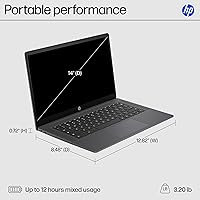
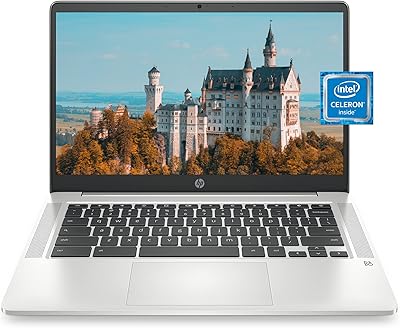
  • Display Size: 14-inch widescreen display in a standard 16:9 aspect ratio, suitable for side-by-side document and browser use.
  • Resolution: Screen resolution is 1366x768 pixels (HD), which is functional for everyday tasks but below the sharpness of Full HD or higher-tier panels.
  • Panel Type: Non-reflective anti-glare coating reduces eye strain and minimizes screen reflections in brightly lit or outdoor environments.
  • Graphics: Intel UHD Graphics (integrated) handles standard video streaming, light Android gaming, and everyday visual tasks without a discrete GPU.
  • Operating System: Runs Chrome OS, Google's cloud-first operating system with built-in security, automatic updates, and native Google Workspace integration.
  • Weight: The laptop weighs 3.2 lbs, making it practical for daily commutes, classroom carry, and extended use away from a desk.
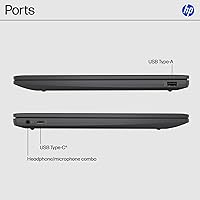
  • USB Ports: Connectivity includes one USB-A 2.0 port and one USB-A 3.0 port; there is no USB-C port on this model.
  • Wireless: Wi-Fi is supported via 802.11a/b/g/n, covering standard home and school wireless networks but not the newer Wi-Fi 5 or Wi-Fi 6 standards.
  • Color: Available in Chalkboard Gray, a neutral matte tone that resists obvious smudging and suits both academic and casual settings.
  • Optical Drive: No optical drive is included, which is standard for modern slim laptops; disc-based media requires an external USB drive.
  • Processor Cores: The Intel N100 features 4 processing cores, enabling the machine to manage concurrent tasks with greater stability than dual-core predecessors.
  • Memory Type: LPDDR5 RAM is used, a low-power variant that extends battery efficiency during active use compared to standard DDR4 configurations.
  • Item Model: The official HP model number is 14a-nf0099nr, with HP part number BN9Q9UA#ABA for retail identification.
  • First Available: This model was first made available for purchase in May 2025, placing it among HP's most current budget Chromebook offerings.

Related Reviews
HP Chromebook 14a-na0024nr
81%
91%
Battery Life
89%
Portability
82%
Performance for Basic Tasks
75%
Display Quality
80%
Keyboard Comfort
More
HP Chromebook 14a 64GB
82%
78%
Performance
88%
Battery Life
91%
Portability
80%
Display Quality
75%
Build Quality
More
HP Chromebook x360 14a-ca0190wm
85%
91%
Value for Money
94%
Battery Life
89%
Portability & Weight
85%
Performance for Light Tasks
83%
Display Quality
More
HP Chromebook 14a-nf0009nr 14-inch Laptop
82%
91%
Battery Life
88%
Portability & Weight
92%
Value for Money
80%
Performance for Everyday Tasks
85%
Display Quality
More
HP Chromebook 14a-na0021nr, 14-inch, 4GB RAM, 32GB eMMC
82%
90%
Value for Money
87%
Battery Life
92%
Portability/Weight
70%
Display Quality
80%
Performance for Everyday Tasks
More
HP Chromebook 14-ca020nr
81%
91%
Value for Money
94%
Portability/Weight
89%
Battery Life
83%
Performance for Basic Tasks
78%
Build Quality
More
HP Chromebook 11A-NB0013DX
81%
92%
Value for Money
89%
Battery Life
85%
Performance for Basic Tasks
93%
Portability & Size
78%
Display Quality
More
HP Chromebook 11-v010nr
82%
91%
Value for Money
93%
Battery Life
89%
Portability & Weight
80%
Display Quality
85%
Performance for Basic Tasks
More
HP Chromebook x360 14 – Celeron N4000, 4GB RAM, 32GB eMMC
81%
89%
Portability
94%
Battery Life
88%
Value for Money
60%
Storage Capacity
74%
Performance
More
HP 2024 14″ Chromebook, Intel Celeron N4120, 4GB RAM, 128GB Storage
80%
92%
Value for Money
89%
Battery Life
91%
Portability
75%
Performance
68%
Display Quality
More

FAQ

Not the full desktop versions, no. Chrome OS does not support traditional Windows software. That said, you can use Microsoft Office through a web browser at Office.com, or install the Android versions of Word and Excel from the Google Play Store. They cover most everyday needs, but power users relying on advanced macros or complex formatting may find the experience limiting.

It is a strong fit for most students. Google Classroom, Docs, Slides, Forms, and Meet all run natively and smoothly, and the machine boots fast enough that it is ready before class starts. The anti-glare screen helps during long study sessions, and the 3.2-pound weight makes it easy to carry between classes. The main caveat is if your school requires specific Windows-only software — check that before buying.

Under moderate use — browsing, writing documents, video calls — most users comfortably get through a full school or workday on a single charge. If you are streaming video continuously with the screen brightness high, expect that number to come down. It is a solid performer for its class, though the advertised maximum figure assumes lighter conditions than most people actually use.

Yes, but with limitations. Chrome OS is designed around an internet connection, so some features and apps work best online. Google Docs, Sheets, and Slides do have an offline mode you can enable in advance, and downloaded Android apps work offline too. For occasional offline use it is manageable, but if you frequently work in areas with no Wi-Fi, this may not be the right machine for you.

No, it does not. This is one of the more common complaints from buyers — you get one USB-A 2.0 and one USB-A 3.0 port, and that is it. That means no USB-C fast charging, no USB-C to HDMI adapters for external monitors, and limited compatibility with newer accessories. If USB-C is important to your setup, you will want to look at a different model.

Honestly, Chrome OS is one of the best operating systems for non-technical users. Setup takes a few minutes, updates happen quietly in the background, and there is essentially nothing to maintain. The HP 14-inch Chromebook is large enough to be comfortable to read and type on without being too heavy to move around the house. As long as the person is comfortable using Google or has email, this machine will make sense to them very quickly.

Casual gaming through Android apps from the Google Play Store works reasonably well — think mobile-style titles, puzzle games, or light strategy games. Cloud gaming services like Xbox Cloud Gaming or NVIDIA GeForce NOW can also run in the browser, which expands options considerably. Full PC games are off the table, and even heavier Android titles may run with some stuttering. Treat it as a light gaming machine, not a gaming laptop.

It is worth being straightforward here: the 1366x768 resolution is below what most modern laptops offer at any price tier, and if you are coming from a Full HD screen or a tablet with a sharp display, you will notice the difference. Text looks slightly soft, and detailed images are not crisp. For browsing, writing, and video calls it is functional, but it is a real trade-off you should weigh honestly before purchasing.

Chrome OS supports many modern printers, particularly those that are Google Cloud Print compatible or that support IPP (Internet Printing Protocol). Most Wi-Fi printers made in the last several years will work. Older printers that rely on manufacturer-specific Windows drivers can be problematic — it is worth doing a quick search for your specific printer model and Chrome OS compatibility before assuming it will connect.

The Intel N100 chip in this machine is a meaningful step forward. Older Celeron-based Chromebooks could feel sluggish with more than a handful of tabs open, and Android app performance was often inconsistent. This budget HP laptop handles everyday multitasking noticeably better — tab switching is smoother, apps launch faster, and the overall experience feels less like you are working around the hardware. It is not a dramatic leap, but users upgrading from a three- or four-year-old Chromebook will feel the difference.