Overview

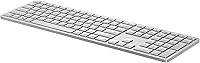
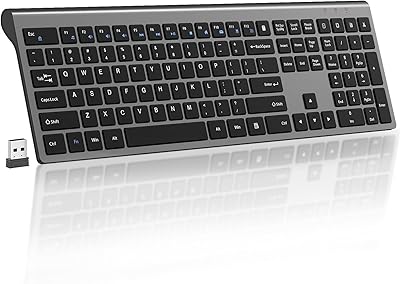
The HP 970 Programmable Wireless Keyboard sits comfortably in the mid-range office peripheral space, targeting users who juggle multiple devices without wanting to compromise on typing comfort or desk real estate. Unlike the wave of compact, numpad-free boards that have flooded the market, this HP wireless keyboard keeps the full-size layout intact — a practical choice for anyone doing serious data entry or spreadsheet work. HP has built a reputation for dependable hardware, and the recycled plastic construction shows genuine environmental effort. Contoured keys, soft return mechanics, and adaptive backlighting round out a design that prioritizes all-day comfort over flashy aesthetics.

Features & Benefits

This programmable keyboard connects to up to three devices at once — two via Bluetooth 5.0 and a third through a USB-A dongle — and switching between them takes a single keystroke, which is genuinely useful in mixed-OS households. The 24 programmable keys add real value if you invest time in HP's Accessory Center app, though the software learning curve is worth acknowledging upfront. The built-in battery charges via USB-C and is rated for over six months, though that figure assumes minimal backlighting use. The proximity sensor that wakes and sleeps the keyboard automatically is a small but consistently appreciated practical touch.

Best For

This HP wireless keyboard makes the most sense for home office professionals who split their time between a Windows machine and a Mac — the one-button OS toggle is genuinely practical, not just a spec-sheet bullet point. It also suits anyone who relies on a numpad daily, whether for accounting, data entry, or spreadsheet-heavy workflows. If you want programmable keys without committing to a mechanical board or a steep price, this is a reasonable entry point. Buyers who care about sustainable materials will appreciate the recycled plastic component, though that alone probably will not be the deciding factor.

User Feedback

With around 156 ratings and a 4.0-star average, the HP 970 lands in solid-but-not-exceptional territory. Buyers consistently praise the multi-device switching reliability and the comfortable low-profile typing feel. The natural silver finish earns positive mentions too — it looks cleaner on a desk than most plastic peripherals in this range. On the flip side, some users find HP's Accessory Center software clunky, and Mac customization options are noticeably limited compared to what Windows users get. A few reviewers also report that real-world battery life drops considerably with backlighting on, so treat the six-month rating as an ideal-conditions figure rather than a guarantee.

Pros

  • Connects to three devices simultaneously via Bluetooth and USB dongle — a genuine daily convenience for multi-device workers.
  • Full-size layout with numpad is increasingly rare at this price, making it a standout for data-heavy workflows.
  • One-button OS switching between Windows and macOS works reliably without repairing from scratch each time.
  • USB-C rechargeable battery removes the recurring cost and hassle of disposable AA batteries.
  • Proximity sensor that sleeps and wakes the keyboard automatically is a small but consistently appreciated power-saving touch.
  • Quiet membrane typing feel keeps the keyboard unobtrusive in shared office or open-plan environments.
  • The HP 970 is built from 20% post-consumer recycled plastic — a credible sustainability effort, not just a label claim.
  • Clean natural silver design looks professional on a desk and holds up without visible key-shine after extended use.
  • Swift Pair support makes initial Windows setup nearly instant compared to standard Bluetooth pairing flows.

Cons

  • HP Accessory Center software feels dated and clunky — setting up macros requires more patience than it should.
  • Mac users get significantly fewer customization options than Windows users through the companion app.
  • Battery life drops noticeably with backlighting active — the six-month rating is an optimistic best-case figure.
  • Single-color backlighting feels underwhelming for a keyboard at this price point.
  • Bluetooth connections can occasionally require re-pairing after extended idle periods, which breaks the switching experience.
  • The full-size footprint is impractical for anyone with a compact desk setup or those who travel with their keyboard.
  • Chrome OS compatibility is officially listed as limited — not a reliable daily driver for Chromebook users.
  • The plastic chassis lacks the premium feel of aluminum-bodied competitors in the same price tier.
  • No per-device profile memory — losing customization settings without the software running is a real workflow disruption.

Ratings

Our AI rating system analyzed verified global user reviews for the HP 970 Programmable Wireless Keyboard, actively filtering out incentivized and bot-generated feedback to surface what real buyers genuinely think. The scores below reflect a balanced picture — where this keyboard earns its place on a desk and where it falls short of expectations. Strengths and frustrations are weighted equally, so you can make a genuinely informed decision.

Multi-Device Connectivity
88%
Users who bounce between a work laptop and a personal Mac throughout the day consistently highlight how reliable the device-switching experience is. The combination of two Bluetooth 5.0 slots and a USB dongle covers almost every real-world desk setup without requiring extra hardware.
A handful of reviewers report occasional re-pairing hiccups after the keyboard has been idle for extended periods, particularly on the Bluetooth connections. It is not a widespread issue, but it surfaces enough to temper an otherwise strong score.
Typing Comfort
83%
The low-profile key travel and contoured keycap design hold up well during long writing or data-entry sessions — buyers who type for several hours a day mention noticeably less finger fatigue compared to flat membrane boards they had previously used. The soft return feel is quiet and consistent.
Users coming from mechanical keyboards often find the 2mm travel shallow and lacking tactile feedback. It is a personal preference divide, but it is worth knowing that this keyboard is firmly in the quiet office membrane category, not a typist's enthusiast board.
Programmable Keys & Software
61%
39%
Having 24 assignable keys is a genuine productivity advantage for users with repetitive workflows — people in accounting, editing, or customer support roles who set up macro shortcuts report real time savings once the configuration is done and working correctly.
The dependency on HP Accessory Center software is the single most cited frustration among reviewers. The app feels dated, has a clunky interface, and macOS users in particular find their customization options significantly more restricted than Windows users. For anyone not willing to spend time with companion software, the programmable key advantage largely disappears.
Battery Life
69%
31%
The built-in rechargeable battery and USB-C charging genuinely remove the annoyance of keeping spare AA batteries around. Users who keep backlighting off or on a low setting do report extended use cycles that feel close to the manufacturer's guidance.
The six-month battery claim is an ideal-conditions figure that most real-world users will not reach. With backlighting active at moderate intensity — which is a common default usage pattern — reviewers suggest significantly shorter cycles. Expectations should be calibrated accordingly.
Build Quality & Materials
74%
26%
The keyboard feels solid enough for an office environment — no flex in the chassis, and the keycaps show minimal shine after extended daily use. The recycled plastic construction does not feel like a cost-cut; the natural silver finish in particular photographs and holds up better than most plastic keyboards in this price tier.
It does not feel premium in hand. Buyers who handle higher-end aluminum keyboards will immediately notice the difference in rigidity and weight distribution. The plastic body, while durable for everyday use, lacks the desk presence some buyers expect given the price.
Backlighting
71%
29%
The proximity sensor that wakes the keyboard when you sit down and dims it when you walk away is a thoughtful touch that users genuinely appreciate in practice — it avoids the minor irritation of a backlit keyboard blazing away in an empty room all day.
Single-color backlighting is a meaningful limitation for buyers who expect per-key RGB or even zone-based color options at this price point. The ambient sensor adjustment works, but the overall brightness ceiling is not impressive in bright office environments.
Mac Compatibility
63%
37%
The one-button OS toggle between Windows and macOS is a practical feature that works as advertised for basic switching. Mac users with straightforward typing needs — no complex macros — generally report a smooth daily experience.
Mac-specific key remapping through HP Accessory Center is noticeably limited compared to the Windows experience, and Chrome OS compatibility is officially listed as partial only. Mac power users or anyone expecting full keyboard customization parity across operating systems will likely be disappointed.
Full-Size Layout & Numpad
86%
In a market where tenkeyless and compact layouts dominate, the intact numpad is a real differentiator. Finance professionals, data analysts, and anyone entering large volumes of numbers consistently cite this as a primary reason they chose this keyboard over alternatives.
The full-size footprint is a trade-off — it takes up more desk space than the compact boards it competes against, and users with smaller workstations occasionally mention the width as an inconvenience when paired with a large monitor setup.
Wireless Reliability
81%
19%
Day-to-day wireless performance via the 2.4 GHz USB dongle is consistently rated as stable, with no notable input lag during normal office use. Buyers in busy wireless environments — coworking spaces, offices with heavy Wi-Fi traffic — generally report no interference issues.
Bluetooth stability is slightly more variable than the dongle connection, as is common across most Bluetooth keyboards. A small proportion of reviewers mention sporadic dropout with specific laptop models, though this appears device-dependent rather than a systemic flaw.
Ease of Setup
84%
Pairing the keyboard out of the box is straightforward, and Microsoft Swift Pair support on Windows 10 and 11 makes initial setup nearly instant for PC users. Most buyers report being up and running within a few minutes without consulting any documentation.
The setup experience is noticeably smoother on Windows than on other platforms. Mac users occasionally need extra steps to get the keyboard recognized correctly, and the need to install HP Accessory Center to unlock the full feature set adds friction for users who prefer plug-and-play simplicity.
Value for Money
72%
28%
For buyers who will actively use the multi-device switching and put in the time to configure the programmable keys, the price feels reasonable for what is on offer. The USB-C rechargeable battery removes an ongoing cost that cheaper competitors impose with disposable batteries.
For users who just want a reliable wireless keyboard and will never touch the HP Accessory Center app, the premium over simpler alternatives is harder to justify. At this price, the software experience and Mac limitations feel like gaps that should have been addressed.
Noise Level
82%
18%
The membrane key mechanism keeps noise to a genuinely office-friendly level. Colleagues on video calls rarely notice typing sounds, and reviewers specifically mention using it confidently during calls without the clatter complaints that mechanical boards often generate.
Some buyers find the typing sound slightly hollow compared to higher-end membrane boards — not loud, but not the most satisfying acoustic experience either. It is a minor point but worth noting for users who are particularly sensitive to keyboard acoustics.
Portability
58%
42%
At just under 1.5 pounds, the keyboard is not heavy in absolute terms. The USB-C charging means you can top it up from the same cable as most modern laptops, which reduces carry load slightly for users who travel with it occasionally.
The 18-inch full-size footprint simply does not fit comfortably in most laptop bags or backpacks. This is not a keyboard designed for commuting or hot-desking across multiple office floors — buyers who need genuine portability will find the size impractical.
Aesthetic & Design
77%
23%
The natural silver colorway photographs well and blends cleanly into modern desk setups, particularly alongside silver or space gray laptops. Reviewers who care about desk aesthetics appreciate that it does not look like a generic black office peripheral.
The design is clean but conservative — there is nothing distinctive about it. Buyers looking for a keyboard with visual personality or premium surface materials will find this option fairly utilitarian, which may or may not matter depending on what you want from your workspace.

Suitable for:

The HP 970 Programmable Wireless Keyboard is built for professionals who live at the intersection of multiple devices — someone who clocks into a Windows work laptop in the morning, switches to a personal Mac in the evening, and occasionally fires up a tablet in between. If you rely on a numpad daily for spreadsheets, accounting software, or data entry, the full-size layout alone sets this keyboard apart from the compact alternatives crowding the market. Home office workers who want to reduce cable clutter without sacrificing a feature-complete keyboard will find the USB-C rechargeable battery and wireless flexibility genuinely useful. Those willing to invest setup time in the HP Accessory Center software will unlock real productivity gains through custom macro shortcuts — particularly useful in roles with repetitive keyboard-heavy tasks. Eco-conscious buyers who factor sustainability into purchasing decisions will also appreciate the recycled plastic construction, which feels like a meaningful commitment rather than a marketing footnote.

Not suitable for:

The HP 970 Programmable Wireless Keyboard is not the right choice for buyers who expect a plug-and-play experience with zero software involvement — unlocking the programmable key functionality requires installing and navigating HP's Accessory Center app, which many users find unintuitive and time-consuming. Dedicated Mac users who need deep keyboard customization will likely feel underserved, as macOS support through the companion software is noticeably more limited than the Windows experience. If you are coming from a mechanical keyboard and prioritize tactile feedback and satisfying key travel, the 2mm low-profile membrane feel will probably disappoint — this is a quiet office board, not an enthusiast typing tool. Frequent travelers or people who hot-desk across multiple locations will find the 18-inch full-size footprint awkward to pack and carry. Anyone expecting six months of battery life with the backlight running regularly should also recalibrate — that figure reflects ideal low-usage conditions that most active users will not replicate.

Specifications

  • Brand & Model: Manufactured by HP Inc. under the model designation HP 970, with part number 3Z729AA#ABA.
  • Layout: Full-size keyboard with a dedicated numeric keypad on the right side, retaining all standard function row and navigation cluster keys.
  • Dimensions: The keyboard measures 18″ in length, 6″ in width, and 2″ in height.
  • Weight: The unit weighs 1.49 pounds, making it a standard desktop board rather than a portable travel keyboard.
  • Connectivity: Supports Bluetooth 5.0 for up to two simultaneous device pairings, plus one 2.4 GHz wireless connection via a USB-A dongle, for a total of three connected devices.
  • OS Compatibility: Officially compatible with Windows 10, Windows 11, and macOS; Chrome OS support is listed as limited and not fully certified.
  • Key Travel: Low-profile membrane keys with 2mm of travel distance, designed for quiet, flat-profile typing rather than tactile mechanical feedback.
  • Programmable Keys: Includes 24 keys that can be reassigned or configured as macros using the HP Accessory Center software, which must be installed separately.
  • Backlighting: Single-color LED backlighting with adjustable intensity, a configurable sleep timer, and an ambient light sensor that auto-adjusts brightness based on room conditions.
  • Proximity Sensor: An integrated proximity sensor automatically activates the keyboard when the user approaches and powers down backlighting when the user steps away.
  • Battery Type: Built-in rechargeable lithium battery charged via a USB-C port; no disposable or user-replaceable battery cells are required.
  • Battery Life: Manufacturer-rated at more than 6 months of use under standard conditions, which assumes reduced or no backlighting use during that period.
  • Charging Port: USB-C charging port located on the keyboard body, compatible with standard USB-C cables used by most modern laptops and accessories.
  • Color: Available in Natural Silver, a light neutral tone designed to complement modern silver and white desktop setups.
  • Materials: Keyboard housing contains 20% post-consumer recycled plastic, consistent with HP's stated commitment to reducing virgin plastic usage in its hardware products.
  • Swift Pair Support: Supports Microsoft Swift Pair for simplified two-step Bluetooth pairing on Windows 10 and Windows 11 PCs.
  • OS Toggle: A dedicated button on the keyboard allows users to switch keyboard behavior between Windows and macOS key layouts without re-pairing the device.
  • Dongle Storage: The 2.4 GHz USB-A receiver dongle is included in the box and required for the third device connection slot.
  • First Available: The product was first listed for sale on March 18, 2022, placing it in a mature product cycle at the time of this review.
  • Amazon Ranking: Holds a Best Sellers Rank of #482 in the Computer Keyboards category on Amazon, based on a rating base of 156 verified reviews averaging 4.0 out of 5 stars.

Related Reviews

HP 960 Ergonomic Wireless Keyboard
86%
88%
Ergonomic Comfort
90%
Build Quality
85%
Battery Life
91%
Programmability of Keys
87%
Multi-Device Connectivity
More
HP 18H24AA Wireless Keyboard and Mouse Combo
79%
91%
Value for Money
93%
Ease of Setup
74%
Keyboard Typing Experience
63%
Mouse Comfort & Ergonomics
86%
Wireless Reliability
More
HP 650 Wireless Keyboard & Mouse Combo
82%
93%
Battery Life
88%
Wireless Stability
81%
Typing Experience
72%
Mouse Comfort & Usability
74%
Build Quality
More
Arteck HW192 Wireless Keyboard and Mouse Combo
78%
78%
Build Quality
72%
Typing Experience
63%
Mouse Comfort & Ergonomics
81%
Battery Life
69%
Wireless Connectivity
More
JLab JBuds Wireless Keyboard
88%
87%
Typing Comfort
94%
Multi-Device Switching
85%
Build Quality
92%
Battery Life
90%
Portability
More
Soueto WK713 Wireless Keyboard
86%
89%
Typing Experience
94%
RGB Lighting Customization
87%
Battery Life
75%
Build Quality
80%
Device Holder Utility
More
JLab Epic Wireless Keyboard
88%
89%
Connectivity & Multi-device Support
87%
Typing Experience
93%
Battery Life
88%
Build Quality
85%
Ergonomics & Comfort
More
Logitech K270 Wireless Keyboard
86%
91%
Battery Life
88%
Build Quality
85%
Typing Comfort
83%
Wireless Range
92%
Ease of Setup
More
INFINMIND K913 Wireless Keyboard
79%
88%
Typing Noise Level
74%
Key Feel & Typing Experience
71%
Build Quality & Materials
87%
Matte Finish & Smudge Resistance
83%
Wireless Connectivity & Stability
More
X9 Wireless Ergonomic Keyboard
84%
89%
Comfort & Ergonomics
92%
Wireless Connectivity
84%
Build Quality
90%
Battery Life
75%
Typing Experience
More

FAQ

Not simultaneously, but switching between them is fast. The HP 970 Programmable Wireless Keyboard stores up to three device pairings, and a single dedicated button toggles the keyboard behavior between Windows and macOS layouts. Most users find the switch takes about a second.

For basic typing and multi-device switching, no software is needed — it works out of the box. However, if you want to configure the 24 programmable keys or fine-tune the backlighting settings, you will need to install HP Accessory Center. Be aware that some users find the app interface unintuitive, so factor that in if macro customization is a priority for you.

HP rates it at over six months, but that figure is based on conditions with minimal or no backlighting. In practice, most users who keep the backlight on at moderate intensity report noticeably shorter cycles. If you type for several hours a day with the light active, plan on recharging more frequently and treat the six-month claim as a best-case ceiling.

It works on macOS for general typing without any issues, and the OS toggle button is genuinely convenient. The limitation kicks in when you want to customize keys — the HP Accessory Center software offers significantly fewer options for Mac users compared to Windows, so deep customization on macOS is restricted. If you mostly type and switch devices, the Mac experience is fine; if you need full macro control on a Mac, it may frustrate you.

Yes. The dongle uses up one of the three device slots and covers only the 2.4 GHz connection. If you pair the keyboard to two Bluetooth 5.0 devices and do not need the third slot, you can leave the dongle unplugged entirely. The dongle is best reserved for a desktop PC or a device without reliable Bluetooth.

Charging uses a standard USB-C cable plugged into the port on the keyboard body. The keyboard can be used wired while it charges, so you will not be locked out of your setup during a top-up. Most users report relatively fast charge times given the battery capacity.

Yes — this is a membrane keyboard with a soft return mechanism, so it is noticeably quieter than any mechanical switch keyboard. Colleagues on video calls are unlikely to hear your typing unless you are in a very quiet room with a highly sensitive microphone. It is specifically designed with an office environment in mind.

In most cases, yes — as long as the tablet supports Bluetooth keyboard input, the HP 970 should pair and work for basic typing. Keep in mind that the programmable key configuration and macOS-specific features are designed around desktop operating systems, so some function keys may behave differently or not at all on a tablet OS.

Yes, the device pairing information is stored in the keyboard hardware and is not lost when the battery depletes. Once you recharge and power it back on, your three paired devices will still be recognized and you can switch between them as normal.

It detects when you sit down at your desk and automatically turns on the backlighting, then dims or turns it off when you step away. In practice, it works well for people who frequently move away from their desk during the day — it prevents the backlight from running unnecessarily when you are not there, which helps preserve battery life. You can adjust sensitivity and sleep timing through the HP Accessory Center software.

Where to Buy