

Overview
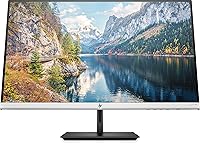
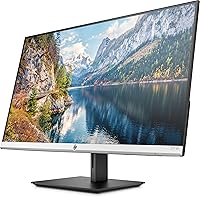
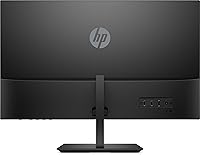
The HP 27f 4K 27-inch Monitor sits comfortably in the mid-range display market, aimed at home office workers and creatives who want a meaningful upgrade without stepping into professional-grade territory. Its 4K IPS panel is the real draw — text looks genuinely crisp, colors feel rich and consistent, and the wide viewing angle means you're not fighting the screen every time you shift position. The height-adjustable stand is a rare ergonomic touch at this price point, and the micro-edge bezel makes it a natural fit for multi-monitor arrangements. That said, if high-refresh gaming is your priority, this 27-inch screen has real limitations worth knowing upfront.
Features & Benefits
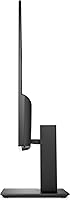
The 4K IPS panel is where this HP display genuinely earns its keep. At this resolution, spreadsheets and detailed documents are noticeably sharper, and photos render with accurate, consistent color across a wide viewing angle — no color shifting when someone leans in to look at your screen. The height-adjustable stand deserves a specific mention: being able to raise or lower the panel by a substantial margin makes a real difference over a full workday. The thin bezel keeps visual interruptions minimal if you're running two screens side by side, and the anti-glare coating handles bright room lighting better than glossy alternatives. AMD FreeSync adds some smoothness for casual video and light gaming.
Best For
The 27f 4K monitor is a strong match for remote workers and home office users who spend most of their day looking at text-heavy documents or web content — 4K makes a genuine difference in reading comfort over a long session. Photo editors and video reviewers will appreciate the color-accurate IPS output for reference work, though professionals with strict requirements may want a factory-calibrated option. People building a dual-monitor workstation will find the slim bezel makes the setup feel far more cohesive. It's also a solid upgrade path for anyone moving up from a standard 1080p screen. Hardcore gamers, though, should look elsewhere — this screen simply can't keep up with competitive gaming demands.
User Feedback
Across buyer reviews, picture quality is consistently the highlight — people are often surprised by how sharp and vivid the image looks straight out of the box, with minimal tuning required. The stand gets regular praise too, with many users calling it a genuine workday comfort improvement. On the downside, port selection is a recurring complaint; limited connectivity pushes some users toward a separate hub. A handful of color-critical buyers mention the factory calibration is decent but not quite print-accurate. The 60Hz cap also surfaces as a frustration for buyers who occasionally game, though for everyday office use, overall satisfaction is clearly high across the board.
Pros
- Crisp 4K IPS image quality makes text and photos look noticeably sharper from day one.
- Wide 178-degree viewing angle keeps colors consistent even when viewing from an off-center position.
- Height-adjustable stand offers meaningful ergonomic flexibility for long work sessions.
- Micro-edge bezel design makes side-by-side dual-monitor setups look clean and uninterrupted.
- Anti-glare coating handles bright room lighting well, reducing reflections without washing out the image.
- AMD FreeSync provides smooth playback for casual video streaming and light gaming.
- Slim silver and black design integrates naturally into modern home office environments.
- Out-of-box color accuracy is solid enough for most everyday creative and media work without extra tuning.
Cons
- The 60Hz refresh rate is a hard ceiling that makes this screen unsuitable for fast-paced or competitive gaming.
- Port selection is limited and has frustrated users who need to connect multiple peripherals simultaneously.
- Factory calibration, while decent, falls short of what color-critical professionals typically require.
- VESA mount compatibility is unconfirmed, which is a concern for buyers planning to use a monitor arm.
- At this screen size, 4K can make UI elements appear small on some operating systems without careful scaling adjustments.
- The 27f 4K monitor offers no built-in USB hub, adding friction to cable-heavy desk setups.
- No tilt or swivel adjustment beyond height means positioning flexibility is more limited than some competitors.
Ratings
Our AI rating system analyzed verified global buyer reviews for the HP 27f 4K 27-inch Monitor, actively filtering out incentivized, bot-generated, and spam submissions to reflect what real everyday users actually experience. The scores below capture both the genuine strengths that keep buyers satisfied and the recurring pain points that affect certain use cases — nothing is glossed over.
Image Sharpness
Color Accuracy
Ergonomics & Stand
Refresh Rate & Gaming
Value for Money
Build Quality
Anti-Glare Performance
Bezel Design
Port Selection
Setup Experience
Eye Comfort
Viewing Angle Consistency
Suitable for:
The HP 27f 4K 27-inch Monitor is a well-rounded choice for anyone who spends the bulk of their day working with text, documents, or visual media and wants a noticeably sharper experience than a standard 1080p screen can offer. Remote workers and home office users will benefit most — reading long documents or managing dense spreadsheets at 4K resolution reduces the kind of eye fatigue that builds up over hours of screen time. Creatives doing casual photo editing or video review will appreciate the IPS panel's color accuracy and wide viewing angle, which means consistent results whether you're sitting straight on or slightly to the side. The height-adjustable stand is a practical ergonomic asset for anyone who shares a desk or switches between sitting and standing postures throughout the day. Those building a dual-monitor workstation will also find the slim bezel makes the setup feel cohesive rather than visually cluttered.
Not suitable for:
The HP 27f 4K 27-inch Monitor has real limitations that make it a poor fit for certain buyers, and it's worth being direct about them. Competitive or enthusiast gamers should skip this screen entirely — the 60Hz refresh rate means fast-paced games will feel noticeably less fluid compared to displays designed with gaming in mind, and no amount of AMD FreeSync support makes up for that ceiling. Professional photographers or print designers who need factory-verified color accuracy may find the out-of-box calibration adequate but not precise enough for color-critical work without manual adjustment. Buyers with a dense cable ecosystem may find the port selection frustrating, particularly if they regularly connect multiple peripherals without a separate hub. Finally, users who need VESA mount compatibility to attach the monitor to an arm or wall bracket should verify this before purchasing, as it is not confirmed in the product listing.
Specifications
- Screen Size: The display measures 27 inches diagonally, offering a comfortable amount of screen real estate for both productivity and media viewing.
- Resolution: Native resolution is 3840x2160 (4K UHD), delivering noticeably sharper text and finer image detail compared to standard 1080p or 1440p panels.
- Panel Type: Uses an IPS (In-Plane Switching) panel, which provides consistent color accuracy and wide viewing angles without the color shift typical of TN panels.
- Refresh Rate: The panel runs at 60Hz, which is standard for office and creative workloads but below what dedicated gaming monitors offer.
- Viewing Angle: Rated at 178 degrees both horizontally and vertically, meaning image quality stays consistent even when viewed from sharp side angles.
- AMD FreeSync: FreeSync support is included, which reduces screen tearing and stuttering during video playback and light gaming within compatible systems.
- Screen Surface: The anti-glare matte coating minimizes reflections in bright or mixed-lighting environments, reducing eye strain during extended use.
- Bezel Style: A micro-edge bezel surrounds the active display area, making it well-suited for multi-monitor arrangements where visual continuity matters.
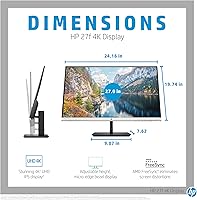
- Height Adjustment: The stand provides 100mm of vertical travel, allowing users to raise or lower the screen to a comfortable eye-level position.
- Aspect Ratio: Standard 16:9 widescreen aspect ratio, compatible with the vast majority of content formats and operating system display configurations.
- Dimensions: The monitor measures approximately 24.16 x 7.62 x 19.74 inches (LxWxH), fitting most standard desks without occupying excessive depth.
- Weight: Weighs 10.56 pounds including the stand, which is typical for a 27-inch display in this category.
- Color Finish: Available in a natural silver and black colorway, with a slim chassis that suits modern home office and minimalist desk setups.
- Voltage: Rated at 240V AC, compatible with standard international power supplies when used with the appropriate regional adapter.
- VESA Mounting: VESA mount compatibility is not confirmed in the official product listing and should be verified with HP directly before purchasing a monitor arm.
Related Reviews

ViewSonic VP2768a-4K 27-Inch 4K Monitor

ViewSonic VA2756-4K-MHD 27-inch 4K Monitor

ViewSonic VG2756-4K 27-Inch 4K Docking Monitor

ViewSonic VX2776-4K-MHDU 27-inch 4K IPS Monitor

Dell S2725QC 27-inch 4K USB-C Monitor
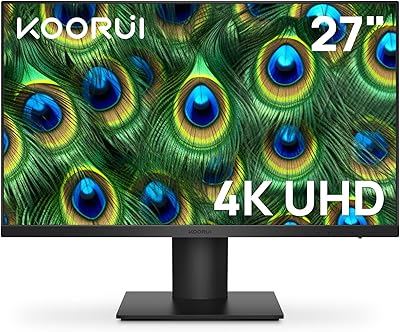
KOORUI N07 27-inch 4K IPS Monitor
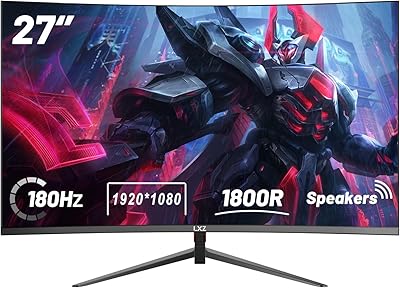
LXZ LX270ZC 27-inch Curved Gaming Monitor
BenQ PD2706U 27-inch 4K Monitor
HP V27i 27-inch FHD IPS Monitor