








Overview

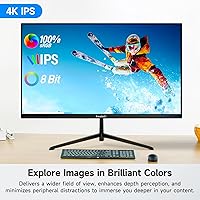
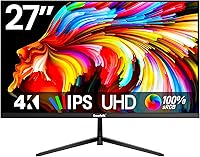
The Gawfolk GF270M 27-Inch 4K Monitor sits in a crowded but genuinely competitive space — budget 4K displays aimed at home office users who want a real resolution upgrade without spending big. Gawfolk isn't a household name, and it's worth being honest about that upfront. What you're getting is a flat, bezel-less IPS panel with a matte surface that handles ambient light reasonably well, paired with a 60Hz refresh rate that suits productivity and media consumption but won't satisfy fast-paced gamers. In a category where name-brand alternatives often cost significantly more, this 4K IPS display makes a credible case for itself on specs alone.

Features & Benefits

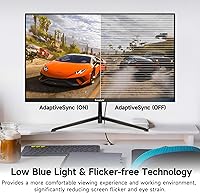
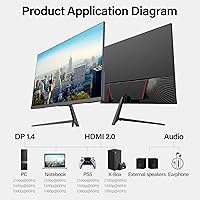
The jump from 1080p to 3840×2160 UHD resolution is immediately obvious — text gets sharper, spreadsheet rows are easier to parse, and photos have noticeably more depth. The IPS panel holds up well from off-center angles, which matters if you share a desk or prop a laptop beside it. Connectivity is a genuine strength: two HDMI 2.0 ports and two DisplayPort 1.4 inputs mean multiple devices stay plugged in without constant cable juggling. The flicker-free backlight and low blue light mode are practically useful for long work sessions, and the matte surface keeps glare manageable without looking washed out. VESA compatibility rounds things out for wall-mount setups.

Best For

This Gawfolk monitor hits a sweet spot for home office workers who spend most of their time in browsers, documents, and spreadsheets — the resolution difference over 1080p is hard to unsee once you have worked with it. Students and photo enthusiasts will appreciate the IPS color accuracy, which is genuinely decent for casual editing and reference work, though it isn't calibrated to professional print standards. Multi-device households benefit from four combined video inputs, making it simple to connect a desktop, laptop, and even a console. The bezel-less flat design also fits well in tighter desk spaces where a cleaner, low-profile panel is preferred.

User Feedback

With over 1,900 ratings averaging 4.2 stars, the GF270M earns its score by delivering on the basics without surprises. Buyers frequently highlight strong out-of-box clarity and appreciate having multiple ports ready without needing adapters. The clean, minimal look receives consistent praise as well. On the flip side, some users find the included stand feels lightweight, and the absence of built-in speakers catches buyers off guard who skipped the spec sheet. A handful of reviews flag shipping damage or missing accessories, though Gawfolk appears reasonably responsive to those complaints. Overall, value relative to the asking price is the most consistent thread running through positive reviews.

Pros

  • Sharp 4K UHD resolution makes text and fine detail significantly crisper than 1080p, especially on a 27-inch screen.
  • Four video inputs — two HDMI 2.0 and two DisplayPort 1.4 — allow easy multi-device setups without extra adapters.
  • The IPS panel offers honest, consistent color accuracy suitable for photo editing and everyday creative work.
  • Flicker-free backlighting and a low blue light mode reduce eye strain during long work sessions.
  • Matte screen coating handles reflections well in bright or mixed-lighting rooms.
  • VESA wall-mount support gives buyers flexibility beyond the included stand.
  • Bezel-less flat design fits cleanly into minimalist or space-conscious desk setups.
  • With over 1,900 ratings averaging 4.2 stars, buyer satisfaction is well above typical for a budget-tier brand.
  • Out-of-box image clarity is a consistent highlight in buyer reviews — minimal setup required to get good results.
  • Value relative to name-brand 4K alternatives at higher prices is frequently cited as the key reason buyers recommend it.

Cons

  • The 60Hz refresh rate is a hard limit — not upgradeable, and a real dealbreaker for any gaming use case.
  • The included stand feels lightweight to some buyers and offers limited height or tilt adjustment options.
  • No built-in speakers means an added purchase if you need audio from the monitor itself.
  • Color accuracy, while decent, is not factory-calibrated and may need manual adjustment for critical creative work.
  • Gawfolk is a relatively new brand, so long-term reliability data and warranty support track record are limited.
  • Some buyers report occasional shipping damage or missing accessories upon arrival, requiring follow-up with support.
  • Brand recognition and resale value are lower than established monitor manufacturers, which may matter for some buyers.
  • No USB hub or KVM functionality, which competing monitors at similar or slightly higher prices sometimes offer.

Ratings

Our AI rating system analyzed thousands of verified global purchases of the Gawfolk GF270M 27-Inch 4K Monitor, actively filtering out incentivized, bot-generated, and duplicate submissions to surface what real everyday buyers actually experienced. The scores below reflect a transparent picture — genuine strengths alongside the recurring frustrations that show up consistently across independent buyer accounts. If something scores low, there's a real reason behind it.

Image Clarity
88%
Buyers upgrading from 1080p panels consistently describe the sharpness improvement as immediately obvious — fine text, spreadsheet rows, and web content all look noticeably cleaner. At 27 inches, the 4K pixel density hits a sweet spot where individual pixels are essentially invisible at a normal desk distance.
Some users note that the out-of-box brightness and contrast settings require adjustment to get the best from the panel. A small number of reviewers also felt that darker scenes looked slightly flat compared to higher-end IPS displays at double the price.
Color Accuracy
74%
26%
For everyday work, photo browsing, and casual editing, the IPS panel delivers colors that look honest and consistent across the screen. Users working on documents, presentations, or light creative tasks report that images and graphics look natural without obvious color bias.
This is not a factory-calibrated display, and professional photographers or video editors notice the gap. Color uniformity across the full panel can vary slightly corner to corner, and the sRGB coverage, while decent, falls short of what dedicated creative monitors offer at higher price points.
Value for Money
91%
This is the category where the GF270M earns its strongest endorsement from buyers. Getting four video inputs, a 4K IPS panel, and a bezel-less design at this price point undercuts most name-brand competitors by a meaningful margin, and buyers recognize it.
The value equation does come with trade-offs — no speakers, a basic stand, and an unproven brand mean you're accepting some compromises. Buyers who prioritize long-term reliability or need robust warranty support may feel those savings carry a degree of risk.
Connectivity
89%
Having two HDMI 2.0 ports and two DisplayPort 1.4 ports on a monitor at this price is genuinely unusual and consistently praised. Home office workers who switch between a desktop and laptop, or users who keep a console connected alongside a PC, appreciate not having to unplug anything.
There is no USB hub built into the monitor, which some buyers in this category have come to expect. The audio output is limited to a single 3.5mm jack, so anyone needing more flexible audio routing will need an external solution.
Eye Comfort
83%
The flicker-free backlight and low blue light mode are practical features that users doing long work-from-home days genuinely notice. Several buyers specifically mention reduced end-of-day eye fatigue compared to their previous displays, particularly when working under artificial lighting.
The low blue light mode does shift the color temperature visibly toward warmer tones, which some users find unflattering for color-sensitive work and choose to disable. The mode is not adjustable in intensity, so it's essentially an on-off compromise rather than a fine-tuned control.
Build Quality
67%
33%
The panel itself feels solid and the bezel-less front looks clean and modern. For a budget-tier monitor, the overall fit and finish is acceptable — nothing feels dramatically cheap when the display is mounted or positioned on a desk.
The included stand is the most consistent build-related complaint. It feels lightweight relative to the screen size and offers minimal ergonomic adjustment — typically just basic tilt. Users who type heavily or have an active desk environment often recommend pairing it with a third-party monitor arm.
Stand & Ergonomics
58%
42%
The stand gets the screen to a usable height for most standard desk setups and assembles without tools in most cases. VESA compatibility means buyers who already own a monitor arm or wall mount can bypass the stand entirely, which many do.
Height adjustment is absent — you get what you get out of the box, and for taller users or those with specific ergonomic needs, that's a real limitation. Swivel and pivot are also not supported, which makes portrait orientation setups or side-by-side angle tuning impossible without an aftermarket arm.
Glare & Reflections
82%
18%
The matte anti-glare coating works well in practical home office conditions — windows to the side, overhead fluorescents, and desk lamps all produce far less interference than a glossy panel would. Users in bright rooms consistently mention this as a daily quality-of-life advantage.
Like most matte coatings, there is a subtle softening effect on very fine detail compared to glossy alternatives. Users who prioritize vivid, high-contrast visuals — particularly for entertainment use — sometimes feel the coating takes the edge off the image's pop.
Setup & Installation
86%
Most buyers report the unboxing and setup process is straightforward, with the stand snapping or bolting together in a few minutes. The multiple input options mean most users can connect without hunting for adapters, and the on-screen menu is generally described as navigable.
The included documentation is minimal, which can be a friction point for less technical buyers trying to configure resolution or input settings for the first time. OSD menu navigation has been called slightly slow or unintuitive by a subset of reviewers.
Refresh Rate & Motion
61%
39%
At 60Hz, everyday computing tasks — scrolling through documents, switching between browser tabs, streaming video — all feel smooth and responsive. For the home office and media consumption use cases this monitor is designed for, 60Hz is functionally adequate.
Anyone coming from a higher-refresh-rate display will notice the step down immediately, and even moderate gaming feels less fluid compared to 90Hz or 144Hz panels. This is a hard ceiling with no variable refresh rate or overdrive mode to compensate, which is a clear limiting factor for mixed-use buyers.
Brand Reliability
63%
37%
The volume of reviews — nearly 2,000 — and a 4.2-star aggregate suggest that most units perform as described. Gawfolk has also been responsive to customer complaints about damaged or incomplete orders, which is a positive signal for a newer brand.
Gawfolk lacks the track record of established monitor brands, and long-term failure rate data simply doesn't exist yet. Warranty support infrastructure is an open question, and buyers in markets where the brand has limited presence take on more risk if something goes wrong after the return window closes.
Viewing Angles
84%
The 178-degree IPS viewing angle holds up well in real-world use — color and brightness stay consistent even when viewing from a couch across the room or from a standing position at an angle. Shared workspaces and screen-sharing scenarios benefit noticeably from this over TN panels.
At very extreme off-axis angles, there is a slight contrast shift, which is normal for IPS technology at this price tier. It won't cause issues in typical use, but buyers expecting OLED-level off-axis consistency will notice the difference in side-by-side comparisons.
Packaging & Delivery
69%
31%
The majority of orders arrive in good condition with all expected components included. Gawfolk explicitly acknowledges delivery issues in their product documentation and encourages buyers to reach out promptly, which shows some awareness of the risk.
A recurring minority of reviews flag units arriving with cosmetic damage or missing accessories such as cables or documentation. While Gawfolk typically resolves these cases, the unboxing experience is not as consistently reliable as what established brands with tighter logistics tend to deliver.
Multi-Device Use
87%
With two HDMI and two DisplayPort inputs, switching between devices is practical without a KVM switch for most users. Remote workers who toggle between a work laptop and a personal desktop throughout the day find this setup particularly useful.
There is no built-in picture-in-picture or picture-by-picture mode confirmed across buyer reports, which limits true simultaneous multi-device display. Physically toggling inputs via the OSD is functional but not as fluid as a dedicated KVM or smart input-switching system.

Suitable for:

The Gawfolk GF270M 27-Inch 4K Monitor is a strong fit for home office workers, remote professionals, and students who spend most of their day staring at text, spreadsheets, or browser tabs — the UHD resolution makes a noticeable difference in readability compared to a standard 1080p screen. Creatives working on casual photo editing or digital artwork will appreciate the IPS panel's color accuracy, which is genuinely capable for reference work and non-critical editing, even if it isn't a professional colorist's tool. Multi-device users will find the four video inputs particularly useful, since switching between a desktop, laptop, or secondary device requires no adapter juggling. The matte surface and low blue light mode make extended work sessions more comfortable, and VESA compatibility gives ergonomic-minded buyers the freedom to wall-mount rather than rely on the included stand. If you're upgrading from a 1080p monitor on a realistic budget, this 4K IPS display delivers a meaningful step up without asking you to overspend.

Not suitable for:

Competitive gamers should look elsewhere — the Gawfolk GF270M 27-Inch 4K Monitor runs at 60Hz, which is perfectly adequate for everyday computing but falls well short of the 144Hz or higher refresh rates that fast-paced gaming demands. Buyers expecting a premium build experience comparable to established brands like LG, Dell, or ASUS may find the stand feels lighter and less adjustable than what they're used to at comparable price points. Professional photographers, video editors, or designers working to strict color standards should note that this Gawfolk monitor does not come factory-calibrated, and IPS panels at this price tier typically cannot match the color volume or accuracy of purpose-built creative displays. Anyone who relies on built-in speakers for calls or media playback will need to budget for external audio, since the GF270M ships without them. Finally, buyers in regions with limited Gawfolk service infrastructure should factor in that warranty support from a smaller, newer brand carries more uncertainty than established players.

Specifications

  • Screen Size: The display measures 27 inches diagonally, offering a comfortable viewing area for both single-monitor home office setups and dual-monitor configurations.
  • Resolution: Native resolution is 3840×2160 pixels (4K UHD), delivering significantly sharper text and image detail than a standard 1080p panel at the same screen size.
  • Panel Type: Uses an IPS (In-Plane Switching) panel, which provides consistent color representation and wide viewing angles compared to TN alternatives.
  • Refresh Rate: The display runs at a fixed 60Hz refresh rate, suitable for productivity, media consumption, and casual use, but not designed for competitive gaming.
  • Viewing Angle: Rated at 178 degrees both horizontally and vertically, meaning color and contrast hold up well when viewed from off-center positions.
  • Contrast Ratio: Dynamic contrast ratio is specified at 3000:1, which supports reasonable depth between bright highlights and dark areas in everyday content.
  • Screen Surface: The matte anti-glare coating reduces reflections from windows and overhead lighting, making it practical in rooms without controlled ambient light.
  • Connectivity: Includes two HDMI 2.0 ports, two DisplayPort 1.4 ports, and one 3.5mm audio output jack for connecting external speakers or headphones.
  • Built-in Speakers: No built-in speakers are included; users requiring audio output will need to connect external speakers or headphones via the 3.5mm audio jack.
  • Eye Care Features: Equipped with flicker-free backlighting and a low blue light mode to reduce eye strain during extended work or study sessions.
  • VESA Compatibility: The panel is VESA wall-mount compatible, giving users the option to remove the included stand and mount the display on a standard arm or wall bracket.
  • Bezel Design: Features a bezel-less (near-frameless) front design on three sides, which minimizes visual distraction and works well in side-by-side multi-monitor arrangements.
  • Aspect Ratio: Standard 16:9 widescreen aspect ratio, compatible with all common video resolutions and productivity layouts.
  • Dimensions: The monitor measures approximately 26.7″ wide, 17.7″ tall, and 4.7″ deep with the stand attached.
  • Weight: Total unit weight is 7.7 pounds, which is typical for a 27-inch IPS panel and manageable for most desk and wall-mount installations.
  • Model Number: The official model identifier is GF270M, produced by Gawfolk.
  • Color Finish: Available in black, with a clean, understated finish that suits most desk environments.
  • Date Available: This model was first made available in June 2025, making it a relatively recent addition to Gawfolk's monitor lineup.

Related Reviews

ViewSonic VP2768a-4K 27-Inch 4K Monitor

86%
94%
Color Accuracy
88%
Ergonomics & Comfort
91%
Value for Money
89%
Build Quality
85%
Ease of Setup
More
ViewSonic VG2756-4K 27-Inch 4K Docking Monitor

80%
91%
USB-C Docking Performance
88%
Display Clarity
74%
Connectivity & Port Selection
86%
Ergonomics & Stand Quality
71%
Color Accuracy
More
ViewSonic VA2756-4K-MHD 27-Inch 4K Monitor
84%
92%
Display Quality
90%
Color Accuracy
88%
Design & Build Quality
85%
Ease of Setup
89%
Connectivity Options
More
ViewSonic VX2776-4K-MHDU 27-inch 4K IPS Monitor

75%
91%
Image Clarity
93%
USB-C Convenience
78%
Color Accuracy
54%
HDR Performance
46%
Stand & Ergonomics
More
Dell S2725QC 27-inch 4K USB-C Monitor
81%
93%
Image Clarity
88%
Color Accuracy
91%
USB-C Connectivity
86%
Refresh Rate & Smoothness
89%
Build Quality & Design
More
LXZ 27-inch 4K Monitor
82%
92%
Value for Money
88%
Display Quality
91%
Ease of Setup
85%
Connectivity Options
76%
Build Quality
More
KOORUI N07 27-inch 4K IPS Monitor
76%
93%
Image Sharpness
89%
Color Accuracy
88%
Color Gamut Coverage
91%
Value for Money
82%
Eye Comfort
More
Dell P2721Q 27-inch 4K Monitor
75%
93%
Image Sharpness
81%
Color Accuracy
89%
USB-C Connectivity
63%
Build Quality
77%
Ergonomics & Adjustability
More
CUNPU U27 27-inch 4K IPS Monitor
74%
88%
Color Accuracy
91%
Image Sharpness
86%
Value for Money
71%
Build Quality
54%
Ergonomics & Stand
More
Gawfolk GF320F 32-Inch 4K UHD Monitor
72%
88%
Image Clarity
83%
Contrast & Color Depth
51%
Brightness
74%
Color Accuracy
81%
Viewing Angle
More

FAQ

Not really, if competitive gaming is your priority. The GF270M runs at 60Hz, which is fine for casual play but won't satisfy anyone used to 144Hz or higher. If you mostly play slower-paced games or RPGs alongside daily work, it'll hold up — but dedicated gamers should look at higher-refresh-rate options.

Gawfolk typically includes at least one cable in the box, though the exact contents can vary by shipment. It's a good idea to have an HDMI 2.0 or DisplayPort 1.4 cable on hand just in case, especially if you're connecting a newer GPU that favors DisplayPort for 4K output.

It depends on your laptop's video output. You'll need an HDMI 2.0 or DisplayPort 1.4 port to get the full 3840×2160 signal at 60Hz — older HDMI 1.4 connections will cap you at a lower resolution or refresh rate. Most laptops from the last few years with a dedicated GPU or a Thunderbolt port should handle it fine.

The stand is functional and gets the job done, but a handful of buyers have noted it feels lighter than expected. It doesn't wobble under normal use, but if you type heavily or bump your desk often, you might find a monitor arm provides more stability and better ergonomic adjustment options.

No, it doesn't. If you need audio from the monitor itself, you'll want to connect external speakers or a headset through the 3.5mm audio output jack on the back. This is a common omission at this price point, so worth planning for ahead of time.

It's decent for casual and hobbyist photo editing — the IPS panel produces honest, consistent color that works well for reviewing and basic retouching. That said, it is not factory-calibrated and doesn't cover wide color gamuts like DCI-P3 in any meaningful way, so professional colorists or print photographers would want a purpose-built display instead.

Yes, this Gawfolk monitor is VESA-compatible, so you can remove the stand and attach it to any standard VESA mount or monitor arm. Just check the specific VESA hole pattern before purchasing a mount to make sure it's a match.

Very noticeable on a 27-inch screen. At 1080p, individual pixels become visible at normal viewing distances on a display this size, which makes text look slightly soft. At 4K on the same size screen, text sharpens up considerably and fine image detail is much cleaner. Most people who switch notice the difference immediately.

Gawfolk has addressed this directly in their product documentation and encourages buyers to contact them promptly if there's any damage or missing accessory. Some buyers have reported positive resolution experiences, though support response times can vary. Documenting any damage with photos at unboxing is always a smart move regardless of brand.

Matte coatings are generally easy to wipe down with a soft microfiber cloth — just avoid paper towels or chemical cleaners. The trade-off is that matte surfaces can slightly reduce perceived sharpness and vibrancy compared to a glossy panel, but the benefit of reduced glare in real-world lighting conditions usually makes it the more practical choice for office use.