Overview

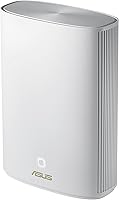
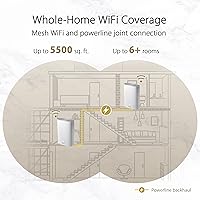
The ASUS ZenWiFi XP4 Mesh WiFi 6 System takes a fundamentally different approach than most mesh routers by pairing its wireless radios with a powerline backhaul, routing traffic through your home's existing electrical wiring rather than relying on a wireless hop between nodes. That distinction matters enormously in older apartments or houses where thick concrete, brick, or plaster walls quietly destroy wireless signals. A single node covers up to 2,750 sq. ft. on paper, though real-world range in dense-construction buildings will naturally be more modest than open-plan lab figures suggest. This hybrid mesh system sits squarely in the mid-range tier and slots into the broader AiMesh ecosystem without friction.
Features & Benefits

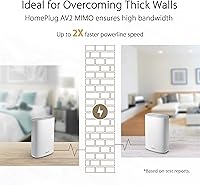
At the heart of this hybrid mesh system is the HomePlug AV2 MIMO powerline backhaul, which pushes data through your electrical circuits rather than over the air — a meaningful advantage when walls are the enemy. The WiFi 6 AX1800 dual-band radio manages client devices, while the powerline link targets up to twice the throughput of the older AV standard; real gains, however, depend on your home's wiring quality and circuit layout. ASUS bundles AiProtection Pro for life at no subscription cost, covering intrusion detection, parental controls, and WPA3 encryption. Network naming is flexible too — one unified SSID or separate per-band names — and the whole setup integrates cleanly with other AiMesh-compatible hardware.

Best For

The ZenWiFi XP4 is a natural match for anyone living in a thick-wall building — pre-war apartments, concrete-block homes, or any space where a conventional mesh system has already disappointed. If you have four or more rooms demanding reliable coverage and pulling Ethernet cable simply is not an option, the powerline backhaul offers a sensible workaround without structural work. Families get parental controls and network security bundled in for the long haul. Gamers and remote workers who need a stable connection but cannot run cable through walls will find the wired-like backhaul a practical step up. Existing ASUS router owners can also fold this into an AiMesh network with minimal effort.

User Feedback

Buyers consistently point to dead-zone elimination as the headline win, particularly those upgrading from pure-wireless mesh systems that struggled against heavy masonry. The ASUS Router app setup is generally described as approachable, although completing the powerline pairing can occasionally require a couple of extra attempts. A recurring complaint is that the single-node pack leaves buyers wanting a second unit in the box. A smaller group of users notes that powerline throughput varies by home — older or more complex electrical layouts tend to underperform newer wiring. The companion app also draws mild criticism for making advanced configuration less intuitive than it could be, though everyday use remains reliable for the majority of households.

Pros

  • Powerline backhaul reaches rooms where every wireless-only mesh system has already failed.
  • Lifetime AiProtection Pro security means no subscription renewals eating into long-term ownership costs.
  • WiFi 6 support improves efficiency and reduces congestion in households with many connected devices simultaneously.
  • WPA3 encryption keeps the network compatible with current device security standards without manual configuration.
  • AiMesh compatibility lets ASUS router owners expand an existing network rather than replace it entirely.
  • Parental controls are granular enough for real household use without requiring a networking background to configure.
  • The powerline backhaul delivers noticeably steadier latency for gaming and video calls compared to a wireless hop.
  • Clean, minimal design sits unobtrusively on a shelf without looking like networking hardware from a sci-fi film.
  • Guest network and QoS features are included and functional without paying for a premium tier.
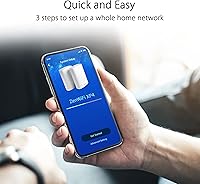
  • Setup via the ASUS Router app is accessible enough for non-technical buyers to complete without outside help.

Cons

  • Real powerline speeds depend heavily on your home's electrical wiring age and circuit layout — results vary widely.
  • Single-node pack leaves larger or more segmented homes needing a second unit, significantly raising the true cost.
  • Powerline pairing during setup can require multiple attempts before the nodes recognize each other reliably.
  • The companion app becomes frustrating for advanced tasks like detailed band management or traffic policy configuration.
  • AX1800 is on the lower end of WiFi 6 throughput, which may feel limiting in high-bandwidth multi-device households.
  • Advertised coverage figures are based on open-space conditions and will not reflect real performance in dense-wall homes.
  • Firmware updates have occasionally introduced temporary connectivity issues with no easy rollback path in the app.
  • Only one color option available, limiting placement flexibility for design-conscious buyers.
  • Alexa integration covers only basic commands and does not expose the more useful network management functions.
  • Buyers on newer open-plan construction will see limited benefit from the powerline approach over a standard mesh system.

Ratings

The scores below for the ASUS ZenWiFi XP4 Mesh WiFi 6 System were generated by our AI engine after analyzing verified purchase reviews from buyers worldwide, with spam, bot activity, and incentivized feedback actively filtered out. The ratings reflect a genuine cross-section of real household experiences — from dense urban apartments to older suburban homes — and do not shy away from the friction points buyers consistently raised alongside the genuine strengths.
Dead-Zone Elimination
88%
For buyers in brick or concrete buildings who had already tried and failed with conventional mesh systems, the powerline backhaul made a tangible difference. Reviewers in multi-story apartments described getting usable signal in rooms that had been effectively offline for years — a result that pure-wireless alternatives simply could not replicate in the same environments.
The improvement is highly location-dependent. Buyers in homes with modern open-plan construction reported gains that felt modest compared to what thick-wall users experienced, making this a specialized solution rather than a universal dead-zone fix.
Powerline Backhaul Performance
74%
26%
When the home's electrical wiring cooperates, the HomePlug AV2 MIMO backhaul delivers noticeably steadier throughput than a wireless hop — particularly helpful for video calls and remote work where stability matters more than peak speed. Several users noted the connection held consistent even during hours of heavy use.
Real-world powerline speeds vary considerably depending on wiring age, circuit layout, and interference from other appliances sharing the same circuits. A subset of buyers on older or more complex electrical systems reported backhaul speeds that fell short of what the spec sheet implied, which is a genuine risk worth understanding before buying.
Setup & Installation
79%
21%
The ASUS Router app guides most users through initial setup without requiring any networking knowledge, and the majority of reviewers completed the process within a reasonable amount of time. For existing ASUS router owners folding this into an AiMesh network, the experience was generally described as plug-and-play.
The powerline pairing step specifically attracted complaints. Some users needed multiple attempts to get the two nodes to recognize each other over the electrical circuit, and the app's guidance at that step was described as less clear than earlier stages of the setup flow.
Network Security & Parental Controls
91%
AiProtection Pro's lifetime inclusion resonates strongly with family buyers who have grown tired of routers that quietly expire their security features or push paid upgrades after the first year. Parents specifically praised the parental controls for being granular enough to set per-device schedules without needing a computer science degree to configure them.
Advanced users who want deep customization of the intrusion detection rules or detailed traffic logs may find the implementation more consumer-grade than professional. The controls are solid for households, but network enthusiasts looking for granular policy management will hit a ceiling.
WiFi 6 Client Performance
82%
18%
Devices that support WiFi 6 — including recent smartphones, laptops, and gaming consoles — benefit from improved airtime efficiency and reduced latency in crowded wireless environments. Households with many simultaneous connected devices reported noticeably fewer slowdowns during peak usage periods compared to their previous routers.
The AX1800 rating is on the lower end of the WiFi 6 spectrum, and homes with a large number of high-bandwidth devices streaming simultaneously may eventually feel the constraint. This is a practical home system, not a high-throughput enthusiast router, and the specs reflect that positioning.
Coverage Consistency
76%
24%
In the environments this powerline mesh router was designed for — divided floor plans, rooms separated by load-bearing walls, multi-story layouts — coverage consistency was a clear improvement over single-router setups. Users praised the ability to walk between rooms and maintain a stable connection without drops.
The advertised 2,750 sq. ft. single-node figure is measured under ideal open-space conditions. Buyers in genuinely dense-wall environments should expect meaningfully lower real-world coverage, and some found they still needed a second node to cover larger properties adequately — which adds cost.
Value for Money
72%
28%
The combination of WiFi 6, powerline backhaul, and lifetime security bundled into a mid-range price tier represents reasonable long-term value for buyers who genuinely need what this system offers. Skipping subscription fees for parental controls and security over several years of ownership adds up to tangible savings.
The single-node pack is a recurring sore point. Buyers expecting whole-home coverage from one unit in larger or more segmented homes often discover they need a second node, effectively doubling the outlay. For those buyers, the initial price calculates very differently than it appears on the listing.
App & Advanced Configuration
63%
37%
For straightforward tasks — changing passwords, setting up a guest network, managing parental controls, or checking connected devices — the ASUS Router app covers the bases without requiring the web-based admin panel. Casual users generally find it sufficient for day-to-day management.
Advanced configuration options are less accessible through the app than through the full desktop interface, and several technically inclined users found the app unintuitive when attempting tasks like QoS prioritization or detailed band management. The app feels designed around the median user, not the experienced one.
Build Quality & Design
81%
19%
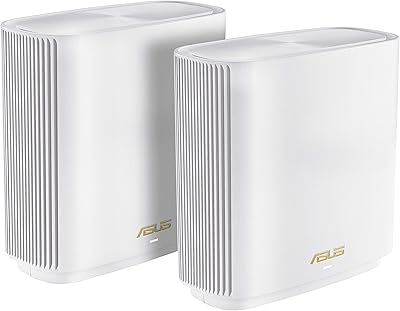
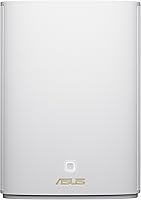
The unit has a clean, upright profile that sits unobtrusively on a shelf or entertainment unit. Build materials feel solid for the price segment, and the white finish blends into most home interiors without drawing attention the way some more aggressive-looking routers do.
There is only one color option, and a small number of buyers noted the power adapter cable length was shorter than ideal for flexible placement. Thermals under sustained heavy load drew occasional comments, though no reviewers flagged stability issues resulting from heat during normal household use.
AiMesh Ecosystem Integration
86%
For buyers already running ASUS hardware elsewhere in their home, adding the ZenWiFi XP4 to an existing AiMesh network was consistently described as one of the smoothest parts of the experience. The router handed off between mesh nodes reliably, and managing the combined network from a single interface worked as advertised.
The AiMesh advantage is only relevant to buyers already in the ASUS ecosystem. For everyone else, this integration point is essentially neutral, and those cross-shopping against non-ASUS mesh competitors will not find a compelling switching reason here specifically.
Alexa & Smart Home Compatibility
67%
33%
Alexa integration allows hands-free control of basic network functions — toggling guest network access or running a speed check without reaching for a phone — which a portion of smart-home-oriented buyers appreciated as a convenience feature in a connected household.
The Alexa functionality is relatively limited in scope and felt superficial to buyers expecting deeper smart home orchestration. It handles simple commands well but does not expose the more useful network management features, making it a minor bonus rather than a meaningful selling point for most households.
Stability & Reliability
84%
The vast majority of reviewers reported that once set up, the hybrid mesh system ran for extended periods without requiring reboots or manual intervention. The powerline backhaul component appeared to contribute to steadier uptime compared to purely wireless mesh systems where a weak backhaul hop can destabilize the entire network.
A small number of users reported occasional disconnection events, particularly after firmware updates. While these incidents appeared isolated rather than systematic, they were enough to temper an otherwise strong reliability picture for buyers who depend on uninterrupted connectivity for remote work.
Firmware & Software Updates
71%
29%
ASUS has a reasonable track record of releasing firmware updates for its ZenWiFi line, and several buyers confirmed receiving updates that addressed early bugs or added minor features over the months following purchase. The update process through the app is straightforward for most users.
A handful of users reported that specific firmware versions introduced temporary connectivity issues or changed interface behaviors without obvious benefit. The lack of an automatic rollback option when a firmware update causes problems left some buyers needing to factory reset and reconfigure their network.
Package Contents
58%
42%
The included RJ-45 cable is a practical touch that removes one small friction point from initial installation, and the quick-start guide covers the basics clearly enough for non-technical buyers to get oriented before opening the app.
The single-node packaging is the most-cited disappointment across the review base. Competitors at similar or slightly higher price points offer two-node systems, and many buyers felt the box contents did not fully justify the asking price relative to what the category offers more broadly.

Suitable for:

The ASUS ZenWiFi XP4 Mesh WiFi 6 System was built for a very specific problem, and it solves that problem well: getting reliable WiFi into every room of a home where thick walls make conventional wireless mesh systems give up. If you live in a pre-war apartment, a concrete-block house, or any older building where signals drop the moment you step into a back bedroom or bathroom, the powerline backhaul fundamentally changes what is possible without touching a single wall or running a single cable. Remote workers who depend on a stable connection for video calls — but whose home layout makes a wired desk setup impractical — will find the consistency here a meaningful step up from wireless-only alternatives. Families get genuine long-term value from the built-in parental controls and network security, which require no subscription to remain active year after year. Existing ASUS router owners wanting to extend their network rather than replace it entirely will find this powerline mesh router integrates into an AiMesh setup with very little friction. Gamers in multi-room homes who cannot run Ethernet to the living room console will also appreciate how the powerline backhaul stabilizes latency compared to a weak wireless hop.
Not suitable for:

The ASUS ZenWiFi XP4 Mesh WiFi 6 System is genuinely the wrong tool if your home does not have a wall problem. In newer open-plan construction or single-floor homes where a standard mesh system already works adequately, the powerline backhaul adds complexity without delivering a proportional improvement, and there are pure-wireless WiFi 6 mesh options at this price tier that will outperform it on raw throughput. Buyers with older or heavily loaded electrical wiring should also approach with caution: powerline speeds are only as good as the circuits they run through, and some homes simply do not produce the stable backhaul performance the spec sheet implies. If you are hoping to cover a large property with a single node, the real-world coverage in dense-wall environments will fall well short of the advertised figure, meaning a second node — and additional cost — may be unavoidable. Power users and network enthusiasts who want deep configuration control, advanced QoS policies, or granular traffic management will find the app interface limiting. And if two-node coverage out of the box is a hard requirement for your budget, this single-pack format is worth reconsidering against competitors that bundle two units at a comparable price.
Specifications

  • WiFi Standard: The system operates on 802.11ax (WiFi 6), supporting backward compatibility with 802.11a, 802.11n, 802.11g, and 802.11ac devices.
  • Max Speed: Theoretical maximum wireless throughput is AX1800, combining dual-band radios across the 2.4 GHz and 5 GHz frequency bands.
  • Frequency Bands: Dual-band operation covers both the 2.4 GHz band for range and the 5 GHz band for higher-speed shorter-range connections.
  • Backhaul Technology: Node-to-node backhaul runs over HomePlug AV2 MIMO powerline, using the home's existing electrical wiring rather than a dedicated wireless channel.
  • Single-Node Coverage: One node covers up to 2,750 sq. ft. under open-space test conditions; real-world coverage in dense-wall environments will be lower.
  • Two-Node Coverage: A two-node deployment extends coverage to approximately 5,500 sq. ft. under the same open-space test methodology.
  • Security Suite: ASUS AiProtection Pro is included at no subscription cost and provides lifetime network intrusion detection and malicious site blocking.
  • Encryption: The system supports WPA3 for current-generation devices alongside WPA2 for compatibility with older hardware on the same network.
  • Parental Controls: Parental control features are delivered through AiProtection and allow per-device scheduling and content filtering without a paid tier.
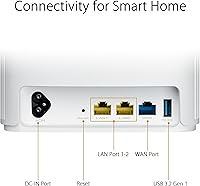
  • Connectivity Ports: Each node includes Ethernet and USB ports, allowing wired device connections and basic USB peripheral sharing on the local network.
  • Voice Assistant: Alexa compatibility is supported for basic hands-free network management commands through an Amazon Echo device.
  • Guest Network: A dedicated guest network can be enabled to isolate visitor devices from the primary home network without additional hardware.
  • QoS: Quality of Service controls allow traffic prioritization by device or application type to manage bandwidth during peak household usage.
  • AiMesh Support: The unit is fully AiMesh compatible, enabling integration with other supported ASUS routers to build or extend a unified mesh network.
  • Dimensions: Each node measures 5.83 x 2.8 x 8.19 inches, designed for upright placement on a shelf or flat surface.
  • Weight: Each node weighs 1.47 pounds, making it straightforward to reposition during initial placement and testing.
  • Color: The unit is available in white only, with a clean minimal profile intended to blend into standard home interiors.
  • In the Box: The single-pack includes one XP4 node, a power adapter, an RJ-45 Ethernet cable, a quick start guide, and a warranty card.
  • SSID Flexibility: Network naming can be configured as a single unified SSID for all bands or as separate names per frequency band based on household preference.
  • Release Date: The ZenWiFi XP4 was first made available in June 2022 as part of the ASUS ZenWiFi product lineup.

Related Reviews
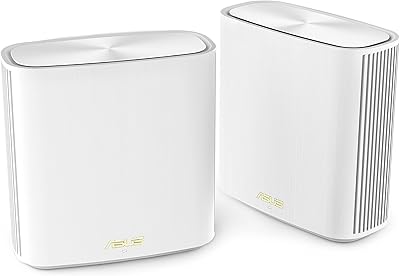
ASUS ZenWiFi XD6 Mesh WiFi 6 System
86%
93%
Wi-Fi Coverage
85%
Ease of Setup
89%
Performance and Speed
80%
App Experience
91%
Parental Controls
More
ASUS ZenWiFi ET9 2-Pack Mesh WiFi System
77%
83%
WiFi Coverage
86%
Network Speed
57%
Setup Experience
72%
App & Management
91%
Network Security
More
NETGEAR Orbi RBK663 WiFi 6 Mesh System
87%
93%
WiFi Performance
90%
Coverage Area
85%
Ease of Setup
88%
Security Features
82%
App Experience
More
NETGEAR Orbi RBK853 WiFi 6 Mesh System
77%
83%
Signal Coverage
86%
Network Speed
88%
Device Handling
81%
Setup Experience
74%
App & Management
More
NETGEAR Nighthawk MK72 WiFi 6 Mesh System
77%
74%
Coverage & Range
78%
WiFi Speed & Performance
91%
Setup & Installation
61%
Network Management & App
83%
Multi-Device Handling
More
NETGEAR Orbi RBK752P WiFi 6 Mesh System
80%
88%
Coverage & Range
79%
WiFi Speed & Throughput
91%
Ease of Setup
83%
Device Handling
85%
Wired Connectivity
More
NETGEAR Nighthawk MK73S
77%
88%
Coverage & Dead Zone Elimination
91%
Setup & Installation Experience
76%
WiFi Speed & Throughput
82%
Device Capacity & Network Congestion
63%
Roaming & Handoff Between Units
More
NETGEAR Nighthawk MK62 Mesh WiFi 6 System
87%
94%
Setup & Installation
88%
Performance for Streaming & Gaming
83%
WiFi Coverage
90%
App Management Experience
92%
Security Features (NETGEAR Armor)
More
Tenda MX12 AX3000 Mesh WiFi 6 System
82%
88%
Performance
79%
Ease of Setup
93%
Coverage Area
85%
Speed & Reliability
82%
Multi-Device Support
More
TP-Link Deco X55 1-Pack Mesh Wi-Fi System
81%
91%
Ease of Setup
84%
WiFi Speed & Throughput
78%
Coverage Reliability
72%
App & Management Experience
88%
Value for Money
More

FAQ

For most buyers in concrete or brick buildings, yes — and the reason is the backhaul. Standard mesh systems rely on a wireless hop between nodes, which thick walls weaken just as much as the signal going to your devices. This powerline mesh router sidesteps that problem by sending the node-to-node traffic through your electrical wiring instead, which walls cannot block. The improvement is real, but how much you gain also depends on the quality of your home's electrical circuits.

Almost certainly not in the real world, and that is not unique to this system — it applies to all powerline products. The AV2 MIMO standard has strong theoretical throughput, but actual speeds depend on your home's wiring age, the distance between outlets, and whether other appliances on the same circuit are creating interference. Homes with newer, clean electrical wiring tend to get much closer to advertised figures than older properties with complex or shared circuits.

For most one-bedroom apartments, a single node should cover the space adequately, particularly if the layout is compact. The coverage ceiling per node is rated at 2,750 sq. ft. under ideal conditions, so a typical apartment is well within that range. Where a second node tends to become necessary is in multi-room homes or spaces where walls create several distinct signal barriers between areas.

Not really. The ASUS Router app walks you through the process step by step, and most users with no networking background complete it without trouble. The one step that occasionally trips people up is the powerline pairing, where the two nodes need to find each other over the electrical circuit. If it does not connect on the first try, unplugging and replugging into a different outlet on the same circuit usually resolves it.

Yes, and that is one of the practical advantages of the AiMesh ecosystem. You can add additional compatible ASUS routers or ZenWiFi nodes to extend the network later without replacing what you already have. The existing node becomes part of a larger unified mesh rather than being made redundant by the expansion.

No, and that is worth emphasizing because many competing systems quietly put their parental control features behind a paid tier after the first year. AiProtection Pro is included for the life of the hardware at no additional cost. You get content filtering, per-device scheduling, and intrusion detection without ever needing to enter payment details to keep them active.

Yes, the system is fully backward compatible with 802.11ac (WiFi 5), 802.11n, 802.11g, and 802.11a devices. WiFi 6 clients will benefit from improved efficiency and lower latency, but your older laptops, phones, and smart home devices will connect and function normally on the same network without any configuration changes.

Yes, that is exactly the scenario AiMesh is designed for. As long as your existing ASUS router appears on the AiMesh compatibility list, you can pair the ZenWiFi XP4 with it to create a unified mesh network managed from a single interface. It is one of the cleaner upgrade paths available without discarding working hardware.

It holds up well for gaming, particularly because the powerline backhaul produces steadier latency than a wireless hop between nodes — which is the part of a mesh system that tends to hurt gaming performance most. If your gaming setup is in a room that previously had weak signal, the improvement in connection stability can be noticeable. The AX1800 throughput is sufficient for current-generation gaming, though enthusiasts with very high bandwidth demands may eventually want a more powerful system.

Alexa is supported for basic voice commands like toggling the guest network or checking connection status. For broader smart home compatibility, the system works as a standard WiFi network that any device — smart bulbs, thermostats, security cameras — can connect to. The Alexa integration itself is fairly limited in scope, so if deep smart home orchestration is a priority, manage expectations around that specific feature.

Where to Buy