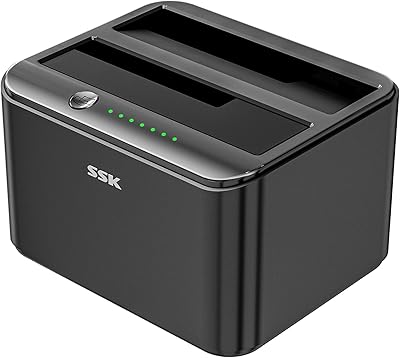
GRAUGEAR G-M2ST235-CL NVMe SATA Drive Docking Station

Overview
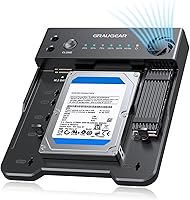
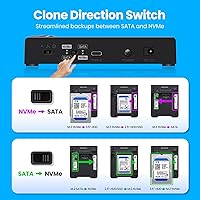
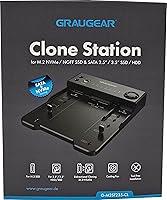
The GRAUGEAR G-M2ST235-CL NVMe SATA Drive Docking Station is a cross-format storage tool built for users who regularly shuffle data between NVMe and SATA drives. Its offline cloning capability is what sets it apart from most docks at this price — no laptop, no software, just plug in your drives and press a button. German brand GRAUGEAR, manufactured by CHAB GmbH, focuses specifically on storage accessories, and this dock sits in a comfortable mid-range position. One important caveat worth flagging early: cloning only works across drive formats. SATA-to-SATA and NVMe-to-NVMe are not supported — a detail that trips up more buyers than it should.
Features & Benefits
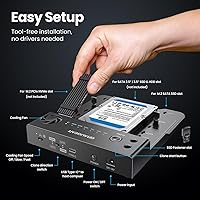
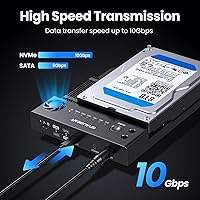
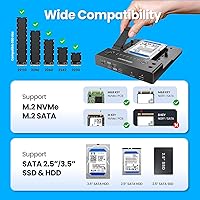
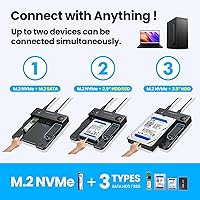
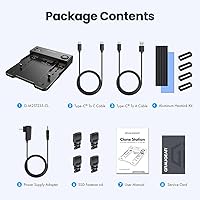
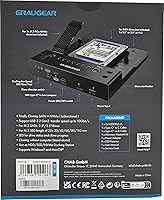
The one-touch cloning process is genuinely simple: hold the button for a few seconds, press it once more, and the dock handles the rest without any host device. This NVMe-SATA dock accommodates M.2 NVMe, M.2 SATA, 2.5-inch SATA SSD and HDD, and full-size 3.5-inch SATA HDDs simultaneously. Through its USB 3.2 Gen 2 connection, NVMe drives transfer at up to 10Gbps while SATA drives run at 6Gbps — quick enough to make large file moves feel manageable. The built-in cooling fan with three speed settings prevents thermal throttling during extended transfers, and UASP support via the JMS586U chipset helps maintain consistent throughput. Both a USB-C to C and USB-C to A cable are included.
Best For
This docking station makes the most sense for IT professionals and PC upgraders who need to migrate data between NVMe and SATA drives regularly. Think of someone retiring an old 2.5-inch SATA boot drive in favor of a faster M.2 NVMe SSD — this dock handles that migration offline, without tying up a machine. Content creators moving large media libraries between drive formats will also find the transfer speeds practical. That said, same-format cloning is off the table: if you need to clone SATA to SATA or NVMe to NVMe, this is not the right tool. Home users wanting software-free backups between compatible formats will find it refreshingly straightforward.
User Feedback
With a 4.3-out-of-5 average across nearly 100 early reviews, the GRAUGEAR clone dock has landed well for a product only launched in early 2025. Buyers consistently praise the no-fuss offline cloning and broad drive compatibility. Where frustration tends to surface is around the format restriction — users who assumed all drive combinations were supported were caught off guard, making it essential to read the specs carefully before purchasing. A handful of reviewers flag fan noise on the highest setting as mildly distracting in quiet rooms. The plastic housing is reasonable at this tier but may feel modest to some. Overall, clone reliability appears consistent for everyday workloads.
Pros
- Offline cloning works without a computer — just insert drives and press a button.
- Supports a genuinely broad range of drive types: M.2 NVMe, M.2 SATA, 2.5-inch and 3.5-inch SATA.
- USB 3.2 Gen 2 delivers up to 10Gbps, making large NVMe transfers noticeably quick.
- Built-in cooling fan prevents thermal throttling during extended cloning or transfer sessions.
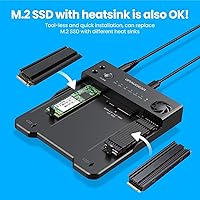
- Tool-free drive installation means no screwdrivers or adapters needed to get started.
- Both USB-C to C and USB-C to A cables are included, so most setups are covered out of the box.
- UASP support via the JMS586U chipset helps maintain consistent throughput under load.
- Handles drives above 2TB without compatibility issues, future-proofing it for larger storage needs.
- Early user ratings are strong for a product this new, suggesting reliable out-of-box performance.
- Compact and lightweight enough to toss in a laptop bag for on-site IT work.
Cons
- SATA-to-SATA and NVMe-to-NVMe cloning are completely unsupported — a hard dealbreaker for some workflows.
- The cloning restriction is not prominently displayed, making it easy to buy this dock for the wrong use case.
- Plastic construction feels modest and may show wear with heavy daily use over time.
- The cooling fan on its highest setting produces audible noise that can be distracting in quiet environments.
- Only one M.2 slot and one SATA slot means you cannot bridge two drives of the same format simultaneously.
- No companion software or status display — drive progress is tracked only through blinking indicator lights.
- The target drive must have equal or greater capacity than the source, adding a planning step before cloning.
- A relatively small review pool means long-term reliability data is still limited for high-frequency professional use.
Ratings
The scores below reflect an AI-driven analysis of verified worldwide buyer feedback for the GRAUGEAR G-M2ST235-CL NVMe SATA Drive Docking Station, with spam, incentivized, and bot-generated reviews actively filtered out before scoring. Both the genuine strengths that earned this dock its loyal following and the recurring frustrations that tempered enthusiasm are transparently reflected in each category. No score has been inflated — if buyers ran into a real problem, you will see it here.
Offline Cloning
Drive Compatibility
Transfer Speed
Cooling Performance
Ease of Use
Build Quality
Value for Money
Cloning Reliability
Thermal Management
Port & Slot Layout
Packaging & Accessories
Software & Firmware
Noise Level
Suitable for:
The GRAUGEAR G-M2ST235-CL NVMe SATA Drive Docking Station is purpose-built for anyone navigating the increasingly common task of migrating data between NVMe and SATA storage formats. It fits particularly well into the workflow of PC upgraders who are retiring an older SATA drive in favor of a faster M.2 NVMe SSD and want to carry over their data without setting up cloning software or borrowing a second machine. IT professionals managing multiple workstations will appreciate the offline cloning capability, which removes the host computer entirely from the equation and speeds up repetitive drive swaps. Content creators and media editors dealing with large file libraries also stand to benefit from the 10Gbps transfer ceiling when using the dock for regular data movement, even outside of cloning. Home users who want a reliable, no-fuss way to back up one drive format onto another without touching a terminal or installer will find this dock refreshingly approachable.
Not suitable for:
The single most important limitation of the GRAUGEAR G-M2ST235-CL NVMe SATA Drive Docking Station is one that catches a meaningful number of buyers off guard: it does not support same-format cloning. If you need to clone a SATA drive onto another SATA drive, or duplicate one NVMe SSD onto another NVMe SSD, this dock simply cannot do it — the cloning engine only works across the two formats. Users who need that flexibility should look at a different solution before purchasing. Beyond cloning restrictions, the all-plastic housing may not inspire confidence in buyers who plan to use this dock heavily in a professional environment over several years. Those sensitive to fan noise will also want to note that the highest fan speed setting has drawn some complaints in quiet workspaces. Finally, buyers who need to simultaneously access or transfer between two drives of the same type will find the single-slot-per-format design limiting.
Specifications
- Brand: Manufactured by CHAB GmbH under the GRAUGEAR brand, a German company focused on storage accessories.
- Model: The model number is G-M2ST235-CL, identifying this specific clone dock variant within the GRAUGEAR lineup.
- Interface: Connects to a host computer via USB 3.2 Gen 2, supporting data transfer speeds up to 10Gbps for NVMe drives.
- Chipset: Uses the JMS586U chipset with UASP support to maintain consistent and optimized throughput during transfers.
- Drive Support: Accommodates M.2 NVMe SSD, M.2 SATA SSD, 2.5″ SATA SSD and HDD, and 3.5″ SATA HDD in a single unit.
- Cloning Support: Offline cloning is supported exclusively between NVMe and SATA formats; SATA-to-SATA and NVMe-to-NVMe cloning are not supported.
- Transfer Speed: NVMe drives transfer at up to 10Gbps while SATA drives operate at up to 6Gbps through the USB 3.2 Gen 2 connection.
- Cooling Fan: A built-in fan offers three speed settings — Off, Low, and High — to prevent thermal throttling during extended use.
- Capacity Support: Compatible with drives above 2TB, making it suitable for modern high-capacity storage needs.
- Included Cables: Ships with both a USB-C to USB-C cable and a USB-C to USB-A cable to cover a wide range of host device configurations.
- Dimensions: The unit measures 6.5 inches long by 5.51 inches wide by 1.02 inches tall, keeping it compact enough for desk or bag use.
- Weight: Weighs 5.5 ounces (155g), making it light enough to carry in a laptop bag for mobile IT work.
- Material: The enclosure is constructed from plastic in a dark gray finish, consistent with mid-range storage peripheral standards.
- Installation: Drive installation is tool-free, requiring no screwdrivers or mounting hardware to seat any of the supported drive formats.
- USB Ports: The dock features one USB-C host port for connection to a computer, plus drive slots that are not counted as USB ports.
- Rating: Holds a 4.3-out-of-5-star rating based on 99 customer reviews as of its early availability period following a March 2025 launch.
Related Reviews
StarTech SDOCKU313 USB 3.1 Hard Drive Dock
Inateck SA02004 USB 3.0 Hard Drive Docking Station
StarTech SDOCKU33BV USB 3.0 Hard Drive Dock

StarTech SDOCK2U33EB Dual-Bay Hard Drive Docking Station
Sabrent EC-DFLT USB 3.0 SATA Hard Drive Docking Station

WAVLINK WL-ST334UA Dual-Bay USB 3.0 Hard Drive Docking Station

G-Technology G-DRIVE Mobile 4TB Portable Hard Drive
G-Technology G-DRIVE Mobile USB-C 2TB Hard Drive
G-Technology G-DRIVE Mobile 1TB Portable Hard Drive