Overview

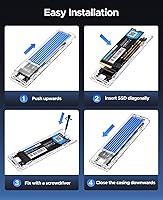
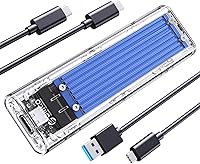
The ORICO TCM2 M.2 NVMe SSD Enclosure is a compact, budget-friendly adapter that turns any M-Key NVMe drive — in 2230, 2242, 2260, or 2280 form factors — into portable external storage. What immediately sets it apart visually is the transparent blue shell, a refreshing departure from the flood of plain aluminum boxes in this category. Installation uses a sliding closure that needs no tools, which makes a genuine difference if you are setting this up for someone less technically inclined. Since its early 2021 launch, it has gathered over 1,600 ratings and holds a 4.1-star average — a solid track record for something priced well under thirty dollars.
Features & Benefits

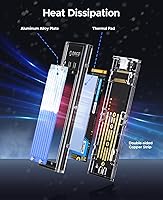
The headline spec is the USB 3.2 Gen 2 controller supporting up to 10 Gbps, though real-world throughput always depends on your host port and the specific NVMe drive installed — worth keeping in mind before expecting peak numbers. That said, users with capable USB-C ports regularly see speeds that outpace anything a SATA enclosure can offer. The included cable bundle covers both scenarios: USB-C to USB-A for older desktops and USB-C to USB-C for modern laptops. Cooling combines copper bars, an updated single-piece silicone pad, and aluminum fins. A 10-minute idle sleep mode and UASP and TRIM support round out a genuinely thoughtful feature set at this price point.

Best For

This NVMe enclosure makes the most sense for people who just upgraded their PC's storage and have a perfectly good old drive sitting unused. Drop it into this transparent SSD adapter and you instantly have a fast, portable external drive. It is also a practical choice for MacBook or laptop users who regularly move large files — video editors, photographers, or students with hefty project folders. IT folks doing occasional drive cloning or OS migrations will appreciate the tool-free access. One important note: this only works with NVMe M-Key drives. If your M.2 SSD runs the SATA protocol, even with the right connector shape, this enclosure simply will not recognize it.

User Feedback

Across verified buyer reviews, easy assembly and solid transfer speeds come up repeatedly as highlights — most people are genuinely surprised by how quick the setup is. The dual-cable bundle earns frequent praise too, since not having to hunt for a compatible cable on day one is a small but real convenience. On the critical side, some users running sustained workloads report the enclosure gets warm enough to cause occasional throttling despite the layered cooling. A handful flagged compatibility hiccups with certain Linux configurations or specific USB controllers. The updated single-piece silicone pad was received positively overall. Casual users tend to be very satisfied; those pushing heavier continuous workloads may find the thermal performance falls short under prolonged stress.

Pros

  • Tool-free sliding installation gets a new drive up and running in under three minutes, no screwdriver needed.
  • Bundled USB-C to USB-A and USB-C to USB-C cables mean you can plug in immediately without hunting for accessories.
  • The ORICO TCM2 supports all four common NVMe form factors, covering nearly every spare drive from a recent PC build.
  • USB 3.2 Gen 2 connectivity delivers noticeably faster transfers than any SATA enclosure at a comparable price.
  • The transparent shell and visible internals give this NVMe enclosure a distinctive look that stands out in a crowded category.
  • UASP and TRIM protocol support help preserve long-term SSD health, not just short-term speed.
  • The built-in LED activity indicator removes the guesswork during file transfers and drive cloning sessions.
  • At under 90 grams, this transparent SSD adapter adds virtually nothing to a laptop bag or travel kit.
  • The 10-minute idle sleep function reduces unnecessary wear on the installed drive during inactive periods.
  • A strong track record across 1,600-plus verified ratings signals consistent quality control for a budget-tier product.

Cons

  • Sustained heavy workloads can push temperatures high enough to trigger throttling, limiting its value as a daily working drive.
  • Actual transfer speeds depend entirely on the host port and installed SSD — peak figures are rarely achieved in practice.
  • The polycarbonate shell scratches easily and has no included sleeve or bumper for bag protection.
  • Linux compatibility is inconsistent across distributions, with mount errors reported on specific kernel versions.
  • The sliding closure can feel slightly loose when housing shorter 2230 form factor drives, raising handling concerns.
  • No option to disable or dim the LED indicator, which becomes a nuisance in dark environments.
  • Cables are functional but short, making desktop connections awkward when the tower sits below desk level.
  • Buyers who mistakenly install a SATA M.2 drive receive no helpful error message — the drive simply does not appear.
  • The enclosure shows fingerprints and smudges prominently given its transparent finish.
  • Long-term reliability drops notably for users running the NVMe enclosure under continuous high-load conditions daily.

Ratings

The ORICO TCM2 M.2 NVMe SSD Enclosure has been scored by our AI system after analyzing thousands of verified global buyer reviews, with spam, incentivized, and bot-flagged submissions actively filtered out before any scoring was applied. The ratings below reflect the full picture — what this transparent SSD adapter genuinely does well and where real users ran into frustration. Nothing has been softened to protect the product's image.

Transfer Speed
83%
Buyers moving large video project folders or doing full drive backups frequently report speeds that feel noticeably faster than their old SATA enclosures. When connected via USB-C to a modern laptop port, the real-world throughput is strong enough to make the upgrade worthwhile for most casual and semi-professional use cases.
Actual speeds are heavily dependent on the host port and the specific NVMe drive installed, so users with older USB-A-only machines on the bundled adapter cable are capped well below the advertised ceiling. Some reviewers expecting peak numbers were disappointed when their setup bottlenecked elsewhere.
Thermal Management
61%
39%
For light to moderate workloads — copying a few folders, cloning a drive once in a while, or transferring photos after a shoot — the copper bar and silicone pad combination keeps temperatures manageable. The enclosure rarely gets alarmingly hot during short bursts, and casual users rarely report any heat-related issues.
Sustained workloads like continuous large file transfers or repeated read-write cycles push the enclosure into noticeable warmth, and some users observed throttling during extended sessions. Power users who planned to use this NVMe enclosure as a daily external working drive found the thermal ceiling lower than hoped.
Build Quality
74%
26%
The transparent polycarbonate shell feels more substantial than its light weight suggests, and the aluminum alloy fins give the body a premium touch that stands out in this price bracket. Most buyers note that the overall fit and finish exceeds what they expected for the money.
The polycarbonate shell, while visually distinctive, attracts fingerprints and minor scratches more readily than a brushed aluminum alternative would. A few reviewers mentioned the sliding closure felt slightly loose after repeated SSD swaps, raising minor long-term durability concerns.
Ease of Installation
91%
The tool-free sliding closure is genuinely one of this enclosure's strongest selling points. Buyers who had never installed an SSD before described the process as self-explanatory, and several noted they had their drive up and running within two or three minutes of opening the box.
A small number of reviewers with 2230 form factor drives noted the shorter SSD felt slightly less secure inside the chassis without the screw that most enclosures would use. It works, but it does not inspire confidence when carrying the drive in a bag.
Cable Bundle Quality
86%
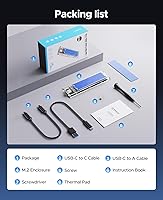
Including both a USB-C to USB-A cable and a USB-C to USB-C cable in the box is a practical decision that reviewers genuinely appreciated — it removes the frustrating guesswork of figuring out which cable you need before the enclosure even works. The C-to-C cable in particular supports the full 10 Gbps connection for compatible hosts.
The cables are functional but not particularly long, which can be awkward when connecting to a desktop tower positioned under a desk. A couple of reviewers also noted the cables feel thinner than premium alternatives, though no widespread durability failures were reported.
Compatibility
67%
33%
Support for all four common NVMe form factors — 2230, 2242, 2260, and 2280 — means this transparent SSD adapter works with a very wide range of drives pulled from laptops, mini PCs, or desktop upgrades. Windows, macOS, and Linux are all recognized without needing to hunt for drivers in most cases.
The single biggest source of negative reviews is buyers who inserted an M.2 SATA drive and could not understand why it was not detected. This enclosure strictly supports NVMe M-Key drives only, and that distinction is easy to miss. A handful of Linux users also flagged occasional mount issues tied to specific kernel versions or USB controllers.
LED Activity Indicator
78%
22%
Having a visible activity light turns out to be more useful than buyers initially expect. When transferring files or cloning a drive, being able to glance over and confirm the drive is actively working — rather than wondering if it froze — provides a small but real sense of reassurance.
The LED is bright enough in a dark room to be mildly distracting, and a few reviewers who use this NVMe enclosure near a sleeping area mentioned they had to cover it at night. There is no option to dim or disable it.
Value for Money
88%
At its price point, the ORICO TCM2 delivers a feature set — dual cables, triple-layer cooling, UASP and TRIM support, LED indicator — that comfortably outpaces stripped-down competitors asking similar prices. For someone repurposing a spare NVMe drive, the cost-to-utility ratio is genuinely difficult to argue against.
Buyers who later discovered their drive was SATA and the enclosure incompatible felt the purchase was a waste, regardless of price. And for users with demanding thermal needs, stepping up to a more expensive aluminum-chassis enclosure would have been the smarter long-term investment.
Portability
89%
At roughly 90 grams, the ORICO TCM2 practically disappears in a laptop bag or jacket pocket. Creatives who carry it alongside a camera and laptop appreciate that it adds almost no perceivable weight to their kit while still delivering fast external storage on location.
The transparent shell, while lightweight, is not ruggedized in any meaningful way. There is no silicone bumper or protective sleeve included, so buyers who toss it loose in a bag with other accessories risk cosmetic scratches accumulating quickly.
Sleep & Power Management
72%
28%
The 10-minute intelligent sleep function is a thoughtful inclusion that helps reduce unnecessary wear on the installed SSD during long periods of inactivity. Users who leave this transparent SSD adapter plugged in all day at a workstation appreciated not having to manually manage drive idle states.
On some systems — particularly macOS setups — the drive occasionally took a moment to wake from sleep before responding, causing brief hesitation that confused a handful of reviewers into thinking the drive had disconnected. It reconnected reliably in most reported cases, but the delay was noticeable.
OS Driver Experience
69%
31%
The plug-and-play experience on Windows 10 and 11 is consistently smooth across reviews, with the drive mounting quickly and reliably without any additional software. macOS users running recent versions of the operating system also reported a largely trouble-free experience.
Linux compatibility is more inconsistent, with a subset of users on specific distributions encountering mount errors or reduced-speed connections tied to USB controller quirks. TRIM support behavior also varied across operating systems, which matters for long-term SSD health.
Design & Aesthetics
81%
19%
The transparent blue shell with visible internals gives this NVMe enclosure a distinctly different look from the sea of identical gray and black aluminum boxes competing for the same buyer. Several reviewers specifically mentioned buying it partly because of the visual appeal, and it does look sharp next to modern laptops.
Aesthetic preferences vary, and a few buyers found the blue transparent look more toy-like than professional. Those using it in a corporate or client-facing environment occasionally mentioned they preferred something that looked more understated.
Thermal Pad Update Reception
76%
24%
The switch from two small silicone pads to a single larger pad was well received among buyers who compared both versions. The larger pad is easier to position correctly during installation and makes better contact across the drive surface, which translates to marginally improved heat transfer in real use.
A small number of longtime buyers who had grown comfortable with the original two-pad layout found the transition slightly confusing at first. The improvement is real but incremental — it did not fundamentally resolve the thermal ceiling concerns that more demanding users still raise.
Long-term Reliability
71%
29%
A reasonable portion of reviewers who purchased the ORICO TCM2 in 2021 or 2022 report still using it without issues years later in light-duty roles — backing up files, occasional cloning, or as a secondary travel drive. For those use cases, the longevity appears solid.
Buyers using this as a primary working drive under daily sustained read-write pressure report a higher rate of performance degradation over time, likely tied to cumulative thermal stress. The enclosure is not designed to handle workstation-level continuous access for months on end.

Suitable for:

The ORICO TCM2 M.2 NVMe SSD Enclosure is a strong pick for anyone who has recently upgraded their desktop or laptop storage and wants to repurpose the old NVMe drive rather than let it collect dust. It works particularly well for MacBook and Windows laptop users who regularly move large files — think photographers culling raw images on location, students shuttling project files between home and campus, or freelancers keeping a fast working backup close at hand. The tool-free sliding design also makes it a practical choice for IT support staff who need to clone drives or run OS migrations without carrying a screwdriver kit. Budget-conscious buyers who want genuine NVMe transfer speeds without spending on a premium enclosure will find the value proposition hard to beat at this price. If you simply need a reliable, fast, and compact adapter for occasional to moderate external storage use, this transparent SSD adapter covers the basics well and then some.
Not suitable for:

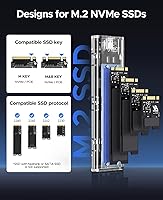
The ORICO TCM2 M.2 NVMe SSD Enclosure is the wrong tool if your M.2 drive runs the SATA protocol rather than NVMe — it strictly supports NVMe M-Key drives, and no amount of troubleshooting will make a SATA drive show up, so confirm your drive type before buying. Users who plan to run sustained, heavy workloads through this enclosure — continuous video editing direct from the external drive, long backup jobs running for hours, or using it as a primary always-active working drive — are likely to hit thermal throttling that impacts performance. The polycarbonate shell is not ruggedized, so anyone who needs drop protection or a tough field-ready case should look elsewhere. Linux power users on non-mainstream distributions may encounter driver or mount inconsistencies that casual users never face. And if you need something that looks strictly professional for client-facing work environments, the transparent blue aesthetic might not land the way a matte aluminum enclosure would.
Specifications

  • Interface: Connects to host devices via USB 3.2 Gen 2, supporting transfer rates up to 10 Gbps over a USB Type-C port.
  • Drive Protocol: Supports NVMe M-Key M.2 SSDs only; SATA-based M.2 drives are not compatible with this enclosure.
  • Form Factors: Accommodates M.2 NVMe drives in 2230, 2242, 2260, and 2280 sizes without requiring any tools or hardware changes.
  • Max Capacity: Supports installed NVMe drives up to 4 TB in total storage capacity.
  • Data Protocols: UASP and TRIM protocols are both supported, helping maintain sustained performance and long-term SSD health.
  • Dimensions: The enclosure measures 4.25″ in length, 1.34″ in width, and 0.45″ in height, making it genuinely pocket-sized.
  • Weight: Weighs approximately 3.2 oz (90 g) without a drive installed, adding minimal bulk to any travel setup.
  • Shell Material: The outer body is constructed from transparent blue polycarbonate combined with aluminum alloy fin detailing for structural reinforcement.
  • Thermal System: Heat is managed through a triple-layer system comprising double-sided copper bars, a single large silicone thermal pad, and aluminum alloy cooling fins.
  • Cables Included: The box includes one USB-C to USB-A cable (5 Gbps) and one USB-C to USB-C cable (10 Gbps) for broad host device compatibility.
  • LED Indicator: A built-in LED provides real-time activity status, illuminating during read and write operations so users can confirm the drive is actively working.
  • Sleep Function: An intelligent idle sleep mode activates automatically after 10 minutes of inactivity to reduce unnecessary wear on the installed SSD.
  • Installation Method: Uses a tool-free sliding closure design; no screws or screwdrivers are required to insert or remove an M.2 drive.
  • OS Compatibility: Compatible with Windows, macOS, and Linux operating systems without requiring proprietary driver installation in most configurations.
  • Connector Type: The host-side connection uses a USB Type-C port, with backward compatibility via the included USB-A adapter cable.
  • Brand & Model: Manufactured by ORICO under the model designation TCM2-Blue, first made available in January 2021.

Related Reviews

dockteck DH0002 M.2 NVMe/SATA SSD Enclosure
84%
88%
Transfer Speed (NVMe)
76%
SATA Drive Performance
83%
Build Quality
93%
Ease of Setup
79%
Thermal Management
More
ineo C2605-NVMe M.2 NVMe SSD Enclosure
77%
88%
Write Protection Reliability
79%
Transfer Speed Performance
82%
Thermal Management
61%
Fan Noise Level
76%
Build Quality & Materials
More
WAVLINK Dual-Bay NVMe M.2 SSD Cloner
75%
83%
Offline Cloning Reliability
78%
Transfer Speed
71%
Compatibility Range
76%
Build Quality
86%
Ease of Setup
More
ORICO Dual M.2 NVMe SSD Enclosure
79%
88%
Build Quality
84%
Thermal Management
82%
Transfer Speed
71%
Drive Compatibility
91%
Ease of Installation
More
Cable Matters USB4 40Gbps M.2 NVMe Enclosure
80%
88%
Data Transfer Performance
83%
Build Quality & Materials
79%
Thermal Management & Cooling
91%
Portability & Form Factor
74%
Compatibility Range
More
Plugable M.2 NVMe SSD Enclosure
87%
94%
Ease of Setup
92%
Data Transfer Speed
88%
Build Quality
90%
Port Compatibility
87%
Cooling & Thermal Management
More
GEWOKLIY 2230 M.2 NVMe SSD Enclosure
86%
88%
Performance & Speed
90%
Build Quality & Durability
93%
Portability & Design
91%
Setup & Ease of Use
85%
Compatibility with Devices
More
GRAUGEAR 40Gbps M.2 NVMe SSD Enclosure
85%
93%
Speed & Performance
88%
Cooling Efficiency
91%
Ease of Installation
85%
Build Quality
75%
Compatibility with Older USB Interfaces
More
ORICO M.2 2242 NVMe SSD 256GB
88%
94%
Performance
91%
Speed (Read/Write)
88%
Heat Management
92%
Ease of Installation
87%
Value for Money
More
ORICO IG740PRO 4TB M.2 NVMe SSD
79%
91%
Sequential Read Performance
88%
Endurance & Longevity
84%
Thermal Management
79%
Value for Money
74%
PS5 Compatibility
More

FAQ

It has to be NVMe. The ORICO TCM2 M.2 NVMe SSD Enclosure is built specifically around the NVMe protocol and an M-Key connector, so a SATA-based M.2 drive will not be recognized at all, even if it physically fits into the slot. Before buying, check your drive's spec sheet or the sticker on the drive itself — it will say either NVMe or SATA.
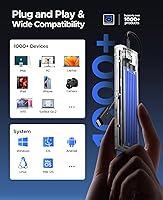
For the vast majority of users on Windows 10, Windows 11, and recent versions of macOS, it is genuinely plug-and-play — no driver installation needed. Linux works on most mainstream distributions as well, though a small number of users on less common setups have reported occasional mount issues depending on their kernel version and USB controller.

That depends quite a bit on two things: the USB port on your computer and the NVMe drive you install. If both your machine and your drive support full USB 3.2 Gen 2, you can realistically expect sequential read speeds in the range of 900 to 1,000 MB/s. If you are using the USB-A cable or your port only supports USB 3.0, speeds will be notably lower. The enclosure itself is not the bottleneck — your setup is.

It does get warm, and that is worth being honest about. For short bursts — transferring a folder, cloning a drive once — the triple heat dissipation system handles things reasonably well. But under prolonged heavy workloads, some users have observed the enclosure getting quite warm and occasional speed throttling as a result. If you plan to use this NVMe enclosure as a daily high-demand working drive, a more robust aluminum enclosure with active cooling might be a better long-term fit.

Yes, the 2230 form factor is supported along with 2242, 2260, and 2280. One thing to note is that the tool-free sliding closure does not physically lock shorter drives like the 2230 as securely as a screw-mounted enclosure would, so the drive may feel slightly loose inside the chassis. It still works fine for normal use, but it is worth being aware of if you are handling it frequently.

Yes, macOS compatibility is generally solid. The drive mounts without needing additional software on recent macOS versions, and it shows up in Disk Utility as expected. A few users have noted a brief wake-from-sleep delay on Mac, where the drive takes a second or two to respond after the enclosure's idle sleep kicks in, but it reconnects reliably in the vast majority of reported cases.

Two cables come in the box: one USB-C to USB-A for connecting to older desktops and laptops, and one USB-C to USB-C for modern devices that support the full 10 Gbps speed. Most users will not need to buy anything additional for day-one use. The cables are a bit shorter than ideal for desktop towers, but for laptop use they are perfectly practical.

Absolutely — this is one of the most common use cases, and it works well for it. Insert your target NVMe drive into the enclosure, connect it to your laptop, and use your preferred cloning software. The tool-free design makes swapping drives between sessions quick, which IT folks and enthusiasts doing occasional migrations tend to appreciate.

The LED is always active whenever the enclosure is connected and the drive is awake — there is no switch or software setting to disable it. During file transfers it flashes to show activity, and it stays on as a steady indicator at idle. In a bright room it is barely noticeable, but if you work in a dark environment or leave it connected near a sleeping area, the glow can be mildly distracting.

It is reasonably solid for its weight class, but the polycarbonate shell does scratch relatively easily and there is no included protective sleeve or bumper. If you are tossing this NVMe enclosure loose in a bag alongside keys, cables, or other accessories, expect some cosmetic wear over time. A small drawstring pouch or a microfiber sleeve would go a long way toward keeping it looking clean.

Where to Buy