Overview

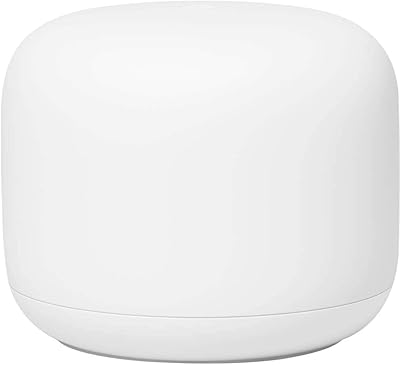
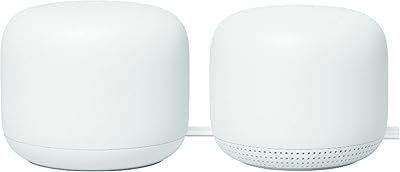
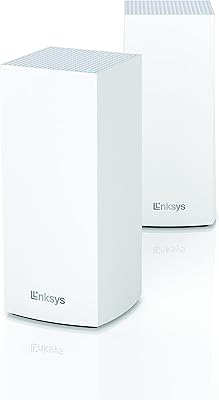
The Google Nest WiFi Pro Mesh Router is Google's push into Wi-Fi 6E territory, designed for households that are done dealing with patchy connections and congested networks. One thing buyers should know upfront: this listing ships in non-retail packaging, meaning you'll likely receive a plain white box rather than a branded retail package — the hardware itself is identical, but it's worth setting expectations. A single node covers up to 2,200 square feet, and adding more nodes expands that coverage without rebuilding your setup from scratch. What distinguishes it from older routers is the tri-band 6 GHz radio, which opens a less crowded frequency that previous-generation devices simply cannot access. The router also monitors itself and fixes common network hiccups automatically.

Features & Benefits

The Nest WiFi Pro runs on Wi-Fi 6E technology, adding a 6 GHz band on top of the standard 2.4 GHz and 5 GHz frequencies. In practical terms, 6 GHz means less interference from neighboring networks and older smart home devices — you get a cleaner channel that modern phones and laptops can actually use. Speed improvements over Wi-Fi 6 are real, though most noticeable in dense environments or with newer client hardware. The router intelligently prioritizes video calls and high-bandwidth activity, which makes a genuine difference when you're on a work call while someone else is streaming. Parental controls and a guest network round out a feature set that functions well with minimal manual tinkering.

Best For

This mesh router makes the most sense for homes in the 1,500 to 2,500 square foot range where a single traditional router leaves corners and back bedrooms without a reliable signal. Remote workers will particularly appreciate the call prioritization — video stays sharp even when other devices are active simultaneously. It's also a natural pick for anyone already running Google Nest hardware, since everything connects through the Google Home app without extra configuration steps. That said, buyers should be comfortable with an app-only setup experience; there is no web-based admin dashboard like you'd find on more enthusiast-focused routers. If deep manual controls matter to you, look elsewhere.

User Feedback

With roughly 165 ratings and a 4.1 out of 5 average — relatively modest for a product launched in mid-2025 — early user sentiment is cautiously positive. Setup draws consistent praise, with most buyers finding the Google Home guided process genuinely straightforward. Improved coverage compared to older routers also comes up frequently. On the downside, the non-retail packaging catches some buyers off guard, and a handful of users question whether the per-node cost holds up against competing mesh systems. A few mention wanting clearer guidance on ethernet backhaul options. Given the still-limited review pool, it's too early for firm conclusions, but the overall direction looks promising for a capable, low-maintenance home network.

Pros

  • Setup through the Google Home app takes under ten minutes, even for non-technical users.
  • A single node reliably covers mid-sized homes up to around 2,200 square feet.
  • The 6 GHz band provides noticeably cleaner, faster connections for compatible modern devices.
  • Video call prioritization keeps work calls stable even when the household network is under load.
  • The self-diagnosing system quietly resolves common network issues without any user intervention.
  • Adding extra nodes to expand coverage requires no reconfiguration — just plug in and go.
  • Guest network setup takes seconds and keeps visitor devices properly isolated from your main network.
  • The compact, unobtrusive design fits on a shelf without looking like networking hardware.
  • Built-in parental controls handle basic scheduling and device pausing without a subscription fee.
  • Forward compatibility with next-generation Wi-Fi 6E devices makes this a longer-term investment.

Cons

  • Non-retail bulk packaging is not disclosed prominently and catches many buyers off guard.
  • There is no browser-based admin panel — everything is locked inside the Google Home app.
  • Incompatible with previous Google Wifi and Nest Wifi hardware, forcing a full system replacement to upgrade.
  • Advanced network controls like static routing, VLANs, and detailed traffic logs are completely absent.
  • The 6 GHz performance benefit is negligible for households still running older Wi-Fi 5 devices.
  • Parental controls lack content filtering and detailed usage reports, limiting usefulness as children get older.
  • Multi-node setups become expensive quickly compared to competing mesh systems with similar coverage.
  • Occasional disconnections requiring a physical reboot have been reported after firmware updates.
  • Guest network options are basic — no bandwidth limits, no time-restricted access, no connected device visibility.
  • Review volume is still limited for a mid-2025 launch, so long-term reliability data is not yet available.

Ratings

The Google Nest WiFi Pro Mesh Router earns a measured 4.1 out of 5 across its early review base — a score our AI has refined by analyzing verified global buyer feedback and actively filtering out incentivized and bot-generated submissions. The ratings below reflect both the genuine strengths users consistently report and the friction points that real buyers have encountered since its mid-2025 launch. Nothing here is glossed over: where the hardware delivers, the scores reflect it, and where it falls short, that shows up too.
Wi-Fi Coverage & Range
86%
Most buyers in mid-sized homes report that a single node genuinely handles the 2,200 square foot claim without much drop-off. Dead zones in back bedrooms and garages that plagued older routers tend to disappear, which is the core reason people buy a mesh system in the first place.
In homes with thick concrete walls or multi-story layouts, a single node shows its limits faster than the spec suggests. Users in those situations often find they need a second node to maintain consistent speeds throughout, which adds to the overall cost.
Wi-Fi 6E Performance (6 GHz Band)
79%
21%
On devices that actually support 6 GHz — newer flagship phones and laptops — users notice meaningfully lower latency and cleaner speeds, especially in apartment buildings where 2.4 GHz and 5 GHz channels are saturated. The difference during video calls is tangible for those with compatible hardware.
The 6 GHz benefit is largely invisible to anyone still running older devices, which covers a significant portion of the average household. Early buyers also note that the pool of 6 GHz-compatible client devices is still growing, so the full value of this feature may not be felt for another year or two.
Setup & Ease of Use
91%
The Google Home app-guided setup is consistently praised as one of the fastest and least frustrating router installations buyers have experienced. Most report being fully connected within ten minutes, with no router terminology knowledge required — a genuine plus for non-technical households.
The experience is entirely app-dependent, with no browser-based admin panel for users who prefer direct network control. Advanced users wanting to set static IPs, configure VLANs, or tweak DNS settings manually will find the options frustratingly limited compared to more enthusiast-oriented systems.
Network Stability & Reliability
84%
Day-to-day connection stability draws positive remarks from remote workers who rely on sustained uptime through hours-long video calls. The self-healing diagnostics appear to catch and correct minor issues — dropped DHCP leases, channel interference — without the user ever noticing anything went wrong.
A small but consistent subset of reviewers report occasional disconnections that require a physical reboot, particularly after firmware updates. These incidents are not widespread, but they are notable enough to suggest the automatic recovery system does not catch everything.
Video Call & Streaming Prioritization
88%
Traffic prioritization for video calls is one of the more practically useful features here. Households with multiple simultaneous users — one on a work call, another streaming — report that call quality holds steady rather than degrading when bandwidth is contested, which is the exact scenario this feature is built for.
The prioritization logic is fully automated with no user control over which applications or devices get preference. In households where gaming latency matters as much as video calls, the inability to manually set priority rules is a real limitation.
App Experience & Controls
76%
24%
The Google Home app interface is clean, well-organized, and does a good job surfacing network health at a glance. Parental controls and guest network management are straightforward to configure, and the app sends useful alerts when it detects network anomalies.
Power users find the app's control depth shallow — there is no access to detailed traffic logs, per-device bandwidth history, or advanced QoS configuration. For a router at this price point, the lack of granular controls is a recurring complaint that affects scores among technically inclined buyers.
Mesh Scalability
83%
Adding a second or third node to expand coverage is handled entirely within the app and requires no network reconfiguration. Users who started with one node and later purchased additional units report the expansion process as genuinely painless, with the mesh adapting automatically.
The Nest WiFi Pro is incompatible with older Google Wifi and previous Nest Wifi hardware, so existing Google mesh users cannot simply add this node to an existing setup — they need to replace their entire system. That is a meaningful cost consideration for upgraders.
Value for Money
67%
33%
At its price point for a single node, the Nest WiFi Pro is positioned competitively against comparable Wi-Fi 6E mesh hardware from Eero and TP-Link. Buyers who need only one node for a medium-sized home tend to feel the value is reasonable given the feature set and brand reliability.
Multi-node household costs add up quickly, and at that scale, competing systems often offer similar or better performance with more advanced controls. The non-retail packaging on this listing also raises questions for some buyers about whether they are paying full retail price for a unit that is not in pristine condition.
Packaging & Unboxing Experience
53%
47%
Functionally, the hardware inside the plain white box is reported to be in working condition by the majority of buyers. For those who simply want the device operational without caring about presentation, the non-retail packaging is a non-issue.
Non-retail packaging is a genuine sticking point for buyers who expect a retail-quality unboxing or plan to gift the product. Several reviewers express frustration that the listing does not prominently disclose the bulk-box packaging upfront, leaving them feeling misled despite receiving a functioning unit.
Design & Physical Footprint
81%
19%
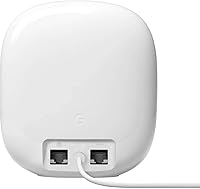
The Snow colorway and compact dimensions mean this router sits unobtrusively on a shelf or desk without looking like networking hardware. At under two pounds, repositioning it during setup or rearranging a room is effortless, and it does not require a ventilation clearance the way tower-style routers do.
The understated design also means there are no visible indicator lights beyond a minimal status LED, which some users find unhelpful when diagnosing whether a problem is with the router or their ISP. A few buyers wished for a simple display or more informative LED behavior.
Self-Healing & Auto-Diagnostics
78%
22%
The automatic network monitoring works quietly in the background and genuinely resolves minor issues — channel congestion adjustments, node handoff optimization — without any user intervention. For less technical households, this is the kind of feature that makes a router feel reliable without requiring maintenance.
The self-healing system lacks transparency. Users are not notified when the router corrects an issue, so there is no way to know how often it actually intervenes or whether a persistent problem is being managed or simply masked. More detailed logging would make this feature far more trustworthy.
Parental Controls
74%
26%
Built-in parental controls allow parents to pause internet access per device or set usage schedules, all from within the Google Home app. For families with younger children, the basic safeguards are sufficient and do not require a third-party subscription to function.
The parental control feature set is basic by current standards — there is no content filtering by category, no detailed usage reports, and no age-based profile presets. Parents wanting robust filtering comparable to dedicated services like Circle will likely find these controls insufficient as children get older.
Guest Network
82%
18%
Setting up a guest network takes about thirty seconds inside the app, and it keeps visitor devices properly isolated from the primary network. Users hosting frequent guests or running small home offices particularly appreciate the clean separation without needing to share their main credentials.
Guest network customization is limited to a simple on/off toggle with a custom password — there is no bandwidth throttling for guests, no time-limited access option, and no way to see which guest devices are connected. Straightforward, but not feature-rich.
Compatibility with Existing Devices
80%
20%
Standard 802.11ax backward compatibility means every device in the home connects without issue, from aging smart home sensors to current laptops and phones. Users transitioning from older routers report that all their existing devices reconnected automatically after setup with no manual pairing required.
The 6 GHz band specifically requires Wi-Fi 6E-capable client devices to benefit from, and many homes still have a mix of older hardware. Buyers upgrading from a Wi-Fi 5 household may not see meaningful speed improvements on the bulk of their devices until they refresh their hardware over time.

Suitable for:

The Google Nest WiFi Pro Mesh Router is a strong fit for households in the 1,500 to 2,500 square foot range where a single traditional router consistently leaves corners, upstairs rooms, or backyard spaces without a usable signal. Remote workers who depend on stable video calls throughout the day will appreciate the built-in traffic prioritization, which keeps call quality steady even when other household members are streaming or downloading simultaneously. Buyers who are already invested in the Google ecosystem — running Nest thermostats, Android devices, or Google Home speakers — will find the unified app management genuinely convenient rather than just a marketing talking point. Families looking for basic parental controls without paying for a third-party subscription service will find the built-in options functional for managing screen time and device access. This mesh router also suits early adopters who want a network that is ready for the next wave of Wi-Fi 6E-capable laptops and phones, even if their current devices do not yet take full advantage of the 6 GHz band.

Not suitable for:

The Google Nest WiFi Pro Mesh Router is not the right choice for advanced users or network enthusiasts who expect deep manual controls — there is no web-based admin interface, no VLAN support, and no granular QoS configuration, which puts it at a real disadvantage compared to prosumer alternatives like Asus or Netgear Orbi. Buyers who already own older Google Wifi or first-generation Nest Wifi nodes should know that this system is entirely incompatible with previous generations, meaning an upgrade requires replacing every node in the house, not just adding one. Households where the majority of devices are older Wi-Fi 5 hardware will see limited real-world benefit from the 6 GHz band and may find the cost hard to justify against a capable Wi-Fi 6 alternative. Anyone planning to gift this router or who cares about the unboxing experience should be aware that this specific listing ships in plain, non-retail bulk packaging — the unit functions the same, but there is no branded presentation. Finally, very large homes over 3,000 square feet will likely need multiple nodes to achieve complete coverage, and the cumulative per-node cost makes competing mesh systems more attractive at that scale.
Specifications

  • Wi-Fi Standard: This router operates on 802.11ax, commonly known as Wi-Fi 6E, the current leading generation of wireless networking technology.
  • Frequency Bands: It broadcasts across three bands simultaneously: 2.4 GHz for range and legacy devices, 5 GHz for balanced performance, and 6 GHz for high-speed, low-congestion connections.
  • Coverage Area: A single node is rated to cover up to 2,200 square feet under typical residential conditions.
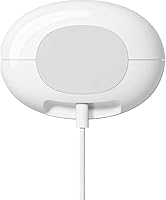
  • Dimensions: Each unit measures 5.16″ x 4.65″ x 3.35″, making it compact enough to sit unobtrusively on a shelf or desk.
  • Weight: The unit weighs 1.88 pounds, light enough to reposition easily during setup or room rearrangements.
  • Color: This listing is the Snow colorway, a clean off-white finish designed to blend into most home interiors.
  • Mesh Support: The system is fully mesh-capable, allowing multiple nodes to be added via the Google Home app without reconfiguring the network from scratch.
  • Traffic Prioritization: Built-in QoS automatically prioritizes bandwidth-sensitive activity such as video conferencing and high-definition streaming over background traffic.
  • Self-Diagnostics: The router continuously monitors its own network health and can identify and resolve a range of common connectivity issues without any user action.
  • Special Features: Included software features cover Guest Mode for isolated visitor access and Parental Controls for per-device scheduling and internet pausing.
  • Compatibility: It works with all current Wi-Fi-enabled devices and is forward-compatible with next-generation 6 GHz-capable phones, laptops, and smart home hardware.
  • Generation Lock: The Nest WiFi Pro is not backward compatible with earlier Google Wifi or first-generation Nest Wifi nodes and cannot be added to those existing mesh systems.
  • Setup Method: Initial setup and all ongoing network management are handled exclusively through the Google Home app, available on iOS and Android.
  • Packaging Type: This listing ships in non-retail bulk packaging, meaning the unit arrives in a plain white box rather than a standard branded retail package.
  • Launch Date: The product was first made available in July 2025, making it a relatively recent release with a still-growing user review base.
  • BSR Ranking: It currently holds the number 89 position in the Whole Home and Mesh Wi-Fi Systems category on Amazon, placing it among the top-tier products in its segment.
  • Brand: Manufactured and supported by Google, which provides firmware updates and customer support through its standard consumer hardware channels.
  • Item Model: The official model identifier listed by Google for this unit is Google Nest.

Related Reviews

Google Nest Wifi Router 1-Pack
79%
93%
Setup & Onboarding
84%
Signal Consistency & Stability
88%
App & Network Management
79%
Parental Controls
74%
Wireless Performance (Speed)
More
ASUS ZenWiFi BQ16 Pro WiFi 7 Mesh Router
77%
91%
Wireless Performance
78%
Coverage & Range
86%
Setup & App Experience
63%
Firmware Stability
88%
10G Port Utility
More
Gryphon Guardian Mesh WiFi Router
73%
88%
Parental Controls
84%
Network Security
61%
WiFi Speed & Performance
72%
Coverage & Range
83%
App Experience
More
Linksys MR8300 Mesh WiFi Router
84%
88%
Wi-Fi Performance
81%
Ease of Setup
90%
Coverage Area
85%
Device Support
89%
Gaming Performance
More
Linksys AX2200 WiFi 6 Mesh Router
84%
88%
WiFi Speed & Performance
91%
Ease of Setup
85%
Coverage & Range
72%
Reliability in Large Homes
90%
App Functionality & Control
More
Google Nest Wifi AC2200 Mesh System 2-Pack
78%
91%
Ease of Setup
74%
Coverage & Range
77%
Network Performance
72%
App & Management
78%
Value for Money
More
Linksys MR6350 Dual-Band Mesh WiFi Router
74%
91%
Ease of Setup
62%
WiFi Coverage
84%
Connection Stability
71%
Real-World Speed
68%
App Experience
More
Tenda RX12 Pro AX3000 WiFi 6 Router
77%
88%
Value for Money
91%
Setup & Ease of Use
83%
WiFi Speed & Performance
71%
Coverage & Range
79%
VPN Support
More
Reyee RG-R6 AX3200 Mesh WiFi 6 System (1-Pack)
71%
88%
Value for Money
91%
Setup & Ease of Use
76%
WiFi Coverage
79%
Network Speed & Throughput
82%
Multi-Device Performance
More
Linksys MX8000 Velop Mesh WiFi Router 2-Pack
75%
86%
Coverage & Range
74%
WiFi Speed Performance
83%
Multi-Device Handling
91%
Setup & Installation
78%
App Experience
More

FAQ

Not necessarily — non-retail packaging typically means the unit was pulled from bulk or OEM stock rather than standard retail supply, but the hardware itself is new. That said, it will arrive in a plain white box with no branded presentation, and you should inspect the unit carefully upon arrival. If you have concerns, check the seller's return policy before purchasing.

No, and this is an important point to flag before buying. The Nest WiFi Pro uses Wi-Fi 6E technology that is architecturally incompatible with previous Google Wifi and first-generation Nest Wifi systems. If you are upgrading from either of those, you will need to replace your entire mesh setup, not just add a new node.

Think of the 6 GHz band as a brand new, uncrowded lane on a highway. Most routers and neighboring networks are competing for space on the older 2.4 GHz and 5 GHz bands, which creates interference and slowdowns. The 6 GHz band is only accessible to newer devices, so when your phone or laptop supports it, it gets a much cleaner, faster connection with far less competition.

It depends on your floor plan. A single node is rated for up to 2,200 square feet under open conditions, which covers most mid-sized homes comfortably. If your home is larger, has multiple floors, or features thick walls, a second node is likely worth adding. The good news is that expanding the mesh is simple — you just plug in the extra node and the app handles the rest.

No — the Google Nest WiFi Pro Mesh Router is managed exclusively through the Google Home app on a smartphone or tablet. There is no web-based admin interface, which is a genuine limitation for users who prefer browser-based control or need access to advanced network settings.

The Nest WiFi Pro nodes do support wired ethernet backhaul, which can significantly improve inter-node performance compared to a wireless-only mesh setup. However, documentation on this feature is not prominently surfaced in the listing or the app, and some users have found the configuration less intuitive than expected. If wired backhaul is a priority for you, verify current setup guidance from Google's support documentation before purchasing.

They cover the basics well — you can pause internet access per device and set usage schedules from within the Google Home app, and it does not require a subscription. What they do not offer is content filtering by category, detailed usage reports, or age-based profile presets. For younger children, the built-in tools are sufficient; for older kids or more nuanced control, you would likely want a dedicated parental control service on top.

It is solid for casual to moderate gaming. The traffic prioritization helps reduce latency spikes, and the 6 GHz band offers clean, low-interference speeds for compatible gaming devices. That said, dedicated gaming routers with manual QoS controls, open NAT configuration options, and detailed ping monitoring will offer more granular optimization than this mesh router provides.

The self-healing system works silently in the background, which is a double-edged situation. It will automatically attempt to fix issues like channel interference or connectivity drops, but it does not send you a notification when it does so. You will not receive an alert or a log of what was corrected, which some users find frustrating when they want to understand what went wrong.

The app is required permanently for any network management task — there is no way to access router settings, run diagnostics, add nodes, or manage parental controls without it. You will need a Google account and the app installed on an active smartphone to use the full feature set of this mesh system on an ongoing basis.

Where to Buy