Overview

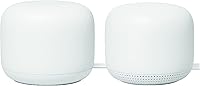
The Google Nest Wifi AC2200 Mesh System 2-Pack is Google's second-generation take on whole-home wireless coverage, built for the mid-size household that has simply outgrown a single router. Mesh networking solves a real, everyday problem: one box in the living room rarely reaches the back bedroom or the basement. This configuration ships with one router and one access point, working in tandem to push coverage across a meaningful stretch of a typical home. It sits at a competitive mid-range price, making it accessible without feeling like a budget compromise. Worth stating upfront: this is a Wi-Fi 5 system, not Wi-Fi 6, so expectations should be set accordingly — capable and dependable, but not the latest generation.
Features & Benefits

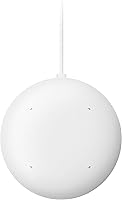
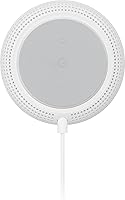
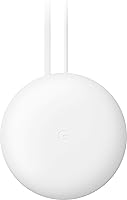
The dual-band AC2200 radio spans both 2.4 GHz and 5 GHz frequencies, which in practice means older smart home gadgets and bandwidth-hungry streaming devices can share a network without constantly stepping on each other. The router and access point communicate behind the scenes, automatically directing your devices toward whichever node delivers the strongest signal — no manual switching required. Everything is managed through the Google Home app, which guides you through initial setup, lets you pause internet access per device, and handles prioritization with minimal effort. WPS support and an Access Point Mode add real installation flexibility, while the clean, internal-antenna design means either unit sits on a shelf without looking like networking hardware.

Best For

This mesh system earns its place in homes roughly between 1,500 and 3,000 square feet, where a single router leaves dead zones in distant rooms or on separate floors. It fits especially well for anyone already invested in the Android or Google Assistant ecosystem, since the management app ties everything together in a single familiar interface. Think households running a handful of active devices — a couple of laptops, smartphones, a smart TV, maybe some connected speakers — rather than a dense multi-device power setup. If you are upgrading from the stock ISP router you have been tolerating for years, the difference will be noticeable. Buyers specifically chasing Wi-Fi 6 throughput, however, should look at newer options.

User Feedback

Across its 213 ratings, the Nest Wifi duo holds a 4.1-star average — solid, though not without recurring complaints. Casual users consistently praise the easy guided setup, stable everyday performance, and the way the hardware blends quietly into a room. The criticisms are equally consistent: tech-oriented reviewers flag the absence of Wi-Fi 6 and point out that the app, while approachable, lacks the granular controls advanced users tend to want. Some owners in larger homes note that signal strength drops noticeably at the outer edges of coverage — a reminder that floor plan and wall materials play a bigger role than any spec sheet acknowledges. Long-term reliability reads as generally solid, with occasional mentions of firmware-related restarts.

Pros

  • Setup takes under 15 minutes for most users, guided step by step through the Google Home app.
  • The mesh system eliminates dead zones across mid-size homes without any manual network configuration.
  • Parental controls let you pause internet access or set schedules per device directly from your phone.
  • Both units have internal antennas, so they blend into a room rather than looking like networking hardware.
  • Works well as a straightforward upgrade from a single ISP-provided modem-router combo.
  • Device prioritization lets you push bandwidth toward what matters most, like a work laptop or a streaming TV.
  • Stable day-to-day performance is one of the most consistently praised aspects in real user feedback.
  • Access Point Mode adds flexibility if you already have an existing router you want to keep in place.
  • The Nest Wifi duo integrates cleanly with other Google and Nest smart home devices in the same ecosystem.
  • At its price point, it offers a reasonable balance of coverage, ease of use, and brand reliability.

Cons

  • No Wi-Fi 6 support means you cannot take full advantage of newer devices built for the latest wireless standard.
  • Advanced users will hit a wall quickly — the app offers very limited options for custom network configuration.
  • Coverage can drop noticeably at the outer edges in larger homes, especially through thick walls or across multiple floors.
  • A 2-pack may simply not be enough nodes for homes above 3,000 square feet without adding a third unit.
  • Some users have reported occasional connectivity hiccups following automatic firmware updates.
  • No ethernet backhaul option limits how efficiently the two nodes can communicate in wired setups.
  • Competing mesh systems at a similar price now offer Wi-Fi 6 and more robust app controls.
  • The system is deeply tied to the Google ecosystem, which can feel restrictive for users preferring platform-neutral tools.
  • No dedicated backhaul band means the nodes share available bandwidth between client devices and inter-node traffic.
  • Long-term software support timelines for second-generation hardware are less certain than for current-generation products.

Ratings

The Google Nest Wifi AC2200 Mesh System 2-Pack scores are generated by AI after analyzing verified buyer reviews from around the world, with spam, bot submissions, and incentivized feedback actively filtered out. The result is an honest, balanced snapshot of where this mesh system genuinely excels and where real owners have run into frustration. Both the strengths that keep casual buyers happy and the limitations that matter to more demanding users are reflected transparently below.
Ease of Setup
91%
Setting up the Nest Wifi duo is consistently one of the most praised experiences owners describe. The Google Home app guides you through each step clearly, and most households report a working network within 10 to 15 minutes — no technical background required.
A small number of users encountered pairing issues where the access point would not register during initial setup, requiring app reinstalls or router reboots. These cases appear to be edge situations, but they are frustrating when they happen.
Coverage & Range
74%
26%
For open-plan homes and single-story layouts in the 1,500 to 2,500 square foot range, the 2-pack delivers noticeably more consistent coverage than a single router. Eliminating dead zones in a back bedroom or a lower floor is the most commonly cited win.
Users in homes above 2,800 square feet, or with thick masonry walls and complex multi-story layouts, frequently report that signal degrades at the outer edges of the access point's reach. The 2-pack is not always enough without adding a third node.
Network Performance
77%
23%
Day-to-day performance for typical household tasks — 4K streaming, video calls, casual gaming, and a mix of smart home devices — is stable and reliable. Most users report no buffering or drops during normal usage across multiple simultaneous devices.
This is a Wi-Fi 5 system, and that ceiling shows when multiple users are hammering bandwidth-heavy applications at the same time. It is not built for households with high device density or those who expect top-tier throughput from newer hardware.
App & Management
72%
28%
The Google Home app makes routine network management genuinely approachable. Pausing internet for a specific device, checking what is connected, and setting up parental schedules are all tasks that non-technical users can handle without looking anything up.
Power users bump into the app's limitations quickly. There is no access to custom DNS settings, no VLAN support, no detailed traffic analytics, and no meaningful QoS customization. For anyone who wants real control over their network, it feels deliberately restricted.
Value for Money
78%
22%
At its mid-range price point, the Nest Wifi duo offers a reasonable balance of brand reliability, clean hardware, and a genuinely simple user experience. For buyers upgrading from a struggling single ISP router, the perceived improvement in daily connectivity is substantial.
The value proposition weakens when you compare it to newer competitors offering Wi-Fi 6 at similar or only slightly higher prices. Buyers who do the research often feel the generational gap makes this system harder to justify as a long-term investment.
Build Quality & Design
86%
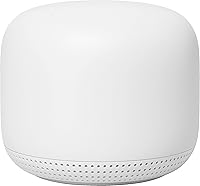
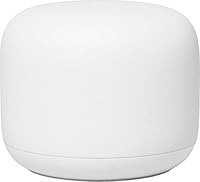
Both units have a clean, minimal aesthetic that genuinely blends into a living room shelf or bookcase. The internal antenna design means nothing sticks out, and the Snow colorway works with most interior palettes without drawing attention to itself.
The hardware feels durable enough for home use, but some users note the plastic casing picks up scuffs and scratches over time if placed in high-traffic areas. There is nothing flimsy about it, but it does not feel premium to the touch either.
Reliability & Stability
81%
19%
Long-term reliability is a genuine strength for most owners. The network stays up consistently, automatic firmware updates apply in the background without noticeable interruption, and the system rarely requires manual reboots under normal home usage conditions.
A subset of owners has reported that certain firmware updates triggered temporary connectivity drops or caused one node to go temporarily offline. These issues tend to resolve on their own or with a simple restart, but they are an unwelcome pattern.
Google Ecosystem Integration
88%
For households already using Nest cameras, Chromecast, Google TV, or Android phones, the integration feels natural and cohesive. The access point also functions as a Google Assistant speaker, so it pulls double duty in whatever room it is placed.
That tight integration is also a constraint — users outside the Google ecosystem, or those who prefer platform-neutral tools, will find the Google Home dependency limiting. There is no meaningful way to manage the system without the app.
Parental Controls
76%
24%
Built-in parental controls let parents pause internet access for specific devices or set daily schedules, all from the Google Home app. For families with younger children and a handful of household devices, it covers the basics without requiring a third-party subscription.
The controls lack the granularity that parents with more specific needs might want — there is no content filtering, no detailed usage reporting, and no per-user profiles that persist independently across device changes. It is functional but basic.
Scalability
67%
33%
The system supports adding more Nest Wifi access points to extend coverage, which means buyers who start with the 2-pack can expand later if their needs grow. This makes it a reasonable starting point for homes that may be in transition.
Scalability is limited to the Nest Wifi generation of hardware specifically, and the newer Nest Wifi Pro operates on a separate, incompatible platform. Long-term investment in this ecosystem carries some risk given that Google has already moved on to a different product line.
Installation Flexibility
79%
21%
Access Point Mode gives users the option to connect the system behind an existing router rather than replacing it entirely, which is useful in rental situations or setups with an ISP gateway that cannot be placed in bridge mode. WPS support adds another easy pairing option.
Wired backhaul between nodes is possible but not officially prioritized in the setup flow, which means many users default to wireless backhaul without realizing a wired connection between nodes would meaningfully improve inter-node performance.
Speed Consistency
73%
27%
Speeds remain stable across the coverage area in typical home conditions, and devices hand off between the router and access point without noticeable disconnection. For streaming households and work-from-home users in average-sized spaces, it holds up well.
Devices at the edge of the mesh range experience more variable speeds, and the system does not always make the fastest handoff decision on its own. Some users report their phone holding onto a weaker node longer than it should before switching.
Privacy & Security Features
71%
29%
Automatic security updates apply without user intervention, keeping the firmware current without requiring owners to log in and manually manage patches. For everyday home users, this passive approach to security is appreciated and appropriate.
There are no advanced security features beyond the basics — no built-in VPN support, no intrusion detection, and no detailed device-level security monitoring. Users with heightened privacy concerns or security-conscious home office setups will want more than what this system offers.

Suitable for:

The Google Nest Wifi AC2200 Mesh System 2-Pack is a strong fit for households in the 1,500 to 3,000 square foot range that have been living with dead zones and patchy coverage from a single ISP-provided router. If your home has a back bedroom, a basement, or a back porch that barely gets a signal, the router-plus-access-point setup addresses exactly that problem without requiring any networking know-how to get running. It particularly suits families and individuals already using Google Home, Android devices, or Nest smart home products, since the entire system is managed from one app they likely already have on their phone. Parents who want to set screen time limits or pause internet access for specific devices will find the built-in parental controls genuinely useful and easy to navigate. For renters or homeowners who simply want reliable whole-home coverage for streaming, video calls, and connected devices without building a custom network setup, this mesh system delivers a practical, low-friction solution.
Not suitable for:

The Google Nest Wifi AC2200 Mesh System 2-Pack is not the right tool for buyers whose priority is maximum throughput or future-proofing their network against increasingly bandwidth-heavy applications. This is a Wi-Fi 5 system, which means households that have already invested in Wi-Fi 6 capable devices and want to take full advantage of that newer standard will be leaving performance on the table. Power users who expect granular controls — custom DNS settings, VLAN support, detailed traffic monitoring, or advanced QoS options — will find the Google Home app limiting and likely frustrating. Homes significantly larger than 3,000 square feet should also be cautious, as a 2-pack configuration may not deliver consistent signal in every corner, particularly in multi-story homes with dense walls or complex floor plans. If you are shopping specifically for the fastest or most technically capable mesh system available at this price point, newer competing options from other brands have closed the gap considerably.

Specifications

  • Brand: Manufactured and sold by Google.
  • Model: AC2200, second-generation Nest Wifi hardware.
  • Pack Contents: Includes one Nest Wifi router and one Nest Wifi access point.
  • Wireless Standard: Operates on 802.11ac (Wi-Fi 5), supporting dual-band frequencies.
  • Frequency Bands: Broadcasts on both 2.4 GHz for range and 5 GHz for higher throughput.
  • Speed Class: Rated at AC2200, combining speeds across both bands under ideal conditions.
  • Antenna Type: Internal antennas are built into both units, with no external protruding elements.
  • Special Features: Supports WPS pairing and can be configured in Access Point Mode for flexible deployment.
  • Management App: Fully managed through the Google Home app, available on Android and iOS.
  • Package Dimensions: Packaged at 10.08 x 6.38 x 5.28 inches for the combined 2-pack box.
  • Item Weight: Total packaged weight is 3.65 pounds for the complete 2-pack set.
  • Color: Available in Snow, a neutral off-white finish suited to most home interiors.
  • Compatible Devices: Works with personal computers and general home devices across operating systems.
  • Recommended Use: Designed for residential whole-home Wi-Fi coverage and everyday home connectivity needs.
  • First Available: This product was first listed for sale in December 2021.
  • Parental Controls: Supports per-device internet pause and scheduling through the Google Home app at no extra cost.
  • Device Priority: Allows users to designate priority devices to receive preferred bandwidth allocation.
  • Expandability: Additional Nest Wifi access points can be added to extend coverage beyond the 2-pack baseline.

Related Reviews
Google Nest Wifi Router 1-Pack
79%
93%
Setup & Onboarding
84%
Signal Consistency & Stability
88%
App & Network Management
79%
Parental Controls
74%
Wireless Performance (Speed)
More
Tenda Nova MW6 2-Pack Mesh WiFi System

76%
93%
Ease of Setup
78%
Coverage & Dead Zone Elimination
72%
Network Stability
69%
Wi-Fi Speed Performance
88%
Value for Money
More
TP-Link Deco S4 Mesh WiFi System (2-Pack)
87%
91%
Wi-Fi Coverage
88%
Performance Stability
94%
Ease of Setup
90%
Parental Controls
85%
Device Support
More
TP-Link Deco BE95 Wi-Fi 7 Mesh System 2-Pack
78%
88%
Wireless Performance
83%
Coverage & Range
93%
Wired Connectivity
86%
Setup & Installation
79%
App & Management Experience
More
Google WiFi 1-Pack
Google WiFi 1-Pack
76%
93%
Ease of Setup
88%
App Experience
79%
Wi-Fi Coverage
76%
Network Speed & Performance
84%
Parental Controls
More
Cudy M3600 WiFi 7 Mesh System
86%
88%
Wi-Fi Performance
91%
Ease of Setup
85%
Device Handling
87%
App Functionality
80%
VPN Compatibility
More
Google Nest WiFi Pro Mesh Router
79%
86%
Wi-Fi Coverage & Range
79%
Wi-Fi 6E Performance (6 GHz Band)
91%
Setup & Ease of Use
84%
Network Stability & Reliability
88%
Video Call & Streaming Prioritization
More
Linksys Velop Mesh Home WiFi System WHW0101
85%
88%
Performance for Streaming & Gaming
94%
Ease of Setup
85%
WiFi Coverage (Up to 1,500 sq. ft.)
87%
Device Support (10+ Devices)
91%
App Experience & Management
More
ASUS ZenWiFi XD6 Mesh WiFi 6 System
86%
93%
Wi-Fi Coverage
85%
Ease of Setup
89%
Performance and Speed
80%
App Experience
91%
Parental Controls
More
Tenda MX12 AX3000 Mesh WiFi 6 System
82%
88%
Performance
79%
Ease of Setup
93%
Coverage Area
85%
Speed & Reliability
82%
Multi-Device Support
More

FAQ

Setup is genuinely straightforward. You plug in the router, open the Google Home app on your phone, and it walks you through the process step by step. Most users report being up and running in under 15 minutes, even without any prior networking experience.

Yes, it works with virtually any internet service provider. You connect the router unit to your modem using an ethernet cable, and it takes over from there. It does not replace your modem, just the router portion of your setup.

You can. Google sells additional Nest Wifi access points separately, and they integrate with your existing network through the same Google Home app. Keep in mind that the additional units must be Nest Wifi access points, not the newer Nest Wifi Pro, as those use a different platform.

It does not. This is a Wi-Fi 5 system, so while your Wi-Fi 6 devices will connect and work fine, they will not operate at Wi-Fi 6 speeds. If getting the most out of newer Wi-Fi 6 hardware is a priority, you would want to look at a more current mesh platform.

Google suggests coverage up to around 3,800 square feet combined for the 2-pack, but real-world results vary considerably. Homes with thick concrete or brick walls, multiple floors, or awkward layouts will see that number shrink. For most open-plan homes in the 1,500 to 2,500 square foot range, it tends to perform reliably.

The access point communicates wirelessly with the router by default, so you only need one ethernet connection going into the main router unit. If you happen to have an ethernet port available near where you place the access point, you can wire it for a more stable backhaul connection, which is always the better option when feasible.

Yes, and that integration is one of the stronger arguments for choosing it if you already use Google or Nest products. Each Nest Wifi access point also has a built-in Google Assistant speaker, so it doubles as a voice assistant device in whichever room you place it.

Yes, the Google Home app gives you a list of connected devices, lets you pause internet access per device, and allows you to set up schedules for specific users or devices. It is not the most granular tool available, but for typical household management it covers the basics well.

If the router unit goes offline, the whole network goes down since the access point depends on it to reach the internet. The access point cannot function independently as a standalone router. This is standard behavior for most mesh systems at this tier.

That depends on what you need. The Nest Wifi duo holds up well for everyday households that prioritize ease of use, Google ecosystem integration, and reliable mid-range coverage. If you need Wi-Fi 6, advanced controls, or coverage for a large or complex home, newer systems have moved ahead. For the right buyer, it remains a practical and capable choice.

Where to Buy