
Overview

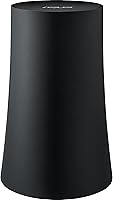
The ASUS SRT-AC1900 OnHub Wi-Fi Router was born from an unusual partnership — ASUS hardware wrapped around Google's software vision — and that collaboration shows in nearly every design decision. There are no protruding antennas, no blinking LED chaos; just a cylindrical black tower that sits quietly on a shelf without looking like networking equipment. Management happens entirely through the Google On app, which was a deliberate choice to keep things simple rather than expose users to browser-based admin panels. It runs dual-band AC1900 speeds, solidly mid-range for its 2015 launch. Today, with Wi-Fi 6 routers widely available, buyers should factor that age into their expectations.

Features & Benefits

The most practical standout is the congestion-sensing antenna system — thirteen internal antennas that actively scan for the least-crowded channel so your connection stays clean during peak hours without any manual input. Pair that with selected power amplifiers tuned for omnidirectional coverage, and the ASUS OnHub handles open-plan living spaces well. The Google On app makes initial setup a matter of minutes, no browser required. Security gets handled automatically through over-the-air firmware updates, a genuine relief for anyone who forgets router maintenance exists. There is a USB 3.0 port for peripheral sharing, and Wave Control — a gesture that briefly prioritizes one device's traffic — is a fun trick, though hardly essential.

Best For

This OnHub router is a natural fit for renters and small-home owners who want solid wireless coverage without the visual clutter of a multi-antenna tower sitting on the desk. The smartphone-only management approach will feel limiting to anyone who likes digging into firewall rules or VLAN configurations, but for the majority of households it is genuinely all they need. It suits single-floor apartments and open-plan spaces well. Those already embedded in the Android or Google Home ecosystem will feel right at home with the app experience. If you just want to plug in, connect, and forget it exists, this Google-integrated router was built with exactly that person in mind.

User Feedback

Owners tend to praise how painless setup is — getting from box to connected in under ten minutes is a common theme — and the hardware's clean look earns consistent compliments. Where feedback turns critical is around control: compared to a standard ASUS router, the app gives you a fraction of the configuration options, which frustrates anyone who needs static IPs or detailed traffic monitoring. Range holds up well in single-story homes, though multi-floor coverage is more hit-or-miss. Some users have raised questions about long-term Google support for the OnHub platform, and that uncertainty is worth weighing seriously if you plan to keep the router for several years.

Pros

  • Setup through the Google On app takes under ten minutes with no technical knowledge required.
  • The cylindrical, antenna-free design sits on a shelf without looking like networking equipment.
  • Automatic firmware updates keep the router patched without any action from the owner.
  • Congestion-sensing channel selection helps maintain consistent speeds during busy network periods.
  • The ASUS OnHub delivers reliable, even coverage across open single-floor living spaces.
  • At roughly one pound, it is easy to move and takes up almost no counter space.
  • WPS support makes connecting compatible guest devices fast and painless.
  • Thirteen internal antennas provide omnidirectional signal distribution without external parts to break or reposition.
  • The hardware has proven durable over time, with many owners reporting years of stable operation.

Cons

  • No browser-based admin panel means advanced network configuration is simply not available.
  • Multi-floor homes often report inconsistent throughput, particularly through older building materials.
  • The Google On app has seen limited feature development, leaving the management experience feeling dated.
  • Long-term platform support from Google for the OnHub lineup remains an open and legitimate concern.
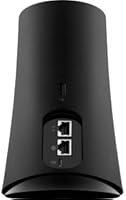
  • A single USB 3.0 port is the only wired peripheral option, which is restrictive for shared storage setups.
  • The AC1900 Wi-Fi standard trails modern Wi-Fi 6 routers in both speed ceiling and device efficiency.
  • No parental controls or content filtering tools are available through the app.
  • Users who need static IP assignments for home servers or smart devices will find no way to configure them.
  • Wave Control gesture traffic prioritization is a novelty that adds no practical value for most households.

Ratings

Our AI rating system analyzed hundreds of verified owner experiences for the ASUS SRT-AC1900 OnHub Wi-Fi Router, actively filtering out incentivized, bot-generated, and spam submissions to surface what real buyers actually encountered day-to-day. The scores below reflect both where this Google-integrated router genuinely delivers and where it falls short, giving you a transparent, balanced picture before you commit.

Setup & Installation
91%
The Google On app guides users through every step with unusual clarity, and most households report being fully connected in under ten minutes without opening a single browser tab. For anyone who has spent an afternoon deciphering a traditional router setup page, this experience feels genuinely refreshing.
The simplicity that makes setup fast also leaves little room for troubleshooting when something does go wrong — the app surfaces only basic diagnostics, which is rarely enough to pinpoint a deeper network problem without outside help.
Wireless Coverage
73%
27%
In open single-floor apartments and studio layouts, the thirteen internal antennas distribute signal evenly, and the congestion-sensing system keeps performance steady during busy evenings without any user intervention. Owners of smaller homes consistently report that dead zones are rare in their day-to-day experience.
Multi-story homes expose a clear limitation — upper floors regularly see weaker signal, and older building construction amplifies the drop-off significantly. The router was not engineered with vertical coverage as a priority, and the real-world results reflect that.
Connection Stability
78%
22%
For households running a moderate number of devices on everyday tasks — streaming, video calls, and general browsing — connection stability is a consistent strength. The automatic channel-switching system quietly handles interference in the background without any user action required.
When a large number of devices compete simultaneously, some users report periodic drops that require a router restart to resolve. Without any manual quality-of-service controls available, there is no proactive way to address congestion before it becomes a problem.
App Experience
67%
33%
For a non-technical user, the Google On app covers the essentials well — connecting devices, checking network health, and running basic speed tests all happen within a few taps. The interface is clean and approachable, which is exactly what the target audience needs from a management tool.
The app has seen minimal development since the OnHub platform stabilized, and its feature set feels frozen. Users who want scheduling controls, traffic logs, parental filters, or device-level insights will find the interface frustratingly shallow compared to competing router apps.
Design & Build Quality
86%
The cylindrical black housing genuinely stands apart from conventional router hardware — it sits comfortably on a bookshelf or side table without looking out of place, and the absence of external antennas removes the visual clutter that most networking equipment brings into a living space.
The enclosed cylindrical design limits airflow, and a portion of users note the unit running noticeably warm during sustained heavy use. Beyond a basic status indicator, there is almost no visual feedback to help diagnose whether the router is functioning correctly.
Throughput Performance
69%
31%
For the most common household workloads — 4K streaming, video conferencing, and light gaming in a well-covered area — the AC1900 dual-band setup provides adequate throughput without becoming a bottleneck for single-user or low-concurrency scenarios.
Measured against current Wi-Fi 5 and Wi-Fi 6 hardware, the speed ceiling is dated. Users on faster ISP plans or those with several people streaming simultaneously will likely find real-world performance underwhelming compared to what modern routers at comparable price points can offer.
Multi-Device Handling
62%
38%
The router manages a moderate household device count — several phones, laptops, and a few smart home gadgets — without noticeable degradation during typical usage patterns. For the average home with under ten active devices, performance holds up reasonably well.
Dense device environments with fifteen or more active connections push the router past its comfort zone, and users with extensive smart home setups have reported slower response times and intermittent connectivity across less-prioritized devices during peak hours.
Security & Updates
71%
29%
Automatic over-the-air firmware updates are a genuine advantage for users who never think about router maintenance — patches arrive and install without any action required, which keeps the device more current than routers relying on users to manually check for updates.
The long-term update commitment from Google for the OnHub platform is ambiguous, and as the product ages, the risk of security patches being quietly discontinued grows. For hardware sitting at the center of a home network, that uncertainty deserves serious consideration.
Value for Money
58%
42%
When this OnHub router was current-generation hardware, the price-to-experience ratio made reasonable sense for a simplicity-first device with premium build quality and tight Google platform integration baked in from the factory.
At today's market pricing, Wi-Fi 6 routers with richer feature sets and clearer long-term support are available at comparable or lower price points, which makes the value argument for aging AC1900 hardware increasingly difficult to justify for most buyers.
Ease of Use
88%
From the moment the box is opened, everything about the experience prioritizes accessibility — there is no manual to read, no jargon to parse, and no admin panel to navigate. Non-technical households and first-time router buyers consistently rate this as the device's most appreciated quality.
The same design philosophy that makes the router approachable also makes it impossible to grow into. Users who eventually want more control have no upgrade path within the existing interface, which becomes frustrating as household networking needs become more complex over time.
Advanced Configuration
31%
69%
For users who genuinely want nothing beyond a working internet connection, the stripped-back configuration model means there are no complex menus to accidentally misconfigure, and nothing to maintain beyond an occasional glance at the app.
Power users encounter a hard wall almost immediately — no static IP assignment, no VLAN support, no custom DNS, no meaningful port forwarding controls, and no firewall rule management. Compared to a standard ASUS router, the gap in configuration depth is striking and non-negotiable.
Long-Term Reliability
74%
26%
The physical hardware has a solid track record across owner reports — many users describe years of continuous operation without failure, which reflects ASUS manufacturing standards that carry over even in this Google-collaborative product form.
Hardware durability aside, platform longevity is a legitimate risk. Google has not made clear commitments about how long the OnHub software ecosystem will receive active support, and buyers intending to keep this router for five or more years are accepting a degree of uncertainty.
Ecosystem Integration
82%
18%
For households built around Android devices or Google Home products, the ASUS OnHub fits naturally into daily life — the app shares a design language with other Google services, and the overall experience feels cohesive rather than cobbled together from separate systems.
Users outside the Google ecosystem get a functional but thinner experience — there is no meaningful integration with Apple HomeKit, Amazon Alexa smart home routines, or other third-party platforms, which limits its usefulness in mixed or non-Google household setups.

Suitable for:

The ASUS SRT-AC1900 OnHub Wi-Fi Router makes the most sense for people who want a router that stays out of the way — visually and operationally. If you live in a studio, a one-bedroom apartment, or a modest open-plan home and your networking demands stop at streaming, browsing, and casual gaming, this OnHub router covers that ground without asking much of you in return. It is particularly well-suited to non-technical users who have never wanted to log into a router admin panel and never plan to; the Google On app handles setup and day-to-day management from a smartphone in a way that genuinely feels approachable. Households already using Android devices or Google Home products will find the ecosystem fit natural rather than forced. Renters who move periodically will also appreciate how lightweight and compact the hardware is — it packs and unpacks without fuss, and setup at a new address takes minutes.

Not suitable for:

If your home has multiple floors, thick concrete walls, or more than a dozen actively connected devices, the ASUS SRT-AC1900 OnHub Wi-Fi Router is likely to leave you frustrated before long. Power users who rely on features like static IP assignment, VLAN segmentation, detailed traffic monitoring, or custom DNS configurations will hit a wall quickly — the app simply does not expose those controls, and there is no browser-based fallback. This Google-integrated router was launched in 2015, which means it predates Wi-Fi 6 and the efficiency improvements that standard brings to dense device environments; households full of newer laptops, phones, and smart home hardware may notice the gap. Anyone concerned about long-term platform support should also think carefully, as the OnHub ecosystem has a narrower future roadmap than mainstream router brands. If you are already considering a mesh system to cover a larger home, purpose-built mesh options at comparable price points will likely serve you better.

Specifications

  • Wireless Standard: The router supports 802.11a/b/g/n/ac across both bands, conforming to the Wi-Fi 5 generation of wireless networking.
  • Frequency Bands: Dual-band operation covers both the 2.4 GHz and 5 GHz spectrums simultaneously, delivering a combined theoretical throughput class of AC1900.
  • Antennas: Thirteen internal omnidirectional antennas work alongside selected power amplifiers to distribute the wireless signal evenly in all directions without any external antenna hardware.
  • RAM: The router is equipped with 4096 MB of onboard RAM, supporting stable multi-device operation and responsive traffic management.
  • Dimensions: The cylindrical housing measures 5″ x 7.87″ x 5.19″, giving it a compact, vertical footprint suitable for shelf or countertop placement.
  • Weight: At approximately 1 pound, the unit is lightweight enough to relocate easily without requiring permanent installation.
  • USB Connectivity: One USB 3.0 port is available for connecting external storage or compatible peripherals to the local network.
  • WPS Support: WPS is supported for simplified one-button pairing with compatible client devices and guest hardware.
  • Power Input: The router operates on a standard 120V input, compatible with North American wall outlets using the included power adapter.
  • App Management: All setup and ongoing management is handled exclusively through the Google On app, available for both Android and iOS mobile operating systems.
  • Firmware Updates: Firmware is delivered automatically over the air through the Google platform, requiring no manual download or intervention from the user.
  • Channel Selection: An integrated congestion-sensing system continuously monitors wireless traffic and switches to the least-crowded available channel without user input.
  • Traffic Prioritization: Wave Control allows a user to briefly wave a hand over the device to trigger short-term traffic prioritization for a selected device.
  • Form Factor: The housing uses a cylindrical, all-black design with no external antennas, intended to blend into a home environment rather than stand out as networking hardware.
  • Platform: The router operates within the Google OnHub software ecosystem, which governs app functionality, cloud features, and long-term firmware support continuity.

Related Reviews
Linksys EA6900 AC1900 Dual-Band Wi-Fi Router
73%
91%
Ease of Setup
78%
Wi-Fi Speed & Performance
67%
Wireless Range
73%
Beamforming Effectiveness
74%
Build Quality & Design
More
D-Link DIR-1950 AC1900 Wi-Fi Router
74%
88%
Setup & Installation
63%
Wi-Fi Range & Coverage
78%
Connection Speed
76%
Multi-Device Handling
84%
Parental Controls
More
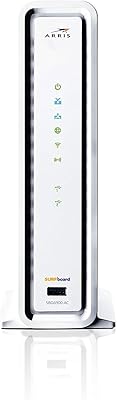
ARRIS SBG6900AC Cable Modem Wi-Fi Router
72%
88%
Ease of Setup
74%
Wi-Fi Range & Coverage
91%
Value for Money
71%
Wi-Fi Speed & Throughput
63%
Build Quality & Durability
More
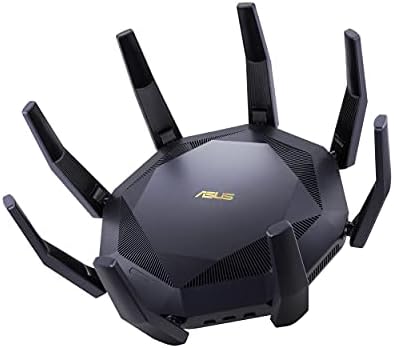
ASUS RT-AX89X AX6000 Dual Band Wi-Fi Router
77%
91%
Wireless Performance
88%
Multi-Device Handling
86%
Build Quality
83%
10G Port Utility
84%
Security Suite
More
Linksys EA7500 AC1900 Dual-Band Router

76%
88%
Setup & Installation
83%
Signal Stability
67%
Wi-Fi Range & Coverage
81%
Multi-Device Performance
84%
Streaming Performance
More
ASUS Lyra Voice Mesh Router Smart Speaker
65%
58%
Wi-Fi Coverage & Range
67%
Wi-Fi Speed & Throughput
44%
Smart Speaker Audio Quality
76%
Alexa Integration & Voice Control
82%
Setup & Installation Ease
More
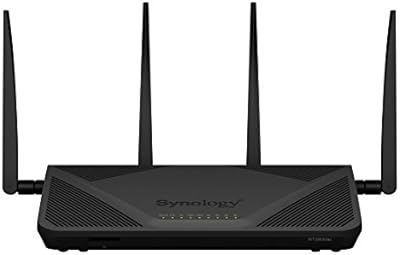
Synology RT2600ac Wi-Fi Router
85%
88%
Performance
91%
Wi-Fi Speed & Coverage
80%
Setup & Installation
90%
Security Features
84%
Ease of Use
More
LNN 788 Wi-Fi 6 Router
74%
91%
Ease of Setup
78%
Wi-Fi Speed Performance
67%
Coverage & Range
82%
Multi-Device Handling
79%
Gaming & Streaming Quality
More
CenturyLink C4000BG Bonded DSL Wi-Fi Router
66%
83%
Wi-Fi Performance
88%
DSL Modem Capability
81%
Ease of Setup
31%
ISP Compatibility
79%
Wi-Fi 6 Readiness
More
Synology WRX560 Dual-Band Wi-Fi 6 Router
77%
91%
Network Security
88%
Software & Firmware
86%
VLAN & Network Segmentation
83%
Wired Connectivity
71%
Wireless Performance
More

FAQ

Setup is genuinely straightforward. You download the Google On app, plug in the router, and follow the on-screen steps — most people are online within ten minutes. There is no need to open a browser or touch a single configuration menu.

Yes, the Google On app is available for both Android and iOS, so iPhone users can handle setup and day-to-day management without any limitations compared to Android users.

Not through any official interface. The ASUS SRT-AC1900 OnHub Wi-Fi Router was deliberately designed to hide that complexity, and the Google On app does not expose advanced networking controls. If you need static IP assignments, VLAN support, or detailed traffic monitoring, this router is not the right fit.

Coverage on a single floor in an open-plan layout is generally solid, but multi-story performance is less consistent. Thick floors, older construction materials, and the distance between levels can all reduce signal quality noticeably. For a two-story home, results will vary depending on the layout.

This is a fair concern. The OnHub platform has a narrower update roadmap than mainstream router brands, and some users have questioned how long Google will continue pushing firmware patches. For the foreseeable term it has received updates, but long-term support is not guaranteed in the way a current-generation router would be.

Your Wi-Fi 6 devices will connect and work, but they will fall back to the AC1900 Wi-Fi 5 standard that this router supports. You will not get the speed ceiling or efficiency gains that Wi-Fi 6 hardware is capable of delivering with a compatible router.

Waving your hand over the top of the router briefly prioritizes network traffic to a specific device you have pre-selected in the app. In practice, most people use it once or twice out of curiosity and then forget it exists. It is a fun hardware quirk, but it solves a problem most users do not have on a daily basis.

The single USB 3.0 port does allow you to connect an external drive, and the ASUS OnHub supports basic storage sharing over the local network through that connection. It is not a full-featured NAS replacement, but it handles light file sharing reasonably well.

For casual gaming on a single device in a well-covered area, the this OnHub router performs adequately. However, the lack of any quality-of-service controls or manual traffic shaping means you cannot prioritize gaming traffic in a meaningful way, which matters if multiple people are using the network at the same time.

A current mesh system will almost always offer better whole-home coverage, more granular app controls, and a clearer support future. The ASUS OnHub made a lot of sense when it launched, but at today's price points you can find mesh options that outperform it across the board, especially in homes larger than a single-floor apartment.

Where to Buy