
Overview

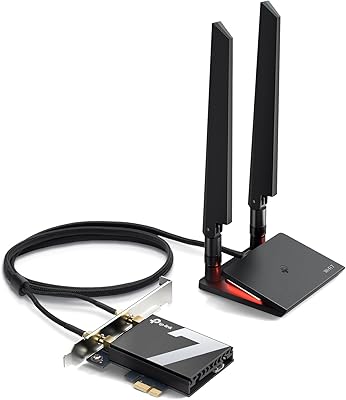
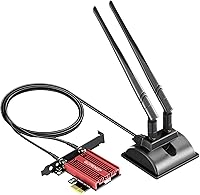
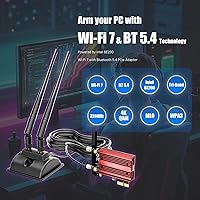
The GLOTRENDS BE200 Wi-Fi 7 PCIe Card is a mid-range desktop wireless upgrade built around Intel's BE200NGW controller, bringing the 802.11be standard to any PCIe-equipped desktop that lacks built-in wireless. Before anything else, two compatibility requirements deserve upfront attention: this Wi-Fi 7 PCIe card only works with Intel motherboards, and it requires Windows 11 24H2 or a later version — AMD platform users should look elsewhere. One standout physical detail is the included 2-meter antenna with a magnetic base, which gives you real placement flexibility rather than being stuck with short antennas at the back of your case. Keep in mind that hitting headline Wi-Fi 7 speeds also demands a matching Wi-Fi 7 router on the other end.

Features & Benefits

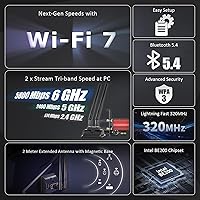
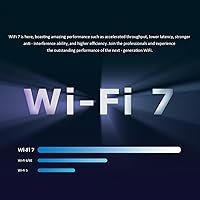
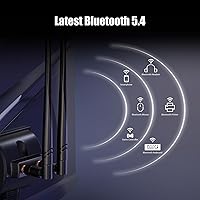
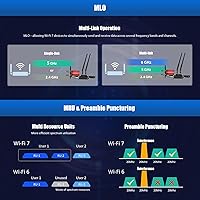
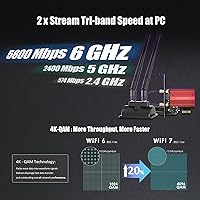
The BE200 card supports Wi-Fi 7 across all three bands — up to 574 Mbps on 2.4GHz, 2400 Mbps on 5GHz, and a theoretical 5800 Mbps on the 6GHz band — though real-world throughput naturally depends on your router and environment. The 320MHz channel width and 4K-QAM modulation translate to noticeably tighter latency compared to Wi-Fi 6, which matters if you are gaming or doing anything time-sensitive over wireless. Bluetooth 5.4 is built in, so you can connect a headset, controller, or keyboard without occupying a separate USB slot. Installation is straightforward via a PCIe x1 slot, and both a standard ATX bracket and a low-profile bracket are included, covering slim builds as well.

Best For

This desktop wireless upgrade suits Intel platform desktop owners who want modern wireless without running Ethernet cables through their home. If you are already invested in a Wi-Fi 7 router, the BE200 card is a logical next step for extracting real performance gains — especially for gaming, 4K or 8K streaming, or AR/VR workloads where latency and bandwidth both matter. The extended antenna is genuinely useful if your desktop sits behind furniture or across a large room from your router. Home office users who rely on multiple Bluetooth peripherals alongside Wi-Fi will also find the combination practical. That said, if you are on an AMD motherboard or have not yet updated to Windows 11 24H2, this card is simply not an option.

User Feedback

Most buyers report a smooth installation process, with the card recognized quickly once the Intel driver is downloaded manually from Intel's site — that extra step catches some users off guard, but it is a minor inconvenience once you know to expect it. The 2-meter antenna cable receives consistent praise for giving people actual placement options, which makes a real difference in signal quality. On the downside, a recurring source of frustration is the AMD and OS version restrictions; several reviewers found out the hard way after purchasing. Bluetooth performance alongside active Wi-Fi draws mixed feedback — most find it reliable, though a handful report minor interference. Overall, buyers on compatible setups tend to feel the pricing is fair given the real-world performance gains.

Pros

  • Wi-Fi 7 support delivers noticeably lower latency compared to Wi-Fi 6, which matters in real gaming and streaming scenarios.
  • The 2-meter antenna cable with a magnetic base gives you genuine flexibility in where you position the antenna.
  • Bluetooth 5.4 is included on the same card, eliminating the need for a separate USB Bluetooth dongle.
  • PCIe x1 installation is quick and uses a slot nearly every desktop has available.
  • Both standard ATX and low-profile brackets are included, so the card fits slim builds without extras to buy.
  • Backward compatibility with Wi-Fi 6, 6E, 5, and 4 means it works fine even before you upgrade your router.
  • The Intel BE200NGW controller is a proven, well-documented chipset with reliable driver support from Intel directly.
  • Combined tri-band throughput is rated up to 8774 Mbps, giving headroom for multi-device households.

Cons

  • AMD motherboard users are completely locked out — there is no workaround or driver fix available.
  • Windows 11 24H2 is a hard requirement; older OS versions will not support the Wi-Fi 7 feature set.
  • Reaching the theoretical 5.8 Gbps ceiling requires a Wi-Fi 7 router, which is still a premium purchase for most households.
  • The Intel driver must be downloaded manually from Intel's website — it does not install automatically out of the box.
  • Some users have reported occasional Bluetooth interference when Wi-Fi is under heavy load simultaneously.
  • The card is useless as a Wi-Fi 7 device if your network infrastructure has not caught up to the standard yet.
  • At mid-range pricing, buyers locked out by compatibility requirements have no partial use case to fall back on.

Ratings

The scores below for the GLOTRENDS BE200 Wi-Fi 7 PCIe Card were produced by our AI rating engine after analyzing verified global buyer reviews, with spam, bot-submitted, and incentivized feedback actively filtered out before scoring. Each category reflects the honest distribution of real user experiences — strengths are credited where earned, and recurring frustrations are scored accordingly. The result is a transparent, balanced picture of where this desktop wireless upgrade genuinely delivers and where it falls short.

Wireless Performance
88%
Users who paired this card with a Wi-Fi 7 router consistently reported dramatic speed gains over their previous Wi-Fi 5 or Wi-Fi 6 setups, with noticeably lower ping during gaming sessions and smoother 4K streaming. The 320MHz channel on the 6GHz band makes a real difference in congested home networks with multiple active devices.
Actual throughput sits well below the theoretical 5.8 Gbps ceiling in everyday home environments, as walls, router distance, and ISP bandwidth all eat into the headline figure. Buyers expecting near-gigabit real-world speeds over Wi-Fi 7 sometimes feel the gap between spec sheet and reality is wider than anticipated.
Installation Ease
76%
24%
The physical installation is genuinely straightforward — the PCIe x1 card drops into any available slot, and most users had it seated and running within minutes. Buyers with basic PC-building experience found the whole process, including antenna cable routing, to be quick and uncomplicated.
The requirement to manually locate and download the Intel driver from their support website adds an extra hurdle that trips up less experienced users, with some reporting the card showing as unrecognized until the correct driver version is installed. This is an environment issue rather than a defect, but it does interrupt what could otherwise be a plug-and-play experience.
Compatibility Clarity
53%
47%
For buyers who carefully read the product listing, the Intel-only and Windows 11 24H2 requirements are stated clearly enough to avoid surprises. Users on compatible Intel platforms with updated Windows 11 installs report zero compatibility issues once the driver is in place.
A recurring frustration in user feedback involves buyers who purchased the card without fully registering the AMD motherboard exclusion or the specific OS version requirement, leading to returns and negative reviews that stem from mismatched expectations rather than product failure. The niche compatibility window means a significant portion of desktop users are simply incompatible buyers, and the product description does not make this impossible to miss.
Antenna Design
91%
The 2-meter cable length and magnetic base combination received some of the most consistent praise across buyer reviews — users in larger rooms or with desks against walls found they could position the antenna on the side of their case or on a nearby metal surface for noticeably stronger signal. The omnidirectional 6dBi design holds signal well even at moderate distances from the router.
The magnetic base, while convenient, is not the most robust long-term mounting solution for setups where the antenna might get bumped or needs to stay fixed in a specific orientation. A small number of users noted the antenna cable connection at the card end feels slightly delicate during initial attachment.
Bluetooth Reliability
74%
26%
Bluetooth 5.4 performs solidly for the most common use cases — wireless keyboards, mice, and headsets pair quickly and maintain stable connections during normal desktop use. Most users appreciate having Bluetooth handled by the card rather than occupying a USB port with a separate dongle.
A subset of users reported intermittent Bluetooth stuttering or brief disconnections specifically during periods of heavy simultaneous Wi-Fi activity, suggesting some co-existence management limitations under peak load. This is not universal, but it is consistent enough across feedback to be worth flagging for users who rely on wireless audio for critical tasks.
Build Quality
79%
21%
The card itself feels solid for its size, and the inclusion of both a standard ATX and low-profile bracket out of the box shows practical attention to real-world installation scenarios. The antenna base and housing feel acceptably robust for a component that will largely stay stationary once installed.
At this price tier, the overall component feel is functional rather than premium — the antenna assembly in particular feels lightweight, and the bracket finishing is utilitarian. Nothing feels flimsy enough to be a concern, but buyers expecting high-end construction quality may find it underwhelming compared to pricier alternatives.
Value for Money
82%
18%
Buyers on compatible Intel platforms running Wi-Fi 7 routers broadly agree that the performance gains justify the mid-range price, particularly given that Bluetooth 5.4 is bundled in and no additional accessories are needed. For users upgrading from older wireless cards, the real-world improvement in throughput and latency feels proportional to the cost.
For buyers who end up needing to also upgrade their router to see Wi-Fi 7 benefits, the total ecosystem cost is considerably higher, which somewhat erodes the card's standalone value proposition. Users who cannot meet the compatibility requirements — AMD motherboard or older Windows 11 — get zero value from the purchase, making the effective value score highly dependent on whether the buyer did their homework.
Driver Support
71%
29%
Intel's driver ecosystem is well-maintained and the specific driver version required is freely available on their support site, with no paywalls or registration needed. Users who followed the manual download process correctly reported stable, issue-free operation afterward.
There is no automatic driver detection or Windows Update delivery for this card, which means users unfamiliar with manual driver installation are left troubleshooting a card that appears non-functional until they find the right file. The extra friction is a legitimate complaint, even if it is resolvable with a five-minute search.
Signal Range
83%
The 6dBi gain on both antennas provides better-than-average range for a desktop add-in card, and users in medium to large homes report maintaining strong signal across multiple rooms. The physical antenna placement flexibility via the long cable amplifies the effective range further in real setups.
On the 6GHz band specifically, range is inherently limited by physics — higher frequency signals do not penetrate walls and floors as effectively as 5GHz or 2.4GHz. Users in multi-story homes or with concrete walls between their desktop and router may find the 6GHz band underperforms relative to expectations.
OS Requirement Friction
49%
51%
For users already running Windows 11 on the 24H2 update or later, the OS requirement is a non-issue and the card functions without any additional configuration beyond the driver install. Microsoft's update availability means most active Windows 11 users can meet the requirement without purchasing anything extra.
The hard dependency on a specific Windows 11 update version is an unusually narrow requirement that excludes users on earlier Windows 11 builds who have not updated, and entirely excludes anyone still on Windows 10. This represents a real barrier that generates genuine buyer frustration and contributes to a disproportionate number of negative reviews from otherwise-compatible hardware setups.
Latency Improvement
86%
Gamers and AR/VR users switching from Wi-Fi 6 cards on the same router reported measurable ping reductions, with several noting that wireless gaming finally felt comparable to their previous wired connection. The OFDMA and 4K-QAM combination appears to deliver tangible latency improvements in congested multi-device households.
The latency benefits are most pronounced when connected to a Wi-Fi 7 router — users still on Wi-Fi 6 routers see only marginal latency improvement compared to a good Wi-Fi 6 card, which can make the upgrade feel underwhelming for those who have not yet invested in the newer router standard.
Package Contents
77%
23%
The inclusion of both bracket types, a proper 2-meter antenna assembly, and all necessary mounting hardware means buyers have everything needed to complete the installation without sourcing additional parts. The thoughtfulness of including a low-profile bracket in particular suggests the manufacturer considered a wider range of build types.
There is no quick-start guide included that clearly walks users through the manual driver download step, which would eliminate a significant portion of setup confusion. A printed or QR-linked instruction sheet pointing directly to the correct Intel driver page would substantially improve the out-of-box experience.
Slot Compatibility
94%
Using a PCIe x1 interface means this card physically fits into virtually any PCIe slot on any Intel desktop motherboard — x1, x4, x8, or x16 slots all work, giving users with limited available expansion room maximum flexibility. Nearly every desktop ever built with PCIe has at least one slot available for this card.
While the PCIe slot compatibility itself is excellent, the motherboard chipset restriction to Intel platforms means that physical slot availability is irrelevant for AMD users — the broad slot compatibility does not compensate for the platform exclusion.

Suitable for:

The GLOTRENDS BE200 Wi-Fi 7 PCIe Card is a strong fit for desktop builders and upgraders who are already running — or planning to run — a Wi-Fi 7 router and want their PC to keep pace with it. If your tower lacks built-in wireless and you are tired of routing Ethernet cables across rooms, this card slots into a PCIe x1 slot and handles the job without demanding much from your system. Gamers who care about latency, streamers pushing 4K or higher, and anyone doing AR/VR work over wireless will appreciate what the 320MHz channel width and 4K-QAM modulation actually deliver in practice compared to older Wi-Fi 6 cards. The 2-meter antenna with its magnetic base is genuinely useful for users whose desktop sits in a cabinet, behind a desk, or far from the router — you can route the antenna to wherever signal is strongest. Home office users who want Bluetooth peripherals handled by the same card, without burning a USB port on a dongle, will also find this a practical all-in-one wireless solution.

Not suitable for:

The GLOTRENDS BE200 Wi-Fi 7 PCIe Card has real hard stops that make it the wrong choice for a meaningful portion of desktop users, and it is worth being direct about that. If your motherboard is AMD-based — Ryzen builds included — this card simply will not work, and no workaround exists. Beyond the platform restriction, your operating system must be Windows 11 updated to the 24H2 release or newer; if you are running an older Windows version or have not updated, Wi-Fi 7 features will not function. Users who only have a Wi-Fi 5 or Wi-Fi 6 router will not see the headline speeds either, since the full bandwidth potential only unlocks in a Wi-Fi 7 router environment. If you are looking for a plug-and-play experience with zero driver hunting, the requirement to manually download the Intel driver from their website may also be a friction point worth considering.

Specifications

  • Wi-Fi Standard: Supports Wi-Fi 7 (IEEE 802.11be) with full backward compatibility with Wi-Fi 6E, Wi-Fi 6, Wi-Fi 5, and Wi-Fi 4 networks.
  • Controller: Powered by the Intel BE200NGW chipset, a widely supported and well-documented wireless controller for desktop PCIe cards.
  • Max Throughput: Combined theoretical maximum throughput is rated at up to 8774 Mbps across all three bands (BE8774 classification).
  • 6GHz Band Speed: The 6GHz band delivers theoretical speeds of up to 5800 Mbps under optimal Wi-Fi 7 router conditions.
  • 5GHz Band Speed: The 5GHz band supports speeds of up to 2400 Mbps for mid-range wireless performance on compatible networks.
  • 2.4GHz Band Speed: The 2.4GHz band operates at up to 574 Mbps, suitable for lower-bandwidth devices and longer-range connections.
  • Bluetooth: Integrated Bluetooth 5.4 supports pairing with keyboards, mice, headsets, controllers, and other peripherals without a separate USB adapter.
  • Interface: Uses a PCIe x1 interface, compatible with any standard PCIe slot on a desktop motherboard regardless of physical slot size.
  • Antenna: Includes a 2x2 6dBi omnidirectional dual-antenna setup on a 2-meter cable with a magnetic base for flexible positioning.
  • Bracket Support: Ships with both a standard ATX bracket and a low-profile bracket, covering full-size and slim desktop PC cases.
  • Modulation: Uses 4K-QAM modulation, which enables higher data density per transmission cycle compared to the 1024-QAM used in Wi-Fi 6.
  • Channel Width: Supports 320MHz channel width on the 6GHz band, doubling the maximum channel capacity available under Wi-Fi 6E.
  • Spatial Streams: Operates with 2x2 MIMO spatial streams, enabling simultaneous send and receive on two independent data paths.
  • OS Requirement: Requires Windows 11 updated to the 24H2 release or a later version to access Wi-Fi 7 features and full driver support.
  • Motherboard Support: Compatible with Intel-platform motherboards only; AMD motherboards are explicitly not supported by this card.
  • Card Dimensions: The PCIe card measures 3.1 x 2.4 x 0.09 inches, making it a compact single-slot add-in card.
  • Driver Version: The recommended Wi-Fi driver is version WiFi-23.150.0-Driver64-Win10-Win11, downloaded directly from Intel's support site.
  • BT Driver Version: The Bluetooth driver version is BT-23.150.0-64UWD-Win10-Win11.exe, also available from Intel's official driver repository.
  • OFDMA Support: Supports OFDMA (Orthogonal Frequency Division Multiple Access), which helps reduce latency and improve efficiency in congested network environments.
  • Item Weight: The full package weighs approximately 0.4 kilograms, which includes the card, antenna assembly, cables, and both brackets.

Related Reviews
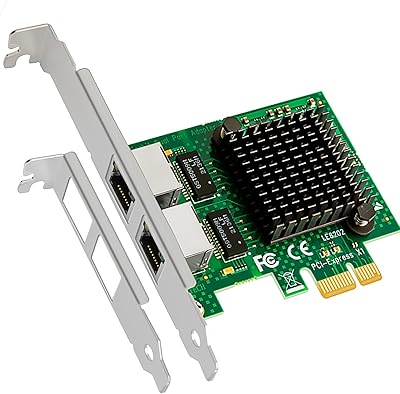
GLOTRENDS LE8202 2-Port Gigabit PCIe Network Card
82%
88%
Driver Compatibility
91%
Ease of Installation
94%
Value for Money
86%
OS & Platform Coverage
79%
Build Quality
More
Ubiquiti UDR7 Dream Router Wi-Fi 7
77%
94%
Ecosystem Integration
83%
Wi-Fi Performance
61%
Hardware Port Selection
58%
Setup Experience
72%
Value for Money
More
TP-Link Archer BE400
80%
88%
Wireless Performance
91%
Setup & Ease of Use
78%
Coverage & Range
87%
Wired Port Performance
83%
Multi-Device Handling
More
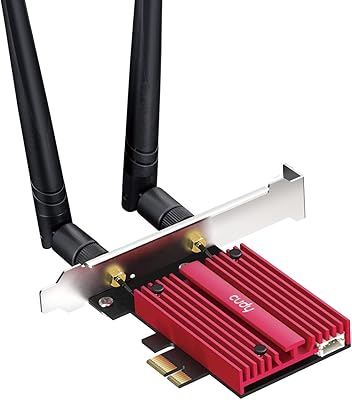
Cudy WE9300 WiFi 7 PCIe Card
75%
88%
Value for Money
91%
Installation Ease
79%
Wireless Performance
86%
Driver Stability
77%
Bluetooth Performance
More
StarTech PEXUSB3S7 7-Port PCIe USB 3.0 Card
79%
91%
Ease of Installation
84%
Build Quality
88%
Port Count & Layout
76%
Transfer Performance
78%
Driver & OS Compatibility
More
AVM FRITZ!Box 4690 Wi-Fi 7 Mesh Router
79%
91%
Wireless Performance
94%
Wired Connectivity
62%
Setup & Configuration
88%
Software & Firmware
67%
Value for Money
More
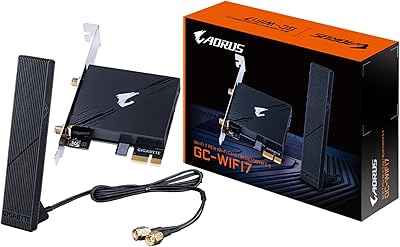
GIGABYTE GC-WIFI7 WiFi 7 PCIe Card
77%
83%
Wireless Performance
88%
Installation Ease
71%
Router Compatibility
86%
Connection Stability
67%
Case Compatibility
More
TP-Link Archer TBE550E
77%
91%
Wireless Performance
43%
OS Compatibility
84%
Installation Ease
88%
Latency & Gaming
78%
Bluetooth Performance
More
TP-Link RE223BE Wi-Fi 7 Range Extender
81%
88%
Coverage & Dead Zone Elimination
71%
Wi-Fi 7 Feature Implementation
91%
Setup & Ease of Use
67%
Real-World Throughput
78%
Build Quality & Design
More
TP-Link RE403BE BE6300 Wi-Fi 7 Range Extender
79%
81%
Wireless Performance
78%
Coverage Range
84%
Setup & Installation
91%
2.5G Ethernet Port
73%
EasyMesh Integration
More

FAQ

No, it does not. The BE200 card is explicitly incompatible with AMD motherboards — this is a chipset-level limitation, not a driver issue. If you are on a Ryzen build, you will need to look at a different Wi-Fi 7 card that supports AMD platforms.

You need Windows 11 specifically updated to the 24H2 release or newer. Earlier versions of Windows 11 will not fully support Wi-Fi 7 features, and Windows 10 is not supported for the full feature set either. Check your Windows version in Settings before purchasing.

Yes, it will work — the card is backward compatible with Wi-Fi 6, Wi-Fi 5, and older standards. You just will not get Wi-Fi 7 speeds or features until you also have a Wi-Fi 7 router on the other end. It is still a perfectly functional upgrade even on older routers.

Unfortunately, the driver does not install automatically. You need to manually download it from Intel's support website — search for driver version WiFi-23.150.0-Driver64-Win10-Win11. It is a straightforward download and install process, but it is an extra step that catches some people off guard.

In most cases, yes — the card is designed to handle simultaneous Wi-Fi and Bluetooth operation. A small number of users have reported minor interference during very heavy Wi-Fi loads, but for typical everyday use like a wireless headset alongside active browsing or gaming, most people find it reliable.

The magnetic base is your friend here. Most people get the best results by routing the antenna cable out from the back panel and sticking the magnetic base somewhere higher up on the side of the case, or on a nearby metal surface. Getting the antenna above desk level and away from the PC chassis generally makes a noticeable difference.

Yes, as long as the case has a PCIe slot, the included low-profile bracket lets you install it in slim and small form factor builds. Just confirm your case has at least one accessible PCIe slot before ordering.

It uses a PCIe x1 connector, but it will physically fit and work in any larger PCIe slot as well — x4, x8, or x16. Most desktops have at least one open PCIe slot available, so compatibility with the slot itself is rarely an issue.

Not strictly. You will get a functional and compatible wireless connection on any Wi-Fi 5 or Wi-Fi 6 network, and the card handles those just fine. However, to actually experience Wi-Fi 7 speeds and features like 320MHz channels and 4K-QAM, you do need a Wi-Fi 7 router. Think of it as future-proofing your PC side so you are ready when your router catches up.

That figure is a theoretical maximum under ideal lab conditions — same router in the same room, no interference, optimal channel conditions. Real-world speeds will be lower depending on your router, distance, walls, and network congestion. That said, even at a fraction of peak throughput, this desktop wireless upgrade comfortably outperforms Wi-Fi 6 cards in practical latency and bandwidth tests.