Overview

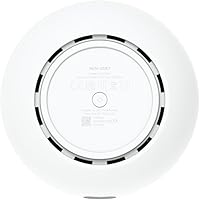
The Ubiquiti UDR7 Dream Router Wi-Fi 7 arrived in March 2025 as Ubiquiti's answer to a practical question many network enthusiasts have been asking: what if one compact desktop unit handled routing, switching, wireless access, and application hosting all at once? Ubiquiti's UniFi platform — a suite of networking software covering everything from traffic management to security camera oversight — runs natively on this all-in-one network hub without requiring a separate controller. That consolidation is genuinely useful. The catch is that this UniFi gateway rewards those already fluent in the ecosystem; newcomers will face a learning curve that shouldn't be underestimated.

Features & Benefits

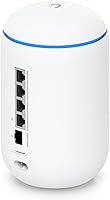
The hardware on the Dream Router Wi-Fi 7 is legitimately impressive for its size. A 10G SFP+ WAN port handles multi-gig internet connections, backed by a 2.5 GbE RJ45 WAN fallback — useful if your ISP delivers fiber via a standard RJ45 handoff. On the LAN side, three 2.5 GbE ports serve wired clients, and one carries PoE output, letting you power a camera or access point without a separate injector. Wi-Fi 7 tri-band radio covers current and legacy devices alike. The quad-core processor keeps everything running at a claimed 26W maximum, and a microSD slot handles local storage for UniFi Protect recordings.

Best For

This UniFi gateway makes the most sense for people already invested in the UniFi platform — or those ready to commit to it. If you're running a small office or a well-equipped home network with multi-gig internet, the combination of managed switching, Wi-Fi 7, and a built-in NVR in a single box removes a lot of hardware clutter. UniFi Protect camera users particularly benefit; the microSD slot means you don't need a separate recording device. It's also a natural upgrade path for anyone coming from an older Dream Machine or Dream Router. Just be honest with yourself: if you want something you plug in and forget, this isn't that device.

User Feedback

Across 71 ratings averaging 4.4 out of 5, buyers are largely satisfied, though the picture isn't entirely rosy. The most consistent praise centers on how well UniFi OS ties everything together — no separate controller box, no cloud dependency if you prefer local management. Wi-Fi 7 throughput improvements get noticed, though reviewers are careful to note that gains depend entirely on having compatible client devices. The most common complaint is the single PoE port; anyone hoping to power multiple cameras or access points will need additional hardware. A few users also flag that first-time UniFi setup takes patience. Nobody is calling it broken — just not designed for the networking newcomer.

Pros

  • Combines router, PoE switch, NVR, and Wi-Fi 7 AP into a single compact desktop unit.
  • The 10G SFP+ WAN port future-proofs the device for multi-gig fiber connections.
  • Self-hosted UniFi OS means no mandatory cloud subscription or dependency on external servers.
  • MicroSD slot allows local UniFi Protect recordings without purchasing a separate NVR device.
  • Wi-Fi 7 tri-band radio supports the latest clients while remaining backward-compatible with older hardware.
  • All five UniFi applications — Network, Protect, Access, Talk, and Connect — run natively on one box.
  • At 26W max draw, this all-in-one network hub is notably power-efficient for what it offers.
  • 2.5 GbE RJ45 WAN fallback provides a practical backup if your primary SFP+ connection drops.
  • Rated 4.4 out of 5 from early adopters, reflecting solid real-world satisfaction across varied deployments.

Cons

  • First-time UniFi setup requires meaningful networking knowledge; it is not beginner-friendly.
  • Only one PoE output port limits direct device powering without adding extra hardware.
  • Wi-Fi 7 speed gains are irrelevant unless your client devices also support the 802.11be standard.
  • Three LAN ports total is lean for small offices hoping to wire several wired workstations directly.
  • No included access point means wireless coverage depends entirely on the built-in radio for larger spaces.
  • MicroSD storage capacity is user-supplied and limited compared to dedicated NVR solutions.
  • UniFi OS updates have historically caused temporary feature regressions — something long-time users know well.
  • The premium price tier is hard to justify if you only need basic routing and have no existing UniFi devices.

Ratings

The scores below for the Ubiquiti UDR7 Dream Router Wi-Fi 7 were generated by our AI engine after analyzing verified global buyer reviews, actively filtering out incentivized, bot-submitted, and duplicate feedback to surface what real users actually experience. Each category reflects an honest synthesis of both the strongest praise and the most consistent frustrations, so you get a complete picture before committing to a purchase.

Ecosystem Integration
94%
For existing UniFi users, the way this all-in-one network hub absorbs the roles of a Cloud Key, NVR, and standalone router into one device is exactly what they've been asking for. Managing cameras, VLANs, and access control through a single unified interface dramatically reduces administrative overhead for small IT teams and home lab operators alike.
The tight integration is a double-edged situation — it only delivers full value if you're already in the UniFi ecosystem. Buyers who mix in third-party APs, cameras, or switches will find the experience fragmented, and some features simply don't surface unless you're running native UniFi hardware throughout.
Wi-Fi Performance
83%
Users with Wi-Fi 7 compatible laptops and newer smartphones report noticeably improved throughput and lower latency compared to their previous Wi-Fi 6 setups, particularly in congested environments with many concurrent devices. The tri-band configuration helps distribute client load effectively, reducing the bottlenecks common on dual-band setups.
The gains are entirely contingent on client device compatibility — users with older hardware see no difference whatsoever compared to a standard Wi-Fi 6 router. A handful of reviewers felt the Wi-Fi 7 branding oversells the real-world impact for households where most devices are still on Wi-Fi 5 or 6.
Hardware Port Selection
61%
39%
The 10G SFP+ WAN port is a legitimate strength for anyone with a multi-gig fiber connection, and having a 2.5 GbE RJ45 fallback WAN adds useful redundancy that competing prosumer devices at this tier often skip entirely.
Three LAN ports is genuinely limiting for any deployment beyond a single workstation and one or two wired devices. The single PoE output port frustrates buyers who assumed they could power multiple cameras or access points directly — most end up needing a downstream switch almost immediately, which adds cost and complexity.
Setup Experience
58%
42%
Users who already have UniFi familiarity report that initial configuration is logical and that the UniFi OS interface has matured considerably, with most core settings reachable without digging through documentation.
First-time UniFi buyers consistently flag the setup as a significant hurdle. Unlike consumer routers that walk you through configuration step by step, this all-in-one network hub drops you into a feature-dense interface with limited hand-holding. Several reviewers spent hours troubleshooting before getting their network into a stable state.
Value for Money
72%
28%
When you account for the hardware it replaces — a separate Cloud Key, a basic NVR, and a standalone router — the consolidated cost argument becomes reasonably compelling for buyers who were going to buy those components anyway. The self-hosted model also avoids the subscription fees that competing camera and network platforms charge monthly.
For buyers who don't need the full UniFi suite, the pricing is hard to justify against capable single-purpose routers with similar Wi-Fi 7 specs at a lower cost. The PoE limitation also means many buyers end up spending more on a switch immediately after purchase, which erodes the all-in-one value proposition.
Build Quality
88%
The physical construction feels appropriately premium for a prosumer device — solid, clean, and desktop-friendly without looking out of place in a home office or small business environment. At 3.75 pounds, it has a substantive feel that reviewers associate with quality internal components rather than hollow consumer-grade plastics.
A few users noted the white finish shows fingerprints and dust more visibly than darker alternatives, requiring occasional cleaning in high-traffic office settings. There are no ventilation concerns reported, but the lack of a mounting option limits placement flexibility for users who want it off their desk.
Power Efficiency
91%
A 26W maximum draw — excluding PoE output — is impressively restrained for a device that handles routing, wireless, switching, and application hosting simultaneously. Users running it in home office environments appreciate that it runs quietly and without any meaningful heat output during typical workloads.
While the base power draw is efficient, the single PoE port means that adding network cameras or access points requires additional switches, which each add to total power consumption — so the low-wattage figure can be somewhat misleading when evaluating the full deployment footprint.
Local Storage & NVR Capability
79%
21%
The microSD slot enabling local UniFi Protect recordings is a standout convenience — users running one or two cameras find it eliminates the need for a separate NVR device entirely, which was a genuine hardware cost and space saving compared to prior Dream Machine setups.
The microSD format caps practical storage, and high-endurance cards suitable for continuous security footage are an additional purchase not included in the box. Users with more than two or three cameras quickly hit retention limits and find themselves looking at dedicated NVR solutions anyway.
Remote Management
85%
The option to manage the Dream Router Wi-Fi 7 remotely through Ubiquiti's cloud portal — without any mandatory subscription — is a meaningful advantage for small business owners who need occasional remote access without paying a monthly fee. Local-only operation remains fully functional if cloud access is disabled.
Remote access reliability depends on Ubiquiti's cloud infrastructure, and some long-term UniFi users remain cautious about cloud dependency after historically inconsistent uptime during platform updates. Setting up secure remote access without the cloud option requires additional networking knowledge most novice buyers won't have.
Firmware Stability
69%
31%
Recent firmware releases for the UniFi OS platform have been more stable than earlier generations, and most UDR7 reviewers report consistent uptime over weeks of daily use without unexpected reboots or feature breakage during the initial ownership period.
The UniFi platform has a documented history of firmware updates occasionally disabling features or introducing new bugs alongside fixes, which experienced users treat as a known risk. A few early UDR7 adopters mentioned waiting before applying updates, which is not ideal behavior to expect from a primary network gateway.
Wireless Range
77%
23%
For a desktop-sized device without external antennas, the built-in Wi-Fi 7 radio covers a typical medium-sized home or small open-plan office without meaningful dead zones, according to the majority of early adopters testing it as a standalone AP in single-floor environments.
Larger homes, multi-floor buildings, or environments with thick concrete walls will likely require supplemental UniFi access points to maintain consistent coverage — the integrated radio is competent but not a substitute for a dedicated mesh or AP deployment in demanding spaces.
Application Suite Depth
86%
Having Network, Protect, Access, Talk, and Connect all self-hosted on one device is a genuinely impressive feature set at this price tier. Small businesses in particular benefit from running door access control and VoIP management on the same hardware as their network routing, without separate software licenses.
Not all five applications are equally mature — UniFi Talk and Connect in particular have historically lagged behind Network and Protect in terms of feature completeness and stability, and users deploying them in production environments should verify current release notes before relying on them for critical workflows.
Documentation & Support
63%
37%
Ubiquiti's community forums are genuinely active and knowledgeable, and for most configuration questions a real answer from an experienced user is findable within minutes. Third-party YouTube tutorials covering UniFi OS are extensive and kept reasonably current with recent firmware changes.
Official Ubiquiti documentation for the UDR7 specifically is still catching up to the product's March 2025 release, and formal customer support response times have historically been a frustration point for users needing help beyond what the community can provide. Buyers new to the platform should factor in a self-service support model.

Suitable for:

The Ubiquiti UDR7 Dream Router Wi-Fi 7 is built for a specific kind of buyer: someone who wants serious network infrastructure without filling a rack with separate devices. If you're already running UniFi access points, cameras, or switches, this hub makes an obvious centerpiece — it replaces your Cloud Key, your NVR, and your standalone router in one compact unit. Small business owners who need reliable managed networking, VLAN segmentation, and multi-gig WAN support without hiring a full-time IT person will find the UniFi OS interface worth the initial investment of time. Home lab enthusiasts and power users with multi-gig fiber connections are equally well-served, particularly those upgrading from older Dream Machine hardware who want Wi-Fi 7 capability without buying into a more expensive enterprise stack. If you already speak the UniFi language, this all-in-one network hub is a genuinely strong consolidation play.

Not suitable for:

The Ubiquiti UDR7 Dream Router Wi-Fi 7 is a poor fit for anyone expecting a plug-and-play router experience. The UniFi platform is powerful, but it assumes a baseline level of networking knowledge — concepts like VLANs, traffic rules, and application suites are front and center, not buried in an optional advanced menu. Buyers coming from consumer brands like Eero, Google Wifi, or even Netgear Orbi will likely find the setup process frustrating without prior familiarity. The single PoE port is also a real constraint: if you're planning to power multiple cameras or access points directly from this device, you'll immediately need to add a PoE switch, which cuts into the appeal of having an all-in-one solution. And if your current client devices are still on Wi-Fi 5 or older, the Wi-Fi 7 radio provides no tangible benefit — you'd be paying a premium for a feature you can't yet use. Renters, light home users, or anyone who just wants reliable internet without managing a network should look elsewhere.

Specifications

  • Wi-Fi Standard: Supports 802.11a/b/g/n/ac/ax/be, covering Wi-Fi 4 through Wi-Fi 7 for broad client compatibility.
  • Frequency Bands: Tri-band operation across 2.4 GHz, 5 GHz, and 6 GHz radio bands.
  • WAN Ports: Includes one 10G SFP+ port and one 2.5 GbE RJ45 port for primary and fallback WAN connectivity.
  • LAN Ports: Three 2.5 GbE RJ45 LAN ports, one of which supports PoE output for powering a connected device.
  • Processor: Quad-core ARM Cortex-A53 clocked at 1.5 GHz handles routing, switching, and application workloads.
  • Power Draw: Maximum power consumption is 26W, not including any power delivered via the PoE output port.
  • Local Storage: A microSD card slot is included for on-device storage, primarily used for UniFi Protect video recordings.
  • UniFi Applications: Natively runs five UniFi applications: Network, Protect, Access, Talk, and Connect, all self-hosted on the device.
  • Dimensions: The unit measures 11.14 x 6.3 x 6.06 inches, designed for desktop placement without rack mounting.
  • Weight: The device weighs 3.75 pounds, making it light enough for desk or shelf deployment.
  • Color: Ships in a white finish that suits both office and home environments.
  • Connectivity: All wired connections use Ethernet; no USB data ports are included on the standard unit.
  • Operating System: Runs UniFi OS via the UniFi Device Discovery Protocol (UDDP) firmware environment.
  • Manufacturer: Designed and manufactured by Ubiquiti Networks, a US-based networking hardware company.
  • In the Box: Package includes the Dream Router unit and a power cable; no microSD card or SFP+ transceiver is included.
  • Availability: First listed for sale in March 2025 as part of the UniFi Dream product family.

Related Reviews
Ubiquiti Dream Router Wi-Fi 6 Router
79%
93%
Network Stability & Reliability
54%
Setup & Initial Configuration
78%
Wi-Fi 6 Performance
91%
UniFi Controller Integration
74%
Value for Money
More
FRITZ!Box 4690 Wi-Fi 7 Mesh Router
84%
92%
Performance
88%
Wi-Fi Range & Coverage
85%
Setup & Installation
90%
Security Features
89%
Smart Home Integration
More
TP-Link Archer BE400
80%
88%
Wireless Performance
91%
Setup & Ease of Use
78%
Coverage & Range
87%
Wired Port Performance
83%
Multi-Device Handling
More
TP-Link Archer GE800
80%
91%
Wireless Performance
94%
Wired Connectivity
88%
Gaming Latency & Prioritization
83%
Build Quality & Design
69%
RGB Lighting
More
TP-Link Archer GE650 Wi-Fi 7 Gaming Router
79%
91%
Wireless Performance
93%
Gaming-Specific Features
89%
Wired Connectivity
86%
Setup & Ease of Use
71%
Software & App Experience
More
TP-Link BE3600 Wi-Fi 7 Travel Router TL-WR3602BE
85%
88%
Performance & Speed
94%
Portability & Size
85%
Wi-Fi Range & Connectivity
92%
Security Features
90%
Ease of Use & Setup
More
Synology RT2600ac Wi-Fi Router
85%
88%
Performance
91%
Wi-Fi Speed & Coverage
80%
Setup & Installation
90%
Security Features
84%
Ease of Use
More
Linksys EA4500 N900 Wi-Fi Router
82%
88%
Wi-Fi Performance
91%
Setup and Installation
85%
App Experience (Smart Wi-Fi)
89%
Range (2.4GHz Band)
70%
Range (5GHz Band)
More
NETGEAR Nighthawk R6900P Wi-Fi Router
85%
88%
Wi-Fi Speed & Performance
85%
Coverage Area
83%
Device Connectivity
91%
Setup & Installation
89%
Security Features
More
Synology WRX560 Dual-Band Wi-Fi 6 Router
77%
91%
Network Security
88%
Software & Firmware
86%
VLAN & Network Segmentation
83%
Wired Connectivity
71%
Wireless Performance
More

FAQ

No, that is actually one of the main reasons people buy it. The UniFi OS runs directly on the device itself, so you manage everything — network settings, cameras, access control — through a local interface without any additional hardware.

It's not impossible, but it's definitely not as simple as plugging in a consumer router. UniFi presents you with a fairly full-featured interface right away, which can feel overwhelming if you're not familiar with concepts like VLANs or traffic policies. If you're new to the platform, budget some extra time and lean on the Ubiquiti community forums — they're genuinely helpful.

Yes, you can. The built-in Wi-Fi 7 radio works independently, so you don't need additional UniFi access points. That said, for larger homes or offices, you may eventually want to extend coverage with dedicated APs, which the UniFi ecosystem supports well.

Ubiquiti recommends a high-endurance microSD card, ideally one rated for continuous write workloads — the kind marketed for dashcams or security cameras. How much you need depends on how many cameras you're running and your retention settings, but 128GB to 256GB is a practical starting point for a small setup.

The single PoE port uses 802.3af/at, which covers most UniFi cameras and smaller access points. It won't power high-draw devices like some outdoor APs that require 802.3bt, so check your device's PoE requirement before assuming it'll work without an injector or switch.

Only if your devices also support Wi-Fi 7. Laptops, phones, and tablets from 2024 onward are starting to include Wi-Fi 7 radios, but anything older will simply connect at its maximum supported standard. The router is backward-compatible, so older devices still work — they just won't benefit from the newer protocol's improvements.

It depends on your needs. The Dream Machine Pro offers more LAN ports and higher throughput headroom for very dense environments, but this all-in-one network hub adds Wi-Fi 7 and a more integrated form factor. If you don't need a rack-mount unit and your wired client count is modest, the UDR7 is actually the more practical choice for most small deployments.

UniFi Protect runs locally on the device and does not require a separate license for basic use. You do need to add compatible UniFi cameras, which are sold separately, and you supply your own microSD card for recordings. There's no ongoing subscription fee for the core functionality, which is a genuine differentiator compared to many camera platforms.

Only three — that's the LAN port count. One of those is the PoE port, so if you're using it to power a camera or AP, you're down to two free RJ45 ports. For any serious wired deployment, you'll want to add a UniFi switch downstream, which the device handles well as a controller.

No mandatory subscription is required. The device operates fully locally, and you can manage it entirely through your browser on your local network without ever involving Ubiquiti's cloud. You can optionally link it to a Ubiquiti account for remote access, but that's a choice, not a requirement.

Where to Buy