Overview

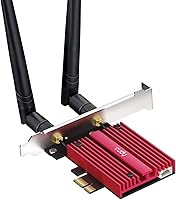
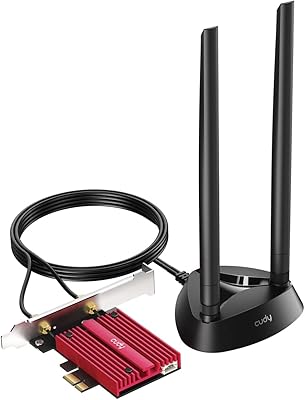
The Cudy WE9300 WiFi 7 PCIe Card is one of the more accessible ways to bring Wi-Fi 7 connectivity to a desktop build — but there is a hard requirement you need to know upfront. This desktop wireless adapter works exclusively with Intel platforms running Windows 11. AMD users, stop here. That is not a minor footnote; it is a fundamental compatibility wall. Built around the Intel BE200 chipset, it carries real engineering credibility rather than relying on lesser-known silicon. Theoretical combined speeds reach 9300 Mbps across three bands, though real-world performance in a typical home network will land considerably lower. Still, for Intel-based Windows 11 machines, this card is a compelling entry point into the Wi-Fi 7 era without a steep price tag.

Features & Benefits

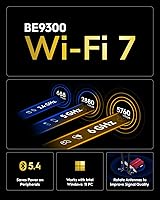
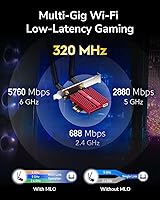
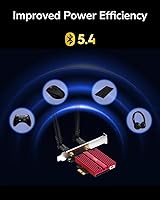
Tri-band coverage is the headline feature here. The 6 GHz band is where Wi-Fi 7 really distinguishes itself — less congestion, more available bandwidth, and theoretical peaks of 5760 Mbps that few home routers will fully saturate. The 5 GHz and 2.4 GHz bands handle legacy devices and longer-range connections. Chipset selection matters more than most buyers realize: the BE200 means Intel-signed drivers, better long-term OS update compatibility, and fewer random disconnection issues than generic alternatives. The built-in Bluetooth 5.4 is a practical bonus, letting you connect a wireless keyboard, headset, or controller without claiming a USB port. Installation slots into any PCIe x1 opening, and WPA3 support keeps security current on modern router configurations.

Best For

This Wi-Fi 7 PCIe card makes the most sense for a specific buyer: someone with an Intel-based desktop already running Windows 11, who either just upgraded to a Wi-Fi 7 router or is planning to. If you are still on Wi-Fi 5 or Wi-Fi 6 and want to future-proof your setup without rewiring your home, this adapter is a practical middle ground. It is also a solid pick for home office or gaming rigs where running ethernet cable simply is not realistic. The combined Wi-Fi and Bluetooth functionality means one card covers both needs cleanly. Budget-minded builders who want Wi-Fi 7 readiness without waiting for prices to drop further will find the value proposition here well-calibrated and honest.

User Feedback

Across more than a hundred ratings, the Cudy WE9300 holds a solid 4.3 out of 5, and the praise tracks predictably: straightforward installation, stable driver behavior, and real-world speeds that satisfy most home network use cases. Bluetooth connectivity earns decent marks too, with few reported pairing problems. Where things get rocky is compatibility. A noticeable share of frustrated buyers discovered the AMD and Windows 10 restrictions only after purchase — the kind of oversight that sours an otherwise positive experience. Some users noted the antennas feel lightweight in hand, though actual signal quality complaints are relatively rare. Buyers who meet the platform requirements generally feel the value holds up well, making it a reasonable Wi-Fi 7 entry point for the right setup.

Pros

  • The Intel BE200 chipset brings reliable driver support and long-term OS update compatibility.
  • Tri-band coverage across 2.4 GHz, 5 GHz, and 6 GHz handles a wide range of network environments.
  • Built-in Bluetooth 5.4 eliminates the need for a separate USB dongle for peripherals.
  • PCIe x1 installation is straightforward and fits virtually any modern motherboard.
  • WPA3 security support keeps the card current with modern router configurations.
  • Most buyers report stable connections and consistent real-world speeds in home network conditions.
  • The price makes Wi-Fi 7 accessible without requiring a premium budget.
  • Two external antennas improve signal reception compared to single-antenna alternatives.
  • At 4.3 out of 5 stars across over 100 ratings, user satisfaction is broadly positive.

Cons

  • Strictly incompatible with AMD platforms — no exceptions, no workarounds.
  • Requires Windows 11; users still on Windows 10 cannot use this desktop wireless adapter.
  • Theoretical max speeds are far above what most home networks can realistically deliver.
  • The antennas feel lightweight and somewhat cheap in hand, according to several buyers.
  • Buyers who miss the platform requirements in the listing often end up with a return on their hands.
  • No support for Linux or other operating systems limits flexibility for multi-OS setups.
  • Wi-Fi 7 performance gains are only meaningful if you also own a Wi-Fi 7 router.
  • The Cudy brand carries less recognition than established networking names, which concerns some buyers.
  • No included extension bracket, which can be an issue in certain smaller or older PC cases.

Ratings

The scores below reflect our AI-driven analysis of verified global user reviews for the Cudy WE9300 WiFi 7 PCIe Card, with spam, bot-generated, and incentivized feedback actively filtered out before scoring. Each category is weighted against real buyer experiences, meaning both standout strengths and recurring frustrations are represented honestly. Where this desktop wireless adapter earns high marks, it genuinely earns them — and where it falls short, that is reflected too.

Value for Money
88%
For buyers who meet the platform requirements, the price-to-performance ratio on this Wi-Fi 7 PCIe card is one of its most compelling attributes. Getting Intel BE200-backed Wi-Fi 7 with Bluetooth 5.4 included at this price point is genuinely difficult to match in the current market.
The value calculation only works if you already own a Wi-Fi 7 router — without one, you are paying for capability you cannot yet use. A handful of buyers felt the savings were offset by the cost of upgrading their router simultaneously.
Installation Ease
91%
The plug-and-play experience on qualifying Intel Windows 11 systems is consistently praised across user reviews. Most buyers reported that Windows 11 detected the card and loaded Intel drivers automatically, with the full setup taking under ten minutes.
The experience falls apart entirely if your system does not meet the compatibility requirements, which some buyers only discovered at the installation stage. There is no low-profile bracket included, which caused fitment problems for a small number of compact case owners.
Wireless Performance
79%
21%
Real-world speeds on the 6 GHz band impressed users who had upgraded to Wi-Fi 7 routers, with noticeably lower latency and faster file transfers compared to their previous Wi-Fi 6 cards. Gamers and remote workers in congested apartment environments particularly appreciated the cleaner 6 GHz channel.
Buyers expecting anywhere near the theoretical 9300 Mbps will be disappointed — real-world throughput is heavily dependent on router quality and physical distance. Performance on the 2.4 GHz band is unremarkable and no better than older-generation cards.
Driver Stability
86%
The Intel BE200 chipset choice pays off here in a meaningful way. Users report fewer random disconnections and smoother Windows Update compatibility compared to cards built on less mainstream chipsets, and Intel driver releases have been reliable since launch.
A small subset of users reported needing to manually update drivers after a Windows 11 feature update caused brief connectivity issues. Non-Intel systems have no driver path at all, which is worth reiterating as a hard constraint.
Bluetooth Performance
77%
23%
Bluetooth 5.4 works reliably for everyday peripheral use — wireless keyboards, mice, and headsets all pair without notable friction according to most reviewers. The convenience of consolidating Wi-Fi and Bluetooth into a single PCIe slot is genuinely appreciated by compact build enthusiasts.
A few users noted occasional re-pairing requirements after system restarts, particularly with some Bluetooth audio devices. Range is adequate for desk setups but not exceptional, and power users with multiple simultaneous Bluetooth devices reported minor instability.
Platform Compatibility
43%
57%
For its intended audience — Intel CPU builds on Windows 11 — the Cudy WE9300 works exactly as described with no major compatibility complaints from qualifying users. Within that narrow window, the experience is consistent and reliable.
The compatibility story is the single biggest weakness of this card. It categorically excludes every AMD platform and every version of Windows below Windows 11, which represents a substantial portion of the desktop PC market. This limitation has generated more negative reviews than any other single issue.
Build Quality
68%
32%
The card itself feels solid once installed and seated in the PCIe slot, and the black-and-red aesthetic is clean and unobtrusive inside most builds. Users have not reported any structural failures or physical defects at a meaningful rate.
The external antennas are the most commonly cited quality concern — they feel lightweight and plasticky relative to what buyers expect at this price tier. Several reviewers noted the antenna connectors feel less robust than premium alternatives, though functional performance has not been widely impacted.
6 GHz Band Access
83%
Access to the 6 GHz band is the core reason to buy any Wi-Fi 7 card, and this desktop wireless adapter delivers on that front for users with compatible routers. The reduction in channel congestion compared to 5 GHz is tangible in dense urban environments.
The 6 GHz band has limited range penetration through walls, and some users found the signal degraded quickly when moving even one room away from the router. The benefit is most pronounced in direct line-of-sight or open-plan environments.
Signal Range
72%
28%
The two multi-directional antennas do a reasonable job of maintaining stable connections across a typical single-floor home layout. Users in medium-sized homes with their router in an adjacent room generally reported clean, uninterrupted connections.
Multi-floor homes or larger spaces with the router at a distance exposed the card's range limitations, especially on the 6 GHz band. A few users in larger properties noted that their older Wi-Fi 6 card actually maintained better range due to the superior wall-penetration characteristics of the 5 GHz band.
OS & Software Experience
66%
34%
On Windows 11 with an Intel platform, the software side of the experience is clean and low-maintenance. Intel's driver ecosystem means updates arrive through standard Windows Update channels without requiring manual intervention in most cases.
The hard Windows 11 requirement is the central pain point here. Users who prefer Windows 10 or run dual-boot Linux configurations have no supported path, and the lack of any Linux driver support is a notable gap for a card targeting technically proficient desktop builders.
Security Features
81%
19%
WPA3 support is a meaningful inclusion that future-proofs the card against evolving router security standards. Users upgrading from older cards appreciated not having to compromise on security protocol compatibility with their newer routers.
WPA3 support is now fairly standard across Wi-Fi 6 and Wi-Fi 7 cards, so this is less of a differentiator than it once was. There are no advanced security software utilities bundled with the card, which is expected at this price point but worth noting.
Package Contents
62%
38%
The included antennas are ready to use immediately out of the box, and the card ships with a standard full-height bracket that fits most mid-tower and full-tower cases without issue.
The absence of a low-profile bracket was a recurring complaint from small form-factor PC builders. There is no driver disc or printed quick-start guide included, which is fine for technically confident users but left some less experienced buyers uncertain about the setup process.
Real-World Speed Consistency
74%
26%
Users who set up the card with a matched Wi-Fi 7 router report consistent speeds during sustained activities like 4K streaming, large file downloads, and online gaming sessions. Throughput held steady under moderate network load without significant drop-off.
Speed consistency degrades noticeably under heavy multi-device household network conditions, and the gap between advertised and delivered speeds disappointed buyers who took the 9300 Mbps figure at face value. Managing expectations upfront would likely reduce a meaningful share of the negative reviews.

Suitable for:

The Cudy WE9300 WiFi 7 PCIe Card is the right call for desktop PC owners who have already committed to an Intel platform, are running Windows 11, and want to step into Wi-Fi 7 without spending a lot doing it. It fits particularly well in home office or gaming setups where pulling a dedicated ethernet cable is not realistic, and where having a stable, modern wireless connection matters day to day. If you recently upgraded to a Wi-Fi 7 router — or plan to — this card lets your desktop actually take advantage of that investment, especially on the less congested 6 GHz band. The built-in Bluetooth 5.4 makes it a clean single-card solution for users who also want to connect wireless peripherals without burning a USB slot. Budget-conscious builders who want a credible, chipset-backed Wi-Fi 7 upgrade rather than a no-name alternative will find this desktop wireless adapter a well-reasoned choice.

Not suitable for:

The Cudy WE9300 WiFi 7 PCIe Card has a hard compatibility wall that disqualifies a large share of potential buyers: it does not work on AMD platforms, period. If your desktop runs a Ryzen processor, this card simply will not function as intended, and no workaround changes that. Windows 10 users are equally out of luck — Wi-Fi 7 support is locked to Windows 11, so anyone holding off on that OS upgrade will hit a dead end. Users expecting the theoretical 9300 Mbps combined speeds in a real home environment will also be disappointed; actual throughput depends heavily on router capability, signal distance, and network congestion. If you need a wireless solution for a multi-OS setup, a Linux machine, or any AMD-based build, this desktop wireless adapter is the wrong tool regardless of its other strengths.

Specifications

  • Wi-Fi Standard: This card supports Wi-Fi 7 (802.11be), the latest wireless generation offering improved throughput, lower latency, and access to the 6 GHz band.
  • Chipset: Built on the Intel BE200 chipset, which provides stable driver support and reliable long-term compatibility with Intel-based Windows systems.
  • Interface: Uses a PCIe x1 interface, making it compatible with virtually any modern desktop motherboard that has a spare PCIe slot.
  • Frequency Bands: Tri-band design covers 2.4 GHz, 5 GHz, and 6 GHz simultaneously, allowing connection to whichever band offers the best performance.
  • Max Speed: Combined theoretical maximum throughput reaches 9300 Mbps across all three bands under ideal conditions.
  • 6 GHz Speed: The 6 GHz band supports theoretical speeds up to 5760 Mbps, the fastest of the three bands and the primary benefit of Wi-Fi 7.
  • 5 GHz Speed: The 5 GHz band supports theoretical speeds up to 2882 Mbps, suitable for most streaming and gaming workloads.
  • 2.4 GHz Speed: The 2.4 GHz band operates at up to 688 Mbps, providing broader coverage range at lower speeds for legacy or distant devices.
  • Bluetooth: Integrated Bluetooth 5.4 allows connection of wireless peripherals such as keyboards, mice, and headsets without requiring a separate USB adapter.
  • Security: WPA3 encryption is supported, ensuring compatibility with current-generation router security configurations.
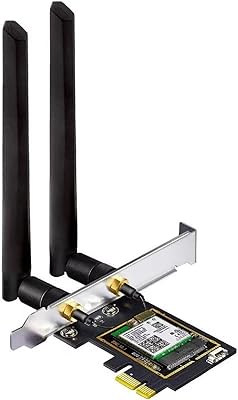
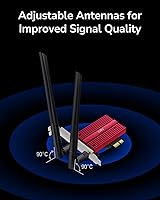
  • Antennas: Two external multi-directional antennas are included to improve signal reception and maintain connection stability across varying room layouts.
  • OS Support: Officially supported only on Windows 11; the card does not function on Windows 10 or any other operating system.
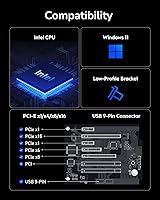
  • Platform Support: Compatible exclusively with Intel CPU platforms; AMD-based desktops are not supported under any configuration.
  • Dimensions: The card measures 2.76 x 1.79 x 0.79 inches, a compact form factor that fits standard PCIe slots without blocking adjacent components.
  • Weight: The unit weighs 9.2 ounces including the antennas, which is typical for a dual-antenna PCIe wireless card.
  • Color: The card features a black and red color scheme consistent with Cudy's product line aesthetic.
  • Model Number: The official model designation is WE9300, used for identifying drivers, firmware updates, and manufacturer support resources.
  • Manufacturer: Designed and manufactured by Shenzhen Cudy Technology Co., Ltd., a China-based networking hardware company.

Related Reviews
GLOTRENDS BE200 Wi-Fi 7 PCIe Card
77%
88%
Wireless Performance
76%
Installation Ease
53%
Compatibility Clarity
91%
Antenna Design
74%
Bluetooth Reliability
More
Cudy WE4000 WiFi 6E PCIe Card
81%
91%
Value for Money
83%
WiFi Performance
88%
Installation Ease
62%
Bluetooth Functionality
84%
Driver Stability
More
Cudy WE3000 WiFi 6 PCIe Card
80%
83%
WiFi Performance
88%
Installation Ease
81%
Signal Range
74%
Bluetooth Quality
69%
Driver Stability
More
GIGABYTE GC-WIFI7 WiFi 7 PCIe Card
77%
83%
Wireless Performance
88%
Installation Ease
71%
Router Compatibility
86%
Connection Stability
67%
Case Compatibility
More
TP-Link Archer TBE550E
77%
91%
Wireless Performance
43%
OS Compatibility
84%
Installation Ease
88%
Latency & Gaming
78%
Bluetooth Performance
More
OKN AX210 WiFi 6E PCIe Card

78%
91%
Value for Money
83%
Wireless Performance
74%
Installation Ease
61%
6GHz Band Access
71%
Bluetooth Performance
More
Cudy WR6500 WiFi 7 Dual-Band Router
75%
88%
Value for Money
76%
Wireless Performance
84%
Setup & Installation
67%
Range & Coverage
91%
Wired Connection Quality
More
Cudy M3600 1-Pack WiFi 7 Mesh System
77%
91%
Value for Money
78%
Wireless Performance
67%
Coverage & Range
93%
VPN Flexibility
88%
Setup & Installation
More
BZIZU AX210 WiFi 6E PCIe Card
80%
86%
Wireless Performance
67%
6GHz Band Access
82%
Installation Ease
83%
Bluetooth Performance
74%
Driver Stability
More
Cudy WR11000 WiFi 7 Tri-Band Router
74%
88%
Value for Money
76%
Wireless Performance
91%
Wired Port Quality
84%
Setup & Ease of Use
79%
Mobile App Experience
More

FAQ

No, it will not. The Cudy WE9300 WiFi 7 PCIe Card is explicitly limited to Intel CPU platforms and will not function correctly on AMD-based systems. This is one of the most important things to confirm before purchasing.

Yes, Windows 11 is required. The Intel BE200 chipset that powers this card does not have official driver support for Windows 10 or earlier. If you are still running Windows 10, you will need to upgrade before this card becomes usable.

You need a Wi-Fi 7 router to unlock the full advantages, particularly access to the 6 GHz band and higher throughput. That said, the card will still connect to Wi-Fi 6 or Wi-Fi 5 routers on the 5 GHz and 2.4 GHz bands, just without the Wi-Fi 7 enhancements.

It is fairly straightforward. You power down your PC, insert the card into any available PCIe x1 slot, secure it with the bracket screw, attach the antennas, and boot into Windows 11. Most users report that Windows automatically detects and installs the Intel drivers without any manual steps required.

Yes, the Bluetooth 5.4 radio and the Wi-Fi radio operate independently and can be used simultaneously. You can be connected to your network while also having a wireless headset or controller paired through Bluetooth without one interfering with the other.

Almost certainly not, and that is true of every Wi-Fi card on the market. The 9300 Mbps figure is a combined theoretical maximum across all three bands under laboratory conditions. In a real home network, your actual speeds will depend on your router, distance from the router, interference, and your internet service plan. Most users see practical wireless speeds well below that ceiling.

The card ships with the two external antennas and a standard full-height PCIe bracket. Some users with smaller form-factor cases have noted there is no low-profile bracket included, so it is worth checking your case compatibility before ordering.

User feedback on Bluetooth is generally positive, with most reporting reliable pairing and stable connections for peripherals like keyboards and headsets. Range is comparable to other integrated Bluetooth solutions. A small number of users mentioned occasional pairing quirks, but these appear to be the exception rather than the norm.

Officially, no. The Intel BE200 chipset has some community-driven Linux driver work in progress, but the manufacturer only guarantees support on Windows 11. If Linux compatibility is important to your setup, this is not the right card to rely on.

The antennas are functional and do the job, but they do feel lightweight compared to what you might find on premium networking cards. Several buyers have noted they feel a bit plasticky. That said, actual signal performance complaints are rare, so it appears to be more of an aesthetic concern than a functional one.

Where to Buy