Overview

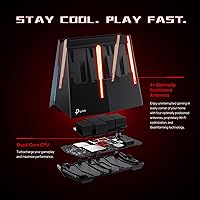
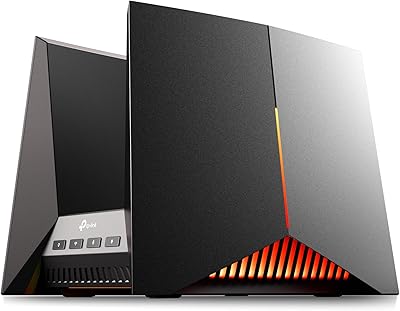
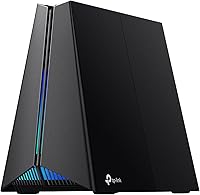
The TP-Link Archer GE650 Wi-Fi 7 Gaming Router is TP-Link's most ambitious push into the gaming router space, bringing the 802.11be standard to households that refuse to compromise on latency. Classified as BE11000 tri-band, it pulls theoretical combined speeds that sound staggering on paper — but the real story is how that headroom translates to a noticeably calmer, more consistent connection during peak household usage. The volcano-inspired chassis and customizable RGB lighting give it a distinct personality that most competing routers lack. Among the wave of Wi-Fi 7 routers that arrived in early 2025, this one targets gamers who want purpose-built features, not just raw speed numbers.
Features & Benefits

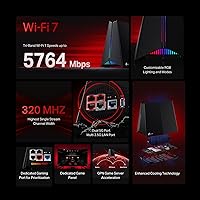
The dedicated 6 GHz gaming band is arguably the standout feature here — it keeps your game traffic on its own lane while the rest of the household streams, video calls, and browses on the other bands. Wi-Fi 7's Multi-Link Operation technology takes this further by letting devices draw on all three frequency bands simultaneously, which cuts latency and keeps connections stable even when the network gets busy. On the wired side, five multi-gig ports mean serious setups won't hit a bottleneck. Built-in WTFast integration routes game traffic more efficiently to major platforms, and the Game Panel dashboard puts real-time network control within a few taps.

Best For

This Wi-Fi 7 gaming router makes the most sense in a busy household where one person is gaming while others are pulling serious bandwidth. If you're on a multi-gig internet plan and your current router is clearly the bottleneck, the Archer GE650's wired and wireless throughput will actually use what you're paying for. Console and PC gamers moving up from Wi-Fi 6 or 6E will notice the difference, though the full Wi-Fi 7 gains require compatible client devices on your end. It also suits anyone who wants a visually bold setup — this is not a router you tuck away out of sight.

User Feedback

Across thousands of reviews, the pattern is fairly consistent: buyers respond well to the quick setup process, strong signal coverage, and real reductions in in-game ping. The RGB and Game Panel controls earn praise for being intuitive, though a portion of users find the companion app somewhat cluttered once you move past the basics. A handful of owners flag that the unit runs noticeably warm under sustained load — worth considering if you plan to keep it in an enclosed space. The HomeShield security suite is useful, but it shifts to a paid subscription after the trial period, which catches some buyers off guard. Overall, the value perception sits solidly in the positive range.

Pros

  • Dedicated 6 GHz gaming band keeps your ping steady even when the whole household is online at once.
  • MLO technology across all three bands delivers connection stability that single-band routers cannot match.
  • Five multi-gig wired ports mean wired gaming rigs and fast NAS devices finally get the throughput they deserve.
  • WTFast integration actively optimizes traffic routing to major gaming platforms, not just traffic prioritization on paper.
  • Setup is fast and approachable — most buyers are fully online within minutes of unboxing.
  • The Game Panel dashboard gives real-time visibility into which devices are using your network and how much.
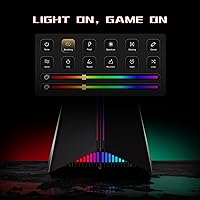
  • Customizable RGB lighting is refined enough to complement a premium gaming desk setup without looking cheap.
  • Strong signal coverage in single-floor and open-plan homes, reducing the need for a mesh satellite node.
  • The 4.4-star rating across thousands of real buyers signals this router delivers on its core promises consistently.
  • Buyers on multi-gig internet plans finally have a router that keeps pace with the speeds they are actually paying for.

Cons

  • HomeShield security and parental controls shift to a paid subscription after the trial — a recurring cost not obvious at checkout.
  • Wi-Fi 7 performance gains are largely inaccessible if your devices do not support the 802.11be standard yet.
  • The companion app becomes noticeably cluttered when navigating advanced settings beyond basic setup.
  • The chassis runs warm under sustained heavy load, making enclosed or poorly ventilated placement a real concern.
  • USB storage performance is underwhelming relative to the router's overall capability and price positioning.
  • 6 GHz band range drops off meaningfully in multi-story homes or spaces with dense building materials.
  • No 10G port is a gap that stands out for buyers building the most bandwidth-intensive wired setups.
  • Advanced QoS and traffic management features require a learning curve that may frustrate less technical users.
  • The app experience is inconsistent between iOS and Android, with some features behaving differently across platforms.

Ratings

The TP-Link Archer GE650 Wi-Fi 7 Gaming Router earns its place among the most talked-about gaming routers of 2025, and these scores reflect what real buyers actually experienced — not marketing claims. Our AI rating system analyzed thousands of verified global reviews, actively filtering out incentivized, bot-generated, and duplicate feedback to surface honest patterns. Both the genuine strengths and the friction points that show up repeatedly in buyer accounts are transparently baked into every score below.
Wireless Performance
91%
Users upgrading from Wi-Fi 6 routers consistently describe a meaningful drop in in-game ping, particularly in busy households where multiple devices are active simultaneously. The dedicated 6 GHz band keeps gaming traffic isolated, and MLO technology adds a layer of connection stability that older standards simply cannot match.
The full performance ceiling is only accessible if your devices support Wi-Fi 7, which limits immediate gains for buyers with older laptops or phones. A small subset of users also reported inconsistent 6 GHz range in homes with thick walls or multiple floors.
Gaming-Specific Features
93%
The WTFast integration and dedicated gaming band combination stands out as genuinely functional rather than cosmetic. Gamers using Steam or competitive titles report noticeably smoother sessions when multiple family members are streaming or on video calls at the same time.
WTFast acceleration covers a solid list of platforms but does not extend to every game or service, which is a mild disappointment for players outside the mainstream titles. Some users also noted the Game Panel stats dashboard, while visually impressive, has a slight learning curve before it becomes genuinely useful.
Wired Connectivity
89%
Five multi-gig ports — including two at 5 Gbps — is a setup that serious wired gamers and NAS users genuinely appreciate. For households already on multi-gig internet plans, this router finally stops being the bottleneck between the wall and the device.
The absence of a 10G port means the most bandwidth-intensive enterprise-style setups may still feel constrained. A small number of reviewers wished for more than three 2.5G LAN ports given the router's positioning as a premium multi-device hub.
Setup & Ease of Use
86%
The initial setup process draws consistent praise across buyer segments, including users who describe themselves as non-technical. The Tether app guides you through configuration quickly, and most buyers report being fully online within minutes of unboxing.
The app experience gets noticeably more complex once you move past the basics — navigating advanced QoS settings, HomeShield controls, and RGB customization simultaneously feels cluttered to some users. A cleaner separation between beginner and advanced modes would help.
Software & App Experience
71%
29%
The Tether app handles everyday tasks well: checking connected devices, tweaking band priorities, and adjusting the Game Panel are all accessible without digging through menus. For most buyers, it covers 80 percent of what they actually need on a daily basis.
Power users report that the app occasionally lags when loading real-time network statistics, and the interface feels inconsistent across iOS and Android. Some features that should logically live in one place are spread across multiple sub-menus, which adds unnecessary friction.
HomeShield Security Suite
67%
33%
During the included trial period, HomeShield provides solid parental controls and real-time threat monitoring that parents and security-conscious buyers genuinely value. The interface for setting content filters by device or profile is more intuitive than many competing solutions.
The recurring subscription requirement after the trial ends is the single most mentioned frustration in negative reviews — buyers feel it should be included given the router's price tier. Those who decline to subscribe lose access to a meaningful chunk of the advertised security feature set.
Build Quality & Design
84%
The volcano-inspired chassis feels substantial and premium in hand, and the angular lines read as genuinely distinctive compared to the generic tower designs flooding the gaming router market. Most buyers who keep it on a desk treat it as a display piece, not just a utility device.
A portion of reviewers flag that the unit runs warmer than expected under sustained heavy load, which raises minor concerns about long-term thermal management. The design also skews large for buyers hoping to tuck it into a media cabinet or shelf.
RGB Lighting & Customization
78%
22%
The RGB implementation is more refined than many competitors, with smooth color transitions and enough zone control to satisfy buyers who care about matching their setup aesthetics. Turning it off entirely is also straightforward for those who prefer a cleaner look.
A subset of users finds the RGB configuration buried too deep in the app, requiring more taps than it should for something that should feel immediate. The lighting effects, while good, stop short of the granular per-zone control offered by some rival gaming routers.
Signal Range & Coverage
82%
18%
In open-plan homes and single-floor layouts, the Archer GE650 delivers strong signal across the full footprint without needing a mesh node. Users in medium-sized homes report reliable coverage in rooms that previously had dead zones with their older routers.
In multi-story homes or properties with dense construction materials, the 6 GHz band in particular shows range limitations that require either positioning the router centrally or supplementing with a mesh satellite. This is a physics constraint of the frequency, but worth flagging for larger homes.
Latency & Ping Consistency
88%
Consistent low latency in competitive gaming scenarios is where this router earns its strongest word-of-mouth. Buyers playing fast-paced online titles report that ping spikes during peak household usage hours — a common complaint with previous routers — become far less frequent.
A handful of users note that latency improvements are most dramatic on wired connections and 6 GHz Wi-Fi 7 clients, with modest gains on older wireless devices. Buyers expecting across-the-board improvement on every device in the home may find the upgrade less transformative than anticipated.
Value for Money
76%
24%
For buyers who check the full feature list — Wi-Fi 7, MLO, multi-gig ports, WTFast, and a gaming-focused dashboard — the overall package feels competitive within the premium Wi-Fi 7 tier. Buyers who actively use the wired and gaming acceleration features generally rate the value positively.
The HomeShield subscription cost adds to the long-term ownership price in a way that is not immediately obvious at purchase, nudging the value calculation downward for security-focused buyers. Those who primarily need basic routing without gaming-specific tools may find more cost-efficient Wi-Fi 7 options available.
USB & File Sharing
58%
42%
The USB 3.0 port handles basic network-attached storage duties adequately for users who want a simple shared drive accessible across the home network. Setup for basic file sharing is straightforward through the Tether app.
Performance and feature depth for USB storage fall noticeably short of dedicated NAS devices and even some competing routers at this price point. Users who planned to use it as a media server or for regular large file transfers report disappointment with the transfer speeds and app functionality.
Parental Controls
73%
27%
The profile-based content filtering and screen time scheduling work reliably during the HomeShield trial, and parents with younger children consistently highlight these tools as a genuine reason they chose this router over alternatives.
Once the HomeShield trial expires, parental control functionality is significantly curtailed unless users pay the subscription fee — a friction point that feels disproportionate given the router's positioning as a premium home networking device.
Heat & Thermal Management
63%
37%
Under normal mixed usage — a few gaming sessions, background streaming, and general browsing — the unit maintains an acceptable temperature and runs without issue for the majority of buyers in well-ventilated spaces.
Extended high-throughput sessions push the chassis to noticeably warm temperatures, and buyers who place the router in enclosed spaces or media consoles report it running hotter than they are comfortable with. A more aggressive passive cooling design would have suited the performance class better.

Suitable for:

The TP-Link Archer GE650 Wi-Fi 7 Gaming Router is built for households where bandwidth is a constant point of contention — think a dedicated gamer in one room while others are streaming 4K, video calling, or downloading large files at the same time. The dedicated 6 GHz gaming band and MLO technology make a meaningful difference in exactly these scenarios, keeping game traffic stable without forcing everyone else to throttle down. PC and console gamers who are already on a multi-gig internet plan will finally have a router capable of actually using that bandwidth both over the air and through its multi-gig wired ports. It also suits buyers who want their networking gear to look intentional — the design is bold enough to sit on a desk without looking out of place next to a high-end gaming setup. Those already in the TP-Link ecosystem, familiar with the Tether app and Archer product line, will find the transition particularly smooth.
Not suitable for:

The TP-Link Archer GE650 Wi-Fi 7 Gaming Router is a poor fit for buyers whose devices are still running Wi-Fi 5 or Wi-Fi 6, since the most compelling performance gains are locked behind Wi-Fi 7 compatible hardware that many households simply do not own yet. If you live alone in a small apartment with a modest internet plan and a handful of devices, the feature depth here is more than you will realistically use — and you would be paying a premium tier price for capability that sits idle. Buyers who place heavy value on network security should go in clear-eyed: the HomeShield suite requires an ongoing subscription after the trial, and declining it noticeably reduces the router's security and parental control functionality. Anyone hoping to use the USB port as a reliable home media server or NAS alternative will likely be underwhelmed — that feature feels secondary at best. Finally, if the router needs to live in a closed cabinet or a poorly ventilated entertainment unit, the heat output under sustained load is a legitimate concern worth weighing.
Specifications

  • Wi-Fi Standard: The router operates on Wi-Fi 7 (802.11be), with backward compatibility for 802.11ax and 802.11ac devices.
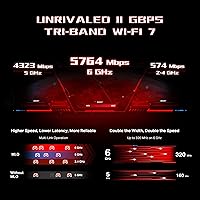
  • Speed Class: Tri-band BE11000 classification combines up to 5764 Mbps on 6 GHz, 4320 Mbps on 5 GHz, and 574 Mbps on 2.4 GHz.
  • Frequency Bands: Three simultaneous bands — 6 GHz, 5 GHz, and 2.4 GHz — are available, with the 5 GHz band designated as the dedicated gaming band.
  • Channel Width: Supports up to 320 MHz channel width on the 6 GHz band, the widest channel option introduced by the Wi-Fi 7 standard.
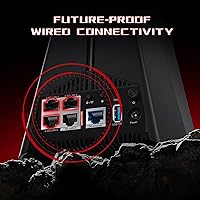
  • WAN Port: One 5 Gbps WAN port allows the router to fully utilize multi-gig internet service plans from compatible ISPs.
  • LAN Ports: Four wired LAN ports are included: one at 5 Gbps and three at 2.5 Gbps, supporting high-throughput wired connections for gaming rigs and other devices.
  • USB Port: One USB 3.0 port is built in for basic network-attached storage and file sharing across connected devices.
  • MLO Support: Multi-Link Operation (MLO) allows compatible Wi-Fi 7 client devices to transmit and receive data across multiple frequency bands simultaneously for lower latency.
  • Game Acceleration: WTFast game acceleration is integrated directly into the router firmware, optimizing traffic routing to major gaming platforms and services.
  • Gaming Port: A dedicated gaming port ensures the connected wired gaming device receives prioritized traffic handling through hardware-level separation.
  • Security Suite: HomeShield provides real-time threat protection and network monitoring, with advanced features including parental controls available through a subscription plan after the initial trial.
  • RGB Lighting: Customizable RGB lighting with multiple zones and effects is controllable through the TP-Link Tether app or the onboard Game Panel interface.
  • Game Panel: An integrated dashboard displays real-time network performance data, accelerated device status, and traffic prioritization controls in a single interface.
  • Dimensions: The unit measures 12.01 × 10.51 × 5.67 inches, reflecting a compact but visually prominent volcano-inspired physical design.
  • Weight: The router weighs 2.45 pounds, making it relatively easy to reposition during initial setup and placement.
  • Wireless Protocols: Supports IEEE 802.11be, 802.11ax, and 802.11ac, ensuring compatibility with a broad range of existing client devices while supporting next-generation hardware.
  • Parental Controls: Profile-based content filtering and scheduled access controls are available through HomeShield, with full functionality requiring an active subscription after the trial period.
  • In the Box: Package includes the router unit, one power adapter, one RJ45 Ethernet cable, and a Quick Installation Guide.

Related Reviews

TP-Link Archer GE800
80%
91%
Wireless Performance
94%
Wired Connectivity
88%
Gaming Latency & Prioritization
83%
Build Quality & Design
69%
RGB Lighting
More
TP-Link Archer BE400
80%
88%
Wireless Performance
91%
Setup & Ease of Use
78%
Coverage & Range
87%
Wired Port Performance
83%
Multi-Device Handling
More
TP-Link Archer AX55
TP-Link Archer AX55
76%
83%
Wireless Performance
74%
Coverage & Range
86%
Device Handling & Congestion
91%
Setup & Ease of Use
78%
Build Quality & Design
More
TP-Link BE3600 Wi-Fi 7 Travel Router TL-WR3602BE
85%
88%
Performance & Speed
94%
Portability & Size
85%
Wi-Fi Range & Connectivity
92%
Security Features
90%
Ease of Use & Setup
More
TP-Link Archer BE550
76%
83%
Wireless Performance
91%
Wired Port Quality
88%
Setup & Ease of Use
67%
Coverage & Range
58%
HomeShield Security & Parental Controls
More
TP-Link Archer BE700 WiFi 7 Router
85%
93%
Performance
88%
Ease of Setup
91%
Coverage & Range
94%
Speed (Wi-Fi 7)
85%
Security Features
More
TP-Link Archer BE24000 WiFi 7 Router
87%
94%
Performance
89%
Setup & Installation
92%
Connectivity & Compatibility
90%
Coverage & Range
88%
Security Features
More
TP-Link Archer BE260 WiFi 7 Router
85%
93%
WiFi Performance
89%
Ease of Setup
77%
Coverage & Range
91%
Streaming & Gaming Experience
85%
Design & Build Quality
More
TP-Link RE653BE Wi-Fi 7 Range Extender
80%
88%
Wireless Performance
83%
Wi-Fi 7 Feature Depth
79%
Coverage Range
93%
Ethernet Port Utility
86%
Setup & App Experience
More
TP-Link RE403BE BE6300 Wi-Fi 7 Range Extender
79%
81%
Wireless Performance
78%
Coverage Range
84%
Setup & Installation
91%
2.5G Ethernet Port
73%
EasyMesh Integration
More

FAQ

Not necessarily. Your existing Wi-Fi 6 and Wi-Fi 5 devices will still connect and work fine — the router is backward compatible. That said, the most significant performance improvements, like lower latency via MLO and the wider 320 MHz channels, are only accessible to devices that actually support Wi-Fi 7. Think of it as future-proofing: you get solid performance today and full capability as you upgrade your devices over time.

TP-Link offers a free trial of HomeShield Pro when you first set up the router, but after that trial ends, advanced features — including real-time threat protection, detailed parental controls, and network analytics — require a paid subscription. The basic router functionality, including Wi-Fi and port management, continues to work without a subscription. It's worth factoring the ongoing cost into your decision if those security features matter to you.

Yes, the Archer GE650 connects to any modem or ISP-supplied gateway via its 5 Gbps WAN port. If your current modem only supports standard gigabit speeds, that port will simply operate at the lower speed — you will not unlock the full multi-gig WAN capability until you also have a compatible multi-gig modem or ISP plan.

WTFast integration is built into the router, but WTFast itself operates on a freemium model — there is a base level of access included, with a premium WTFast subscription unlocking broader game support and more advanced routing options. For many popular titles and platforms, the included access covers everyday needs reasonably well.

The TP-Link Archer GE650 Wi-Fi 7 Gaming Router uses passive cooling rather than active fans, so it operates silently. The trade-off is that the chassis can run noticeably warm under sustained heavy use, which is worth keeping in mind when choosing where to place it.

For most single-floor homes and open-plan spaces, this router handles coverage on its own without needing mesh nodes. In larger or multi-story homes, you may still want to add a mesh satellite, and the Archer GE650 can work as the primary node in a compatible TP-Link mesh setup. It is not a mesh system by itself out of the box.

Setup is handled through the TP-Link Tether app on your phone, and for most standard home internet connections you will not need to contact your ISP or change modem settings. You plug in the router, follow the in-app steps, and it auto-detects your connection type in most cases. The process typically takes less than ten minutes for a straightforward home setup.

Yes, that is exactly what the dedicated gaming port is designed for. Plugging your console or gaming PC into that specific LAN port tells the router to prioritize that connection's traffic automatically, which helps keep latency low even when other devices on the network are active.

No, the RGB lighting is cosmetic and runs independently of the networking hardware. Turning it off entirely is straightforward through the app if you prefer a cleaner look or want to minimize any visual distraction in your space.

This is genuinely one of the scenarios this router handles best. The dedicated 5 GHz gaming band keeps game traffic isolated from everything else, while the 2.4 GHz and additional 5 GHz or 6 GHz capacity services the rest of the household. Combined with the QoS and traffic prioritization tools in the Game Panel, most users report that gaming performance stays stable even during peak evening usage when everyone in the house is online at once.