Overview

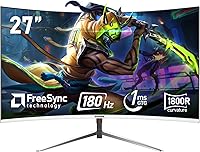
The Gawfolk GF270C 27-Inch Curved Gaming Monitor enters a crowded budget segment with a clear pitch: a large, immersive curved screen without the steep price that usually comes with it. Built around a 27-inch 1800R VA panel, it wraps your field of view just enough to feel engaging without going overboard. Gawfolk isn't a household name — the monitor is manufactured by Shenzhen Qinghong Zhuoyue Technology — so some skepticism is fair. That said, the bezel-free white design genuinely stands out on a desk dominated by black plastic. This is a value-tier display, and knowing that upfront sets the right expectations before you dive into the specs.
Features & Benefits

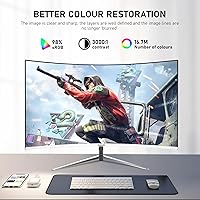
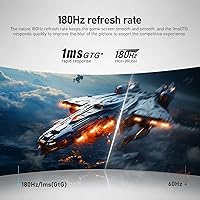
One thing worth getting straight before buying: you only get 180Hz over DisplayPort. Connect via HDMI and you are capped at 120Hz — a detail buried in the specs that catches a lot of buyers off guard. Still, 120Hz is far from slow, and the 1ms GTG response time keeps motion looking crisp in fast-paced games either way. The VA panel's 3000:1 contrast ratio is a genuine strength — blacks look deep and rich, which makes a real difference in darker game environments. Color coverage reaches 98% sRGB, solid for casual gaming and everyday use, though not suited for color-critical creative work. AMD FreeSync and VESA 100x100mm mounting round out a surprisingly capable spec sheet.

Best For

This curved gaming monitor hits a sweet spot for a fairly specific type of buyer. If you are building a first gaming setup or need a secondary screen that can handle spreadsheets by day and gaming sessions by night, the GF270C covers that ground well. The 1080p resolution at 27 inches stays sharp for most uses and keeps GPU demands low, which matters when your card is not top-of-the-line. AMD GPU owners get the most out of FreeSync without paying extra for it. Students and remote workers who game casually will also appreciate the low blue light mode and DC dimming during long desk sessions. Not recommended for anyone who needs precise color accuracy for creative or professional work.

User Feedback

Buyers generally come away impressed by how good the image looks for the asking price — contrast and color vibrancy tend to earn positive mentions. Stand stability, however, is a recurring concern; it feels a bit wobbly under normal use, making the VESA mount option more practical than optional. Several users noted that out-of-box color settings needed manual tweaking before things looked right. The HDMI refresh cap has also caused frustration among buyers who expected full 180Hz without checking port requirements first. Packaging quality is described as adequate, and the 12-month warranty provides some reassurance for a lesser-known brand, though long-term reliability data remains thin given how recently this Gawfolk screen became available.

Pros

  • 180Hz refresh rate over DisplayPort makes fast-paced gaming noticeably smoother without needing a high-end GPU.
  • The 3000:1 contrast ratio delivers genuinely deep blacks, which makes dark game environments look far better than on most IPS panels at this price.
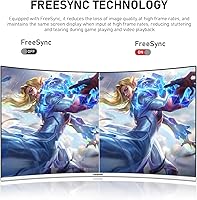
  • AMD FreeSync works out of the box, eliminating screen tearing for Radeon GPU users at no extra cost.
  • The frameless white design looks cleaner on a desk than most budget monitors in this category.
  • VESA 100x100mm support makes it easy to mount on a third-party arm for a more ergonomic setup.
  • DC dimming and low blue light mode are practical additions for anyone pulling long hours in front of the screen.
  • 1080p at 27 inches stays sharp for everyday gaming and keeps GPU load manageable on mid-range cards.
  • At this price, getting a 27-inch curved panel with 180Hz capability is genuinely hard to beat on paper.

Cons

  • HDMI users are capped at 120Hz, not 180Hz — a critical detail that is easy to miss before purchasing.
  • The included stand feels wobbly and lacks height or pivot adjustments, making ergonomics a real limitation.
  • Out-of-box color calibration often needs manual correction before the image looks its best.
  • VA panel ghosting can appear in fast, dark scenes — not deal-breaking, but noticeable compared to IPS alternatives.
  • At only 250 cd/m² brightness, this Gawfolk screen may struggle in brightly lit rooms or near windows.
  • Gawfolk has a short track record, making it hard to assess long-term build reliability with confidence.
  • The 12-month warranty is shorter than the two or three years offered by more established monitor brands.
  • No USB hub or built-in speakers means you will need to budget for additional peripherals if your setup is minimal.

Ratings

The Gawfolk GF270C 27-Inch Curved Gaming Monitor scores below are generated by AI after analyzing thousands of verified buyer reviews worldwide, with spam, incentivized, and bot-driven feedback actively filtered out. Ratings reflect the honest balance of what real users praised and where they ran into frustration — nothing is glossed over. Both the genuine strengths and the recurring pain points of this Gawfolk screen are transparently represented across every category.
Value for Money
83%
For buyers coming from 60Hz flat panels, the jump to a 180Hz curved screen at this price genuinely surprises people in a good way. Most users feel they got more display than their money typically buys, especially given the large panel size and the inclusion of FreeSync.
A few buyers who compared it carefully against similarly priced screens from established brands felt the build quality did not fully justify the gap. The short 12-month warranty also makes the long-term value proposition less certain than competing options.
Image Quality
78%
22%
The 3000:1 contrast ratio is the standout here — dark scenes in games like RPGs and horror titles look noticeably richer than what most IPS monitors at this price can produce. Colors are vibrant and lively, and the 98% sRGB coverage means everyday content looks genuinely pleasant.
Out-of-box calibration is inconsistent enough that many users needed to spend time adjusting brightness and color temperature before things looked right. For anything beyond casual gaming or media consumption, the color accuracy falls short of what content creators or serious editors expect.
Refresh Rate Performance
81%
19%
At 180Hz over DisplayPort, fast-paced shooters and racing games feel noticeably fluid compared to 60 or 75Hz panels, and users running AMD GPUs with FreeSync active report a clean, tear-free experience even at mid-range frame rates.
The HDMI cap at 120Hz has been a consistent source of frustration — users who connected via HDMI expecting full 180Hz performance felt misled, even though the spec is technically disclosed. This single issue drives down satisfaction more than almost any other factor in this category.
Response Time & Motion Clarity
74%
26%
In well-lit, fast-moving scenes across most game genres, the 1ms GTG rating holds up and motion looks clean and controlled. Casual and mid-level players switching from slower panels consistently notice the improvement in tracking moving targets.
VA panel ghosting surfaces in darker, high-contrast motion sequences — think fast enemies emerging from shadowy backgrounds — and some users found it distracting enough to affect gameplay. It is not a dealbreaker for most, but it is a real limitation that separates this from faster IPS competitors.
Build Quality
62%
38%
The frameless panel itself feels solid and the white finish looks clean and premium for the price tier. Users who mounted the screen via the VESA bracket reported the panel body felt sturdy and well-constructed once separated from the stand.
The included stand is the weakest link — it wobbles noticeably with minor desk bumps and lacks any height or swivel adjustment. Several buyers flagged that the plastic components around the base and rear feel noticeably cheap, which undermines the otherwise decent panel presentation.
Contrast & Black Levels
88%
This is where VA technology earns its reputation, and the GF270C does not disappoint. Blacks look genuinely dark rather than washed-out gray, and the depth this adds to cinematic games or late-night movie watching is one of the most consistently praised aspects across buyer reviews.
In very bright room conditions, the glossy panel surface can introduce reflections that reduce the perceived contrast advantage. The 250 cd/m² brightness ceiling also limits how punchy HDR-style content can look compared to higher-brightness alternatives.
Color Vibrancy
76%
24%
Everyday gaming content, streaming, and casual browsing all look colorful and engaging without any obvious dullness. The 98% sRGB coverage means most games render with the intended color palette, and buyers who just want a lively-looking screen are generally satisfied.
The colors can trend toward oversaturation straight out of the box, particularly with reds and greens, which requires manual correction to look natural. It is not a panel for anyone who needs accurate color representation for photo or video work.
Eye Comfort
79%
21%
DC dimming instead of PWM flickering is a meaningful feature for users who spend four or more hours a day at their desk, and several buyers specifically credited the low blue light mode with reducing headaches during long evening sessions.
At lower brightness levels, some users reported that the image loses punch and shadow detail suffers, making it harder to find a comfortable setting that balances eye comfort with picture quality. The low blue light mode also shifts whites toward a warm yellow tone that not everyone finds acceptable during daytime use.
Connectivity
67%
33%
Having both HDMI and DisplayPort covered means this monitor works cleanly with most modern PCs, laptops with DP output, and current-gen consoles. The VESA compatibility adds flexibility for users who want to ditch the stand and free up desk space.
The port selection is minimal — only one of each — so users with multiple devices will need a switch or will be swapping cables regularly. There is no USB hub, no headphone jack on the monitor itself, and no built-in speakers, which adds cost and cable clutter for users building a tidy desk setup.
Setup & Installation
82%
18%
Assembly is quick and straightforward — most users had the monitor up and running within ten minutes of opening the box. The stand clips into place without tools, and the cable routing is simple enough for first-time monitor buyers to handle confidently.
The instruction manual is minimal and the on-screen display menu takes some getting used to, with button placement that a handful of buyers found unintuitive. Users who needed to enable 180Hz manually in Windows display settings were occasionally confused by the process if they had never done it before.
FreeSync Implementation
84%
AMD GPU owners running mid-range cards like the RX 6600 or 6700 series report that FreeSync works reliably across a wide frame rate range, keeping gameplay smooth even when frame rates dip during demanding scenes. It activates without any complex configuration.
Nvidia users do not get the same guaranteed experience, and some found G-Sync Compatible mode either did not activate cleanly or introduced minor artifacts. The monitor's FreeSync range is not published prominently, which makes it harder to verify optimal performance before buying.
Stand & Ergonomics
44%
56%
The stand does get the monitor onto your desk at a usable height, and the basic tilt adjustment works adequately for users sitting at a fixed-height chair and desk. For someone who never adjusts their monitor, it is functional enough day to day.
There is no height adjustment, no swivel, and no pivot — the stand is as basic as it gets. The wobble issue is real and recurring across buyer feedback; even moderate typing vibration can cause the screen to shake, which becomes genuinely annoying during long sessions.
Brightness
58%
42%
In a typical indoor gaming room with controlled lighting, 250 cd/m² provides enough brightness for comfortable extended play without feeling harsh on the eyes in low-light conditions.
In brighter workspaces, near windows, or under strong overhead lighting, the screen can look washed out and dim. Users who work near natural light sources consistently flag brightness as a limitation, and the glossy surface compounds the problem by adding reflections.
Brand Trust & Warranty
53%
47%
Gawfolk does offer a 12-month warranty and buyers who contacted support for minor issues generally reported receiving a response, which is a baseline level of reassurance for a newer brand. The monitor arriving in good condition was noted positively in most unboxing feedback.
Twelve months is simply not competitive when brands like LG, AOC, and ViewSonic offer two to three years on comparable screens. The brand’s short track record means there is little independent data on long-term panel reliability, and that uncertainty is a legitimate concern for buyers who plan to keep a monitor for several years.
Packaging & Unboxing
71%
29%
Most buyers found the monitor arrived well-protected and free of visible damage, with adequate foam padding around the panel. The unboxing process is clean and the accessories — cables and stand components — are organized reasonably well inside the box.
The included cable selection is minimal, and some buyers received only one cable type, which is inconvenient if your PC setup requires DisplayPort for full refresh rate but you were not supplied one. The packaging itself is functional but does not communicate the level of care that premium monitor brands typically invest in presentation.

Suitable for:

The Gawfolk GF270C 27-Inch Curved Gaming Monitor makes the most sense for entry-level PC gamers and students who want a high-refresh-rate curved display without stretching their budget. If you are building your first dedicated gaming setup, this screen delivers a noticeably smooth experience at 180Hz over DisplayPort — something that was hard to find at this price point even a couple of years ago. AMD GPU owners benefit directly from FreeSync, which keeps gameplay tear-free without any extra cost or configuration headaches. The 1800R curve and large panel size also make it a reasonable pick for anyone who spends long hours at a desk and wants a more immersive feel during both work and play. Students sharing a small apartment setup, or anyone adding a secondary screen to an existing workstation, will find the bezel-free white design and VESA mount compatibility genuinely useful for managing desk space.
Not suitable for:

The Gawfolk GF270C 27-Inch Curved Gaming Monitor is not the right call for buyers who need color accuracy for creative work — 98% sRGB is respectable for gaming but falls short of what photo editors, video colorists, or designers need from a display. Competitive esports players who demand the absolute lowest input lag and the fastest panel response may also find that VA panels carry a slight ghosting risk in very dark, fast-moving scenes that IPS panels tend to handle better. Anyone planning to connect exclusively over HDMI should know upfront that they will be capped at 120Hz, not the advertised 180Hz — a meaningful distinction if high refresh rate is your main reason for buying. The included stand has drawn criticism for feeling unstable, so buyers who prefer not to invest in a separate arm or wall mount may find the ergonomic experience frustrating. Finally, those who place heavy weight on brand reputation or long-term reliability data may want to wait — Gawfolk is a newcomer without the track record of more established monitor brands.
Specifications

  • Screen Size: The panel measures 27 inches diagonally, offering a large viewing area well-suited for both gaming and everyday desktop use.
  • Panel Type: Uses a VA (Vertical Alignment) panel, which delivers strong contrast and rich blacks compared to IPS alternatives at a similar price.
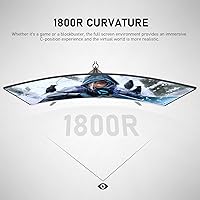
  • Curvature: The 1800R curvature gently wraps the screen around your field of view, reducing edge distortion and adding a sense of depth during long sessions.
  • Resolution: Native resolution is 1920x1080 (Full HD), which keeps the image sharp at 27 inches while remaining easy on mid-range graphics cards.
  • Refresh Rate: Supports up to 180Hz when connected via DisplayPort, and up to 120Hz when connected via HDMI — an important distinction for buyers chasing peak smoothness.
  • Response Time: Rated at 1ms GTG (gray-to-gray), which helps reduce motion blur and trailing in fast-moving game scenes.
  • Contrast Ratio: The native contrast ratio is 3000:1, a meaningful advantage of VA technology that makes dark scenes and shadow detail look noticeably better than on most IPS panels.
  • Color Gamut: Covers 98% of the sRGB color space, producing vibrant and reasonably accurate colors for gaming and general media consumption.
  • Color Depth: Supports 8-bit color, enabling smooth gradients and natural-looking transitions across the full palette.
  • Brightness: Peak brightness is rated at 250 cd/m², which is adequate for moderately lit rooms but may feel dim in very bright or sunlit environments.
  • Adaptive Sync: Compatible with AMD FreeSync, which synchronizes the monitor’s refresh rate with your GPU output to reduce screen tearing and stuttering.
  • Dimming Tech: Uses DC global dimming rather than PWM, which eliminates the high-frequency flicker that can cause eye strain during extended use.
  • Low Blue Light: Includes a dedicated low blue light mode that filters short-wave blue light, useful for reducing eye fatigue during long work or gaming sessions.
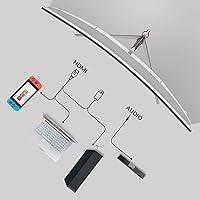
  • Ports: Connectivity includes one HDMI port and one DisplayPort input, covering the most common connection types for both PC and console users.
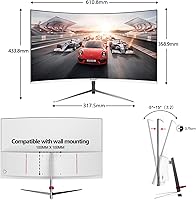
  • VESA Mount: The rear of the monitor is VESA 100x100mm compatible, making it straightforward to attach to most third-party monitor arms or wall mounts.
  • Bezel Design: Features a frameless (borderless) design on three sides, which creates a cleaner aesthetic and reduces visual distraction during gameplay.
  • Dimensions: The monitor measures 24.06 x 17.09 x 5.63 inches with the stand attached, fitting comfortably on most standard desks.
  • Weight: Weighs 9.78 pounds including the stand, which is typical for a 27-inch curved display and manageable for single-person setup.
  • Warranty: Comes with a 12-month manufacturer warranty covering defects, which is shorter than the 2–3 year coverage offered by some competing brands.
  • Aspect Ratio: Standard 16:9 widescreen aspect ratio, compatible with virtually all games, applications, and video content without letterboxing or distortion.

Related Reviews

Skytech Gaming Moonshadow 27-inch Curved Gaming Monitor

83%
88%
Image Quality
91%
Refresh Rate Performance
86%
Adaptive-Sync
83%
VA Panel Contrast
84%
Stand & Ergonomics
More
Sealan 27-inch Curved Gaming Monitor
82%
85%
Display Quality
90%
Ease of Setup
91%
Value for Money
87%
Performance in Gaming
83%
Color Accuracy
More
Gawfolk GF320C 32-Inch Curved Gaming Monitor
75%
88%
Refresh Rate Performance
83%
Image Quality
76%
Motion Clarity
86%
Curvature & Immersion
91%
Value for Money
More
CRUA CR270C 27″ Curved Gaming Monitor
71%
83%
Value for Money
78%
Image Quality
81%
Refresh Rate Performance
86%
Panel Contrast & Blacks
67%
Build Quality
More
FYHXele 27-inch Curved Gaming Monitor
73%
84%
Gaming Performance
71%
Image Quality
88%
Value for Money
83%
Design & Aesthetics
62%
Build Quality
More
ArcticPro AD27EF4C 27-inch Curved Gaming Monitor
74%
88%
Value for Money
91%
Refresh Rate Performance
79%
Panel & Image Quality
76%
Motion Clarity
53%
Ergonomics & Adjustability
More
Viewedge 27-inch Curved Gaming Monitor CS27FHUS
84%
92%
Gaming Performance
89%
Display Quality
82%
Build Quality
91%
Ease of Setup
88%
Immersion & Comfort
More
GreBear BM27QA 27-inch Curved Gaming Monitor
65%
83%
Image Quality
78%
Gaming Performance
74%
Refresh Rate Value
61%
Build Quality
44%
Ergonomics & Adjustability
More
Samsung S39C 27-Inch Curved Gaming Monitor
75%
83%
Picture Quality & Color Accuracy
88%
Curvature & Immersion
61%
Refresh Rate & Gaming Performance
86%
Eye Comfort & Long-Session Usability
79%
Build Quality & Aesthetics
More
GAMEPOWER T50 27-Inch Curved Gaming Monitor
66%
83%
Value for Money
79%
Gaming Performance
74%
Display Quality
61%
Pixel Density & Sharpness
62%
Build Quality
More

FAQ

You get 180Hz only when using a DisplayPort cable. If you connect via HDMI, the monitor caps out at 120Hz. Both are fast enough for smooth gameplay, but if hitting 180Hz is the whole point for you, make sure you have a DisplayPort connection available on your GPU before buying.

Yes, it will work with both consoles over HDMI. Just keep in mind that consoles connect via HDMI, so you will be limited to 120Hz rather than 180Hz. At 1080p and 120Hz, the gaming experience is still very smooth for console play.

FreeSync is AMD’s technology and works natively with Radeon GPUs. Some Nvidia cards support FreeSync monitors through Nvidia’s G-Sync Compatible program, but results vary by card and driver version. If you have an Nvidia GPU, it is worth checking Nvidia’s compatibility list before assuming it will work.

VA panels in general have a higher tendency toward ghosting in very dark, fast-moving scenes compared to IPS panels. For most gaming genres it is a non-issue, but if you play a lot of dark, fast-paced titles like horror shooters, you may notice faint trailing behind moving objects. Turning on the monitor’s overdrive mode can help reduce this.

The stand supports basic tilt adjustment but does not offer height, swivel, or pivot adjustments, which is a common limitation at this price. If you need proper ergonomic positioning, it is worth investing in a VESA-compatible monitor arm since the rear of this screen supports 100x100mm mounting.

Most users report that the default color settings are a bit oversaturated or warm straight from the box. A quick manual adjustment to brightness, contrast, and color temperature usually gets it looking much better. For casual gaming this is a minor inconvenience; for anything color-sensitive, a proper calibration tool would be needed.

At 27 inches, 1080p works out to around 82 pixels per inch, which is lower than smaller screens at the same resolution. Text and fine details may look slightly softer compared to a 24-inch 1080p monitor, but for gaming and media it holds up fine. If pixel-perfect sharpness is a priority, a 1440p option would be a better fit.

Yes, the back of the GF270C has a standard 100x100mm VESA mounting pattern, so it is compatible with most wall mounts and desk arms. This is actually a good option given that the included stand is not the most stable, and mounting frees up desk space as a bonus.

Activating low blue light mode does shift the color temperature toward warmer tones, which can make whites look slightly yellowish. It is a worthwhile trade-off for long evening sessions where eye comfort matters more than color accuracy. You can toggle it off when watching movies or doing anything color-sensitive during the day.

It is functional but on the shorter end — most established monitor brands offer two to three years. The 12-month window covers you for early defects, which is where most panel failures tend to show up anyway. If extended protection matters to you, check whether your credit card offers purchase protection, as some cards extend manufacturer warranties automatically.