CUNPU U27 27-inch 4K IPS Monitor




Overview
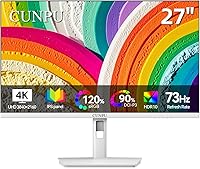
The CUNPU U27 27-inch 4K IPS Monitor enters a market full of look-alike black panels and immediately does something different: it comes in white. That choice alone gives it a distinct visual identity most budget monitors simply don't have. CUNPU is a newer, lesser-known brand, which is worth being upfront about — there's less of a track record to rely on compared to established names. Still, the core offer is compelling: a full UHD resolution spread across a 27-inch IPS screen, bringing real sharpness and color depth at a price that won't cause sticker shock. One quirk worth flagging early is the 73Hz refresh rate — not a standard number, and slightly above the typical 60Hz baseline.
Features & Benefits
What this white 4K monitor gets genuinely right is color. The 100% DCI-P3 coverage, paired with a delta-E rating that stays below 2, puts it in legitimate territory for photo editing and video work — not just on paper, but in practice. IPS technology keeps colors consistent across wide viewing angles, which matters when you're sharing your screen or working in a collaborative space. The E-Book mode is a small but practical touch, shifting the display toward a softer, paper-like tone that reduces fatigue during long reading sessions. Connectivity is solid: two HDMI 2.0 ports and a DisplayPort 1.4, covering most setups. At 300 nits, indoor brightness is comfortable, though HDR content won't have much room to breathe here.
Best For
This IPS panel makes the clearest sense for creative users on a budget. Photographers and graphic designers who need accurate, reliable color reproduction — but can't justify spending on a professional-grade display — will find the specs here surprisingly capable. Remote workers and students looking for a large 4K screen for daily tasks will appreciate the sharp, comfortable image without a complicated setup. It's also a natural pick for anyone putting together a white or minimalist workspace, where finding a monitor that doesn't clash aesthetically is harder than it sounds. Console gamers with a PS5 or Xbox can connect and enjoy native 4K — just don't expect this to compete with high-refresh gaming panels. Writers and heavy readers will get real value from the E-Book mode.
User Feedback
Since the CUNPU 27-inch display only arrived on the market in mid-2025, buyer reviews are sparse — something worth keeping in mind when weighing any feedback. Early impressions are largely positive: most users report that color accuracy is solid straight out of the box, which is a good sign for a monitor leaning on DCI-P3 credentials. That said, a few buyers have pointed to the stand as a weak spot — specifically the absence of height adjustment, which becomes frustrating during longer sessions. The white finish earns compliments for aesthetics, though some owners have noticed it attracts smudges more readily than a dark panel. On the 73Hz question, reactions are mild: most describe the experience as smooth for daily use.
Pros
- Full 100% DCI-P3 color gamut makes this IPS panel a credible tool for photo and video editing work.
- A delta-E rating below 2 means color accuracy is reliable enough to trust without heavy manual calibration.
- The white exterior is a genuine rarity at this price point and looks sharp in modern, minimal desk setups.
- E-Book mode meaningfully reduces eye fatigue for anyone reading or writing for hours at a time.
- Two HDMI 2.0 ports plus a DisplayPort 1.4 make switching between multiple devices straightforward.
- At 163 PPI on a 27-inch screen, image sharpness is noticeably crisp for both text and detailed visuals.
- The ultra-slim bezel keeps the viewing area feeling open and uncluttered, especially in multi-monitor arrangements.
- 73Hz delivers a perceptibly smoother experience than a standard 60Hz panel for everyday scrolling and workflow use.
- The matte screen surface handles reflections well, reducing glare in typical indoor lighting conditions.
- Native 4K output for PS5 or Xbox works reliably, making this a capable option for casual console use.
Cons
- CUNPU is a newer brand with limited long-term reliability data, which makes it a harder recommendation for risk-averse buyers.
- The stand lacks height adjustment, which can be a real ergonomic problem during long work sessions.
- At 300 nits, the display is not bright enough to handle HDR content or well-lit rooms with confidence.
- The white finish, while attractive, tends to show smudges and fingerprints more visibly than darker alternatives.
- 73Hz is an unusual refresh rate that sits awkwardly between standard tiers and may not be widely recognized by all hardware.
- Competitive gamers will find the refresh rate inadequate compared to monitors purpose-built for fast-paced titles.
- Early review data is limited given the mid-2025 launch date, making it harder to assess long-term durability.
- The contrast ratio of 1200:1 is decent but not exceptional, meaning dark scenes may look flat compared to VA panel alternatives.
Ratings
Our editorial team analyzed verified buyer reviews for the CUNPU U27 27-inch 4K IPS Monitor from multiple global markets, actively filtering out incentivized submissions, bot activity, and outlier spam to surface what real users consistently report. The scores below reflect a balanced synthesis of genuine praise and recurring frustrations — nothing is glossed over. Where this white 4K monitor earns strong marks, you'll see why; where it falls short, we say so plainly.
Color Accuracy
Image Sharpness
Value for Money
Build Quality
Ergonomics & Stand
Refresh Rate & Smoothness
Connectivity
Brightness & Glare Handling
E-Book & Reading Mode
Gaming Performance
White Finish Durability
Setup & Out-of-Box Experience
Viewing Angles
Brand Trust & Support
Suitable for:
The CUNPU U27 27-inch 4K IPS Monitor is a genuinely smart pick for creative users who want accurate color without a professional-grade price tag. Photographers, illustrators, and video editors working on a tight budget will appreciate the 100% DCI-P3 coverage and a delta-E rating below 2, which translates to color you can actually trust for editing work. Remote workers and students who spend long hours at a desk will also find this white 4K monitor a comfortable daily driver — the E-Book mode alone makes extended reading sessions noticeably easier on the eyes. Anyone building a white or minimalist workspace will find it rare and refreshing to have a large 4K screen that actually fits the aesthetic. Console gamers with a PS5 or Xbox who want native 4K output for cinematic gaming — without needing ultra-high frame rates — will get solid value here too.
Not suitable for:
The CUNPU U27 27-inch 4K IPS Monitor is not the right choice for competitive or fast-paced gamers who rely on high refresh rates — 73Hz is a step up from 60Hz, but it falls well short of the 144Hz or higher panels purpose-built for gaming. Users who need peak brightness for a bright office environment or HDR content will likely find 300 nits limiting, as the display simply doesn't have the luminance headroom for a compelling HDR experience. Buyers who need ergonomic flexibility, such as height adjustment or pivot rotation, should check carefully before committing, as early user reports suggest the stand is basic at best. Anyone who needs the reassurance of a long-established brand with robust after-sales support may want to pause — CUNPU is relatively new, and its long-term reliability and warranty track record are still largely unproven. Finally, professionals working in environments with ambient light coming from multiple directions may find 300 nits of brightness simply insufficient for comfortable extended use.
Specifications
- Screen Size: The display measures 27 inches diagonally, offering a generous viewing area well-suited to detailed creative and productivity work.
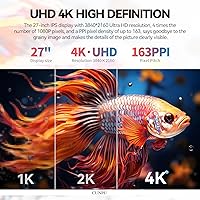
- Resolution: Native resolution is 3840 x 2160 pixels (4K UHD), delivering approximately four times the pixel density of a standard Full HD panel.
- Panel Type: Uses an IPS (In-Plane Switching) panel, which provides consistent, accurate color reproduction across a wide range of viewing angles.
- Refresh Rate: Runs at 73Hz, meaning it refreshes the image 73 times per second — a modest but noticeable step above the 60Hz baseline common on many office monitors.
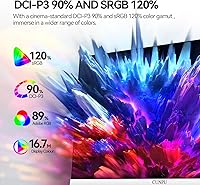
- Color Gamut: Covers 100% of the DCI-P3 color space, making it suitable for color-critical work such as photo editing, video grading, and digital illustration.
- Color Accuracy: Delta-E is rated below 2, which indicates that color deviation from the reference standard is small enough for professional creative use.
- Color Depth: Supports over 1.07 billion colors, enabling smooth, nuanced gradients with minimal banding in rich or complex imagery.
- Brightness: Peak brightness is rated at 300 nits, which is comfortable for standard indoor environments but not designed for HDR or high-ambient-light conditions.
- Contrast Ratio: A 1200:1 static contrast ratio provides reasonable depth between light and dark elements, though it trails behind VA-panel alternatives in this regard.
- Pixel Density: At 163 PPI, individual pixels are not discernible at normal viewing distances, resulting in sharp, detailed text and imagery across the full panel.
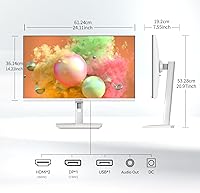
- Connectivity: Equipped with two HDMI 2.0 ports and one DisplayPort 1.4, supporting up to 4K resolution at 73Hz across all inputs.
- Screen Surface: The matte screen coating diffuses reflections effectively, reducing glare from overhead lighting or nearby windows during indoor use.
- Bezel Design: Features an ultra-slim bezel on three sides, which minimizes visual interruption and makes it a clean fit for side-by-side dual-monitor setups.
- E-Book Mode: Includes a dedicated E-Book display mode that adjusts color temperature and tone to simulate a paper-like appearance, reducing eye strain during extended reading.
- Exterior Color: The monitor shell and stand are finished in white, a deliberate aesthetic choice that stands out in a market where black and grey dominate.
- Dimensions: The overall unit measures approximately 24.1 x 20.97 x 7.55 inches (width x height x depth) including the stand.
- Weight: The complete unit weighs 13.9 pounds, which is typical for a 27-inch monitor and manageable for most desk setups.
- Aspect Ratio: Maintains the standard 16:9 widescreen aspect ratio, compatible with the vast majority of video content, games, and productivity software.
- Model Number: The official model designation is U27, as listed by the manufacturer CUNPU on the product packaging and documentation.
- Compatibility: Connects to a wide range of devices including PS5, Xbox Series X, desktop PCs, and laptops via its HDMI and DisplayPort inputs.
Related Reviews

ViewSonic VG2756-4K 27-Inch 4K Docking Monitor
CUNPU S027 27-inch QHD Gaming Monitor
LG 27UP850K-W 27-inch 4K IPS Monitor
YEYIAN ODRAZ 27″ 4K UHD Gaming Monitor

ViewSonic VP2768a-4K 27-Inch 4K Monitor

ViewSonic VA2756-4K-MHD 27-inch 4K Monitor

ViewSonic VP3268A-4K 32-inch 4K Monitor

ViewSonic VX2776-4K-MHDU 27-inch 4K IPS Monitor

Dell S2725QC 27-inch 4K USB-C Monitor