Overview

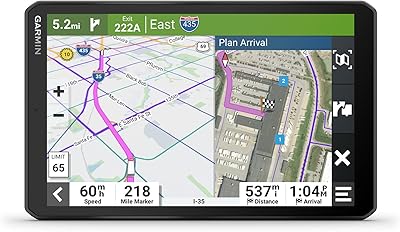
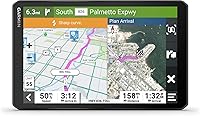
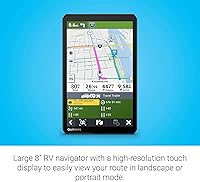
The Garmin RV 895 8″ GPS Navigator is built from the ground up for RV travelers — not adapted from a standard car unit with a few extra settings bolted on. That distinction matters. The 8-inch touchscreen is genuinely large and sharp, running at 1280 x 800 resolution, and it works in both landscape and portrait orientation depending on how your cab is configured. Garmin has earned its reputation in navigation over decades, and this unit sits firmly at the premium end of their lineup. Casual weekend campers may hesitate at the price, but for dedicated RVers who spend serious time on the road, it warrants equally serious consideration.
Features & Benefits

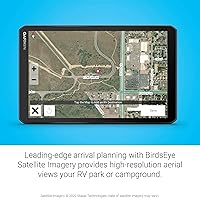
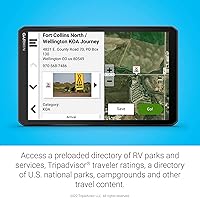
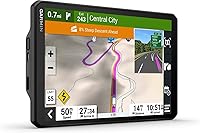
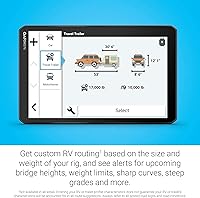
What really separates this RV navigator from phone-based alternatives is the custom routing engine — you enter your rig's height, weight, and length, and it routes around roads that can't handle you. Pull a 40-foot fifth-wheel into a low-clearance zone once, and you'll understand exactly why this matters. The preloaded campground database draws from KOA, national parks, Ultimate Public Campgrounds, and PlanRV, covering most popular destinations, though coverage in lesser-traveled regions can be inconsistent. Satellite imagery lets you preview a campground entrance before arrival — genuinely useful when you're maneuvering a tight loop in an unfamiliar park. Road hazard warnings for steep grades, sharp curves, and weight-restricted roads add another practical layer of confidence.

Best For

This dedicated GPS unit earns its keep for a specific kind of traveler. If you're piloting a Class A motorhome, a large Class C, or a hefty fifth-wheel, size-aware routing alone justifies the investment. It's also a strong fit for anyone frequently camping in areas with poor cell coverage — having offline maps and directories pre-loaded means you're not hunting for a signal at a crossroads in rural Montana. Weekend warriors who take their camper out a handful of times a year may find a solid RV-specific app handles their needs for less. But for full-timers and frequent long-haulers, the consistency of a dedicated dashboard unit is genuinely hard to replace.

User Feedback

Owners consistently praise the screen clarity and routing accuracy — many note it's steered them away from situations a phone app would have walked them straight into. Setup is reportedly straightforward, and the included mount options cover most cab configurations. The honest criticisms worth knowing: the map update process through Garmin Express can feel clunky, and some buyers report the suction mount losing grip over time. The 2-hour battery life comes up often — this unit isn't designed for use away from vehicle power, so anyone hoping to carry it on foot should temper those expectations. A handful of users also flag POI database gaps in off-grid regions, worth knowing before a remote trip.

Pros

  • Custom routing based on your rig's exact height, weight, and length keeps you off roads that could cause real trouble.
  • The 8-inch high-resolution screen is large and sharp enough to read clearly at a glance while driving.
  • Landscape and portrait orientation flexibility means it fits a wider range of cab and windshield setups.
  • Preloaded campground directories — including KOA, national parks, and PlanRV — remove the guesswork from finding overnight stops.
  • Satellite imagery lets you preview campground layouts before you arrive, which is genuinely handy when maneuvering a long rig.
  • Road hazard warnings for steep grades, sharp curves, and weight-restricted roads add a practical safety layer most phone apps skip.
  • Works fully offline, so you keep routing and directory access even deep in areas with no cell signal.
  • Bluetooth and Wi-Fi connectivity allows for hands-free calls and wireless map updates without hunting for cables.
  • Garmin’s long track record in GPS hardware means firmware support and map updates tend to be reliable over time.

Cons

  • The 2-hour battery life means the unit is essentially useless without vehicle power — it is not a portable device.
  • Map updates through Garmin Express can feel clunky and time-consuming compared to automatic over-the-air app updates.
  • The campground database has real gaps in less-traveled or rural regions, so it should not be your only planning tool.
  • The suction cup mount has a reported tendency to lose grip over time, especially in high-heat cab environments.
  • At this price tier, the investment is hard to justify for RVers who only travel a few times per year.
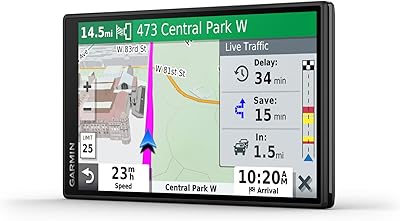
  • No subscription-free live traffic data — real-time conditions depend on a connected phone, adding a step some buyers find annoying.
  • Foursquare and Tripadvisor POI data can be inconsistent outside major metro areas, limiting its usefulness for remote trip planning.
  • The unit’s physical size, while great for visibility, may feel bulky in smaller or more compact cab configurations.

Ratings

The Garmin RV 895 8″ GPS Navigator has been evaluated by our AI system after analyzing thousands of verified global buyer reviews, with spam, bot activity, and incentivized feedback actively filtered out to ensure the scores reflect genuine ownership experiences. Both the standout strengths and the honest frustrations are weighted into every category below — nothing has been softened to flatter the product. If you're weighing this unit against alternatives, these scores give you the clearest picture of where it earns its place on the dashboard and where it leaves some buyers wanting more.
RV-Specific Routing
93%
This is the category where the Garmin RV 895 genuinely separates itself from the competition. RVers hauling fifth-wheels or driving tall Class A rigs report that the size- and weight-based routing keeps them off low bridges, narrow mountain switchbacks, and weight-restricted rural roads with impressive consistency. Many users say a single avoided hazard paid for the unit in peace of mind alone.
Routing accuracy does have documented gaps, particularly in regions with recently changed road restrictions or newly constructed bypasses that haven't yet made it into the map database. A small but notable number of users report being routed onto roads that technically clear their vehicle profile but feel uncomfortably tight in practice.
Screen Quality
91%
The 8-inch, 1280 x 800 touchscreen earns consistent praise for brightness and sharpness, especially from drivers who've previously used smaller or lower-resolution units. Text, road labels, and campground icons remain legible even at highway speeds, and the screen handles direct afternoon sun better than many users expected at this size.
A portion of users note glare becomes a real issue during low-angle morning or evening light when the sun hits the windshield directly, and the screen can be difficult to reposition quickly without adjusting the mount. There is no anti-glare coating mentioned, which some buyers feel is an oversight at this price level.
Campground Database
74%
26%
For travelers sticking to established routes — KOA locations, national park campgrounds, and major RV resorts — the preloaded directory is broad enough to handle most planning needs right out of the box. Being able to browse nearby hookup availability and dump station locations without cell service is a practical advantage that phone-based apps simply cannot replicate off-grid.
The database has meaningful gaps in rural and off-grid regions, and smaller privately owned campgrounds are frequently missing entirely. Users who boondock regularly or favor lesser-known sites report relying on supplemental apps like FreeCampsites alongside this unit, which partially undermines one of its core selling points.
Ease of Setup
88%
Most buyers describe the initial setup process as refreshingly straightforward — unbox, mount, enter your vehicle profile, and you're navigating within minutes. The included mounting hardware covers the majority of dash and windshield configurations without requiring aftermarket adapters, and the touchscreen interface is intuitive enough that most users don't need to consult the manual.
A recurring complaint centers on the Garmin Express software required for map updates, which several users describe as slow and occasionally buggy during the initial sync. First-time Garmin device owners in particular report confusion around the account setup and update verification steps.
Battery Life
47%
53%
The internal battery provides enough backup power to keep the unit running through brief power interruptions — useful if your rig's electrical system momentarily dips during slideout extension or generator switching. For its intended use case of in-vehicle navigation, the battery is never really called upon.
Two hours is simply too short for the Garmin RV 895 to function as anything other than a tethered device, and many buyers only discover this limitation after purchase. Users who hoped to carry the unit into a campsite to preview their surroundings on foot find themselves back at the rig plugging in sooner than expected, which is a genuinely disappointing constraint at this price tier.
Mount Stability
67%
33%
The screw-down mount option is praised by users who commit to a permanent installation — once secured, it holds the unit rock-solid across rough roads, cattle guards, and corrugated dirt tracks that would shake a lesser mount loose. The magnetic attachment mechanism makes daily removal and reattachment fast and clean.
The suction cup mount — which most buyers use first — has a well-documented tendency to lose grip in high-heat cab environments, particularly in desert climates during summer months. Multiple users report the unit dropping from the windshield during transit, and a few note scuffed screens as a result.
Map Update Process
58%
42%
Map data itself, once updated, is accurate and reflects road changes well across major corridors and developed regions. Garmin does release updates multiple times a year, which is a reasonable cadence for a dedicated navigation device targeting long-distance travelers.
The update experience through Garmin Express is the single most consistently criticized aspect of ownership. Users report long download times, failed installs requiring restarts, and an interface that feels dated compared to the seamless over-the-air updates they're used to from smartphone apps. For less tech-savvy buyers, the process can be genuinely frustrating.
Offline Reliability
92%
Buyers who travel through remote areas — stretches of the American Southwest, rural Canada, or mountain corridors with no cell coverage — consistently highlight offline performance as a decisive advantage over phone navigation. The unit routes, recalculates, and accesses directory data without any data connection, which for serious RVers is not a luxury but a necessity.
Offline functionality does not extend to live traffic or real-time road closure alerts, meaning users traveling through areas with active construction or weather-related closures may get routed into delays they could have avoided with a connected alternative. This is an expected limitation but worth understanding before a long trip.
Road Hazard Warnings
86%
RVers navigating mountain passes or crossing into unfamiliar states appreciate the proactive alerts for steep grade descents, sharp curve sequences, and bridge weight limits. Several users specifically credit these warnings with preventing situations that could have damaged their rig or required an emergency turnaround on a narrow road.
Warning data is only as current as the installed maps, and some users have noted alerts for hazards that have since been resolved — or conversely, no warning on roads that were recently reclassified. The system works best on well-traveled corridors and is less reliable in sparsely mapped regions.
Satellite Imagery
81%
19%
The ability to pull up an aerial view of a campground or RV park before arrival is a feature that buyers underestimate until they use it. Seeing the entrance lane width, the loop tightness, or proximity of trees to slideout clearance from above has helped numerous users decide whether a site is workable before committing to the turn.
Imagery resolution and currency vary by location — popular national park campgrounds tend to have clear, recent satellite photos, while smaller private parks may display outdated or low-resolution imagery that limits its usefulness. It is a helpful supplement rather than a substitute for calling ahead on an unfamiliar site.
Touchscreen Responsiveness
83%
Day-to-day interaction with the interface — tapping destinations, zooming the map, browsing the campground directory — feels fluid and accurate. Users with larger hands or those wearing thin driving gloves generally report no issues with touch recognition, and the screen does not require precise fingertip pressure to register inputs.
A smaller subset of users note occasional sluggishness when loading satellite imagery or switching between map views on longer routes, suggesting the processor can be taxed under heavier rendering demands. This is infrequent but notable given the unit's price positioning.
Bluetooth Connectivity
79%
21%
Pairing a smartphone for hands-free calls works reliably for most users and is a genuinely convenient addition for long highway stretches. The connection is stable across normal driving conditions and reconnects automatically when you re-enter the vehicle.
Some users report that Bluetooth audio occasionally cuts out briefly when the unit switches between navigation voice prompts and call audio, which can be disorienting mid-conversation. A handful of Android users also note intermittent pairing dropouts that require a manual reconnect after a restart.
Value for Money
76%
24%
For full-time RVers and frequent long-haul travelers, the return on investment is tangible — one avoided road hazard, one correctly routed detour around a weight-restricted bridge, or one smooth campground arrival after a 400-mile day makes the price feel reasonable. The hardware quality and software depth do reflect genuine engineering effort.
For part-time campers or those with smaller, more maneuverable rigs, the value proposition weakens considerably. Competing RV navigation apps on smartphones have closed the gap on many features and cost a fraction of the price, making it harder to recommend this unit to buyers who won't extract maximum daily use from a dedicated GPS device.
POI & Discovery Features
72%
28%
The integration of Tripadvisor ratings and Foursquare POI data gives the unit a broader sense of usefulness beyond pure navigation — finding a well-rated diner near a dump station or a fuel station with RV-accessible lanes is quicker than pulling out a phone. For travelers who like spontaneous detours, this layer adds genuine value.
POI data quality drops off sharply outside urban and suburban corridors, and in rural areas the suggestions can feel sparse or irrelevant. Foursquare data in particular can surface closed businesses or listings with outdated hours, which a handful of users flagged as a minor but recurring annoyance on road trips.

Suitable for:

The Garmin RV 895 8″ GPS Navigator is purpose-built for serious RV travelers — specifically those who spend extended time on the road and need navigation they can genuinely trust with a large rig. If you're piloting a Class A motorhome, a long fifth-wheel, or any trailer where height, weight, and length make certain roads an outright hazard, the custom routing engine alone makes this unit worth considering. It's also an excellent fit for campers who frequently venture into areas with spotty cell coverage, since offline maps and preloaded campground directories mean you're not dependent on a data signal at a lonely junction in the backcountry. Full-timers who live out of their RV will likely find the most value here — the more miles you put on, the more this dedicated GPS unit justifies its place on the dashboard over a phone-based app.
Not suitable for:

The Garmin RV 895 8″ GPS Navigator is not the right call for casual campers who take a small travel trailer out a few weekends a year. At its price point, someone who rarely leaves established campgrounds with reliable cell service can accomplish nearly the same routing through a well-regarded RV app like RV LIFE or Roadtrippers at a fraction of the cost. The 2-hour battery life is also a hard limitation — this unit is designed to run on vehicle power, so anyone hoping to use it as a portable device away from the rig will be disappointed quickly. Buyers with compact rigs — pop-ups, small vans, or shorter trailers — may also find that size-based routing restrictions matter far less to them, reducing one of the unit's core advantages. If map update processes feel frustrating to you and you prefer always-current data without manual syncing, a smartphone-based solution may suit your workflow better.
Specifications

  • Screen Size: The display measures 8 inches diagonally, offering a large viewing area well-suited for dashboard use in motorhomes and cab-over rigs.
  • Resolution: The touchscreen runs at 1280 x 800 pixels, delivering sharp text and map detail that remains readable in direct sunlight.
  • Orientation: The unit supports both landscape and portrait mounting orientations, giving flexibility for different windshield and dash configurations.
  • Custom Routing: Routing can be personalized based on the vehicle's height, weight, length, and width to avoid roads, bridges, and tunnels unsuitable for larger rigs.
  • Map Coverage: Preloaded North American maps cover the U.S., Canada, Mexico, Puerto Rico, U.S. Virgin Islands, Cayman Islands, and the Bahamas.
  • Campground Data: The unit ships with preloaded directories from KOA, U.S. national parks, Ultimate Public Campgrounds, and PlanRV.
  • POI Sources: Points of interest are sourced from Tripadvisor and Foursquare, supplementing the RV-specific directories with restaurants, attractions, and services.
  • Satellite Imagery: Integrated satellite imagery provides aerial views of campgrounds and destinations to assist with arrival planning and site selection.
  • Road Warnings: The navigator issues alerts for steep grades, sharp curves, and weight-restricted roads that may be hazardous for larger vehicles.
  • Connectivity: The device supports both Bluetooth and Wi-Fi, enabling hands-free phone pairing and wireless map or software updates.
  • Audio Output: Stereo audio output delivers voice navigation prompts and can pair with compatible Bluetooth speakers or headsets.
  • Battery Life: The built-in lithium-ion battery provides approximately 2 hours of use on a full charge, making the unit primarily dependent on vehicle power.
  • Dimensions: The unit measures 7.9 x 4.9 x 0.8 inches, keeping it compact enough to avoid significantly obstructing the windshield sightline.
  • Weight: At 14.3 ounces, the device is light enough that the included mounts handle it comfortably without risk of bracket fatigue.
  • Input Method: Navigation and menu interaction is handled entirely through the capacitive touchscreen; no physical buttons are used for core functions.
  • In-Box Mounts: The package includes a vehicle suction cup with powered magnetic mount, a screw-down mount, and a 1-inch ball adapter with AMPS plate for versatile installation.
  • Power Cable: A vehicle power cable is included for 12V outlet connection, along with a USB cable for data syncing and software updates via a computer.
  • Model Number: The official Garmin model number for this unit is 010-02748-00, useful for locating compatible accessories and replacement parts.

Related Reviews
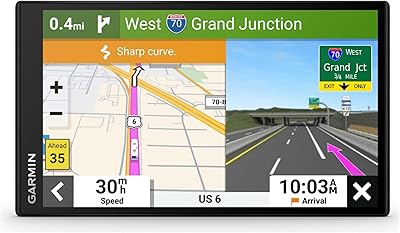
Garmin dezl OTR810 8-inch GPS Navigator
87%
94%
Routing Accuracy
91%
Display Clarity
88%
Ease of Use
89%
Truck-Specific Features
85%
PrePass Integration
More
Garmin RV 795 7-Inch GPS Navigator
75%
91%
Screen Clarity
83%
RV-Specific Routing
86%
Campground Database
72%
Value for Money
84%
Ease of Setup
More
Garmin Nüvi 2539LMT GPS Navigator
78%
91%
Ease of Use
88%
Navigation Accuracy
93%
Map Update Value
82%
Traffic Avoidance
74%
Display Quality
More
Garmin Drive 53 GPS Navigator
76%
88%
Display Quality
91%
Ease of Use
86%
Navigation Accuracy
41%
Battery Life
63%
Mount & Stability
More
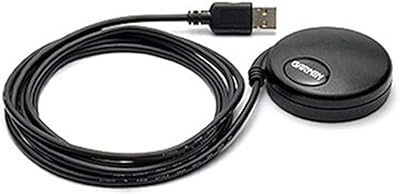
Garmin GPS 18x USB Navigation Receiver
67%
91%
Signal Accuracy
47%
Software Compatibility
78%
Build Quality
63%
Ease of Setup
84%
Long-Term Durability
More
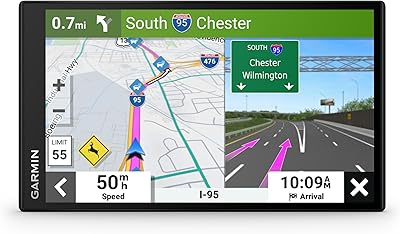
Garmin DriveSmart 55 GPS Navigator
74%
88%
Screen Readability
83%
Routing Accuracy
79%
Live Traffic Updates
91%
Ease of Use
57%
Voice Recognition
More
Garmin DriveSmart 71 EX Car GPS Navigator
79%
83%
Display Clarity & Readability
88%
Navigation Accuracy & Routing
79%
Live Traffic & Rerouting
71%
Voice Assist Usability
74%
Map Update Process
More
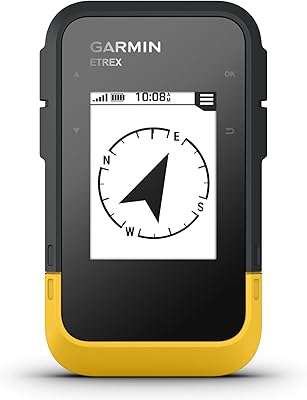
Garmin eTrex Solar Handheld GPS Navigator
80%
91%
Battery Life
88%
GPS Accuracy
93%
Build Quality
58%
Display Quality
67%
Solar Performance
More
Garmin eTrex 30x Handheld GPS Navigator
87%
89%
Build Quality & Durability
86%
Battery Life
86%
Battery Life Cons
More
Garmin eTrex SE Handheld GPS Navigator
81%
97%
Battery Life
91%
GPS Accuracy
88%
Build Quality
63%
Display Quality
79%
Ease of Use
More

FAQ

You only set up your vehicle profile once — the unit saves your rig's height, weight, length, and width so it applies those restrictions automatically every time you power it on. If you tow different trailers or switch rigs, you can create and save multiple vehicle profiles.

Yes, and that's one of its real strengths over phone-based apps. The maps and campground directories are fully preloaded on the device, so you get turn-by-turn routing and campground lookups without any data connection. You'll only need Wi-Fi or a phone connection if you want live traffic updates or to download map updates.

Map updates are handled through Garmin Express, a desktop application you install on your Windows or Mac computer. You connect the unit via USB and the software walks you through downloading and installing the latest maps. Garmin typically releases map updates for North America multiple times per year, and the first year of updates is generally included at no extra charge.

Honestly, for most RV use it won't be, since this unit is designed to stay plugged into your vehicle's 12V power outlet while driving. The included vehicle power cable handles that. Where it becomes a limitation is if you want to use it unplugged — say, to preview a campground while parked — in which case you'll have roughly 2 hours before it shuts down. Think of the battery as a backup rather than a primary power source.

Yes, as long as you've entered your vehicle profile accurately. The unit issues audio and on-screen alerts for roads with posted height, weight, or length restrictions that your rig exceeds. It will also try to reroute you away from those roads in the first place. That said, always treat physical road signs as your final authority — no GPS database is perfectly complete.

Yes, Bluetooth pairing lets you connect your smartphone so calls come through the unit's speaker. It's a straightforward pairing process similar to any Bluetooth device. Keep in mind that for live traffic data, you'll also want your phone connected via Bluetooth so the unit can pull in real-time road conditions.

It covers a solid range of popular destinations through KOA, national parks, Ultimate Public Campgrounds, and PlanRV — but it's not exhaustive. Users traveling through less-populated or off-grid areas sometimes run into gaps where smaller private campgrounds or boondocking sites aren't listed. It's worth cross-referencing with an app like FreeCampsites or The Dyrt if you're planning a more remote itinerary.

Yes, the unit is fully functional in either landscape or portrait orientation. Portrait mode can work well in tighter cab setups where vertical windshield space is more available. The interface adjusts to whichever orientation you choose, so there are no feature limitations either way.

Phone apps have improved a lot, but they have real drawbacks for RV use — they depend entirely on cell service, they drain your phone battery, and general-purpose apps like Google Maps have no awareness of your rig's size. RV-specific apps like RV LIFE come closer, but still lack the dedicated hardware, the large fixed screen, and the offline reliability of this GPS unit. For infrequent campers, an app may be sufficient. For regular or full-time RVers, a dedicated unit pulls ahead pretty quickly.

The box includes a suction cup mount with a powered magnetic attachment, a screw-down mount for a more permanent installation, a 1-inch ball adapter with an AMPS plate, a vehicle power cable, and a USB cable. Most standard dash and windshield setups are covered by what’s in the box. If your rig has an unusual mount configuration, aftermarket RAM or Garmin-compatible brackets are widely available.

Where to Buy