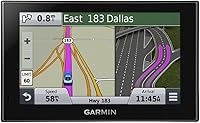
Overview

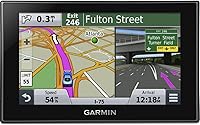
The Garmin Nüvi 2539LMT GPS Navigator is a dedicated car navigation device built for North American drivers who'd rather not rely on their phone for directions. Launched in 2014, it sits comfortably in the mid-range tier — capable enough for daily commuters and weekend road-trippers, yet straightforward enough that you don't need a tech background to use it. The 5-inch glass display supports pinch-to-zoom and flips between portrait and landscape orientation, which is a genuinely useful touch. By today's hardware standards it's aging, but its core navigation remains solid. Think of it as a dependable workhorse rather than a flashy new tool.

Features & Benefits

What keeps the 2539LMT genuinely useful is its lifetime maps and traffic — no subscription, no annual fee, just updated road data whenever you connect it to a computer. That's a real saving over time and one of the strongest arguments for choosing a dedicated GPS. Garmin's Real Directions feature is surprisingly practical: instead of a robotic distance cue, it guides you using actual landmarks, saying things like turn left at the gas station — much clearer when you're scanning an unfamiliar intersection at speed. Lane Assist and Direct Access help in complex spots like airport terminals or large shopping malls. Foursquare POI search lets you find a coffee shop or gas station on the fly without reaching for your phone. Bluetooth for hands-free calling is available, though pairing can be finicky with certain devices.

Best For

This dedicated GPS unit makes the most sense for a few specific types of drivers. If you frequently travel through areas with poor cellular coverage — rural highways, mountain passes, dead zones — having a device that doesn't depend on a data signal is a genuine relief. It's also a strong fit for older or less tech-savvy drivers who find phone mounts awkward and smartphone apps overly complicated. Long-distance commuters and road-trippers will appreciate not worrying about draining a phone battery during a five-hour drive. And if you simply want a dedicated backup device that lives in the glove box, ready to go whenever your phone fails you, the 2539LMT fits that role well.

User Feedback

Long-term owners of this Garmin nüvi tend to be quietly loyal to it. The most common praise centers on how easy it is to set up and use daily — no app updates, no sign-ins, just turn it on and go. The display holds up well in direct sunlight, which is more than you can say for many phone screens. That said, complaints aren't hard to find. The map interface looks dated next to modern apps, and a handful of users report the suction mount losing its grip on hot days. Real-time rerouting isn't as fast as Waze or Google Maps. The Bluetooth pairing can also be hit-or-miss depending on your phone model. Still, for buyers who've owned it for several years, the reliability factor tends to outweigh those gripes.

Pros

  • Lifetime map updates are included at no extra cost — a real long-term saving over subscription-based alternatives.
  • Free traffic avoidance with no ads or hidden fees sets this dedicated GPS unit apart from many competitors.
  • Garmin Real Directions uses landmarks instead of just distances, which makes turns far easier to follow in unfamiliar areas.
  • The 5-inch glass display is easy to read in direct sunlight, which is more useful than it sounds on a long drive.
  • Lane Assist takes the guesswork out of complex highway interchanges where missing a split can cost you miles.
  • Direct Access simplifies navigation into large venues like airports and shopping malls where standard routing falls short.
  • Foursquare POI integration lets you search for restaurants or fuel stops on the go without touching your phone.
  • Setup is genuinely quick — plug it in, mount it, and you're navigating within minutes with no app installs required.
  • The device works fully offline, making it reliable in rural areas, mountain passes, or anywhere cell service disappears.
  • At 6.4 ounces, the 2539LMT is light and unobtrusive on the dashboard without blocking sightlines.

Cons

  • The map interface looks visibly dated compared to modern navigation apps, which some buyers find off-putting daily.
  • Bluetooth pairing is unreliable with certain phone models and has been a consistent frustration for a segment of users.
  • Real-time rerouting is noticeably slower to react than crowd-sourced apps like Waze when incidents happen ahead.
  • The suction cup mount can lose its grip on hot dashboards, which is a recurring complaint during summer months.
  • Battery life tops out at around two hours, so it's essentially useless away from a power source for extended periods.
  • Resolution at 480x272 is low by current standards, and the visual sharpness gap versus a modern phone screen is obvious.
  • Map coverage is limited to North America, with no practical path to adding international maps for overseas travel.
  • The proprietary Garmin OS receives no third-party app support, so what you see out of the box is all you get.
  • Hardware design and software UI have not meaningfully evolved since the device launched, which limits its longevity appeal.

Ratings

The scores below reflect our AI-powered analysis of verified global user reviews for the Garmin Nüvi 2539LMT GPS Navigator, with spam, bot-generated, and incentivized feedback actively filtered out before scoring. Each category captures both what real drivers genuinely appreciated and where this dedicated GPS unit fell short in everyday use. Nothing is glossed over — the ratings reflect the full picture, strengths and frustrations alike.

Ease of Use
91%
Drivers across all age groups consistently praise how quickly they can get up and running — plug it in, mount it, and navigate within minutes. The menu structure is logical and the touchscreen responds well, making it a go-to recommendation for less tech-savvy users who find smartphone apps overwhelming.
A handful of users note that some menu layers feel buried, particularly when trying to adjust settings while already on a route. The learning curve is minimal but not entirely absent for first-time GPS device owners.
Navigation Accuracy
88%
Core routing is reliable across highways, city streets, and rural backroads throughout North America. Long-term owners frequently mention that the device rarely makes a wrong call on major roads, and the landmark-based Real Directions feature genuinely reduces confusion at tricky intersections.
In dense urban areas with complex one-way systems, a small number of users report occasional outdated routing even after map updates. The rerouting logic, while functional, reacts more slowly than crowd-sourced apps when a sudden road closure occurs mid-trip.
Map Update Value
93%
The no-cost lifetime map updates stand out as one of the most appreciated features among long-term owners, particularly those who've watched competitors quietly move to annual subscription models. Users in growing suburban areas note that new roads and developments do appear in updates, keeping the device genuinely useful years after purchase.
Downloading updates requires connecting to a computer via USB and using Garmin Express, which a segment of older users finds slightly cumbersome. Update file sizes can be large, and the process occasionally stalls on slower home internet connections.
Traffic Avoidance
82%
18%
Free lifetime traffic updates with no ads or subscription fees is a legitimate differentiator, and commuters in congested metro areas appreciate that the device quietly reroutes around known delays without any extra setup. The traffic data covers most major North American corridors reliably.
Real-time responsiveness lags noticeably behind crowd-sourced platforms like Waze, particularly for incidents that develop quickly. In less populated regions, traffic data coverage thins out and the feature becomes less useful the further you get from urban centers.
Display Quality
74%
26%
The 5-inch glass screen is large enough to read comfortably at a glance while driving, and sunlight legibility is genuinely better than many similarly sized phone screens without cases. Dual-orientation support is a practical touch that accommodates different mounting preferences.
At 480x272 resolution, the display looks visibly soft compared to modern smartphones, and text rendering on map labels can feel cramped in dense urban areas. Buyers accustomed to high-DPI screens will notice the difference immediately and may find it difficult to unsee.
Bluetooth Performance
52%
48%
When pairing works correctly, hands-free calling through the device is convenient enough for occasional use on the road. Users with compatible phones describe the call audio as acceptable for brief conversations during commutes.
Bluetooth pairing is arguably the most criticized aspect of this GPS unit, with a consistent pattern of complaints about dropped connections, failed initial pairing, and incompatibility with newer Android and iOS versions. For many buyers, this feature functions unreliably enough that they stop using it altogether.
Mount & Build Quality
67%
33%
The device itself feels solid in hand and the casing shows good resistance to everyday handling wear. Most users report the physical unit holding up well over multiple years of in-car use without any structural issues.
The suction cup mount draws consistent complaints about losing grip on hot days, especially when the car has been sitting in direct sunlight. Several owners resorted to third-party mounts after the original failed repeatedly, which is an extra cost and inconvenience that shouldn't be necessary at this price point.
Battery Life
44%
56%
The internal battery is adequate for brief walks from a parking lot to a destination or testing the device at home before a trip. It functions as intended for short offline use cases.
Two hours of battery life is genuinely limiting and means the device is essentially useless on any drive without a powered mount or USB connection. Unlike a phone that doubles as a multi-purpose device, dedicating dashboard space to a GPS that can't survive a moderate drive unplugged is a frustration several users call out directly.
POI Search (Foursquare)
78%
22%
Having Foursquare points of interest built directly into the navigation interface is a practical convenience, particularly on road trips where you want to find fuel or food without unlocking your phone. The search is responsive and covers most common categories well.
The Foursquare database on-device is not live-updated as frequently as the app itself, so occasionally a listed business has closed or moved. Users in smaller towns also note that POI density thins out quickly outside major metro areas.
Setup & Installation
89%
Out of the box, the setup process is about as painless as it gets for a dedicated GPS — attach the mount, plug in the power cable, and the device walks you through the rest. Most buyers report being fully operational within ten minutes of opening the box.
First-time GPS device owners occasionally feel uncertain about windshield mounting legality in their state, and the manual doesn't address this. Garmin Express setup on a computer for map management adds a small extra step that a handful of less tech-comfortable users find mildly confusing initially.
Offline Reliability
92%
Drivers in rural areas, national parks, and other cellular dead zones consistently highlight offline navigation as the device's single strongest real-world advantage over phone-based alternatives. The maps load and route without hesitation regardless of signal availability.
While offline performance is excellent, the device has no mechanism to pull in real-time data of any kind — weather, speed cameras, or dynamic closures — when offline, leaving drivers fully dependent on the pre-downloaded map data alone.
Value for Money
79%
21%
The combination of lifetime maps, lifetime traffic, and a no-subscription model makes the total cost of ownership quite reasonable when spread across several years of use. Buyers who've owned it for three or more years generally feel they got their money's worth without any ongoing financial commitment.
At its price point, the hardware specifications and software interface are aging relative to what competing devices now offer. Buyers comparing it against newer Garmin models or evaluating it purely on specs may feel the price is harder to justify given the low-resolution display and dated OS.
Lane Guidance
83%
Active Lane Guidance earns consistent positive feedback from users who frequently drive complex multi-lane interchanges, where choosing the wrong lane early can mean a significant detour. The visual cues are clear and appear with enough lead time to act comfortably.
Lane guidance data accuracy depends entirely on the map data for a given road, and in areas where road infrastructure has changed recently, the guidance can occasionally reflect outdated lane configurations until the next map update is applied.

Suitable for:

The Garmin Nüvi 2539LMT GPS Navigator is a strong choice for anyone who wants dependable, offline navigation without the hassle of a monthly subscription or a phone mount. It's particularly well-suited to older drivers or those who find smartphone apps unnecessarily complicated — the interface is straightforward, the screen is readable in bright sunlight, and there's no account to manage. Long-distance road-trippers and rural commuters will appreciate that it works reliably in areas where cell coverage drops out entirely, something Google Maps and Waze simply can't guarantee. If you're the kind of driver who wants a dedicated device that lives in the car, charges via USB, and is ready to go without fuss, this Garmin nüvi fits that role well. The no-fee lifetime traffic updates are a genuine perk for anyone who drives in congested metro areas regularly.

Not suitable for:

Buyers who rely heavily on real-time crowd-sourced rerouting — the kind Waze does exceptionally well — will likely find the Garmin Nüvi 2539LMT frustrating by comparison, as its traffic data is solid but not as dynamically responsive. Tech enthusiasts or anyone accustomed to the sharp, high-resolution displays on modern smartphones may find the 480x272 screen resolution noticeably dated. If Bluetooth hands-free calling is a priority for you, be aware that pairing has proven inconsistent across phone models, and it's not the device's strongest suit. Drivers who frequently travel internationally will also hit a hard wall — coverage is North America only, with no option to add maps for Europe or elsewhere. Anyone looking for a cutting-edge navigation experience with voice-assistant integration or smartphone app mirroring should look at more recent hardware instead.

Specifications

  • Screen Size: The device features a 5-inch glass touchscreen display that supports pinch-to-zoom gestures and dual-orientation (portrait and landscape).
  • Resolution: The display renders at 480x272 pixels, which is functional for navigation but noticeably lower than modern smartphone screens.
  • Dimensions: The unit measures 0.7 x 5.5 x 3.5 inches, making it compact enough to mount without significantly obstructing the driver's sightline.
  • Weight: At 6.4 ounces, the device is lightweight and easy to reposition or remove from the dashboard mount as needed.
  • Battery Life: The internal lithium-ion battery provides up to 2 hours of use, making a powered mount or USB cable necessary for any extended drive.
  • Map Coverage: Maps cover North America in full, including the United States, Canada, and Mexico, with no support for international regions.
  • Map Updates: Lifetime map updates are included at no additional cost and can be downloaded via a computer using Garmin Express software.
  • Traffic Updates: Free lifetime traffic avoidance is built in with no subscription fee, no ads, and no hidden recurring costs.
  • Connectivity: The unit connects via Bluetooth for hands-free calling and uses cellular-based traffic data reception for real-time traffic avoidance.
  • Input Method: Navigation is controlled entirely through the capacitive touchscreen; there are no physical buttons for core functions.
  • Mounting Type: The device ships with a dashboard suction cup mount that attaches to the windshield or a dashboard mounting disc.
  • Operating System: The 2539LMT runs on Garmin's proprietary embedded OS, which does not support third-party apps or external software installation.
  • POI Integration: Foursquare points of interest are integrated directly, allowing drivers to search for restaurants, shops, and services without a phone.
  • Lane Assist: Active Lane Guidance visually highlights the correct lane to be in before complex highway interchanges and multi-lane splits.
  • Direct Access: The Direct Access feature simplifies routing into large, complex destinations like airports, shopping malls, and transit hubs.
  • Real Directions: Garmin Real Directions provides landmark-based turn cues (such as referencing traffic lights or buildings) rather than relying solely on distances.
  • Backup Camera: The unit is optionally compatible with a Garmin wireless backup camera, which is sold separately and not included in the box.
  • In the Box: The package includes the GPS unit, a suction cup mount, a vehicle power cable, and a USB cable for computer connectivity.

Related Reviews
Garmin nüvi 2689LMT GPS Navigator
73%
88%
Screen Size & Readability
83%
Map Accuracy
86%
Traffic Avoidance
84%
Ease of Use
79%
Direct Access Feature
More
Garmin nüvi 2455LMT Portable GPS Navigator
71%
83%
Navigation Accuracy
78%
Map Coverage & Updates
76%
Ease of Use
74%
Display Quality
81%
Lane Assist & Junction Views
More
Garmin DriveSmart 55 GPS Navigator
74%
88%
Screen Readability
83%
Routing Accuracy
79%
Live Traffic Updates
91%
Ease of Use
57%
Voice Recognition
More
Garmin GPS 18x USB Navigation Receiver
67%
91%
Signal Accuracy
47%
Software Compatibility
78%
Build Quality
63%
Ease of Setup
84%
Long-Term Durability
More
Garmin Drive 53 GPS Navigator
76%
88%
Display Quality
91%
Ease of Use
86%
Navigation Accuracy
41%
Battery Life
63%
Mount & Stability
More
Garmin eTrex Solar Handheld GPS Navigator
80%
91%
Battery Life
88%
GPS Accuracy
93%
Build Quality
58%
Display Quality
67%
Solar Performance
More
Garmin eTrex 32x Handheld GPS Navigator
78%
93%
Satellite Performance
91%
Battery Life
88%
Build & Durability
74%
Map Quality & Coverage
89%
Navigation Accuracy
More
Garmin eTrex 30x Handheld GPS Navigator
87%
89%
Build Quality & Durability
86%
Battery Life
86%
Battery Life Cons
More
Garmin DriveSmart 71 EX Car GPS Navigator
79%
83%
Display Clarity & Readability
88%
Navigation Accuracy & Routing
79%
Live Traffic & Rerouting
71%
Voice Assist Usability
74%
Map Update Process
More
Garmin eTrex SE Handheld GPS Navigator
81%
97%
Battery Life
91%
GPS Accuracy
88%
Build Quality
63%
Display Quality
79%
Ease of Use
More

FAQ

No, and that's genuinely one of the best things about this device. Lifetime map updates are included at no cost — you just download them through Garmin's free Express software on your computer whenever new maps are released. There's no subscription and no expiration date on that benefit.

Yes, completely. All maps are stored on the device itself, so it navigates offline without needing any data connection. This makes it especially useful in rural areas, mountain roads, or anywhere your phone would lose signal. The only features that require connectivity are the live traffic updates.

The 2539LMT receives traffic data through a built-in receiver that picks up FM-based traffic signals, so it doesn't need a SIM card or a phone tethered to it. Coverage depends on your region, but it works across most major metro areas in North America automatically.

It works, but it's worth being realistic: Bluetooth pairing on this Garmin nüvi has been inconsistent for some users, particularly with newer Android and iOS devices. If hands-free calling is your primary reason for buying it, you may want to test it with your specific phone model before fully committing.

All three countries are covered. The North America maps include the United States, Canada, and Mexico, so cross-border road trips are handled without needing to purchase additional maps.

It holds fine in most conditions, but a number of owners have reported the suction cup losing its grip on very hot days — particularly when the car has been sitting in the sun. Using the included adhesive mounting disc on your dashboard instead of the windshield glass can help with this.

It lets you search for nearby points of interest — restaurants, gas stations, shops, hotels — directly on the device using Foursquare's database. It's convenient when you want to find something nearby without picking up your phone, though the database won't be as current as searching live on your phone.

You connect the 2539LMT to a computer using the included USB cable, then use Garmin's free Express software to check for and download any available updates. The software walks you through the process, and it's straightforward even if you're not especially tech-savvy.

Unfortunately, no. The device only supports North American maps, and there's no official way to add coverage for other continents. If you travel internationally and need GPS navigation abroad, you'd need a separate solution for those trips.

The internal battery lasts around two hours, which is enough for short trips but not for anything longer. In practice, most people use it plugged into the vehicle's power outlet the entire time, which is how it's designed to be used on any meaningful drive.