Overview

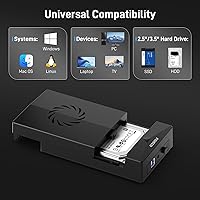
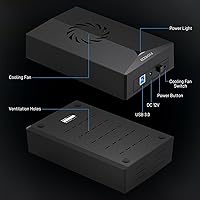
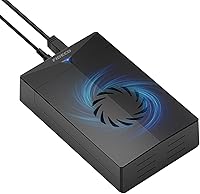
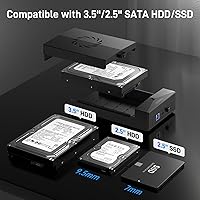
The FIDECO P3U-U3 Hard Drive Docking Station is a no-frills, single-bay dock that handles both 2.5″ and 3.5″ SATA drives without asking much from your wallet or your patience. It sits flat on your desk, connects via USB 3.0, and works across Windows, Mac, and Linux straight out of the box — no driver installation required. One thing worth flagging early: this docking station is SATA-only. If you have older IDE drives lying around, this will not help you. The included 12V power adapter is a practical touch, since 3.5″ HDDs need dedicated power that a USB port alone simply cannot supply.
Features & Benefits

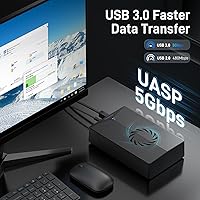
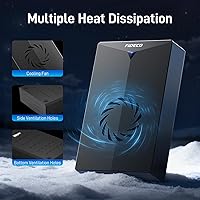
The FIDECO dock runs on USB 3.0 with UASP support, which helps reduce CPU overhead and sustain faster transfer speeds compared to standard USB mass storage mode. Real-world throughput still depends on your drive's condition and your port quality, so keep expectations grounded. The built-in cooling fan is genuinely useful during long transfers or extended backup sessions, when drives can heat up noticeably — active airflow keeps temperatures in check without any extra setup. The unit also works with USB 2.0 ports for older machines, though speeds will drop accordingly. No separate power purchase needed; the adapter ships right in the box.

Best For

This hard drive dock is best suited for occasional, task-specific use rather than permanent always-on setups. Think data recovery from an old desktop HDD, file migration after a storage upgrade, or running periodic backups without committing to a dedicated enclosure. IT technicians and hobbyists who swap drives frequently will appreciate the tool-free access and quick connection. It also works well for anyone juggling both 2.5″ laptop drives and full-size 3.5″ desktop drives in the same workflow. It is not built for round-the-clock operation, but as a pull-out utility you reach for when needed, it covers a wide range of common scenarios efficiently.

User Feedback

With a 4.4-star rating across nearly 900 reviews, the FIDECO dock has clearly found a reliable audience. Buyers consistently highlight the cooling fan as a genuinely functional addition, and the bundled power adapter earns credit for handling larger 3.5″ drives without issue. On the other side, a portion of users raise fair concerns about the plastic build quality and whether it holds up under heavy long-term rotation. A few buyers also hit a wall when a brand-new HDD wasn't recognized — this happens because new drives require an initialization step in Disk Management first, which the product page mentions but does not explain clearly. Older chipset compatibility has also surfaced in a handful of reviews.

Pros

  • Works with both 2.5-inch and 3.5-inch SATA drives, covering most common drive recovery scenarios in one device.
  • Cooling fan actively prevents heat buildup during long transfers — a rare feature at this price point.
  • Plug-and-play across Windows, Mac, and Linux with zero driver installation required.
  • 12V power adapter is included, so 3.5-inch desktop HDDs are powered properly from day one.
  • UASP support delivers noticeably faster sustained speeds compared to standard USB mass storage mode.
  • Compact lay-flat design stores easily in a drawer and travels reasonably well between locations.
  • Strong buyer satisfaction rating across nearly 900 verified reviews signals dependable real-world performance.
  • Backward compatible with USB 2.0, so older machines are not left out entirely.
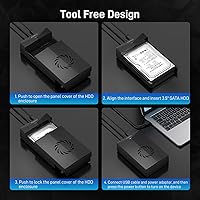
  • No tools needed to insert or remove drives, making quick swaps fast and frustration-free.

Cons

  • All-plastic construction raises durability concerns for buyers who plan on using the dock heavily week after week.
  • Fan noise is constant during operation, which can be distracting in quiet home office environments.
  • New unformatted drives require manual initialization via OS disk tools before they appear — this is not explained clearly.
  • A handful of users on older USB controller chipsets have reported inconsistent or failed drive detection.
  • The power adapter brick adds bulk, making the dock less convenient to carry around than it initially appears.
  • Only one drive can be connected at a time, which slows down workflows involving multiple drives in sequence.
  • Included USB cable feels lightweight and shows signs of wear faster than expected under regular use.
  • No thermal indicator or drive activity light, leaving users with no visual feedback during transfers.

Ratings

The FIDECO P3U-U3 Hard Drive Docking Station has been evaluated using AI-driven analysis of verified global buyer reviews, with spam, bot-generated, and incentivized feedback actively filtered out before scoring. Ratings reflect real-world usage patterns across home users, IT professionals, and data recovery scenarios. Both the strengths that keep buyers satisfied and the friction points that have generated complaints are transparently factored into every score below.
Value for Money
88%
At this price tier, buyers consistently report feeling like they got more than they paid for — especially given the inclusion of a power adapter and a cooling fan, two extras that competing docks often drop to cut costs. For someone who only needs occasional drive access, this dock checks nearly every practical box without overspending.
A small segment of buyers feel the plastic construction makes the value equation feel shakier over time, particularly if they plan on using it weekly. The savings are real upfront, but longevity concerns keep this from scoring higher on perceived long-term value.
Transfer Speed & UASP Performance
79%
21%
Most users running modern systems with USB 3.0 ports report noticeably faster transfers compared to basic enclosures, especially when moving large video files or doing full drive clones. UASP support makes a tangible difference in sustained workloads, keeping the CPU load low during extended sessions.
Real-world speeds rarely hit the theoretical 5Gbps ceiling — actual throughput depends heavily on the connected drive and host port quality. Users on older USB 3.0 controllers or with worn drives have reported underwhelming speeds that don't match the advertised figures.
Cooling & Thermal Management
84%
The built-in fan is one of the most frequently praised aspects across reviews — users doing multi-hour data migrations or overnight backups note that drives stay noticeably cooler compared to fanless alternatives they have owned. For 3.5-inch HDDs that generate real heat during sustained use, this is a practical advantage.
The fan does produce an audible hum, which a handful of buyers found distracting in quiet home office environments. There is also no speed control, so the fan runs constantly during operation regardless of actual drive temperature.
Ease of Setup & Plug-and-Play
86%
Plug-in and go — that description holds up well for most users on Windows, Mac, and Linux. The absence of driver installation is consistently mentioned as a relief, particularly by less technical buyers who expected a complicated setup process and got none.
New, unformatted drives cause genuine confusion because the dock does not signal that initialization is needed first. Several one-star reviews trace back entirely to this single issue, which is a documentation problem more than a hardware flaw but still hurts the out-of-box experience.
Build Quality & Durability
63%
37%
For light to moderate use — pulling it out a few times a month to swap drives or recover files — the plastic chassis holds up without obvious issues. The lay-flat form factor feels stable on a desk, and the drive slot has reasonable retention for a dock at this price.
Heavy rotational use exposes the limitations of the all-plastic construction faster than buyers would like. A notable minority of long-term reviewers report flex in the chassis and connector looseness over time, raising legitimate questions about how this unit holds up beyond the first year of regular use.
Drive Compatibility
82%
18%
Support for both 2.5-inch and 3.5-inch SATA drives in a single unit is genuinely useful — many buyers specifically purchased this dock to handle a mix of old laptop SSDs and full-size desktop HDDs without needing two separate devices. The flexibility is a meaningful practical asset.
The SATA-only limitation catches some buyers off guard, particularly those with older IDE drives from pre-2010 desktop systems. The listing mentions this, but not prominently enough to prevent frustrated returns from legacy hardware owners.
Power Adapter Inclusion & Quality
81%
19%
Shipping the 12V adapter in the box removes one of the most common frustrations with budget docks — buyers not realizing they need a separate power source for larger drives. Multiple reviewers specifically called this out as a reason they chose this dock over cheaper options that leave you hunting for a compatible adapter.
The adapter cable length is a minor complaint in several reviews, as it can feel short depending on outlet placement. A small number of international buyers also flagged voltage compatibility questions, though this appears to affect only a narrow subset of users outside North America.
Operating System Compatibility
83%
Windows, Mac, and Linux all recognize the dock without friction under normal conditions, which makes it genuinely useful across mixed-OS households or IT environments. Mac users in particular noted smooth recognition without any additional steps required.
A cluster of reviews from users running older Windows versions or niche Linux distributions mention inconsistent detection, particularly with certain USB controller chipsets. These appear to be edge cases rather than widespread issues, but they are real enough to warrant a mention.
Noise Level
67%
33%
For most use cases — running a quick file transfer or accessing a drive for under an hour — the fan noise is minimal and fades into background ambiance. Buyers using this in a living room or common area generally do not flag it as a meaningful issue.
In a quiet desk environment, the constant fan hum is noticeable. Buyers expecting a silent experience are often surprised, since budget docks with cooling fans are relatively uncommon and the noise expectation gap leads to recurring complaints in otherwise positive reviews.
Portability & Form Factor
74%
26%
The lay-flat design is compact enough to slide into a drawer or a bag pocket, making it reasonably portable for IT work or carrying between home and office. At just over a pound with the adapter, it does not feel like a burden to transport occasionally.
The included power brick reduces portability meaningfully — you are carrying two pieces every time, and the adapter is not particularly compact. For users who expected a more travel-friendly setup, the tethered power requirement is a notable constraint.
New Drive Initialization Experience
57%
43%
Once buyers understand that a brand-new unformatted drive needs to be initialized through the OS disk utility before it appears in the file system, the process is straightforward and works reliably. Experienced users report zero issues with this step.
The lack of clear first-time setup guidance for new drives generates a disproportionate number of confused reviews. Buyers who plug in a new HDD, see nothing appear on their computer, and assume the dock is broken represent a sizable and preventable frustration that better documentation would eliminate.
Cable & Port Quality
71%
29%
The USB cable included with the dock is functional and long enough for typical desk setups. The connection feels secure during normal use, and buyers doing single-session transfers rarely experience disconnection events.
A handful of buyers report that the USB cable feels thinner than expected and shows wear after repeated bending near the connector. Longer-term users occasionally mention intermittent connection drops, suggesting the included cable may be a weak point for heavy-rotation use cases.
Customer Support & Documentation
61%
39%
FIDECO provides a direct support email and has been responsive in resolving firmware-related questions according to several buyers who reached out. The offer of firmware updates adds a degree of post-purchase confidence that not all budget brands extend.
The included documentation is sparse — a more detailed quick-start guide addressing common pitfalls like new drive initialization would prevent a significant share of support contacts and negative reviews. Buyers who run into trouble often discover the email support option only after frustration has already set in.

Suitable for:

The FIDECO P3U-U3 Hard Drive Docking Station is a strong fit for anyone who needs occasional, task-specific access to bare SATA drives rather than a permanent always-on storage solution. Home users clearing out a box of old HDDs, people migrating data after a PC upgrade, or anyone recovering files from a deceased laptop will find this dock covers the job without unnecessary complexity. IT technicians and hobbyists who regularly swap between multiple drives will appreciate the tool-free access and broad OS compatibility across Windows, Mac, and Linux. The included power adapter makes it immediately usable with full-size 3.5-inch desktop drives right out of the box, which removes a common stumbling block. If you work with a mix of 2.5-inch SSDs and 3.5-inch HDDs and want a single device that handles both, this hard drive dock handles that dual role reliably and without fuss.

Not suitable for:

The FIDECO P3U-U3 Hard Drive Docking Station is not the right choice if you are looking for a ruggged, always-on storage hub that runs continuously day after day. The plastic chassis raises legitimate durability questions under heavy rotation, and buyers who need a dock for daily professional workloads would be better served by a more robust metal-bodied option. Anyone with older IDE drives — common in pre-2010 desktop systems — should stop here, because this dock is strictly SATA and will not recognize those drives at all. If near-silent operation is a priority in your workspace, the constant cooling fan hum may become a genuine annoyance over time. Users chasing maximum transfer speeds should also calibrate expectations carefully, as real-world throughput depends heavily on the connected drive and host port, and theoretical peaks are rarely achieved in practice.
Specifications

  • Model Number: This docking station carries the manufacturer model designation P3U-U3.
  • Interface: Connects to the host computer via USB 3.0 with full UASP (USB Attached SCSI Protocol) support for improved sustained transfer performance.
  • Transfer Rate: Maximum theoretical data transfer rate is 5Gbps over USB 3.0; actual speeds vary based on drive condition and host port capability.
  • Drive Sizes: Accommodates both 2.5″ and 3.5″ SATA hard drives and solid-state drives in a single bay.
  • Drive Type: Compatible exclusively with SATA interface drives (HDD and SSD); IDE drives are not supported under any configuration.
  • Bay Count: Single-bay design allows connection of one drive at a time.
  • Power Adapter: Includes a bundled 12V/2A DC power adapter, sufficient to power full-size 3.5″ HDDs that cannot draw adequate power from USB alone.
  • Cooling: Equipped with a built-in active cooling fan that runs continuously during operation to reduce drive operating temperature.
  • OS Compatibility: Plug-and-play compatible with Windows, macOS, and Linux operating systems without requiring driver installation.
  • USB Backward Compatibility: Fully backward compatible with USB 2.0 ports, though transfer speeds will be limited to USB 2.0 maximums on older hardware.
  • Dimensions: The unit measures 7.28 x 4.53 x 1.57 inches (approximately 185 x 115 x 40 mm) in its lay-flat form factor.
  • Weight: Complete unit weighs approximately 1.23 pounds (0.56 kg) excluding the power adapter.
  • Material: Chassis is constructed from plastic; color is dark black.
  • Form Factor: Lay-flat, open-top docking design that leaves the drive partially exposed for tool-free insertion and removal.
  • UASP Support: UASP mode reduces CPU overhead and enables faster command queuing compared to standard USB mass storage protocol when the host controller supports it.
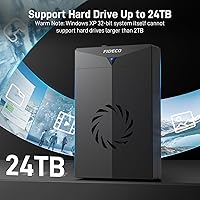
  • Capacity Support: While the listing references 2TB as a memory storage capacity figure, the dock is not inherently limited to that ceiling and supports larger SATA drives subject to OS and file system constraints.
  • Warranty & Support: FIDECO offers customer and technical support via email at [email protected], including firmware update assistance for compatible units.
  • Rating: Holds a 4.4 out of 5 star average rating based on 886 verified customer reviews on Amazon as of the review period.

Related Reviews
FIDECO YPZ220C Dual Bay USB 3.2 Gen 1 Hard Drive Docking Station
79%
88%
Offline Clone Functionality
79%
Transfer Speed
92%
Drive Compatibility
91%
Plug-and-Play Setup
63%
Build Quality
More
SSK DK103 Aluminum Hard Drive Docking Station
86%
91%
Value for Money
88%
Ease of Use
90%
Data Transfer Speed
87%
Cloning Functionality
92%
Build Quality
More
YOTUO 500GB Portable Docking Station External Hard Drive
81%
78%
Performance
92%
Portability
85%
Connectivity Options
88%
Ease of Use
70%
Build Quality
More
Tccmebius USB 3.0 Hard Drive Docking Station
82%
91%
Setup & Installation
87%
Speed & Performance
72%
Build Quality & Durability
88%
Ease of Use
93%
Compatibility (Windows/Mac)
More
RSHTECH Dual Bay Hard Drive Docking Station 16TB
86%
88%
Performance
91%
Ease of Use
89%
Offline Cloning Function
85%
Build Quality
90%
Data Transfer Speed
More
ORICO Hard Drive Docking Station DD18C3, 22TB Capacity
86%
89%
Ease of Use
94%
Setup and Installation
85%
Data Transfer Speed
88%
Build Quality
84%
Design and Aesthetics
More
dockteck Dual Bay External Hard Drive Docking Station
84%
90%
Performance and Speed
88%
Ease of Use
85%
Build Quality
91%
Cloning Functionality
82%
Compatibility
More
MAIWO Dual Bay Hard Drive Docking Station 48TB
83%
91%
Offline Cloning Feature
89%
Ease of Use & Installation
93%
Compatibility with SATA Drives
85%
Cloning Speed & Reliability
80%
Build Quality
More
SABRENT DS-UC1B USB-C Hard Drive Docking Station
81%
88%
Plug-and-Play Reliability
79%
Transfer Speed Performance
74%
Build Quality & Materials
86%
Hot-Swap Functionality
83%
Compatibility Range
More
CineRAID CR-H212 Dual Bay Hard Drive Docking Station 2TB
85%
87%
Performance & Speed
92%
Build Quality & Durability
88%
Ease of Use & Setup
93%
Data Transfer Speed (USB 3.0)
90%
Compatibility with Operating Systems
More

FAQ

Unfortunately, no. This docking station is strictly SATA-only, and IDE drives use a completely different connector and protocol. If your drive has a wide, ribbon-style connector rather than the smaller L-shaped SATA connector, it will not fit or function in this dock. You would need a dedicated IDE-to-USB adapter for those older drives.

Almost certainly not — this is one of the most common points of confusion with any docking station. A brand-new, unformatted drive has not been initialized yet, so your operating system simply does not know what to do with it. On Windows, open Disk Management (right-click the Start button), find the unallocated drive, initialize it, and create a new volume. On Mac, open Disk Utility and format the drive from there. Once that is done, it will appear normally.

It works across all three without any driver installation. On macOS and most mainstream Linux distributions, the dock is recognized automatically as a standard USB storage device the moment you plug it in. Just keep in mind that drives formatted as NTFS may show up as read-only on Mac unless you use additional software.

It produces a consistent, low-level hum rather than a loud whirring sound — most people describe it as similar to a small desk fan on its lowest setting. In a quiet room or at night, you will notice it. In a typical home office or workspace with ambient noise, it tends to fade into the background after a few minutes.

Yes, the dock is backward compatible with USB 2.0 ports. It will work fine, but your transfer speeds will be capped at USB 2.0 limits — roughly 480Mbps theoretical, and considerably less in practice. For basic file access or small transfers that is usually acceptable, but large backups or full drive clones will take noticeably longer than on a USB 3.0 port.

Yes, and this is one of the things buyers consistently appreciate about this dock. The bundled 12V/2A adapter provides enough power for standard 3.5-inch HDDs, which require more juice than a USB port can supply on its own. You should not need to purchase a separate adapter for typical desktop-class drives.

You can, and the cooling fan exists precisely for this kind of extended use. That said, this dock is built from plastic rather than metal, and it is positioned more as a periodic-use utility than a 24/7 NAS-style device. For an occasional overnight backup it should be fine, but running it continuously day after day long-term is not what it was designed for.

Start by trying a different USB cable and a different port on your computer — connector issues and port-level problems account for a surprising number of detection failures. Also check whether UASP is causing a conflict on older host controllers; some users with older chipsets have had better results connecting through a USB hub or a PCIe USB expansion card. If the drive itself spins up (you can feel or hear it), the dock is likely working and the issue is on the host side.

It supports both. Any 2.5-inch or 3.5-inch SATA SSD will work just as well as a traditional spinning HDD. In practice, SATA SSDs are almost always 2.5-inch, so they slot right in. The cooling fan is more relevant for HDDs than SSDs, since SSDs generate very little heat, but it does not cause any harm to run an SSD in this dock either.

FIDECO offers post-purchase technical support and firmware updates through their support email at [email protected]. Response times and support quality can vary, but multiple buyers have reported receiving useful assistance for firmware-related questions. It is worth reaching out directly before assuming a hardware fault, especially for detection or compatibility issues.