Overview

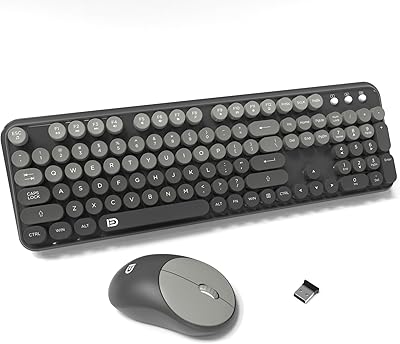
The FD V2020 Wireless Keyboard and Mouse Combo landed in late 2024 targeting buyers who are tired of staring at the same dull black keyboard every day. With its round retro keycaps in a cheerful colorful finish, this colorful wireless combo has a personality that most budget peripherals skip entirely. It reached a top-100 ranking in its category quickly, reflecting genuine demand for affordable gear that actually looks good. Both devices share one USB-A nano receiver — plug it in and you are running instantly, no drivers, no setup menus. Just keep in mind: there is no USB-C adapter in the box, and Mac hotkey support is limited.
Features & Benefits

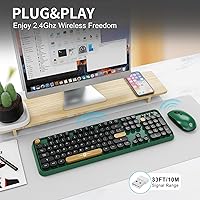
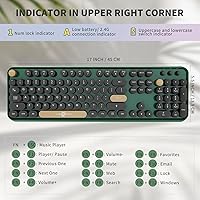
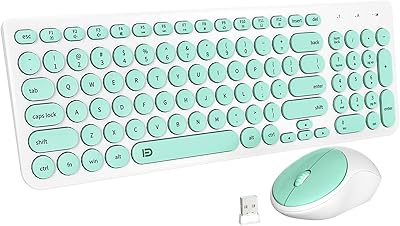
The keyboard runs on 2.4GHz wireless with a claimed 10-meter range that holds up fine across a normal home office or classroom. Plug the nano receiver into any USB-A port and both devices come alive instantly — no software to install, no account to create. The 104-key layout is low-profile, and the keys are noticeably quiet, which matters when you share space with others. An auto-sleep mode kicks in after five idle minutes, and FD estimates about a year of keyboard battery life on AA batteries, which are not included. Twelve media hotkeys handle playback controls, email shortcuts, and quick searches. The mouse matches the keyboard's look, though the manufacturer shares limited detail on its specific specs.

Best For

This typewriter-style keyboard and mouse is a natural fit for students who want their desk to look a bit more intentional without spending heavily. It also works well for remote workers sharing a living space — the quiet key switches won't disturb a partner on a call nearby. Windows users will get the most from it; plug-and-play genuinely takes about 30 seconds. It also makes a solid gift pick for anyone stuck with a generic black combo who'd appreciate something with more visual character. If you're running a modern MacBook with only USB-C ports, factor in the cost of an adapter before buying.

User Feedback

With more than 2,100 ratings averaging 4.3 stars, the FD retro keyboard set has earned real traction. Buyers consistently mention the visual appeal first — the colorful keycaps genuinely stand out on a desk — then express surprise at how quiet the keys feel in daily use. Setup earns consistent praise too, with people noting it just works out of the box. On the downside, some reviewers find the mouse feels lightweight, and its construction does not fully match the keyboard's more satisfying key feel. A 3-year warranty plus a 60-day return window helps offset those concerns for anyone on the fence. Gift purchasers appear regularly in the feedback, confirming broad appeal beyond the personal-use buyer.

Pros

  • Plug-and-play setup takes under a minute — no drivers, no accounts, no frustration.
  • The retro round keycaps look genuinely distinctive on a desk, not like a cheap gimmick.
  • Quiet key switches make it considerate to use in shared spaces without calling attention to yourself.
  • A single nano receiver handles both the keyboard and mouse, keeping your USB ports free.
  • Keyboard battery life is estimated at around 12 months, so you are not swapping batteries constantly.
  • Twelve hotkeys cover everyday shortcuts like media control and email access without any configuration.
  • Works across Windows, Android, Chromebook, and Smart TV with no compatibility headaches.
  • A 3-year warranty and 60-day return window offer real peace of mind for a budget-tier purchase.
  • The full 104-key layout means no compromises on key count despite the compact aesthetic design.
  • Over 2,100 buyers have rated it positively, giving it credibility beyond just looking good in photos.

Cons

  • AA batteries are not included, so you will need to buy some before the keyboard is usable.
  • Mac users lose access to several hotkeys, making it a noticeably weaker fit for Apple setups.
  • USB-C port owners need a separate adapter to connect the receiver, adding cost and a loose dongle.
  • The mouse receives minimal spec detail from the manufacturer, making it hard to evaluate before buying.
  • Some buyers report that the mouse feels lightweight and less solid than the keyboard suggests.
  • No Bluetooth option means you cannot switch between two devices without physically moving the receiver.
  • Battery door design has drawn criticism in a portion of reviews, pointing to minor build quality inconsistencies.
  • Long-session typists may find the low-profile switches lack the tactile satisfaction of mechanical keys.
  • The combo is marketed broadly, but Windows users get meaningfully more out of it than other platform users.
  • Durability over multi-year heavy use remains a legitimate open question given the budget construction tier.

Ratings

Our AI-generated scores for the FD V2020 Wireless Keyboard and Mouse Combo are built by analyzing verified global buyer reviews, with spam, bot activity, and incentivized feedback actively filtered out before any scoring takes place. The result is an honest picture of where this colorful wireless combo genuinely delivers and where real buyers have run into friction. Both the highlights and the frustrations are reflected transparently in every category below.
Aesthetic Design
91%
The retro round keycaps are the single most praised aspect of this combo across thousands of reviews. Buyers frequently describe the effect of placing it on their desk as an immediate visual upgrade, with several noting it became a talking point during video calls or in shared office environments.
A small but consistent group of buyers notes that the green colorway photographs more vividly than it appears in person, leading to mild disappointment on unboxing. The glossy mouse finish also attracts fingerprints quickly, which undermines the clean aesthetic after a day or two of use.
Setup & Ease of Use
93%
Plug-and-play reliability is one of the strongest recurring themes in user feedback. Buyers with minimal technical comfort repeatedly highlight that the nano receiver required no installation steps whatsoever — insert it, and within seconds both devices are working, which is genuinely appreciated by non-technical users and gift recipients.
The lack of any pairing button or indicator light means that if the receiver is lost or the connection drops, users have no obvious troubleshooting path. A handful of buyers also noted initial confusion about the auto-sleep feature, mistaking a sleeping keyboard for a broken one.
Typing Experience
78%
22%
For casual daily typing — emails, browsing, light document work — the quiet low-profile keys feel comfortable and responsive enough that many buyers express genuine surprise at the quality given the price tier. The reduced key noise is consistently cited as a practical benefit in shared living spaces and open offices.
Extended typing sessions reveal the limits of the low-profile quiet switches; buyers who type heavily for work report a lack of tactile feedback that becomes fatiguing over longer stretches. A portion of reviews also mention slight key wobble on certain keys, which is noticeable during fast typing.
Mouse Quality
61%
39%
The mouse functions reliably for basic navigation tasks and its quiet clicks are appreciated in noise-sensitive settings. Its visual consistency with the keyboard means the desk setup looks cohesive, which matters to buyers who purchased primarily for aesthetic reasons.
Mouse build quality is the most common source of criticism in negative reviews. Buyers frequently describe it as feeling lightweight and hollow compared to the keyboard, and detailed specs from the manufacturer are sparse enough that tracking performance and DPI are difficult to evaluate before purchasing.
Wireless Reliability
84%
The 2.4GHz connection holds up well across typical home and office distances, with very few buyers reporting dropout issues during standard desk use. The single receiver handling both devices cleanly is consistently mentioned as a practical convenience that keeps the desktop tidy.
The USB-A only connection is a recurring friction point for users with modern laptops that have moved entirely to USB-C. Without an included adapter, those users face an immediate additional purchase, and some report the connection feeling less stable through third-party adapters.
Battery Life
86%
The keyboard's estimated 12-month battery life on AA batteries is well above average for a wireless keyboard in this segment, and buyers who have owned it for several months confirm they have not needed to replace batteries yet. The auto-sleep function visibly contributes to this longevity in real daily use.
AA batteries are not included, which is a small but noted frustration for buyers who expected to use the combo immediately out of the box. There is also no battery level indicator, so users have no warning before the keyboard eventually goes dead.
Value for Money
88%
At its price point, this typewriter-style keyboard and mouse delivers a level of visual distinctiveness that comparable budget combos simply do not offer. The included 3-year warranty and 60-day return policy provide a level of purchase protection that meaningfully improves the overall value proposition for cautious buyers.
The mouse side of the combo lags behind the keyboard in perceived quality, which makes the bundle feel slightly uneven in value. Buyers who care primarily about mouse performance may feel they are effectively overpaying for a peripheral that does not match the keyboard's relative quality.
Build Quality & Durability
67%
33%
The keyboard chassis feels reasonably solid for its price tier, and most short-term buyers report no structural issues after weeks of daily use. The keycap printing appears resistant to fading based on early feedback, which is a positive sign for buyers concerned about legends wearing off quickly.
Long-term durability remains a legitimate open question; this combo has only been available since late 2024, meaning few buyers have used it beyond six months. Battery door construction has drawn specific criticism in a subset of reviews, with some reporting it feels flimsy and difficult to reseat properly.
Mac Compatibility
44%
56%
Basic keyboard input and mouse navigation work without issue on Mac OS, making it functional at a fundamental level for users who occasionally switch between Windows and Mac machines. Chromebook compatibility is reported as clean and complete, which widens the appeal somewhat for that user segment.
The partial hotkey incompatibility with macOS is a genuine dealbreaker for Mac-primary users who depend on those shortcuts. Several Apple users in the review pool specifically flag this as a reason they returned the combo, and the manufacturer openly notes the limitation, which does not make it any less frustrating in practice.
Noise Level
89%
Quiet key performance is one of the most frequently praised functional attributes across the review base. Buyers working in shared apartments, library study rooms, or open-plan offices specifically call out the low typing noise as the feature that made this the right choice for their environment.
The keyboard is quiet but not silent — in a very quiet room, particularly late at night, the key actuation is still audible to someone sitting nearby. Buyers expecting near-silent performance comparable to scissor-switch laptop keyboards may find it slightly louder than anticipated.
Hotkey Functionality
73%
27%
On Windows machines, the 12 hotkeys work as advertised and cover the most-used shortcuts — media pause, volume, email, and browser search — without any configuration. Students and home office users on Windows report these shortcuts becoming genuinely habitual after a short adjustment period.
Mac users experience significant hotkey gaps, and there is no software utility to remap or customize key assignments on any platform. Buyers who wanted to tailor the hotkey layout to their specific workflow find the combo rigid in a way that more expensive keyboards in this category do not share.
Packaging & Unboxing
77%
23%
Several gift buyers specifically mention that the packaging presents well enough to give without rewrapping, which aligns with the product's strong performance as a gift item. The combo arrives organized, and the unboxing experience feels a step above what buyers expect from budget-tier peripherals.
The nano receiver is small enough that a few buyers report nearly discarding it with the packaging material before noticing it. There is also no quick-start guide beyond the most basic instructions, which is fine for experienced buyers but can cause momentary confusion for first-time wireless keyboard users.
Portability
81%
19%
At 2.14 pounds for the full combo and with no cable to manage, this FD retro keyboard set is easy to move between a home office desk and a kitchen table or classroom setup. The compact nano receiver fits in a laptop bag pocket without any concern, and there is nothing to tangle or misplace beyond it.
The keyboard's dimensions — 13.5 inches wide — are not compact by any stretch, so it is not a realistic choice for true mobile use or for slipping into a standard backpack alongside a laptop. Buyers expecting a travel-friendly keyboard will need to look at smaller form factors.

Suitable for:

The FD V2020 Wireless Keyboard and Mouse Combo is a strong pick for students, casual home office workers, and anyone who has grown tired of looking at a generic black keyboard all day. If your primary machine runs Windows and you want a plug-and-play setup that requires zero technical fiddling, this colorful wireless combo delivers exactly that — pop in the nano receiver and both devices work immediately. It is especially well-matched for shared spaces like dorm rooms, open-plan apartments, or small office pods where quiet typing is genuinely appreciated by the people around you. Remote workers on a tighter budget who still want their workspace to feel personal and put-together will find the retro keycap aesthetic genuinely satisfying rather than gimmicky. It also makes a thoughtful, affordable gift for someone upgrading from a plain or aging wired keyboard, particularly if that person values visual personality in their tech.
Not suitable for:

The FD V2020 Wireless Keyboard and Mouse Combo is not the right choice for Mac-primary users who rely on hotkeys to get work done, since several of those shortcuts do not translate cleanly to macOS. If your laptop only has USB-C ports — as most modern MacBooks do — you will need to buy a separate adapter before you can even use it, which adds friction and cost that undercuts the value. Power users, coders, or anyone who logs long daily typing sessions and demands tactile precision or mechanical key feedback will likely find the low-profile quiet switches underwhelming over time. The mouse side of this combo gets very little attention from the manufacturer in terms of detailed specs, so buyers who are particular about sensor quality, DPI settings, or ergonomic shape should look elsewhere. Finally, durability-conscious buyers who expect a budget peripheral to hold up under heavy daily use for several years may want to temper their expectations, as build quality concerns appear in a portion of real-world reviews.
Specifications

  • Wireless Technology: Both the keyboard and mouse connect via a single 2.4GHz nano USB-A receiver, with no Bluetooth option available.
  • Wireless Range: The connection supports a range of up to 10 meters under typical open-room conditions.
  • Key Count: The keyboard features a full 104-key layout, including all standard alphanumeric, function, and navigation keys.
  • Hotkeys: Twelve dedicated shortcut keys provide quick access to media playback controls, email, and web search functions.
  • Key Style: Keys use a round, retro typewriter-inspired keycap design with a low-profile build and quiet switch mechanism.
  • Auto-Sleep: The keyboard enters a power-saving sleep state automatically after five minutes of inactivity and wakes with a single keypress.
  • Battery Life: Keyboard battery life is estimated at approximately 12 months under typical daily use conditions.
  • Battery Type: The keyboard requires AA batteries, which are not included in the box.
  • Dimensions: The keyboard measures 13.5 x 4.2 x 1.2 inches, offering a standard tenkeyless-adjacent footprint with a slight retro profile.
  • Combo Weight: The full keyboard and mouse combo weighs approximately 2.14 pounds as a set.
  • Receiver Port: The nano receiver uses a USB-A connector; devices with only USB-C ports will require a separately purchased adapter.
  • Drivers Required: No software drivers or additional installations are needed; the combo operates on a true plug-and-play basis.
  • Compatibility: The combo is compatible with Windows, Mac OS, Android, Chromebook, and Smart TV platforms.
  • Mac Hotkeys: Hotkey functionality is partially limited on Mac OS; standard typing and navigation keys work normally.
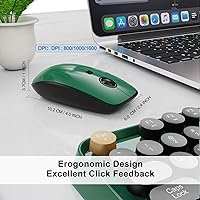
  • Mouse Design: The mouse shares the keyboard's colorful retro aesthetic and features a glossy finish with a quiet click mechanism.
  • Connection Sharing: A single nano receiver manages both the keyboard and mouse simultaneously, using only one USB port on the host device.
  • Warranty: FD provides a three-year warranty on this combo along with a 60-day money-back or replacement guarantee.
  • Brand: This combo is manufactured by FD, model number V2020, and was first made available in December 2024.

Related Reviews

FD K6630 Wireless Keyboard and Mouse Combo

75%
88%
Design & Aesthetics
67%
Typing Experience
83%
Noise Level
58%
Mouse Performance
81%
Wireless Connectivity
More
FD EK8870 Wireless Keyboard and Mouse Combo

78%
88%
Design & Aesthetics
71%
Typing Experience
82%
Wireless Reliability
63%
Mouse Comfort & Usability
74%
Build Quality
More
Arteck HW192 Wireless Keyboard and Mouse Combo

78%
78%
Build Quality
72%
Typing Experience
63%
Mouse Comfort & Ergonomics
81%
Battery Life
69%
Wireless Connectivity
More
KNOWSQT Wireless Keyboard and Mouse Combo
87%
89%
Wireless Performance
83%
Build Quality
86%
Ergonomics & Comfort
91%
Design & Aesthetics
76%
Battery Life
More
Letton Wireless Retro Keyboard and Mouse Combo

78%
93%
Visual Design & Aesthetics
91%
Setup & Ease of Use
61%
Typing Feel & Key Travel
84%
Wireless Reliability
58%
Mouse Performance
More
FOPETT Retro Wireless Keyboard and Mouse Combo
82%
93%
Design & Aesthetics
76%
Typing Experience
67%
Mouse Performance
88%
Wireless Connectivity
91%
Battery Life
More
ULSOU Wireless Ergonomic Keyboard and Mouse Combo

74%
88%
Value for Money
84%
Typing Comfort
86%
Key Noise Level
57%
Key Feel & Tactility
61%
Mouse Performance
More
GEEZER Wireless Keyboard and Mouse Combo
72%
83%
Value for Money
91%
Aesthetic Design
94%
Ease of Setup
67%
Typing Feel
62%
Mouse Quality
More
TKVPJYYI Wireless Retro Typewriter Keyboard and Mouse Combo
76%
88%
Design & Aesthetics
71%
Typing Experience
62%
Mouse Performance
58%
Build Quality
83%
Wireless Connectivity
More
cimetech Wireless Keyboard and Mouse Combo

76%
94%
Ease of Setup
91%
Typing Noise Level
89%
Portability
83%
Key Layout & Usability
62%
Mouse Performance
More

FAQ

No, nothing to install at all. Just plug the nano receiver into a USB-A port on your computer and both the keyboard and mouse should be recognized within seconds. It works completely out of the box on Windows and most other supported platforms.

It will work, but you will need a USB-A to USB-C adapter, which is not included in the package. If you are using a modern MacBook or another USB-C-only laptop, factor that extra purchase into your decision. The adapter itself is inexpensive and widely available.

Basic typing works fine on a Mac, but the 12 dedicated hotkeys are only partially compatible with macOS. If you rely heavily on media shortcuts or function-layer keys in your Mac workflow, you may find some of them do not respond as expected. For Windows users, the hotkeys work fully.

The keyboard runs on standard AA batteries, but they are not included in the box, so you will want to have a pair ready before you set up. Battery life is rated at roughly 12 months under normal daily use, which is reasonably long for a wireless keyboard in this category.

Based on real buyer feedback, the keys are genuinely quieter than a typical membrane keyboard. They are not silent in an absolute sense, but they are unobtrusive enough that most people working in shared spaces or next to a partner on a call report no complaints. The mouse clicks are also described as soft.

Yes, that is exactly how it works. The single nano receiver handles both devices simultaneously through one USB port. You do not need two separate receivers or any pairing process — it is all handled automatically.

Just press any key. The keyboard goes into auto-sleep after five minutes of sitting idle, and a single keypress brings it back instantly. There is no dedicated power switch, so if the keyboard feels unresponsive after a break, that is likely all that is happening.

It is actually a solid gift choice for that exact type of person. The setup involves nothing more than plugging in a small receiver, and the colorful retro design tends to get a positive reaction from people who have only ever used plain black keyboards. The 60-day return window also means there is little risk if it does not suit them.

Honestly, the keyboard tends to be the stronger part of this combo. The mouse is functional and matches the aesthetic, but a portion of buyers note it feels lighter and less substantial than expected. If mouse quality is a priority for you, it is worth keeping that in mind.

FD backs this colorful wireless combo with a three-year warranty and a 60-day money-back or replacement guarantee. That is a notably long coverage period for a product in this price range and suggests reasonable confidence from the manufacturer. If you have an issue, contacting their support team within those windows is your best path to a resolution.