Overview

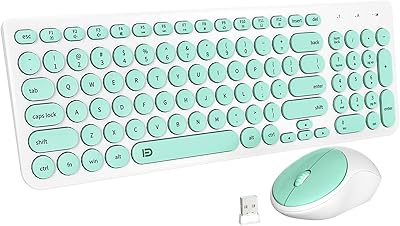
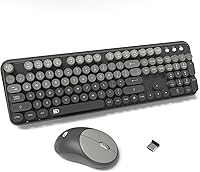
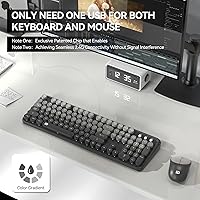
The FD EK8870 Wireless Keyboard and Mouse Combo is one of those rare budget picks that actually looks the part. The round keycaps, spread across a full-sized 104-key layout in a soft grey gradient, give it a retro typewriter personality that genuinely stands out on any desk. Setup takes about thirty seconds — plug in the shared nano receiver and both devices are immediately recognized, no driver installation required. Launched in early 2025, it has already climbed into the top 350 of its Amazon category, which suggests the design is resonating. It targets students, home users, and remote workers who want something functional without sacrificing style.
Features & Benefits

The shared nano USB receiver is a small but genuinely useful design choice — one port handles both devices, keeping cable clutter to a minimum on a tidy desk. The keycaps are laser-engraved rather than pad-printed, meaning the characters resist rubbing off even with heavy daily use. A built-in DSP chip softens the sound of each keystroke noticeably, and the mouse clicks are nearly inaudible — real advantages if you work in a bedroom or shared office. The keyboard also has a waterproof membrane with a drainage design, so an accidental coffee splash is unlikely to be catastrophic. Both devices include batteries out of the box and have dedicated power switches to help conserve them.

Best For

This retro keyboard combo makes the most sense for students and home office workers who want a visually distinct desk setup without spending much. If you share a room or work late while others sleep, the quiet keys and silent mouse clicks make this set genuinely considerate. It works straight out of the box with Windows systems from XP through 11, Chromebooks, and even Smart TVs — a broader compatibility range than many rivals at this price. That said, Mac users should know upfront that the hotkeys are not fully compatible, which is a real limitation worth flagging before purchasing. Anyone upgrading from a plain, forgettable keyboard will find the typewriter-inspired aesthetic a worthwhile change.

User Feedback

Buyers respond well to the overall look — the round keys get consistent praise for their character, and most people find the typing feel pleasant enough for everyday tasks. The compact mouse size divides opinion, though: users with smaller hands appreciate how light it feels, while those with larger hands find it a bit cramped for long sessions. Battery life feedback is generally positive, with several buyers noting weeks of use before needing a replacement. The wireless signal holds up reliably at normal room distances. The most recurring criticism is the Mac hotkey limitation, which some buyers only discovered after purchase — so it is worth confirming your setup before committing.

Pros

  • Retro round-keycap design stands out on any desk without a premium price tag.
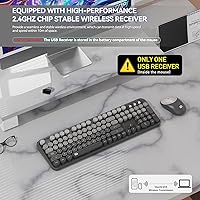
  • Single shared nano receiver means one USB port handles both keyboard and mouse — no desk clutter.
  • Laser-engraved keycaps resist fading even with years of daily use.
  • Built-in DSP chip noticeably softens keystroke noise for quieter shared spaces.
  • Silent mouse clicks are genuinely unobtrusive in bedrooms or open offices.
  • Waterproof membrane with drainage design offers real protection against accidental spills.
  • Both devices ship with batteries included, so setup is immediately complete out of the box.
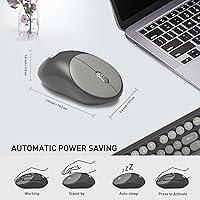
  • Power-saving switches on both devices help stretch battery life over weeks of normal use.
  • Broad Windows compatibility covers XP through 11, plus Chromebooks and Smart TVs.
  • Three-year warranty and a 60-day money-back option provide solid post-purchase peace of mind.

Cons

  • Mac hotkey incompatibility is a recurring frustration that buyers often discover only after purchase.
  • The mouse is too compact for users with larger hands during extended work sessions.
  • Membrane typing feel will disappoint anyone coming from a mechanical keyboard background.
  • Mouse DPI tops out at 1600, which limits precision for tasks requiring finer cursor control.
  • The keyboard is on the heavier side at 1.57 lb, making it less ideal for frequent travel.
  • No Bluetooth option means you must sacrifice a USB port permanently for the nano receiver.
  • Hotkey shortcuts for media and function keys may not work as expected outside Windows environments.
  • No backlighting makes this set impractical in low-light or dim workspace conditions.

Ratings

The FD EK8870 Wireless Keyboard and Mouse Combo scores below are generated by AI after analyzing thousands of verified global buyer reviews, with spam, bot activity, and incentivized feedback actively filtered out. Each category reflects the honest spread of real user experiences — strengths are credited where they are earned, and recurring pain points are not softened or buried. The result is a transparent, balanced picture to help you decide whether this retro wireless set genuinely fits your needs.
Design & Aesthetics
88%
The round keycap styling and grey gradient colorway consistently earn praise from buyers who were tired of generic black keyboards cluttering their desks. Students and home office workers in particular mention that this set noticeably upgrades the visual feel of their workspace without requiring a major investment.
A small number of buyers felt the grey gradient looked slightly less striking in person than in product photos, describing it as more muted than expected. The overall aesthetic is also quite specific — buyers who prefer a minimalist or modern look may find the retro typewriter styling a bit too niche for their taste.
Typing Experience
71%
29%
The round keycaps create a tactile and visually distinct typing feel that many casual users genuinely enjoy for daily correspondence, note-taking, and browsing. The DSP noise-reduction chip takes enough edge off the keystroke sound that users in shared living spaces report fewer complaints from housemates.
Buyers coming from mechanical keyboards frequently note that the membrane actuation feels mushy and imprecise by comparison. For anyone who types heavily for long stretches — writers, coders, data entry workers — the lack of tactile feedback becomes fatiguing over time.
Wireless Reliability
82%
18%
The 2.4GHz connection holds up consistently in normal room use, and most buyers report zero noticeable input lag during everyday computing tasks. The shared nano receiver keeps things tidy with just one USB port occupied, which users working from smaller laptops especially appreciate.
A handful of buyers noted intermittent disconnection when the receiver was plugged into a USB hub rather than directly into the computer. Performance beyond around six to seven meters also showed occasional stuttering in some setups, falling short of the advertised ten-meter ceiling.
Mouse Comfort & Usability
63%
37%
The mouse is exceptionally light at under 0.15 lb, which users with smaller hands tend to appreciate during short-to-medium work sessions. The silent click mechanism is a genuine highlight for anyone working in a bedroom setup or quiet shared office where noise etiquette matters.
Users with medium or large hands repeatedly flag that the compact 4.1 × 2.5-inch body feels cramped and causes hand strain after extended use. At 1600 DPI with no adjustability, the cursor speed also sits too fast for precise detail work and too slow for users with larger monitors.
Build Quality
74%
26%
The laser-engraved keycaps are a legitimate durability upgrade over pad-printed alternatives — buyers who have owned the set for several months report no visible character fading even with heavy daily use. The keyboard chassis feels reasonably solid on the desk thanks to the anti-slip silicone base.
The mouse shell feels noticeably lightweight in a way that can read as cheap rather than comfortable, and a few buyers mentioned minor flex in the keyboard frame when pressing keys near the center. Overall build quality is acceptable for the price tier but would not satisfy anyone expecting premium materials.
Spill & Splash Resistance
77%
23%
The waterproof membrane with drainage design provides meaningful everyday protection, and several buyers confirmed the keyboard survived minor liquid spills without permanent damage when dried promptly. For a desk where beverages are a regular presence, this is a practical feature that earns genuine trust over time.
The protection is limited to the keyboard only — the mouse has no stated spill resistance. Buyers should also understand this is splash resistance rather than full waterproofing; submerging or soaking the keyboard would likely cause damage regardless of the drainage design.
Setup & Compatibility
91%
Plug-and-play setup is genuinely immediate — buyers consistently report both devices working within seconds of inserting the nano receiver, with no driver downloads or configuration screens required. The compatibility range covering Windows XP through 11, Chromebooks, and Smart TVs is broader than most rivals at this price point.
Mac users face a recurring frustration: the hotkey row does not map correctly to macOS functions, making shortcuts for media, volume, and brightness unreliable. This limitation is not prominently flagged at purchase, and it surfaces repeatedly in reviews from buyers who only discovered the issue after unboxing.
Battery Life
78%
22%
Most buyers report several weeks of comfortable use from a single set of batteries under normal working conditions, which compares favorably to similarly priced wireless sets. The on/off switches on both devices are a practical touch that genuinely extends intervals between battery changes when used consistently.
Battery consumption increases noticeably if users forget to toggle the power switches when stepping away, which happens more often than it should given how small the switches are. The keyboard requires two AAA batteries rather than the more common AA format, which can be a minor inconvenience when restocking.
Key Travel & Feedback
58%
42%
The key travel depth is adequate for casual typing, and the round keycap shape gives a slightly different tactile surface that some users find refreshing compared to standard flat-profile keys. Light typists working on emails or browsing tasks tend to find the feel perfectly acceptable.
Heavy typists and anyone accustomed to mechanical switches will find the feedback shallow and indistinct, making it harder to type accurately at speed without bottoming out keys. There is limited resistance before actuation, which contributes to the mushy feel that comes up repeatedly in critical reviews.
Noise Level
84%
The combination of the DSP-dampened keyboard and silent-click mouse makes this one of the quieter membrane combos available at this price, and buyers in shared apartments or dorm rooms specifically mention it as a reason they chose this set. The reduction in click and keystroke noise is audible and real, not just a marketing claim.
The keyboard is not completely silent — fast typing still produces a moderate tapping sound that is audible in a very quiet room. Buyers expecting near-silent operation similar to a laptop keyboard may be slightly disappointed, particularly when typing quickly on hard surfaces.
Value for Money
86%
At its price point, this wireless keyboard and mouse set packages a distinctive retro aesthetic, laser-engraved keycaps, spill resistance, quiet operation, and a three-year warranty into a bundle that is difficult to match from competing brands. Buyers consistently describe it as exceeding their expectations for what they paid.
The value calculation shifts if you are a Mac user or need an ergonomic mouse for long daily sessions, since neither the hotkey compatibility nor the mouse size holds up well under those conditions. A few buyers also noted that similarly priced competitors offer adjustable DPI and better mouse ergonomics, which narrows the value gap for those specific needs.
Warranty & Support
79%
21%
A three-year warranty paired with a 60-day money-back option is notably generous for a budget peripheral, and buyers who contacted FD through Amazon messaging generally report responsive and cooperative service. Replacement units for defective items were issued without significant friction in most documented cases.
Support interactions are handled exclusively through Amazon messaging, which can slow resolution times compared to brands with dedicated support portals or live chat. A small number of buyers reported delays getting responses outside standard business hours, which is a gap for time-sensitive issues.

Suitable for:

The FD EK8870 Wireless Keyboard and Mouse Combo is a strong fit for students, remote workers, and anyone setting up a home desk on a tight budget who still wants something that looks genuinely interesting. If your current keyboard is a plain black slab and you find yourself wishing your workspace had a bit more personality, the retro round-key design delivers that without requiring a major investment. It works especially well in shared or noise-sensitive environments — dorm rooms, open-plan home offices, or late-night work sessions where quiet peripherals matter to people around you. The plug-and-play setup also makes it a great pick for non-technical users who just want to unbox, plug in one receiver, and get going without installing drivers or fiddling with software. Windows users across a wide range of systems, from older laptops to Chromebooks and Smart TVs, will find the compatibility genuinely broad and hassle-free.
Not suitable for:

The FD EK8870 Wireless Keyboard and Mouse Combo has a few real limitations that certain buyers should weigh carefully before purchasing. Mac users are the most obvious group to pause here — the function hotkeys are not fully compatible with macOS, which could be a daily frustration if you rely on shortcut keys for productivity. The included mouse is compact and lightweight, measuring just 4.1 by 2.5 inches, which suits smaller hands but can feel awkward or cramped during long sessions for users with larger hands. If you are a heavy typist who expects a tactile, clicky mechanical feel from your keys, the membrane construction of this set will likely feel underwhelming compared to dedicated mechanical keyboards at higher price points. Gamers or power users who need precision above 1600 DPI, adjustable polling rates, or multi-device Bluetooth switching will also find this set too limited for their needs. Finally, anyone who primarily works in a Mac-centric ecosystem or needs robust cross-platform hotkey support should look elsewhere.

Specifications

  • Wireless Technology: Both the keyboard and mouse connect via 2.4GHz wireless using a single shared nano USB receiver.
  • Wireless Range: The wireless connection operates reliably at distances of up to 10 meters from the receiver.
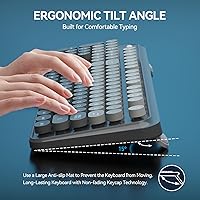
  • Keyboard Size: The keyboard measures 17.5 × 5.5 × 1.3 inches and uses a full-sized layout with a tilt angle for comfortable positioning.
  • Key Count: The keyboard features 104 round retro-style keycaps, including 12 function shortcut keys for media and system controls.
  • Keycap Printing: All keycap characters are laser-engraved using an injection molding process, making them resistant to fading with long-term use.
  • Noise Reduction: A DSP-based noise-reduction chip is built into the keyboard to soften keystroke sound during typing sessions.
  • Spill Resistance: The keyboard uses a waterproof conductive membrane with an internal drainage design to allow liquids to escape rather than damage the internals.
  • Mouse Dimensions: The mouse measures 4.1 × 2.5 × 1.0 inches, making it a compact form factor suited to smaller hand sizes.
  • Mouse DPI: The mouse operates at a fixed 1600 DPI, providing fast cursor movement suitable for everyday computing and general productivity.
  • Mouse Clicks: Silent micro-motion switch technology makes mouse clicks nearly inaudible, reducing noise in shared or quiet environments.
  • Keyboard Batteries: The keyboard requires two 1.5V AAA batteries, which are included in the box.
  • Mouse Battery: The mouse requires one 1.5V AA battery, which is also included in the box.
  • Power Management: Both devices have individual on/off switches to conserve battery power when not in use.
  • Keyboard Weight: The keyboard weighs 1.57 lb, making it a sturdy desktop peripheral not intended for frequent travel.
  • Mouse Weight: The mouse weighs 0.15 lb, giving it an exceptionally lightweight feel during use.
  • OS Compatibility: The combo is compatible with Windows XP through 11, Chromebooks, and Smart TVs with a USB port; Mac hotkey support is partial.
  • Model Number: The model identifier for this combo is EK8870, manufactured by FD.
  • Warranty: FD covers this combo with a three-year warranty and a 60-day money-back or replacement guarantee.

Related Reviews

FD K6630 Wireless Keyboard and Mouse Combo
75%
88%
Design & Aesthetics
67%
Typing Experience
83%
Noise Level
58%
Mouse Performance
81%
Wireless Connectivity
More
Arteck HW192 Wireless Keyboard and Mouse Combo
78%
78%
Build Quality
72%
Typing Experience
63%
Mouse Comfort & Ergonomics
81%
Battery Life
69%
Wireless Connectivity
More
KNOWSQT Wireless Keyboard and Mouse Combo
87%
89%
Wireless Performance
83%
Build Quality
86%
Ergonomics & Comfort
91%
Design & Aesthetics
76%
Battery Life
More
CHESONA Multi-Device Wireless Keyboard and Mouse Combo
79%
88%
Multi-Device Switching
81%
Keyboard Typing Feel
61%
Mouse Quality
84%
Battery Life
74%
Wireless Connectivity Stability
More
Harburfine Wireless Keyboard and Mouse Combo
85%
88%
Ergonomics & Comfort
93%
Quietness & Noise Level
85%
Wireless Connectivity & Range
84%
Battery Life & Power Management
90%
Setup & Installation
More
ULSOU Wireless Ergonomic Keyboard and Mouse Combo
74%
88%
Value for Money
84%
Typing Comfort
86%
Key Noise Level
57%
Key Feel & Tactility
61%
Mouse Performance
More
TKVPJYYI Wireless Retro Typewriter Keyboard and Mouse Combo
76%
88%
Design & Aesthetics
71%
Typing Experience
62%
Mouse Performance
58%
Build Quality
83%
Wireless Connectivity
More
JOYACCESS Wireless Keyboard and Mouse Combo
82%
88%
Value for Money
83%
Typing Experience
74%
Mouse Performance
86%
Backlight Quality
81%
Battery Life
More
cimetech Wireless Keyboard and Mouse Combo
76%
94%
Ease of Setup
91%
Typing Noise Level
89%
Portability
83%
Key Layout & Usability
62%
Mouse Performance
More
Letton Wireless Retro Keyboard and Mouse Combo
78%
93%
Visual Design & Aesthetics
91%
Setup & Ease of Use
61%
Typing Feel & Key Travel
84%
Wireless Reliability
58%
Mouse Performance
More

FAQ

No, there is nothing to install. Just plug the nano USB receiver into any available USB port on your computer and both the keyboard and mouse will be recognized automatically. It works on Windows straight out of the box without any additional setup steps.

It will function as a basic keyboard on a Mac, but the shortcut hotkeys — things like media controls, volume, and mail shortcuts — are not fully compatible with macOS. If you rely on those function row shortcuts daily, that gap will likely frustrate you. For pure typing on a Mac it works fine, but power Mac users should keep this limitation in mind.

They share a single nano USB receiver, which is one of the more practical aspects of this set. One port handles both devices simultaneously, so you are not giving up two USB slots just to run a wireless keyboard and mouse combo.

The nano receiver tucks into a small compartment at the bottom of the mouse, which is a handy detail if you are moving between desks or packing up your workspace. It keeps the receiver safe and means you are unlikely to lose it.

Battery life varies depending on how much you type and whether you remember to use the power-off switches, but many users report several weeks of normal use before needing a replacement. Using the on/off switches when you step away from your desk makes a noticeable difference in how long each set of batteries lasts.

Honestly, the mouse is on the compact side — it measures just 4.1 × 2.5 inches and weighs very little. People with smaller hands tend to like it, but users with larger hands often find it a bit cramped during long sessions. If you have bigger hands or prefer a palm-grip style, it is worth keeping that in mind before buying.

It is genuinely quieter than most standard membrane keyboards, thanks to a DSP noise-reduction chip that takes the edge off each keystroke. The mouse clicks are also designed to be nearly silent. It is not completely soundless, but for a shared bedroom or open office setting it is noticeably less disruptive than a typical keyboard.

The FD EK8870 Wireless Keyboard and Mouse Combo uses a waterproof membrane with a drainage design, meaning liquid can escape through the bottom rather than pooling inside and damaging the electronics. A small spill handled quickly should not be catastrophic, but it is still a good idea to tilt the keyboard and dry it out promptly rather than assuming it is fully waterproof.
Yes, both are officially supported. As long as your device has a standard USB port and recognizes plug-and-play peripherals, this wireless keyboard and mouse set should work without any configuration. Some advanced hotkeys may not map correctly on non-Windows systems, but basic typing and cursor control function normally.

The manufacturer offers a three-year warranty covering defects, along with a 60-day money-back or replacement option for early issues. If something goes wrong, the recommended first step is to contact the seller directly through Amazon messaging rather than initiating a return immediately, as they are generally willing to send replacements for defective units.