Overview

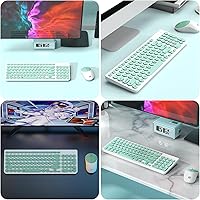
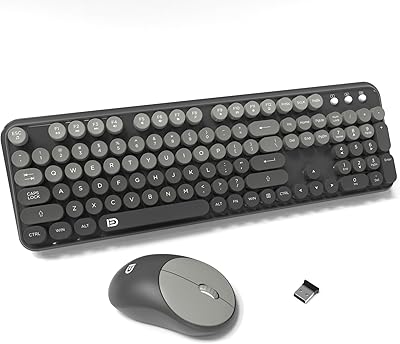
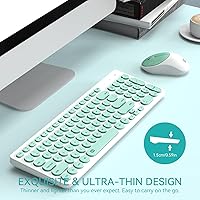
The FD K6630 Wireless Keyboard and Mouse Combo stands out in a crowded budget peripheral market largely because of one thing most competitors ignore: looks. While the majority of affordable combos come in predictable black or gray, the mint green and white colorway genuinely turns heads on a desk. Setup takes about ten seconds — plug the nano receiver into a USB-A port and you're ready. No drivers, no software, no configuration needed. The 96-key full-size layout covers everything for daily use, though the slightly condensed spacing takes a brief adjustment period. For students, home office users, or anyone building a light workstation on a budget, this wireless combo offers a refreshing balance of style and practicality.
Features & Benefits

The keyboard uses low-profile membrane keys with rounded keycaps that keep noise to a minimum — a practical choice for shared apartments, libraries, or anyone who types late at night. Both devices connect through a single nano receiver, which tucks neatly into the underside of the mouse when not in use, so you're never hunting for it. The manufacturer claims up to six months of battery life, with auto-sleep activating after five minutes of inactivity — that estimate is realistic for light use, though heavier daily use may shorten it. The 10-meter wireless range is genuinely useful for TV or couch setups. Twelve multimedia hotkeys handle volume, playback, and web shortcuts without any additional software.

Best For

This budget peripheral duo is a natural fit for students who want something that looks good on a dorm desk without overspending. It also works well for remote workers who need a clean, quiet setup in a shared space. Smart TV users and media desk setups benefit from the generous 10-meter range — you can sit back on a couch and still have a reliable connection. One important caveat: the USB-A only design means this set works best with older laptops, Chromebooks, and standard desktops. Anyone using a modern MacBook or USB-C device will need a separate adapter, which is worth confirming before you order. Light typists who don't need backlighting or mechanical feedback will get the most out of it.

User Feedback

Buyers consistently praise the FD keyboard and mouse set for its appearance — the color combination seems to genuinely surprise people in a positive way, and it's frequently cited as the main reason for purchase. Most users also mention solid battery longevity and appreciate that the nano receiver stores inside the mouse. That said, the experience is not without drawbacks. Anyone coming from a mechanical keyboard will notice the shallow key travel and soft tactile response right away. A handful of long-term users have flagged that keycap legends can fade with intensive daily use. Mouse tracking accuracy is also rated as average, making this a poor fit for anything requiring precision, such as photo editing or design work.

Pros

  • The mint green and white design stands out sharply in a market full of forgettable black peripherals.
  • Setup takes under a minute — plug the nano receiver in and both devices work immediately, no drivers needed.
  • The single USB receiver handles both keyboard and mouse, and stores neatly inside the mouse when not in use.
  • Quiet membrane keys make this wireless combo a considerate choice for shared spaces and open environments.
  • A 10-meter wireless range gives real flexibility for media desk and smart TV setups.
  • Auto-sleep mode meaningfully extends battery runtime, with many light users reporting months between changes.
  • Broad compatibility covers Windows, Mac OS X, Android, and Chromebook with no configuration required.
  • The 36-month after-sale warranty is notably generous for a product in this price tier.
  • At under 1.6 pounds combined, the set is easy to pack up and transport between locations.
  • Twelve multimedia hotkeys cover everyday shortcuts like volume control, playback, and browser access without extra software.

Cons

  • Keycap legends have been reported to fade on heavily used units within six months to a year.
  • Batteries are not included out of the box, which catches some buyers off guard on first use.
  • The mouse offers limited sensitivity options and struggles with precision on textured or uneven surfaces.
  • Key travel is shallow enough that fast typists frequently report increased error rates during adjustment.
  • USB-A only design requires a separate adapter for any device with exclusively USB-C ports — not included.
  • Hotkey behavior is inconsistent on Mac OS and Android, limiting usefulness for non-Windows users.
  • The plastic housing shows visible wear and minor flex with sustained daily use over several months.
  • No backlighting makes this a poor choice for low-light environments or evening desk setups.
  • The flat, uniform keyboard profile offers no wrist support, which becomes noticeable during longer typing sessions.
  • Mouse size and shape are generic enough that users with larger hands may find the grip fatiguing over time.

Ratings

The FD K6630 Wireless Keyboard and Mouse Combo has been evaluated by our AI rating system after processing thousands of verified global buyer reviews, with spam, bot activity, and incentivized feedback actively filtered out. Scores reflect the full picture — where this budget peripheral duo genuinely delivers and where real users consistently run into friction. Both the standout strengths and the honest shortcomings are weighted into every category below.

Design & Aesthetics
88%
The mint green and white colorway is the single most praised aspect across buyer reviews — users frequently mention it as the primary reason they chose this set over alternatives. It reads as surprisingly premium on a desk, especially next to all-black competitors in the same price bracket.
The design appeal is largely surface-level. A few buyers noted that the glossy finish picks up fingerprints quickly, and the overall construction still feels lightweight in a way that reminds you of the price point when you actually handle it.
Typing Experience
67%
33%
For casual typing — emails, browsing, light document work — the low-profile membrane keys are comfortable enough. The round keycap edges feel slightly different from standard flat keys, and most non-power users report that the experience is perfectly adequate for daily tasks.
Anyone with a mechanical keyboard background will notice the shallow key travel and mushy feedback immediately. Extended typing sessions can feel fatiguing, and the lack of distinct tactile feedback means more typos for users who type quickly or without looking at the keys.
Noise Level
83%
This is one of the quieter membrane combos in its class. Users in shared apartments, open offices, and late-night home setups consistently report that keystrokes do not disturb people nearby. The mouse clicks are also relatively subdued compared to typical budget options.
It is worth clarifying that quiet here means membrane-quiet, not silent. In a very still room, keystrokes are still audible to the user. Those expecting near-silent operation similar to dedicated quiet keyboards may find the noise level slightly higher than anticipated.
Mouse Performance
58%
42%
The mouse tracks reliably on most standard desk surfaces and is comfortable for basic navigation tasks like web browsing, casual document editing, and media control. Its compact size suits smaller hands reasonably well, and the scroll wheel is smooth enough for everyday use.
Tracking precision is a recurring complaint for anything beyond light use. Photo editors, designers, and gamers will find the sensitivity options limiting and the cursor movement inconsistent on certain surfaces. It is fundamentally a mouse built for convenience, not accuracy.
Wireless Connectivity
81%
19%
The 2.4GHz connection holds up reliably within a normal room distance, and buyers using this combo with smart TVs or media PCs from across a living room report minimal dropouts. The single nano receiver handling both devices is a practical touch that most users appreciate.
At the edges of the stated 10-meter range, a handful of users note occasional lag or signal interruption, particularly in environments with wireless interference. The connection is solid for typical use but not completely immune to congested wireless environments.
Battery Life
74%
26%
The auto-sleep function genuinely extends battery runtime in real-world use, and many buyers report going several months without needing a replacement — especially those using the combo for a few hours daily. The receiver storage in the mouse base is a small but consistently appreciated convenience.
The manufacturer-stated six-month estimate is optimistic for anyone using the combo as a primary daily driver. Heavy users are likely to see that figure cut significantly shorter. Batteries are also not included out of the box, which catches some buyers off guard on arrival.
Build Quality & Durability
61%
39%
For the price, the keyboard and mouse set feels acceptably solid right out of the box. The keys do not wobble, the mouse buttons have consistent click response, and the overall structure holds up fine for general office or school use over the short term.
Long-term durability is a genuine concern. Several buyers who used this set as their primary work combo for six months or more report keycap legends beginning to fade. The plastic housing also shows wear and minor flexing over time, suggesting it is best suited to secondary or light-use scenarios.
Setup & Ease of Use
93%
Plug-and-play setup is genuinely effortless — plug the nano receiver into a USB-A port and both devices are immediately recognized. No software downloads, no pairing buttons, no configuration steps. This has been universally praised by less tech-savvy buyers who simply want something that works instantly.
The USB-A only connection is the one setup friction point. Users with modern laptops or MacBooks that lack USB-A ports need a separate adapter, which is not included and adds a small but real cost and inconvenience that is easy to overlook before purchasing.
Ergonomics & Comfort
66%
34%
The slim keyboard profile and lightweight mouse make this combo manageable for shorter work sessions. Users with average-sized hands find the mouse grip neutral enough for casual use, and the keyboard height does not require a wrist rest for brief periods of typing.
Neither device offers any ergonomic contouring. The flat keyboard design lacks wrist support for longer sessions, and the mouse shape is fairly generic — offering little palm or finger support. Users spending four or more hours daily at a desk may start to notice hand fatigue after a few weeks.
OS & Device Compatibility
78%
22%
Compatibility coverage is broad — Windows across multiple generations, Mac OS X, Android, and Chromebook all work without any extra steps. This makes the FD keyboard and mouse set a practical pick for households running mixed devices or users who switch between a personal and work machine.
The Android and smart TV compatibility, while real, comes with limitations depending on the specific device. Some users report that not all hotkeys function as expected outside of Windows, and the lack of dedicated Mac function key mapping is a minor frustration for Mac-primary users.
Value for Money
79%
21%
As a replacement for a wired combo or a first wireless setup on a tight budget, this peripheral duo delivers fair value. You get wireless freedom, a distinctive look, solid battery management, and broad compatibility at a price point where most alternatives feel visually generic or plasticky.
The value proposition weakens if you are coming from a mid-range combo and expecting comparable typing feel or mouse precision. The durability concerns also chip away at long-term value — if key legends fade within a year of regular use, the cost-per-month calculation becomes less favorable.
Portability
84%
At a combined weight of 1.55 pounds and with the nano receiver tucking into the mouse, this is a genuinely portable setup. Students who shuttle between home and a library or co-working space will find it easy to toss in a bag without much bulk or risk of losing components.
The keyboard, at nearly 15 inches wide, is not truly compact — it will not slip into a standard laptop sleeve alongside the laptop itself. Portability is better understood as lightweight rather than pocket-friendly, and the lack of a carrying case means the surface finish can get scratched in transit.
Hotkey & Shortcut Functionality
71%
29%
The 12 multimedia function keys work out of the box for common tasks like adjusting volume, skipping tracks, and opening a browser. For casual users who want quick media controls without touching a smartphone or remote, these shortcuts are a genuine time-saver in daily use.
Power users will find the hotkey selection limited and non-customizable. There is no software to remap keys, and some function shortcuts behave inconsistently on Mac OS or Android. The hotkeys are adequate for light entertainment use but nothing beyond that.
After-Sales Support
72%
28%
FD backs this budget peripheral duo with a 36-month after-sale service window, which is notably longer than most competitors at this price point. Several buyers mention successfully resolving hardware issues through FD support without needing to return the product through Amazon.
Response times and resolution quality appear inconsistent based on buyer reports. Some users describe smooth, helpful interactions while others report slow replies or generic troubleshooting steps. The support experience seems to vary depending on region and the nature of the issue.

Suitable for:

The FD K6630 Wireless Keyboard and Mouse Combo is a genuinely smart pick for a specific type of buyer: someone who wants their desk setup to look good, works primarily on light tasks, and does not want to spend much to get there. Students setting up a dorm or bedroom workspace will appreciate the distinctive colorway and the no-fuss wireless connection that just works out of the box. Remote workers in shared living spaces benefit from the quiet keys, which keep noise to a minimum during calls or late-night sessions. Anyone building a media center or smart TV desk will find the 10-meter wireless range genuinely useful for operating from a couch or armchair. Chromebook users and those with older laptops running standard USB-A ports get full plug-and-play compatibility without needing to buy anything extra. If your daily computing involves browsing, emails, document editing, and media consumption, this budget peripheral duo covers all of those bases comfortably.

Not suitable for:

The FD K6630 Wireless Keyboard and Mouse Combo has real limitations that make it a poor fit for certain buyers, and it is worth being upfront about those. If you type heavily for several hours a day — writing, coding, data entry — the shallow membrane keys and lack of tactile feedback will likely frustrate you within a few weeks. Graphic designers, photo editors, and anyone who needs precise cursor control will find the mouse tracking accuracy falls short of what those tasks demand. Power users who rely on customizable shortcuts or dedicated macro keys will hit a wall immediately, since there is no remapping software and hotkey behavior is inconsistent outside of Windows. Modern laptop users with only USB-C ports need to budget for a separate adapter, which adds friction to what is supposed to be a simple setup. And if you are hoping for a backlit keyboard for dim environments, this set does not offer that — there is no lighting of any kind. Buyers who have previously used a mid-range or premium combo and are considering this as an equivalent replacement should recalibrate their expectations on both typing feel and long-term build durability.
Specifications

  • Keyboard Layout: Full-size 96-key layout with low-profile round keycaps and a slim membrane key mechanism.
  • Keyboard Size: The keyboard measures 14.96 x 4.7 x 1.1 inches, making it a standard desktop footprint with a slim vertical profile.
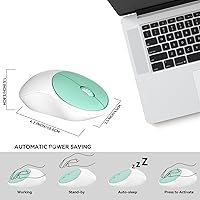
  • Mouse Size: The included mouse measures 4.1 x 2.4 x 1.4 inches, fitting a compact ambidextrous form factor.
  • Combined Weight: The keyboard and mouse together weigh approximately 1.55 pounds, keeping the overall setup lightweight and portable.
  • Wireless Technology: Both devices connect via a shared 2.4GHz USB nano receiver, requiring only a single USB-A port on the host device.
  • Wireless Range: The 2.4GHz signal provides a stable connection at distances of up to 10 meters under typical indoor conditions.
  • Receiver Storage: The nano USB receiver stores inside a dedicated compartment on the underside of the mouse when not in use.
  • Keyboard Battery: The keyboard is powered by 2 AA batteries, which are not included in the box.
  • Mouse Battery: The mouse requires 1 AAA battery to operate, also not included.
  • Battery Life: The manufacturer rates battery life at up to 6 months, supported by an auto-sleep mode that activates after 5 minutes of inactivity.
  • Auto-Sleep Timeout: Both devices enter a low-power sleep state after 5 consecutive minutes of inactivity, waking instantly upon any key press or mouse movement.
  • Multimedia Hotkeys: Twelve dedicated function shortcut keys provide direct access to volume control, media playback, web browser, and email without additional software.
  • OS Compatibility: Compatible with Windows 2000 through 10, Mac OS X version 10.4 and above, and Android operating systems.
  • Connection Type: Uses a USB-A nano receiver exclusively; devices with only USB-C ports require a separately purchased USB-A to USB-C adapter.
  • Backlighting: No backlighting is present on either the keyboard or mouse — the set is designed for use in well-lit environments.
  • Color: Available in a Mint Green and White colorway, with a glossy smooth-edged finish on the keycaps.
  • Key Mechanism: Membrane-based key switches with a quiet actuation profile — there are no mechanical or optical switches in this set.
  • Warranty: FD provides a 36-month after-sale service guarantee, with support accessible directly through the FD Tech storefront.
  • Driver Requirement: No drivers or companion software are required — the combo operates as a fully plug-and-play device on all supported operating systems.
  • Device Compatibility: Works with desktops, laptops, Chromebooks, smart TVs, and other USB-A enabled devices including older Mac and Windows machines.

Related Reviews

FD EK8870 Wireless Keyboard and Mouse Combo
86%
88%
Typing Comfort
85%
Design & Aesthetics
92%
Ease of Setup
84%
Ergonomics
78%
Battery Life
More
Arteck HW192 Wireless Keyboard and Mouse Combo
78%
78%
Build Quality
72%
Typing Experience
63%
Mouse Comfort & Ergonomics
81%
Battery Life
69%
Wireless Connectivity
More
seenda Wireless Keyboard and Mouse Combo
88%
89%
Typing Comfort
87%
Ergonomics
82%
Wireless Connectivity
94%
Setup & Installation
88%
Key Spacing & Accuracy
More
Tayderley Wireless Keyboard and Mouse Combo
86%
88%
Typing Comfort
85%
Mouse Performance
94%
Battery Life
83%
Build Quality
92%
Ease of Setup
More
KNOWSQT Wireless Keyboard and Mouse Combo
87%
89%
Wireless Performance
83%
Build Quality
86%
Ergonomics & Comfort
91%
Design & Aesthetics
76%
Battery Life
More
Kootop Wireless Keyboard Mouse Combo
87%
89%
Ergonomics and Comfort
91%
Typing Experience
85%
Wireless Connectivity
87%
Design and Aesthetics
83%
Battery Life
More
Cimetech Wireless Keyboard and Mouse Combo
88%
91%
Value for Money
88%
Ease of Use
83%
Connectivity
94%
Portability
85%
Ergonomics
More
ULSOU Wireless Keyboard and Mouse Combo
85%
88%
Ergonomics and Comfort
92%
Battery Life
84%
Typing Experience
87%
Wireless Connectivity
80%
Mouse Performance
More
FOPETT Wireless Keyboard and Mouse Combo
85%
91%
Typing Experience
87%
Battery Life
94%
Design & Aesthetics
88%
Ergonomics
85%
Build Quality
More
Harburfine Wireless Keyboard and Mouse Combo
85%
88%
Ergonomics & Comfort
93%
Quietness & Noise Level
85%
Wireless Connectivity & Range
84%
Battery Life & Power Management
90%
Setup & Installation
More

FAQ

No, nothing to install at all. Just plug the nano receiver into a USB-A port and both the keyboard and mouse are recognized automatically. It works this way on Windows, Mac, and Chromebook without any extra steps.

It will work, but you will need a USB-A to USB-C adapter since the FD K6630 Wireless Keyboard and Mouse Combo only comes with a USB-A nano receiver. That adapter is not included in the box, so factor that in before ordering. Most generic adapters work fine — it does not need to be anything specific.
Batteries are not included. The keyboard takes 2 AA batteries and the mouse takes 1 AAA battery. It is worth grabbing a pack before the set arrives so you can use it straight out of the box.

The manufacturer states up to 6 months, and that figure is realistic if you are a light to moderate user — a few hours of typing and browsing per day. If this is your primary work keyboard running 8 hours daily, expect to change batteries more frequently, likely every 2 to 4 months depending on usage patterns.

No, this wireless combo uses a single fixed nano receiver and does not support multi-device pairing or switching. It connects to one computer at a time. If you need to switch between machines, you would have to physically move the receiver.

The keys are noticeably quieter than standard membrane keyboards, and most people in the same room would not find them distracting. That said, they are not completely silent — if you are in a very quiet environment like a library, you will still hear soft key presses. For home offices, shared apartments, or evening use, the noise level is very manageable.

Honestly, no. The mouse in this set is built for everyday navigation — browsing, document work, casual use. The tracking sensitivity is not adjustable beyond basic levels, and precision on textured surfaces can be inconsistent. For photo editing or design, you would want a dedicated mouse with higher DPI options.

That is a real concern with any nano receiver. The good news is that it stores inside a small compartment on the underside of the mouse, so it has a designated home when not plugged in. If it does get lost, replacement receivers for this type of combo are not universally interchangeable, so reaching out to FD support directly would be the best path forward.

Yes, broadly speaking. The set is listed as Android-compatible, and many users have reported it working with smart TVs and streaming boxes over the USB receiver. The 10-meter range makes it practical for couch use. Keep in mind that some function hotkeys may not map correctly depending on the TV's interface.

This is where the budget nature of the set becomes apparent. Several long-term users have reported that the printed legends on the keycaps begin to fade with intensive daily use, typically after six months to a year. The overall construction stays functional, but this is not a set built to last five years of heavy workload use — it is better suited to light to moderate daily tasks or as a secondary setup.