Overview

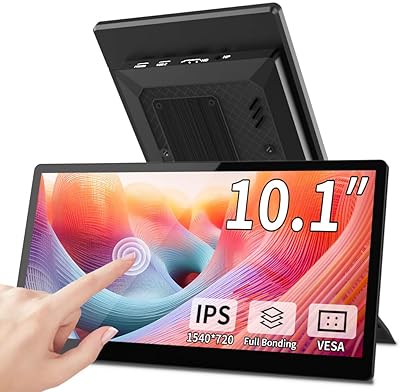
The Eyoyo EM101T 10-inch Touchscreen Monitor occupies an interesting spot in the small display market — compact enough to tuck into a tight workspace, yet built with a metal housing that feels more serious than most monitors at this size. It targets makers, small business owners, and hobbyists who need a portable touch display without the hassle of installing drivers. Plug in the USB cable and the touch function just works. That kind of frictionless setup matters when you are wiring up a Raspberry Pi project or configuring a kiosk. It is not trying to replace your main desktop screen, but as a dedicated secondary display, it punches above what you would expect for the price tier.

Features & Benefits

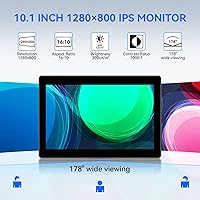
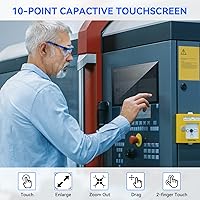
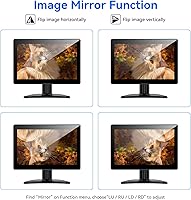
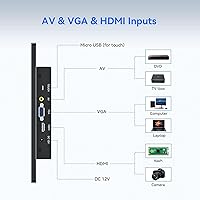
The 10.1-inch IPS panel delivers 1280x800 resolution with a 178° viewing angle and 300 cd/m² brightness — solid numbers for a screen this size, and the image holds up well from off-center angles. The 10-point capacitive touch layer sits flush against a true flat bezel, so gestures feel responsive rather than mushy. Input flexibility is a real strength here: HDMI, VGA, and AV ports let you connect everything from a Raspberry Pi to a security camera without adapters. The image mirror function — adjustable both horizontally and vertically — is particularly useful for teleprompter builds where reversed text is a requirement. The built-in dual speakers handle system alerts adequately, though do not expect much in the way of audio depth.

Best For

This compact touchscreen is most at home in purpose-built setups rather than casual desk use. Raspberry Pi builders will appreciate the driver-free USB touch connection, which removes one headache from an already involved build process. It also fits naturally into tight retail or food service environments as a compact POS display — no wasted counter space, and the metal body handles the occasional bump. Smart home tinkerers can mount it to a wall panel using the VESA 75x75 mount points and rotate the stand up to 180° for the exact angle they need. Security and CCTV installs benefit from the AV input, while developers who need a dedicated prototyping screen will find the plug-and-play setup saves real time.

User Feedback

The Eyoyo 10-inch monitor has earned a 4.0-star rating, and that score reflects the general experience fairly well. Most buyers come away satisfied with the easy out-of-box setup and consistent touch response, particularly on Windows. Where criticism surfaces, it tends to focus on a few specific areas: the VGA signal quality lags noticeably behind HDMI, so if that is your primary input, go in with adjusted expectations. The stand, while functional, does not feel as solid as the metal chassis implies. Touch calibration on some Linux distributions occasionally requires manual adjustment. Speaker output is workable for notification sounds but thin for anything more demanding. Buyers who match this small touch display to the right use case tend to be genuinely happy with it.

Pros

  • Driver-free USB touch setup means you are up and running in minutes with no software headaches.
  • The metal housing feels genuinely durable and more industrial than competing plastic-bodied screens at this size.
  • Triple inputs — HDMI, VGA, and AV — cover a wider range of source devices than most compact monitors offer.
  • The IPS panel holds color and contrast well from wide angles, useful in kiosk or wall-mount scenarios.
  • Built-in image mirror function works reliably for teleprompter and reverse-display applications without extra software.
  • VESA 75x75 mount points and a 180° adjustable stand give real flexibility for permanent or semi-permanent installations.
  • 10-point capacitive touch performs accurately and responsively in Windows environments right out of the box.
  • The compact footprint makes it genuinely practical for tight POS counters, server racks, or small control panels.
  • Built-in dual speakers handle alert sounds and basic system audio, reducing the need for an external speaker in simple setups.

Cons

  • VGA input delivers noticeably softer image quality compared to HDMI — not ideal if that is your only available connection.
  • The adjustable stand feels less solid than the metal chassis implies and can wobble under repeated touch interaction.
  • Touch calibration on certain Linux distributions requires manual adjustment, which adds friction for less technical users.
  • At 10.1 inches, the screen is too small for comfortable general-purpose desktop or productivity use.
  • Speaker audio is thin and limited — functional for notifications, but not a substitute for even basic external speakers.
  • The 1280x800 resolution, while adequate for kiosk use, will feel cramped if you try running full desktop interfaces.
  • No USB-C input limits compatibility with newer single-board computers and modern laptops without adapters.
  • At just over four pounds, it is heavier than it looks, which may complicate some portable or handheld mounting ideas.

Ratings

The scores below for the Eyoyo EM101T 10-inch Touchscreen Monitor were generated by our AI system after analyzing verified buyer reviews from multiple global markets, with spam, incentivized, and bot-flagged submissions actively filtered out before scoring. Each category reflects the honest distribution of real user experiences — strengths and frustrations weighted equally — so you get a transparent picture of where this compact display genuinely delivers and where it falls short.

Touch Responsiveness
83%
Most buyers report that the 10-point capacitive surface picks up taps and swipe gestures reliably right from the first connection, particularly in Windows environments where plug-and-play USB recognition is near-universal. For Raspberry Pi and POS builds, this kind of consistent first-use accuracy matters a lot.
On certain Linux distributions, calibration does not land perfectly out of the box and requires manual correction using additional tools. A small percentage of users also note occasional drift at the screen edges during extended touch sessions.
Image Quality
78%
22%
The IPS panel produces well-balanced color and holds contrast at wide angles, which is a genuine advantage in wall-mount or kiosk scenarios where viewers are rarely positioned dead center. At 1280x800, text-heavy interfaces and UI dashboards look clean and legible.
The resolution, while adequate for control panels and POS displays, starts to feel limiting if you try running a full desktop environment or viewing detailed imagery. Pixel density at this screen size is modest and noticeable when viewing fine text up close.
Ease of Setup
91%
Buyers consistently highlight how refreshingly straightforward the initial setup is — HDMI for video, USB for touch, and the screen is recognized instantly on Windows and Android without any driver hunting. For hobbyists building Raspberry Pi projects, this frictionless experience saves real time.
Users on less common Linux distros occasionally need to invest extra effort in touch calibration, and the on-screen display menu for adjusting settings like brightness or input source has a learning curve that a few buyers found non-intuitive initially.
Build Quality
76%
24%
The metal housing gives this small touch display a weight and rigidity that stands out against plastic competitors in the same size bracket. For light commercial use in a food service or retail environment, the chassis inspires reasonable confidence in daily durability.
The adjustable stand is the clear weak point — it feels noticeably less solid than the body it supports, and repeated touch interaction can cause wobble. Several buyers note it does not feel proportionally engineered compared to the housing quality.
Input Versatility
87%
Having HDMI, VGA, and AV inputs on a 10-inch monitor is genuinely uncommon and opens up connection options most competitors in this class do not offer. Security camera installs and legacy equipment with composite AV output benefit directly from this flexibility.
VGA signal quality is a consistent complaint — the analog connection produces a noticeably softer image than HDMI, and buyers who rely on VGA as their primary input source are frequently disappointed by the result compared to what the HDMI input delivers.
Mounting Flexibility
84%
VESA 75x75mm compatibility combined with the 180-degree adjustable stand gives buyers real options for how and where this screen lives. Wall panels, pole mounts, and desk deployments are all practical without needing third-party adapters or custom brackets.
The included stand, while versatile in angle, does not lock firmly at intermediate positions for some users. Buyers doing permanent installations tend to bypass the stand entirely and go straight to VESA mounting for a more stable result.
Value for Money
79%
21%
Relative to touch-capable monitors of similar size, the combination of metal housing, triple inputs, VESA support, and plug-and-play USB touch at this price point represents a reasonable deal for project-focused buyers who need a capable, niche display.
For buyers who just need a small secondary screen without touch, cheaper non-touch alternatives undercut this on price noticeably. The value proposition only holds if you are actively using the touch capability and multi-input flexibility.
Speaker Quality
44%
56%
The dual built-in speakers are genuinely useful in kiosk and surveillance contexts where you only need audio alerts, beeps, or basic system sounds. Having any speaker at all removes the need for a separate audio device in simple utility deployments.
Audio output is thin, low in volume, and lacks any meaningful bass or midrange clarity. Multiple users describe the sound as barely adequate for notifications and wholly unsuitable for video playback, presentations, or any situation where audio quality matters.
Brightness & Visibility
73%
27%
At 300 cd/m², the panel performs well in typical indoor lighting conditions including office environments and retail counters with overhead fluorescent lighting. Colors stay accurate and readable without needing to push the brightness to maximum settings.
In brighter environments near windows or under direct overhead spotlights, the glossy screen surface introduces reflections that reduce visibility. There is no high-brightness mode or anti-glare coating to compensate in those situations.
OS Compatibility
77%
23%
Windows support is thorough and consistent across XP through Windows 10, and Android compatibility is reliable for single-board computer builds. The breadth of supported operating systems is a practical asset for developers working across multiple platforms.
Linux experience varies depending on distribution and kernel version, with calibration reliability being the main inconsistency reported. MacOS is not officially supported, which is a genuine gap for buyers working in Apple-centric development environments.
Mirror Display Function
81%
19%
The horizontal and vertical image flip works as advertised and is accessible directly through the on-screen menu without any software dependency. For teleprompter builds specifically, this hardware-level mirror function eliminates the need for third-party display rotation software.
The feature is niche enough that many buyers never use it, and it is not always clearly documented which display modes trigger it correctly across different input types. A small number of users report confusion about accessing it through the OSD navigation.
Portability
69%
31%
At roughly 10 inches and designed for versatile mounting, this compact touchscreen travels reasonably well between workstations or project setups, particularly for developers testing different hardware configurations in a workshop environment.
At 4.07 pounds, the monitor is heavier than it looks due to the metal housing, and that weight combined with the bulkier stand makes it feel less portable than comparable plastic-bodied screens. It is not a device most users would move around frequently.
Cable Management
58%
42%
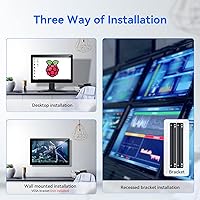
The recessed bracket design allows some degree of clean installation, especially in wall-mount or embedded panel scenarios where cables can be routed behind the surface. VESA mounting in particular makes for a tidier finished look.
Running both an HDMI and a USB cable simultaneously — which is required for full touch functionality — means two cables are always present, which can create clutter in compact setups. The included cables are also reported as short by several buyers doing rack or wall installations.

Suitable for:

The Eyoyo EM101T 10-inch Touchscreen Monitor is a strong match for anyone building a purpose-driven setup where a small, touch-capable display solves a specific problem. Raspberry Pi hobbyists will find it particularly practical — the driver-free USB touch connection means less time troubleshooting and more time actually building. Small retail operators or food service owners who need a compact POS screen will appreciate how little counter space it demands, along with the metal housing that holds up in busier environments. Home automation enthusiasts can wall-mount it via the VESA 75x75 points and use it as a dedicated smart home control panel without routing a mess of extra cables. Security and CCTV users benefit from the AV input, which lets them tie in camera feeds that HDMI-only screens simply cannot accept. If you are building a teleprompter and need a mirror-flip display, the horizontal and vertical image mirror function makes this small touch display one of the few affordable options that handles that requirement natively.

Not suitable for:

The Eyoyo EM101T 10-inch Touchscreen Monitor is not the right call if you need a general-purpose desktop display for daily productivity or media consumption. At 10.1 inches and 1280x800, the screen real estate is simply too limited for browsing documents, watching video, or running multiple windows side by side comfortably. Buyers planning to connect via VGA should be aware that the signal quality through that port is noticeably softer than HDMI — if VGA is your only option, you may be underwhelmed. The built-in speakers are adequate for system sounds but fall well short for anyone expecting usable audio during video playback or presentations. Linux users who need reliable out-of-box touch calibration may hit friction, as some distributions require manual adjustment that less experienced users might find frustrating. If you are comparing this compact touchscreen against a larger dedicated monitor for a single fixed installation, the price-per-inch math may point you toward a bigger screen instead.

Specifications

  • Screen Size: The display measures 10.1 inches diagonally, making it compact enough for tight installations while still readable at typical arm's length.
  • Resolution: Native resolution is 1280x800 pixels at a 16:10 aspect ratio, delivering HD-class clarity suitable for UI interfaces, kiosk displays, and control panels.
  • Panel Type: An IPS panel provides accurate color reproduction and a wide 178° viewing angle both horizontally and vertically.
  • Brightness: Rated at 300 cd/m², the screen maintains legibility in well-lit indoor environments including retail counters and office settings.
  • Contrast Ratio: A 1000:1 contrast ratio produces clear distinction between light and dark elements, keeping text and UI elements sharp.
  • Touch Technology: 10-point capacitive touch with a true flat bezel supports tap, drag, pinch-to-zoom, and multi-finger gestures without any driver installation.
  • Video Inputs: The monitor accepts HDMI, VGA, and AV (composite) inputs, allowing connection to a broad range of source devices simultaneously switchable via on-screen menu.
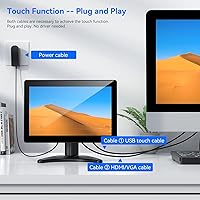
  • Touch Interface: Touch functionality is enabled via a standard USB-A cable using plug-and-play recognition — no additional drivers or software are required on Windows, Android, or Linux.
  • OS Compatibility: Confirmed compatible with Windows XP, 7, 8, and 10, as well as Android and Linux operating systems.
  • Housing Material: The enclosure is constructed from metal, providing durability and basic resistance to the wear conditions found in light industrial or commercial environments.
  • VESA Mount: Standard VESA 75x75mm mounting holes allow the screen to be attached to wall brackets, pole mounts, or compatible VESA arms.
  • Stand Rotation: The included adjustable stand supports up to 180° of tilt rotation, enabling flexible positioning for desk, counter, or angled installations.
  • Built-in Audio: Dual stereo speakers are integrated into the housing, providing basic audio output suitable for system notifications and simple media without external speakers.
  • Power Input: The monitor operates at 12V DC; a compatible power adapter is included in the box.
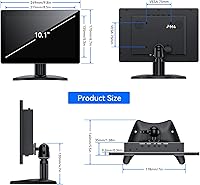
  • Dimensions: Physical dimensions are approximately 11.8 inches wide, 8.2 inches tall, and 3.9 inches deep including the stand.
  • Weight: The unit weighs 4.07 pounds, which is moderately heavy for its size due to the metal housing construction.
  • Image Mirror: A built-in image flip function supports both horizontal and vertical mirror modes, activated through the on-screen display menu without any software.
  • Model Number: The official model identifier is EM101T, manufactured under the Eyoyo brand.

Related Reviews
ELECROW 10.1 Inch Touchscreen Monitor
86%
88%
Display Quality
80%
Touchscreen Responsiveness
94%
Portability
92%
Ease of Setup
85%
Build Quality
More
Magedok T101F 10.1-inch Portable Touchscreen Monitor
72%
88%
USB-C Connectivity
63%
Touch Accuracy
79%
Display Quality
84%
Aspect Ratio Fit
76%
Setup Experience
More
Prechen 24-Inch Touchscreen Monitor
83%
92%
Value for Money
88%
Display Quality
90%
Touchscreen Responsiveness
84%
Build Quality
80%
Gaming Performance
More
Eyoyo EM12B 12-Inch Portable Monitor
76%
91%
Input Versatility
86%
Value for Money
88%
Image Flip Function
78%
Build Quality
62%
Display Resolution
More
Eyoyo EM08B 8″ Monitor
75%
91%
Input Versatility
88%
BNC Connectivity
84%
Setup & Plug-and-Play Experience
82%
Mirror Flip Functionality
76%
Image Clarity for Surveillance Use
More
Haiway SM10.1 10.1-inch Security Monitor
72%
88%
Ease of Setup
91%
Input Connectivity
67%
Display Clarity
49%
Glare & Screen Surface
72%
Build Quality
More
SKitphrati 17-inch Touchscreen Monitor 1280x1024
84%
85%
Touchscreen Performance
87%
Display Quality
90%
Ease of Setup
88%
Build Quality
92%
Connectivity Options
More
Thinlerain 10.1 Inch FHD Monitor
83%
85%
Display Quality
91%
Portability
88%
Setup & Installation
80%
Build Quality
92%
Connectivity Options
More
AISHICHEN 10.1-Inch IPS Mini Monitor
70%
78%
Value for Money
86%
Connectivity & Inputs
89%
Raspberry Pi Compatibility
73%
Display Clarity
61%
Build Quality
More
Moonka 10.5-inch Portable Monitor
84%
89%
Display Quality
94%
Portability
92%
Ease of Setup
87%
Build Quality
75%
Gaming Performance
More

FAQ

It works without any additional drivers on Raspberry Pi. You connect the display via HDMI for video and a standard USB cable for touch, and the Pi recognizes it automatically. Most users are up and running within a few minutes of unboxing.

Yes, both consoles output via HDMI and the monitor accepts that signal without issue. Keep in mind that this is a 10.1-inch screen, so it works best as a personal or secondary gaming display rather than a shared living room setup. Touch will not function with consoles since that requires a USB connection to a compatible host device.

Honestly, there is a noticeable difference. HDMI delivers a crisp digital signal that looks sharp at 1280x800, while VGA tends to produce a slightly softer image due to the analog nature of the connection. If you have a choice between the two inputs on your source device, go with HDMI every time.

It is not rated for outdoor use. The metal housing adds durability for indoor commercial environments, but there is no weatherproofing or high-brightness mode to compete with direct sunlight. Stick to covered or indoor installations for reliable performance.

Yes. The back panel includes standard VESA 75x75mm mounting holes, so you can remove the stand and attach it directly to a wall bracket or pole mount. This is a popular setup for home automation panels and kiosk installations.

It works on most Linux distributions since the USB touch interface uses standard HID drivers that the kernel already includes. That said, a small number of users report that touch calibration needs manual adjustment on certain distros. If you hit that issue, running a calibration tool like xinput-calibrator usually resolves it.

They are adequate for system sounds, notification chimes, and basic audio feedback in a kiosk or control panel context. Do not expect them to handle music or video audio with any real quality — the output is thin and low in volume. For anything beyond functional alerts, plug in external speakers or headphones.

Yes, and this is actually one of the more practical use cases for that feature. Teleprompters work by reflecting text off a beam-splitter glass, which means the displayed text needs to be horizontally flipped. This small touch display handles that flip natively through its on-screen menu, no software workaround needed.

It is functional but not the sturdiest part of the package. For light tapping it holds position well enough, but users who interact with the screen frequently or with heavier gestures mention some wobble. If stability is critical for your setup, mounting it via the VESA points will give you a much more solid result.

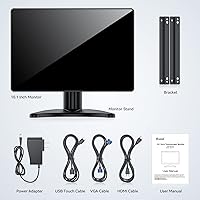
The package typically includes the monitor, the adjustable desk stand, a power adapter, an HDMI cable, a USB touch cable, and a user manual. It is worth confirming the cable lengths before installation since the included cables can be short for some rack or wall-mount configurations.