Overview

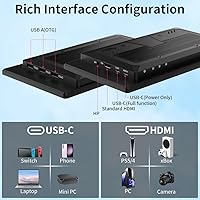
The Magedok T101F 10.1-inch Portable Touchscreen Monitor takes a different approach from typical compact displays, adopting a stretched bar form factor that signals right away this is purpose-built for specific workflows. At its price point, it sits in mid-range territory — not disposable budget hardware, but not a stretch for what you get. Connectivity is a genuine strength: USB-C with DP Alt Mode and full-size HDMI give real flexibility across host devices. A built-in speaker and integrated foldable stand add practical value without contributing much to the overall footprint. Just set expectations correctly — this is a focused tool, not a conventional secondary monitor for general use.
Features & Benefits

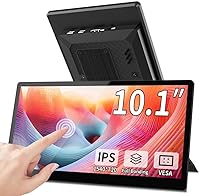
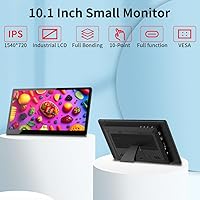
The IPS panel delivers a 1540×720 resolution across that wide 2.1:1 aspect ratio — which sounds limited until you realize this bar-format monitor was never intended for movies or photo editing. For AIDA64 sensor graphs, CPU load bars, or a pinned task board, the picture is sharp and 400-nit brightness holds up well in typical indoor lighting. Here is something buyers often miss: touch input requires USB-C. Connect via HDMI and you get video only — no touch, full stop. The integrated foldable stand covers most desk situations, and VESA support lets you mount it cleanly on an arm. At under a pound, portability is genuine.

Best For

This compact secondary display finds its sweet spot with PC builders who want a dedicated stats panel running AIDA64 or HWiNFO alongside their main screen — the stretched layout is practically designed for that use case. Raspberry Pi and Jetson Nano users get a low-power, directly attachable screen that requires no adapters over USB-C. It fits naturally into STEM classrooms and maker spaces where students need a small output panel for embedded projects. On the professional side, keeping a calendar or chat app visible on this mini touchscreen panel frees up your primary monitor for actual work. Home automation enthusiasts will appreciate it as an always-on control dashboard that does not dominate a shelf.

User Feedback

Buyers who pick this up for system monitoring or Pi projects tend to come away satisfied, with plug-and-play USB-C setup being the most consistently praised aspect — most report it just works without driver hunting. Image clarity earns positive marks for text-heavy dashboards where sharpness matters more than color range. On the downside, some users flag touch calibration as needing adjustment out of the box, and a handful mention the stand feels a bit flimsy under repeated repositioning. The built-in speaker draws mixed reactions — functional for system alerts, but nobody is mistaking it for real audio. In bright rooms, a few buyers wished for a bit more luminance headroom.

Pros

  • Plug-and-play USB-C setup works reliably with most modern laptops and single-board computers without driver headaches.
  • The stretched bar layout is genuinely ideal for AIDA64, HWiNFO, and similar system monitoring software.
  • IPS panel delivers accurate colors and consistent viewing angles for a display at this size and price tier.
  • At under a pound and less than half an inch thin, this bar-format monitor slips into a bag without adding noticeable bulk.
  • VESA mount support means you can fix it cleanly to a monitor arm or wall bracket for a tidy permanent installation.
  • Integrated foldable stand allows quick desk deployment without needing any additional accessories.
  • Broad compatibility with Raspberry Pi, Jetson Nano, and other embedded platforms makes it highly versatile for makers.
  • USB-C power delivery means one cable handles both display signal and power in supported setups.
  • Built-in speaker removes the need for separate audio output in light-duty notification or alert scenarios.

Cons

  • Touch input is completely unavailable when connected via HDMI — a limitation that catches many buyers off guard.
  • Touch calibration often needs manual adjustment out of the box, which adds friction to initial setup.
  • The foldable stand feels less sturdy than expected and can wobble if the screen is repositioned frequently.
  • Glossy screen surface increases glare in well-lit rooms, making brightness feel insufficient in some environments.
  • The 2.1:1 aspect ratio makes this mini touchscreen panel impractical for standard window layouts or side-by-side app use.
  • Speaker output is thin and low-volume — useful only for basic system sounds, not comfortable listening.
  • No USB-A passthrough or hub functionality limits desk cable management options.
  • Brightness ceiling of 400 nits may not satisfy users working near bright windows or under strong overhead lighting.

Ratings

The scores below for the Magedok T101F 10.1-inch Portable Touchscreen Monitor were generated by our AI engine after analyzing verified purchase reviews from global buyers, with spam, bot-submitted, and incentivized feedback actively filtered out. Each category reflects the genuine consensus of real-world users — from PC builders running 24/7 monitoring rigs to Raspberry Pi hobbyists and home automation enthusiasts. Both the standout strengths and the recurring frustrations are represented transparently, so you can make a fully informed call before buying.
USB-C Connectivity
88%
Buyers consistently praise how effortlessly this bar-format monitor connects to modern laptops and single-board computers via USB-C — one cable handles both power and display signal in most setups. For Raspberry Pi and Jetson Nano users especially, the plug-and-play experience is a genuine time-saver.
A notable minority of users hit compatibility walls with older USB-C ports that lack DP Alt Mode support, leaving them with a non-functional display until they source the right cable or adapter. The dependency on DP Alt Mode for touch makes cable selection more consequential than most buyers anticipate.
Touch Accuracy
63%
37%
When calibrated correctly over USB-C, the touch layer is responsive enough for navigating dashboards, tapping controls in home automation panels, or interacting with Raspberry Pi interfaces. Users who took the time to run through calibration settings reported a noticeably improved experience.
Out-of-the-box calibration is a recurring complaint — several users noted touch registration drifting from the actual tap point, particularly near screen edges. The complete absence of touch when connected via HDMI also frustrates buyers who discover this limitation only after unboxing.
Display Quality
79%
21%
The IPS panel earns consistent praise for color consistency and viewing angle performance — two things that matter when this compact secondary display is mounted off to the side of a main monitor. Text on AIDA64 graphs and dashboard widgets appears crisp and easy to read at typical desk distances.
The glossy surface is a divisive choice; in rooms with overhead lighting or nearby windows, reflections reduce effective contrast and make reading darker UI elements harder. A few users also noted that 400 nits feels underpowered compared to ambient conditions in brighter workspaces.
Aspect Ratio Fit
84%
For the specific use cases this mini touchscreen panel targets — system monitoring, ticker-style data feeds, pinned chat windows, home automation dashboards — the 2.1:1 stretched layout is exactly the right shape. PC builders in particular describe it as feeling purpose-designed once it is running AIDA64 or HWiNFO.
Buyers who attempt to use it as a general secondary monitor for standard app windows or video playback quickly find the aspect ratio limiting and somewhat disorienting. Content designed for 16:9 or 16:10 either crops awkwardly or letterboxes to an impractical height.
Setup Experience
76%
24%
The majority of users on Windows and Raspberry Pi OS report a smooth initial setup with no additional drivers needed for basic display functionality. The foldable stand means the monitor is ready to use within minutes of being unboxed, which is appreciated by buyers who just want to get running quickly.
Touch setup on certain Linux distributions requires manual configuration, and a handful of users report that display settings like resolution and refresh rate needed manual overrides before output looked correct. First-time embedded system users sometimes struggle without clear documentation.
Build Quality
71%
29%
The chassis feels reasonably solid for a display at this size and weight class, and the slim profile holds up well during transport. Several buyers who carry it alongside a laptop report no flex or panel stress issues after weeks of daily bag use.
The integrated stand is the weakest physical element — it holds steady on flat surfaces but wobbles noticeably when nudged, and a few users reported the hinge becoming looser over time with repeated adjustment. The overall build reads as functional rather than premium.
Portability
91%
At 14.1 ounces and under half an inch thick, this is one of the easier secondary displays to carry without noticing it in a bag. Professionals who move between workspaces or travel frequently cite the weight and footprint as significant practical advantages over conventional portable monitors.
The glossy screen surface picks up fingerprints quickly and scratches if slid against other objects without a sleeve or protective layer. There is no bundled carrying case or screen protector, which feels like an oversight for a display marketed partly on its portability.
Brightness & Glare
58%
42%
In controlled indoor environments — a dim office, a home lab, or a server room — 400 nits delivers adequate brightness for comfortable extended viewing. The 1000:1 contrast ratio helps dark UI elements stay readable without pushing luminance higher.
Bright-room performance is a genuine weak point; the glossy panel compounds the modest brightness ceiling, and users near windows or under harsh overhead lighting report washing out and visible screen reflections. This is one of the most frequently cited real-world frustrations from verified buyers.
Raspberry Pi Compatibility
86%
Among maker-community buyers, this compact secondary display has earned a positive reputation for working reliably with Raspberry Pi 4 and Pi 5 boards, typically requiring only minor config.txt edits to lock in the correct resolution. Jetson Nano users report similarly smooth results.
Pi 3 and older boards can require more trial and error, and there is no official Magedok documentation covering board-specific configuration. Users who are not comfortable editing boot config files may find this step unexpectedly time-consuming.
Speaker Quality
41%
59%
The built-in speaker is present and functional — for dashboard alert sounds, notification pings, or background audio at low volume in a quiet room, it gets the job done without requiring any additional hardware. Its existence is genuinely appreciated in minimal-cable setups.
Audio quality is thin, lacks bass entirely, and the maximum volume is too low to be useful in any environment with ambient noise. Most buyers treat it as a last resort rather than a real audio option, and several explicitly recommend ignoring it in favor of external speakers or headphones.
VESA & Mounting
83%
VESA support is a genuine asset for users building permanent installations — home automation panels, wall-mounted kiosk displays, or monitor arm setups all benefit from the clean, stable mounting this enables. Buyers who use arms describe the result as a tidy, professional-looking workstation addition.
The VESA pattern specifics are not prominently documented in the product listing, which caused some buyers to purchase incompatible brackets. There is also no mounting hardware included in the box, meaning users need to source their own bolts and spacers.
Value for Money
74%
26%
For the specific audience this bar-format monitor targets — makers, PC enthusiasts, and home automation builders — the combination of IPS display, touch input, dual connectivity, and built-in stand represents fair value relative to alternatives in this niche. Most satisfied buyers feel the price is justified for what it does well.
Buyers who approach it expecting a general-purpose secondary monitor tend to feel the price is harder to justify given the resolution ceiling and aspect ratio constraints. The speaker and stand, while included, are not polished enough to meaningfully strengthen the value argument.
Driver & Software Support
62%
38%
On Windows 10 and 11, the display typically works as a standard plug-and-play monitor with no additional software required. Basic touch HID functionality also registers natively in most cases, lowering the barrier for non-technical users.
Linux support varies considerably by distribution, and touch input in particular can require manual input device mapping that is not beginner-friendly. Magedok provides limited official troubleshooting resources, leaving users reliant on community forums for configuration guidance.
Cable Management
55%
45%
The single-cable USB-C setup is a real convenience for users whose host device supports DP Alt Mode — one cable replaces what would otherwise be two separate connections for power and video. This makes the wiring situation noticeably cleaner than many competing displays.
Users who need HDMI for video and USB-C only for power end up with two cables regardless, which partially undermines the clean-desk appeal. The lack of any USB-A passthrough or integrated hub means peripheral management still requires a separate hub or dock in most setups.

Suitable for:

The Magedok T101F 10.1-inch Portable Touchscreen Monitor is purpose-built for users who need a dedicated, always-visible information panel rather than a conventional second screen. PC builders and performance enthusiasts will find the stretched 2.1:1 aspect ratio perfectly matched to AIDA64 or HWiNFO dashboards, keeping sensor data visible without sacrificing space on their primary display. Raspberry Pi and Jetson Nano hobbyists get a compact, USB-C-powered display that connects cleanly to embedded systems without requiring external power bricks. STEM educators and students working on DIY electronics projects benefit from the touchscreen capability and broad compatibility with single-board computers. Professionals who want to offload a chat client, calendar, or task list to a persistent side panel will also find this bar-format monitor earns its desk real estate. For home automation setups, it functions well as a low-profile, wall-mountable control interface that stays on without dominating the room.
Not suitable for:

Anyone shopping for a general-purpose secondary monitor to browse the web, watch video, or handle photo editing should look elsewhere — the 1540×720 resolution and unconventional aspect ratio are genuinely limiting outside of dashboard-style content. The Magedok T101F 10.1-inch Portable Touchscreen Monitor is a niche tool, and buyers who approach it expecting a miniature version of a standard display will be disappointed. Touch functionality is only available over USB-C with DP Alt Mode; if your laptop or desktop only has a standard HDMI output, you get a display panel and nothing more. Users who work frequently in brightly lit offices or near windows may find 400 nits of brightness a bit marginal, particularly on the glossy panel surface. Those who prioritize audio quality should also note the built-in speaker is a bare-minimum addition — adequate for alert sounds but not a substitute for even basic external speakers. If portability is your top priority but you need a traditional widescreen layout, this compact secondary display will feel like a poor fit for general on-the-go productivity.
Specifications

  • Screen Size: The display measures 10.1 inches diagonally, presented in a stretched horizontal bar format rather than a conventional widescreen layout.
  • Resolution: Native resolution is 1540×720 pixels, optimized for dashboard and monitoring content rather than standard video or productivity layouts.
  • Panel Type: IPS (In-Plane Switching) technology provides consistent color accuracy and wide viewing angles across the full screen surface.
  • Aspect Ratio: The 2.1:1 aspect ratio defines the stretched bar shape, making it distinctly wider relative to its height compared to a standard 16:9 display.
  • Brightness: Peak brightness is rated at 400 nits, suitable for typical indoor environments but potentially marginal in rooms with strong ambient light.
  • Contrast Ratio: A 1000:1 contrast ratio delivers clear distinction between dark and light elements, which aids readability of text-heavy dashboard interfaces.
  • Color Depth: Supports 16.8 million colors, providing adequate color fidelity for UI monitoring, graph visualization, and general secondary-screen tasks.
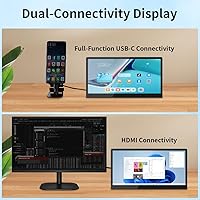
  • Inputs: Connectivity includes one USB-C port (with DisplayPort Alt Mode, supporting both display and touch) and one full-size HDMI port (display signal only).
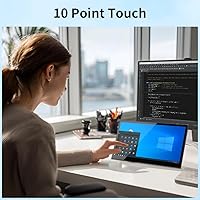
  • Touch Support: Capacitive touch input is functional exclusively when connected via the USB-C port; HDMI connections provide no touch capability whatsoever.
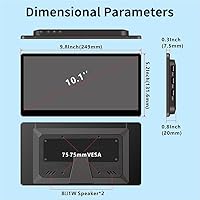
  • Built-in Speaker: An integrated speaker is included for basic audio output such as system alerts or notification sounds, though it is not designed for high-quality listening.
  • Stand: An integrated foldable stand is built into the rear of the unit, enabling quick tabletop setup without requiring any separate accessories.
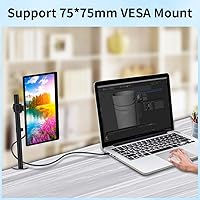
  • VESA Mount: VESA mounting is supported, allowing the display to be fixed to a compatible monitor arm, wall bracket, or kiosk enclosure.
  • Dimensions: The unit measures 9.06 × 6.69 × 0.39 inches, keeping the overall footprint compact enough to fit alongside a laptop in most bags.
  • Weight: At 14.1 ounces (approximately 0.8 lbs), this is a genuinely lightweight panel that adds minimal burden when carried for portable use.
  • Power: The display is powered via 5V USB, meaning most USB-C laptop ports or standard USB power adapters can supply sufficient power.
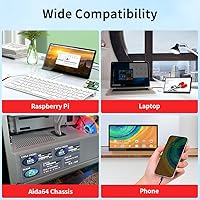
  • Compatibility: Works with Windows and Linux PCs, laptops, Raspberry Pi, Jetson Nano, and other mini PCs or embedded systems that support USB-C DP Alt Mode or HDMI output.
  • Screen Surface: The panel features a glossy screen surface, which enhances color vibrancy but can produce reflections under direct or overhead lighting conditions.
  • Model Number: The official model identifier is T101F, manufactured and sold under the Magedok brand.

Related Reviews

ELECROW 10.1 Inch Touchscreen Monitor
86%
88%
Display Quality
80%
Touchscreen Responsiveness
94%
Portability
92%
Ease of Setup
85%
Build Quality
More
Magedok MG140-FT02 14-Inch Portable Touchscreen Monitor
74%
91%
Portability
74%
Display Quality
77%
Color Accuracy
63%
Touchscreen Responsiveness
79%
Connectivity & Compatibility
More
Magedok 16-inch 4K OLED Touchscreen Portable Monitor
85%
91%
Display Quality
89%
Portability
75%
Touchscreen Performance
65%
Brightness in Bright Environments
88%
Gaming Performance
More
Eyoyo EM101T 10-inch Touchscreen Monitor
75%
83%
Touch Responsiveness
78%
Image Quality
91%
Ease of Setup
76%
Build Quality
87%
Input Versatility
More
Magedok 14-Inch 4K Portable Monitor
85%
93%
Display Quality
88%
Portability
90%
Ease of Setup
91%
Color Accuracy
58%
Sound Quality
More
AISHICHEN 10.1-Inch IPS Mini Monitor
70%
78%
Value for Money
86%
Connectivity & Inputs
89%
Raspberry Pi Compatibility
73%
Display Clarity
61%
Build Quality
More
Moonka 10.5-inch Portable Monitor
84%
89%
Display Quality
94%
Portability
92%
Ease of Setup
87%
Build Quality
75%
Gaming Performance
More
Lrtzcbi 14-inch Portable Touchscreen Monitor
74%
88%
Value for Money
79%
Image Quality
72%
Touch Responsiveness
91%
Portability
58%
Kickstand Stability
More
Thinlerain 10.1 Inch FHD Monitor
83%
85%
Display Quality
91%
Portability
88%
Setup & Installation
80%
Build Quality
92%
Connectivity Options
More
Haiway SM10.1 10.1-inch Security Monitor
72%
88%
Ease of Setup
91%
Input Connectivity
67%
Display Clarity
49%
Glare & Screen Surface
72%
Build Quality
More

FAQ

No, and this is probably the most important thing to know before buying. Touch input only works through the USB-C connection with DP Alt Mode. If you plug in via HDMI, you get a perfectly functional display, but the touchscreen is completely inactive. Make sure your source device supports USB-C DP Alt Mode if touch is important to you.

Yes, it is one of the better use cases for this bar-format monitor. The Raspberry Pi 4 and 5 both support USB-C video output in the right configurations, and the display is recognized without much fuss. For Pi 4, you may need to tweak the config.txt to set the correct resolution — there are community guides for this specific screen size that make the process straightforward.

That depends entirely on what you mean by everyday use. For system stats, dashboards, task lists, or a pinned chat window, the resolution looks clean and text is sharp. For watching video or using it as a general productivity screen, the stretched 2.1:1 aspect ratio makes standard content feel awkward. Think of it as a purpose-built panel, not a shrunken regular monitor.

Yes, though with a caveat. If your MacBook has a USB-C or Thunderbolt port that supports DisplayPort Alt Mode, you can connect this compact secondary display and it should be detected as a secondary screen. Touch will also work over that same connection. If you only use the HDMI port, display works fine but touch does not. macOS may also require manual resolution selection in display settings.

The integrated stand is convenient for quick setup, but it is not the most robust option for heavy daily use. It holds the screen steady under normal conditions, but if you frequently reposition the monitor or work on a surface that gets bumped, you may find it a bit wobbly. For a permanent desk setup, the VESA mount option paired with a monitor arm is a more reliable long-term solution.

In most cases, USB-C handles both the display signal and power delivery in a single cable, which is one of the practical advantages of this mini touchscreen panel. If you are connecting via HDMI for display and want to avoid a second cable, you can power it separately via any 5V USB adapter. Either way, there is no dedicated power brick required.

It manages adequately in moderate indoor lighting, but 400 nits on a glossy panel is not ideal when there is strong overhead light or a nearby window. Reflections can reduce effective contrast and make the screen harder to read comfortably. If your workspace is particularly bright, positioning the monitor to minimize direct light sources hitting the screen helps a lot.

Yes, VESA mount support is built in, so you can attach it to any compatible arm or wall bracket. This makes it a solid option for home automation panels, kiosk-style setups, or anyone who wants a clean, cable-managed permanent install. Just confirm your arm or bracket matches the VESA pattern before purchasing hardware.

Somewhere in between, honestly. It is loud enough to hear system notification sounds or low-volume audio alerts in a reasonably quiet room. Do not expect it to be pleasant for music, podcasts, or anything you actually want to listen to — the audio quality is thin and it lacks any real bass or volume headroom. Think of it as a bonus that saves you from needing headphones just to hear a ping.

You need a USB-C cable that supports DisplayPort Alt Mode — not all USB-C cables do, so this is worth double-checking. A high-quality USB-C to USB-C cable rated for video output (sometimes labeled as Thunderbolt 3 or 4 compatible, or explicitly marked with DP Alt Mode support) will carry both the display signal and the touch data through that single connection. If your cable only supports charging or data transfer, video and touch will not work.