Overview

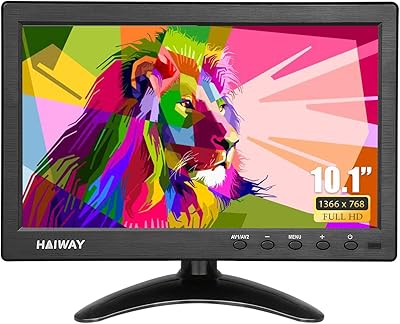
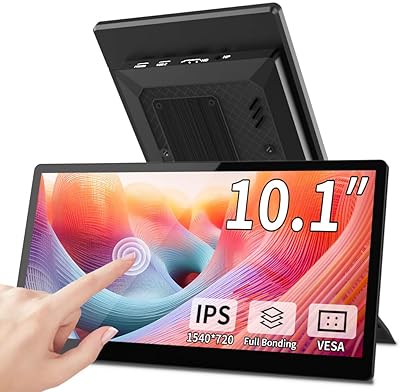
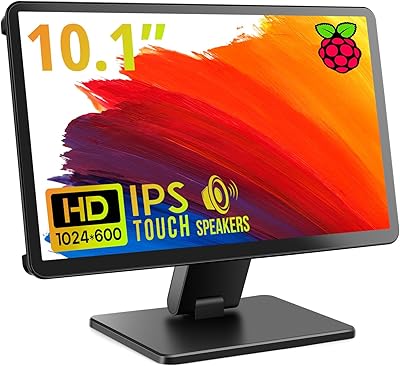
The AISHICHEN 10.1-Inch IPS Mini Monitor is a compact, no-frills secondary display built with hobbyists and DIY tinkerers in mind. At just 1 pound without the mount, this mini monitor slips easily into a bag or sits unobtrusively on a workbench. The matte IPS panel keeps glare manageable, which matters when you're staring at a terminal or camera feed for extended stretches. Budget-friendly by design, it comes with the expected trade-offs — don't expect premium build materials or audiophile-grade components. But for makers who need a reliable little screen without spending much, it holds its own reasonably well for its size and price tier.

Features & Benefits

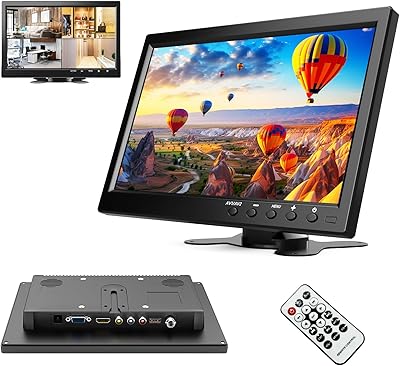
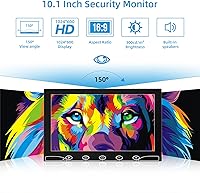
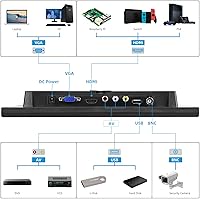
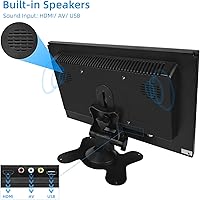
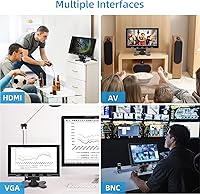
The panel specs are honest and reasonable for the category — 1280x800 resolution across 10.1 inches, a 1000:1 contrast ratio, and 300 cd/m² brightness that holds up fine in typical indoor lighting. What genuinely sets this small IPS display apart is its input flexibility: HDMI, VGA, BNC, and AV are all on board, which is rare at this size. That BNC port alone makes it useful for reviewing CCTV feeds without adapters. The built-in dual speakers handle basic audio — system sounds or a podcast in the background — but don't expect anything beyond functional. A remote control is included, which reduces wear on the physical buttons over time. At 60 Hz with a 5ms response time, it covers productivity and light media comfortably.

Best For

This mini monitor is a natural fit for a few specific types of users. Raspberry Pi hobbyists will appreciate how easily it pairs over HDMI, requiring minimal configuration to get a working display running on their projects. Security DIYers who need a small, BNC-compatible screen for reviewing CCTV footage will find the input lineup particularly handy. Retro computing fans can run both a legacy VGA machine and a modern HDMI source through a single screen. Travelers who want a lightweight portable display for gaming on the road will find the 1-pound body genuinely convenient. It's not built for color-critical creative work or high-refresh gaming — but for the right user, it does exactly what it promises.

User Feedback

Buyers who picked up the AISHICHEN screen for Raspberry Pi use tend to be satisfied — the plug-and-play setup is frequently praised, and most units arrive working straight out of the box. One recurring frustration worth flagging: the product title references 1024x600 resolution while the actual specs list 1280x800, and this inconsistency has genuinely confused some buyers before purchase. The speakers work, but multiple reviewers describe them as thin and low-volume — fine for notifications, less ideal for extended media sessions. Build quality is acceptable for the price tier; the plastic chassis feels light but not especially flimsy. A handful of users note the remote's limited range, and a few mention on-device button sensitivity becoming inconsistent with prolonged use.

Pros

  • Plug-and-play HDMI setup works reliably with Raspberry Pi devices right out of the box.
  • The BNC input is genuinely rare at this screen size, making it useful for CCTV hobbyists.
  • At just 1 pound without the mount, this mini monitor is easy to transport and reposition.
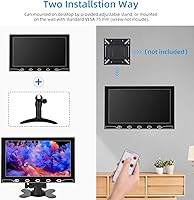
  • VESA 75mm compatibility allows flexible wall mounting alongside the included desktop stand.
  • Multi-input support — HDMI, VGA, BNC, and AV — covers both modern and legacy device connections.
  • The matte IPS panel reduces glare effectively in typical indoor environments.
  • 178-degree viewing angles mean image quality holds up even when the screen is not viewed head-on.
  • The included remote control helps preserve button longevity during regular daily use.
  • Built-in dual speakers handle basic audio needs without requiring an external speaker.

Cons

  • The product listing has referenced two different resolutions, creating genuine pre-purchase confusion for buyers.
  • Built-in speaker volume and audio quality are thin — not suited for media consumption beyond basic system sounds.
  • The plastic chassis feels lightweight in a way that raises durability concerns with frequent handling.
  • Remote control range has been flagged as limited, requiring closer proximity than users typically expect.
  • On-device buttons can become inconsistent or less responsive with extended daily use over time.
  • At 10.1 inches, the screen is too small for comfortable use as a primary desktop or productivity monitor.
  • The 60 Hz refresh rate rules out this small IPS display for any performance-focused gaming use case.
  • No USB-C input means connectivity options for newer slim laptops and tablets are limited.
  • Power requires a 12V supply, so portable battery-pack use requires a compatible output — not always convenient on the go.

Ratings

The AISHICHEN 10.1-Inch IPS Mini Monitor scores below are generated by AI after systematically analyzing verified global buyer reviews, with spam, bot submissions, and incentivized feedback actively filtered out. This small IPS display attracts a niche but passionate audience — Raspberry Pi builders, CCTV hobbyists, and budget-conscious makers — and the scores reflect their real-world experiences honestly, strengths and frustrations alike.

Value for Money
78%
22%
For buyers who need a small multi-input display on a tight budget, this mini monitor punches above its weight class. The combination of IPS panel, BNC input, and a remote control at this price tier is genuinely difficult to match in the 10-inch category.
The value equation weakens for buyers who discover the speaker quality is too thin for their needs and end up purchasing external audio anyway. A few hidden extras — like needing to source your own VESA mount hardware — add small costs that chip away at the initial appeal.
Connectivity & Inputs
86%
Four distinct inputs — HDMI, VGA, BNC, and AV — on a 10-inch screen is a rare and genuinely practical combination. Makers running a Raspberry Pi alongside a legacy VGA machine, or security hobbyists pulling a direct BNC feed from a CCTV camera, find real day-to-day utility in this flexibility.
The absence of USB-C is a real gap for users with modern ultrabooks or tablets, requiring adapters that add clutter. Switching between inputs using the physical buttons can also feel imprecise, and the remote's limited range makes that workaround less reliable than expected.
Raspberry Pi Compatibility
89%
The HDMI connection with Raspberry Pi is about as frictionless as it gets — plug in, power on, and the Pi detects the display without driver headaches or resolution negotiation issues. Hobbyists building dedicated Pi kiosks, retro game emulators, or headless server dashboards consistently praise how little setup is involved.
A small number of users report needing to manually set the resolution in the Pi config file to get the 1280x800 output to display correctly, which can trip up beginners. The screen size, while compact, means text-heavy terminal work can feel cramped during extended sessions.
Display Clarity
73%
27%
The IPS panel delivers honest color rendering and a matte finish that keeps reflections manageable under typical desk or workbench lighting. For monitoring CCTV feeds, reviewing Pi output, or running a secondary information display, the image is clear and readable without strain.
At 1280x800 on a 10.1-inch panel, pixel density is modest — fine for utility use but noticeably soft when rendering small text or detailed graphics up close. The 300 cd/m² brightness holds up indoors but becomes washed out near a bright window or in sunlit environments.
Build Quality
61%
39%
For a budget-tier product, the physical construction is adequate for stationary desk or workbench use. The included desktop stand is stable under normal conditions, and the matte plastic chassis does not feel dangerously flimsy when handled with reasonable care.
The all-plastic construction lacks any premium feel, and prolonged daily handling reveals wear on the hinge and casing faster than most users would like. Buyers who move the monitor frequently — between travel bag and desk, for example — report cosmetic scratches and joint loosening over a few months of use.
Audio Performance
44%
56%
Having any built-in speakers at this size and price is a practical convenience for users who just need to hear system alerts, voice calls, or basic video audio without pulling out a separate Bluetooth speaker. For CCTV monitoring stations where audio is incidental, it covers the need.
The dual speakers are thin, low-volume, and produce almost no bass — any content beyond spoken voice or simple system sounds sounds noticeably poor. Users expecting to use this mini monitor for media viewing, gaming audio, or music will almost certainly need to connect an external speaker or headphones.
Portability
83%
At 1 pound without the mount hardware, the AISHICHEN screen slips into a laptop bag or backpack with minimal added weight. Commuters and travelers who want a secondary display for gaming or productivity on the road find the footprint genuinely easy to manage.
There is no included protective case or sleeve, which makes frequent travel riskier for the matte panel surface and plastic chassis. The power supply requirement of 12V DC also means portable battery bank use requires a compatible step-up output, which is not universally available.
Remote Control Usability
57%
43%
The remote control is a thoughtful inclusion that reduces wear on the physical buttons over time — a genuine long-term reliability benefit for a device that may sit in a fixed installation for months. Users who mount the screen on a wall or in a tight space find it useful for switching inputs without physically reaching the unit.
The remote's effective range is shorter than most buyers expect, functioning reliably only within a few feet and with a fairly direct line of sight. Several users report that it became intermittent within a few months, possibly due to the standard CR2025-type cell losing charge or the IR receiver being obstructed by the mounting angle.
Viewing Angles
81%
19%
The 178-degree horizontal and vertical viewing angles are where IPS technology genuinely delivers, and this small display is no exception. For shared workbench use — where two people are viewing a Pi output or a camera feed side by side — the image stays consistent and color-accurate even at sharp off-axis positions.
While the viewing angle spec is solid, the relatively modest brightness means that at extreme angles in well-lit rooms, the image can appear slightly dimmer than expected. This is a minor issue for solo use but worth noting for any collaborative or presentation-style setup.
Setup & Ease of Use
82%
18%
Most users are up and running within minutes — connecting the HDMI cable, powering the monitor on, and selecting the right input source is straightforward enough for beginners. The inclusion of a desktop stand means no additional accessories are needed to get started.
The on-screen menu navigation using physical buttons is unintuitive for first-time users, and the lack of a printed quick-start guide frustrates some buyers. Pi users occasionally need to edit the config.txt file to lock in the correct resolution, which can be a stumbling block for those new to the platform.
Listing Accuracy
39%
61%
The core specifications that matter most — IPS panel type, input options, and physical dimensions — are accurately reflected in the product description and match what arrives in the box. Buyers researching the inputs and mounting options get what they expect.
The resolution discrepancy between the product title (which cites 1024x600) and the actual spec sheet (1280x800) is a recurring frustration that has caused genuine confusion pre-purchase. This inconsistency undermines buyer confidence and has led several users to leave negative reviews simply because they were unsure what they were actually buying.
Mounting Flexibility
74%
26%
VESA 75mm compatibility is a meaningful feature for hobbyists who want to integrate this display into a custom rack, wall panel, or articulated arm setup. The included desktop stand also covers basic freestanding use without any extra purchases.
The VESA mount hardware is not included, which is a common complaint from buyers who assumed it would be. For a product marketed toward makers who often build custom enclosures, this omission adds a small but annoying extra step and cost to the installation process.
Brightness & Glare Control
69%
31%
The matte panel coating is genuinely effective at diffusing reflections from overhead lighting, making the screen comfortable for long workbench sessions without the glare that glossy displays produce. In controlled indoor environments, 300 cd/m² is sufficient for clear viewing.
Outdoors or near a bright window, the brightness rating shows its limits — the image washes out in a way that makes the display impractical for any use outside a shaded indoor environment. Users hoping to use this as a portable display in varied lighting conditions will find the brightness ceiling a real constraint.

Suitable for:

The AISHICHEN 10.1-Inch IPS Mini Monitor is a smart pick for a fairly specific set of buyers who know exactly what they need from a small, affordable display. Raspberry Pi hobbyists will find it particularly well-matched — HDMI connectivity works reliably out of the box, and the compact footprint fits neatly into most project setups without consuming desk space. Security and CCTV enthusiasts benefit from the rare BNC input at this size and price tier, letting them connect older camera systems without hunting for adapters. Retro computing users who need both VGA and HDMI on a single screen will appreciate the input variety. Travelers and commuters wanting a lightweight secondary display for gaming or casual media on the road will find the 1-pound body genuinely easy to carry. For makers and tinkerers operating on a tight budget who need a functional, plug-and-play screen rather than a precision display, this small IPS display delivers solid value.

Not suitable for:

Buyers expecting a primary desktop monitor for everyday productivity or creative work should look elsewhere — the AISHICHEN 10.1-Inch IPS Mini Monitor is simply too small and too modest in spec for that role. Designers, photographers, or video editors who require accurate color reproduction or high brightness in varied lighting conditions will find this mini monitor falls short of professional standards. Competitive gamers will be frustrated by the 60 Hz refresh rate and modest resolution, which are not suited for fast-paced titles where refresh rate and pixel density genuinely matter. Users hoping for a rich audio experience from the built-in speakers should manage expectations — they are functional for alerts and background audio, not for music or film viewing. Anyone sensitive to spec inconsistencies should also be aware that the product listing has historically cited two different resolutions, which can create uncertainty about what you are actually receiving.

Specifications

  • Screen Size: The display measures 10.1 inches diagonally, making it one of the smaller monitors in its category.
  • Panel Type: An IPS (In-Plane Switching) panel is used, offering consistent color and contrast across wide viewing angles.
  • Resolution: Native resolution is 1280x800 pixels at a 16:9 aspect ratio, suitable for general-purpose and hobbyist use.
  • Brightness: Panel brightness is rated at 300 cd/m², which performs adequately in controlled indoor lighting conditions.
  • Contrast Ratio: A 1000:1 contrast ratio provides reasonable differentiation between dark and light image areas for a budget IPS panel.
  • Refresh Rate: The display runs at 60 Hz, which is standard for non-gaming secondary monitors and general desktop use.
  • Response Time: Response time is rated at 5ms, acceptable for productivity and casual media but not optimized for fast-action gaming.
  • Viewing Angle: Horizontal and vertical viewing angles both reach 178 degrees, allowing clear visibility from nearly any position.
  • Inputs: Available inputs include one HDMI port, one VGA port, one BNC port, and one AV port, covering both modern and legacy signal sources.
  • Audio: Two built-in speakers are integrated into the unit, providing basic audio output without requiring an external speaker.
  • Surface Type: The screen uses a matte surface treatment that reduces reflections and glare under typical indoor ambient lighting.
  • Dimensions: The monitor body measures 7.87 x 5.12 x 2.36 inches, compact enough to fit on a small workbench or inside a travel bag.
  • Weight: Without the mounting hardware, the unit weighs 1 pound, making it one of the lighter options in the 10-inch monitor category.
  • VESA Mount: The monitor supports the industry-standard VESA 75mm pattern for wall or arm mounting, though the mount hardware itself is not included.
  • Stand: An adjustable desktop mount stand is included in the box, providing a stable base without requiring additional accessories.
  • Power Supply: The monitor operates at 12 volts DC; a compatible power adapter should be confirmed before use with portable battery solutions.
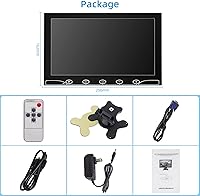
  • Remote Control: A remote control is included in the package, allowing input switching and basic settings adjustment without using the on-device buttons.
  • Brand: Manufactured and sold under the AISHICHEN brand, which positions its products in the budget-oriented hobbyist and maker market segment.

Related Reviews
ELECROW 10.1 Inch Touchscreen Monitor
86%
88%
Display Quality
80%
Touchscreen Responsiveness
94%
Portability
92%
Ease of Setup
85%
Build Quality
More
Haiway SM10.1 10.1-inch Security Monitor
72%
88%
Ease of Setup
91%
Input Connectivity
67%
Display Clarity
49%
Glare & Screen Surface
72%
Build Quality
More
Thinlerain 10.1 Inch FHD Monitor
83%
85%
Display Quality
91%
Portability
88%
Setup & Installation
80%
Build Quality
92%
Connectivity Options
More
Magedok T101F 10.1-inch Portable Touchscreen Monitor
72%
88%
USB-C Connectivity
63%
Touch Accuracy
79%
Display Quality
84%
Aspect Ratio Fit
76%
Setup Experience
More
ROADOM 10.1-inch Raspberry Pi Touchscreen Monitor

78%
91%
Ease of Setup
83%
Touch Responsiveness
72%
Display Quality
88%
Build & Enclosure
59%
Speaker Quality
More
RCA Cambio 10.1-inch 2-in-1 Tablet PC
79%
92%
Value for Money
88%
Portability
85%
Ease of Use
78%
Display Quality
82%
Keyboard Usability
More
ITMEIPC T-10 Android Tablet 10.1-inch, 6GB RAM, 64GB Storage
80%
91%
Value for Money
85%
Display Quality
74%
Battery Life
78%
Build Quality
88%
Performance for Light Use
More
podofo 10.1-inch Portable TFT LCD Monitor
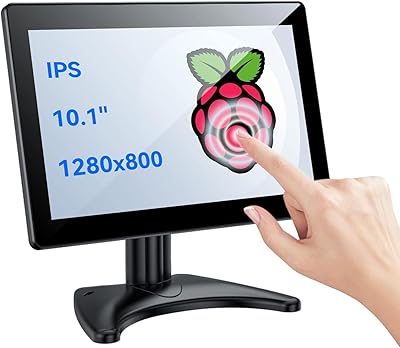
72%
83%
Value for Money
61%
Image Quality
88%
Ease of Setup
91%
Input Versatility
54%
Build Quality
More
Gigastone 27-inch IPS Monitor
84%
91%
Display Quality
88%
Ergonomics and Adjustability
92%
Value for Money
85%
Connectivity Options
89%
Setup and Installation
More
Eyoyo EM101T 10-inch Touchscreen Monitor
75%
83%
Touch Responsiveness
78%
Image Quality
91%
Ease of Setup
76%
Build Quality
87%
Input Versatility
More

FAQ

Yes, in most cases it does. Connect the Raspberry Pi to the HDMI port, power on the monitor, and the Pi should detect it automatically without any driver installation. Most users report it working on the first try with standard Raspberry Pi OS.

This is a legitimate point of confusion and worth clarifying before you buy. The technical specifications list the resolution as 1280x800, and that is what the panel is officially rated at. The 1024x600 figure appears in some older product titles and likely reflects a listing error or an earlier product variant. Go by the spec sheet: 1280x800.

Yes, that is actually one of the more practical use cases for this small IPS display. The BNC input is onboard and ready to use, so you can connect a standard CCTV camera directly without any adapter. Just switch the input source via the remote or the on-device buttons.

Honestly, they are functional but nothing more. You will hear system sounds, voice calls, and background audio clearly enough, but they are thin and low-volume by any reasonable standard. If audio quality matters to you — for movies, music, or gaming — plan on connecting external speakers or headphones.

Yes, the monitor supports the standard VESA 75mm mounting pattern, so it is compatible with most wall brackets and monitor arms that specify VESA 75. Just be aware that the mount hardware itself is not included — you will need to source a compatible bracket separately.

It is a surprisingly good fit for that specific scenario. Having both VGA and HDMI inputs on a single 10-inch display is genuinely uncommon at this price tier. You can switch between a legacy machine on VGA and a modern device on HDMI without touching any cables — just change the input source.

At 1 pound and roughly 7.87 x 5.12 inches, it fits comfortably into most laptop bags or backpack side pockets. It is not a purpose-built travel monitor with a protective case, so you will want to wrap it carefully, but the footprint is genuinely small and light enough to take on the road.

It works, but some buyers have noted that the effective range is shorter than expected. It is most reliable within a few feet of the monitor and with a reasonably direct line of sight. If you are sitting across a room expecting TV-remote-style range, you may be disappointed. For desk use it is a convenient bonus.

Yes, connecting via HDMI to a Windows laptop works fine. Windows will detect it as a secondary display and let you extend or mirror your desktop. Keep in mind the 1280x800 resolution means it is best suited as a reference or utility screen rather than your main workspace.

The build is plastic throughout, which is expected at this size and price point. It does not feel fragile in a way that would worry you on a desk, but it is not a device that will shrug off drops or rough handling. For a stationary workbench or home setup, it should hold up fine with normal use. For frequent travel, a sleeve or padding is a smart precaution.