
Overview

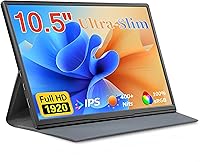
The Moonka P10 10.5-inch Portable Monitor occupies a genuinely useful middle ground — bigger than a tablet screen, smaller than the bulkier 15-inch portables crowding the market. One thing that stands out immediately is the 16:10 aspect ratio, which gives you noticeably more vertical space than the standard widescreen format most buyers are used to. Out of the box you get three cables, a charging adapter, a smart cover, and a user manual — enough to get started without hunting for extras. This is a budget-conscious pick, so temper expectations accordingly: it rewards buyers who need a reliable travel companion screen more than those chasing professional-grade color accuracy.

Features & Benefits

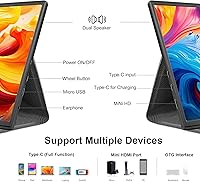
The 1920x1280 IPS panel delivers solid color reproduction for everyday tasks — documents look crisp, videos are watchable, and the 178-degree viewing angle means colors stay consistent even when someone glances from the side. That extra vertical room from the 16:10 format is particularly welcome when scrolling through code or long documents. Connectivity runs through a single USB-C port, which keeps the desk tidy but means you cannot easily add a second device without an adapter. The dual stereo speakers are functional rather than impressive — fine for video calls, thin for music. The included PU cover doubles as a stand, though it can feel slightly wobbly on uneven surfaces.

Best For

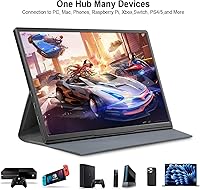
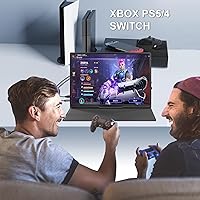
This portable screen makes the most sense for people whose needs fit a specific profile. Remote workers and students will get the most out of it — anyone who wants a quick second display without committing to a heavier, pricier setup. It connects to Nintendo Switch, PS5, and Xbox, making it a reasonable option for casual portable gaming, though it is not a dedicated gaming monitor, so temper expectations on competitive play. MacBook and compact laptop users pairing it for extra screen real estate will find the plug-and-play setup refreshingly straightforward. Frequent travelers who prioritize lightweight productivity will find this compact display easy to justify.

User Feedback

Buyers who pick up the Moonka monitor tend to be pleasantly surprised by the picture quality relative to what they paid — the IPS panel draws consistent praise in that regard. Where opinions split is around the stand: the PU cover works fine on a solid desk but shifts on softer surfaces like beds or laps. The single USB-C port comes up often, with some older-laptop owners hitting compatibility snags before finding the right cable. Brightness in strongly lit rooms gets mixed marks — solid at a desk, but less commanding near a sunny window. Most buyers say they would purchase again; long-term durability is the main open question.

Pros

  • The IPS panel produces genuinely good colors for everyday tasks like documents, video calls, and streaming.
  • The 16:10 aspect ratio gives more vertical screen real estate than most portable monitors at this size.
  • Plug-and-play USB-C setup requires no drivers and works out of the box with most modern laptops and Macs.
  • At under 1.7 pounds, this portable screen is light enough to forget it is in your bag.
  • The included cable and adapter bundle means you can start using it immediately without extra purchases.
  • Built-in stereo speakers handle video calls and casual media well enough to skip an external speaker in a pinch.
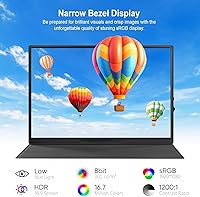
  • The flicker-free, blue-light-reduced panel is noticeably easier on the eyes during long work sessions.
  • HDMI input adds flexibility for users connecting devices that lack USB-C video output.
  • The 16:10 format is a genuine differentiator — more useful for productivity than the standard widescreen shape.
  • Setup in portrait orientation works well for reading long documents or browsing social feeds.

Cons

  • Only one USB-C port means you cannot simultaneously charge and connect a second device without a hub.
  • The PU cover stand wobbles on uneven surfaces and offers limited angle adjustability compared to a proper stand.
  • Brightness levels can feel insufficient in brightly lit rooms or near windows with direct sunlight.
  • Older laptops and some Android phones may need specific cables or adapters that are not in the box.
  • The built-in speakers lack volume and bass depth for anything beyond background audio or basic calls.
  • No on-screen display controls are readily accessible, making brightness and settings adjustments less intuitive.
  • Long-term durability remains uncertain — the slim build feels fine initially but raises questions with heavy daily travel use.
  • HDR performance is limited in practice given the brightness ceiling of the panel.

Ratings

Our AI rating engine analyzed thousands of verified global buyer reviews for the Moonka P10 10.5-inch Portable Monitor, actively filtering out incentivized, bot-generated, and low-quality feedback to surface what real users genuinely experience. The scores below reflect an honest synthesis of both the standout strengths and the recurring frustrations that show up consistently across independent purchases. Nothing is sugar-coated — where buyers ran into limitations, those pain points are scored accordingly.

Display Quality
83%
Most buyers are genuinely impressed by how sharp and color-rich the IPS panel looks for everyday tasks — spreadsheets, video calls, and streaming all look noticeably better than a comparable-sized tablet screen. The 178-degree viewing angle means colors hold up well even when the monitor is positioned slightly off-axis at a shared desk.
Color accuracy falls short of what creative professionals need, and a few users noted that the panel struggles to hit deep blacks in darker scenes. HDR support is present on paper but the brightness ceiling limits how much of a real-world difference it makes in practice.
Brightness & Visibility
61%
39%
In controlled indoor environments with moderate ambient light — a home office, a library study room, or a hotel desk — the brightness level is comfortable and the image stays readable throughout long sessions. Most remote workers report no issues during typical nine-to-five desk setups.
Near sunny windows or in brightly lit open-plan offices, the panel loses its competitive edge noticeably. Several buyers in warmer climates mentioned the screen becomes difficult to read without repositioning entirely, which is a real limitation for those who work in variable lighting conditions throughout the day.
Portability
91%
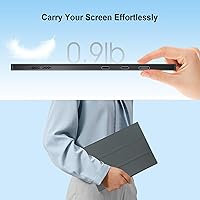
At 1.68 pounds with a slim 0.3-inch profile, this compact display disappears into a laptop bag without adding meaningful bulk or weight. Frequent travelers and daily commuters consistently highlight how easy it is to pack alongside a laptop without rethinking what else fits in the bag.
The slim chassis, while great for portability, means the whole unit can feel somewhat fragile when jostled loosely in a bag. A small number of buyers noted minor flex in the panel when packed alongside heavier items, which suggests using a padded sleeve is worth the extra step.
Stand & Stability
54%
46%
The bundled PU smart cover is genuinely clever in concept — it folds into a stand without requiring a separate accessory purchase, and on a flat, firm desk it holds the monitor at a usable angle for both landscape and portrait orientations.
On anything other than a perfectly flat, rigid surface, the cover stand wobbles and shifts, which becomes frustrating during typing or touchscreen interaction nearby. Buyers who use their monitors on beds, laps, or textured surfaces consistently flag this as one of the most noticeable limitations of the overall package.
Connectivity & Compatibility
67%
33%
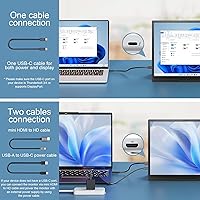
The USB-C plug-and-play setup works smoothly with modern MacBooks, Windows laptops, and even some Android phones without any driver installation — buyers regularly mention being up and running within a minute of unboxing. The included HDMI cable adds a practical fallback for devices without USB-C video output.
Having only a single USB-C port is a recurring complaint, particularly among users whose laptops also only have one USB-C port available — simultaneous display and charging then requires a hub. Older laptop owners occasionally hit compatibility snags where the included cable does not produce a signal, requiring a different cable to resolve.
Setup Experience
88%
The out-of-the-box experience is one of the most praised aspects in user reviews — cables, adapter, cover, and manual are all included, and most buyers describe the initial setup as taking under two minutes. Windows and macOS both detect the display automatically without any manual configuration.
A minority of buyers — particularly those with older devices or certain Android phones — reported that getting a stable signal required trial and error with different cable configurations. The manual, while present, offers limited troubleshooting guidance for these edge cases.
Build Quality
72%
28%
The thin-bezel design feels more premium than the price tier typically delivers, and the overall finish holds up well under normal daily handling. Most buyers who have carried it for several months report no creaking, loose ports, or surface wear beyond light scuffs.
The slim construction means the chassis has some flex when handled roughly, and long-term durability under heavy travel use remains a genuine open question given the product has not been on the market long enough for multi-year feedback. The PU cover shows wear faster than the monitor itself.
Audio Quality
53%
47%
The dual stereo speakers are adequate for video calls and occasional YouTube watching in a quiet room — having any built-in audio at this size and price point is genuinely useful and saves buyers from needing an extra Bluetooth speaker for basic tasks.
Volume tops out at a level that gets drowned out in any moderately noisy environment, and the bass is essentially absent, making music or cinematic content feel thin and unsatisfying. Buyers who expected functional media speakers were frequently let down and defaulted to headphones almost immediately.
Gaming Performance
66%
34%
For casual gaming on a Nintendo Switch or PS5 in a bedroom or hotel room, the monitor delivers a perfectly watchable experience — colors are vibrant enough for single-player adventures, and input lag is not distracting for slower-paced titles.
Competitive or fast-paced gaming reveals the limitations of this panel more clearly — buyers who play fast-paced shooters or fighting games noted that the response time is not quite where a dedicated gaming monitor would sit. This is a casual gaming screen first and should be evaluated as such.
Eye Comfort
81%
19%
The flicker-free, blue-light-reduced panel draws consistent praise from users who work on it for three to five hours at a stretch — several buyers with sensitivity to screen fatigue specifically noted they experienced less strain compared to their primary laptop display.
The blue light filter, while helpful, cannot be adjusted in intensity from the hardware side, which means users who prefer a stronger warm-toned filter for evening use need to rely entirely on software solutions like Night Shift or f.lux.
Value for Money
86%
For buyers who need a dependable second screen without a large upfront investment, the overall package — monitor, cables, adapter, and cover all included — represents strong bang for the outlay. The picture quality in particular consistently surprises buyers who expect less at this price tier.
A handful of buyers felt that the single port and stand limitations were concessions that nudged the value proposition downward compared to slightly pricier competitors offering dual ports or a proper adjustable kickstand. The sweet spot is buyers whose needs align tightly with what it does well.
16:10 Aspect Ratio
79%
21%
Users who switched from a 16:9 portable monitor consistently mention that the extra vertical space feels immediately useful — referencing a document while writing in another window, or coding with more lines of code visible at once, becomes meaningfully more comfortable.
Some buyers were initially surprised by the non-standard ratio and found that a few video apps or older software letterbox the content, creating black bars at the sides. It is a minor adjustment, but buyers who stream widescreen content extensively may find it slightly more noticeable than expected.
Portrait Mode Usability
74%
26%
Portrait orientation works well for reading, long documents, and vertical content — the 16:10 ratio actually becomes closer to a natural document shape when rotated, and the smart cover stand supports this mode without needing any additional accessories.
Rotating the display output requires navigating display settings manually on most operating systems, which is a minor but recurring friction point for less technical buyers. The stand is also marginally less stable in portrait orientation than in landscape.

Suitable for:

The Moonka P10 10.5-inch Portable Monitor is a practical fit for anyone who needs a reliable second screen without committing to something heavy or expensive. Remote workers and freelancers who bounce between coffee shops, co-working spaces, and home desks will appreciate how easily it slips into a bag alongside a laptop. Students cramming in dorms or libraries get a meaningful productivity boost from the extra vertical screen space the 16:10 panel provides — particularly useful when referencing notes on one side and writing on the other. Travelers who want to stay productive on the road without packing a full-size monitor will find the weight and footprint genuinely manageable. It also works as a dedicated personal display for console gaming on a Switch or PS5 in a bedroom or hotel room, where portability matters more than peak panel performance.

Not suitable for:

The Moonka P10 10.5-inch Portable Monitor is not the right call for buyers who need robust, stable connectivity options. Professionals doing color-critical work — photo editing, video grading, or graphic design — should look elsewhere, as this panel is not calibrated for accuracy at that level. Users with older laptops lacking a modern USB-C port may run into compatibility headaches that require extra adapters not included in the box. Competitive gamers who care about response time and high refresh rates will find this compact display underwhelming; it is built for casual use, not fast-paced multiplayer. Anyone expecting a sturdy, adjustable stand should know the bundled PU cover is a workaround, not a dedicated monitor stand, and it shows on anything other than a flat, firm surface.

Specifications

  • Screen Size: The display measures 10.5 inches diagonally, sitting comfortably between a large tablet and a standard portable monitor.
  • Resolution: The panel renders at 1920x1280 pixels, delivering sharp detail across documents, video, and general computing tasks.
  • Aspect Ratio: The 16:10 aspect ratio provides more vertical screen space than the conventional 16:9 widescreen format.
  • Panel Type: An IPS panel is used, offering accurate color reproduction and consistent image quality across a 178-degree viewing angle.
  • HDR Support: The display supports HDR input, which can improve contrast and color range when connected to a compatible source.
  • Connectivity: The monitor connects via USB-C or HDMI, with a single USB-C port handling both video signal and power delivery simultaneously.
  • Speakers: Two built-in stereo speakers are integrated into the chassis for basic audio output without requiring external accessories.
  • Eye Care: The panel includes blue light reduction and flicker-free technology designed to reduce eye strain during extended use sessions.
  • Weight: The unit weighs 1.68 pounds, making it light enough to carry daily in a laptop bag without noticeable added bulk.
  • Dimensions: The monitor measures 0.3 x 8 x 6 inches, keeping its footprint compact and its profile ultra-thin.
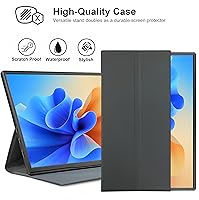
  • Stand Included: A PU leather smart cover is included in the box and functions as a foldable stand for both landscape and portrait orientations.
  • Driver Requirement: No software drivers are required — the monitor operates as a plug-and-play display on compatible devices immediately upon connection.
  • Compatible Devices: The monitor works with laptops, desktop PCs, Macs, tablets, smartphones, PS5, Xbox, and Nintendo Switch via USB-C or HDMI.
  • Box Contents: The package includes the monitor, a USB-C to USB-C cable, an HDMI cable, a charging adapter, the PU smart cover, and a user manual.
  • Model Number: The official model designation for this unit is P10, manufactured by Moonka.
  • Availability: This model has been available for purchase since June 2023.

Related Reviews
VOKENSU RF10 10.5″ Portable Monitor
73%
93%
Portability
81%
Display Quality
47%
Glare & Reflections
89%
Aspect Ratio Utility
74%
Connectivity
More
CUIUIC 18.5″ Portable Monitor
74%
83%
Display Quality
88%
Screen Size & Real Estate
58%
Portability & Weight
61%
USB-C Connectivity
72%
Build Quality & Materials
More
Cocopar T185FHLS 18.5-inch Portable Monitor
75%
83%
Display Quality
76%
Color Accuracy
58%
Brightness Performance
81%
Refresh Rate & Motion
69%
Build Quality
More
Upperizon U185C 18.5″ Portable Monitor
75%
91%
Screen Size & Impact
84%
Image Quality
82%
Refresh Rate & Motion
58%
USB-C Compatibility
79%
Included Magnetic Cover
More
Ingnok 18.5-inch FHD Portable Monitor
72%
83%
Value for Money
91%
Setup & Ease of Use
78%
Display Quality
61%
Brightness
59%
Build Quality
More
Motyeowe 18.5 Inch Portable Monitor
86%
89%
Display Quality
94%
Portability & Design
88%
Connectivity
84%
Performance (Gaming)
91%
Ease of Setup
More
HotYeah 18.5-inch 1080P Portable Monitor
75%
83%
Display Clarity
78%
Color Vibrancy
81%
Refresh Rate & Motion
57%
Brightness & Outdoor Use
67%
USB-C Connectivity
More
Qunub 18.5-inch Portable Monitor
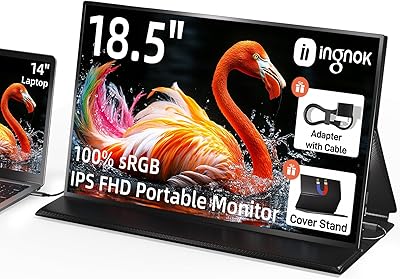
85%
89%
Display Quality
94%
Portability
85%
Gaming Performance
90%
Setup & Installation
88%
Build Quality
More
CoolHood 18.5-inch Portable Monitor
88%
94%
Portability
88%
Display Quality
91%
Ease of Setup
85%
Gaming Performance
89%
Color Accuracy
More
VisionOwl 18.5-Inch 1080p Portable Monitor
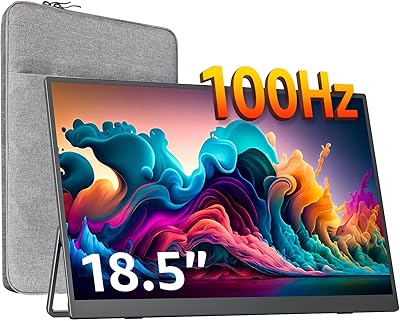
77%
91%
Screen Size & Real Estate
83%
Display Clarity & Sharpness
78%
Color Accuracy & Vibrancy
81%
Refresh Rate & Motion Performance
89%
Connectivity & Setup Ease
More

FAQ

Yes, in most cases a single USB-C cable handles both video output and power delivery when connected to a modern MacBook. Just make sure your MacBook supports DisplayPort Alt Mode over USB-C, which all recent Apple silicon and Intel MacBook models do.

You can connect it in docked mode using the HDMI cable included in the box — just run that from the Switch dock to the monitor. Handheld-to-USB-C direct connection depends on your Switch model, so check whether your specific Switch variant supports video output over USB-C before assuming it will work that way.

The bundled PU smart cover works fine on a flat, firm desk for everyday use, but it is not as sturdy as a dedicated monitor stand. If you plan to use it on a bed, lap, or uneven surface, the cover can shift around more than you would want. A small third-party tablet stand works well as an upgrade if stability matters to you.

Indoors at a typical desk, brightness is adequate for comfortable viewing. Near a sunny window or in a very bright environment, you may find the screen harder to read clearly. It is not an outdoor-rated panel, so direct sunlight will wash it out noticeably.

Not directly — this monitor requires a USB-C or HDMI connection. If your laptop only has USB-A ports, you would need to use the included HDMI cable alongside a separate power source, since USB-A cannot carry a video signal to this display.

No setup software is needed at all. Plug it in and your operating system should detect it automatically within a few seconds. Windows, macOS, and most Linux distributions recognize it without any extra steps.

That depends on your laptop. The Moonka P10 10.5-inch Portable Monitor has a single USB-C port, so if your laptop only has one USB-C port as well, you cannot do both simultaneously without a USB-C hub. Laptops with multiple ports or a dedicated charging connector handle this without any issue.

They are adequate for casual video watching, video calls, and background audio in a quiet room. Do not expect rich or loud sound — the speakers are functional rather than impressive for a display this thin. For music or anything where audio quality matters, external speakers or headphones are a better choice.

Yes, portrait orientation is supported. The smart cover stand can prop the monitor upright in portrait mode, and you can rotate the display output through your operating system's display settings. It works particularly well for reading long documents, articles, or code files where extra vertical height is useful.

The build feels solid for its price range and most buyers report it holds up well in a padded laptop bag. The PU cover provides reasonable scratch protection. That said, the slim chassis is not ruggedized, so it warrants the same care you would give any thin-glass electronics when traveling — keep it flat and protected rather than loose in a bag with heavier items.