
Overview

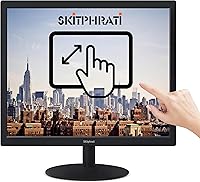
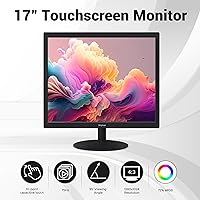
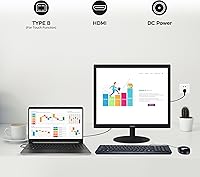
The SKitphrati 17″ Touch Screen Monitor is a no-frills, purpose-built display aimed squarely at commercial environments — think retail counters, kiosk stations, and light industrial setups — rather than home desks or creative workspaces. It positions itself as an accessible entry into touch-enabled displays for small businesses that need reliability without enterprise-level costs. One thing worth flagging upfront: the 5:4 aspect ratio is a legacy format that hasn't been standard for years, so users running modern widescreen software may encounter letterboxing or layout quirks. Setup is genuinely straightforward — plug in the cables, no driver hunting on Windows, and you're running. SKitphrati is a newer brand, so it's worth tempering expectations around long-term after-sales support.

Features & Benefits

The 10-point capacitive touch is where this touch monitor earns its keep in daily commercial use. It responds accurately to multi-finger gestures — swiping through a POS menu or signing off on a transaction feels natural rather than laggy. Connectivity is genuinely broad: HDMI handles modern PCs and consoles, VGA keeps older hardware in the loop, and the USB Type-B cable transmits touch data without requiring separate driver installation on Windows. The 75Hz refresh rate won't impress anyone coming from a gaming panel, but it does produce noticeably smoother scrolling than a standard 60Hz display. The tilt-adjustable stand covers a practical range for counter placement, and the VESA 75mm pattern makes wall or arm mounting straightforward.

Best For

This 17-inch touchscreen hits a clear sweet spot for small business owners running a POS setup — a cafe, boutique, or food service counter where space is tight and budget matters. It's also a solid choice for Raspberry Pi enthusiasts who want a compact touch display without hunting for niche hardware. Light industrial environments with legacy equipment will appreciate the VGA input, which keeps older machines relevant. Educators building interactive kiosk stations on a limited budget will find the plug-and-play Windows compatibility a genuine time-saver. Where it falls short is for anyone needing a wide-format display or strong output in a sunlit space — this monitor is built for controlled indoor use, plain and simple.

User Feedback

Buyers using the SKitphrati display in retail and POS roles consistently highlight quick, hassle-free setup as its biggest practical win — most report being operational within minutes on Windows machines. Touch accuracy in everyday interactions earns steady approval for basic point-of-sale tasks. On the critical side, users in brighter spaces frequently mention the glossy screen washing out under direct light, making it hard to read clearly. A handful of buyers note the stand feels lighter than expected, raising questions about stability during repeated heavy touch use. The 5:4 resolution occasionally catches buyers off guard when modern applications don't scale cleanly to it. After-sales support is a question mark given the brand's limited track record, so documenting your purchase details upfront is a sensible precaution.

Pros

  • Plug-and-play setup on Windows means most users are up and running in under ten minutes.
  • The 10-point capacitive touch responds accurately to everyday POS gestures without noticeable lag.
  • HDMI, VGA, and USB Type-B ports in one display covers a surprisingly wide range of devices and legacy hardware.
  • VESA 75mm compatibility gives real flexibility for wall mounts and articulating arms in tight commercial spaces.
  • The tilt-adjustable stand handles counter and desk positioning well for repeated daily touch interaction.
  • At its price point, this 17-inch touchscreen offers touch functionality that would cost significantly more from established brands.
  • 75Hz refresh rate makes on-screen scrolling and menu navigation noticeably smoother than entry-level 60Hz panels.
  • Compact footprint works well on crowded service counters where space comes at a premium.

Cons

  • The 5:4 aspect ratio causes layout issues and letterboxing in many modern widescreen applications.
  • Glossy screen surface reflects ambient light heavily, making the display difficult to read near windows or bright overhead lighting.
  • 250 cd/m² brightness is underwhelming for any environment that isn't a dim or controlled indoor space.
  • The stand feels lightweight and can wobble during repeated firm touch inputs, which is a concern in busy POS settings.
  • SKitphrati has a limited brand history, making long-term reliability and warranty support genuinely uncertain.
  • Apple device compatibility is unreliable — touch functionality may simply not work depending on the Mac OS version.
  • The 1280×1024 resolution looks noticeably soft when displaying modern UI elements designed for higher-density screens.
  • No mention of an on-screen display menu with intuitive controls, which can make brightness and input adjustments cumbersome.

Ratings

The SKitphrati 17″ Touch Screen Monitor has been scored by our AI system after analyzing verified buyer reviews from global markets, with spam, bot activity, and incentivized feedback actively filtered out. Scores reflect a candid synthesis of what real users — from small business owners to hobbyist makers — consistently praised and complained about. Both the genuine strengths and the honest limitations are represented in every category below.

Touch Responsiveness
78%
22%
In everyday POS and kiosk environments, buyers consistently report that the 10-point capacitive panel registers taps and basic swipes accurately on the first attempt. For counter staff moving quickly through menus or processing transactions, the touch layer keeps up without frustrating delays.
Under heavier multi-touch workloads or when users input gestures rapidly in succession, some buyers notice occasional missed inputs or slight drift near the screen edges. It handles standard commercial tasks well but isn't tuned for precision-heavy applications.
Setup & Installation
88%
The plug-and-play experience on Windows earns consistent praise — connecting two cables and having a fully functional touch display running in minutes is a genuine time-saver for small business owners with no technical background. Most buyers across retail and hobbyist use cases report zero driver headaches.
The quick start guide is described by several users as minimal, which can leave buyers with older VGA setups or non-Windows devices spending extra time troubleshooting connections. Apple users in particular often hit a wall without any clear guidance in the included documentation.
Connectivity Range
83%
Offering HDMI, VGA, and USB Type-B in a single budget-tier display is genuinely useful — buyers running legacy POS terminals or older warehouse PCs alongside newer hardware appreciate not needing an adapter or a separate hub just to get started. It covers a broader hardware range than competitors at this price level.
There is no DisplayPort option, which matters less in this segment but can be a minor inconvenience for users with newer compact PCs that have dropped legacy ports. The USB Type-B touch cable also feels dated to some users accustomed to Type-C connectors on modern peripherals.
Build Quality
61%
39%
The monitor chassis feels solid enough for light commercial duty, and the plastic finish holds up reasonably well on a stationary counter. Buyers using it in low-traffic kiosk setups or dedicated workstations generally have no structural complaints over short to medium-term use.
The stand is a recurring concern — multiple buyers describe it as flimsy and prone to wobbling under repeated firm touch input, which is a real problem in a busy retail environment. The overall construction feels appropriate for its price tier but would struggle under demanding daily commercial use without wall mounting.
Display Brightness
54%
46%
In controlled indoor environments — a dim stockroom, a back-office kiosk, or a shaded counter — the 250 cd/m² output is workable and avoids eye strain during extended shifts. For after-hours or low-light retail setups, buyers find the brightness level comfortable enough.
In any space with natural light, overhead fluorescents, or direct window exposure, the brightness falls noticeably short. Buyers in well-lit cafes and retail shops frequently cite washed-out visuals as a significant day-to-day frustration, and the glossy panel amplifies the problem by adding reflections on top of the modest brightness ceiling.
Aspect Ratio & Resolution
57%
43%
For buyers using dedicated POS software or older commercial applications historically built around square-ish screen formats, the 5:4 ratio actually aligns well with interface layouts that would look awkward on a widescreen panel. A small but vocal group of industrial and retail users consider it a feature rather than a limitation.
Anyone running modern browser-based software, widescreen UI frameworks, or current-generation operating system interfaces will encounter letterboxing, scaling artifacts, or unusable black bars. The 1280×1024 resolution also looks noticeably soft next to contemporary displays, which frustrates buyers expecting a crisper visual experience.
Viewing Angle
58%
42%
For a single user positioned directly in front of the screen — the typical scenario for a POS cashier or kiosk operator — the viewing angle is adequate and colors stay reasonably stable. Buyers using this as a dedicated single-operator station rarely raise angle-related complaints.
The rated 95-degree viewing angle is narrow by modern standards, and color shift becomes visible when the display is viewed from even moderate off-axis positions. In retail environments where customers occasionally glance at the screen from the side, the image can appear dim and washed out quickly.
VESA Mount Compatibility
84%
The 75×75mm VESA pattern works exactly as advertised — buyers who invest in a compatible wall bracket or monitor arm report a stable, professional-looking installation that solves the stand wobble issue entirely. For permanent kiosk deployments, this is one of the display's most practical features.
The VESA hole spacing of 75mm is on the smaller end, and some buyers find that affordable wall mounts in this pattern are slightly harder to source locally compared to the more common 100mm standard. A few users also note the mounting area on the rear panel feels tighter than expected during installation.
Value for Money
79%
21%
For buyers who specifically need a touch-enabled display for a Windows-based POS, Raspberry Pi project, or industrial terminal, the price-to-function ratio is genuinely competitive. Getting 10-point multi-touch, triple connectivity, and VESA support in a single unit at this cost is difficult to match with established brand alternatives.
Buyers expecting broader general-purpose usability — widescreen compatibility, better brightness, or premium build quality — will feel the budget-tier compromises more acutely. The value proposition is tightly scoped; outside of its intended commercial niche, the trade-offs start to outweigh the cost savings.
Stand Ergonomics
62%
38%
The tilt adjustment range covers the most common counter-top positioning needs, and buyers setting up a fixed cashier station report that finding a comfortable angle is straightforward. The mechanism is easy to adjust without tools, which is useful during initial workspace configuration.
The stand's physical stability under repeated touch input is the main complaint — it shifts and rocks rather than holding firmly, which becomes an annoyance during fast-paced transaction workflows. Several buyers end up using the VESA mount option specifically to avoid dealing with the stand's limitations in daily use.
OS Compatibility
66%
34%
On Windows 10 and Windows 11, the touch driver integration is clean and reliable — the operating system identifies the display correctly without manual configuration, which is exactly what non-technical business owners need. For the core Windows audience this display is built for, compatibility is a non-issue.
macOS and Linux compatibility is hit-or-miss at best, with touch functionality unreliable across different device configurations. Buyers who discover the Apple limitation after purchase tend to leave strongly negative feedback, suggesting the product listing could do more to surface this constraint upfront.
Cable Management
59%
41%
All necessary cables are included in the box — HDMI, USB Type-B, and power — so buyers can set up the display without an additional trip to a hardware store. The cable routing on the back of the stand keeps things reasonably tidy in a fixed desk or counter installation.
The USB Type-B cable is noticeably short according to several buyers, which limits where the monitor can be positioned relative to the connected PC. There is no built-in cable clip or channel system on the stand, so in permanent commercial installations the cable routing can look untidy without additional cable management accessories.
Brand Reliability
53%
47%
For buyers purchasing through major retail platforms with strong return policies, the brand's lack of history is partially offset by platform-level buyer protection. A segment of buyers report positive short-term experiences and consider the product reliable enough for the price paid.
SKitphrati has minimal presence in terms of documented warranty processing, responsive customer support channels, or a track record of long-term product reliability. Buyers who encounter hardware issues after the return window closes report difficulty getting meaningful assistance, which is a legitimate risk for commercial deployments expected to run daily over multiple years.

Suitable for:

The SKitphrati 17″ Touch Screen Monitor is a practical fit for small business owners who need a dedicated touch display for point-of-sale systems without overspending on commercial-grade hardware. A cafe, boutique retail counter, or food truck with a Windows-based POS setup will find the plug-and-play installation and responsive multi-touch input genuinely useful day-to-day. It also serves hobbyists and makers well — particularly those building Raspberry Pi kiosks or interactive projects who need a compact, touch-capable screen that doesn't require complex driver configurations. Light industrial and warehouse environments still running VGA-equipped machines get real value from the triple-port connectivity, keeping older systems relevant without expensive upgrades. Educators or community trainers setting up shared kiosk-style stations on tight budgets will also find this touch monitor a sensible, low-risk choice.

Not suitable for:

Buyers looking for a primary desktop monitor for everyday computing, creative work, or media consumption should look elsewhere — the SKitphrati 17″ Touch Screen Monitor was not designed with those use cases in mind. The 5:4 aspect ratio and 1280×1024 resolution feel genuinely dated against modern widescreen software, and some applications will not scale cleanly to this format without manual adjustments. Anyone working in a brightly lit space — a storefront with large windows or an outdoor kiosk enclosure — will find the 250 cd/m² brightness and glossy panel a real liability, as the screen washes out under strong ambient light. Mac users should also be cautious, since touch functionality is not reliably supported across Apple devices. Finally, buyers who place high importance on after-sales support and long warranty coverage may feel uneasy with a relatively new and lesser-known brand that has a limited track record in the market.

Specifications

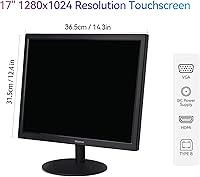
  • Screen Size: The display measures 17 inches diagonally, making it compact enough for counter-top deployment without sacrificing usable screen area.
  • Resolution: Native resolution is 1280×1024 pixels, which is standard for the 5:4 aspect ratio format common in commercial and industrial displays.
  • Aspect Ratio: The panel uses a 5:4 aspect ratio, a legacy format that differs from the 16:9 widescreen standard used by most modern monitors.
  • Touch Technology: Capacitive multi-touch supports up to 10 simultaneous touch points, enabling natural gesture input such as pinch, swipe, and multi-finger tap.
  • Refresh Rate: The display runs at 75Hz, providing moderately smoother motion than standard 60Hz panels during touch interactions and on-screen navigation.
  • Brightness: Panel brightness is rated at 250 cd/m², which is functional for dim or controlled indoor environments but limited under strong ambient or direct light.
  • Connectivity: The monitor includes one HDMI port, one VGA port, and one USB Type-B port for transmitting touch signal data to the connected device.
  • VESA Compatibility: A 75×75mm VESA pattern on the rear panel allows the display to be mounted on compatible wall brackets or monitor arms.
  • Tilt Range: The included adjustable stand supports a tilt range of +5° forward to -20° backward for ergonomic positioning on flat surfaces.
  • Screen Surface: The panel features a glossy screen surface, which can increase reflections and glare in brightly lit or windowed environments.
  • Dimensions: The full unit measures 20.08 × 3.54 × 13.39 inches with the stand attached, giving a clear picture of the counter space it occupies.
  • Weight: The monitor weighs 7.28 pounds, making it manageable for single-person installation or repositioning without additional assistance.
  • OS Compatibility: Full plug-and-play touch functionality is supported on Windows; compatibility with Apple devices is limited and not guaranteed across all macOS versions.
  • Box Contents: The package includes the monitor, an HDMI cable, a USB Type-B touch signal cable, a DC power cord, the adjustable stand, and a quick start guide.
  • Model Number: The manufacturer model number for this unit is S-170toch-HC, which can be useful when sourcing replacement parts or contacting support.
  • Brand: This display is manufactured by SKitphrati, a newer entrant to the consumer and commercial monitor market with a growing product line.

Related Reviews
SKitphrati S-17-W 17-inch LED Monitor
64%
78%
Value for Money
54%
Display Quality
41%
Viewing Angles
91%
Ease of Setup
62%
Build Quality
More
ViewSonic TD2465 24-Inch Touch Screen Monitor
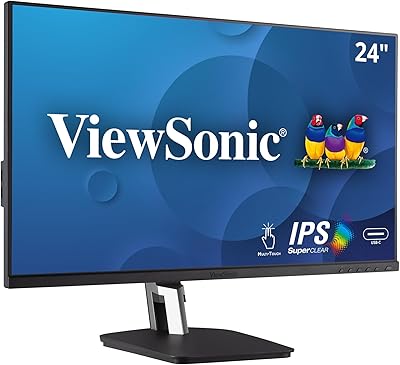
75%
88%
Touch Responsiveness
84%
Touch Mode Versatility
79%
macOS Compatibility
81%
Build Quality & Durability
62%
Stand Design & Stability
More
ViewSonic TD2455 24-inch Touch Monitor
78%
88%
Touch Responsiveness
83%
Build Quality
86%
Ergonomics & Stand
67%
Display Clarity
91%
USB-C Connectivity
More
VIEWMEI 8-Inch Portable Touch Screen Monitor
71%
83%
Build Quality
78%
Display Clarity
62%
Touch Responsiveness
88%
Portability
81%
Setup & Compatibility
More
Wisecoco R126F01T-HB 12.6-inch Bar Touch Monitor
67%
78%
Display Quality
81%
Build Quality
61%
Touch Responsiveness
83%
Setup & Ease of Use
53%
Power Stability
More
KTC MegPad 27-Inch Portable Smart TV
72%
83%
Mobility & Design
78%
Display Quality
88%
Smart TV Platform
71%
Performance & Speed
62%
Battery Life
More
ROADOM 10.1-inch Raspberry Pi Touchscreen Monitor
78%
91%
Ease of Setup
83%
Touch Responsiveness
72%
Display Quality
88%
Build & Enclosure
59%
Speaker Quality
More
ViewSonic TD2423D 24-Inch Touch Monitor
73%
83%
Touch Responsiveness
76%
macOS Compatibility
62%
Image Quality
71%
Build Quality
84%
Eye Care Performance
More
WALI GMF004 Freestanding Quad Monitor Mount for 17-27 Inch Screens
85%
89%
Build Quality
92%
Ease of Assembly
86%
Ergonomics & Adjustability
81%
Stability & Durability
90%
Value for Money
More
VILTROX DC-550 Pro 5.5-inch Field Monitor
79%
83%
Display Quality
78%
Outdoor Visibility
81%
Touchscreen Usability
86%
Color Accuracy
91%
Value for Money
More

FAQ

On Windows 10 and Windows 11, the touch functionality works without any driver installation — just connect the HDMI cable for video and the USB Type-B cable for touch signal, and the OS recognizes it automatically. Most buyers report being fully operational within a few minutes of unboxing.

Touch input is not reliably supported on Apple devices, and the listing explicitly notes limited compatibility. Video output via HDMI may work on some Macs, but you should not count on touch functionality behaving correctly on macOS or iPadOS. If a Mac is your primary device, this is a meaningful limitation worth weighing carefully before purchasing.

Yes — the rear of the monitor has a standard 75×75mm VESA pattern, so it's compatible with a wide range of wall brackets and monitor arms available at most hardware or electronics retailers. Just make sure the mount you buy specifies VESA 75 compatibility.

It depends on your software. Many dedicated POS platforms actually handle 5:4 or 4:3 formats well since they were historically common in retail environments. Where you might run into trouble is with modern browser-based POS systems or apps designed for widescreen layouts — those can appear letterboxed or require manual scaling adjustments. It's worth checking with your POS provider before committing.

The 10-point capacitive panel handles rapid single taps and basic multi-finger gestures well for typical POS workflows. It is not designed for high-speed gaming or precision drawing, but for signing, tapping menu items, and swiping through options in a retail or food service environment, the response is solid enough that most users don't report significant issues.

It's functional but not industrial-grade. A number of buyers mention the stand feels lighter than expected and can shift slightly under firm or repeated tapping. If your setup involves heavy daily touch use, attaching it to a wall or a solid arm mount via the VESA pattern would be a more stable long-term solution.

Yes, this is actually a popular use case for the SKitphrati 17″ Touch Screen Monitor. Connect video via HDMI and route the USB Type-B cable to a USB-A port on the Pi for touch input. Most users running Raspberry Pi OS report the touch layer works without manual configuration, though results can vary slightly depending on the Pi model and OS version in use.

The glossy panel does pick up reflections under overhead fluorescent lights, especially if the screen is positioned at an angle relative to the light source. At 250 cd/m² brightness, it's not dim, but it's not punchy enough to overpower strong reflections either. Tilting the monitor slightly and positioning it away from direct overhead lights helps noticeably.

SKitphrati is a relatively new brand and their after-sales infrastructure is not as established as major monitor manufacturers. Coverage terms can vary, so it's worth checking the current warranty card included in the box and saving your purchase receipt. Buying through a platform with a strong return policy gives you a reasonable safety net given the brand's limited track record.

It can work as a secondary display if your PC has an available HDMI or VGA output and you want touch capability on a second screen. Keep in mind the 5:4 resolution and 17-inch size mean it won't match visually with a modern widescreen primary monitor, and some Windows display scaling adjustments may be needed. For a functional touch-enabled secondary display on a budget, though, it does the job.