Overview

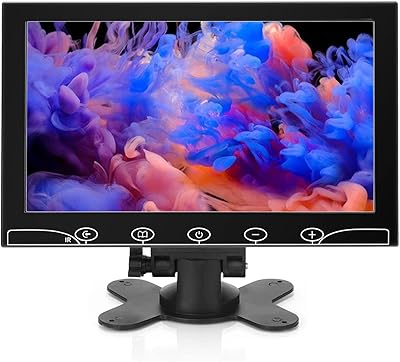
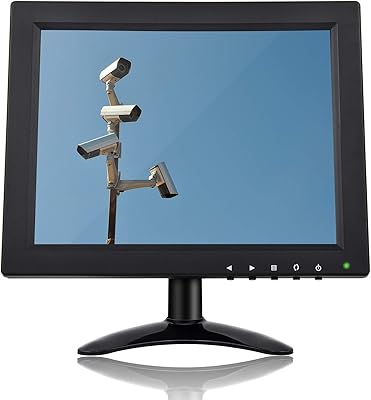
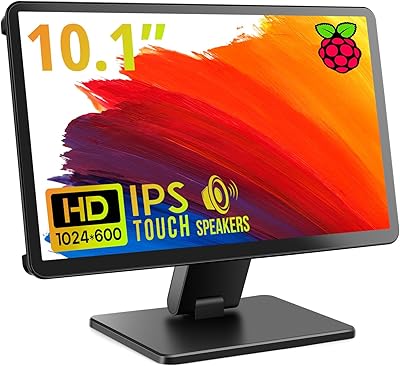
The Haiway SM10.1 10.1-inch Security Monitor is a compact, no-fuss display aimed squarely at CCTV users, Raspberry Pi hobbyists, and anyone who needs a small second screen without a big footprint. At under 2.5 lbs and roughly the size of a thick paperback, it sets up fast and travels well. Haiway includes both an AC adapter and a 12V vehicle cable, a genuinely useful touch for mobile or workshop use. The panel runs at 1366x768 — honest enough for surveillance or basic desktop tasks, though not a fit for high-resolution photo work. The stand flips between landscape and portrait, and the 178° viewing angle keeps the image readable from practically any position.
Features & Benefits

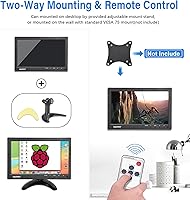
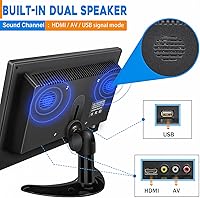
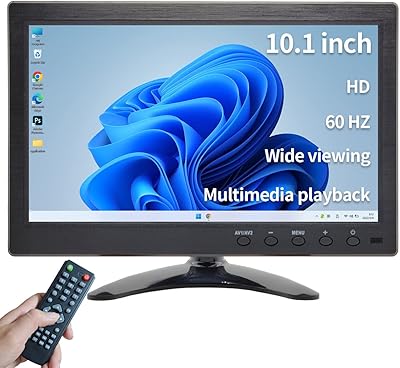
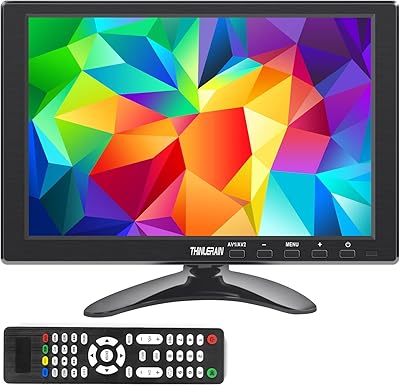
What makes this compact security monitor stand out in a crowded small-screen market is the sheer range of inputs packed into a chassis barely larger than a tablet. HDMI, VGA, BNC, AV, and USB are all present, meaning you can connect a modern laptop, an old desktop with a VGA port, and an analog CCTV camera without hunting for adapters. The dedicated BNC port alone saves CCTV users real money and setup headaches. A remote control handles input switching and basic settings, which matters more than it sounds when the unit is wall-mounted out of reach. The built-in speakers are thin — fine for camera audio, not for music — and VESA 75 compatibility opens up clean mounting options.

Best For

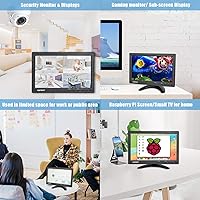
This small HDMI monitor hits its sweet spot in a few well-defined situations. Hook it up to a Raspberry Pi or similar single-board computer and it just works — no driver drama, no resolution guesswork. It handles analog CCTV cameras directly via BNC, making it a practical pick for garage or shed surveillance where running a full-size PC monitor would be overkill. Retro console players will appreciate the compact footprint on a crowded desk, and the vehicle power cable opens up interesting mobile use cases. Where it falls short is with users expecting crisp full-HD output or color-accurate work — the resolution ceiling is real and worth understanding before buying.

User Feedback

Owners of the Haiway 10.1-inch display tend to split along predictable lines. Those using it for Raspberry Pi projects or basic camera monitoring are largely satisfied — the plug-and-play setup earns consistent praise, and the BNC connectivity saves steps that would trip up less technical users. On the downside, glossy screen glare comes up often from anyone working near a window or under bright overhead lighting. The stand draws some criticism in portrait orientation, where it can feel slightly wobbly under pressure. A handful of buyers have flagged remote control lag during input switching, and a smaller group reports backlight inconsistency after extended use — not universal, but worth noting.

Pros

  • Direct BNC connectivity lets you plug analog CCTV cameras in without any adapter — a real time-saver for security setups.
  • Five input types on one small screen cover legacy VGA desktops, modern HDMI sources, and security cameras simultaneously.
  • Raspberry Pi users consistently report a true plug-and-play experience with zero driver or resolution configuration needed.
  • At under 2.5 lbs, this small HDMI monitor moves easily between workspaces, vehicles, and project benches.
  • The included 12V coiled vehicle cable is a thoughtful addition that most competing displays simply do not ship with.
  • VESA 75 compatibility opens up clean wall and arm mounting options beyond the included stand.
  • Portrait mode support is a genuine bonus for vertical dashboards, code editors, or stacked CCTV feed layouts.
  • The remote control is practical for wall-mounted installations where physically reaching the unit is inconvenient.
  • The 178-degree viewing angle keeps the image readable from wide off-axis positions, useful in multi-viewer security setups.
  • For buyers who need multi-input flexibility in a tight footprint, the value proposition is hard to beat at this price tier.

Cons

  • The glossy panel creates persistent mirror-like reflections in any room with windows or bright overhead lighting.
  • Resolution tops out at 1366x768, making fine detail in HD video and dense documents noticeably soft.
  • The built-in speakers are thin and unconvincing for anything beyond basic camera audio or notification sounds.
  • Portrait mode exposes the stand's instability — the base is too narrow to feel secure without a third-party mount.
  • Remote control lag during input switching is a recurring complaint, and some units reportedly become unresponsive over time.
  • A subset of long-term owners report uneven backlight zones developing after roughly 12 to 18 months of continuous use.
  • Port placement on the rear panel makes cable management awkward when the display is positioned close to a wall.
  • The tilt adjustment range on the included stand is limited, which restricts ergonomic positioning for seated desk use.

Ratings

The Haiway SM10.1 10.1-inch Security Monitor has been scored by our AI system after parsing verified buyer reviews from global markets, with spam, bot-generated, and incentivized feedback actively filtered out. The result is a balanced snapshot of where this compact display genuinely delivers and where real-world use exposes its limits. Both the strengths that keep buyers recommending it and the friction points that trigger returns are reflected transparently in the scores below.
Ease of Setup
88%
Plug-and-play behavior is the most consistently praised aspect across buyer reviews. Raspberry Pi users in particular report having the display running within minutes of unboxing, with no driver installation or resolution tweaking required. CCTV camera connections via the BNC port are equally straightforward for non-technical users.
A small segment of buyers report confusion when switching between multiple inputs for the first time, noting the on-screen menu navigation is not immediately intuitive. The remote control helps, but its labeling is minimal and can slow down first-time configuration.
Input Connectivity
91%
The combination of HDMI, VGA, BNC, AV, and USB on a sub-11-inch monitor is genuinely rare and earns strong appreciation from users running mixed setups. Tinkerers who need to toggle between a Raspberry Pi, an older PC, and a security camera without swapping cables find this flexibility hard to match at this price tier.
While the input count is impressive, several users note the port placement on the rear panel makes cable management awkward when the unit is desk-mounted close to a wall. A side-facing USB placement would have helped in tighter setups.
Display Clarity
67%
33%
For surveillance monitoring and basic desktop tasks, the 1366x768 resolution holds up reasonably well. Text is readable, camera feeds are clear enough to identify faces and movement, and the 178-degree viewing angle means image quality holds from off-axis positions — useful in multi-camera security rooms.
Anyone expecting 1080p sharpness will be disappointed. Users who attempted to use this display for photo editing or watching HD video reported visible pixel density limitations and soft fine detail. The resolution ceiling is a genuine trade-off that buyers need to accept before purchasing.
Glare & Screen Surface
49%
51%
In dim or controlled-light environments such as a basement server room, a vehicle interior at night, or a shaded workshop, the glossy panel causes no real issues. Brightness at 400 cd/m² is sufficient to push through moderate ambient light in these contexts.
In any room with windows or direct overhead fluorescent lighting, the glossy surface becomes a persistent problem. Multiple buyers working in offices or kitchens report mirror-like reflections that make the screen uncomfortable to use for extended periods. This is the single most common complaint in the review pool.
Build Quality
72%
28%
The plastic chassis feels sturdy enough for stationary desk or wall use, and the overall assembly quality is consistent with what buyers expect at this price point. The stand hinge has a decent amount of resistance and does not wobble during normal use in landscape orientation.
Portrait mode exposes the stand's structural weakness — several users describe the unit feeling unstable and prone to tipping without additional support or a third-party mount. The plastic finish also picks up fingerprints and light scratches faster than matte-finish competitors.
Stand & Mounting Flexibility
74%
26%
The ability to rotate into portrait mode is a genuinely useful feature for vertical code editors or single-column dashboards, and VESA 75 compatibility opens up wall bracket and monitor arm options that make the overall setup much cleaner. Several buyers specifically purchased this unit for vertical mounting in a CCTV rack.
The included stand is the weakest physical component. In portrait orientation it lacks the base width to feel stable, and the tilt adjustment range is limited. Buyers planning desk use in portrait mode are better off investing in a VESA arm from the start.
Built-in Speakers
53%
47%
Having speakers at all in a monitor this small and inexpensive is a practical convenience. For receiving audio from a CCTV camera feed — door chimes, ambient sound alerts, or basic voice — the built-in audio is functional and saves needing a separate speaker in a utility space.
The audio quality is thin and lacks any real bass or mid-range presence. Users who tried using this monitor for YouTube, streaming, or music playback found the listening experience unsatisfying. These speakers are a last-resort convenience, not a selling point.
Remote Control
61%
39%
The inclusion of a remote is a thoughtful addition for wall-mounted or vehicle-mounted use cases where physically reaching the unit is impractical. Basic functions like input switching, volume, and brightness adjustment work as intended in most environments.
Input-switching responsiveness draws criticism, with several buyers noting a noticeable lag between pressing the remote and the display reacting. A handful of users also report the remote becoming unresponsive after a few months, suggesting the build quality of the accessory does not match the longevity of the monitor itself.
Brightness & Visibility
78%
22%
The 400 cd/m² brightness rating translates to a display that handles moderately lit indoor environments well. In garages, workshops, and shaded office corners, the image remains clear and easy to read without needing to push the brightness setting to maximum.
Under direct daylight or bright fluorescent lighting the glossy surface compounds any brightness shortfall. A few buyers in sunny rooms found themselves maxing out brightness settings and still dealing with washed-out contrast, suggesting the panel would benefit from a matte coating option.
Value for Money
83%
For the specific use cases this monitor targets — CCTV monitoring, Raspberry Pi projects, and secondary desktop displays — the price-to-functionality ratio is strong. The BNC input alone typically adds cost to comparable displays, making this a smart pick for buyers who know exactly what they need.
Buyers who purchase this expecting a general-purpose display for productivity or media consumption tend to feel the value proposition is weaker. The resolution and screen surface limitations become harder to justify if the multi-input connectivity is not actually needed.
Portability & Size
86%
At 2.38 lbs and slightly smaller than a standard laptop screen, this compact security monitor travels well and fits in tight spaces without dominating a workbench or vehicle dashboard. The included 12V coiled cable makes it genuinely usable as a portable diagnostic or mobile monitoring screen.
The compact size is a deliberate trade-off, not a universal benefit. Users who initially bought it for light desktop use occasionally find themselves wishing for even a 13-inch panel once the novelty of the small footprint wears off.
Long-term Durability
63%
37%
The majority of buyers using this monitor in low-intensity roles — running 24/7 as a static security display or as an occasional Raspberry Pi terminal — report no major issues over the first year of ownership. Factory testing claims appear to hold up for typical use cases.
A recurring pattern in longer-term reviews points to backlight inconsistency developing after extended continuous use, with some units showing uneven brightness zones after 12 to 18 months. This is not universal, but it appears frequently enough to suggest the backlight components are a durability weak point.
Power Options
81%
19%
The dual power system — a standard AC adapter for home or office and a 12V coiled vehicle cable for mobile use — is a practical design decision that expands where this display can realistically be deployed. Very few monitors in this category ship with both options included.
The vehicle cable length, while coiled, is fixed and may not reach power outlets in larger vans or truck cabs depending on their layout. A few mobile users noted they ended up using a separate extension for a clean installation.
Portrait Mode Performance
58%
42%
Portrait orientation is a useful option for vertical dashboard displays, narrow code windows, or stacked CCTV feeds. Buyers who planned for this use case and paired the monitor with a VESA arm reported a clean and functional result.
Without a third-party mount, portrait mode is undermined by the stand's instability. The transition between modes also requires manually adjusting the display rotation in software on most platforms, which is a minor but consistent friction point noted by users expecting automatic rotation.

Suitable for:

The Haiway SM10.1 10.1-inch Security Monitor is purpose-built for buyers who have a specific, well-defined job in mind rather than a general-purpose display need. If you are setting up a DIY home surveillance system with analog CCTV cameras, the built-in BNC port means you can connect directly without hunting for adapters or signal converters. Raspberry Pi enthusiasts and single-board computer hobbyists will find it particularly practical — it powers up, recognizes the signal, and gets out of the way, which is exactly what a project display should do. The included 12V vehicle cable makes it a credible option for mobile mechanics, delivery drivers, or van-lifers who need a small diagnostic or entertainment screen that runs off a car's power supply. Workshop and garage owners who want a dedicated monitoring screen tucked into a corner, away from a main computer, will also appreciate how little desk or shelf space this unit demands. Anyone juggling multiple legacy and modern devices — a VGA-era desktop alongside a current gaming console, for instance — will find the five-input lineup genuinely useful rather than just a marketing bullet point.
Not suitable for:

Buyers shopping for a primary desktop monitor or a display for extended creative or productivity work should look elsewhere before committing to this compact security monitor. The 1366x768 resolution is a hard ceiling — fine for camera feeds and terminal windows, but noticeably soft when viewing detailed images, spreadsheets spanning many columns, or any content mastered at 1080p and above. The glossy panel is a genuine dealbreaker for anyone working in a room with windows or bright overhead lighting, since the reflections are persistent and no setting adjustment will fix a physical surface characteristic. The built-in speakers, while handy for alert audio, will frustrate anyone who expects even modest sound quality from music, video calls, or streaming. Users who need a display for color-sensitive work such as photo editing, graphic design, or video grading should be especially cautious — the panel is not calibrated or profiled for accurate color reproduction. Finally, buyers expecting rock-solid portrait-mode stability from the included stand will likely be disappointed without also investing in a VESA arm, which adds cost and effort to what initially looks like a simple purchase.

Specifications

  • Screen Size: The display measures 10.1 inches diagonally, making it one of the more compact standalone monitors available for security and hobbyist use.
  • Resolution: Native resolution is 1366x768 pixels at a 16:9 aspect ratio, suitable for surveillance feeds and basic desktop tasks but not full HD content.
  • Brightness: The panel is rated at 400 cd/m², providing adequate visibility in moderately lit indoor environments such as workshops, offices, and vehicle interiors.
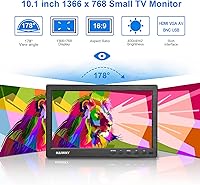
  • Viewing Angle: A 178-degree wide viewing angle ensures the image remains clear and color-consistent when observed from most horizontal and vertical off-axis positions.
  • Panel Surface: The screen uses a glossy finish, which enhances color vibrancy in controlled lighting but introduces noticeable reflections in bright or window-lit rooms.
  • Video Inputs: Connectivity includes HDMI, VGA, BNC, AV composite, and USB, covering both legacy analog sources and modern digital devices in a single unit.
  • VESA Mount: The monitor supports a standard VESA 75x75mm mounting pattern, compatible with most third-party wall brackets and monitor arms (mount hardware not included).
  • Built-in Audio: Dual speakers are integrated directly into the chassis, providing basic audio output for camera feeds and alerts without requiring an external speaker.
  • Remote Control: A handheld remote is included in the box for adjusting inputs, volume, brightness, and other on-screen menu settings without touching the unit directly.
  • Power Options: The monitor ships with both an AC/DC mains adapter for fixed indoor use and a 12V coiled spring cable for powering the display from a vehicle socket.
  • Operating Voltage: The unit operates at 12 volts DC, which is what enables direct compatibility with standard 12V vehicle power outlets via the included cable.
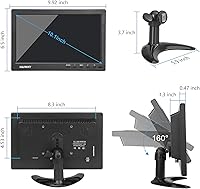
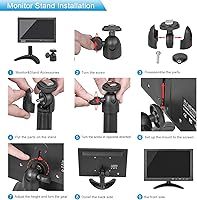
  • Stand Modes: The included adjustable stand supports both landscape and portrait orientations, allowing the display to be repositioned to suit different workspace configurations.
  • Item Weight: The monitor weighs 2.38 lbs, making it light enough for portable use, vehicle installation, or repositioning on a workbench without tools.
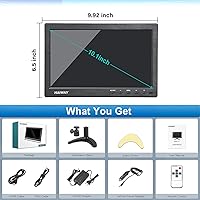
  • Dimensions: Physical dimensions are 9.92 x 6.5 x 1.3 inches, giving the unit a slim profile that fits comfortably on crowded desks or shallow shelving.
  • Brand and Series: Manufactured by Haiway under the SM10.1 series, with the item model number MONITOR-CAFU, first available on the market in August 2019.

Related Reviews

TPEKKA 10-inch Security CCTV Monitor
86%
88%
Value for Money
85%
Display Quality
91%
Portability
90%
Setup & Installation
60%
Brightness in Direct Sunlight
More
Thinlerain 10.1 Inch FHD Monitor
83%
85%
Display Quality
91%
Portability
88%
Setup & Installation
80%
Build Quality
92%
Connectivity Options
More
AISHICHEN 10.1-Inch IPS Mini Monitor
70%
78%
Value for Money
86%
Connectivity & Inputs
89%
Raspberry Pi Compatibility
73%
Display Clarity
61%
Build Quality
More
ELECROW 10.1 Inch Touchscreen Monitor
86%
88%
Display Quality
80%
Touchscreen Responsiveness
94%
Portability
92%
Ease of Setup
85%
Build Quality
More
Haiway 13.3-inch Security Monitor
85%
88%
Display Quality
92%
Ease of Setup
85%
Connectivity
79%
Build Quality
90%
Energy Efficiency
More
Qcvoruno QC101A 10.1″ Security Monitor
87%
88%
Display Clarity
95%
Input Compatibility
91%
Portability
82%
Audio Quality
89%
Ease of Setup
More
Magedok T101F 10.1-inch Portable Touchscreen Monitor
72%
88%
USB-C Connectivity
63%
Touch Accuracy
79%
Display Quality
84%
Aspect Ratio Fit
76%
Setup Experience
More
ROADOM 10.1-inch Raspberry Pi Touchscreen Monitor
78%
91%
Ease of Setup
83%
Touch Responsiveness
72%
Display Quality
88%
Build & Enclosure
59%
Speaker Quality
More
RCA Cambio 10.1-inch 2-in-1 Tablet PC
79%
92%
Value for Money
88%
Portability
85%
Ease of Use
78%
Display Quality
82%
Keyboard Usability
More
ITMEIPC T-10 Android Tablet 10.1-inch, 6GB RAM, 64GB Storage
80%
91%
Value for Money
85%
Display Quality
74%
Battery Life
78%
Build Quality
88%
Performance for Light Use
More

FAQ

No drivers needed. The Haiway SM10.1 10.1-inch Security Monitor is plug-and-play with Raspberry Pi across most common OS builds including Raspberry Pi OS. Just connect via HDMI, power it on, and it should detect the signal automatically. Some users adjust the resolution in the Pi config file to get a cleaner fit at 1366x768, but that takes about two minutes and is well-documented in Pi forums.
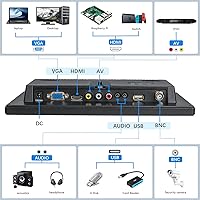
You can connect directly. The BNC port on this compact security monitor accepts a standard BNC coaxial cable from most analog CCTV cameras without any converter in between. This is one of the main reasons buyers in the surveillance space choose this display over generic HDMI-only monitors.

It depends heavily on your room setup. If you have windows behind or beside you, the reflections can be genuinely distracting — multiple buyers have flagged this as a deal-breaker in bright rooms. In a darker space like a basement, server room, or at night, it is a non-issue. If your workspace gets a lot of natural light, a matte-screen alternative would serve you better.

The stand does rotate to portrait orientation, but stability is a known weak point in that mode. The base is not wide enough to feel confident without support, so if portrait is your main use case, plan to pick up an inexpensive VESA 75 arm alongside it. Landscape mode is noticeably more stable and works well without modifications.

The USB port supports media playback directly from a flash drive — you can navigate and play video or image files through the on-screen menu without connecting a PC. It is a useful bonus feature, though the resolution and speaker quality mean it works better for functional content than for entertainment viewing.

Most buyers running it continuously for surveillance report no thermal issues in the short to medium term. That said, a subset of long-term users have noted backlight inconsistency appearing after roughly a year or more of uninterrupted use, suggesting it is not rated for indefinite 24/7 industrial deployment. For home or small office monitoring, it should hold up reasonably well.

For basic input switching and brightness adjustment, the remote works fine for most users. The main complaints involve input-switching lag — there is a short delay between pressing the button and the display reacting — and a handful of buyers report the remote becoming less responsive after several months. It is a convenience accessory, not a precision tool.

The box includes the monitor itself, the adjustable stand, an AC/DC power adapter, a 12V coiled spring vehicle power cable, a remote control, and basic documentation. HDMI and other signal cables are not included, so factor that in if you are starting from scratch.

Yes, the VESA 75x75mm pattern on the back makes it compatible with a wide range of affordable wall brackets and monitor arms. The mount hardware itself is not included in the box, but any standard VESA 75 bracket will fit. Wall mounting is actually the setup many security-focused buyers prefer, since it eliminates stand wobble entirely.

It depends on what you mean by everyday use. For a terminal window, a single browser tab, or basic coding work, it is perfectly usable. For spreadsheets with many columns, detailed design work, or anything involving 1080p content, the resolution will feel limiting and visibly soft. Think of it as a utility display rather than a primary workstation monitor, and it will meet expectations.

Where to Buy