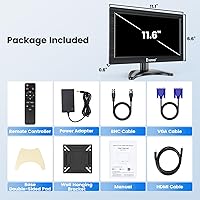
Overview

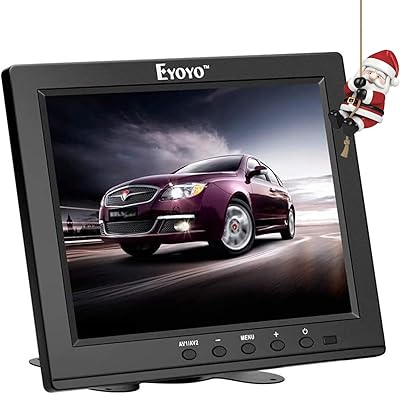
The Eyoyo EM12B 12-Inch Portable Monitor has been quietly carving out a niche since its 2017 debut, and its staying power says something real about the demand for compact, no-frills displays. This compact monitor is not trying to replace your main workstation screen — it is built for people who need a reliable secondary display without a big investment. Its consistent ranking near the top of Amazon's Security Monitors & Displays category reflects genuine buyer interest, not just algorithmic luck. Think of it as a workhorse specialty tool designed for specific jobs rather than a general-purpose panel for daily computing.

Features & Benefits

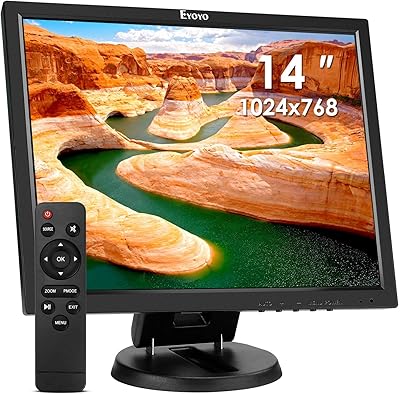
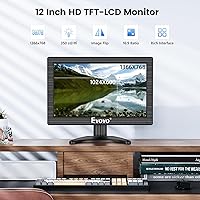
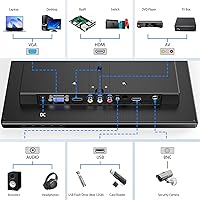
What makes this mini display worth attention is the breadth of its input options. HDMI handles modern laptop or PC connections, VGA covers older hardware, and the BNC input is the real differentiator — it lets you plug in analog CCTV cameras directly, something most small monitors simply cannot do. Resolution sits at 1366x768, which is honest HD for a screen this size, though it is not ideal for dense spreadsheet work. Brightness at 350 cd/m² holds up reasonably in typical indoor lighting. The image flip function — both horizontal and vertical — combined with the VESA 75mm mount adds practical flexibility for unusual or custom installations.

Best For

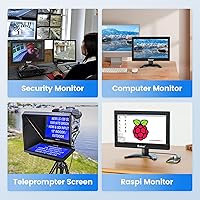
This small secondary screen really shines in specific, purpose-driven setups. If you are running a Raspberry Pi project and need a compact display, this fits naturally. Security and surveillance users will appreciate the BNC port, which connects directly to analog cameras without extra adapters. Teleprompter builders benefit from the image-flip function, saving the cost of a dedicated mirror rig. It also works well in cramped desk setups as a secondary PC monitor, or mounted in a vehicle. Worth noting: this is a straight display — no tuner, no smart apps — which keeps things simpler for people who just need a clean, dedicated screen.

User Feedback

Buyers generally come away satisfied when their expectations are calibrated correctly. The most consistent praise centers on build quality relative to the price — people are often surprised by how solid it feels out of the box. On the other side, some users flag that the resolution can feel limiting for reading fine text or working in dense spreadsheets for long stretches. A few reviewers mention that the stand, while adjustable, can wobble slightly under repeated repositioning. Brightness in direct sunlight is also noted as a weak spot. Most buyers do confirm that the image-flip feature works exactly as advertised, which is welcome validation for the teleprompter crowd.

Pros

  • The BNC input sets this mini display apart from most small monitors, enabling direct analog camera connections.
  • Four input types — HDMI, VGA, BNC, and AV — make it compatible with both modern and legacy devices.
  • The image-flip function works as advertised, making it genuinely useful for teleprompter builds.
  • At roughly 13 inches wide and under 8 inches tall, this compact monitor fits into tight spaces with ease.
  • The VESA 75mm wall-mount compatibility adds real installation flexibility for fixed or custom setups.
  • The adjustable stand handles both rotation and tilt, covering most viewing angle needs without extra hardware.
  • Build quality consistently surprises buyers at this price tier — it feels more solid than expected.
  • The included remote control makes OSD navigation practical, especially when the screen is mounted.
  • Multi-language menu support is a small but welcome touch for international buyers or shared environments.
  • Its long production history since 2017 suggests reliable parts availability and a proven design.

Cons

  • Resolution at 1366x768 feels noticeably limiting during extended text-heavy or spreadsheet work.
  • The glossy screen surface creates distracting reflections in brightly lit or sunlit rooms.
  • Brightness tops out at 350 cd/m², which struggles in high-ambient-light environments.
  • The stand can wobble or feel less stable after repeated repositioning or tilt adjustments.
  • Not compatible with Fire TV Stick or similar streaming sticks, which some buyers discover only after purchase.
  • Only one USB port is included, which limits peripheral connectivity in multi-device setups.
  • The marketed 12-inch size is slightly misleading — the actual panel measures 11.6 inches diagonally.
  • No built-in speakers are included, so audio requires an external solution for any media use.
  • At 12V DC power, mobile or off-grid use requires a compatible power source that is not always included.
  • Color accuracy is adequate but not suited to any work where faithful color reproduction matters.

Ratings

The scores below for the Eyoyo EM12B 12-Inch Portable Monitor were generated by our AI system after analyzing thousands of verified global buyer reviews, with spam, bot activity, and incentivized feedback actively filtered out before scoring. Each category reflects the real distribution of buyer sentiment — strengths are credited where they are earned, and genuine pain points are not smoothed over. This compact monitor punches above its weight in several niche areas while showing clear limitations in others, and the scores reflect exactly that.

Input Versatility
91%
The combination of HDMI, VGA, BNC, and AV inputs is the single biggest reason buyers choose this mini display over similarly priced competitors. Security installers and hobbyists consistently praise how the BNC port eliminates the need for signal adapters when connecting analog CCTV cameras directly.
A small number of users report that switching inputs via the OSD can feel slightly unintuitive at first, particularly when cycling through unused ports. There is also no DisplayPort or USB-C, which limits compatibility with some newer ultrabooks and tablets.
Value for Money
86%
Buyers repeatedly express that the feature set — four inputs, image flip, VESA mount, remote control, and adjustable stand — feels like a lot to get at this price tier. For niche use cases like CCTV monitoring or Raspberry Pi setups, most buyers feel they got exactly what they paid for.
Expectations matter here: buyers who approach this as a general-purpose display sometimes feel the value calculation does not hold up as well, particularly when the resolution limitations become apparent during daily text-heavy work.
Image Flip Function
88%
Among buyers who specifically purchased this small secondary screen for teleprompter builds or mirror-based setups, satisfaction with the image-flip function is notably high. Both horizontal and vertical flipping are confirmed to work reliably, and the feature is accessible quickly through the remote.
The image-flip option lives inside the OSD menu rather than being a dedicated hardware button, which means a few extra steps each time it is toggled. Users without the remote nearby find navigating to the setting mildly tedious.
Build Quality
78%
22%
For a monitor in this price range, the physical construction regularly surprises first-time buyers in a positive way. The chassis feels more solid than the price would suggest, and the overall fit and finish are described as clean and professional-looking out of the box.
Longer-term owners note that the plastic housing can show scuff marks with regular handling, and the stand pivot point tends to loosen with frequent repositioning. It holds up well in static installations but shows wear faster in mobile or frequently adjusted setups.
Display Resolution
62%
38%
For its intended use cases — analog camera feeds, Raspberry Pi output, or basic secondary monitor duties — the 1366x768 resolution is functional and renders video content clearly enough to serve its purpose without obvious pixelation at normal viewing distances.
This is one of the most common pain points flagged in user reviews. Anyone doing extended text work, spreadsheet editing, or anything requiring fine detail will find 1366x768 genuinely limiting. The resolution is dated even by budget monitor standards and stands out as the weakest specification on paper.
Brightness & Glare
59%
41%
In a dim or moderately lit indoor environment — a recording studio corner, a security desk, or a bedroom setup — the 350 cd/m² brightness level is adequate and images look reasonably well-defined without any eye-strain complaints from buyers using it in those conditions.
The glossy panel surface combined with the modest brightness ceiling creates a real problem near windows or under strong overhead lighting. Multiple reviewers specifically mention that reflections make the screen difficult to use comfortably in bright rooms, and there is no anti-glare coating to offset this.
Stand Stability
66%
34%
The stand covers a generous tilt range and the 180° rotation gives buyers real flexibility in how they position the screen. For static desk or workbench setups where the monitor stays in one position, most users are satisfied with the stability it provides day to day.
Repeated tilting and repositioning causes the stand joint to loosen progressively, and a number of buyers note visible wobble after a few weeks of regular adjustment. Users who need to reposition frequently are better served by the VESA wall-mount option.
VESA Mount Compatibility
83%
The VESA 75mm pattern is a practical inclusion that allows this compact monitor to be mounted on any standard compatible bracket, which is especially appreciated by security installers and in-vehicle users who want a clean, fixed installation without the stand.
The VESA mount itself is not complex to use, but a few buyers note that the screw holes on their unit required slight force to align with standard brackets, suggesting minor quality-control variation in hole placement across production batches.
Remote Control
74%
26%
Having a remote control for a monitor this small is a genuinely useful inclusion, particularly for wall-mounted or vehicle-installed setups where reaching the panel buttons would be awkward. Buyers in CCTV and teleprompter applications find it especially practical for adjusting settings without disturbing their setup.
The remote feels lightweight and inexpensive, and a handful of users report inconsistent response range requiring them to point it precisely at the receiver. There are also isolated complaints about the remote losing pairing responsiveness over time.
Viewing Angles
77%
23%
The 160° horizontal and 140° vertical viewing angles hold up well for a panel at this price, and users sharing a security monitor view or presenting from a Raspberry Pi to a small group confirm that color and contrast hold reasonably well off-axis.
At extreme angles — particularly vertical — some color washing is noticeable, which is expected for a non-IPS panel at this tier. It is not a problem for single-viewer setups but becomes more apparent when multiple people are viewing from different positions.
Setup & Installation
81%
19%
Most buyers report that getting the monitor up and running is straightforward regardless of whether they are connecting via HDMI, BNC, or VGA. The multi-language OSD menu reduces friction for international buyers, and the included stand requires no tools to attach.
A small subset of users encounter confusion around input auto-detection, finding that the monitor does not always default to the active input on startup and requires a manual source selection each time. This is a minor but recurring complaint in longer-term reviews.
Portability
79%
21%
At roughly 13 inches wide and under 8 inches tall, this mini display is genuinely portable — light enough to carry between locations and compact enough to fit in a bag alongside a laptop. Raspberry Pi users and mobile presenters particularly value how little space it demands.
The power brick and cable assembly adds bulk to any portable setup, and the glossy surface picks up fingerprints and smudges quickly when handled frequently. There is no carrying case or protective sleeve included, which is a small but noticeable omission for a monitor marketed partly on portability.
Compatibility Range
72%
28%
The breadth of supported inputs means this small secondary screen works with an unusually wide range of devices — from legacy VGA laptops to modern HDMI sources to raw analog camera signals. Most buyers find it connects to whatever they need without extra converters.
The incompatibility with Fire TV Stick and similar HDMI streaming dongles catches some buyers off guard. There is also no built-in audio output, so any source requiring sound needs a separate audio path, which adds complexity for buyers who assumed the HDMI connection would handle audio routing.
OSD Menu Usability
68%
32%
The on-screen menu covers all the essential adjustments — brightness, contrast, input selection, image flip, and language — and the remote makes cycling through these settings reasonably comfortable once buyers get familiar with the menu layout.
Several buyers describe the menu structure as dated and slightly unintuitive, particularly the multi-level navigation required to reach less common settings. Without the remote, using the physical buttons on the unit to navigate the OSD is described by multiple reviewers as frustratingly slow.

Suitable for:

The Eyoyo EM12B 12-Inch Portable Monitor is a strong fit for anyone who needs a compact, purpose-built display for a specific task rather than a general daily driver. Security and surveillance enthusiasts will find the BNC input particularly useful, since it allows direct connection to analog CCTV cameras without any adapters or converters. Raspberry Pi hobbyists and makers who need a small, portable screen to pair with a single-board computer will appreciate how straightforward the setup is. Teleprompter builders get genuine value from the image-flip function, which handles the mirror effect without requiring extra hardware. It also suits people who want a no-nonsense secondary screen for a cramped desk, a workshop, a recording studio corner, or even a vehicle — anywhere a full-size monitor would be impractical and a smart TV would be overkill.

Not suitable for:

The Eyoyo EM12B 12-Inch Portable Monitor is not the right choice for anyone expecting a primary workstation display or a high-resolution panel for detail-intensive work. At 1366x768, the resolution is modest — passable for video feeds and simple tasks, but genuinely limiting if you spend hours reading dense text, working in spreadsheets, or editing photos. This is also strictly a monitor, not a smart TV, so there is no built-in tuner, no app support, and no Wi-Fi — buyers hoping to run a Fire TV Stick or similar streaming dongle will run into compatibility issues. Those who need a bright display for use near windows or in sunlit rooms may find the 350 cd/m² brightness underwhelming in practice. If you want a single screen that handles everything well, this compact monitor will likely leave you wanting more.

Specifications

  • Screen Size: The panel measures 11.6 inches diagonally, though it is marketed and sold under the 12-inch designation.
  • Resolution: Native display resolution is 1366x768 pixels, delivering standard HD image quality suitable for video feeds and general-purpose tasks.
  • Aspect Ratio: The screen uses a 16:9 widescreen aspect ratio, which aligns with most modern video formats and CCTV outputs.
  • Brightness: Peak brightness is rated at 350 cd/m², which performs adequately in controlled indoor lighting but can struggle near bright windows.
  • Viewing Angles: Horizontal viewing angle extends to 160° and vertical to 140°, reducing color shift when the screen is viewed from off-center positions.
  • Input Ports: The monitor includes four video inputs: HDMI, VGA, BNC, and AV, covering both current and legacy signal sources.
  • USB Ports: One USB port is included, intended primarily for powering small peripheral devices rather than full data transfer.
  • Image Flip: The OSD menu supports both horizontal and vertical image flipping, making this monitor compatible with teleprompter and mirror-based installations.
  • Stand Movement: The included stand rotates 180° and tilts 35° upward or 55° downward, offering a broad range of positioning options.
  • Wall Mount: A VESA 75mm mounting pattern is built into the rear panel, allowing standard wall-mount brackets to be used in place of the stand.
  • OSD Menu: The on-screen display menu supports multiple languages and is navigable via the included infrared remote control.
  • Remote Control: A remote control is included in the box for adjusting input selection, brightness, contrast, and image orientation without touching the unit.
  • Power Supply: The monitor operates on 12V DC power and requires a compatible adapter, which should be confirmed before use with vehicle or off-grid setups.
  • Surface Type: The display uses a glossy screen surface, which can produce reflections in environments with strong ambient or overhead lighting.
  • Dimensions: The unit measures 1.3 x 13 x 7.9 inches, making it compact enough for tight desk installations or in-vehicle mounting.
  • Model Number: The official model designation for this monitor is EM12B, manufactured under the Eyoyo brand.
  • Category Rank: This monitor holds a top ranking in the Security Monitors and Displays category on Amazon, reflecting consistent long-term buyer demand.
  • Availability: The product has been available continuously since March 2017, indicating an established and stable supply chain for this model.

Related Reviews
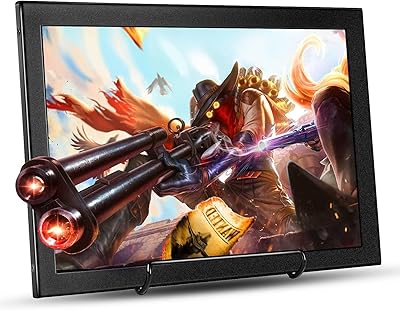
Eyoyo EM12-2K 12-inch 2K Portable Monitor
75%
88%
Image Sharpness
79%
Color Accuracy
83%
Build Quality
91%
Portability
67%
Stand & Mounting Versatility
More
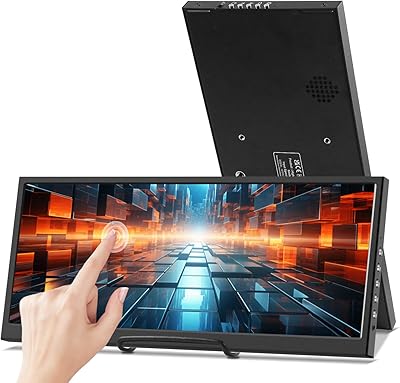
Prechen 12.3 Inch Touchscreen Portable Monitor
84%
88%
Display Quality
93%
Portability & Size
79%
Touchscreen Responsiveness
84%
Build Quality
91%
Ease of Setup
More
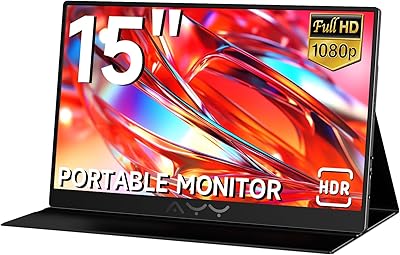
AYY 15-inch Portable Monitor
86%
91%
Display Quality
94%
Portability/Size/Weight
88%
Ease of Setup
85%
Build Quality/Durability
90%
Color Accuracy
More
Eyoyo EM08B 8″ Monitor
75%
91%
Input Versatility
88%
BNC Connectivity
84%
Setup & Plug-and-Play Experience
82%
Mirror Flip Functionality
76%
Image Clarity for Surveillance Use
More
Eyoyo EM101T 10-inch Touchscreen Monitor
75%
83%
Touch Responsiveness
78%
Image Quality
91%
Ease of Setup
76%
Build Quality
87%
Input Versatility
More
Westinghouse 15.6 Inch Portable Monitor
82%
88%
Display Quality
92%
Portability
86%
Connectivity Options
94%
Ease of Setup
80%
Build Quality
More
CUIUIC 18.5″ Portable Monitor
74%
83%
Display Quality
88%
Screen Size & Real Estate
58%
Portability & Weight
61%
USB-C Connectivity
72%
Build Quality & Materials
More
LXU 16-inch Portable Monitor S11
81%
88%
Display Quality
83%
Portability & Size
91%
Ease of Setup
75%
Compatibility with Devices
85%
Ergonomics & Flexibility
More
SideTrak Slide 12.5″ Portable Monitor
85%
91%
Portability and Weight
88%
Display Quality
93%
Ease of Setup
65%
Brightness in Bright Environments
89%
Magnetic Attachment
More
Thinlerain 11.6-inch Portable Monitor
81%
94%
Portability
76%
Display Quality
88%
Ease of Setup
82%
Build Quality
90%
Compatibility
More

FAQ

Yes, and that is actually one of the strongest reasons to choose this mini display over generic small monitors. The BNC input connects directly to analog security cameras without needing an adapter or signal converter, which makes setup noticeably cleaner.

No, and this is worth knowing before you buy. This is a monitor, not a smart TV, so it has no built-in software layer to support Fire TV Sticks or similar streaming dongles that require a full HDMI handshake with a TV-class device. For streaming, you would need a dedicated media player connected through a compatible source device like a laptop or mini PC.

It works reliably and is accessible through the OSD menu or remote control without any complicated setup. For teleprompter use, both horizontal and vertical flipping are available independently, so you can match whichever mirror orientation your rig requires. Buyers using it in teleprompter builds consistently confirm the feature performs as expected.

It works very well for this use case. The HDMI input handles Raspberry Pi output cleanly, and the compact footprint fits naturally on a desk or workbench alongside a Pi setup. Just make sure your Pi is configured for 1366x768 output to get the best results.

The stand is reasonably solid for a monitor at this size and price, but it is worth noting that repeated adjustment — especially frequent tilting — can cause it to feel slightly less firm over time. If you plan to reposition it daily, mounting it via the VESA bracket may be the more stable long-term option.

Yes, it works as a secondary display through either the HDMI or VGA input depending on what ports your laptop offers. Keep in mind that at 1366x768, it is not ideal for extended reading or document work, but for monitoring a feed, reference playback, or running a secondary app window, it handles the job well.

No, there are no integrated speakers. If you need audio alongside your video source, you will need to route sound through an external speaker or headphone output from your source device.

It runs on 12V DC power, which technically aligns with standard vehicle electrical systems. However, you will need to confirm that the included adapter or a separately sourced 12V cable is compatible with your vehicle setup before assuming it will work out of the box.

In a typical indoor environment with controlled lighting, the 350 cd/m² brightness is adequate. Near bright windows or under strong overhead lights, you may notice the glossy surface reflecting ambient light in a way that reduces clarity. It is not an outdoor-rated or high-brightness display, so placement matters.

Yes. The rear panel has a VESA 75mm mounting pattern, which is a standard configuration compatible with many affordable wall-mount brackets available separately. Removing the stand and mounting it flush to a wall or cabinet is a popular choice for security monitoring stations and in-vehicle installs.