Overview

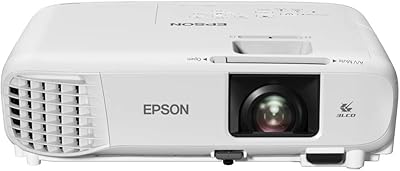
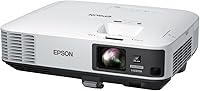
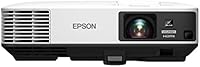
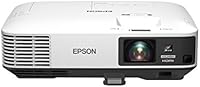
The Epson PowerLite 2250U WUXGA 3LCD Projector sits firmly in the professional tier — designed for boardrooms, lecture halls, and training spaces where bright ambient light is simply unavoidable. What sets it apart from competing units is its 3-chip 3LCD design, which delivers more consistent, accurate color than single-chip DLP alternatives. Native WUXGA resolution (1920x1200) gives it a slight edge over standard 1080p for content-heavy presentations. It launched in December 2016, and while newer models exist, the specs remain competitive for most business and education deployments. Just be clear going in: this is an installation-grade unit, not a home theater projector.
Features & Benefits

One of the standout qualities of the PowerLite 2250U is that its color and white brightness are both rated at 5,000 lumens — and that parity actually matters. Many projectors tout high white brightness while their color brightness quietly lags, resulting in washed-out hues under real-world conditions. That is not the case here. The 3LCD system also eliminates the rainbow artifacting common in DLP projectors, producing steadier, more natural-looking images. At 15,000:1 contrast, text stays crisp and readable at large screen sizes. The split screen capability lets presenters run two sources simultaneously, a genuinely useful feature for training sessions or live comparisons.

Best For

This Epson business projector is best suited to environments where image output needs to compete with ambient light — think conference rooms with large windows or university lecture halls where full blackout is impractical. The 16:10 WUXGA aspect ratio is particularly valuable for productivity-oriented content; spreadsheets and design documents simply display more information vertically compared to a standard 16:9 setup. Corporate IT teams will appreciate the optional wireless module's support for enterprise security protocols including WPA2-EAP, and the Crestron RoomView compatibility makes centralized AV management significantly easier. This is not the right pick for home cinema use or small meeting rooms with controlled lighting.

User Feedback

With a 4.7-star average across 81 ratings, this high-lumen 3LCD unit has earned a solid reputation among business and education buyers. Most reviewers highlight day-use brightness performance as the standout quality — the projector genuinely holds its own in rooms where curtains stay open. Build quality also draws consistent praise. That said, a handful of buyers mention that fan noise at maximum brightness is noticeable in quieter settings, and some were caught off guard by the additional wireless module cost — it is not included in the box. Lamp replacement is another real consideration; factor in ongoing maintenance costs before committing. Epson's support response, however, generally earns positive marks.

Pros

  • Matched 5,000-lumen color and white brightness means colors stay accurate and vivid, not just bright.
  • 3LCD technology eliminates the distracting rainbow effect that plagues many single-chip DLP projectors.
  • WUXGA resolution gives presentations more vertical space, making spreadsheets and dashboards easier to read at scale.
  • The 15,000:1 contrast ratio keeps text sharp and clean even when projecting at very large sizes.
  • Split screen mode lets you run two live sources simultaneously — genuinely useful for training and demos.
  • Crestron RoomView compatibility makes centralized AV monitoring straightforward in managed corporate environments.
  • Enterprise-grade wireless security protocols including WPA2-EAP make it a credible IT department choice.
  • Build quality consistently earns praise from buyers who use it in demanding, high-frequency environments.
  • Epson customer support responsiveness draws positive mentions from most long-term owners.
  • Capable of projecting images up to 300 inches diagonally, covering even unusually large venue requirements.

Cons

  • Wireless connectivity requires a separately purchased module — it is not included, which catches many buyers off guard.
  • Lamp replacement costs are a real ongoing expense that should be factored into the total cost of ownership.
  • Fan noise at maximum brightness is noticeable enough to be distracting in quieter meeting or classroom settings.
  • At over 10 pounds, this is not a projector you will want to carry between rooms or locations regularly.
  • The 2016 release date means some buyers may find newer competing models offer better value at similar price points.
  • The premium price tier is difficult to justify for small teams, occasional users, or budget-constrained organizations.
  • Initial setup can feel complex without AV installation experience, particularly for IT teams new to this class of projector.
  • With 81 ratings, the review pool is relatively small, making it harder to assess long-term reliability with full confidence.

Ratings

Our AI rating system analyzed verified global user reviews for the Epson PowerLite 2250U WUXGA 3LCD Projector, actively filtering out incentivized, duplicate, and bot-generated submissions to surface what real buyers consistently experience. The scores below reflect both the genuine strengths that make this projector a standout in professional environments and the pain points that have frustrated some owners over time. Nothing has been smoothed over — the highs and the frustrations are represented equally.

Brightness Performance
94%
Most reviewers single out raw brightness as the defining reason they chose this unit, and it rarely disappoints. In conference rooms with floor-to-ceiling windows and no blackout blinds, the image stays vivid and readable — a scenario where many competing projectors visibly struggle. The matched color and white lumen ratings mean you are not sacrificing color accuracy to achieve that brightness.
A small number of buyers note that running at maximum brightness accelerates lamp wear noticeably, pushing them toward eco mode to extend lamp life. In truly small rooms, the output can feel overwhelming and requires dialing back to avoid eye fatigue during extended sessions.
Color Accuracy
91%
The 3-chip 3LCD system produces color that holds up remarkably well compared to single-chip DLP competitors, and buyers who work with data visualizations, branded presentation decks, or educational graphics notice the difference immediately. Corporate users report that logo colors and chart palettes render closer to on-screen expectations than they have experienced with cheaper alternatives.
Out-of-the-box color calibration may not satisfy buyers with very precise color-matching requirements without some manual adjustment to color temperature and gamma settings. A few professional AV users note that while color is excellent for business use, it does not reach the calibrated accuracy expected in color-critical design or production workflows.
Image Sharpness
88%
At WUXGA resolution, text remains crisp and legible even when projecting spreadsheets or dense slide content at large sizes — a quality that educators and data-heavy presenters specifically call out. The 15,000:1 contrast ratio reinforces edge definition, making fine details in charts and technical diagrams easier to read from the back of a room.
Buyers who project fast-motion video content occasionally report that sharpness softens slightly in high-motion sequences, which is a minor limitation of the 3LCD technology in this price tier. Those coming from laser-based projectors may also notice a subtle difference in perceived crispness over long throw distances.
Build Quality
89%
The chassis feels solid and well-constructed for an installation-grade unit, and buyers using it in demanding daily-use environments report that it holds up reliably over years. IT managers who have deployed multiple units cite the consistent build as a reason they stay with Epson for repeat purchases.
At over 10 pounds, the casing is on the heavier side, and some buyers feel the plastic housing does not quite match the premium price point aesthetically. A small number of long-term owners report minor cosmetic wear around ventilation grilles after extended use, though structural integrity rarely seems to be an issue.
Value for Money
74%
26%
For organizations that genuinely need 5,000-lumen output with enterprise wireless security and Crestron compatibility, the PowerLite 2250U delivers a coherent, well-rounded package that justifies the investment when measured against professional AV alternatives. Buyers who deploy it in high-use, large-venue settings tend to feel the cost amortizes reasonably over time.
Buyers who underestimate ongoing costs — particularly lamp replacements and the separately purchased wireless module — often feel the total cost of ownership creeps higher than initially anticipated. For smaller teams or infrequent users, the premium price tier is a tough sell when lower-lumen alternatives could cover their actual needs at a fraction of the cost.
Setup & Installation
67%
33%
Buyers with prior AV installation experience report that the physical setup is logical and that Epson's documentation covers the key steps adequately. Crestron integration is praised by corporate AV teams as relatively smooth once network configuration is in place.
Users without dedicated AV support often find the initial configuration — particularly keystone adjustment, network setup, and input switching — more involved than expected for a projector at this price. Several reviewers wished for clearer out-of-box guidance, and those adding the optional wireless module found the wireless configuration process adds another layer of complexity.
Wireless Connectivity
58%
42%
When the optional wireless module is installed and configured, the enterprise-grade security support including WPA2-EAP makes this a credible choice for IT-managed corporate networks where consumer-grade Wi-Fi would not pass security review. Buyers in locked-down IT environments appreciate having protocol options that most consumer projectors simply do not offer.
The fact that wireless is not included in the box is a recurring frustration in reviews — buyers assume it is standard at this price point and are caught off guard at the checkout or after delivery. Even with the module added, some users report the wireless performance is not as fast or reliable as a direct HDMI connection for high-resolution content.
Fan Noise
63%
37%
In typical conference room or classroom environments with background HVAC noise and normal ambient sound levels, most buyers find the fan unobtrusive and easy to tune out. Running in eco mode noticeably reduces fan output for situations where noise is a concern.
At full brightness in a quiet room — a small boardroom or a library-style study space — the fan is audible enough to draw attention, particularly during pauses in a presentation. A handful of buyers specifically mention that it was louder than they expected for a projector in this category, and some have switched to eco mode as a permanent compromise.
Lamp Longevity
71%
29%
Buyers running the projector in eco mode report lamp life that extends comfortably into multi-year ownership, which helps manage replacement costs in environments with moderate daily usage. Epson replacement lamps are widely available, and most users do not report difficulty sourcing them.
Heavy daily users — those running the projector for four or more hours a day in full brightness mode — report reaching lamp replacement sooner than anticipated, and the cost of a genuine Epson replacement lamp is a meaningful expense. A few buyers flag this as an underappreciated ongoing cost that was not obvious at the point of purchase.
Split Screen Feature
82%
18%
Trainers, educators, and presenters who regularly compare two sources side by side — a live feed alongside a slide deck, or two software environments at once — find this feature genuinely useful in day-to-day use. It reduces the need for additional display hardware in training room setups.
The split screen feature has some source compatibility limitations, and a few users note that resolution per pane feels reduced when both feeds are active simultaneously. It works best with relatively simple content on each side; complex video on both inputs simultaneously can feel compressed.
Remote Management
86%
IT teams managing multiple projectors across a campus or multi-room corporate installation praise the Crestron RoomView compatibility as a significant operational convenience — monitoring lamp status, power state, and error alerts remotely saves meaningful time. Epson's own bundled management software provides a reasonable alternative for organizations not running Crestron.
The remote management capabilities are largely only relevant if your organization already has an AV management infrastructure in place; standalone buyers get little practical benefit from this feature. Initial network configuration to enable remote monitoring can be fiddly for IT staff unfamiliar with Epson's specific setup requirements.
Portability
44%
56%
The unit is compact enough to move between fixed rooms on a cart, and its proportions fit standard ceiling-mount and table-top installation scenarios without issue. For a permanently installed projector, the form factor is entirely appropriate.
At 10.2 pounds, this is not a projector you carry under your arm to a client site or take on a business trip — it is designed to stay put, and most buyers who expected otherwise are disappointed. The physical footprint and cable management requirements reinforce that this is an installation product, not a portable one.
Epson Support
78%
22%
Most buyers who needed to contact Epson for technical support report a reasonably positive experience, with knowledgeable representatives and clear guidance on lamp replacement, firmware, and configuration issues. The brand's established reputation in the AV space means parts and documentation are consistently available.
A minority of reviewers describe response times as slower than expected for a premium-tier product, particularly for complex network configuration issues. Post-warranty support for a projector launched in 2016 may also become a consideration for buyers factoring in multi-year operational lifespans.

Suitable for:

The Epson PowerLite 2250U WUXGA 3LCD Projector is built for professionals who need reliable, high-brightness output in spaces where lighting conditions are difficult to control. Corporate AV managers installing a permanent or semi-permanent setup in mid-to-large conference rooms will find the brightness, resolution, and remote management features genuinely useful rather than merely impressive on paper. Educators projecting detailed charts, data tables, or instructional graphics to large classrooms benefit from the WUXGA 16:10 aspect ratio, which displays more content vertically than a standard 16:9 setup. IT departments will appreciate the support for enterprise wireless security protocols — provided they budget for the optional wireless module separately. Organizations already running Crestron-managed AV ecosystems will slot this projector in cleanly, and anyone regularly running side-by-side comparison presentations will get real mileage out of the dual-source split screen capability.
Not suitable for:

The Epson PowerLite 2250U WUXGA 3LCD Projector is a poor fit for buyers expecting a home theater experience — it is optimized for business and education output, not cinematic immersion. At 10.2 pounds and with installation-grade proportions, it is not a portable unit you carry between locations on a daily basis. Home users or small teams working in well-controlled dark rooms will find the extreme brightness unnecessary and the investment difficult to justify against lighter, more affordable alternatives. Buyers on a tighter budget should also account for long-term lamp replacement costs, which can add up considerably over years of heavy use. Those who assumed wireless connectivity is included out of the box will be surprised — it requires a separately purchased optional module, which is a frustrating discovery after the fact. If your use case is a small huddle room or personal desktop projection, this high-lumen 3LCD unit is simply more projector than you need.
Specifications

  • Display Technology: Uses a 3-chip 3LCD panel system, which processes red, green, and blue light simultaneously for more consistent color output than single-chip alternatives.
  • Native Resolution: Native WUXGA resolution of 1920x1200 pixels, with full support for 1080p Full HD input signals.
  • Color Brightness: Rated at 5,000 lumens of color brightness, matching the white brightness rating for accurate, non-washed-out color in lit environments.
  • White Brightness: Delivers 5,000 lumens of white brightness, making it suitable for large rooms where ambient light cannot be fully controlled.
  • Contrast Ratio: Offers a 15,000:1 contrast ratio, which helps maintain sharp text edges and distinguishable shadow detail at large projection sizes.
  • Max Image Size: Capable of projecting images up to 300 inches diagonally, accommodating large-venue and auditorium installations.
  • Aspect Ratio: Native 16:10 widescreen aspect ratio, which provides more vertical screen real estate than standard 16:9 for productivity and presentation content.
  • Connectivity: Includes HDMI and USB ports for wired source connections; wireless networking requires a separately purchased optional module.
  • Wireless Security: When the optional wireless module is installed, supports WEP, WPA, WPA2-PSK, and WPA2-EAP enterprise security protocols.
  • Split Screen: Built-in split screen function allows two different input sources to be projected simultaneously side by side on a single screen.
  • Remote Management: Compatible with Crestron RoomView and Epson's own network management software for remote monitoring and control in managed AV environments.
  • Dimensions: Measures 11.48 x 14.85 x 4.93 inches, sized for ceiling-mount or table-top installation in professional settings.
  • Weight: Weighs 10.2 pounds, reflecting its installation-grade build rather than a portable carry-anywhere form factor.
  • Light Source: Uses a lamp-based light source; replacement lamps are available separately and should be factored into long-term ownership costs.
  • Model Number: Officially designated as model 8G7290, sold under the Epson PowerLite product family.
  • Manufacturer: Designed and manufactured by Epson, a brand with an established presence in professional and education projection markets.
  • Release Date: First made available in December 2016 and remains an active, non-discontinued product as of the time of this review.
  • Color Gamut: 3LCD technology provides a wider color gamut compared to competitive single-chip DLP projectors operating at similar brightness levels.

Related Reviews

Epson PowerLite X49 XGA Classroom Projector
80%
91%
Image Brightness
86%
Color Accuracy
72%
Image Sharpness
83%
Brightness Consistency
88%
Connectivity
More
Epson EX3240 SVGA 3LCD Projector
72%
88%
Brightness Performance
83%
Color Accuracy
61%
Image Sharpness
91%
Ease of Setup
79%
Connectivity
More
Epson PowerLite W49 LCD Projector
84%
88%
Brightness & Image Quality
92%
Value for Money
85%
Setup & Ease of Use
90%
Lamp Life
70%
Built-In Speaker
More
Epson PowerLite 1781W Portable Projector
76%
93%
Portability
88%
Image Brightness
79%
Image Quality
74%
Wireless Connectivity
82%
Setup Speed
More
Epson EX3280 XGA 3LCD Projector
73%
88%
Brightness Performance
84%
Color Accuracy
91%
Value for Money
61%
Resolution Clarity
83%
Refurbished Condition Quality
More
Epson EpiqVision Ultra Short Throw LS300 3LCD Smart Laser Projector
84%
93%
Brightness
89%
Picture Quality
85%
Setup & Installation
82%
Sound Quality
90%
Connectivity & Smart Features
More
Epson EX3290 WXGA 3LCD Business Projector
77%
88%
Image Brightness
91%
Color Accuracy
74%
Resolution & Sharpness
86%
Setup & Ease of Use
83%
Portability
More
Epson Home Cinema 1080 1080p Projector
77%
91%
Image Quality
84%
Brightness & Ambient Light Performance
88%
Color Accuracy
79%
Gaming Performance
93%
Setup & Ease of Use
More
Epson EX7280 WXGA 3LCD Projector
73%
93%
Image Brightness
89%
Color Accuracy
82%
Value for Money
71%
Resolution & Clarity
61%
Noise Level
More
Epson EpiqVision Ultra LS500 4K Laser Projector
87%
94%
Image Quality
92%
Brightness Performance
88%
Ease of Setup
87%
Value for Money
70%
Sound Quality
More

FAQ

No — and this is worth knowing before you buy. The PowerLite 2250U does not include a wireless module in the box. You need to purchase Epson's optional wireless LAN adapter separately to enable Wi-Fi connectivity. If wireless projection is central to how you plan to use it, budget for that additional component from the start.

Yes, and honestly that is one of the strongest reasons to consider this unit. With 5,000 lumens of both color and white brightness, the image holds up well in rooms with open blinds or overhead fluorescent lighting. It is specifically built for that kind of environment, unlike lower-lumen consumer projectors that wash out the moment you let daylight in.

WUXGA is 1920x1200 pixels, while 1080p is 1920x1080 — the difference is 120 extra rows of pixels vertically. For watching video it is a subtle distinction, but for business presentations, spreadsheets, or software demos, that extra vertical space means more content fits on screen without scrolling. If your work involves data-heavy content, it is a genuinely useful advantage.

No. The rainbow effect — those brief flashes of red, green, and blue you sometimes notice on high-contrast edges — is a characteristic of single-chip DLP projectors. This Epson business projector uses a 3-chip 3LCD system, where all three colors are processed simultaneously, so that artifact simply does not occur.

At full brightness, the fan is audible — some buyers describe it as noticeable enough to be a minor distraction in quieter settings. In a lively classroom or a conference room with background HVAC noise, most people will not find it bothersome. If your environment is very quiet and the projector will be near the audience, it is worth considering.

Lamp life for this class of projector typically runs between 4,000 and 5,000 hours in normal mode, and longer in eco mode. Replacement lamps are available but carry a meaningful cost — often in the range of professional AV consumables. If you plan to run the projector heavily day in and day out, factor lamp replacement into your annual operating budget rather than treating it as a one-time purchase.

Yes. The Epson PowerLite 2250U WUXGA 3LCD Projector is compatible with Crestron RoomView, which makes it a reasonable choice for organizations that already manage their AV infrastructure centrally. Epson also includes its own network management software for environments that do not use Crestron.
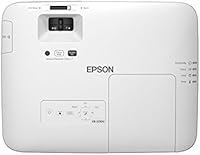
If your laptop has an HDMI port, you can connect directly using a standard HDMI cable. USB connectivity is also available for certain input types. Older laptops with only VGA output may require an adapter. It is standard AV connectivity for this class of projector — nothing proprietary to navigate.

Probably not the right fit. This high-lumen 3LCD unit is engineered for bright professional environments, not darkened home viewing rooms. The extreme brightness that makes it excellent in a conference room becomes overkill in a typical home setup, and the industrial build and price point reflect its commercial purpose. A projector designed specifically for home cinema use would likely serve you better.

Setup is manageable but not as plug-and-play as a consumer projector. Ceiling mounting, keystone adjustment, and network configuration — especially if you add the wireless module — can feel complex if you have not worked with installation-grade AV equipment before. For a boardroom or classroom with a permanent install, bringing in an AV integrator for the initial setup is worth considering. Once it is configured, day-to-day operation is straightforward.

Where to Buy