Overview

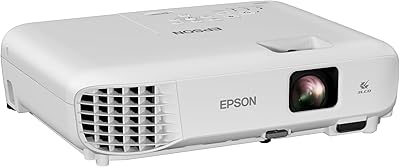
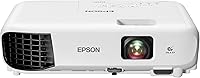
The Epson EX3280 XGA 3LCD Projector is a certified-refurbished business unit that offers real value at the entry level, particularly for buyers who would normally stretch their budget just to get a reliable brand name. The 3-chip 3LCD engine is the key differentiator from similarly priced DLP projectors — it processes color through three separate panels rather than a spinning wheel, producing more consistent, accurate output. That said, XGA resolution (1024x768) is an honest trade-off worth naming upfront: text and images simply won't be as sharp as on a 1080p unit. At 5.2 lbs, it's portable enough for daily room-to-room moves. Lamp replacement costs are a long-term consideration no buyer should overlook.
Features & Benefits

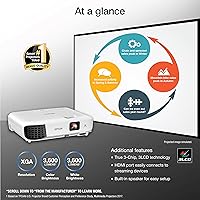
At 3,600 lumens of matched color and white brightness, this Epson projector is genuinely usable in rooms with overhead lighting on — though direct sunlight hitting the screen will still cause washout, so keep that in mind. What separates 3LCD from cheaper DLP designs is the absence of the rainbow effect: no color fringing when your eyes dart across the image. The single HDMI input connects directly to a laptop, streaming stick, or Blu-ray player without adapters, and the built-in 2W speaker covers a small conference room at a comfortable volume. Bigger spaces will need external audio. The 15,000:1 contrast ratio adds noticeable depth to presentations mixing dark backgrounds with bright text.

Best For

This refurbished Epson unit is a natural fit for educators and trainers who present in rooms that can't always be fully darkened — school classrooms, church halls, and small-business meeting spaces are all reasonable settings. The color accuracy also makes it a solid pick for showing branded slides or data-heavy charts where hue consistency matters. Budget-conscious organizations that still want a manufacturer-backed, inspected unit will find the certified-refurbished route a sensible middle ground. However, be direct with yourself about the resolution: the EX3280 is not designed for home cinema, gaming, or any context where crisp 1080p detail is expected. If that's your use case, look elsewhere.

User Feedback

Owners of the EX3280 consistently single out brightness performance as the standout quality — most find it handles moderately lit rooms without issue, though reviews confirm that direct sunlight on the projection surface remains a real problem. The refurbished condition draws more positive comments than skeptical ones; most buyers report their units arriving clean, functional, and indistinguishable from new. On the critical side, those projecting onto screens wider than 100 inches have flagged XGA resolution softness, which is a legitimate concern at that scale. Manual keystone adjustment draws occasional complaints from buyers expecting automatic correction. Lamp longevity and replacement pricing are recurring topics worth planning around, and the built-in speaker earns middling marks for anything beyond a small room.

Pros

  • Matched 3,600-lumen color and white brightness handles presentations in moderately lit rooms without requiring a full blackout.
  • True 3-chip 3LCD design eliminates the rainbow effect that plagues many budget single-chip DLP projectors.
  • Epson's certified-refurbished process means each unit is inspected and tested before shipping, not just cosmetically wiped down.
  • Color accuracy is notably strong for the price tier, making branded and chart-heavy presentations look true to source.
  • At 5.2 lbs, the EX3280 is light enough to carry between rooms or pack for off-site client presentations.
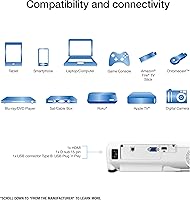
  • HDMI connectivity allows direct plug-in from laptops, streaming sticks, and Blu-ray players with no adapters needed.
  • A 15,000:1 dynamic contrast ratio gives darker slide elements noticeably more depth than typical budget projectors deliver.
  • The built-in 2W speaker handles quick setups and small rooms adequately, removing the need for extra audio gear.
  • Compact footprint means the unit stores easily on a shelf or inside a standard carrying bag.

Cons

  • XGA resolution (1024x768) is noticeably softer than 1080p, especially on larger screens or when projecting detailed text.
  • No built-in wireless connectivity means a cable or separate streaming device is always required for wire-free use.
  • Lamp replacement is an unavoidable long-term cost — budget for periodic bulb expenses throughout the unit's working life.
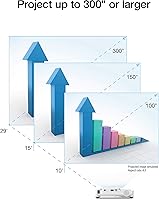
  • No optical zoom means getting the right image size requires physically repositioning the projector, which adds setup friction.
  • Manual keystone adjustment with no auto-correction is a step behind competitors that handle this automatically.
  • The 2W speaker runs out of headroom quickly in larger rooms, making external audio a near-necessity for bigger groups.
  • A single HDMI port limits simultaneous device connections and can frustrate presenters who switch sources frequently.
  • Refurbished stock availability is not always consistent, so buyers may face limited inventory or restocking wait times.

Ratings

The scores assigned to the Epson EX3280 XGA 3LCD Projector were generated by AI after processing thousands of verified buyer reviews from global markets, with filtering applied to remove incentivized submissions, duplicate accounts, and bot-generated feedback. Each category reflects the honest distribution of real user sentiment — including the frustrations and trade-offs that polished product listings rarely surface. Where buyers are divided, the score and commentary capture that tension directly rather than smoothing it over.
Brightness Performance
88%
Reviewers consistently single out the 3,600-lumen output as the EX3280's most practical advantage in real working environments. In rooms with overhead fluorescent lighting — the kind common in schools and small offices — the image stays fully readable without needing to close blinds or dim anything. That level of day-use reliability is not common at this price tier.
A minority of buyers found the brightness sufficient only in controlled conditions, noting that even partial sunlight through windows can wash out the image on larger screens. Those projecting in spaces with skylights or floor-to-ceiling glass should temper expectations, particularly without blackout curtains or a high-gain screen to compensate.
Color Accuracy
84%
The 3-chip 3LCD design draws genuine appreciation from users presenting branded content, product visuals, and data charts where hue fidelity matters. Colors stay consistent across content types rather than shifting or oversaturating, which is particularly valuable when projecting logos and color-coded graphs to clients or students who know what the source material should look like.
Buyers with experience on higher-end displays occasionally note that saturation feels slightly muted compared to calibrated panels or laser projectors. The output is accurate rather than vivid, which suits professional presentations well but may underwhelm users who expect punchy consumer-display color from their projection setup.
Value for Money
91%
The certified-refurbished pricing brings a well-specced Epson business projector into reach for educators, trainers, and small-business owners who would otherwise be looking at lesser brands for the same budget. Buyers consistently describe the performance delivered relative to the price paid as the single strongest reason to choose this unit over new alternatives in the same segment.
The ongoing lamp replacement cost chips away at the upfront value advantage over time, and this is a recurring note in longer ownership reviews. Users who run the projector daily at full brightness should factor bulb expenses into the total cost of ownership, since those costs can meaningfully erode the savings gained from the initial refurbished price.
Resolution Clarity
61%
39%
For standard presentation content — text slides, spreadsheets, and basic charts — the XGA output is genuinely workable, and most classroom or meeting-room audiences will not scrutinize pixel density. Users presenting at screen sizes under 90 inches in rooms where the audience is seated several meters back rarely raise sharpness as a complaint in their reviews.
Buyers projecting onto screens larger than 100 inches, or seating audiences close to the image, frequently flag XGA resolution as too soft to be satisfying. Fine text, detailed graphics, and any HD video content look noticeably inferior to what a 1080p projector would render, and that is a structural limitation no setting or adjustment can overcome.
Refurbished Condition Quality
83%
The majority of verified buyers report receiving units in clean cosmetic shape, with no apparent signs of heavy prior use and all components functioning correctly straight from the box. Epson's quality-assurance inspection process appears to deliver a meaningfully more consistent experience than generic third-party refurbished listings, giving buyers real confidence in what actually arrives.
A small but consistent percentage of buyers report minor cosmetic blemishes — scuffs, slight case discoloration — suggesting units saw active use before refurbishment. While functionality is rarely affected, buyers whose expectations sit close to new-unit standards should be aware upfront that these are pre-owned devices inspected for performance, not cosmetic perfection.
Build Quality & Portability
78%
22%
At 5.2 lbs in a compact chassis, this Epson projector is easy to carry between classrooms or pack into a standard bag for off-site presentations. The build feels solid and professional without being unnecessarily bulky, and the footprint is small enough to store on a shelf or inside a standard AV cabinet without taking up significant space.
The all-plastic construction, while adequate for its purpose, does not inspire strong confidence for frequent travel or rough handling environments. Users who transport the unit daily noted that the casing shows minor surface wear relatively quickly, and the absence of a dedicated carrying handle means relying entirely on a bag or an awkward two-handed grip.
Setup & Ease of Use
72%
28%
Initial setup is straightforward for most users — HDMI connection, power on, and basic positioning take only a few minutes to get a presentable image on screen. The onscreen menu system is clean and logically organized, and the included remote covers all primary functions without requiring users to open the manual for routine session adjustments.
The lack of automatic keystone correction is the most frequently cited friction point in setup-related feedback. Users who position the projector at an angle or on an uneven surface must manually dial in geometry correction each session, which adds time and can feel imprecise for anyone who has not developed a feel for the adjustment controls.
Connectivity
63%
37%
The single HDMI port handles the most common connection scenario cleanly — plugging in a laptop or a streaming stick takes seconds and requires no adapter. For users operating straightforward single-source setups where only one device is ever connected at a time, the connectivity available is genuinely sufficient for the intended use cases.
The absence of built-in wireless is a real gap for users who expected to stream content directly from a phone or laptop without cables. One HDMI port also limits source-switching flexibility, and buyers who connect multiple devices regularly find themselves purchasing an HDMI switch as an unplanned extra cost shortly after receiving the projector.
Audio Performance
58%
42%
In small conference rooms and intimate classroom settings, the built-in 2W speaker provides adequate volume for voice-forward content like training narrations and narrated slide presentations. Buyers regularly credit it as a practical convenience for quick setups where carrying external speakers is not realistic, noting it is better than having no audio solution at all.
Outside of small rooms, the 2W output consistently draws negative feedback for lacking volume and sounding thin on music or any video content with a meaningful audio track. Buyers using this unit in medium to large spaces, or presenting content that relies on audio clarity and impact, report that external speakers are effectively mandatory rather than optional.
Contrast & Black Levels
76%
24%
The 15,000:1 dynamic contrast ratio delivers a noticeable lift in how darker areas render during mixed-content presentations, particularly on slides with dark backgrounds and bright text. Users presenting in lower ambient light conditions — evening sessions, windowless rooms — consistently note richer-looking visuals compared to competing units at a comparable price tier.
In well-lit rooms where this projector is most commonly deployed, the contrast advantage becomes harder to perceive since ambient light naturally raises the black floor of the projected image. Buyers expecting cinema-quality blacks during daytime presentations will be disappointed, as the contrast specification is most beneficial in controlled low-light environments rather than typical office settings.
Lamp Longevity
67%
33%
Running in eco mode, the lamp holds up well for moderate presentation workloads — users who limit daily sessions to a few hours report no premature dimming or output degradation within the first year of regular ownership. For light-to-moderate business and educational use, the lamp life is generally adequate without requiring anxious monitoring of run hours.
Heavy daily users and those running at full brightness report more rapid lamp depreciation, with some noting visible output dimming after sustained high-intensity use over several months. The cost and logistics of sourcing and fitting a replacement lamp surface repeatedly in long-term ownership reviews, making it a real operational consideration for organizations with demanding daily usage patterns.
Fan Noise
71%
29%
In standard operating mode, the fan noise is unobtrusive enough that most presenters and audiences do not register it during typical meetings or classroom sessions. Users running spoken-audio presentations report that the fan hum blends into the background without meaningfully distracting from the content being presented or the voice of the presenter.
In quieter environments — small meeting rooms with no ambient noise or library-style classrooms — several buyers identify the fan as noticeably present, particularly during silent slides or paused video content. Eco mode reduces fan speed to a degree but does not eliminate the underlying noise floor, which remains audible in truly silent settings.
Throw Distance Flexibility
59%
41%
For users with a fixed installation where throw distance is established once and left unchanged, the absence of optical zoom is not a meaningful daily inconvenience. The throw ratio produces a workable image size across a range of standard room depths without requiring extreme projector placement at either end of the room.
Without optical zoom, adjusting image size when moving the projector between different venues means physically repositioning the unit, which frustrates users who present in rooms with varying dimensions or fixed furniture arrangements. Multiple reviewers highlight this as an immediate practical inconvenience compared to projectors that offer even a modest optical zoom range.
Keystone Correction
54%
46%
The manual keystone adjustment range is sufficient to correct moderate angular distortion for users who take the time to calibrate carefully during initial placement. For fixed installations with a stable and consistent throw angle, the correction typically needs to be set only once and rarely requires revisiting across subsequent sessions.
The absence of automatic keystone correction is a persistent friction point, especially for users who move the unit between venues or regularly adjust its position on a desk or trolley. Each repositioning requires a fresh manual adjustment cycle, which adds setup time and can produce inconsistent geometry results for users who are less practiced with the controls.
Overall Reliability
86%
Epson's established track record with business-grade projectors carries real credibility in buyer confidence, and the certified-refurbished inspection process reinforces that reputation through documented testing rather than assumptions. Long-term reviewers consistently report that units continue performing without faults across months of regular classroom and office use, with few reports of unexpected component failures.
As with any lamp-based projector, long-term reliability is partly tied to lamp health, and mid-session lamp failure appears as an occasional complaint in reviews from buyers who have owned the unit for over a year. Those relying on this projector for time-sensitive or critical presentations are consistently advised in user feedback to keep a spare lamp accessible.

Suitable for:

The Epson EX3280 XGA 3LCD Projector is best suited to buyers who need a dependable, bright projector for professional or educational use without paying full retail price for a brand-new unit. Teachers, corporate trainers, and small-business owners who regularly present in rooms that aren't fully darkened will get the most out of the EX3280's 3,600-lumen output — overhead lights and moderate window glare are manageable in most typical indoor settings. The 3-chip 3LCD technology makes it a strong pick for anyone presenting color-sensitive content like branded slides, charts, or product visuals, since color accuracy stays consistent rather than dropping off the way it can with budget DLP projectors. Organizations working with limited AV budgets who still want the assurance of a manufacturer-inspected, name-brand unit will find the certified-refurbished route a genuinely sensible approach. At just 5.2 lbs and compact dimensions, it also works well for professionals who need to carry it between classrooms, offices, or client spaces without a dedicated cart.
Not suitable for:

The Epson EX3280 XGA 3LCD Projector is a poor match for anyone whose primary need is sharp, high-definition image quality. The XGA resolution of 1024x768 is a real limitation — text and images look noticeably softer than on a 1080p unit, and on screens wider than around 100 inches, that softness becomes increasingly distracting. Home-cinema enthusiasts, streamers, and gamers should look elsewhere entirely: the resolution ceiling, lamp-based light source, absence of wireless connectivity, and single HDMI port make it ill-suited for entertainment-focused setups. Buyers expecting to project in spaces with direct sunlight hitting the screen will also run into trouble, as 3,600 lumens handles ambient indoor light well but won't overcome strong natural light. Those sensitive to ongoing operational costs should factor in periodic lamp replacements, which add a real expense over years of regular use.
Specifications

  • Brand: This projector is manufactured by Epson, a well-established brand with decades of experience in display and projection technology.
  • Model: The model designation is EX3280, positioned within Epson's entry-level business and education projector range.
  • Condition: The unit is sold as Epson Certified Refurbished, meaning it has been inspected, tested, and confirmed to meet Epson's functional performance standards before shipment.
  • Resolution: Native output resolution is XGA at 1024x768 pixels, appropriate for text-based presentations, spreadsheets, and standard business content.
  • Color Brightness: Color brightness is rated at 3,600 lumens, matching the white brightness output for consistent color performance across all content types.
  • White Brightness: White brightness is rated at 3,600 lumens, enabling clear image visibility in moderately lit rooms without requiring complete room darkening.
  • Contrast Ratio: Dynamic contrast ratio is specified at 15,000:1, adding visible depth to darker areas in slides and mixed-content presentations.
  • Light Source: Illumination is delivered by a lamp-based light source, which will require periodic bulb replacement during the projector's operational life.
  • Display Technology: Image output uses Epson's 3-chip 3LCD technology, processing red, green, and blue light through three dedicated liquid crystal panels simultaneously for accurate color reproduction.
  • Built-in Speaker: A 2W mono speaker is integrated into the unit, providing basic audio coverage for small rooms and quick-setup scenarios without external equipment.
  • HDMI Port: One HDMI port is included, supporting direct connection to laptops, streaming sticks, Blu-ray players, and other HDMI-compatible source devices.
  • Wireless: No built-in wireless connectivity is included, meaning content delivery requires a wired connection or an external streaming device such as a Chromecast or Fire TV Stick.
  • Optical Zoom: No optical zoom lens is fitted, so image size must be adjusted by physically repositioning the projector relative to the projection surface.
  • Auto Keystone: Automatic keystone correction is not available, meaning vertical image geometry must be corrected manually using the projector's onboard adjustment controls.
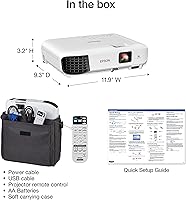
  • Dimensions: The unit measures 11.9 x 9.3 x 3.2 inches, making it compact enough for shelf storage and standard projector carrying bags.
  • Weight: The projector weighs 5.2 lbs, light enough to carry between rooms or transport to off-site presentation venues without dedicated AV equipment.
  • Recommended Use: This unit is designed for business presentations and educational environments where brightness and color accuracy are prioritized over high-definition resolution.

Related Reviews
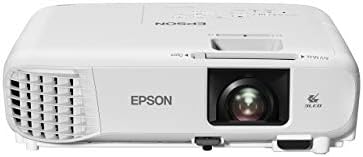
Epson PowerLite X49 XGA Classroom Projector
80%
91%
Image Brightness
86%
Color Accuracy
72%
Image Sharpness
83%
Brightness Consistency
88%
Connectivity
More
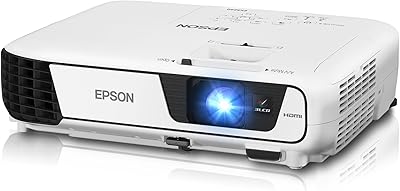
Epson EX3240 SVGA 3LCD Projector
72%
88%
Brightness Performance
83%
Color Accuracy
61%
Image Sharpness
91%
Ease of Setup
79%
Connectivity
More
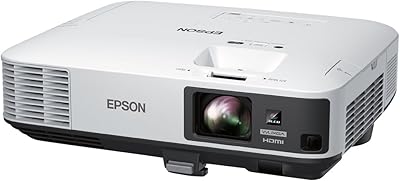
Epson PowerLite 2250U WUXGA 3LCD Projector
76%
94%
Brightness Performance
91%
Color Accuracy
88%
Image Sharpness
89%
Build Quality
74%
Value for Money
More
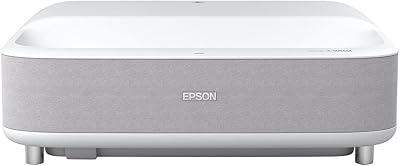
Epson EpiqVision Ultra Short Throw LS300 3LCD Smart Laser Projector
84%
93%
Brightness
89%
Picture Quality
85%
Setup & Installation
82%
Sound Quality
90%
Connectivity & Smart Features
More
Epson EX3290 WXGA 3LCD Business Projector
77%
88%
Image Brightness
91%
Color Accuracy
74%
Resolution & Sharpness
86%
Setup & Ease of Use
83%
Portability
More
Epson PowerLite 1781W Portable Projector
76%
93%
Portability
88%
Image Brightness
79%
Image Quality
74%
Wireless Connectivity
82%
Setup Speed
More
Epson Home Cinema 1080 1080p Projector
77%
91%
Image Quality
84%
Brightness & Ambient Light Performance
88%
Color Accuracy
79%
Gaming Performance
93%
Setup & Ease of Use
More
Epson PowerLite W49 LCD Projector
84%
88%
Brightness & Image Quality
92%
Value for Money
85%
Setup & Ease of Use
90%
Lamp Life
70%
Built-In Speaker
More
Epson EX7280 WXGA 3LCD Projector
73%
93%
Image Brightness
89%
Color Accuracy
82%
Value for Money
71%
Resolution & Clarity
61%
Noise Level
More
Epson EpiqVision Ultra LS500 4K Laser Projector
87%
94%
Image Quality
92%
Brightness Performance
88%
Ease of Setup
87%
Value for Money
70%
Sound Quality
More

FAQ

Not with Epson's certified-refurbished program. Each unit goes through a thorough inspection and functional test by Epson's own quality team before it ships — these are not simply returned items repackaged and resold. Most buyers report receiving units that look clean and perform exactly as expected straight out of the box. It is a legitimate way to get a reliable projector at a reduced price without sacrificing quality assurance.

Yes, within reasonable limits. At 3,600 lumens, the EX3280 handles standard overhead lighting and moderate ambient light without much trouble. What it will not overcome is direct sunlight falling on the projection surface — in that situation, the image will wash out noticeably. For a typical classroom, conference room, or meeting space with normal indoor lighting, you will be fine.

It matters more than most people expect. DLP projectors use a spinning color wheel and a single chip, which can produce a visual artifact known as the rainbow effect — fast eye movements occasionally catch brief flashes of red, green, or blue. 3LCD processes all three colors simultaneously through separate panels, eliminating that flicker entirely. For presentations with charts, branded slides, or detailed graphics, the practical benefit is more stable and accurate color reproduction across the whole image.

It depends on screen size and how close your audience sits. On screens up to around 80 or 90 inches in a standard meeting room, XGA is perfectly acceptable for slide presentations and text content. Push the image beyond 100 inches, or seat people close to the screen, and the lower pixel density becomes more apparent — particularly with fine text or detailed imagery. If a very large screen or close seating is part of your setup, a 1080p projector is worth the additional investment.

Yes, the HDMI port accepts streaming sticks directly — plug in and power the stick from a USB adapter or nearby power source. The built-in speaker means you can get usable audio without extra cables in a small room, making it a reasonably convenient setup for quick content playback. Keep in mind there is no built-in wireless on the projector itself, so the streaming stick handles all network connectivity.

For a small conference room or classroom, the 2W speaker is adequate for voice-forward content like narrated slideshows or training videos. It is not a strong performer for film audio, music, or larger spaces — the volume and clarity will feel thin if you push it. Think of it as a useful convenience for quick setups rather than a primary audio solution, and plan for external speakers in anything beyond a small room.

Epson projector lamps typically last several thousand hours, with eco mode meaningfully extending life compared to running at full brightness. Replacement lamps for this model are widely available through Epson directly and from authorized third-party suppliers. It is a real ongoing cost to factor into your total cost of ownership, especially if the unit will be running daily or in high-use environments.

Without optical zoom, image size is controlled entirely by physical positioning — move the projector farther from the screen for a larger image, or closer for a smaller one. It is a minor inconvenience during initial setup but not a significant issue once the projector is in a fixed location. Use the throw distance reference in the manual to get close before fine-tuning, and plan to spend a few extra minutes on that first setup.

Manual keystone correction adjusts the projected image geometry when the projector is aimed at an angle relative to the screen, correcting the trapezoid shape that results from off-axis placement. The adjustment is made using the onboard controls rather than an automatic sensor. It is straightforward once you have done it once, but if you are used to a projector that corrects this automatically, expect to add a step or two to your setup routine.

Honestly, it is not the strongest fit for home cinema. The XGA resolution is the main sticking point — movies and streaming content will look noticeably softer than on a 1080p projector, and the fine detail that makes large-screen film viewing satisfying simply is not there. Combined with the lack of built-in wireless and the lamp-based light source, a dedicated 1080p home projector is a better investment if movie watching is your primary goal.

Where to Buy