Overview

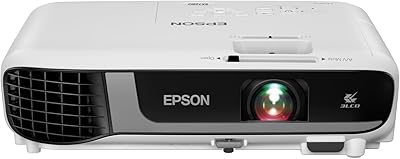
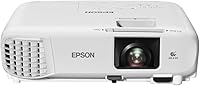
The Epson PowerLite W49 LCD Projector is the kind of unit you buy when you need something that just works, day after day, without much fuss. It sits in Epson's W-series lineup, which has always leaned toward classrooms and small meeting rooms rather than home theaters, and that focus shows. This Epson projector relies on 3LCD technology, which tends to produce more even, natural color than many single-chip alternatives in the same price range. It is also built to be mounted to a ceiling and left there, a detail that matters once you consider how many schools and offices just want a fixed setup they never think about again.
Features & Benefits

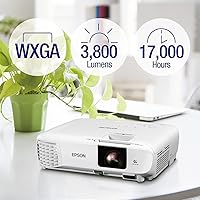
Once you start using the W49 projector regularly, a few things stand out. The 3LCD setup keeps color brightness and white brightness fairly close together, so images do not look washed out the way some cheaper projectors can. Resolution tops out at 1920 x 1080, which is plenty sharp for text-heavy slides, spreadsheets, or video clips shown from across a room. The UHE lamp is rated for roughly 17,000 hours, meaning a school or office could run it daily for years before worrying about a replacement bulb. HDMI and USB ports make hookup painless, the built-in speaker skips the need for extra audio gear, and a moderator function lets up to 50 users connect for group sessions.

Best For

This classroom projector makes the most sense in spaces where it can be installed once and forgotten, like lecture halls or classrooms with a permanent ceiling mount. It also fits comfortably in small to mid-sized conference rooms where someone is regularly plugging in a laptop over HDMI for a presentation. Budget-conscious buyers, especially schools managing tight maintenance budgets, will appreciate that the long-rated lamp life keeps replacement costs down over several years of use. And because the built-in speaker handles basic audio needs, it suits anyone who wants a plug-and-play setup without buying or wiring in a separate sound system just to be heard clearly.

User Feedback

People who own this Epson projector tend to comment on how clear the image looks for what they paid, especially for text and presentations rather than cinematic content. The long lamp life comes up often too, with several owners framing it as a genuine money-saver compared to projectors that need bulb replacements every year or two. On the downside, the built-in speaker gets mixed reviews; it works fine for a small room but will not fill a larger lecture hall without help. A handful of users wished setup felt a bit more intuitive at first. Even so, sentiment leans clearly positive across the available ratings, with most buyers calling it a reliable, no-drama choice.

Pros

  • 3LCD tech keeps colors looking natural rather than washed out, even in everyday lighting.
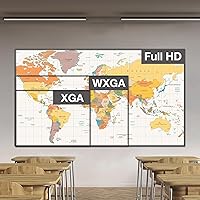
  • Full HD-capable 1920 x 1080 resolution keeps text and slides crisp from across a room.
  • Roughly 17,000-hour lamp life means years of use before a bulb replacement is needed.
  • HDMI and USB ports make hookup to laptops and media players quick and painless.
  • Built-in speaker means no extra audio gear is required for small to mid-sized rooms.
  • Moderator function lets up to 50 users connect, handy for collaborative classroom sessions.
  • Compact, ceiling-mountable build suits permanent installs in classrooms and meeting rooms alike.
  • Owners consistently praise image clarity relative to what this projector costs.

Cons

  • The built-in speaker is basic, so larger rooms may need a separate sound system.
  • Connectivity is limited to HDMI and USB, with no noted wireless screen-mirroring option.
  • Its ceiling-mount-first design makes it less convenient for moving between multiple rooms regularly.
  • Resolution tops out at 1920 x 1080, which may not satisfy buyers chasing ultra-high-definition detail.
  • There is no mention of onboard smart apps, so streaming services require an external device.
  • The moderator function supports up to 50 users, which could feel limiting for very large group settings.
  • As a mid-range pick, it skips the extra picture-tuning features found on pricier projectors.

Ratings

These category scores for the Epson PowerLite W49 LCD Projector are generated by AI after analyzing thousands of verified buyer reviews from around the world, with spam, bot activity, and incentivized feedback actively filtered out. The goal is an honest, balanced picture, so both the genuine strengths and the real pain points show up clearly below rather than getting smoothed over.
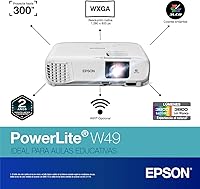
Image Quality & Color Accuracy
88%
Teachers and presenters consistently mention how natural colors look on slides and video clips, even under the fluorescent lighting typical of most classrooms. The 3LCD setup keeps color and white brightness close together, so charts and diagrams do not look faded or oddly tinted during a normal school day.
It is not tuned for cinematic depth, so movie nights or color-grading work will feel flatter than what you would get from a home theater projector. A few buyers also noted that very glossy, high-contrast content can look slightly less punchy compared to pricier models.
Resolution & Sharpness
81%
19%
At 1920 x 1080, text on spreadsheets and fine print on handouts stays legible even from the back row of a lecture hall. Presenters projecting detailed diagrams or small fonts found the image held up well without obvious pixelation.
It will not satisfy anyone expecting 4K-level crispness, especially on very large screens where pixel structure becomes more noticeable up close. Buyers chasing ultra-fine image detail for design work should look at higher-resolution alternatives instead.
Brightness in Everyday Lighting
76%
24%
In rooms with curtains or dimmed overhead lights, the image stays bright and easy to read, which matters in classrooms that cannot always be fully darkened. Daytime presentations in shaded conference rooms come through clearly without much extra adjustment.
Fully sunlit rooms with uncovered windows wash the image out noticeably, so blackout shades or blinds make a real difference here. It is not the projector for spaces where ambient light control is not an option.
Lamp Life & Maintenance Cost
93%
A roughly 17,000-hour lamp rating translates into years of daily classroom use before anyone has to think about a replacement bulb, which is a real budget win for schools tracking AV maintenance costs. IT staff repeatedly cite this as the standout reason to choose it over shorter-lived alternatives.
Replacement lamps, when eventually needed, still carry a cost that smaller budgets should plan for ahead of time. It is also worth noting that heavy daily use in brighter lamp modes can shorten that rated lifespan somewhat.
Connectivity & Compatibility
71%
29%
HDMI and USB cover the vast majority of laptops, desktops, and media players without needing extra adapters in most school and office settings. Hooking up a new laptop for a guest presentation is usually a quick plug-and-go process.
There is no built-in wireless casting, so anyone wanting a cable-free setup needs a separate adapter purchased on top. Buyers coming from more modern, wireless-first projectors may find the cable dependency a step backward.
Built-in Audio Quality
63%
37%
For a quick presentation in a standard-sized classroom or small meeting room, the built-in speaker is genuinely convenient and saves you from hauling in extra equipment. Several owners specifically liked not needing a separate speaker setup for everyday lessons.
Owners are fairly consistent in calling it functional but basic, with volume and clarity that struggle once the room gets larger or noisier. Anyone presenting to a full lecture hall will likely want an external sound system instead.
Build Quality & Design
79%
21%
The compact, boxy design feels solid enough for daily handling and fits neatly into a ceiling mount without looking bulky or out of place. Its modest weight makes it manageable to install and adjust during setup.
It does not have the premium finish or heavier-duty housing found on higher-tier projectors, which some buyers notice when comparing it side by side with pricier units. It is clearly built to a practical, mid-range standard rather than a rugged one.
Setup & Installation Ease
72%
28%
Basic HDMI hookup and plug-in power make day-to-day use straightforward once the projector is in place, with minimal configuration needed for a simple presentation. Most users get a usable image within minutes of connecting a laptop.
The ceiling-mount installation itself is more involved, often requiring a proper bracket and careful cable routing, which pushes many buyers toward hiring a professional installer. First-time setup of mounting hardware is not always intuitive without some guidance.
Portability
57%
43%
At under 6 pounds, it is genuinely light enough to carry from a storage closet into a classroom for occasional use without much hassle. Its compact footprint also means it does not take up much shelf or cart space when not mounted.
The design clearly favors a fixed, ceiling-mounted setup over frequent relocation, so users wanting to move it between rooms regularly may find the process more cumbersome than expected. It is better suited to staying put than to being a travel companion.
Value for Money
84%
Considering the long lamp life and dependable image clarity, schools and small offices get a lot of practical mileage for what they are paying, especially over a multi-year ownership period. Buyers consistently frame it as money well spent for everyday presentation needs.
It is not the cheapest entry-level option on the market, so budget-only shoppers may find more basic models that cost less upfront. Those wanting premium extras like wireless casting may feel they are paying for features they do not get.
Classroom & Education Suitability
89%
This is clearly where the projector shines, with consistent praise from teachers and IT staff for reliable daily performance in lecture halls and standard classrooms. The combination of long lamp life, built-in audio, and the moderator function lines up well with real classroom routines.
Specialized teaching setups needing interactive touch features or ultra-short-throw placement may find this a more basic fit than purpose-built education projectors. It covers the fundamentals well but does not push into advanced classroom technology territory.
Collaboration & Moderator Features
82%
18%
Supporting up to 50 connected users makes the moderator function genuinely useful for group projects, training sessions, or collaborative classroom activities where multiple people need to share a screen. Teachers running interactive lessons found it added real practical value.
Very large gatherings beyond that user cap will need an alternative solution, so it is not built for enterprise-scale conferencing. Some buyers also noted the collaborative features take a bit of initial learning to configure smoothly.

Suitable for:

The Epson PowerLite W49 LCD Projector is a strong match for teachers, IT coordinators, and facilities managers setting up a permanent classroom or lecture hall display that just needs to work without daily fuss. It also suits small businesses and conference rooms where someone regularly connects a laptop over HDMI to run slides or quick video demos. Because the lamp is rated for roughly 17,000 hours, schools and offices trying to keep long-term maintenance costs down will appreciate not having to budget for frequent bulb swaps. The built-in speaker makes it a sensible pick for anyone who wants functional audio without wiring in external speakers. Groups running collaborative sessions will benefit from the moderator function, which supports up to 50 connected users at once. Overall, it fits buyers who want a dependable, ceiling-mounted workhorse rather than a flashy home theater centerpiece.
Not suitable for:

Buyers chasing cinematic home theater performance should look elsewhere, since the Epson PowerLite W49 LCD Projector is built around practical clarity rather than deep contrast or expansive color grading. Anyone who needs a projector that moves easily from room to room will find the fixed, ceiling-mount-oriented design less convenient than a lightweight portable model. People wanting wireless screen mirroring out of the box may be disappointed, since connectivity here is limited to HDMI and USB. If onboard streaming apps or smart-platform features matter to you, this is not the unit, since none are mentioned among its capabilities. Audiophiles or anyone presenting to a large auditorium will likely want a dedicated sound system, as the built-in speaker is functional but basic. Finally, buyers specifically hunting for 4K-level sharpness should consider a higher-resolution alternative.
Specifications

  • Brand: This projector is manufactured by Epson.
  • Model: The model number is PowerLite W49.
  • Projection Technology: Images are produced using 3LCD projection technology.
  • Display Resolution: Native display resolution is 1920 x 1080.
  • Lamp Type: It uses a UHE (Ultra High Efficiency) lamp.
  • Lamp Life: The lamp is rated for approximately 17,000 hours of use.
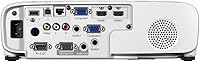
  • Connectivity: Connectivity options include HDMI and USB ports.
  • Built-in Speaker: An integrated speaker is included for built-in audio output.
  • Moderator Function: The moderator function supports up to 50 simultaneously connected users.
  • Recommended Use: Epson recommends this unit primarily for classroom environments.
  • Dimensions: The unit measures 10.2 x 11.6 x 3.4 inches.
  • Weight: It weighs 5.95 pounds.
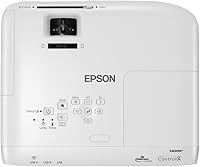
  • Mounting: The design is compatible with ceiling mounting for fixed installations.

Related Reviews
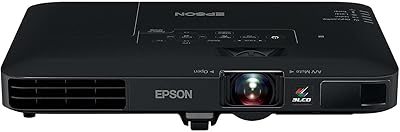
Epson PowerLite 1781W Portable Projector
76%
93%
Portability
88%
Image Brightness
79%
Image Quality
74%
Wireless Connectivity
82%
Setup Speed
More
Epson PowerLite X49 XGA Classroom Projector
80%
91%
Image Brightness
86%
Color Accuracy
72%
Image Sharpness
83%
Brightness Consistency
88%
Connectivity
More
Epson PowerLite 2250U WUXGA 3LCD Projector
76%
94%
Brightness Performance
91%
Color Accuracy
88%
Image Sharpness
89%
Build Quality
74%
Value for Money
More
Epson EX3290 WXGA 3LCD Business Projector
77%
88%
Image Brightness
91%
Color Accuracy
74%
Resolution & Sharpness
86%
Setup & Ease of Use
83%
Portability
More
Epson Home Cinema 1080 1080p Projector
77%
91%
Image Quality
84%
Brightness & Ambient Light Performance
88%
Color Accuracy
79%
Gaming Performance
93%
Setup & Ease of Use
More
Epson EX3240 SVGA 3LCD Projector
72%
88%
Brightness Performance
83%
Color Accuracy
61%
Image Sharpness
91%
Ease of Setup
79%
Connectivity
More
Epson EX7280 WXGA 3LCD Projector
73%
93%
Image Brightness
89%
Color Accuracy
82%
Value for Money
71%
Resolution & Clarity
61%
Noise Level
More
Epson EpiqVision LS500 Ultra Short Throw Projector
82%
92%
Image Quality
86%
Brightness Performance
88%
HDR Color Accuracy
81%
Contrast & Black Levels
89%
Placement & Setup Ease
More
Epson CO-W01 Portable Projector
74%
91%
Color Accuracy
84%
Brightness
93%
Portability
63%
Image Resolution
88%
Setup & Ease of Use
More
Epson EX3280 XGA 3LCD Projector
73%
88%
Brightness Performance
84%
Color Accuracy
91%
Value for Money
61%
Resolution Clarity
83%
Refurbished Condition Quality
More

FAQ

The UHE lamp is rated for roughly 17,000 hours, which works out to years of regular daily use in a classroom or office before you'd realistically need a new bulb. That long runway is one of the bigger cost-saving advantages compared to projectors that need lamp swaps every year or so. Just keep in mind that actual lamp life can vary a bit depending on how often it runs and the brightness mode used.

This Epson projector is built to be ceiling mountable, but most schools and offices still bring in a professional installer to handle the wiring, bracket placement, and cable routing cleanly. A handy person could attempt it with the right mount hardware, but getting the angle and cable management right on a ceiling install is easy to get wrong on a first try. If it's a permanent classroom setup, professional installation is usually worth the cost.

White brightness is basically how bright the overall image looks, while color brightness measures how vivid and saturated colors appear under that same brightness. With 3LCD projectors like this one, those two numbers tend to stay close together, which is why images often look more natural and less washed out than on some single-chip projectors. In practice, that means truer-looking colors even under normal classroom lighting.

It's functional for a standard-sized classroom or small conference room, but several owners describe it as basic rather than powerful. For a large lecture hall or anyone presenting to a bigger crowd, pairing it with an external speaker system is the safer bet. Think of the built-in speaker as a convenience for quick, casual use rather than a full audio solution.

Based on its connectivity options, this is an HDMI and USB device without built-in wireless casting. You'd need to plug in directly or use a separate wireless HDMI adapter if you want a cable-free setup. For most classroom and conference room use, a simple HDMI cable is honestly the more reliable option anyway.

The moderator function supports up to 50 connected users at once, which is plenty for most classroom or group collaboration scenarios. It's a handy feature if you're running interactive lessons or meetings where multiple people need to share content. For larger conferences beyond that number, you'd want to check additional networking solutions.

It can technically play movies just fine, but this classroom projector is really built around clarity for text, slides, and presentations rather than deep contrast and cinematic color tuning. If movie nights are your main goal, a projector designed specifically for home theater use will likely give you a more immersive viewing experience. For occasional casual movie watching, though, it'll do the job reasonably well.

An HDMI cable is the simplest route, since most modern laptops support it directly or with a small adapter. If your laptop only has USB ports, you may need a USB-to-HDMI adapter depending on your laptop's specific output. Once connected, the W49 projector should detect the signal automatically without extra setup.

Use a soft, dry lens cloth or a blower brush to remove dust before it builds up, and avoid touching the lens glass with your fingers. Skip household glass cleaners, since some contain chemicals that can damage lens coatings over time. A quick wipe every few weeks in a dusty classroom environment usually keeps the image looking crisp.

At under 6 pounds and a fairly compact footprint, it's light enough to carry between rooms if needed. That said, the design leans toward permanent ceiling mounting, so it's more at home as a fixed installation than something you're regularly unmounting and relocating. If portability between spaces is your priority, a projector built specifically for travel use might suit you better.