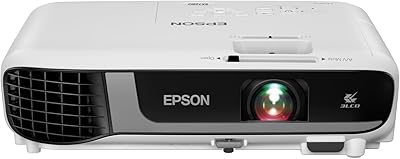
Overview

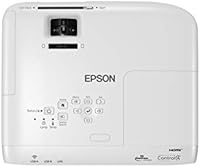
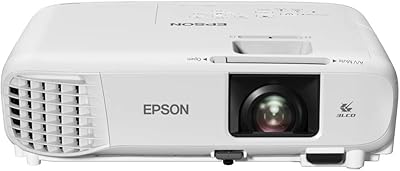
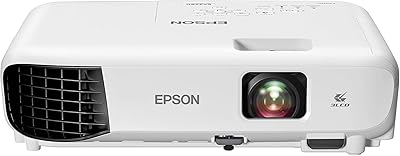
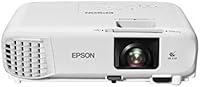
The Epson PowerLite X49 XGA Classroom Projector is built specifically for educational environments — not as a repurposed home theater unit, but as a machine designed around the real demands of daily classroom use. Epson's 3-chip 3LCD engine is a meaningful step above the single-chip DLP units that crowd this price range, producing more consistent color without the rainbow effect some teachers find distracting. It lands in a practical mid-range tier — more capable than bargain-bin imports, far less expensive than laser models. Native XGA resolution with a 4:3 aspect ratio still aligns well with most classroom content, from textbook PDFs to standard presentation software. And with a 12,000-hour lamp life in ECO mode, the long-term cost of ownership is genuinely favorable for institutions watching their maintenance budgets.
Features & Benefits

At 3,600 lumens of both color and white brightness, the PowerLite X49 holds up well in rooms that never fully darken — a real advantage when you need slides readable at 2 PM with the blinds half-open. The moderator function is genuinely useful: up to 50 devices can connect simultaneously over the network, letting a teacher pull up student work side by side without everyone crowding a single screen. Wired network connectivity via RJ-45 keeps things stable where Wi-Fi is unreliable. HDMI and USB cover virtually any laptop or thumb drive a student walks in with. In ECO Mode, the lamp replacement cycle stretches considerably, which matters when your IT department is managing a dozen units across a building.

Best For

This classroom projector is a strong fit for K-12 and college classrooms that run projectors hard — daily, all year. If you are an IT coordinator managing a fleet of units across campus, the network management tools via RJ-45 make remote monitoring practical without physically visiting each room. The 3,600-lumen output handles moderate ambient light competently, so rooms without blackout blinds still get a usable image. Schools still working with 4:3 curricula materials or older software will appreciate that nothing feels cropped or stretched. This Epson unit also makes financial sense for institutions that want brand reliability and low maintenance overhead without stepping up to the significantly higher cost of a laser projector.

User Feedback

With a 4.6-star average across 115 ratings, the feedback picture here is credibly positive — that is enough reviews to spot real patterns rather than a handful of enthusiastic outliers. Buyers consistently highlight brightness in lit classrooms and how straightforward setup tends to be. The multi-user moderator feature earns specific praise from educators who use it regularly, not just as a novelty. That said, a handful of users flag fan noise at higher brightness settings as noticeable in quieter rooms, and a few mention the remote control feels basic. It is also worth noting that lamp replacement is an eventual cost — checking current replacement lamp pricing before purchase is a practical step most buyers overlook.

Pros

  • 3,600 lumens of matched color and white brightness keeps images sharp and vivid even in rooms with overhead lights on.
  • The 3-chip 3LCD engine produces noticeably more consistent color than single-chip DLP competitors at a similar price.
  • Lamp life stretching up to 12,000 hours in ECO Mode dramatically reduces how often schools need to budget for replacements.
  • The moderator function supporting up to 50 simultaneous network connections is a standout tool for interactive classroom instruction.
  • Wired RJ-45 connectivity makes network management and campus-wide administration practical without depending on Wi-Fi stability.
  • HDMI and USB ports cover both current laptops and older devices, reducing the need for adapter kits.
  • At under 6 pounds with a compact footprint, the PowerLite X49 is straightforward to ceiling-mount or move on an AV cart.
  • A 4.6-star average across 115 buyer ratings reflects consistently positive real-world experiences in educational settings.
  • Epson's brand support and parts availability give institutional buyers more confidence than sourcing from lesser-known manufacturers.

Cons

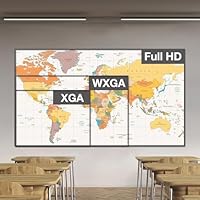
  • Native XGA resolution (1024x768) is adequate for slides and text but noticeably soft when displaying HD video or detailed imagery.
  • The 4:3 aspect ratio creates letterboxing issues for anyone whose content is formatted in standard 16:9 widescreen.
  • Fan noise at higher brightness settings has been flagged by some users as distracting in smaller or quieter room environments.
  • The included remote control feels basic and lacks the responsiveness some users expect at this price tier.
  • Lamp replacement is an inevitable long-term cost that many buyers overlook when comparing upfront prices against laser alternatives.
  • No built-in wireless connectivity means a separate wireless adapter or network cable is required for network-based features.
  • Manual focus and zoom adjustments may feel fiddly during initial setup, especially for less experienced AV installers.
  • Not a practical option for buyers who need 16:9 widescreen output for modern media or video-heavy lesson content.

Ratings

The Epson PowerLite X49 XGA Classroom Projector scores below were generated by our AI system after analyzing verified global buyer reviews, with spam, incentivized submissions, and bot activity actively filtered out. Based on 115 confirmed ratings, this analysis reflects the honest consensus of real educators, IT administrators, and school purchasing teams — both where the PowerLite X49 genuinely delivers and where it falls short. No category has been glossed over; the pain points are weighted just as seriously as the strengths.

Image Brightness
91%
Educators consistently report that 3,600 lumens holds up well in standard classroom lighting — slides, charts, and text remain clearly readable without dimming the overhead lights or drawing curtains. This is the single most praised aspect among verified buyers, particularly in rooms with large windows.
A small number of users in very bright rooms with direct sunlight exposure found the image washable on certain wall types. Maximum brightness also pushes the fan harder, which creates a tradeoff between visibility and noise level.
Color Accuracy
86%
The 3-chip 3LCD engine produces notably more natural, consistent color than single-chip DLP alternatives in the same price range. Teachers displaying color-coded diagrams, maps, or science visuals appreciate that colors appear without the flicker or rainbow artifacting common in competing units.
Out-of-the-box color calibration occasionally skews slightly warm, and a few users noted that adjusting the color temperature manually requires navigating a menu that is not especially intuitive. It is not a dealbreaker, but first-time projector buyers may find it frustrating.
Image Sharpness
72%
28%
For standard classroom content — text-heavy presentations, PDFs, spreadsheets, and web pages — XGA resolution (1024 x 768) is entirely adequate and draws no complaints from users primarily using the projector for instruction and slides. Characters are legible at reasonable projection distances.
Anyone displaying HD video, detailed photographs, or high-resolution graphics will notice the resolution ceiling quickly. Several buyers who upgraded from 1080p home or office projectors flagged visible softness, particularly when projecting onto larger screens above 100 inches diagonal.
Brightness Consistency
83%
Matched color and white brightness at 3,600 lumens means the image does not appear artificially bright only in white areas while looking dull on colorful content — a common complaint with cheaper projectors that inflate white-only lumen figures. Users appreciate that color slides look as vivid as plain text slides.
Brightness does decrease noticeably as the lamp ages past the midpoint of its rated life. A handful of longer-term owners noted a visible dimming after two to three years of heavy daily use, making periodic lamp assessment part of good maintenance practice.
Connectivity
88%
HDMI, USB-A, USB-B, and RJ-45 together cover a genuinely wide range of classroom devices without requiring a bag of adapters. IT coordinators specifically call out the RJ-45 port as valuable for locking projectors into a managed network, pushing updates, and monitoring status remotely across a whole building.
There is no built-in wireless capability — an optional adapter sold separately is required for wireless projection, which is an added cost that surprises some buyers. In schools where wired drops are not available near the projector, this becomes a meaningful limitation.
Network & Multi-user Features
84%
The moderator function is one of the most distinctively useful features in this category, allowing a teacher to pull up and compare work from up to 50 connected student devices without any extra hardware. Educators who use it regularly report it changes how they run peer review and class discussion activities.
Initial network configuration is not plug-and-play, and a few buyers without strong IT support found the setup documentation harder to follow than expected. The feature also requires all devices to run Epson iProjection software, which adds a deployment step that some schools are not prepared for.
Ease of Setup
81%
19%
Physical installation earns consistently positive marks — the unit is compact and light enough for a single installer to ceiling-mount without assistance, and basic HDMI projection is up and running within minutes out of the box. Teachers who just need to plug in a laptop and present find the experience straightforward.
Focus and zoom are manual adjustments, and getting them dialed in precisely on a ceiling mount can require multiple small corrections that feel fiddly. A few users also noted the keystone correction range, while adequate for most installs, is limited if the projector is mounted at an unusual angle.
Build Quality
78%
22%
The chassis feels appropriately sturdy for a unit expected to live on a ceiling mount for years at a time. Buyers who have run this unit through daily school-year use report no structural issues, and the overall fit and finish reflects Epson's standard for mid-range educational hardware.
The plastic housing does not feel premium relative to the price point, and the input port covers are the type that get lost quickly in a busy classroom setting. A couple of users also noted minor cosmetic blemishes on units received out of the box, though functional quality was unaffected.
Noise Level
63%
37%
In ECO Mode, the fan runs at a noticeably lower speed, and most users in standard-sized classrooms report it fades into the background during normal instruction. For everyday lesson delivery, the noise profile is within acceptable limits for the majority of buyers.
At full brightness, the cooling fan becomes one of the more commonly cited frustrations among verified buyers — several describe it as distracting in small rooms, quiet assessment sessions, or when showing audio-dependent video content. It is not the loudest projector in its class, but it is audible enough to warrant attention.
Remote Control
61%
39%
The remote covers the core functions a teacher needs during a lesson — source switching, volume, freeze, and basic menu navigation — without requiring a deep dive into the projector's on-board controls. Range is acceptable for standard classroom depths.
The remote is widely described as feeling cheap and under-featured for the overall price of the unit. Button responsiveness drew specific complaints, and a few users noted the layout is not intuitive for quick in-lesson adjustments. It works, but it is not a strong point of the package.
Lamp Longevity
87%
A rated lamp life of up to 12,000 hours in ECO Mode is a genuine advantage for schools running projectors every school day. Institutions that have owned the unit for two or more years consistently report they have not yet needed a lamp replacement, which validates the manufacturer rating in real conditions.
When replacement does eventually become necessary, the cost of a genuine Epson replacement lamp is a meaningful expense that some buyers did not factor into the total cost of ownership at purchase. Third-party lamp compatibility varies, and Epson recommends OEM parts for reliable performance.
Value for Money
82%
18%
Buyers consistently position this Epson unit as a justifiable step up from cheap no-brand projectors without reaching the much higher price tier of laser models. The combination of a trusted brand, long lamp life, and classroom-specific network features makes the price feel defensible for institutional purchasing teams.
Individual teachers buying personally rather than through a school budget may find the price harder to absorb, especially when factoring in future lamp replacement costs. At this price point, a few buyers also expect built-in wireless as standard, and its absence as a paid add-on generates some resentment.
Portability
76%
24%
At 5.95 pounds with a compact footprint, the PowerLite X49 is practical to move on an AV cart between rooms, and its size makes ceiling installation straightforward for one person. Schools that share projectors across classrooms find the weight and dimensions manageable for daily relocation.
It is not a projector designed for true portability — there is no carry case included, no battery option, and the power cable setup is better suited to semi-permanent installation than frequent travel. Anyone needing a truly portable device for off-site or multi-venue use should look at a different form factor.
Long-term Reliability
85%
Epson's track record in the educational projector space and the number of schools that have standardized on this model line give buyers reasonable confidence in long-term durability. Users who have owned the unit through multiple school years report stable performance with no major mechanical failures under normal classroom conditions.
A small subset of buyers reported issues with color uniformity emerging after extended use, and warranty support experiences have been mixed depending on region and purchasing channel. Buying through an authorized educational reseller rather than a general marketplace is advisable for reliable after-sales support.

Suitable for:

The Epson PowerLite X49 XGA Classroom Projector is purpose-built for educators and institutions that need dependable, high-brightness projection every single school day — not just occasionally. K-12 teachers who deal with partially lit classrooms will appreciate the 3,600-lumen output, which keeps slides and lesson materials clearly visible without forcing students to sit in a blacked-out room. IT coordinators managing multiple units across a school campus get real value from the RJ-45 network port, which allows remote projector monitoring and management without walking room to room. The moderator function — letting up to 50 devices connect simultaneously — is a genuine instructional tool for teachers who want to display and compare student work on the fly. Schools still running 4:3 curricula materials, legacy software, or older textbook layouts will find the native XGA resolution and aspect ratio a natural match rather than a compromise. Budget-conscious districts looking for a name-brand unit with a long lamp lifespan and low ongoing maintenance overhead will find this Epson unit hits a practical sweet spot in the market.
Not suitable for:

Anyone shopping for a home theater projector, a portable presentation device for road warriors, or a unit capable of displaying 1080p or 4K content should look elsewhere — the Epson PowerLite X49 XGA Classroom Projector is not designed for those use cases, and stretching it into them will leave buyers disappointed. The native XGA resolution (1024x768) is adequate for text, spreadsheets, and standard slide decks, but it will visibly soften high-definition video content, detailed photography, or anything where pixel density matters. The 4:3 aspect ratio is also a mismatch for anyone whose content library lives in 16:9 widescreen format — letterboxing becomes a constant nuisance. Users in very quiet environments, such as small seminar rooms or recording spaces, may find the fan audible enough at full brightness to be a distraction. This is also not the right pick for someone who wants to set it up once and forget about it indefinitely: lamp replacement is an eventual reality, and buyers should factor that ongoing cost into their total budget before committing.
Specifications

  • Brand: Manufactured by Epson America, Inc., a well-established name in professional and educational display technology.
  • Model: PowerLite X49, designed specifically for classroom and educational presentation environments.
  • Display Technology: Uses a 3-chip 3LCD engine, which produces color using three separate liquid crystal panels for more consistent, accurate color output.
  • Brightness: Delivers 3,600 lumens of both color brightness and white brightness, meaning vivid images are maintained even in partially lit rooms.
  • Native Resolution: Native resolution is 1024 x 768 (XGA), suited for standard presentation content, text-heavy slides, and traditional curricula formats.
  • Aspect Ratio: Displays content in a 4:3 aspect ratio, which aligns with legacy educational materials, older software interfaces, and standard document layouts.
  • Lamp Life: Rated up to 12,000 hours in ECO Mode, significantly reducing lamp replacement frequency and associated maintenance costs over the unit's lifespan.
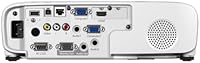
  • Connectivity: Equipped with HDMI, USB, and RJ-45 ports, covering a wide range of source devices and enabling wired network-based presentations and remote management.
  • Multi-user Support: The built-in moderator function supports up to 50 simultaneous device connections over a network for collaborative classroom display use.
  • Network Management: The RJ-45 Ethernet port allows IT administrators to remotely monitor, configure, and manage the projector without physical access to the unit.
  • Dimensions: The unit measures 10.2 x 11.6 x 3.4 inches, making it compact enough for standard ceiling mounts or placement on an AV cart.
  • Weight: Weighs 5.95 pounds, which is light enough for a single person to install on a ceiling mount or relocate between rooms as needed.
  • ECO Mode: ECO Mode reduces lamp brightness to extend lamp life and lower power consumption, a practical setting for schools running projectors throughout the day.
  • Buyer Rating: Holds a 4.6 out of 5 star average based on 115 verified ratings, reflecting broadly positive real-world experience among educational users.
  • Recommended Use: Rated and positioned by the manufacturer for classroom and general education environments, not for home cinema or professional media production.

Related Reviews

Epson PowerLite 1781W Portable Projector
76%
93%
Portability
88%
Image Brightness
79%
Image Quality
74%
Wireless Connectivity
82%
Setup Speed
More
Epson PowerLite W49 LCD Projector
84%
88%
Brightness & Image Quality
92%
Value for Money
85%
Setup & Ease of Use
90%
Lamp Life
70%
Built-In Speaker
More
Epson EX3280 XGA 3LCD Projector
73%
88%
Brightness Performance
84%
Color Accuracy
91%
Value for Money
61%
Resolution Clarity
83%
Refurbished Condition Quality
More
Epson PowerLite 2250U WUXGA 3LCD Projector
76%
94%
Brightness Performance
91%
Color Accuracy
88%
Image Sharpness
89%
Build Quality
74%
Value for Money
More
Epson EX3290 WXGA 3LCD Business Projector
77%
88%
Image Brightness
91%
Color Accuracy
74%
Resolution & Sharpness
86%
Setup & Ease of Use
83%
Portability
More
Epson EX3240 SVGA 3LCD Projector
72%
88%
Brightness Performance
83%
Color Accuracy
61%
Image Sharpness
91%
Ease of Setup
79%
Connectivity
More
Epson EX7280 WXGA 3LCD Projector
73%
93%
Image Brightness
89%
Color Accuracy
82%
Value for Money
71%
Resolution & Clarity
61%
Noise Level
More
Epson Home Cinema 1080 1080p Projector
77%
91%
Image Quality
84%
Brightness & Ambient Light Performance
88%
Color Accuracy
79%
Gaming Performance
93%
Setup & Ease of Use
More
Epson EpiqVision Ultra LS500 4K Laser Projector
87%
94%
Image Quality
92%
Brightness Performance
88%
Ease of Setup
87%
Value for Money
70%
Sound Quality
More
Epson CO-W01 Portable Projector
74%
91%
Color Accuracy
84%
Brightness
93%
Portability
63%
Image Resolution
88%
Setup & Ease of Use
More

FAQ

Yes, and this is genuinely one of its stronger points. At 3,600 lumens of both color and white brightness, the PowerLite X49 produces a clear, readable image in rooms with standard overhead fluorescent lighting. Full blackout curtains are not required for day-to-day classroom use, though direct sunlight hitting the screen will still wash things out.

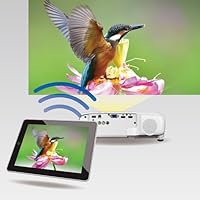
The moderator function lets a teacher control which student devices are displayed on screen, pulling content from up to 50 connected devices over the network. In practice, it is useful for showing student work side by side, running peer review sessions, or quickly comparing responses during a lesson. Setup requires a wired or wireless network connection and the Epson iProjection software, which is freely available.

No, wireless projection is not built in. The unit has a dedicated USB port that supports an optional Epson wireless LAN adapter, which is sold separately. For most school IT environments, the wired RJ-45 Ethernet connection is the more reliable and manageable option anyway.

For the vast majority of classroom content — PowerPoint slides, PDFs, spreadsheets, web pages, and standard educational software — XGA resolution is perfectly adequate. Text is legible and charts are clear. Where it falls short is with HD video playback or highly detailed imagery, where the 1024 x 768 limit becomes visible. If your lessons are heavily video-based or involve high-resolution media, you may want to consider a 1080p-capable unit instead.

In ECO Mode, Epson rates the lamp at up to 12,000 hours, which works out to many years of regular classroom use. In normal mode, that figure drops, so running ECO Mode where brightness allows makes practical sense. Replacement lamps are available through Epson directly and third-party suppliers; it is worth checking current lamp pricing before purchasing, since that is a long-term cost many buyers forget to factor in upfront.

It works well in both setups. At under 6 pounds and with standard mounting threads, it is compatible with most ceiling mount brackets designed for compact projectors. Many schools install these permanently, which also makes it easier to lock in focus and keystone settings once and leave them. If you need to move it between rooms, it is light enough to carry and quick to reconnect.

Fan noise is one of the more common points raised by buyers. At full brightness, the cooling fan is audible — not disruptively loud, but noticeable in a quiet room. In ECO Mode, the fan runs more quietly, and most users in standard classroom settings report it is not distracting during normal instruction. If you are setting this up in a small seminar room or a very quiet testing environment, it is worth considering.

The Epson PowerLite X49 XGA Classroom Projector has HDMI, USB Type-A, USB Type-B, and RJ-45 ports, which covers a wide range of devices including laptops, desktop computers, Chromebooks with HDMI output, USB flash drives, and networked computers. Most modern teaching setups will connect without needing extra adapters, and the HDMI port handles audio pass-through as well if the room has external speakers connected.

It depends on your content mix. If most of your materials are in standard 4:3 format — older textbooks, legacy software, Word documents, traditional presentations — you will not notice an issue. Widescreen 16:9 content will display with black bars at the top and bottom, which some users find acceptable and others find annoying. If the majority of your content is widescreen, a projector with a native 16:9 panel would be a better fit.

It can work for an individual teacher, but the feature set is weighted toward institutional use. Network management, the moderator function, and the focus on lamp longevity over multiple years make the most sense when you are managing a fleet of units or running them daily in a fixed classroom. A single teacher who only needs occasional projection and wants something truly portable might find a lighter, simpler model more practical for their needs.

Where to Buy