Overview

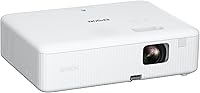
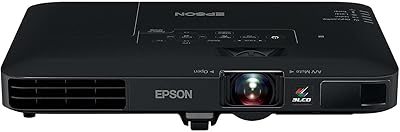
The Epson CO-W01 Portable Projector sits in a sweet spot for anyone who wants a capable, carry-anywhere display without spending serious money on a fixed home theater setup. Powered by Epson's 3-chip 3LCD engine, it stands apart from the single-chip DLP projectors that dominate this price range — a meaningful technical distinction, not just marketing talk. The unit weighs 5.3 pounds and fits neatly into a backpack, which matters when you're hauling gear to a client meeting or a friend's backyard. It can throw an image up to 300 inches, though the realistic sweet spot is considerably smaller. Solid brightness for its class, but not a replacement for a dedicated home cinema setup.

Features & Benefits

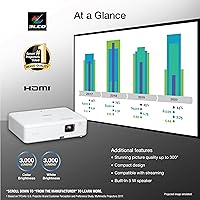
What sets this 3LCD projector apart from cheaper alternatives comes down to how it handles color. Many budget projectors advertise high lumen counts using white brightness alone, while color brightness lags far behind — producing washed-out, yellowish images. Here, color and white brightness are matched at 3,000 lumens each, meaning what you see on screen is genuinely accurate. The 3LCD panel also eliminates the rainbow effect that some viewers notice on DLP units. Resolution lands at 1280x800 — fine for presentations and casual streaming, but noticeable if you're coming from a 1080p TV. The built-in HDMI port works plug-and-play with most streaming sticks, and the 5W speaker handles a small room adequately, though a Bluetooth speaker improves the experience noticeably.

Best For

This portable projector makes the most sense for people whose display needs move around with them. Teachers rotating between classrooms, consultants pitching from client offices, and remote workers wanting a proper big-screen setup in a hotel room will find it reliable and easy to deploy. At home, it works well for movie nights as long as you can dim the room — ambient light control makes a real difference at this brightness level. Families wanting a big-screen experience without committing to a large wall-mounted TV will appreciate the size-to-performance ratio. It is less suited for buyers whose top priority is crisp HD detail, where a dedicated 1080p projector would serve them better.

User Feedback

Across nearly 800 ratings, the Epson EpiqVision CO-W01 holds a 4.5-star average — a score that, at that volume, usually reflects genuine satisfaction rather than a lucky streak. Buyers consistently mention easy out-of-box setup and colors that surprised them with their vibrancy. On the critical side, fan noise comes up repeatedly; in a quiet room during a slow-paced film, the hum is hard to ignore. The absence of auto-keystone also draws complaints — manually adjusting the image angle every time you reposition the unit gets tedious. A handful of users flag the WXGA resolution as underwhelming for high-definition streaming. Portability scores well almost universally, with many buyers specifically noting how travel-ready the unit feels.

Pros

  • Matched color and white brightness at 3,000 lumens means colors look accurate, not washed out.
  • 3LCD technology produces smooth, consistent images without the rainbow effect common in DLP rivals.
  • At 5.3 pounds with a compact footprint, this portable projector genuinely fits in a standard backpack.
  • Plug-and-play HDMI compatibility works instantly with Roku, Fire TV, Apple TV, and similar sticks.
  • Setup is straightforward enough that first-time projector users rarely report frustration.
  • Holds a 4.5-star average across nearly 800 ratings — a strong signal of reliable real-world performance.
  • The 5W speaker handles small-room presentations without requiring any extra equipment.
  • Ranks in the top 150 projectors on Amazon, suggesting strong value retention in its category.
  • WXGA resolution is well-suited for slide presentations, spreadsheets, and casual video without visible pixelation at moderate throw distances.

Cons

  • No auto-keystone correction means manually realigning the image every time you shift the unit's position.
  • Fan noise is noticeable in quiet environments and can be distracting during slow or dialogue-heavy content.
  • WXGA resolution shows its limits when streaming HD video — fine detail looks softer than on a 1080p display.
  • No built-in operating system requires an external streaming stick; it is an added cost and one more cable to manage.
  • The 5W mono speaker struggles in larger rooms or outdoor settings and is not adequate for music playback.
  • Manual keystone adjustment lacks the precision and convenience that competing models at higher price points offer.
  • Bright ambient light significantly degrades image quality, limiting practical use to darker or controlled spaces.
  • No carrying case is included, so backpack users need to source padding or protection separately.

Ratings

Our AI rating engine analyzed thousands of verified global purchases of the Epson CO-W01 Portable Projector, actively filtering out incentivized, spam, and bot-generated submissions to surface patterns from real buyers. The scores below reflect an honest cross-section of experience — from enthusiastic repeat buyers to users who ran into genuine frustrations — so both the strengths and the trade-offs are represented transparently.

Color Accuracy
91%
The 3LCD engine consistently draws praise for producing colors that look natural and well-saturated, even from buyers who have owned DLP projectors before. Users regularly note that skin tones in films and vivid presentation graphics both render without the yellowish cast that plagues many competitors in this price bracket.
A small number of buyers noted that in very dark scenes, shadow detail can look slightly flat. Color performance also depends heavily on the wall or screen surface used, and a few users found that textured or off-white walls skewed results noticeably.
Brightness
84%
At 3,000 lumens of matched color and white brightness, this portable projector performs better than expected in semi-lit rooms — overhead office lighting, for instance, is not an immediate dealbreaker. Buyers who use it for daytime business presentations in rooms with drawn blinds report consistently solid, readable images.
In genuinely bright spaces — sunlit living rooms or outdoor settings — the image washes out quickly, which is a common limitation at this output level. Some users expected the 3,000-lumen rating to carry more punch in fully lit environments and were disappointed by the gap between expectation and real-world performance.
Portability
93%
At 5.3 pounds with a compact 11.6″ x 8.3″ x 3.4″ body, this is one of the most frequently praised aspects across the entire review set. Buyers who commute or travel for work specifically call out how naturally it fits alongside a laptop in a standard backpack without adding uncomfortable bulk.
The unit ships without a dedicated carrying case, which means buyers need to source padding or a protective sleeve separately before trusting it to a packed bag. A few users also noted that the power cable adds slightly more bulk than expected for a projector marketed as ultra-portable.
Image Resolution
63%
37%
For presentations, spreadsheets, and slide decks, the 1280x800 WXGA resolution is genuinely adequate — text is sharp and readable at normal viewing distances, and buyers using it primarily for office work rarely flag it as an issue. The 16:10 aspect ratio also lines up well with standard laptop screen proportions.
Buyers who primarily stream movies or TV shows notice the resolution gap compared to 1080p fairly quickly, especially when upscaled HD content reveals soft edges and reduced fine detail. This is the most common source of post-purchase disappointment among home entertainment buyers who did not research the spec beforehand.
Setup & Ease of Use
88%
Out-of-box setup receives consistent praise, particularly from first-time projector buyers who were anxious about the process. Plugging in an HDMI streaming stick, powering the unit on, and getting a usable image typically takes under five minutes, which is a recurring positive data point across hundreds of reviews.
The manual keystone correction requires hands-on adjustment every time the unit is moved, which some users find tedious in practice — especially when switching between portrait and landscape surface configurations. There is no digital fine-tuning option, so getting the geometry exactly right demands patience.
Fan Noise
54%
46%
The fan noise is not reported as a showstopper during action-heavy films, presentations with audio, or any content with a consistent soundtrack. In those contexts, most buyers say it fades into the background quickly and does not actively disrupt the viewing experience.
In quiet environments — late-night movie sessions, silent scenes in drama films, or small office meetings — the fan hum becomes noticeably intrusive and is one of the more frequent complaints in the review pool. This is not an anomalous defect; it appears to be a consistent characteristic of the unit across production batches.
Built-in Speaker
57%
43%
The 5W mono speaker is sufficient for a small bedroom or private office setting where you are sitting within 10 feet of the projector. For quick presentations where adding a speaker is not practical, it covers the functional minimum without requiring any additional hardware.
Buyers attempting to use it for movie nights in medium or large rooms consistently report that the audio feels thin and underpowered. The mono output also means there is no stereo separation, which becomes noticeable during any content where spatial audio contributes meaningfully to the experience.
Streaming Compatibility
82%
18%
The HDMI port works plug-and-play with every major streaming stick on the market, and buyers using Roku, Fire TV, and Apple TV report zero compatibility issues. The USB port can power many streaming sticks directly, which keeps the cable count low and makes the setup feel cleaner.
The absence of a built-in operating system means there is always an additional device to manage, charge, and potentially troubleshoot. Buyers who expected a self-contained smart projector experience were caught off guard by this requirement, which is not always clearly communicated at the point of purchase.
Build Quality
76%
24%
The unit feels solid and well-assembled for its price tier — buyers do not report creaking, loose ports, or obvious material shortcuts. The matte plastic shell resists minor scuffs reasonably well, and the overall build inspires enough confidence for regular transport.
The chassis does not feel premium, and buyers comparing it to higher-end Epson models note a step down in fit and finish. A few long-term owners flagged that ventilation grilles collect dust visibly over time and require periodic cleaning to maintain airflow.
Value for Money
81%
19%
Buyers who understand what they are getting — a portable, color-accurate 3LCD projector for presentations and casual home use — consistently rate the value as strong. The 3LCD technology at this price point is genuinely hard to match from competing brands, and the overall feature set holds up well against alternatives.
Buyers who purchased primarily for home theater streaming and later discovered the WXGA resolution limitation felt the value proposition was weaker than expected. The lack of auto-keystone and a carry case also register as minor omissions that add friction at a price point where buyers expect a more complete package.
Keystone Correction
49%
51%
The manual keystone adjustment does function reliably — once dialed in, the geometry holds steady throughout a viewing session without drifting. For users who keep the projector in a fixed position, the one-time setup effort is a non-issue.
For anyone who regularly repositions the unit — which describes a large portion of buyers given its portable design — the manual-only correction becomes a genuine friction point. Competing models at similar or slightly higher price points include auto-keystone as standard, making this omission feel like a meaningful step backward.
Connectivity Options
73%
27%
The HDMI and USB combination covers the core use cases cleanly — laptops, streaming sticks, and basic peripheral connections are all handled without adapters in most setups. Buyers using it in office environments appreciate that it connects to virtually any modern laptop without fuss.
The port selection is minimal compared to projectors with multiple HDMI inputs, audio output jacks, or SD card slots. Users who want to connect a separate sound system alongside a streaming device quickly run out of native options and need a small HDMI switch or audio extractor.
Throw Distance Flexibility
71%
29%
For typical living room or medium meeting room distances, the throw ratio delivers a usably large image without needing to push the projector to an awkward position. Buyers setting up in rooms between 8 and 15 feet deep find the working range practical for everyday use.
The lens lacks zoom, so achieving a specific image size at a non-ideal distance requires physically moving the unit — which then requires another round of manual keystone adjustment. Buyers in rooms with fixed furniture or limited floor space occasionally find the throw ratio constraining.

Suitable for:

The Epson CO-W01 Portable Projector is a practical pick for anyone whose display needs are flexible rather than fixed. Remote workers who present from client sites, co-working spaces, or hotel rooms will appreciate how quickly it sets up and how little space it demands in a bag. Educators moving between classrooms or community spaces get a dependable, bright image without needing to negotiate for a wall-mounted screen. At home, it works well for families who want an occasional big-screen movie night in a room where they can draw the blinds — the brightness holds up respectably in controlled lighting conditions. It also suits people who care more about accurate, natural color than razor-sharp pixel density, since the 3LCD engine genuinely delivers on that front.

Not suitable for:

The Epson CO-W01 Portable Projector is not the right tool for buyers whose priority is a sharp, detailed image for streaming 1080p or 4K content — the WXGA resolution will leave those users underwhelmed compared to even modestly priced 1080p alternatives. Anyone planning to use it in a room with significant ambient light, such as a bright living room with large windows, should temper their expectations; 3,000 lumens is solid for its class, but it is not a substitute for a high-output installation projector. If quiet ambiance is essential — during late-night viewing or in a silent office — the fan noise is a recurring complaint that is hard to overlook. Audiophiles or home theater enthusiasts will find the built-in speaker too limited for an immersive experience and will need to budget for external audio. Buyers who want auto-keystone correction for quick, hassle-free repositioning should look at step-up models that include that feature.

Specifications

  • Resolution: The projector outputs at 1280x800 pixels in a 16:10 widescreen WXGA format, which is well-suited for presentations and general video but falls short of 1080p sharpness.
  • Color Brightness: Color brightness is rated at 3,000 lumens, matching the white brightness figure — an important distinction that ensures accurate, vibrant color reproduction on screen.
  • White Brightness: White brightness is also rated at 3,000 lumens, making this one of the more balanced projectors in its price range for overall image consistency.
  • Technology: Epson's 3-chip 3LCD system processes red, green, and blue light simultaneously, eliminating the sequential color wheel used in single-chip DLP projectors.
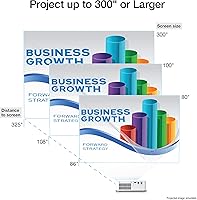
  • Max Image Size: The projector can throw an image up to 300 inches diagonally, though optimal image quality is typically achieved at considerably smaller sizes in controlled lighting.
  • Speaker: A single built-in 5W mono speaker is included, providing adequate audio for small meeting rooms and presentations but not intended for immersive home theater use.
  • Connectivity: The unit includes one HDMI port and one USB port, enabling connection to streaming sticks, laptops, and other compatible source devices.
  • Keystone: Image alignment is managed through manual vertical keystone correction, which requires physical adjustment when the projector is repositioned.
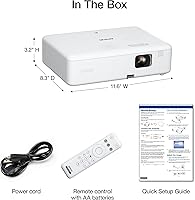
  • Dimensions: The projector measures 11.6″ wide, 8.3″ deep, and 3.4″ tall, giving it a compact footprint that fits inside most standard backpacks and laptop bags.
  • Weight: At 5.3 pounds, this 3LCD projector is light enough to carry comfortably on day trips or commutes without adding significant burden to a travel bag.
  • Streaming: The unit has no built-in operating system and relies on an external HDMI streaming device such as a Roku, Amazon Fire TV Stick, or Apple TV for content access.
  • Aspect Ratio: The native 16:10 aspect ratio is slightly taller than the standard 16:9 widescreen format, making it particularly well-matched for laptop-style presentations and office applications.
  • Manufacturer: This projector is designed and manufactured by Epson, a company with a long-established track record in professional and consumer imaging products.
  • Release Date: The product was first made available in September 2022 and remains an active, non-discontinued model in Epson's EpiqVision Flex lineup.
  • Market Rank: It holds a Best Sellers Rank of #112 in the Video Projectors category on Amazon, reflecting sustained commercial relevance within its segment.

Related Reviews
Epson EpiqVision Mini EF21 Laser Projector
79%
83%
Picture Brightness
91%
Color Accuracy
88%
Ease of Setup
86%
Portability & Form Factor
84%
Smart Platform & App Experience
More
ARTSEA Mini Portable Projector
69%
91%
Portability
88%
Ease of Setup
57%
Image Quality
49%
Brightness
83%
Value for Money
More
Vamvo VF320 Portable Projector
83%
90%
Ease of Setup
94%
Portability
88%
Picture Quality
65%
Sound Quality
72%
Connectivity
More
Wowlink W206 Mini Portable Projector
76%
74%
Picture Quality
58%
Brightness
91%
Setup Experience
69%
Built-in App Experience
93%
Portability
More
Epson EX3290 WXGA 3LCD Business Projector
77%
88%
Image Brightness
91%
Color Accuracy
74%
Resolution & Sharpness
86%
Setup & Ease of Use
83%
Portability
More
XGIMI MoGo 4 Portable Projector
80%
93%
Portability
74%
Image Quality
68%
Built-in Battery
84%
Audio Quality
88%
Smart TV Experience
More
Kodak Ultra Mini Pico Projector
71%
93%
Portability & Form Factor
52%
Image Brightness
47%
Native Resolution & Sharpness
91%
Portability for Travel
61%
Battery Life
More
XGIMI Elfin Flip Portable Projector
76%
83%
Image Quality
61%
Brightness
91%
Portability & Form Factor
78%
Setup & Auto-Correction (ISA)
88%
Built-in Netflix
More
TransarJect Portable WiFi and Bluetooth Projector
84%
88%
Image Quality
94%
Portability
85%
Ease of Setup
90%
Streaming Performance
86%
Connectivity (WiFi/Bluetooth)
More
BenQ GV50 Portable Laser Projector
86%
89%
Brightness & Image Quality
93%
Portability & Size
91%
Ease of Setup
82%
Sound Quality
78%
Battery Life
More

FAQ

The Epson CO-W01 Portable Projector does not have a built-in operating system, Wi-Fi streaming capability, or Bluetooth. To stream content wirelessly, you need to plug an external device — like a Roku Streaming Stick or Amazon Fire TV Stick — into its HDMI port. Once you do that, connecting to your home Wi-Fi happens through the streaming device itself, not the projector.

You can, but results vary depending on how bright the room is. At 3,000 lumens, this 3LCD projector handles moderately lit rooms reasonably well — think overhead lights on but no direct sunlight hitting the screen. In a brightly lit space with open windows or strong ambient light, the image will look noticeably washed out. For the best experience, dimming the room even partially makes a real difference.

Pretty much any HDMI-based streaming stick or box will work — Roku, Amazon Fire TV Stick, Apple TV, Google Chromecast with Google TV, and Android TV devices all connect without any special configuration. You just plug the stick into the HDMI port, power it via USB if needed, and use the streaming device's own remote as you normally would.

The 5W mono speaker is adequate for a quiet room — think a small office, bedroom, or a classroom where there is minimal background noise. It is not going to fill a large living room or compete with any outdoor ambient sound. For movie nights or anything where audio quality matters, pairing it with a Bluetooth speaker or a small external audio setup is worth doing.

It is noticeable, especially in a quiet room. Most buyers describe it as a consistent low hum rather than an intrusive whirring sound. During action-heavy movies or presentations with audio playing, you will not think about it. During quiet dialogue scenes or late-night viewing, some people find it distracting. It is a common trait across projectors in this price range, not a defect unique to this model.

This projector uses manual keystone correction, so you adjust the image shape using the physical controls on the unit. The process is straightforward but requires a bit of trial and error each time you reposition the projector. There is no automatic alignment feature, so if you frequently move or reangle the unit, expect to spend a minute or two dialing in the geometry each session.

It can handle casual gaming reasonably well — think indie games, retro titles, or anything that does not demand ultra-low input lag or precise color gradations. For competitive gaming, the input lag is not designed to be class-leading, and the WXGA resolution means fast-paced games will not look as crisp as on a dedicated 1080p display. For couch co-op or party games on a big screen, though, it is genuinely fun to use.

The 300-inch maximum is a theoretical ceiling at a very long throw distance. In a typical living room, you will more likely be working with a 100- to 150-inch image, which still looks impressively large. The throw ratio determines how far back you need to place the projector relative to screen size, so measuring your available space before buying is a smart step.

No carrying case is included in the box. The Epson EpiqVision CO-W01 ships with the projector, a power cord, and a remote control. If you plan to travel with it regularly, it is worth picking up a padded case or sleeve separately — the unit is compact enough to fit in many universal projector bags available online.

In plain terms, DLP projectors use a spinning color wheel to produce color sequentially, which can cause some people to see brief flashes of red, green, and blue — especially during fast motion. This is called the rainbow effect. Epson's 3LCD system uses three separate panels to handle each color simultaneously, so the image is always a full-color frame with no sequential cycling. The result is smoother, more natural color rendering, particularly in dark scenes or with saturated hues.

Where to Buy