
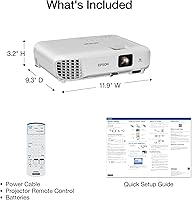
Overview

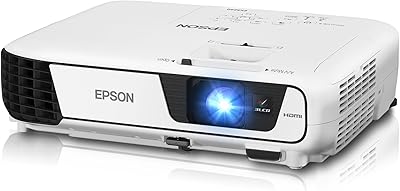
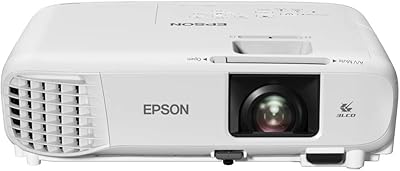
The Epson EX3290 WXGA 3LCD Business Projector sits in a practical sweet spot for offices and classrooms that need reliable, bright imagery without stepping into high-end territory. At just over five pounds, it moves easily between rooms, and the 3-chip LCD engine is a meaningful differentiator — it eliminates the rainbow flickering that frustrates users of single-chip DLP units. Resolution sits at WXGA, which is not Full HD, but for spreadsheets, slide decks, and video calls, the difference is rarely noticeable. A lamp-based light source means eventual bulb replacement costs to factor in, though Epson backs it with lifetime phone support alongside the standard one-year warranty.

Features & Benefits

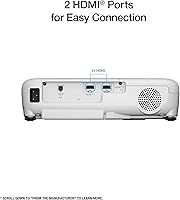
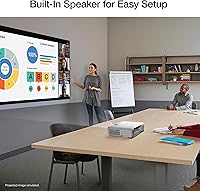
What makes the EX3290 stand out in its class is the 3LCD color accuracy — every frame gets the full RGB signal, so charts and branded presentation slides look clean and true rather than washed out. Two HDMI ports let you keep a laptop and a streaming stick plugged in at the same time, which is genuinely useful in a busy meeting room. The auto vertical keystone correction handles tilted setups automatically, saving time during quick room changes. The built-in speaker covers basic audio needs, though for anything beyond a small huddle space you will want an external option. Dynamic contrast performance keeps fine detail visible across graphs and video alike.

Best For

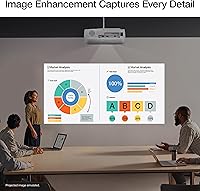
This 3LCD business projector is a strong fit for office presentations and training sessions where ambient light cannot be fully controlled — the brightness output handles well-lit environments better than many comparably priced units. Educators who cart equipment between rooms will appreciate the compact footprint and light carry weight. It also works well for hybrid workers who need a large display for Zoom calls or remote team check-ins without investing in a full conferencing setup. That said, buyers expecting cinematic home theater performance should look elsewhere. This is a workhorse built for practical, daytime use — not a premium image quality machine.

User Feedback

With a 4.4-star average across roughly 150 ratings, the EX3290 earns consistently positive marks, particularly for out-of-the-box brightness in office lighting conditions. Buyers frequently praise image color accuracy and how quickly the unit gets up and running. The complaints, where they appear, tend to cluster around two areas: fan noise during extended use and the expected reality of lamp-based maintenance — bulb replacement is an eventual cost worth budgeting for. A few reviewers note the built-in audio is better than nothing but insufficient for larger rooms. Overall, most users coming from older DLP models report a noticeable improvement in color consistency.

Pros

  • Color accuracy is a standout — the 3LCD engine keeps charts and branded slides looking true across every frame.
  • Handles ambient light far better than most comparably priced projectors, making it viable in typical office environments.
  • Auto vertical keystone correction makes room-to-room setup fast and frustration-free.
  • Dual HDMI ports let you keep two devices connected simultaneously, which is genuinely useful in shared meeting rooms.
  • At just over five pounds, the EX3290 is easy to carry, pack, and transport without strain.
  • Epson's lifetime free phone support adds long-term peace of mind that many competitors simply do not offer.
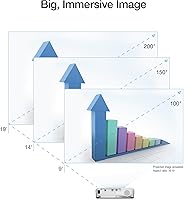
  • The image can scale up to fill very large screens, making it practical for sizable classrooms or training rooms.
  • Plug-and-play compatibility with laptops, Chromebooks, and streaming sticks means zero setup headaches.
  • Strong 4.4-star buyer satisfaction across a meaningful number of verified reviews reflects consistent real-world performance.
  • The 3LCD engine eliminates the rainbow flickering that frustrates users of single-chip DLP alternatives.

Cons

  • No built-in wireless connectivity is a real gap for modern hybrid work environments that expect cable-free setups.
  • Lamp replacement is an unavoidable future cost — budget for it before assuming the purchase price is your total spend.
  • The built-in speaker is inadequate for rooms larger than a small huddle space and frequently needs to be supplemented.
  • Fan noise increases noticeably during extended use or in warmer rooms, which can be distracting in quiet settings.
  • WXGA resolution shows its limits on detailed photography or high-resolution video content.
  • Horizontal keystone correction is manual, meaning off-center placement still requires physical repositioning.
  • No carry handle on the unit itself makes transport slightly awkward without a dedicated case or bag.
  • The one-year warranty window is shorter than some competing units that offer two or three years of coverage.
  • Wireless display adapters, external speakers, and a protective bag can collectively add meaningful cost beyond the unit price.

Ratings

The Epson EX3290 WXGA 3LCD Business Projector has been scored across key performance categories by our AI system after analyzing verified purchase reviews from buyers worldwide — with spam, bot submissions, and incentivized feedback actively filtered out. The result is a balanced picture that honestly reflects both what this projector does well and where real users have run into frustration. Strengths and trade-offs are weighted equally so you can make a genuinely informed call.

Image Brightness
88%
Users consistently report that the light output holds up well in typical office and classroom conditions — fluorescent-lit meeting rooms, partially drawn blinds, the kind of environments where cheaper projectors wash out. Presenters say slides and spreadsheets stay clearly readable without needing to dim the room first.
A handful of buyers note that in spaces with large windows and direct afternoon sunlight, the image loses punch. It performs best when at least some light control is available, so fully uncurtained rooms on bright days can still be a challenge.
Color Accuracy
91%
The 3-chip LCD engine is a genuine advantage here. Buyers switching from single-chip DLP units frequently comment on how much more natural brand colors and photography look — no color wheel artifacts, no flickering, just steady and consistent output frame after frame.
A small number of users mention that out-of-the-box color calibration skews slightly cool, requiring a manual white balance tweak for warmer-toned content. This is minor but worth knowing if color precision matters for your workflow.
Resolution & Sharpness
74%
26%
For its primary use case — business presentations, charts, spreadsheets, and video calls — the WXGA panel delivers clean, legible text and sharp edges on data visuals. Most office users report zero practical issues with the resolution in day-to-day use.
WXGA is not Full HD, and that gap becomes noticeable when displaying detailed photography or high-resolution video. Buyers who expected 1080p sharpness from a projector at this price point sometimes feel let down, though that expectation is arguably misplaced for a business-focused unit.
Setup & Ease of Use
86%
The auto vertical keystone correction is one of the most praised features by users who move the projector frequently between rooms. Just power it on, point it at the screen, and the image squares itself within seconds — no fumbling through menus mid-meeting.
Horizontal keystone correction is manual and less forgiving, so placement off to one side of the room still requires physical repositioning. A few users also note that the menu interface feels dated and takes some getting used to for first-time Epson buyers.
Portability
83%
At just over five pounds and with a footprint roughly the size of a hardcover book, the EX3290 is easy to carry between classrooms or pack into a laptop bag for offsite presentations. Educators and traveling trainers specifically call out the carry weight as a practical advantage.
The power brick adds some bulk to the total carry package, and the unit lacks a dedicated carry handle. For frequent travelers, a protective sleeve or bag is essentially required, which is an extra purchase to consider.
Connectivity
79%
21%
Having two HDMI ports is more useful than it sounds in a shared meeting room — one stays connected to the room PC while the other handles visiting laptops or a streaming stick. Users appreciate not having to unplug and swap devices during back-to-back sessions.
There is no built-in wireless, which is a real limitation in modern hybrid work environments where wireless screen mirroring has become an expectation. Users who want Miracast or AirPlay functionality will need to plug in a separate streaming adapter, adding cost and a cable to manage.
Built-in Audio
52%
48%
For small group huddles or a quick video clip in a compact room, the onboard speaker is adequate enough to avoid the immediate need for external gear. Users appreciate that it works right out of the box without any audio setup.
In rooms larger than a small conference space, the speaker simply does not have enough output to fill the room clearly. Most reviewers who use this for training sessions or classroom instruction end up pairing it with a Bluetooth speaker or room audio system fairly quickly.
Lamp Life & Maintenance
61%
39%
Epson's lamp technology is well-established and replacement bulbs are widely available. Users who stay within the recommended brightness modes report the lamp lasting through years of regular business use before any degradation becomes noticeable.
Lamp replacement is an inevitable ongoing cost that catches some buyers off guard — bulbs for this class of projector typically run between 60 and 100 dollars. Fan noise, which increases as the lamp ages, is also a recurring complaint from users who run the unit for extended sessions.
Fan Noise
63%
37%
In normal operating mode, the fan noise is described by most users as a low background hum that fades into the room ambiance during presentations. It rarely registers as disruptive during typical business use in a room with normal activity.
During longer sessions or in warmer rooms, the cooling fan ramps up noticeably. A number of reviewers mention that in quiet environments — recording setups, small tutoring sessions, or silent meeting rooms — the fan noise becomes a genuine distraction.
Build Quality
77%
23%
The chassis feels solid for a unit in this class, with no flex or creaking during handling. Users who have owned it for over a year note that it still looks and functions like new with basic care, which reflects well on long-term durability.
The plastic finish picks up scratches and smudges fairly easily, and the lens cap design feels like an afterthought — a few buyers report losing it within the first month. Premium it is not, but for an office workhorse, most users accept the trade-off.
Value for Money
82%
18%
Buyers who evaluate this against the total package — brand reliability, brightness output, color performance, and long-term support access — generally feel the price is justified. Epson's lifetime phone support is a perk that adds real perceived value for less tech-savvy users.
At this price tier, the absence of wireless connectivity and the lamp replacement cost over time make some buyers question whether a laser-based alternative at a slightly higher upfront cost would be smarter in the long run.
Keystone & Image Geometry
81%
19%
The automatic vertical keystone correction works reliably and quickly, which users who set up in different rooms each day consistently highlight as a time-saver. Image geometry holds steady once corrected and does not drift during use.
The correction range has limits — if the projector is placed at a steep angle above or below the screen, the auto correction cannot fully compensate and image quality degrades at the edges. Ceiling-mount or extreme-angle setups may still require careful physical alignment.
Warranty & Support
89%
Epson's lifetime free phone support is a genuine differentiator that buyers — especially non-technical users in small business settings — genuinely use and appreciate. The full-unit replacement clause in the first year gives buyers real peace of mind during the ownership period.
The standard warranty window is one year, which is fairly typical but shorter than some competitors who offer two or three years on comparable units. After the warranty period, repair costs are entirely on the owner, which is worth factoring in for long-term budgeting.
Compatibility & Integration
76%
24%
Works reliably with standard laptops, Chromebooks, and streaming sticks out of the box. Users running Zoom, Teams, or Google Meet for hybrid meetings report a straightforward plug-in experience with no driver installations or configuration headaches.
No wireless display support means it lags behind newer competitors in environments that have moved to cable-free setups. IT teams managing shared spaces have flagged the wired-only connectivity as a minor friction point when rolling it out across multiple rooms.

Suitable for:

The Epson EX3290 WXGA 3LCD Business Projector is built for people who need a dependable, bright display in real-world working conditions — not a darkened home theater. Office professionals who run back-to-back presentations in naturally lit conference rooms will find the brightness output genuinely practical, keeping slides and data visuals readable without requiring anyone to hunt for a light switch. Educators and corporate trainers who move their equipment between rooms daily will appreciate how light and compact it is, and the auto keystone correction means setup takes seconds rather than minutes. Hybrid workers who want a large shared display for remote meetings and video calls without investing in a full conferencing system will find it a capable, low-friction solution. It also suits small business owners or department heads who want the reassurance of a recognized brand and accessible long-term technical support — Epson's lifetime phone support is a real differentiator for less technical users who just need things to work.

Not suitable for:

The Epson EX3290 WXGA 3LCD Business Projector is not the right tool for buyers whose primary goal is cinematic image quality or who expect Full HD sharpness from a projector in this price range. Anyone planning to use it for movie nights, gaming, or detailed photography display will likely feel the resolution gap compared to a 1080p or 4K unit. The absence of any built-in wireless connectivity is a genuine limitation for organizations that have standardized on wireless screen sharing — there is no Miracast, no AirPlay, and no way to cast from a phone without an external adapter. Buyers who need clean audio without a separate speaker should also look elsewhere, as the onboard audio is functional for tiny rooms at best. Finally, anyone sensitive to ongoing maintenance costs should factor in eventual lamp replacement, which is an unavoidable expense that laser-based alternatives in the market avoid entirely.

Specifications

  • Resolution: The projector outputs WXGA resolution at 1280x800 pixels, which is well-suited for business presentations and widescreen content but falls short of Full HD.
  • Color Brightness: Rated at 4,000 lumens for color brightness under IDMS standards, providing strong visibility in ambient and moderately lit environments.
  • White Brightness: White brightness is independently rated at 4,000 lumens under ISO standards, confirming consistent output across both color and white content.
  • Light Source: Uses a traditional replaceable lamp as its light source, which will require periodic bulb replacement over the projector's operational lifespan.
  • Display Technology: Built on Epson's 3-chip 3LCD engine, which processes the full RGB color signal on every frame without a spinning color wheel.
  • Contrast Ratio: Dynamic contrast ratio reaches up to 16,000:1, helping render fine detail in data-heavy visuals, charts, and mixed-media presentations.
  • Max Image Size: Can project an image up to 300 inches diagonally, making it usable in large conference rooms, auditoriums, and open classroom settings.
  • Input Ports: Equipped with two HDMI ports, supporting simultaneous connection of a laptop and a secondary device such as a streaming stick.
  • Wireless: No built-in wireless functionality is included; screen mirroring requires a separately purchased wireless display adapter plugged into one of the HDMI ports.
  • Built-In Speaker: Includes a 2W mono speaker that handles basic audio output for small spaces without requiring an external sound system.
  • Keystone Correction: Features automatic vertical keystone correction that detects and compensates for image distortion when the projector is not perfectly level with the screen.
  • Dimensions: The unit measures 11.9 x 9.3 x 3.2 inches, giving it a compact footprint that fits comfortably in a laptop bag or on a standard shelf.
  • Weight: Weighs approximately 5.2 lbs, making it light enough to carry between rooms or transport to offsite locations without dedicated equipment cases.
  • USB Power: No USB power output port is included, so powering streaming sticks or other USB-powered accessories requires a separate power source.
  • Warranty: Covered by a 1-year limited warranty with full-unit replacement in the first year, plus free technical phone support available for the lifetime of the product.
  • Recommended Use: Designed primarily for business presentations, corporate training sessions, classroom instruction, and hybrid video conferencing environments.
  • Model Number: The official Epson model number for this unit is V11HB57020, which is the reference to use when ordering replacement lamps or accessories.
  • Aspect Ratio: Native aspect ratio is 16:10 widescreen, which aligns well with modern laptop displays and standard presentation software output.

Related Reviews
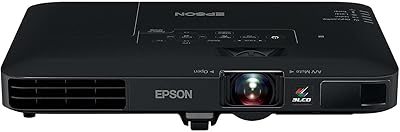
Epson Pro EX7280 WXGA Projector
85%
92%
Brightness and Visual Performance
90%
Ease of Setup
85%
Connectivity Options
88%
Image Clarity in Well-Lit Rooms
70%
Built-in Speaker Quality
More
Epson PowerLite 1781W WXGA Projector
86%
94%
Portability
89%
Brightness in Well-Lit Rooms
78%
Wireless Connectivity
91%
Ease of Setup
85%
Build Quality
More
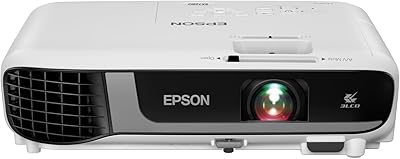
Epson EX3240 SVGA 3LCD Projector
83%
91%
Value for Money
88%
Brightness and Visibility
93%
Setup and Installation
68%
Resolution and Image Quality
72%
Sound Quality
More
Epson EX3280 3-Chip 3LCD XGA Projector
85%
89%
Brightness & Clarity
85%
Portability
91%
Ease of Setup
62%
Audio Quality (Built-in Speaker)
86%
Connectivity Options
More
Epson PowerLite X49 3LCD XGA Classroom Projector
84%
88%
Brightness & Image Quality
91%
Ease of Setup
89%
Value for Money
93%
Lamp Life & Eco Mode
86%
Connectivity & Versatility
More
Epson PowerLite 2250U Full HD WUXGA 3LCD Projector
84%
94%
Brightness
91%
Image Clarity and Sharpness
68%
Portability
82%
Ease of Setup
85%
Wireless Connectivity
More
Epson EpiqVision Ultra Short Throw LS300 3LCD Smart Laser Projector
84%
93%
Brightness
89%
Picture Quality
85%
Setup & Installation
82%
Sound Quality
90%
Connectivity & Smart Features
More
BenQ MS560 DLP Business Projector
76%
83%
Image Brightness
58%
Image Resolution & Clarity
74%
Brightness Consistency
91%
Ease of Setup
86%
Connectivity & Ports
More
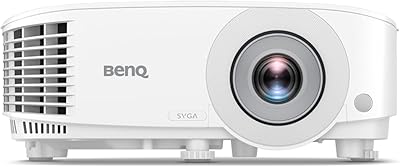
BenQ MW632ST Business Projector
84%
91%
Value for Money
94%
Brightness and Visual Quality
85%
Portability
88%
Ease of Setup
56%
Sound Quality
More
Epson Home Cinema 1080 1080p Projector
77%
91%
Image Quality
84%
Brightness & Ambient Light Performance
88%
Color Accuracy
79%
Gaming Performance
93%
Setup & Ease of Use
More

FAQ

Yes, and that is genuinely one of its stronger points. The brightness output is substantial enough to keep slides, charts, and spreadsheets clearly visible in a standard office environment with overhead lighting on. Direct sunlight through large uncovered windows is still a challenge, but typical indoor lighting is not a problem.

No, there is no built-in wireless capability. If you want to mirror a phone, tablet, or laptop wirelessly, you will need to plug a separate adapter — such as an Amazon Fire Stick, Chromecast, or Miracast dongle — into one of the HDMI ports. It works well once set up, but it is an extra purchase to plan for.

Epson rates the lamp for several thousand hours depending on which brightness mode you use — economy mode extends life significantly compared to full brightness. In practice, regular business users often get two to four years of use before noticeable dimming occurs. Replacement lamps are widely available and cost roughly 60 to 100 dollars depending on the source.

For a small huddle room or a one-on-one demo, it gets the job done. In any space larger than that, it struggles to fill the room adequately, and most users who run training sessions or classroom instruction end up connecting a Bluetooth speaker or plugging into a room audio system. Think of it as a convenience feature rather than a real audio solution.

The unit only has HDMI inputs natively, so if your laptop uses USB-C or DisplayPort, you will need a compatible adapter or hub. USB-C to HDMI adapters are inexpensive and widely available, and most users report they work without any issues once connected.

Only vertical keystone correction is automatic. Horizontal correction is manual, which means if the projector is significantly off-center to the left or right of the screen, you will need to physically reposition it rather than dial it in from the menu. For ceiling-mounted or fixed installations, this is worth factoring into your placement planning.

Technically yes, but it was not designed with that use case in mind. The WXGA resolution is visibly below Full HD, which becomes apparent on large screens with film content or high-resolution streaming. If movies and TV shows are your primary use case, a 1080p or higher projector would serve you noticeably better.

Any streaming device with an HDMI output will work — Amazon Fire Stick, Roku, Apple TV, and Chromecast with Google TV have all been confirmed compatible by users. Just note that some streaming sticks draw power via USB, and since the projector has no USB power port, you may need a separate wall adapter or power strip nearby.

The main practical difference is color rendering and eye fatigue. DLP projectors use a spinning color wheel that can cause a rainbow effect — brief flashes of color fringing — which some people notice and find distracting. The 3LCD approach processes all three color channels simultaneously, eliminating that artifact entirely. For text-heavy or color-critical presentations, most users find 3LCD more comfortable over long sessions.

It is physically compatible with standard ceiling mounts that use the universal mounting pattern, but keep in mind that steep mounting angles will push the limits of the auto keystone correction. For permanent ceiling installations, careful physical alignment during mounting is important to get the best image geometry without relying entirely on digital correction.

Where to Buy