Overview

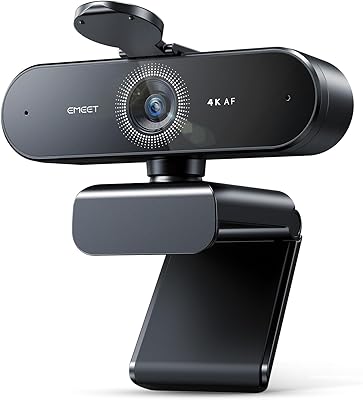
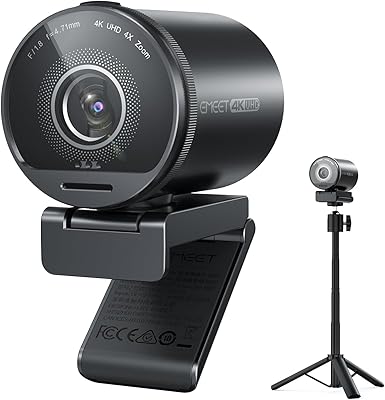
The EMEET S600 4K Webcam arrived in mid-2024 as a genuinely interesting option in the crowded mid-range webcam space. What separates it from typical budget offerings is its Sony 1/2.55″ CMOS sensor — the kind of hardware you’d expect at a notably higher price. At just 3.52 oz, it’s compact enough to sit unnoticed on a monitor. Setup is pure plug-and-play; no driver installation, no software required before use. The built-in rotary privacy cover is a small but meaningful touch — a physical mechanism, not a software toggle, which makes it genuinely trustworthy. With over 1,500 Amazon ratings averaging 4.4 stars and a top-10 webcam ranking, it’s clearly resonating with buyers.
Features & Benefits

The standout here is the PDAF autofocus system. Unlike the contrast-detection approach most webcams rely on, phase detection locks onto a subject faster and holds focus more reliably when you shift positions mid-stream. The S600 also gives you a practical choice: 4K at 30FPS for maximum detail, or 1080P at 60FPS for smoother motion — the latter being more useful for gaming streams. Field of view runs from 40° to 73° at 1080P, giving you real framing flexibility. The dual microphones handle noise reasonably well for a built-in option, and EMEETLINK software unlocks additional image and audio controls whenever you want them, without requiring it from day one.

Best For

This streaming webcam hits a sweet spot for a fairly specific type of user. If you’re building a streaming setup and want genuine 4K output without the cost and complexity of a dedicated camera, it’s a strong candidate. Live commerce creators and beauty streamers will appreciate the detail and accurate color rendering the Sony sensor provides up close. Gamers running at 1080P/60FPS get smooth footage without dropped frames. It’s also a solid pick for hybrid workers who handle sensitive calls — that physical privacy cover earns its keep. And beginners will find the plug-and-play setup removes the friction usually associated with getting a new webcam running.

User Feedback

Buyers consistently call out autofocus responsiveness as a highlight — it locks on quickly and doesn’t hunt awkwardly mid-stream, which is a frequent complaint with cheaper webcams. Image sharpness also draws regular praise, with several reviewers noting it holds up well in less-than-ideal lighting. On the downside, a handful of users feel the full feature set is slightly gated — out of the box it performs well, but accessing some settings requires EMEETLINK. The microphones rate as acceptable for casual streams, though dedicated podcasters and serious streamers typically pair this 4K webcam with a standalone mic. A few buyers also mention the mount clip feels adequate rather than premium, worth considering if you reposition the camera often.

Pros

  • The Sony CMOS sensor delivers image quality that punches above what this price tier normally offers.
  • PDAF autofocus responds quickly and holds focus steadily — no awkward hunting during fast movements.
  • Plug-and-play setup works immediately on both Windows and macOS with zero driver installation.
  • The physical rotary privacy cover is a rare and genuinely useful hardware feature at this price point.
  • Adjustable field of view at 1080P gives real framing flexibility without touching the camera position.
  • 1080P at 60FPS mode produces smooth, natural-looking motion well-suited to gaming and active streaming.
  • Auto light balancing handles backlit and dim environments without requiring manual exposure adjustments.
  • Compact and lightweight enough to pack into a laptop bag for mobile or multi-location setups.
  • Compatible across major streaming platforms and video call apps with no configuration required.
  • EMEETLINK software provides meaningful customization options for users who want to go beyond the defaults.

Cons

  • Accessing the full 4K resolution requires third-party software like OBS — it does not work automatically in most default camera apps.
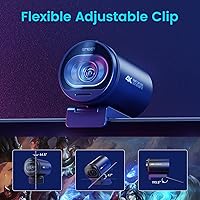
  • The monitor clip feels noticeably less solid than the rest of the build, especially on thicker bezels.
  • EMEETLINK software has a clunky interface and occasional disconnect issues after system sleep.
  • Built-in microphones are adequate for casual use but will disappoint anyone with serious audio standards.
  • Field of view is locked at 73° in 4K mode — no framing flexibility when shooting at full resolution.
  • The lens cover picks up fingerprint smudges during rotation and requires regular cleaning to avoid image impact.
  • Linux compatibility is inconsistent and not officially supported, making it a risky choice for non-standard setups.
  • True 4K streaming remains impractical on most major platforms, so the headline resolution spec rarely gets used in practice.

Ratings

The EMEET S600 4K Webcam has been evaluated using AI-driven analysis of verified global buyer reviews, with spam, bot activity, and incentivized feedback actively filtered out to ensure reliability. What surfaces is a nuanced picture: strong image performance and smart hardware design win consistent praise, while a few friction points around software dependency and audio limitations keep it from being a universal recommendation. Both sides are reflected honestly in the scores below.
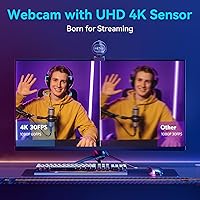
Image Quality
88%
Reviewers repeatedly highlight how sharp and detailed footage looks compared to what they expected at this price tier. The Sony sensor handles fine textures and skin tones particularly well, which matters for beauty and live commerce creators who need accurate close-up rendering during live sessions.
A small but vocal group of buyers note that achieving true 4K output requires compatible software like OBS or PotPlayer — the built-in camera app on Windows often defaults to lower resolution without manual configuration, which catches some newcomers off guard.
Autofocus Performance
91%
The PDAF system earns genuine enthusiasm from streamers who have dealt with hunting, laggy autofocus on other webcams. It locks on quickly when a subject shifts position and holds steady without the unsettling micro-adjustments that plague contrast-based systems during animated gestures or close-up beauty demos.
A handful of users report occasional focus hesitation in very low-contrast backgrounds, such as plain white walls. It is a minor edge case, but worth knowing if your streaming environment lacks visual depth cues.
Low-Light Performance
79%
21%
The auto light balancing handles backlit desk setups and dim room conditions better than most webcams in this category. Users working from home without professional lighting mention noticeably improved brightness and reduced muddiness compared to previous webcams they owned.
In genuinely dark conditions — a room lit only by monitor glow, for instance — the image still shows some digital noise. It compensates well for moderate low-light situations but is not a substitute for even basic ring light supplementation in serious streaming setups.
Microphone Quality
71%
29%
For a built-in dual-mic setup, it performs respectably. Everyday streamers and remote workers report that background keyboard noise and ambient room sound are noticeably reduced without the audio sounding artificially processed or hollow, which is a real win for video calls and casual streaming.
Serious podcasters and streamers with audio-conscious audiences consistently suggest pairing the S600 with a dedicated external microphone. The built-in mics lack the depth and presence expected at that level, and the noise reduction algorithm can occasionally soften vocal clarity at higher suppression settings.
Setup & Ease of Use
93%
Plug-and-play functionality works exactly as advertised. Multiple buyers — including self-described non-technical users — mention being live within minutes of unboxing, with zero driver installation required across both Windows and macOS environments. It simply shows up as a recognized device.
Accessing the more advanced settings requires downloading EMEETLINK software, which a portion of buyers find mildly inconvenient. It is a one-time step, but a few reviewers mention the software interface feels less polished than the hardware itself.
Build Quality
74%
26%
The body feels solid for a compact webcam, and the joint and tilt mechanisms hold their position reliably under normal desk use. The integrated privacy cover in particular feels intentionally engineered rather than tacked on — it rotates smoothly and closes with a satisfying firmness.
The monitor clip is the one weak point buyers flag most often. It rates as functional but not confidence-inspiring, especially on thicker bezels. Users who regularly reposition the webcam mention that the clip mechanism feels noticeably less premium than the rest of the unit.
Privacy Cover
89%
Having a physical rotary cover built directly into the lens housing is something buyers genuinely appreciate — especially remote workers and hybrid employees on back-to-back video calls. There is real peace of mind in a hardware block that cannot be bypassed by a software glitch or accidental app permission.
The cover sits directly on the lens, and a couple of users note it can pick up fingerprint smudges during rotation if handled carelessly. It is a minor maintenance point, but keeping a microfiber cloth nearby becomes part of the routine for some owners.
Field of View Flexibility
82%
18%
The adjustable 40° to 73° range at 1080P gives streamers real creative control over framing without physically repositioning the camera. Gaming streamers tend to prefer the tighter end for a focused face-cam shot, while live commerce hosts value the wider angle for product display.
At 4K, the FOV locks to a fixed 73° with no adjustment option. For creators who specifically want a tighter composition at full resolution, this is a genuine constraint that does not get clearly communicated in the product listing.
Frame Rate Performance
86%
The 1080P at 60FPS mode is where many streamers find their sweet spot. Motion during gaming sessions or animated on-screen presentations looks noticeably smoother than the 30FPS ceiling most competing webcams in this tier offer, and buyers in gaming communities call this out specifically.
4K is capped at 30FPS, which is standard but worth understanding before purchasing. For streamers whose platform or audience expects high frame rates above everything else, 1080P/60 will always be the practical mode of choice rather than the headline 4K spec.
Software & Customization
66%
34%
EMEETLINK gives users meaningful control over color balance, exposure, and microphone gain — settings that stay locked in most webcam companion apps. For streamers who want to match their camera output to specific scene lighting without touching OBS filters, it is a practical option.
The software itself carries mixed reviews. Some buyers find it intuitive enough; others describe the UI as clunky and report occasional disconnect issues between the app and the camera after system sleep. For a product that markets itself as plug-and-play, the software experience feels like an afterthought.
Value for Money
84%
Against competing webcams at or near this price point, the combination of a Sony sensor, PDAF autofocus, and a hardware privacy cover represents a genuinely strong feature-to-price ratio. Buyers switching from older or budget webcams consistently describe it as a clear step up in perceived quality.
Buyers comparing it directly against higher-tier Logitech or Insta360 options note the gap narrows on image quality but widens on software polish and build refinement. If your workflow is professional and your expectations are high, the incremental cost of a premium webcam may be worth reconsidering.
Compatibility
88%
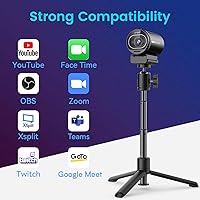
Works reliably across Windows 10, Windows 11, and macOS without requiring any configuration. Buyers confirm stable operation across Zoom, Teams, OBS, Streamlabs, and Twitch Studio. USB 2.0 and 3.0 support means it functions on older hardware without any bandwidth-related performance drops.
A small number of Linux users report inconsistent compatibility, with some distros requiring manual configuration to achieve stable video output. This is a niche concern but worth flagging for developers or technical users running non-standard operating systems.
Size & Portability
87%
At under 4 oz and a footprint smaller than a typical coffee mug, the S600 is easy to pack into a laptop bag for remote work setups or travel streaming. Content creators who work across multiple locations specifically mention its low footprint as a practical daily advantage.
The compact size is mostly a positive, but it does mean the tripod mount and clip system handle a narrower range of surfaces than bulkier, heavier webcams with wider base designs. Mounting on non-standard monitor setups occasionally requires improvisation.
Streaming-Specific Performance
83%
In live streaming environments specifically, the S600 holds up well under the variable conditions streamers face — shifting room light, sudden movements, and extended multi-hour sessions. Streamers in beauty and live commerce note the color accuracy makes products look representational rather than washed out or over-saturated.
Dedicated streaming platforms that support 4K broadcasting are still limited, which means the headline resolution spec goes unused by a majority of buyers on Twitch or YouTube Live. The real-world streaming advantage comes more from the sensor quality at 1080P than from the 4K ceiling itself.

Suitable for:

The EMEET S600 4K Webcam is a well-matched choice for anyone building or upgrading a streaming or content creation setup without wanting to spend significantly more on dedicated camera gear. Live commerce sellers and beauty creators will get the most out of it — the Sony sensor renders skin tones and product details with real accuracy, which matters when your audience is deciding whether to buy based on what they see on screen. Gamers who stream face-cam footage alongside their gameplay will appreciate the 1080P at 60FPS mode, which produces noticeably smoother motion than most webcams in this tier. Home office workers and hybrid employees who handle sensitive video calls will find the physical rotary privacy cover genuinely useful — it is a hardware guarantee, not a software promise. Beginners benefit from the zero-configuration plug-and-play setup, while anyone who eventually wants more control can explore EMEETLINK at their own pace without feeling locked out of the basics.

Not suitable for:

Buyers with professional-grade expectations should understand that the EMEET S600 4K Webcam, despite its strong sensor, is still a mid-range tool with mid-range trade-offs. If you are a podcaster, journalist, or audio-focused creator who relies heavily on microphone quality, the built-in dual mics will likely fall short — they handle everyday noise reduction competently, but they do not produce the vocal presence or depth that a dedicated USB or XLR microphone delivers. Users who want true 4K output straight out of the box may also be caught off guard: reaching that resolution requires software like OBS or PotPlayer configured correctly, and the default Windows camera app rarely surfaces it automatically. If you are comparing this directly to higher-tier webcams from brands with more mature software ecosystems, the EMEETLINK companion app does feel underdeveloped by comparison. Linux users or anyone running non-standard operating systems should also proceed cautiously, as compatibility outside Windows and macOS is inconsistent and largely unsupported.

Specifications

  • Sensor: Uses a Sony 1/2.55″ CMOS image sensor, which is notably larger and more capable than the sensors found in most webcams at this price tier.
  • Resolution: Supports 4K (3840×2160) at 30FPS and 1080P (1920×1080) at 60FPS, selectable depending on your software and use case.
  • Autofocus: Phase Detection Autofocus (PDAF) provides faster subject acquisition and more stable tracking compared to standard contrast-detection autofocus systems.
  • Field of View: Adjustable between 40° and 73° at 1080P; fixed at 73° when shooting in 4K to minimize edge distortion.
  • Aperture: Fixed aperture of f/4, which balances depth of field and light intake for typical indoor streaming and video call environments.
  • Microphones: Dual built-in AI microphones with a proprietary noise-reduction algorithm that filters background sound; the feature can be toggled via EMEETLINK software.
  • Privacy Cover: Integrated rotary hardware cover sits directly over the lens and physically blocks the camera when closed, independent of any software or OS permissions.
  • Video Formats: Outputs video in YUY2 and MJPEG formats, ensuring broad compatibility with streaming software, video call platforms, and recording applications.
  • Audio Format: Captures and transmits audio in AAC format for clear, compressed voice communication across supported platforms.
  • Connectivity: Connects via USB with support for both USB 2.0 and USB 3.0 ports, maintaining stable performance on older and newer hardware alike.
  • Dimensions: Measures 2.8 × 2.95 × 2.05 inches, making it compact enough to sit unobtrusively on a monitor or laptop screen.
  • Weight: Weighs 3.52 ounces, light enough to travel in a laptop bag without adding meaningful bulk to a daily carry setup.
  • Plug-and-Play: Recognized automatically by Windows and macOS without requiring driver installation or initial software setup before first use.
  • Software: EMEETLINK companion software is available for optional advanced customization of image parameters, exposure, color balance, and microphone gain settings.
  • Compatible OS: Officially compatible with Windows 10, Windows 11, and macOS, as well as major streaming and video conferencing platforms including OBS, Zoom, and Teams.
  • Focal Length: Maximum focal length of 3000mm equivalent, optimized for close-to-medium distance subjects typical of desktop streaming and video call scenarios.
  • Item Model: Manufacturer model number is E7001, produced by Shenzhen eMeet Technology Co., Ltd. and first made available in July 2024.
  • Best Sellers Rank: Ranked #6 in the Amazon Webcams category based on sales performance, with over 1,500 verified ratings averaging 4.4 out of 5 stars.

Related Reviews

EMEET Piko 4K Webcam
82%
88%
Video Clarity
84%
Autofocus Performance
74%
Low-Light Handling
81%
Audio Quality
91%
Design & Build
More
EMEET C950 4K Webcam
78%
83%
Video Clarity
88%
Autofocus Performance
71%
Microphone Quality
62%
Low-Light Performance
93%
Privacy Features
More
EMEET Nova 4K Webcam
77%
83%
Video Clarity
78%
Autofocus Performance
69%
Microphone Quality
76%
Low-Light & Auto Exposure
86%
Build Quality & Design
More
EMEET SmartCam S800 4K Webcam
87%
91%
Video Quality
85%
Autofocus Performance
94%
Ease of Setup
88%
Audio Clarity
92%
Flexibility and Positioning
More
EMEET C980 Pro
EMEET C980 Pro
77%
88%
Video Clarity
83%
Audio Capture
67%
Built-In Speaker Quality
91%
Setup & Ease of Use
79%
Wide-Angle Flexibility
More
PixelForge 4K Webcam
86%
94%
Video Quality
88%
Audio Performance (Microphone)
91%
Ease of Setup
89%
Lighting Effectiveness
86%
Privacy Features
More
Lusinx 4K Webcam
Lusinx 4K Webcam
86%
91%
Video Quality
88%
Noise Cancellation Performance
87%
Low-Light Performance
94%
Setup & Installation
75%
Microphone Clarity
More
MOERTEK 4K Webcam
MOERTEK 4K Webcam
87%
91%
Video Quality
89%
Noise Reduction
85%
Auto Framing
94%
Ease of Setup
88%
Privacy Features
More
Diccik 4K Webcam
Diccik 4K Webcam
85%
91%
Video Quality
75%
Microphone Performance
94%
Ease of Setup
88%
Light Adjustment
89%
Compatibility
More
Combess 4K Webcam
Combess 4K Webcam
85%
91%
Video Quality
88%
Audio Performance
95%
Ease of Setup
70%
Field of View
93%
Privacy Features
More

FAQ

No, you do not. The S600 is a true plug-and-play device — plug it into a USB port and your computer will recognize it automatically on both Windows and macOS. The optional EMEETLINK software is only needed if you want to fine-tune things like exposure, color balance, or microphone sensitivity beyond the defaults.

Most likely not. Zoom and Microsoft Teams cap their video quality well below 4K regardless of your camera. To get true 4K output from this webcam, you need compatible software like OBS or PotPlayer configured to capture at that resolution. For everyday video calls, 1080P is the practical ceiling on most platforms.

It handles movement noticeably better than most webcams in this price range. The PDAF system re-locks onto your face quickly when you shift position, lean forward, or gesture. It is not completely immune to hesitation in very plain, low-contrast backgrounds, but for typical desk or studio setups it performs reliably.

It depends on your standards. For casual streaming, gaming content, or video calls, the dual built-in mics with noise reduction do a solid job. If you are producing podcast-style content or streaming to an audience that expects broadcast-quality audio, you will likely want a dedicated USB or XLR microphone alongside it.

At 1080P, yes — the FOV is adjustable between 40° and 73°, which gives you real control over how much of your background appears on screen. At 4K, the FOV locks to 73° with no adjustment option, which is a trade-off to maintain image quality and reduce edge distortion at that resolution.

The EMEET S600 4K Webcam has a rotary cover built directly into the lens housing — you physically rotate it to block the lens when you want privacy. It is a hardware mechanism, so it works regardless of what software is running or what permissions an app might have. It does attract fingerprints with regular use, so wiping it occasionally with a microfiber cloth keeps the lens clean.
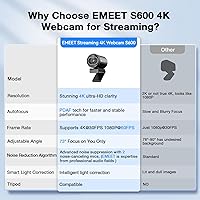
Yes, it works reliably with both. It shows up as a standard UVC camera device, which means any software that supports webcam input will recognize it without extra configuration. OBS users will want to set the capture resolution manually to access 4K or 1080P/60FPS modes rather than relying on the default selection.

The clip holds position adequately for normal desktop use and does not shift during a session once set. That said, multiple buyers note it feels less robust than the rest of the build, particularly on monitors with thicker bezels. If you frequently reposition the camera or use it on an unusual surface, a small tabletop tripod is worth considering as an alternative mount.

Linux is not officially supported, and user feedback on it is mixed. Some buyers report getting it working with certain distributions using standard UVC drivers, but others encounter inconsistent behavior or resolution limitations. If Linux compatibility is important to your workflow, it is a meaningful risk to be aware of before purchasing.

For most gaming streams, 1080P at 60FPS is the better practical choice. The smoother motion looks more natural when you are animated or reacting on camera, and the majority of streaming platforms and viewers consume content at 1080P anyway. The 4K mode is more useful for beauty, product, or close-up content where fine detail matters more than motion smoothness.