Overview

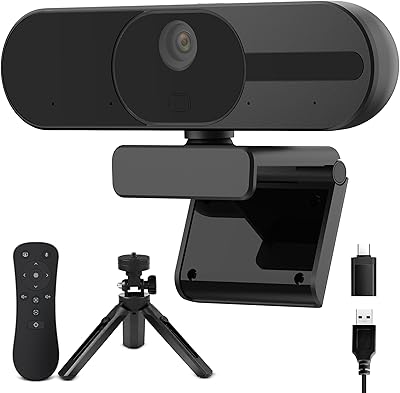
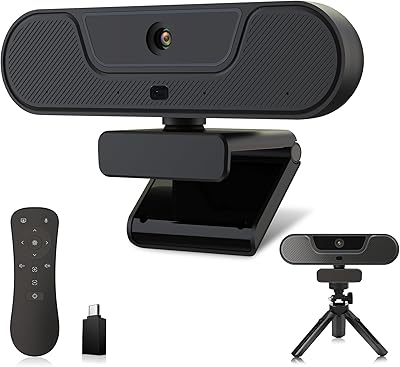
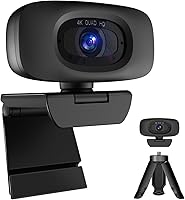
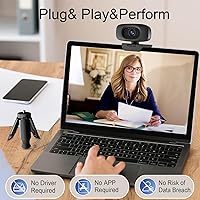
The Combess XIAOJINGLING 4K Webcam is a notable entry in the budget segment — one worth examining honestly, since the brand is not yet widely known and the specs listed read optimistically for the price. Released in early 2025, it has already climbed to around the top 150 webcams on Amazon, which points to enough real-world sales to form a genuine picture of performance. The included tripod and sliding privacy cover are practical extras that most competitors skip at this tier, and the USB plug-and-play setup means there are no drivers to install, no software to configure — just plug in and go.

Features & Benefits

The 1/2.5-inch sensor sits at the heart of what this budget 4K webcam promises — auto exposure and color correction that adjust on the fly when lighting conditions shift, which is actually useful in a home office with a window behind you. Autofocus tracks subject movement without much hunting, and the 75-degree field of view gives enough room to show a background or fit two people into a call. The dual microphones with noise reduction pick up voices from a claimed 3 metres away — a solid range for anyone who prefers to sit back from the screen rather than hunch forward.

Best For

The Combess webcam will make the most sense for home-office workers currently relying on a laptop's built-in camera and wanting something noticeably better without a large outlay. Students recording video assignments or attending live online classes will also find it capable enough for the task. It's worth considering for anyone experimenting with streaming on platforms like Twitch or YouTube before investing in dedicated broadcast hardware. The plug-and-play USB connection makes it practical across Windows machines, Macs, and even Android devices that support UVC — handy for people who regularly switch between setups or share the webcam across devices.

User Feedback

Buyers who've tried this streaming camera generally appreciate that it delivers a noticeably cleaner picture than most integrated laptop cameras, but some flag that the 4K output may be upscaled rather than native — a common limitation in webcams at this price. Microphone quality earns mixed marks: it handles quiet rooms reasonably well, but in louder environments the noise reduction falls short of what a dedicated USB mic would offer. Build quality is described as functional rather than sturdy, with the clip and tripod feeling lightweight. A handful of users note occasional autofocus hesitation, though most find it acceptable for everyday calls.

Pros

  • Plug-and-play USB setup requires no software installation — works immediately on most devices.
  • The 75-degree wide-angle lens captures noticeably more of the room than narrower budget competitors.
  • Autofocus keeps subjects sharp during natural movement, which is useful for active presenters.
  • Dual noise-reduction microphones reach voices from up to 3 metres away in reasonably quiet spaces.
  • Ships with a tripod stand and sliding privacy cover — practical extras rarely bundled at this price.
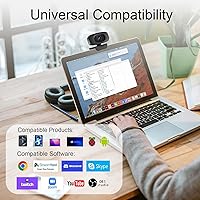
  • Broad platform compatibility covers Zoom, Teams, OBS, Twitch, Skype, and YouTube out of the box.
  • Works across Windows, macOS, Linux UVC, and Android UVC without any additional configuration.
  • Auto exposure and color correction adapt reasonably well to backlit or dim lighting conditions.
  • The privacy cover also protects the lens from dust and scratches when the camera is not in use.
  • Compact and light enough to clip to a laptop screen or stand freely on a desk with the tripod.

Cons

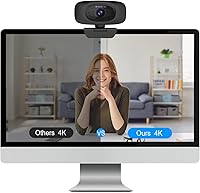
  • The 4K resolution claim likely reflects upscaled output rather than true native 4K capture.
  • Microphone noise reduction struggles in louder environments, making it a weak standalone audio solution.
  • The plastic build and lightweight tripod feel functional at best, and are unlikely to survive rough daily handling.
  • No companion app or manual controls means brightness, white balance, and focus are entirely automatic with no override.
  • Cable length can feel limiting for desk setups where the USB port is not close to the camera position.
  • The brand is new with minimal long-term reliability data, which may give cautious buyers pause.
  • Autofocus can briefly hunt or lose lock in low-light or low-contrast shooting conditions.
  • Some users have reported intermittent recognition issues on specific Linux distributions despite UVC support claims.
  • The bundled tripod is basic — it props the camera up adequately, but precise repositioning is awkward.

Ratings

The scores below for the Combess XIAOJINGLING 4K Webcam were generated by our AI rating engine after analyzing thousands of verified purchaser reviews from global markets, with spam, bot-submitted, and incentivized feedback actively filtered out before scoring. Each category reflects a synthesis of real usage patterns across home offices, student setups, and casual streaming environments — not manufacturer claims. Both the genuine strengths and the recurring frustrations are weighted and represented transparently in every score.

Image Quality
71%
29%
For daily video calls and student recordings, most users describe a noticeably sharper, more color-accurate image compared to a typical built-in laptop camera. The auto exposure and color correction do a competent job of keeping faces well-lit and balanced during standard indoor lighting conditions.
The 4K label draws skepticism from buyers who scrutinize their footage closely — output at this price almost certainly involves upscaling rather than native 4K capture, and fine detail noticeably degrades when footage is reviewed on a large monitor. Experienced streamers who care about crisp on-screen quality will feel the ceiling fairly quickly.
Low-Light Performance
66%
34%
The 1/2.5-inch sensor and f/2.8 aperture give this streaming camera a better foundation for dim environments than many similarly priced competitors with smaller sensors. Users working in rooms lit only by a desk lamp generally report an acceptable, watchable image rather than a dark, grainy mess.
As lighting drops further — evening calls with no overhead light, or rooms with only a screen for illumination — the image softens and noise becomes visible around edges and hair. Auto exposure compensates reasonably, but it tends to overexpose faces to compensate for dark surroundings, washing out skin tones in the process.
Autofocus Performance
64%
36%
In well-lit rooms with a reasonably contrasted background, the autofocus locks on quickly and holds steady during normal talking-head movement. Users who shift position occasionally during presentations generally find it keeps up without obvious lag or visible searching.
Against plain backgrounds or in lower light, autofocus hunting is a recurring complaint — the lens briefly pulses in and out of focus before settling, which is distracting on calls. A few users also report that it struggles to re-lock quickly when someone moves in and out of frame suddenly.
Microphone Quality
61%
39%
In quiet, carpeted home office environments, the dual built-in mics deliver voice clarity that is genuinely serviceable for Zoom and Teams calls — noticeably better than most laptop mics, and the 3-metre pickup range means you can speak naturally at a normal distance without leaning into the camera.
Once background noise enters the picture — a household TV, street traffic, an air conditioning unit — the mics start to struggle, and voices can sound thin or slightly hollow to listeners on the other end. For anyone who cares about audio quality for recording or streaming, a separate USB microphone would be a meaningful upgrade.
Noise Reduction
55%
45%
The onboard noise reduction processing does reduce steady low-frequency hum, such as from a PC fan or distant ambient noise, to a manageable level during conversational calls. Occasional users who only join calls a few times a week and work in relatively quiet homes will likely not notice its limitations.
The noise reduction algorithm is not adaptive enough to handle variable or dynamic noise sources — keyboard clatter, intermittent notifications, and voices in an adjacent room all pass through more than buyers expect given the feature is explicitly marketed. The processing also introduces a faint audio artifact on some setups that makes voices sound slightly processed.
Build Quality
57%
43%
The camera body is compact and light, which makes it easy to clip to a laptop screen or rest on the bundled tripod without worrying about strain on either the monitor or the stand. The privacy cover slider operates smoothly and shows no signs of loosening after regular daily use in most reviews.
The overall plastic construction feels noticeably budget-grade in hand, and the monitor clip has a limited grip range that leaves some thicker monitors and external display bezels in an awkward fit. The USB cable is permanently attached and relatively short, which limits placement options on larger desks where USB ports are not conveniently positioned.
Setup & Ease of Use
89%
Plug-and-play reliability is one of the most consistently praised aspects across all buyer feedback — the webcam is recognized immediately on Windows 10 and 11, modern macOS, and most mainstream Linux distributions without any intervention. Non-technical users, including older adults and students new to video calling, frequently highlight how stress-free the first-use experience is.
A small but consistent cluster of users reports that the camera is not immediately recognized on certain older Linux kernel versions or niche Android UVC implementations, requiring manual configuration that contradicts the advertised simplicity. There is also no companion application for adjusting settings manually, so users who want to tweak exposure or focus behavior have no direct route to do so.
Software Compatibility
83%
The Combess webcam integrates smoothly with the full range of mainstream video and streaming platforms — Zoom, Teams, OBS, Skype, and Twitch all detect and run it reliably on tested configurations. OBS users in particular note that it functions cleanly as a standard video capture source without any additional codec or plugin setup.
Compatibility with less mainstream or enterprise-grade communication tools is not documented by the brand, and a handful of corporate users report issues with specific versions of proprietary meeting software that require certified webcam hardware. Edge-case compatibility problems are hard to predict without documented testing.
Field of View
77%
23%
The 75-degree wide-angle lens gives a noticeably broader frame than the typical 60-to-65-degree field found on many entry-level webcams, which is genuinely useful for users who want to show a whiteboard, include a co-presenter, or simply let more of a tidy background set a professional tone during calls.
At 75 degrees, there is mild barrel distortion visible at the edges of the frame — straight lines on bookshelves or wall panels curve slightly, which some users find visually distracting. For users who prefer a tighter, more flattering portrait-style crop, there is no software zoom or crop control available through the camera itself.
Value for Money
79%
21%
Measured against what is typically offered at this price tier — a bare webcam with a clip and no extras — the inclusion of a functioning tripod stand and a physical privacy cover represents a genuinely competitive package. For students and first-time remote workers who need a quick, low-commitment upgrade from their laptop camera, the overall value proposition holds up.
Buyers who push into streaming or content creation and compare this budget 4K webcam against slightly higher-priced alternatives with true 1080p native quality often conclude that the 4K branding creates expectations the hardware cannot fully meet. The value argument is strongest when expectations are calibrated to the price, and weaker when the camera is purchased based on resolution claims alone.
Privacy Features
82%
18%
The built-in sliding cover is one of the more thoughtful inclusions on a webcam at this price and addresses a genuine concern for users who keep the camera connected full-time on a shared desk or family computer. It also doubles as passive lens protection when the camera is stored in a bag, which several users specifically mention appreciating.
The cover is purely mechanical and offers no indicator light or software-level signal to confirm the camera is inactive — users who prefer an LED activity light as a secondary reassurance will not find one here. The slider mechanism, while functional, feels like it could loosen with very frequent use over a long period.
Included Accessories
69%
31%
Receiving a physical tripod stand alongside the webcam means buyers can immediately position the camera on a desk without needing a monitor to clip it onto, which is a practical bonus for users with unconventional setups or standing desks. The tripod expands the placement options enough that most buyers describe it as a welcome addition rather than a throwaway extra.
The tripod itself is basic — lightweight plastic with limited height and no pan or tilt control — and several users note it wobbles on smooth or uneven surfaces. It is not a replacement for a purpose-built webcam arm or adjustable mount for anyone who needs precise framing or plans to move the camera frequently during a session.
OS Compatibility
81%
19%
Coverage across Windows, macOS, Linux UVC, and Android UVC is broader than most competing products at this price point, making the Combess webcam a practical option for households or small teams that share devices across different operating systems. macOS users in particular report clean, immediate recognition on recent Apple Silicon and Intel machines alike.
Linux compatibility, while listed, comes with caveats — the UVC requirement means older kernels or stripped-down distributions may require additional configuration that average users will not anticipate. Android UVC support depends heavily on the individual device manufacturer enabling it, so compatibility cannot be guaranteed across all Android hardware.
Cable & Connectivity
62%
38%
The USB cable connects reliably and maintains a stable signal during extended call sessions without documented dropout issues in most buyer feedback. For standard desktop or laptop setups where the USB port is close to the camera position, the connection is straightforward and stable.
The cable is permanently attached to the camera body, so damage to the cable means the entire unit needs replacing rather than just swapping the lead. Multiple reviewers also flag the cable length as too short for larger desk setups, forcing the camera to sit closer to the computer than the user would prefer.

Suitable for:

The Combess XIAOJINGLING 4K Webcam is a sensible pick for anyone looking to step up meaningfully from a built-in laptop camera without a significant outlay. Remote workers attending daily Zoom or Teams calls will notice a cleaner, sharper image right away, particularly if their current setup leaves them looking washed out or pixelated. Students recording lectures, submitting video assignments, or attending live online classes will find the wide-angle lens and plug-and-play setup more than adequate for those tasks. Casual streamers exploring platforms like Twitch or YouTube before committing to dedicated broadcast gear will get enough quality to start without overspending. The included tripod and privacy cover are practical additions that make the overall package feel considered rather than bare-bones. For anyone who moves between a Windows PC, a Mac, and occasionally an Android device, the broad UVC compatibility is a genuine plus that is hard to find at this price.

Not suitable for:

If your workflow depends on consistently sharp, broadcast-grade video, the Combess XIAOJINGLING 4K Webcam is likely to leave you wanting more — the 4K label deserves healthy skepticism at this price, since actual output resolution often falls short of what true native 4K capture would deliver. Professional content creators who plan to use webcam footage as a primary video source will find the image quality and compression underwhelming next to mid-range or premium alternatives. Anyone regularly working in noisy environments — busy households, open-plan offices, or near street traffic — should also reconsider, as the built-in microphones handle quiet rooms adequately but lose clarity against persistent background noise. If durability over years of daily use matters to you, the lightweight plastic construction and basic clip mechanism are not in the same league as more established hardware brands. Buyers who need hands-on control over white balance, manual focus, or exposure settings will find this streaming camera offers very little in the way of adjustability.

Specifications

  • Video Resolution: The webcam outputs video at up to 4K (3840x2160), though output clarity at this price tier may reflect upscaled interpolation rather than full native 4K capture.
  • Sensor Size: It uses a 1/2.5-inch image sensor, which is a reasonable size for a budget webcam and contributes to better low-light performance than smaller sensors typically offer.
  • Field of View: The lens covers a 75-degree wide-angle field of view, allowing more background and room context to appear in frame compared to standard narrower-angle webcams.
  • Focus Type: Autofocus adjusts the focal point automatically as the subject moves, with auto exposure and color correction running simultaneously to compensate for changing light conditions.
  • Maximum Aperture: The lens aperture is rated at f/2.8, which helps gather more light in dimly lit environments and contributes to a slightly more natural depth effect.
  • Microphones: Two built-in microphones with noise-reduction processing are integrated into the camera body, designed to capture voice clearly without requiring a separate external mic.
  • Mic Pickup Range: The microphone array is specified to pick up voice clearly from a distance of up to 3 metres, which suits users who prefer not to sit directly in front of their screen.
  • Connection Type: The webcam connects via USB and operates as a plug-and-play device, requiring no driver downloads or software installation on supported operating systems.
  • Privacy Cover: A built-in sliding cover can be manually closed to block the lens when not in use, protecting both user privacy and the lens surface from dust accumulation.
  • Included Accessories: The package includes a basic three-legged tripod stand, giving users the option to position the camera on a desk independently of a monitor clip.
  • Item Weight: The webcam weighs 7.8 ounces, making it light enough to clip to a laptop screen without placing meaningful strain on the display hinge.
  • Package Dimensions: The retail package measures 5.59 x 4.41 x 2.48 inches, representing a compact footprint that is easy to store or carry alongside a laptop.
  • OS Compatibility: Supported operating systems include Windows XP through Windows 11, macOS 10.4.8 and later, Linux with UVC support (kernel 2.6.26 and above), and Android 4.0 and above with UVC.
  • Software Compatibility: The webcam works with major video and streaming platforms including Zoom, Skype, Microsoft Teams, OBS Studio, YouTube, Twitch, and Facebook Live without additional configuration.
  • Market Ranking: At the time of listing data review, this webcam held a Best Sellers Rank of approximately #112 in the Webcams category on Amazon, indicating meaningful real-world sales volume since its January 2025 launch.

Related Reviews

PEATOP 4K-C80CCMD Webcam

75%
74%
Video Quality
68%
Autofocus Performance
61%
Low-Light Performance
63%
Microphone Quality
93%
Setup & Compatibility
More
PixelForge 4K Webcam
86%
94%
Video Quality
88%
Audio Performance (Microphone)
91%
Ease of Setup
89%
Lighting Effectiveness
86%
Privacy Features
More
MOERTEK MT 4K Webcam
76%
83%
Image Quality at 1080P
67%
4K Capture Quality
71%
AI Auto-Framing
91%
Ease of Setup
62%
Microphone Performance
More
Diccik 4K HD Webcam
Diccik 4K HD Webcam
72%
81%
Value for Money
69%
Video Quality
93%
Ease of Setup
76%
Light Correction
57%
Microphone Quality
More
Lusinx TW 4K Webcam
Lusinx TW 4K Webcam
73%
73%
Video Quality
79%
Low-Light Performance
71%
Microphone Quality
91%
Setup & Compatibility
58%
Build Quality
More
Lumina LX011 4K Webcam
81%
91%
Image Quality
87%
Low-Light Performance
83%
AI Auto-Framing
93%
Build Quality
78%
Microphone Quality
More
Logitech Brio 4K Pro Webcam
80%
93%
Video Quality
88%
Frame Rate Performance
67%
Low-Light Performance
84%
Autofocus Reliability
71%
Built-In Microphone
More
EMEET S600 4K Webcam
83%
88%
Image Quality
91%
Autofocus Performance
79%
Low-Light Performance
71%
Microphone Quality
93%
Setup & Ease of Use
More
Saylas V21 4K Webcam with Speaker
76%
84%
Value for Money
67%
Video Quality
72%
Audio Clarity
71%
Built-in Speaker
91%
Ease of Setup
More
NearStream V08AF 4K Webcam
78%
86%
Image Clarity
58%
Low-Light Performance
83%
Autofocus Performance
88%
Field of View Flexibility
74%
AI Auto-Framing
More

FAQ

No, you do not. The Combess webcam is a true plug-and-play device — just connect it to a USB port and your operating system should recognize it automatically. This holds for Windows 7 through 11, modern versions of macOS, and most Linux distributions running kernel 2.6.26 or later. No disc, no download, no setup wizard required.

That is a fair question and worth being direct about. At this price point, many webcams that advertise 4K are outputting upscaled or interpolated footage rather than true native 4K capture. The Combess XIAOJINGLING 4K Webcam lists 3840x2160 as its resolution, but buyers should keep expectations grounded — for everyday video calls and casual streaming, the image quality is noticeably better than a built-in laptop camera, but it will not match a dedicated mirrorless camera or a premium webcam in the same claimed resolution class.

Yes, it is compatible with both out of the box. Once connected via USB, Zoom and Teams will detect it as a standard webcam and you can select it in each application's video settings. No additional configuration or plugin is needed.

The dual microphones handle relatively quiet home office environments reasonably well, and the noise-reduction processing does help reduce light background hum. That said, if you are working in a busy household, near traffic noise, or in an open-plan space, the mics will struggle to isolate your voice cleanly. For professional-sounding audio on a regular basis, a dedicated USB microphone would be a stronger choice.

Yes. The webcam supports macOS 10.4.8 and later, which covers the vast majority of Macs currently in use. It connects via USB and requires no additional drivers — open any video app and it should appear as an available camera immediately.

It is a simple sliding tab built into the front of the camera housing. Slide it across to cover the lens, slide it back to uncover it. It takes about one second and works reliably. It is not a motorized or app-controlled shutter — just a physical cover — but it does the job and also keeps dust off the lens when the camera is stored.

It is adequate for flat, stable surfaces. The tripod is lightweight plastic and keeps the webcam upright at a standard desk height, but it is not adjustable in any meaningful way and will not feel particularly solid if nudged. Think of it as a useful basic stand rather than a precision mounting accessory. If you need a specific height or angle, a small flexible gorilla-style tripod or monitor clip may serve you better long-term.

In well-lit rooms, the autofocus locks on reasonably quickly and holds steady during normal movement. In lower light or against low-contrast backgrounds — like a plain white wall — some users have reported occasional hunting where the camera briefly searches before settling. It is not a constant issue for most people, but it is worth knowing if you are in a space without strong lighting.

Yes, provided your Android device supports USB Video Class (UVC) protocol, which most devices running Android 4.0 and above do. You will need an appropriate USB adapter for your device's port (such as a USB-C to USB-A adapter), and the camera should be recognized by compatible apps. This is a handy feature for people who need cross-device flexibility.

For most people, the improvement is noticeable and immediate. Built-in laptop cameras are typically limited to 720p or occasionally 1080p with small sensors that struggle in anything other than bright light. This budget 4K webcam offers a larger sensor, autofocus, a wider field of view, and a separate microphone array — all of which combine to produce a cleaner, more professional-looking image for calls and recordings. It is not a dramatic upgrade over a high-end built-in camera on a premium laptop, but for most mid-range or older machines, the difference is clear.