

Overview

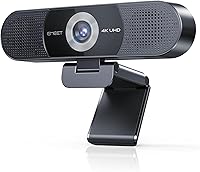
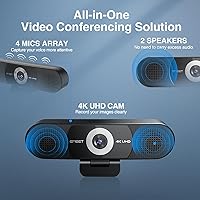
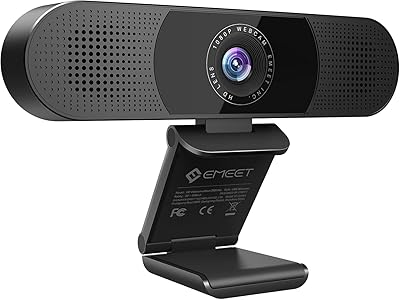
The EMEET C980 Pro takes a practical approach to desk simplification — combining a 4K camera, a four-microphone array, and dual speakers into a single USB device that plugs in and works immediately. Launched in late 2024, it has quickly climbed to a top-60 ranking in webcams, suggesting real buyer demand rather than just marketing noise. The appeal is straightforward: one cable replaces a separate webcam, USB mic, and desktop speaker. Worth noting upfront, though — this camera uses fixed focus and a USB 2.0 connection, both deliberate design choices that keep setup simple but do impose real-world limitations buyers should factor in before purchasing.

Features & Benefits

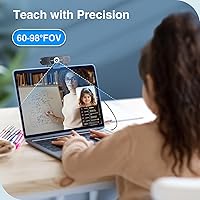
The CMOS sensor paired with a six-element glass lens produces noticeably sharper, less distorted footage than most webcams in this range — particularly in low-contrast lighting where cheaper lenses tend to smear detail. The adjustable wide-angle view spans from a tighter personal framing to a room-filling 98 degrees, which is genuinely useful when you shift from a solo call to pulling in a colleague sitting beside you. The four-mic array handles background noise well at conversational distances, and the two built-in speakers deliver clear enough audio for call playback. They will not replace dedicated desktop speakers, but for a meeting-focused device they hold their own.

Best For

This all-in-one webcam suits remote professionals who want a clean, no-fuss setup for daily Zoom or Teams calls without hunting for drivers or fiddling with settings. It is also a reasonable pick for a small home office or huddle room where a full conferencing bar would be overkill. Content creators on a budget can get clean 4K footage without building out a dedicated camera rig. If you care about keeping sensitive calls off the cloud, the lack of Wi-Fi and Bluetooth is a genuine plus. That said, Linux users, tablet users, and anyone whose PC sits behind a USB hub or docking station should look elsewhere.

User Feedback

Buyers consistently highlight video clarity and the convenience of having audio handled by the same device — no extra cables, no pairing, just one port. Setup praise is common, especially from users who have previously wrestled with driver installations. On the flip side, some find the fixed focus limiting when sitting closer than a couple of feet from the camera, and a few note the built-in speaker volume feels modest in open or noisy spaces. The USB direct-connection requirement has caught buyers off guard — those expecting hub compatibility ran into power issues. Build quality gets mixed reactions, with the magnetic cover occasionally described as feeling somewhat lightweight rather than premium.

Pros

  • Single USB cable replaces a webcam, microphone, and desktop speaker — real desk simplification.
  • Plug-and-play setup works immediately on Windows and macOS with zero driver installation required.
  • The six-element lens produces noticeably sharper, less distorted video than most webcams in this class.
  • Adjustable wide-angle view lets you switch between solo and group framing without touching the camera position.
  • Four-microphone array handles typical home office background noise reliably during live calls.
  • Physical magnetic privacy shutter offers genuine lens coverage, not just a software toggle.
  • No Wi-Fi or Bluetooth means zero wireless data exposure — a real plus for security-conscious users.
  • The 1/4-inch tripod mount adds flexible placement options beyond standard monitor-top use.
  • At its price point, the all-in-one value is hard to match when buying equivalent audio and video separately.
  • EMEET C980 Pro supports major conferencing platforms out of the box with no configuration needed.

Cons

  • Fixed focus causes real sharpness problems for anyone sitting closer than arm's length from the camera.
  • USB hub and docking station incompatibility is a frequent setup surprise that forces port reshuffling.
  • Built-in speaker volume falls short in any environment with moderate background noise.
  • The plastic housing feels functional but does not inspire confidence compared to premium-tier webcams.
  • The magnetic privacy cover has been reported to shift or loosen with regular repositioning.
  • Companion software receives mixed feedback — occasional crashes and unclear UI reduce its usefulness.
  • 30FPS frame rate is adequate but noticeably behind cameras optimized for smooth motion or streaming.
  • Linux and ARM Windows users are fully locked out, shrinking the compatible audience considerably.
  • Wide-angle adjustments are manual and physical, which can disrupt active calls if you need to change framing.
  • Firmware update process through the EMEETLINK app has been unreliable for a subset of users.

Ratings

The EMEET C980 Pro has been evaluated by our AI system after analyzing thousands of verified global buyer reviews, with spam, bot submissions, and incentivized feedback actively filtered out. Scores reflect the real-world experience of remote workers, content creators, and hybrid office users — not marketing claims. Both standout strengths and genuine frustrations are factored into every category below.

Video Clarity
88%
Most buyers are genuinely impressed by how sharp and detailed the footage looks on calls — faces are well-defined, backgrounds stay readable, and the six-element lens keeps edge distortion to a minimum compared to similarly priced competitors. For daily video calls and light content creation, the image quality consistently draws positive comments.
At 30FPS the video is smooth but not buttery, and in lower-light conditions some users notice the image loses punch. A few creators accustomed to mirrorless cameras found the dynamic range limiting, particularly in backlit home office setups.
Audio Capture
83%
The four-microphone array handles typical home office ambient noise — keyboard clicks, HVAC hum, street noise — without requiring any manual adjustments. Colleagues on the other end of calls frequently remark that voices come through cleanly, which is the practical benchmark that matters most for this device.
At greater distances or in rooms with hard surfaces and echo, voice pickup becomes less consistent. A handful of users in open-plan spaces found the noise cancellation struggling to keep up when multiple people were talking simultaneously near the camera.
Built-In Speaker Quality
67%
33%
For a webcam with integrated speakers, audio playback is cleaner than most buyers expected — call audio and notification sounds come through without the tinny resonance common in budget all-in-one devices. Users in quiet home offices found them perfectly adequate for one-on-one meetings without needing a separate speaker.
Volume headroom is the recurring complaint; in any environment with moderate ambient noise, the speakers can feel underpowered. Users who take calls in kitchens, open offices, or near windows regularly mentioned needing to lean in or pair external audio after all.
Setup & Ease of Use
91%
Plug-and-play via USB-A means most users are up and running in under a minute with no driver downloads or software configuration required. This straightforward experience is especially valued by less technical users who have been burned by finicky webcam installations in the past.
The requirement to connect directly to a computer port — bypassing USB hubs and docking stations entirely — catches a meaningful number of buyers off guard. Users with cable-managed desks or laptop docking setups have reported frustrating power instability or dropped connections when ignoring this requirement.
Wide-Angle Flexibility
79%
21%
The ability to adjust the field of view from a standard personal framing to a near-100-degree wide shot is a practical differentiator for small meeting rooms or shared desks. Users who occasionally pull a colleague into frame mid-call find this adjustment genuinely useful rather than just a spec-sheet talking point.
The transition between angle settings is manual and requires physically adjusting the camera, which some users find disruptive during live calls. A few buyers also noted that the widest setting introduces mild geometric distortion around the frame edges.
Fixed Focus Performance
63%
37%
For users positioned at a normal desk distance — roughly two to four feet from the screen — fixed focus works reliably and eliminates the hunting or refocusing lag that autofocus cameras sometimes exhibit mid-call. It is a sensible design choice for the target use case.
Users who sit closer to their monitors, or who use the camera for product demos and close-up content, run into real sharpness issues that cannot be corrected. This is one of the most commonly cited disappointments among buyers who did not read the specs carefully before purchasing.
Build Quality & Design
72%
28%
The overall form factor is compact and professional-looking — it does not stand out awkwardly on a monitor shelf or conference table. The 90-degree tilting stand gives reasonable flexibility for finding a flattering camera angle without needing a separate mount.
The plastic housing feels functional rather than premium; buyers comparing it to higher-end Logitech units frequently describe it as feeling slightly lightweight in hand. The magnetic privacy cover, while a thoughtful feature, has been described by several users as less sturdy than expected.
Privacy & Security
86%
The physical magnetic shutter is a meaningful step above software-only privacy solutions — when it is closed, the lens is genuinely blocked, which offers peace of mind for users who keep their cameras running throughout the workday. The absence of wireless connectivity also means no background data transmission to worry about.
The magnetic cover has occasionally been reported to shift position in transit or when the camera is repositioned, which undermines confidence slightly. There is no LED indicator to confirm when the camera is actively streaming, which some security-conscious users noted as a minor gap.
Compatibility
74%
26%
Out-of-the-box support for Windows 10 and 11, recent macOS versions, and Android TV covers the vast majority of home and business users without any additional configuration. Major conferencing platforms like Zoom and Teams work immediately without touching any settings.
Linux users are explicitly unsupported, and ARM-based Windows devices also fall outside the compatibility list — a real limitation as more users shift to ARM laptops. Tablet users should also note this is strictly a desktop peripheral, which narrows the use-case pool somewhat.
Cable & Connectivity
71%
29%
The six-foot cable gives enough reach to position the camera comfortably on top of a monitor or on a shelf several feet from the PC tower. Most users find the length practical without creating significant cable management headaches.
USB 2.0 throughput is sufficient for the camera's output, but the hard requirement for a direct motherboard or laptop port connection is a persistent pain point. Buyers with fully occupied USB ports on their machines need to replug other devices rather than using a hub.
Value for Money
81%
19%
Replacing a standalone webcam, USB microphone, and desktop speaker with one device at this price point represents a genuine saving for users who would otherwise buy all three separately at entry-to-mid-range quality. The consolidated setup cost is a strong selling point.
Users comparing strictly on video performance against dedicated webcams in the same price bracket sometimes feel the audio compromises are not worth it. For buyers who already own quality audio gear, the all-in-one bundling adds less value and the relative cost-per-feature calculus shifts.
Mounting & Placement Options
77%
23%
The 1/4-inch tripod nut interface adds meaningful flexibility for users who want to position the camera away from their monitor, on a desk arm, or at a custom height for content creation. The tilting stand handles most standard monitor-top setups without fuss.
Tripod accessories are sold separately, which feels like a missed opportunity for a product positioning itself as a complete solution. The stand does not clip to ultrawide or curved monitors as securely as some users expected.
Software & Firmware
68%
32%
The EMEETLINK companion app lets users fine-tune image settings and update firmware without needing third-party tools, which adds a layer of customization beyond the plug-and-play baseline. Users who take the time to explore it find color and exposure adjustments make a visible difference.
Several buyers report inconsistent experiences with the software — occasional crashes, unclear UI labeling, and firmware update prompts that do not always complete reliably. For a device marketed on simplicity, the software layer introduces more friction than it should.
Noise Cancellation in Practice
76%
24%
In controlled home office conditions the noise cancellation holds up well — keyboard typing, fan noise, and moderate street sounds are filtered without noticeably affecting voice tone or warmth. Users on back-to-back calls appreciate not having to manually mute between meetings.
Aggressive background environments — construction outside a window, a busy shared apartment, open-plan coworking spaces — expose the limits of onboard processing. Some users noted that heavy filtering occasionally introduced a slightly processed quality to their voice on the receiving end.

Suitable for:

The EMEET C980 Pro is a strong fit for remote professionals who want to reduce desktop clutter without sacrificing call quality — particularly those juggling back-to-back Zoom or Teams meetings from a home office or a small dedicated workspace. If you currently have a mid-range webcam, a USB microphone, and a desktop speaker all competing for ports and desk real estate, consolidating into one device makes genuine practical sense. It is especially well-suited to small huddle rooms or shared home office setups where two or three people occasionally need to fit into frame, since the adjustable wide-angle view handles that shift without any hardware swap. Content creators who want clean, high-resolution video for streaming or recording — but are not yet ready to invest in a full mirrorless camera setup — will find the image quality a meaningful step up from standard 1080p webcams. Privacy-conscious users will also appreciate that the device keeps everything local, with no wireless transmission or cloud dependency to worry about.

Not suitable for:

The EMEET C980 Pro is not the right call for users whose PC workflow depends on USB hubs or docking stations, since the camera requires a direct port connection to draw stable power — a requirement that routinely surprises buyers who only discover it after setup. Anyone who sits closer than a couple of feet from their monitor will likely find the fixed focus a persistent frustration, as there is no autofocus to compensate for close-range sharpness. Linux users and those on ARM-based Windows devices are explicitly unsupported and should not purchase this camera expecting full functionality. The built-in speakers, while useful in quiet environments, will not satisfy users who take calls in open-plan offices, noisy apartments, or any space with meaningful ambient sound. Tablet users should also pass entirely, as this is a desktop-only peripheral with no meaningful compatibility beyond PC and Mac.

Specifications

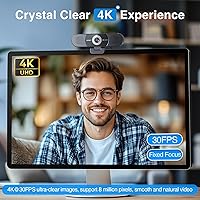
  • Video Resolution: Captures footage at 4K UHD natively, with the ability to output at 2K or 1080p depending on platform and bandwidth requirements.
  • Frame Rate: Records and streams at 30 frames per second across all supported resolutions.
  • Image Sensor: Uses a CMOS sensor designed to improve color accuracy and detail retention while keeping power draw low.
  • Lens: A six-element (6P) glass lens reduces edge distortion and improves center-to-corner sharpness compared to simpler plastic lens assemblies.
  • Field of View: Offers a manually adjustable field of view ranging from 60 degrees for tighter personal framing up to 98 degrees for wide group coverage.
  • Focus System: Fixed focus only — no autofocus mechanism; optimized for subjects seated at a standard desk distance from the camera.
  • Microphones: Four-microphone noise-canceling array with a claimed pickup range of up to 10 feet under typical room conditions.
  • Speakers: Two built-in AI speakers tuned for low distortion, intended for call audio playback in quiet to moderately quiet environments.
  • Connectivity: USB 2.0 Type-A interface; plug-and-play with no drivers required, but must connect directly to a computer port — USB hubs and docking stations are not supported.
  • Power Requirement: Draws power at 5V with a maximum of 500mA, supplied entirely through the USB connection with no external power adapter needed.
  • Cable Length: Ships with a permanently attached 6-foot (approximately 1.8-meter) USB cable.
  • Privacy Cover: Magnetic physical shutter slides over the lens to block the camera entirely, with no software component required to activate it.
  • Wireless: No Wi-Fi, Bluetooth, or any wireless connectivity — all data stays local to the connected computer.
  • Mounting: Includes a 90-degree forward-tilting stand for monitor-top use and a 1/4-inch threaded nut interface for optional tripod mounting.
  • Dimensions: Measures 2.76 inches deep, 6.3 inches wide, and 2.44 inches tall with the stand attached.
  • Weight: Weighs 10.9 ounces (approximately 309 grams) as a complete unit including stand.
  • OS Compatibility: Supports Windows 10 and 11, macOS 10.14 and later, and Android TV 7.0 and above; Linux, ARM Windows, tablets, and game consoles are not supported.
  • Video Format: Outputs video in YUY2 or MJPEG format depending on the host platform and application requirements.
  • Audio Formats: Supports AAC, MP3, PCM, FLAC, and Dolby Digital/AC-3 audio formats for playback through the built-in speakers.
  • Software: Optional EMEETLINK companion app available for image customization and firmware updates on supported Windows and macOS systems.

Related Reviews
EMEET C980 PRO

EMEET C980 PRO
83%
84%
Video Clarity (1080p)
89%
Audio Output Quality
78%
Microphone Performance
92%
Build & Physical Security
71%
Low-Light Correction
More
Ubiquiti UniFi Dream Machine Pro UDM-Pro
86%
94%
Performance
88%
Ease of Use
90%
Reliability
92%
Connectivity
85%
Network Security Features
More
DS18 PRO-DR1PK44 Compression Driver with PRO-H44/BK Horn
86%
96%
High-Frequency Loudness
93%
Sensitivity & Efficiency
88%
Vocal Clarity & Naturalism
86%
Build Quality & Materials
81%
Installation Versatility
More
DS18 PRO-ZXI10MBASS 10-inch Pro Audio Mid Bass Loudspeaker
86%
88%
Sound Quality
91%
Bass Performance
85%
Ease of Installation
87%
Durability and Build Quality
92%
Value for Money
More
Cinema Secrets Pro Cosmetics Ultimate Corrector 5-In-1 Pro Palette No.1
86%
91%
Effectiveness for Color Correction
88%
Blendability
84%
Coverage Customization
85%
Longevity of Wear
93%
Suitability for All Skin Tones
More
Apple MacBook Pro 14-inch M1 Pro 16GB RAM 1TB SSD
87%
95%
Performance
92%
Display Quality
89%
Battery Life
91%
Build Quality
82%
Value for Money
More
Cinema Secrets Pro Cosmetics Ultimate Foundation 5-In-1 Pro Palette 500A

88%
93%
Coverage & Pigmentation
85%
Skin Compatibility (Sensitive Skin)
88%
Ease of Application
90%
Longevity & Wear
91%
Versatility (Contouring & Concealing)
More
HP Pro Tower 290 G9 Desktop (i5-12500, 32GB RAM, 1TB SSD)

81%
96%
Multitasking Capability
91%
Value for Money
88%
Port Selection
84%
Thermal & Acoustic Performance
93%
Boot Speed & Storage
More
JLab JBuds Pro
JLab JBuds Pro
85%
88%
Sound Quality
85%
Bass Response
91%
Fit & Comfort
82%
Battery Life
78%
Bluetooth Connectivity
More
JONSBO D32 PRO
JONSBO D32 PRO
88%
94%
Build Quality
91%
Cooling Support
89%
GPU Compatibility
88%
Motherboard Compatibility
85%
Ease of Assembly
More

FAQ

No — the camera is fully plug-and-play on both Windows and macOS. Just plug it into a USB port and your operating system recognizes it automatically. The optional EMEETLINK software is available if you want to adjust image settings or update firmware, but it is not required to get up and running.

Unfortunately, no. This is one of the most important things to know before buying. The camera needs to be connected directly to a USB port on your computer to draw stable power. Running it through a hub or dock — even a powered one — can cause connection drops or prevent the camera from being recognized at all.

Yes, as long as your Mac is running macOS 10.14 (Mojave) or a later version. It works natively without any software installation and is compatible with Zoom, Teams, FaceTime, and other major conferencing apps on macOS.

Correct. There is no autofocus and no manual focus ring on this camera. It is calibrated to produce sharp images at a typical desk-to-monitor distance, roughly two to four feet. If you tend to sit very close to your screen or want to film subjects at varying distances, you may notice softness that cannot be corrected.

They are adequate for one-on-one calls in a reasonably quiet home office — call audio and notification sounds come through clearly enough. That said, if your space has any meaningful background noise or you just prefer higher volume, they will likely feel underpowered. Think of them as a convenient complement to your setup rather than a full speaker replacement.

No — Linux is explicitly listed as unsupported. The same applies to ARM-based Windows devices, tablets, and game consoles. If your machine runs any of those operating systems, this is not the right camera.

Yes, when closed it physically covers the lens entirely — it is not a software toggle or an LED indicator, it is a real physical shutter. The main caveat from user feedback is that the cover can shift slightly if the camera is bumped or repositioned frequently, so it is worth checking it is seated properly after moving the camera.

Yes. There is a 1/4-inch threaded nut on the bottom of the unit, which is the standard tripod mount size. EMEET does not include a tripod in the box, but any standard camera tripod or desk arm with a 1/4-inch thread will fit. This is a useful option if you want to position the camera somewhere other than the top of your monitor.

It can do both reasonably well. The 4K resolution and six-element lens produce clean, detailed footage that is a noticeable step up from standard 1080p webcams, and the four-microphone array handles light ambient noise without an external mic. For casual streaming, podcasting, or recording tutorials it is a capable all-in-one. If you are producing professional-level video content, you will likely want a dedicated mirrorless camera at some point, but for most home creators it holds its own.

EMEET rates the pickup range at up to 10 feet under typical conditions, and in practice most users find it handles normal conversational distances in a home office without issue. Echo-heavy rooms or especially noisy environments can degrade performance at the far end of that range, but for standard desk use — say, one to six feet from the camera — voice clarity is generally solid.