Overview

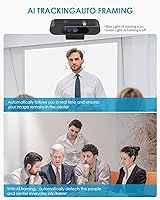
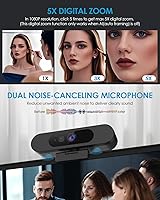
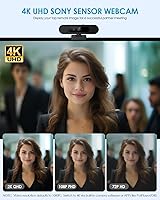
The MOERTEK MT 4K Webcam is a mid-range camera that launched in late 2024, aimed at home office workers and casual streamers who want AI-powered features without paying a premium price. MOERTEK isn't a household name, so the specs and real-world results need to do the talking — and there's one thing worth knowing upfront: 4K and auto-framing cannot run simultaneously. Auto-framing, along with 5x digital zoom, only operates at 1080P. The camera is compact at 3.53 oz and connects via USB with no drivers required, making setup genuinely painless across Windows, macOS, Linux, and Android.

Features & Benefits

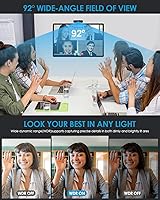
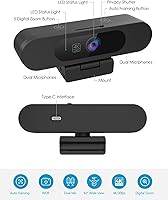
The AI auto-framing tracks movement and recenters the frame automatically, which proves useful if you pace during calls or work at a standing desk. The 92° field of view is wide enough to capture a second monitor or a notepad beside you without repositioning the camera. WDR light correction handles mixed or dim lighting without manual adjustments, and the f/2.2 aperture helps pull in enough light for a natural exposure. The dual noise-reducing microphones reach up to 3 meters with 180° horizontal pickup — adequate for a quiet home office, though not a substitute for a dedicated mic. The built-in privacy cover is a small but practical inclusion.

Best For

This 4K webcam suits remote workers who spend long hours on video calls and want noticeably sharper image quality than a built-in laptop camera delivers. It works especially well for people who move around during presentations, since auto-framing handles repositioning without any manual effort. Casual streamers using OBS or PotPlayer will find the 4K output worthwhile, though they should expect to activate that resolution manually through software — it does not default on. Cross-platform users benefit from the plug-and-play setup, with no driver installs or configuration headaches involved. Anyone prioritizing privacy will also appreciate the physical lens cover, a feature many competing webcams omit.

User Feedback

Buyer responses to the MOERTEK webcam follow a fairly predictable pattern. Users who stick with 1080P — the out-of-box default — report solid image clarity and quick, hassle-free setup. The frustration tends to come from buyers who assumed 4K and auto-framing could work together; they cannot, and that gap between expectation and reality is the most recurring complaint. Microphone feedback is mixed: serviceable in quiet rooms, but noticeably underwhelming in louder or more open spaces. MOERTEK's claim of lifetime technical support gets positive mentions, though whether that support is consistently responsive in practice is harder to confirm from available buyer accounts.

Pros

  • Plug-and-play USB setup works immediately on Windows, macOS, Linux, and Android — no driver installs needed.
  • AI auto-framing keeps you centered in the frame during calls, even when you move around frequently.
  • The 92° field of view is wide enough to share a desk setup or secondary screen without repositioning.
  • WDR light correction handles tricky lighting conditions automatically, reducing the need for extra studio lighting.
  • Built-in physical privacy cover gives you instant lens blocking without unplugging anything.
  • Dual noise-reducing microphones are sufficient for quiet home office calls, removing the need for a basic external mic.
  • Supports a wide range of video call and streaming apps including Zoom, Teams, OBS, Skype, and FaceTime.
  • Compact and light enough at 3.53 oz to sit on virtually any monitor without strain or instability.
  • Lifetime technical support is offered by the manufacturer, which is a reassuring safety net for less technical users.

Cons

  • 4K resolution and AI auto-framing cannot run at the same time — a significant limitation given these are the two headline features.
  • 4K mode does not activate automatically; users must manually switch to it through third-party software like OBS or PotPlayer.
  • The 5x digital zoom is locked to 1080P only, limiting its usefulness for anyone shooting in 4K.
  • Microphone performance drops off noticeably in louder or more open environments, making it unreliable as a solo audio solution.
  • MOERTEK is a relatively unknown brand with limited independent long-term reliability data available.
  • Whether the promised lifetime technical support holds up consistently in practice is difficult to verify from current buyer accounts.
  • Defaulting to 1080P out of the box means less experienced users may never realize they have 4K capability.
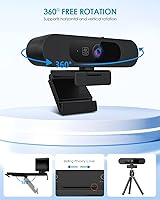
  • No mention of a mounting thread or tripod compatibility, which limits flexible positioning options beyond monitor placement.

Ratings

Our AI scoring model analyzed verified global buyer reviews for the MOERTEK MT 4K Webcam — actively filtering out incentivized, bot-generated, and duplicate submissions — to produce the scores below. Each category reflects the honest distribution of real user sentiment, weighted by purchase recency and review depth. Both the genuine strengths and the frustrating limitations are represented transparently, so you can make a fully informed decision.

Image Quality at 1080P
83%
Users consistently praise how sharp and natural the image looks during everyday video calls at 1080P. The f/2.2 aperture and WDR correction work together to keep faces well-lit even in dim rooms, which is a real advantage for anyone working near a window with unpredictable light.
A handful of users noted that the image can look slightly over-sharpened in high-contrast scenes, which creates an artificial look compared to pricier webcams with larger sensors. Color accuracy, while generally acceptable, is occasionally reported as slightly cool or flat.
4K Capture Quality
67%
33%
When manually activated through OBS or PotPlayer, the 4K output is noticeably crisper than 1080P — particularly for static shots where fine detail matters, such as showing printed documents or detailed product demos on camera.
The requirement to activate 4K manually through third-party software is a real stumbling block for less technical users, and many never successfully enable it at all. On top of that, the 4K mode strips away auto-framing and digital zoom, leaving the camera feeling less capable rather than more.
AI Auto-Framing
71%
29%
For users who stand, pace, or step back to reference a whiteboard during calls, the AI tracking does a decent job of keeping the subject centered without any manual camera adjustment. It responds reasonably well to gradual movement and is a genuinely useful feature for active presenters.
The framing can lag noticeably during fast or wide movements, causing a brief disorienting zoom before it recorrects. More critically, the fact that it is entirely unavailable in 4K mode means users have to consciously choose between resolution and smart framing — a trade-off many find frustrating.
Ease of Setup
91%
Plug-and-play USB setup is where this camera genuinely delivers without caveats. Users across Windows, macOS, Linux, and Android report that it is recognized instantly with zero driver installation, which makes it ideal for people who just need a camera working in under two minutes.
The out-of-box experience breaks down slightly once users try to unlock advanced features like 4K resolution or manual focus adjustments, both of which require navigating third-party software that is not bundled or clearly explained in the documentation.
Microphone Performance
62%
38%
In a quiet home office, the dual mics hold up well enough for video calls — voice comes through clearly and background hum is reduced to an acceptable level. The 180° horizontal pickup means you do not need to position yourself precisely in front of the camera for your voice to register.
Buyers in louder environments — shared apartments, open offices, or rooms with HVAC noise — report that the noise reduction struggles to keep up, resulting in a muddy or distracting audio feed. It is an adequate convenience mic, but it is not a substitute for even an entry-level dedicated USB microphone.
Low-Light Performance
74%
26%
The WDR light correction handles mixed indoor lighting reasonably well, keeping faces visible and preventing the harsh blown-out look common in cheaper webcams near windows. Most home office users report they do not need a ring light to look presentable on calls.
In genuinely dark conditions — a bedroom at night with only a desk lamp — the image becomes notably grainy and soft. The CMOS sensor size is a limiting factor that no amount of software correction can fully compensate for in true low-light scenarios.
Field of View
79%
21%
The 92° field of view strikes a practical balance for desk use — wide enough to include a second monitor or nearby colleague without creating the distorted fisheye effect that ultra-wide webcams sometimes produce. Presenters who share physical workspace context during calls find it especially useful.
Users who wanted a tighter, more portrait-focused framing for solo talking-head calls find 92° slightly too wide by default, and without a software crop tool built into the camera, adjusting framing requires relying on the app-level controls of whichever platform they are using.
Build Quality & Design
68%
32%
The camera feels solid enough for daily desk use, and at 3.53 oz it sits stably on most monitors without the clip digging in or shifting. The integrated privacy cover is a thoughtful inclusion that feels more premium than the stick-on lens covers bundled with competing models.
The plastic housing has a lightweight feel that some users associate with budget construction, and the monitor clip — while functional — does not offer significant angle adjustment range, which can be limiting for setups where the monitor is positioned unusually high or low.
Software Compatibility
86%
The MOERTEK webcam works reliably with every major platform buyers are likely to use — Zoom, Microsoft Teams, Google Meet, OBS, Skype, FaceTime, and BlueJeans all recognized it without any configuration. This breadth of compatibility is consistently highlighted as a practical strength.
There is no proprietary companion app, which means users cannot adjust settings like brightness, saturation, or framing sensitivity from a single dedicated interface. Each platform handles camera settings differently, which creates an inconsistent experience depending on which app you are calling from.
Privacy Features
84%
The built-in physical privacy cover is one of the most appreciated details among security-conscious buyers. Being able to block the lens with a single slide — without unplugging the device or navigating software settings — is a small but meaningful quality-of-life feature.
Beyond the physical cover, there are no additional privacy or security features — no indicator light separate from the lens, and no companion software for permission management. For users who want layered privacy controls, the offering stops at the mechanical cover.
Value for Money
76%
24%
For buyers who primarily need a reliable 1080P webcam with auto-framing and a wide field of view, the price-to-performance ratio is genuinely reasonable. The feature set — including AI tracking, dual mics, and a privacy cover — would cost more if assembled from competing single-feature products.
The value proposition weakens for anyone who bought specifically for the 4K capability, given that unlocking it requires extra steps and immediately disables the camera's other standout features. In that context, some buyers feel the 4K label on the packaging overpromises relative to the practical experience.
Cross-Platform Compatibility
88%
Verified buyers using Linux — a platform often ignored by webcam manufacturers — specifically called out that this camera worked immediately without any workaround or manual driver compilation. Android tablet users also reported clean compatibility, which is rarer than it should be in this category.
A small number of macOS users on older operating system versions reported occasional recognition failures after waking from sleep, requiring a USB replug to restore the connection. This appears to be an edge case but is worth noting for Mac users who leave their systems on extended sleep cycles.
Brand Trust & Support
58%
42%
MOERTEK's stated lifetime technical support via email is noted positively by buyers who needed help with software configuration, and some report receiving helpful, timely replies. The brand ranks solidly in the webcam category for a product launched less than a year ago, which suggests real market traction.
MOERTEK is an unfamiliar name with a limited track record outside of this product, which makes it difficult to assess long-term reliability or consistent support quality. Buyers who prioritize brand accountability and established after-sales infrastructure may understandably feel uncertain committing to an unknown manufacturer.

Suitable for:

The MOERTEK MT 4K Webcam is a practical pick for remote workers who spend a good portion of their day on video calls and want noticeably cleaner image quality than a built-in laptop camera provides. If you tend to move around during calls — standing up, stepping back to reference a whiteboard, or presenting from a distance — the AI auto-framing feature is genuinely useful at 1080P. Casual streamers who use OBS or PotPlayer and want access to 4K capture without investing in a complex rig will find this camera covers the basics well, provided they are comfortable activating 4K manually through software. Cross-platform households benefit too: the plug-and-play USB setup works across Windows, macOS, Linux, and Android without hunting for drivers. People who value privacy will appreciate that the physical lens cover is built in, not sold separately.

Not suitable for:

Buyers who expect to run 4K resolution and AI auto-framing at the same time will be disappointed — the MOERTEK MT 4K Webcam simply does not support that combination, and this is a hard technical limitation, not a settings issue. Professional streamers or content creators who need consistently sharp 4K output without manual software configuration will likely find the workflow friction frustrating. Anyone working in a loud environment — open-plan offices, shared spaces, or rooms with heavy background noise — should not rely on the built-in microphones as a primary audio source; they are adequate in quiet conditions but not robust enough for noisier setups. Buyers unfamiliar with software like OBS or PotPlayer may never actually unlock 4K mode, since the camera defaults to 1080P and the activation process is not obvious. Finally, those who prefer an established brand with a proven support track record may want to look elsewhere, as MOERTEK is a newer name with limited long-term reliability data.

Specifications

  • Video Resolution: Supports 4K, 2K, and 1080P capture, with the default output set to 1080P out of the box.
  • Image Sensor: Uses a CMOS sensor with an f/2.2 aperture and a 3mm focal length for reliable light capture in varied conditions.
  • Field of View: A 92° wide-angle field of view captures a broad scene, making it practical for desk setups, whiteboards, and shared workspaces.
  • AI Auto-Framing: AI-powered auto-framing detects movement and recenters the frame automatically, but operates exclusively at 1080P — not at 4K.
  • Digital Zoom: Offers 5x digital zoom, available only when shooting at 1080P resolution.
  • Focus Modes: Supports both auto-focus and fixed-focus modes to suit dynamic presentations or stationary desk setups.
  • Microphones: Dual built-in noise-reducing microphones with an SNR above 58dB and 180° horizontal pickup capture voice up to 3 meters away.
  • Light Correction: Wide Dynamic Range (WDR) light correction automatically balances exposure in low-light or high-contrast environments.
  • Video Format: Records and streams in MJPG format, which is broadly compatible with major video call and streaming applications.
  • Connectivity: Connects via USB with true plug-and-play functionality — no drivers or additional software installation required.
  • OS Compatibility: Compatible with Windows, macOS, Linux, and Android operating systems without requiring dedicated drivers.
  • App Support: Works with Zoom, Microsoft Teams, Skype, OBS, PotPlayer, YouTube, FaceTime, and BlueJeans, among other common platforms.
  • Privacy Cover: Features a built-in physical privacy cover that slides over the lens to block the camera without unplugging the device.
  • Weight: Weighs 3.53 oz, making it light enough to sit stably on top of most standard monitors without a mounting bracket.
  • Dimensions: Measures 5.04 x 2.05 x 1.89 inches in packaged form, reflecting a compact and unobtrusive physical footprint.
  • Brand: Manufactured by MOERTEK, a consumer electronics brand that launched this model in September 2024.
  • Warranty: MOERTEK states lifetime technical support is available via email for any issues encountered after purchase.

Related Reviews

Combess XIAOJINGLING 4K Webcam

71%
71%
Image Quality
66%
Low-Light Performance
64%
Autofocus Performance
61%
Microphone Quality
55%
Noise Reduction
More
Lusinx TW 4K Webcam
Lusinx TW 4K Webcam
73%
73%
Video Quality
79%
Low-Light Performance
71%
Microphone Quality
91%
Setup & Compatibility
58%
Build Quality
More
PEATOP 4K-C80CCMD Webcam
75%
74%
Video Quality
68%
Autofocus Performance
61%
Low-Light Performance
63%
Microphone Quality
93%
Setup & Compatibility
More
Lumina LX011 4K Webcam
81%
91%
Image Quality
87%
Low-Light Performance
83%
AI Auto-Framing
93%
Build Quality
78%
Microphone Quality
More
Diccik 4K HD Webcam
Diccik 4K HD Webcam
72%
81%
Value for Money
69%
Video Quality
93%
Ease of Setup
76%
Light Correction
57%
Microphone Quality
More
PixelForge 4K Webcam
86%
94%
Video Quality
88%
Audio Performance (Microphone)
91%
Ease of Setup
89%
Lighting Effectiveness
86%
Privacy Features
More
Opal Tadpole 4K Webcam
73%
78%
Image Quality
84%
Build Quality
71%
Microphone Performance
91%
Portability & Size
76%
Mounting & Compatibility
More
Camii C-4K 4K Webcam with Light
72%
83%
Value for Money
71%
Image Quality
88%
Built-in Ring Light
62%
Microphone Quality
76%
Remote Control
More
j5create JVU430 4K Webcam
74%
72%
Image Quality
58%
Low-Light Performance
54%
Autofocus
61%
Audio Quality
76%
Value for Money
More
VIZOLINK V20 4K PTZ Webcam
77%
78%
Video Quality
82%
Audio Performance
84%
PTZ & Remote Control
91%
Ease of Setup
86%
Value for Money
More

FAQ

No — this is a hard limitation worth knowing before you buy. The MOERTEK MT 4K Webcam only supports AI auto-framing at 1080P. If you switch to 4K, the auto-framing and 5x digital zoom features are both disabled. You have to choose between the two.

That is expected behavior. The camera ships set to 1080P by default, and you need to manually switch to 4K through a compatible app. OBS Studio and PotPlayer both let you select the output resolution; most built-in OS camera apps may not expose this option, so third-party software is the practical route.

No drivers are needed. It is a plug-and-play USB device that your operating system recognizes automatically — Windows, macOS, Linux, and Android all work without any additional software. Just plug it in and open your video call or streaming app.

It works on both. The camera is fully compatible with macOS without any driver installation. It also supports Linux and Android, which makes it a solid choice for mixed-platform households or developers who switch between machines.

In a quiet home office, yes — they are adequate for calls and basic recordings. The dual mics reduce background noise reasonably well at up to 3 meters. That said, if your workspace is noisy, open-plan, or you are recording content seriously, a dedicated USB or XLR microphone will give you a noticeably better result.

It uses digital cropping and zoom to reframe the image around detected movement, keeping you centered without you having to physically move the camera. This works well for gradual movement like standing up or stepping back slightly. Rapid or large movements may result in a brief lag before the frame catches up.

For most standard desk setups, yes. At a typical monitor-to-chair distance, 92° captures enough width to include a second screen or some items beside you. It is not an ultra-wide fisheye view, but it is broader than the 60–70° found on many basic webcams, which makes a noticeable difference when sharing workspace context on calls.

No, unplugging is not needed. The privacy cover is a physical slider built directly into the camera housing. Slide it over the lens and the view is blocked instantly. The camera remains connected and your system still recognizes it — it just cannot capture any image. It is a simple but genuinely useful feature.

It handles low light reasonably well for its price range. The f/2.2 aperture pulls in more light than a narrower lens would, and the WDR light correction adjusts exposure automatically to avoid blown-out or underexposed faces. It is not a match for premium webcams with larger sensors, but most users in typical home office lighting will get acceptable results.

MOERTEK advertises lifetime technical support via email, and some buyers mention positive experiences reaching out to them. That said, MOERTEK is a newer and less-established brand, so the long-term consistency of that support is harder to verify than it would be for a major manufacturer. For common issues like resolution switching or software compatibility, community forums for OBS or your specific OS are often just as helpful.