Overview

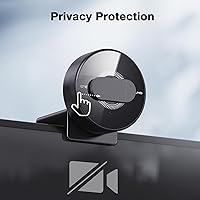
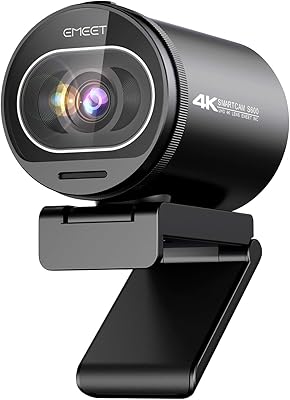
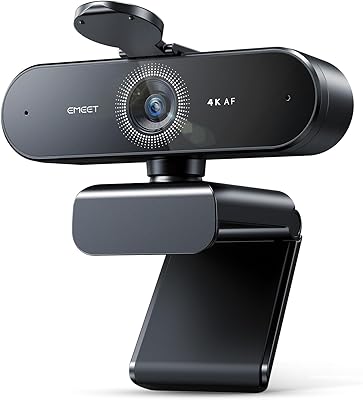
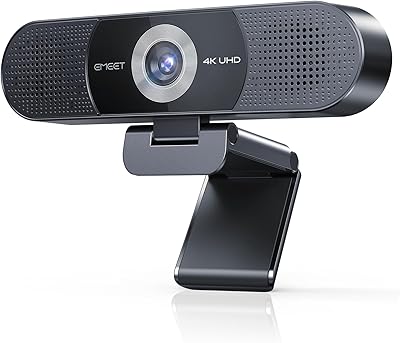
The EMEET C950 4K Webcam arrived in mid-2024 and has quietly climbed to one of the top spots in its category — not bad for a compact device that costs less than most people spend on a monthly streaming subscription. It sits small enough to perch on any monitor without blocking the screen, and setup takes about thirty seconds: plug in the USB cable and you are live. There is a physical privacy shutter built into the housing, which more buyers are treating as non-negotiable these days. For home offices, classrooms, or casual streaming setups, this webcam covers a lot of ground without demanding a premium-tier investment.
Features & Benefits

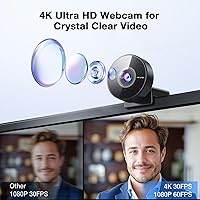
The C950 supports both 4K at 30 frames per second and full HD at 60fps, so you can prioritize resolution or smoothness depending on your platform. Its PDAF autofocus system — the same phase-detection technology found in many smartphone cameras — locks onto a face quickly and holds steady without the jittery hunting effect common in cheaper optics. The 70-degree field of view is deliberately narrow, keeping the background out of the shot rather than broadcasting your entire room. A built-in microphone handles background noise reasonably well within a normal desk range. The tilt bracket adjusts generously both forward and back, which matters more than expected when mounting high on a tall monitor.

Best For

This 4K camera is a strong pick for anyone who relies on daily video calls and feels let down by a laptop's built-in camera — which, honestly, is most people. Students joining online classes benefit from the clear image and usable audio without needing a separate microphone. Home office workers who want nothing phoning home will appreciate that there is no cloud, no Wi-Fi, and no Bluetooth dependency whatsoever. Light streamers or tutorial creators shooting at 1080P for smoother motion will find the image more than capable. Worth flagging: there is no tripod thread, so monitor or screen mounting is the only intended placement option.

User Feedback

Buyers generally come away impressed with image sharpness in daylight, though several note that performance drops noticeably in dim or purely artificial lighting — a fair trade-off at this price tier. The autofocus draws consistent praise for being quick without overreacting to minor movement. Audio gets a mixed but mostly positive reception: clear enough for calls, though anyone expecting podcast-level quality will want a dedicated microphone. The lack of a tripod mount shows up regularly as a complaint, especially from buyers who wanted more placement flexibility. On value, the consensus leans positive — most feel the combination of 4K resolution, privacy features, and reliable autofocus at this tier is hard to match.

Pros

  • Phase-detection autofocus locks on quickly and holds steady without the jittery hunting common in cheaper webcams.
  • The physical privacy shutter is a tangible, reliable way to block the lens — no software required.
  • Plug-and-play USB setup works immediately across Windows, macOS, and Android TV without driver installation.
  • Switching to 1080P at 60fps produces noticeably smoother motion, useful for tutorial recording or light streaming.
  • The compact footprint fits neatly on any monitor without blocking the screen or wobbling during calls.
  • No wireless radios, no cloud storage, and no background drivers keep the setup clean and low-risk.
  • The tilt bracket adjusts generously, handling both standard monitor height and higher shelf placements.
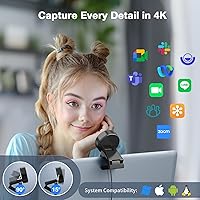
  • Compatible out of the box with every major calling platform including Zoom, Teams, Webex, and Google Meet.
  • The 70-degree field of view frames a solo subject cleanly without broadcasting the entire room behind you.

Cons

  • Low-light image quality degrades significantly — a desk lamp or ring light is essentially required for sharp footage.
  • The built-in cable is short enough to cause real problems for desktop users with a tower placed below the desk.
  • No tripod thread means placement is limited to monitor or screen edges — no standalone desk positioning.
  • The plastic housing feels hollow and budget-tier, which is noticeable when handling the camera up close.
  • The EMEETLINK companion software has an unintuitive interface and has reset custom image settings after firmware updates for some users.
  • The microphone picks up background bleed in genuinely noisy environments like shared offices or open kitchens.
  • The 4K resolution advantage is largely invisible on video calls due to platform compression — mostly useful for local recording.
  • The privacy shutter hinge feels loose on some units after repeated use, which undermines confidence in a safety-critical feature.
  • Buyers wanting to fit two people in the frame will find the narrower field of view a genuine limitation in shared setups.

Ratings

The EMEET C950 4K Webcam has accumulated a substantial volume of verified buyer feedback since its mid-2024 launch, and the scores below reflect an AI-assisted analysis of that data — filtered to remove incentivized, duplicate, and bot-generated submissions. What you see here represents the honest distribution of real-world experience, covering both what this camera does well and where it falls short for specific users.
Video Clarity
83%
Under good natural or desk lighting, buyers consistently describe the image as sharp and detailed — noticeably better than the built-in cameras on mid-range laptops. The 4K resolution gives faces a defined, three-dimensional look that reads well on the other end of a video call.
A number of users point out that the 4K advantage largely disappears on platforms like Zoom and Teams, which compress video regardless of source quality. In lower light the image softens and loses the crispness that makes 4K worth using in the first place.
Autofocus Performance
88%
The phase-detection autofocus is one of the most praised aspects of the C950. Users switching from webcams with older contrast-based systems notice an immediate difference — it locks on quickly when you sit down and does not drift or hunt during longer calls.
A small but consistent group of buyers reports occasional over-correction when there is movement near the edges of the frame, such as a pet walking by or a door opening. It is not frequent, but in open-plan offices it can be momentarily distracting.
Microphone Quality
71%
29%
For everyday video calls the built-in microphone holds its own, picking up voices clearly within a normal seated distance and doing a reasonable job of suppressing keyboard noise and ambient hum. Most call participants report that voices come through cleanly without additional hardware.
Buyers with an audio background or those recording tutorial content find the microphone output thin and lacking in warmth. It also struggles to fully isolate voices in genuinely loud environments like shared kitchens or open co-working spaces, where some background bleed comes through.
Low-Light Performance
62%
38%
The CMOS sensor performs acceptably in well-lit home office conditions with a ring light or a bright window nearby. Some buyers doing evening calls with a lamp behind their monitor report passable results compared to webcams in a similar price range.
Without supplementary lighting the image degrades noticeably — faces lose detail, colors shift toward muddy yellow tones, and the overall picture looks soft. This is probably the most common disappointment in verified reviews, particularly from buyers who expected 4K performance in dim conditions.
Privacy Features
93%
The physical lens cover is one of the most appreciated touches on this webcam, and buyers mention it repeatedly. Knowing there is no cloud storage, no wireless radio, and no background driver activity gives users in corporate and educational environments real peace of mind.
The physical shutter feels slightly plasticky and a couple of reviewers report that it can feel loose after frequent use. It is a minor construction concern, but for a feature that many buyers consider essential, a slightly more solid build would be reassuring.
Build Quality & Design
68%
32%
The compact footprint is genuinely appreciated — it sits flat on a monitor without wobbling and does not obstruct the screen. The all-black matte finish looks professional in video, and the overall form factor is unobtrusive on a busy desk.
The housing feels lightweight in a way that reads more as hollow than portable. Several buyers mention the plastic construction feels more budget-tier than the image quality would suggest, and at least a few noted the cable feels thin for something you plug and unplug regularly.
Ease of Setup
94%
Plug-and-play via USB works exactly as advertised across Windows, macOS, and even Android TV. Buyers who dread driver installations specifically call out how refreshing it is to have the camera recognized instantly without any setup wizard or account creation.
The EMEETLINK companion software, while optional, has drawn a handful of complaints about its interface feeling unintuitive on first launch. A small number of users on older macOS builds also experienced brief recognition delays before the camera was fully detected.
Field of View
77%
23%
The 70-degree framing is well-suited for solo use at a standard desk setup. You appear centered and appropriately sized in the frame without the fisheye distortion that wider-angle lenses sometimes introduce at lower price points.
Anyone hoping to fit two people in the shot — a common scenario in shared home offices or tutoring setups — will find the narrower field limiting. Several buyers specifically mention wishing for a wider option, even as a toggle in the companion app.
Platform Compatibility
91%
Zoom, Microsoft Teams, Google Meet, Webex, and Slack all recognize the webcam without manual configuration. Buyers in corporate environments using managed devices mention this as a specific positive, since IT-restricted machines often reject hardware requiring custom drivers.
A handful of users on older Windows 10 builds or non-standard Linux configurations report intermittent detection issues. These are edge cases, but worth noting for anyone working in a non-standard IT environment.
Frame Rate Flexibility
81%
19%
The ability to drop to 1080P at 60fps is practical for streamers and anyone recording motion-heavy content like tutorials with fast hand movements. Buyers doing casual streaming specifically mention that the smoother frame rate at full HD is more useful day-to-day than 4K at half the speed.
Switching between modes requires going through the EMEETLINK software or adjusting settings within the calling platform, which is not always intuitive. A dedicated hardware toggle or a simpler in-app control would reduce the friction for users who switch modes regularly.
Tilt & Mounting Flexibility
59%
41%
The vertical tilt range is generous enough to handle both a standard monitor placement and a higher shelf or shelf-mounted setup. Buyers working with unusually tall monitors appreciate being able to angle the lens downward without the camera sliding off.
The complete absence of a tripod thread is a real constraint that catches buyers off guard. Users who wanted to mount this on a portable stand, a desk arm, or position it away from a monitor have no official way to do so, which narrows the use-case considerably.
Value for Money
86%
At its price point, the combination of phase-detection autofocus, 4K resolution, a physical privacy shutter, and genuine plug-and-play reliability is difficult to match. Most buyers describe it as the most capable webcam they have owned without spending significantly more.
A few buyers who pushed into edge use-cases — low light recording, wide-angle group shots, or high-quality audio capture — feel the limitations add up and wish they had spent more on a fully-featured model. For basic-to-moderate use, though, the value holds.
Software & Firmware
66%
34%
The option to update firmware directly through EMEETLINK without hunting for downloads is a small but genuine convenience. Users who wanted to fine-tune brightness, contrast, and saturation beyond what their calling platform allows find the app useful for that.
The software itself draws criticism for a dated-feeling UI and occasional instability on macOS. A few users also reported that image customizations reset after a firmware update, which is a frustrating experience when you have spent time dialing in your settings.
Cable & Connectivity
73%
27%
USB 2.0 connectivity keeps things simple and broadly compatible, including with older laptops and desktop PCs that lack USB-C ports. Buyers in multi-device setups appreciate that it does not compete for bandwidth on a congested hub.
The built-in cable length is on the shorter side, which creates real issues for desktop users whose tower sits more than arm-reach from the monitor. An extension cable solves it, but it is an extra purchase that feels unnecessary for a work peripheral.

Suitable for:

The EMEET C950 4K Webcam is a practical choice for remote professionals who spend a meaningful portion of their workday on video calls and are tired of the grainy, flat image their laptop's built-in camera produces. Students attending online classes will appreciate that it handles both clear video and usable audio without requiring a separate microphone purchase. Privacy-conscious users — particularly those in regulated industries or simply uncomfortable with always-on connected devices — will find the combination of a physical lens cover, no wireless radios, and zero cloud dependency genuinely reassuring rather than a marketing talking point. Casual content creators who record tutorials or stream at full HD resolution will get smooth, capable footage without overspending on a prosumer setup. It also suits anyone setting up a home office on a tighter budget who wants a meaningful, visible upgrade over their current camera without committing to a premium-tier purchase.

Not suitable for:

The EMEET C950 4K Webcam is not the right tool for buyers who work in dim environments or rely on artificial lighting alone — the image quality drops noticeably without adequate light, and no amount of software adjustment fully compensates for what the sensor cannot capture in low-light conditions. Anyone expecting broadcast-quality audio from the built-in microphone will be disappointed; it handles calls competently but lacks the warmth and separation that dedicated USB or XLR microphones deliver. Users who need flexible camera placement — on a tripod, a desk arm, or anywhere away from a monitor edge — should know upfront that there is no tripod mount, and no workaround short of third-party adapters. Those regularly joining calls with a second person in the frame may also find the narrower field of view limiting for shared setups. Finally, buyers who need 4K resolution to genuinely register on the other end of their calls should understand that most major video platforms compress the stream, meaning the 4K benefit is most relevant for local recording rather than live conferencing.
Specifications

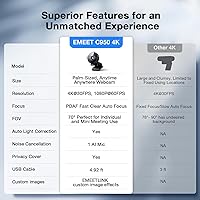
  • Resolution: Captures video at up to 4K UHD using an 8-megapixel CMOS sensor, with selectable output down to 1080P depending on platform and use case.
  • Frame Rates: Supports 4K at 30 frames per second and 1080P at 60 frames per second, allowing users to prioritize either resolution or motion smoothness.
  • Autofocus Type: Uses PDAF (Phase Detection Autofocus), which locks focus faster and with greater stability than standard contrast-detection systems found in most budget webcams.
  • Field of View: Offers a 70-degree horizontal field of view, designed to frame a single subject at a standard desk distance without exposing excessive background.
  • Microphone: Features a built-in noise-canceling microphone rated for clear voice capture up to approximately 6 feet from the camera.
  • Connectivity: Connects via USB 2.0 with full plug-and-play support — no drivers or software installation required for basic operation.
  • Video Format: Outputs video in YUY2 and MJPEG formats, ensuring broad compatibility with third-party recording and streaming applications.
  • Tilt Range: The mounting bracket tilts approximately 15 degrees forward and up to 90 degrees backward to accommodate different monitor heights and desk angles.
  • Dimensions: Measures 1.9 x 1.9 x 1.5 inches, making it one of the more compact options in the 4K webcam category.
  • Weight: Weighs 3.04 ounces, light enough to sit stably on most monitor edges without requiring additional support.
  • Privacy: Includes a physical sliding lens cover and has no WiFi, Bluetooth, cloud storage, or background drivers — all data stays local.
  • OS Compatibility: Fully compatible with Windows 10 and 11, macOS 10.14 and later, and Android TV version 7.0 and above.
  • Platform Support: Works natively with Zoom, Microsoft Teams, Google Meet, Cisco Webex, Slack, GoToMeeting, Facetime, and several other major conferencing platforms.
  • Sensor Type: Uses a CMOS image sensor optimized for standard indoor lighting conditions, with moderate performance improvements over basic webcam sensors in low light.
  • Tripod Mount: Does not include a tripod thread or tripod mounting compatibility — placement is restricted to monitor-top or flat-surface positioning via the integrated bracket.
  • Companion Software: Compatible with the optional EMEETLINK application, which allows manual adjustment of image settings such as brightness and contrast, and supports firmware updates.
  • Audio Formats: Supports AAC and MP3 audio formats for recorded output, depending on the application used for capture.
  • Aperture: Features a maximum aperture of f/4, which is functional in well-lit environments but limits light intake compared to wider-aperture lenses in higher-end models.

Related Reviews

EMEET Nova 4K Webcam
77%
83%
Video Clarity
78%
Autofocus Performance
69%
Microphone Quality
76%
Low-Light & Auto Exposure
86%
Build Quality & Design
More
EMEET S600 4K Webcam
83%
88%
Image Quality
91%
Autofocus Performance
79%
Low-Light Performance
71%
Microphone Quality
93%
Setup & Ease of Use
More
EMEET Piko 4K Webcam
82%
88%
Video Clarity
84%
Autofocus Performance
74%
Low-Light Handling
81%
Audio Quality
91%
Design & Build
More
EMEET SmartCam S800 4K Webcam
87%
91%
Video Quality
85%
Autofocus Performance
94%
Ease of Setup
88%
Audio Clarity
92%
Flexibility and Positioning
More
EMEET C980 Pro
EMEET C980 Pro
77%
88%
Video Clarity
83%
Audio Capture
67%
Built-In Speaker Quality
91%
Setup & Ease of Use
79%
Wide-Angle Flexibility
More
PixelForge 4K Webcam
86%
94%
Video Quality
88%
Audio Performance (Microphone)
91%
Ease of Setup
89%
Lighting Effectiveness
86%
Privacy Features
More
Lumina LX011 4K Webcam
81%
91%
Image Quality
87%
Low-Light Performance
83%
AI Auto-Framing
93%
Build Quality
78%
Microphone Quality
More
Combess 4K Webcam
Combess 4K Webcam
85%
91%
Video Quality
88%
Audio Performance
95%
Ease of Setup
70%
Field of View
93%
Privacy Features
More
PEATOP 4K-C80CCMD Webcam
75%
74%
Video Quality
68%
Autofocus Performance
61%
Low-Light Performance
63%
Microphone Quality
93%
Setup & Compatibility
More
Lusinx 4K Webcam
Lusinx 4K Webcam
86%
91%
Video Quality
88%
Noise Cancellation Performance
87%
Low-Light Performance
94%
Setup & Installation
75%
Microphone Clarity
More

FAQ

Yes, it does. Plug it into a USB port and your operating system will recognize it automatically — Windows, macOS, and Android TV all handle it natively. The optional EMEETLINK app is only needed if you want to manually adjust image settings or update the firmware.

Honestly, not much. Both Zoom and Microsoft Teams compress incoming video streams, so the 4K resolution advantage is largely invisible to the person on the other end of your call. Where the 4K resolution genuinely pays off is local recording — if you are capturing tutorial videos or streaming to a platform that accepts higher-quality input, the difference is real.

For standard video calls, yes — most people on the receiving end will hear you clearly without any additional hardware. That said, if you are recording content for YouTube, podcasting, or any situation where audio quality is front and center, a dedicated microphone will sound noticeably better. Think of the built-in mic as a solid convenience feature, not a studio tool.

Low light is the C950's clearest weakness. In a properly lit room with natural daylight or a ring light, the image is sharp and detailed. With only a dim desk lamp or overhead lighting behind you, the picture softens and colors can shift. If you regularly take calls in the evening, investing in a small ring light or positioning a lamp in front of you will make a significant difference.

No — the EMEET C950 4K Webcam does not have a tripod thread, and there is no adapter included in the box. It is designed exclusively to sit on top of a monitor or flat surface. If you need to position the camera away from your monitor, you would need a third-party universal webcam mount that grips rather than threads.

The 70-degree field of view is intentionally narrower than some competitors, which is actually a feature rather than a flaw for most solo users. At a typical arm-length desk distance, it frames your face and upper torso cleanly without broadcasting your bookshelves or unmade bed. If you need to fit two people in the shot, it will feel limiting.

It works on both. macOS 10.14 (Mojave) and any newer version will recognize the webcam automatically. A small number of users on older macOS builds have reported brief detection delays, but these appear to be isolated cases rather than a systematic issue.

The physical shutter is a real, mechanical cover that slides over the lens — it genuinely blocks the camera regardless of what software is running. The main caveat is that the plastic hinge feels a bit lightweight, and a handful of users report it becoming slightly loose after extended daily use. It works as intended, but it does not feel premium in the hand.

The integrated USB cable is on the shorter side, which works fine for a laptop on a desk but can be frustrating for desktop users with a tower on the floor. A standard USB 2.0 extension cable will work without any signal issues — just make sure you pick an active extension if you are going beyond a few meters.

Not for basic use — straight out of the box the camera performs well without it. The software becomes useful if you want to fine-tune brightness, saturation, or contrast beyond what your calling platform allows, or if a firmware update becomes available. Just be aware that some users have reported image settings resetting after firmware updates, so it is worth documenting your preferred configuration before applying one.