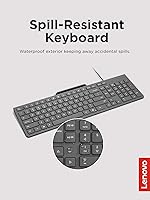

Overview

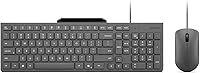
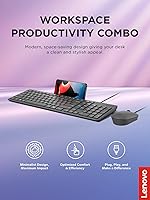
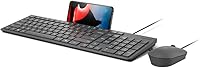
The Lenovo 310 Keyboard and Mouse Combo is Lenovo's straightforward answer to the demand for clean, practical desk setups that don't require much budget. Launched in April 2025, this wired combo has quickly amassed over 1,336 ratings at a 4.5-star average and holds a top-100 spot in its category — solid early traction. The Luna Grey colorway stays professional and understated, broad compatibility covers Windows, Chrome OS, Android, and Linux, and the plug-and-play USB-A connection means zero setup friction. A built-in phone stand adds a touch of thoughtful design that's rarely found at this price tier.

Features & Benefits

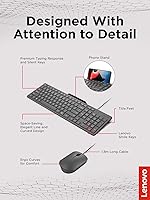
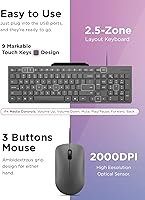
What makes this keyboard and mouse set genuinely useful day-to-day starts with the quiet. The low-profile keys let you type through video calls or in shared offices without generating the usual clatter. The spill-resistant build is worth highlighting too — it's not a submersion guarantee, but it handles accidental splashes well enough to matter. The integrated phone stand is the sleeper feature here; it props your device right at eye level so you're not constantly glancing down at a flat surface. A single USB-A cable powers both devices, the 2000 DPI mouse tracks cleanly, and the slim body keeps your desk looking organized.

Best For

This wired combo works best for people who want a dependable daily driver without overthinking the purchase. Students setting up a first workspace, remote workers who need to keep peripheral costs down, and anyone upgrading from a laptop-only setup will find it covers the basics with room to spare. The quiet keys make it particularly well-suited for shared or open offices — libraries, co-working spaces, anywhere clatter is unwelcome. The slim, neutral design appeals to minimalists who find most gaming-oriented keyboards too aggressive for a calm, productive setup. If your day is mostly typing, browsing, and video calls, this set delivers without overcomplicating anything.

User Feedback

Among the 1,336 ratings this keyboard and mouse set has collected, the response is broadly positive. Buyers often highlight how much quieter it is than they expected, and the built-in phone stand gets called out repeatedly as a useful bonus they didn't expect to rely on. That said, key travel depth is the most common gripe — typists who prefer a more tactile response may need time to adjust. A handful of reviewers also flag the cord length as limiting for larger desk configurations. Comparisons to similarly priced competitors tend to favor this set overall, though a few note the mouse feels light in hand.

Pros

  • Noticeably quiet keys make it easy to type in shared spaces without disturbing others.
  • The built-in phone stand is a clever, practical touch rarely found at this price point.
  • Plug-and-play USB-A setup works immediately with no software installation required.
  • Compatible with Windows, Chrome OS, Android, and Linux — covers most everyday setups.
  • Spill-resistant keyboard adds meaningful peace of mind for cluttered or coffee-heavy desks.
  • The slim, neutral Luna Grey design fits professional environments without looking out of place.
  • A single USB cable powers both the keyboard and mouse, keeping desk clutter minimal.
  • The 2000 DPI mouse handles everyday browsing, document work, and light editing without issue.
  • Strong early rating from over 1,300 buyers gives meaningful confidence for a recently launched product.

Cons

  • Key travel is shallow, which may frustrate typists who prefer a more tactile or clicky feel.
  • The mouse feels light in hand, which can reduce the sense of control for users accustomed to heavier builds.
  • USB-A only — no USB-C option means modern thin laptops may require a separate adapter.
  • Cord length may not reach comfortably on larger or more complex desk configurations.
  • Lightweight plastic construction may not hold up as well under years of heavy daily use.
  • No wireless option, so cable management remains a permanent consideration regardless of desk setup.
  • The mouse lacks side buttons or scroll customization, limiting efficiency for power users.
  • Spill resistance covers splashes but should not be mistaken for waterproofing or full liquid protection.

Ratings

The scores below reflect an AI-driven analysis of verified global buyer reviews for the Lenovo 310 Keyboard and Mouse Combo, with spam, bot activity, and incentivized feedback actively filtered out before scoring. Each category is weighted against real purchase experiences from everyday users across home offices, classrooms, and shared workspaces. Both the standout strengths and the honest pain points are reflected here — nothing is glossed over.

Value for Money
91%
Among the most consistently praised aspects across buyer feedback, this wired combo consistently surprises users with how much it delivers for the spend. The inclusion of a phone stand, spill resistance, and quiet keys — features that typically cost more — makes buyers feel they got more than they bargained for.
A small number of reviewers note that the lightweight feel of the mouse and keyboard chassis makes the combo feel budget-grade in hand, which can temper the value perception for buyers who equate physical heft with quality.
Typing Comfort
74%
26%
Users who spend most of their day on emails, documents, and spreadsheets report that the low-profile keys feel smooth and consistent during extended sessions. The quiet mechanism means fatigue from noise-related tension is noticeably reduced in shared environments.
Typists who are accustomed to deeper key travel or tactile mechanical feedback often describe the keys as feeling too flat or mushy. This is a real dividing line in feedback — comfort is highly dependent on what the user has typed on before.
Noise Level
93%
The quiet keystroke design earns strong praise from buyers in open-plan offices, libraries, and shared living spaces. Multiple reviewers specifically mention being able to work late at night without waking household members — a meaningful real-world win.
The keys are not fully silent, and in extremely quiet environments — during a video call with a sensitive microphone, for instance — some soft clicking is still audible. Expectations of total silence should be tempered slightly.
Mouse Performance
68%
32%
For everyday tasks like browser navigation, document editing, and video streaming, the 2000 DPI mouse tracks reliably on most surfaces without noticeable lag or skipping. Users upgrading from a basic laptop trackpad tend to find it a genuine improvement.
Power users and anyone doing precision graphic work or light photo editing report the mouse feeling imprecise at higher speeds, and the lightweight body reduces the sense of controlled movement. No adjustable DPI means it is a fixed experience with no customization available.
Build Quality
63%
37%
The keyboard holds up well for standard daily office use, and the spill-resistant construction has earned real credibility among buyers who have put it to the test with minor accidental splashes. The slim chassis feels intentional rather than cheap for most users.
The overall plastic construction feels noticeably light, and several longer-term buyers report that key legends begin to fade with heavy use over many months. It is not a peripheral built to last five or more years under daily heavy typing.
Spill Resistance
78%
22%
Buyers who have experienced minor spills — a tipped glass, a coffee splash — generally report that the keyboard recovered without issue after being unplugged and dried. This practical durability is a genuine comfort for users with busy or cluttered desks.
The spill resistance is not a waterproofing certification, and a few reviewers who subjected it to more significant liquid exposure found the protection had limits. It handles everyday accidents well but should not be relied upon for anything beyond that.
Phone Stand Utility
88%
This is the feature that catches buyers off guard in the best way. Users who follow recipes while cooking at a desk, take reference calls while typing, or monitor a second app during work sessions describe it as one of the most practical additions they did not expect to use so often.
The stand works best with phones in the standard size range, and users with very large or heavy devices in bulky protective cases note that balance can be inconsistent. It is also fixed in position, so there is no angle adjustment available.
Setup & Compatibility
96%
The plug-and-play experience is genuinely seamless across Windows, Chrome OS, Android, and Linux. Buyers repeatedly mention how refreshing it is to simply plug in and start working — no drivers, no software portals, no restart required.
The USB-A only connection is the one setup friction point: users with newer laptops that have moved entirely to USB-C ports will need an adapter, and that extra step or added cost is a mild but real inconvenience that a small number of buyers flag.
Design & Aesthetics
83%
The Luna Grey colorway and slim profile have earned consistent appreciation from buyers who want a workspace that looks clean and intentional. It blends naturally into both home office setups and professional desk environments without drawing attention.
There is no backlighting, which limits usability in dim environments, and the single color option leaves no room for personalization. Buyers who want a more expressive or customizable desk setup will find the aesthetic too plain.
Cable & Cord Management
61%
39%
Running a single USB cable for both devices keeps things tidier than setups requiring separate cables or a USB hub, which is a small but appreciated detail for users who are conscious of desk clutter.
The fixed cord length is a recurring complaint among buyers with larger desks or tower PCs positioned on the floor, and the cable is not braided or reinforced, raising some questions about long-term durability at the connector ends.
Desk Space Efficiency
87%
The slim form factor is a practical advantage for users working on small student desks, compact home office setups, or shared workstations where real estate is at a premium. The keyboard footprint is minimal without sacrificing a full key layout.
The integrated phone stand, while useful, does add a small fixed protrusion to the keyboard body that cannot be removed or folded away, which may be a minor annoyance for users who never use it and prefer a completely flat profile.
Mouse Ergonomics
57%
43%
The mouse is light enough to move quickly across a desk without arm fatigue during short to medium sessions, and its compact size suits users with smaller hands well for everyday browsing and clicking tasks.
Users with larger hands or those who work in front of a computer for six or more hours daily find the small, lightweight mouse tiring to grip over extended periods. There is no ergonomic shaping or palm rest, making it a functional but not a comfort-first design.
OS & Device Compatibility
89%
Support for Windows, Chrome OS, Android, and Linux out of the box makes this keyboard and mouse set a practical choice for households or offices running mixed operating systems, and it handles switching between device types without issue.
Mac and iPadOS are absent from the official compatibility list, which is a notable omission for a significant segment of buyers. Basic input functions may work on Apple devices, but there are no guarantees and key mapping issues have been reported.

Suitable for:

The Lenovo 310 Keyboard and Mouse Combo is a strong fit for anyone who needs a dependable, low-maintenance peripheral setup without committing serious budget to it. Students furnishing a first desk, remote workers who already spend heavily on monitors or chairs, and office staff who want a spare set for a shared workstation will all find it covers the essentials without friction. The quiet keystroke mechanism is a particular advantage in noise-sensitive environments — open-plan offices, library study rooms, or shared apartments where late-night typing would otherwise disturb others. The integrated phone stand is genuinely useful for anyone who references recipes, takes video calls, or follows written instructions while working, removing the need for a separate stand entirely. Broad OS compatibility also makes it a practical choice for households or small offices running a mix of Windows machines, Chromebooks, and Android tablets from a single peripheral set.

Not suitable for:

The Lenovo 310 Keyboard and Mouse Combo is not the right pick for buyers who demand a tactile, high-travel typing experience — the low-profile keys prioritize quietness over the kind of satisfying key feedback that dedicated typists or writers often prefer. Heavy gaming is equally out of scope; despite a mention of gaming design in the product title, the 2000 DPI mouse and wired slim form factor are productivity tools, not competitive peripherals, and anyone expecting performance-grade tracking or programmable buttons will be disappointed. The fixed USB-A cable could frustrate users with modern laptops that only offer USB-C ports, requiring an adapter that adds cost and a potential point of failure. Those with large desks or workstations positioned far from their tower may also find the cable length restrictive. Finally, buyers prioritizing long-term build durability over affordability should consider stepping up to a more robust option, as the lightweight construction and plastic chassis typical of this price tier may show wear with heavy daily use over the years.

Specifications

  • Connectivity: Both the keyboard and mouse connect via a single USB-A wired connection with no wireless or Bluetooth option available.
  • Mouse DPI: The included mouse uses a 2000 DPI optical sensor suited for general office navigation and light creative work.
  • Compatible OS: The combo works with Windows 10, Chrome OS, Android, and Linux out of the box without additional drivers.
  • Compatible Devices: Designed for use with laptops, desktop PCs, and tablets that have an available USB-A port.
  • Color: The combo ships in Luna Grey, a neutral, professional tone that suits most home office and workplace environments.
  • Combo Weight: The full keyboard and mouse combo weighs 2.29 pounds as packaged.
  • Package Dimensions: The retail package measures 20.04 x 6.69 x 1.73 inches, reflecting the slim profile of the included peripherals.
  • Key Design: The keyboard uses an ultra-slim, low-profile key layout engineered to minimize noise during regular typing sessions.
  • Spill Resistance: The keyboard is built with spill-resistant construction to withstand minor liquid splashes, though it is not rated as fully waterproof.
  • Phone Stand: An integrated phone stand is built directly into the keyboard body, capable of propping up a smartphone for hands-free viewing.
  • Setup: The combo is plug-and-play, requiring no software installation or driver configuration before use.
  • Power Source: The combo is corded electric, drawing power directly through the USB connection with no batteries required.
  • Model Number: The official Lenovo model number for this combo is GX31R09775.
  • Availability: The combo was first made available in April 2025 and reached a top-100 Best Sellers Rank in its category shortly after launch.
  • BSR Ranking: As of recent data, this combo holds the #74 position in the Computer Keyboard and Mouse Combos category on Amazon.

Related Reviews
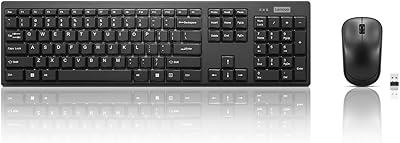
Lenovo 100 Wireless Keyboard and Mouse Combo
75%
88%
Value for Money
93%
Setup & Ease of Use
76%
Keyboard Typing Feel
84%
Noise Level
58%
Mouse Comfort & Ergonomics
More
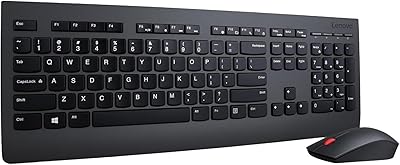
Lenovo Professional Wireless Keyboard and Mouse Combo
78%
93%
Ease of Setup
81%
Keyboard Typing Feel
62%
Mouse Comfort & Ergonomics
88%
Wireless Reliability
74%
Battery Life
More
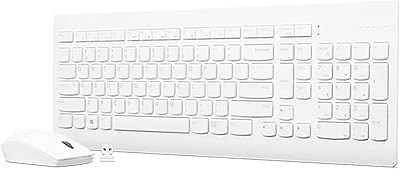
Lenovo 510 Wireless Keyboard and Mouse Combo

78%
88%
Value for Money
93%
Ease of Setup
81%
Keyboard Typing Feel
62%
Mouse Performance
84%
Wireless Reliability
More
FOPETT Retro Wireless Keyboard and Mouse Combo
82%
93%
Design & Aesthetics
76%
Typing Experience
67%
Mouse Performance
88%
Wireless Connectivity
91%
Battery Life
More
Tayderley Wireless Keyboard and Mouse Combo
86%
88%
Typing Comfort
85%
Mouse Performance
94%
Battery Life
83%
Build Quality
92%
Ease of Setup
More
TopMate Wireless Keyboard and Mouse Combo
77%
91%
Value for Money
78%
Typing Experience
68%
Mouse Performance
63%
Build Quality
83%
Wireless Reliability
More
GEEZER Wireless Keyboard and Mouse Combo
72%
83%
Value for Money
91%
Aesthetic Design
94%
Ease of Setup
67%
Typing Feel
62%
Mouse Quality
More
JOYACCESS Wireless Keyboard and Mouse Combo
82%
88%
Value for Money
83%
Typing Experience
74%
Mouse Performance
86%
Backlight Quality
81%
Battery Life
More
ULSOU Wireless Ergonomic Keyboard and Mouse Combo
74%
88%
Value for Money
84%
Typing Comfort
86%
Key Noise Level
57%
Key Feel & Tactility
61%
Mouse Performance
More
ASLDPUO Bluetooth Keyboard and Mouse Combo
86%
92%
Value for Money
90%
Connectivity & Compatibility
85%
Ergonomics & Comfort
88%
Battery Life
84%
Design & Portability
More

FAQ

No, not at all. Just plug the USB-A connector into an open port on your computer or tablet and both the keyboard and mouse will be recognized immediately. It works this way on Windows, Chrome OS, Android, and Linux without any extra steps.

The combo is officially listed as compatible with Windows 10, Chrome OS, Android, and Linux. Mac and iPadOS are not on the official compatibility list, so while it may function in basic plug-and-play mode on some Apple devices, Lenovo does not guarantee full support and certain keys may not map correctly.

The keyboard and mouse set uses a USB-A connector, so you would need a USB-A to USB-C adapter to use it with a modern laptop that lacks USB-A ports. That adapter is not included in the box, so factor that in if your setup is USB-C only.

The low-profile keys are noticeably quieter than standard membrane keyboards and significantly quieter than any mechanical switch. They produce a soft, muted click that most people around you would not find disruptive. That said, they are not completely silent — you will still hear some sound in a very quiet room.

Spill resistance covers the kind of accidental splash or minor liquid contact that happens on a real desk — a tipped coffee cup or a splash from a water bottle. It is not waterproof and should not be submerged or exposed to heavy liquid flow. If a spill happens, unplug it and let it dry thoroughly before using it again.

The stand is designed for typical smartphone sizes and handles most modern phones reasonably well. Very large or heavy devices in thick cases may feel less stable depending on balance, but for standard everyday use it works reliably without tipping.

Lenovo does not publish the exact cable length in the official specs, but buyer feedback suggests the cord is adequate for most standard desk configurations. If your PC tower is positioned on the floor or more than a meter or two from your keyboard position, you may find the cord limiting and might need a USB extension cable.

Not really. Despite the word gaming appearing in the product title, the Lenovo 310 Keyboard and Mouse Combo is built for productivity use. The mouse tops out at 2000 DPI with no adjustable polling rate, and there are no programmable buttons, macro support, or RGB lighting. For casual browser games or light use it is fine, but competitive or serious gaming calls for a dedicated gaming peripheral set.

No, this is a straightforward wired USB combo with no multi-device pairing or switch functionality. It connects to one device at a time through the USB-A port, so swapping between machines requires physically unplugging and re-plugging.

At this price point the build is solid for everyday office and student use, but the lightweight plastic chassis is not built to the same standard as premium peripherals. Most buyers report no issues in the short to medium term, though users who type heavily for many hours a day over several years may start to notice wear on the key surfaces or lighter plastic components before they would on a more expensive set.

Where to Buy