





Overview
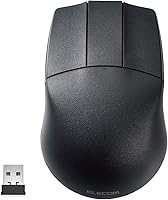
The ELECOM M-CAD01DBBK Wireless 3D-CAD Mouse showed up on my desk looking like a fairly ordinary mouse, until I noticed what was missing: the scroll wheel. In its place sits a dedicated center button, a deliberate choice for CAD work rather than an oversight. This isn't trying to be your everyday office mouse — it's built around the specific motions of 3D modeling, where a spinning wheel often gets in the way more than it helps. Connection runs over 2.4GHz wireless through a small USB receiver, and input felt responsive enough that I forgot I wasn't on a wired setup. At this price point, it reads as a focused tool rather than a do-everything peripheral.
Features & Benefits
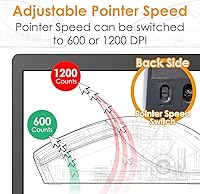
What stands out most about this CAD mouse is how deliberately every feature serves one purpose. The switchable DPI — 600 for detail work, 1200 for faster cursor travel — actually matters here, since CAD tasks swing between zooming into tiny details and jumping across a large canvas. Tracking is handled by a blue LED optical sensor that held up fine on a cloth mat and a wood desk alike, no skipping or jitter that I noticed. The three-button layout keeps things simple, and that center button takes over scroll-wheel duties without feeling like a compromise. A physical ON/OFF switch on the back is a small but appreciated touch, since it actually stretches out the single AA battery between charges. The whole thing stays light enough that long sessions don't tire out your wrist.
Best For
This wireless mouse makes the most sense for people whose work actually revolves around 3D modeling — think AutoCAD, SolidWorks, or similar CAD platforms where precise, repetitive movements matter more than flashy extras. Engineering and design students chasing a dedicated input device without spending a fortune will likely find it a smart fit, especially if they're tired of fighting a regular office mouse during long drafting sessions. It also suits anyone who genuinely doesn't miss a scroll wheel and would rather have a clean, streamlined layout instead. Budget matters here too: this is clearly aimed at buyers who want a tool built for one job, not a luxury accessory. Windows compatibility spans several OS versions, which helps if you're running an older CAD workstation alongside a newer machine.
User Feedback
Feedback on this ELECOM mouse tends to split along expected lines. Buyers who do CAD work daily generally adapt to the missing scroll wheel within a week or two and end up preferring the center button once the muscle memory kicks in — though anyone expecting a normal mouse feel will need an adjustment period. Wireless range and connection stability get positive marks for typical desk distances, with few complaints about dropouts. The AA battery setup draws mixed opinions: some appreciate being able to swap a battery anywhere rather than hunting for a charging cable, while others would prefer rechargeable convenience. A handful of reviewers with larger hands note the compact size feels a bit cramped during extended use, so anyone with bigger palms may want to check the dimensions first.
Pros
- Switchable 600/1200 DPI makes it easy to shift between detailed work and faster cursor movement.
- The dedicated center button replaces the scroll wheel cleanly, without feeling like a missing feature.
- Blue LED optical tracking stays accurate across cloth mats, wood desks, and other common surfaces.
- A physical ON/OFF switch noticeably extends the life of the single AA battery.
- 2.4GHz wireless connection holds steady across roughly 32 feet, plenty for most desk setups.
- Compact, lightweight build does not add bulk or strain during long design sessions.
- Wide Windows compatibility covers everything from XP to Windows 10, useful for older CAD rigs.
- Three-button layout keeps CAD-specific commands simple instead of cluttered with unnecessary extras.
- Priced as a focused tool rather than a premium all-purpose mouse, which suits its niche well.
Cons
- Relies on a single AA battery instead of a rechargeable cell, meaning periodic replacements.
- Compact dimensions may feel cramped for users with larger hands during extended use.
- No scroll wheel at all, which takes real adjustment for anyone used to standard mice.
- Mac support is not clearly emphasized despite the listing, leaving compatibility details a bit murky.
- Limited to three buttons total, so it will not suit users wanting extra programmable controls.
- Not built for gaming or general browsing, so it underperforms outside CAD-specific tasks.
- Wireless range tops out around 32 feet, which will not help in larger or shared workspaces.
- Lacks any RGB lighting or aesthetic extras that some buyers expect at this price tier.
Ratings
These scores for the ELECOM M-CAD01DBBK Wireless 3D-CAD Mouse come from an AI-driven analysis of verified buyer reviews gathered from CAD professionals and students worldwide, with spam, bot activity, and incentivized feedback filtered out before scoring. Each category below reflects genuine strengths alongside real pain points, so you can see exactly where this CAD mouse excels and where it falls short before deciding if it fits your workflow.
CAD Precision & DPI Control
Tracking Accuracy
Wireless Connectivity & Range
Battery Life
Build Quality & Comfort
Button Layout & Ergonomics
OS Compatibility
Portability & Size
Value for Money
Setup & Ease of Use
Durability
Design & Aesthetics
Suitable for:
The ELECOM M-CAD01DBBK Wireless 3D-CAD Mouse is a smart pick for anyone whose daily work actually involves CAD or 3D modeling software like AutoCAD or SolidWorks. Engineering students setting up a budget workstation will appreciate getting a dedicated input device without paying for features they will never touch. It also makes sense for professionals who have grown tired of bumping a scroll wheel mid-task and would rather have a clean three-button layout built around precision. Anyone running an older Windows machine alongside a newer one benefits from the broad OS compatibility here, since it does not force an upgrade just to keep working. If wireless freedom at a desk matters more than flashy lighting or extra programmable buttons, this is the kind of tool that quietly does its one job well.
Not suitable for:
Buyers expecting an all-purpose mouse for browsing, gaming, or office tasks should look elsewhere, since the ELECOM M-CAD01DBBK Wireless 3D-CAD Mouse intentionally leaves out a scroll wheel that most everyday users rely on without thinking. People with larger hands may find the compact frame a bit tight during long sessions, especially compared to ergonomic mice built for all-day general use. Anyone who prefers rechargeable batteries over swapping AA cells will see the power setup as a step backward rather than a convenience. It is also not the right choice for Mac-only households expecting full native support, since the OS compatibility list leans heavily toward Windows. Casual users who just want a reliable mouse for everyday computing are better served by something cheaper and less specialized.
Specifications
- Connectivity: Connects wirelessly over 2.4GHz using a small USB receiver.
- OS Compatibility: Supports Windows 10, Windows 8.1, Windows RT 8.1, Windows 7, and Windows XP.
- DPI Settings: Offers switchable 600 and 1200 DPI tracking for adjustable cursor speed.
- Tracking Sensor: Uses a blue LED optical sensor for surface tracking accuracy.
- Button Layout: Features a three-button design with no traditional scroll wheel.
- Center Button: Includes a dedicated center button in place of a scroll wheel.
- Power Switch: Has a physical ON/OFF switch on the underside to conserve battery power.
- Wireless Range: Maintains a working wireless range of approximately 32 feet.
- Battery Type: Runs on a single AA battery.
- Dimensions: Measures 4.33 x 2.78 x 1.5 inches.
- Weight: Weighs 2.22 ounces.
- Receiver: Ships with a small USB wireless receiver for setup.
- Model Number: Listed under the official model number M-CAD01DBBK.
- Brand: Manufactured by ELECOM, a Japan-based electronics brand.
- Intended Use: Designed specifically for CAD and 3D modeling workflows rather than general computing.
Related Reviews

ELECOM HUGE Wired Finger Trackball Mouse

ELECOM DEFT Trackball Mouse
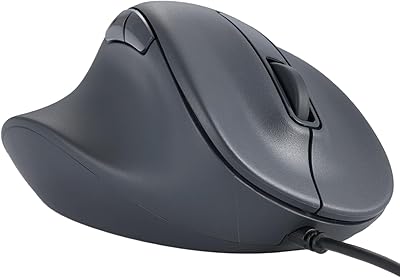
ELECOM M-XGM30UBSKBK Wired Ergonomic USB Mouse

Arteck HW192 Wireless Keyboard and Mouse Combo

MOFII Wireless Ergonomic Mouse
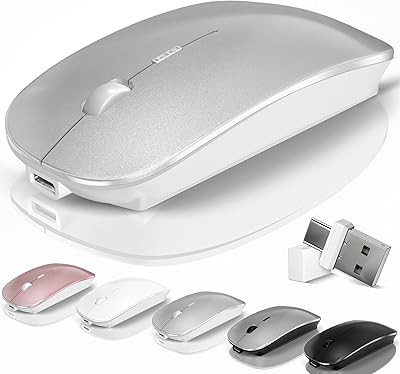
Kovess 4-Mode Silent Wireless Mouse
FENIFOX Wireless Keyboard and Mouse
Logitech M325 Wireless Mouse

Logitech M217 Wireless Mouse
