Overview

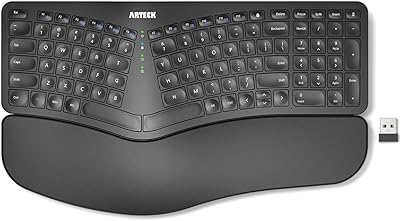
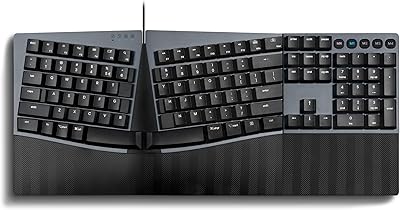
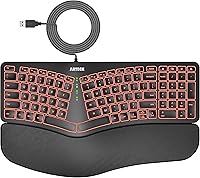
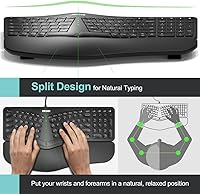
The Arteck Ergonomic Split USB Keyboard with Wrist Rest sits in an interesting spot — it's a practical, no-fuss entry into ergonomic typing without the steep price or learning curve of fully adjustable split boards. The split key layout is the real draw here, angling your hands outward so your wrists and forearms aren't cramped into an unnatural position during long work sessions. It's wired, which means consistent, zero-lag input with no battery anxiety mid-meeting. Just to be clear: this is a comfort-focused membrane keyboard, not a mechanical board built for tactile feedback enthusiasts or gamers chasing precision.
Features & Benefits

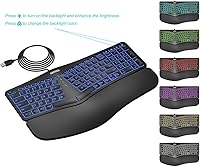
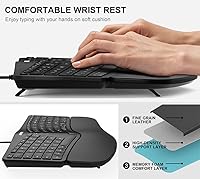
The split angle is fixed — you can't tent or reposition it like higher-end ergonomic boards — but it still does meaningful work placing your arms in a more neutral typing posture. The foam wrist rest is built directly into the frame, so there's nothing extra to buy or align separately. Key travel is shallow and actuation is quiet, which works well in shared office spaces. Backlighting spans seven colors with three brightness settings, making it genuinely useful in dim rooms rather than purely decorative. The six-foot cable offers real placement flexibility, and plug-and-play setup means it's fully operational within seconds of connecting.

Best For

This ergonomic split keyboard suits office workers who spend most of their day typing and have started noticing strain in their wrists or forearms. It's also a reasonable starting point for anyone curious about ergonomic layouts but put off by more radical designs — the split here is subtle enough that most people adapt within a day or two. Windows desktop and laptop users will feel right at home, as it's built for that ecosystem. It's not the right fit for Mac users, anyone who needs wireless freedom, or those after the tactile punch of mechanical switches. For straightforward wired daily comfort, though, it delivers.

User Feedback

Across its 880-plus ratings, the Arteck wrist-rest keyboard earns consistent praise for genuinely reducing wrist tension — many buyers report feeling a real difference after switching from a flat, standard keyboard. The wrist rest padding draws mixed opinions: some find it adequately soft for long sessions, while others feel it loses support over time or wish it were slightly firmer. The fixed split angle is a recurring limitation for buyers who expected more adjustability. Key feel is widely described as soft and quiet, appreciated in open offices. A handful of users note the chassis feels lightweight, but cable durability and day-to-day reliability hold up well across long-term use reports.

Pros

  • The split key layout meaningfully reduces wrist and forearm tension during long daily typing sessions.
  • Integrated foam wrist rest removes the need to buy or align a separate palm support accessory.
  • Quiet membrane keys make it a courteous choice for open offices and shared home workspaces.
  • Seven backlight colors with three brightness levels cover most low-light desk environments well.
  • A six-foot cable gives genuine placement flexibility without needing a USB extension.
  • Plug-and-play setup works instantly on Windows — no drivers, no software, no friction.
  • The 24-month warranty offers solid long-term coverage at this price tier.
  • Light enough to carry between home and office without adding bulk to a bag.
  • The moderate split angle is approachable for first-time ergonomic keyboard users.

Cons

  • The wrist rest foam compresses noticeably with regular use and loses support over several months.
  • No tenting or lateral adjustment means the ergonomic benefit is limited for users with more severe strain.
  • The plastic chassis feels lightweight in a way that can make the board shift on smooth desk surfaces.
  • macOS compatibility is inconsistent, with key mapping issues reported across multiple buyer accounts.
  • No wireless option exists, making it a non-starter for multi-device or cable-free setups.
  • The board footprint is wide, which can feel cramped on smaller desks or compact standing desk surfaces.
  • Light bleed around key edges is visible at higher brightness levels on lighter-colored desk mats.
  • No dedicated numpad limits usefulness for data entry or spreadsheet-heavy work.
  • The non-braided cable raises minor durability concerns for users who frequently move or unplug the keyboard.

Ratings

The Arteck Ergonomic Split USB Keyboard with Wrist Rest has been evaluated using AI-driven analysis of verified global buyer reviews, with spam, bot activity, and incentivized feedback actively filtered out to surface genuine user experiences. Scores reflect what real office workers, remote employees, and long-session typists consistently report — both the genuine strengths and the recurring frustrations. Nothing has been smoothed over: where buyers pushed back, the scores show it.
Ergonomic Comfort
83%
Most buyers notice a tangible reduction in wrist and forearm tension within the first week of switching from a flat keyboard. The split angle does a solid job of opening up the wrists into a more neutral position during back-to-back typing sessions at a desk.
The split angle is fixed — there is no tenting, tilting, or repositioning available, which limits how much it can adapt to individual body proportions. Users with more pronounced wrist issues often find this board a useful first step but not a complete solution.
Wrist Rest Quality
71%
29%
Having the cushioned rest integrated directly into the frame is genuinely convenient — there is nothing to align, reattach, or lose. For moderate typing sessions, most buyers find the foam adequate and appreciate not needing a separate accessory.
A recurring complaint across reviews is that the padding compresses and loses its firmness after a few months of daily use. Some buyers with larger hands or heavier wrist pressure feel it is too shallow to provide meaningful relief during long work days.
Key Feel & Typing Experience
74%
26%
The low-profile membrane keys are noticeably quieter than most standard office keyboards, which earns consistent appreciation from users in open-plan offices or shared home workspaces. Actuation feels light and the keys respond without requiring heavy finger force.
Mechanical keyboard users will find the feedback flat and unrewarding — there is no tactile bump or audible click, which makes the typing experience feel somewhat soft and imprecise to those accustomed to more defined keystrokes. It is purely functional, not satisfying.
Build Quality & Durability
67%
33%
For its price tier, the board holds together well under regular daily office use, and the plastic frame does not flex noticeably during normal typing. The cable connection point feels secure, and most long-term owners report no key failures over the first year.
The overall chassis feels lightweight to the point of feeling slightly cheap when picked up, and the board can shift on smooth desk surfaces without a mat underneath. A few buyers note that the wrist rest material shows wear and discoloration faster than expected.
Backlighting
78%
22%
Seven color options with three brightness levels covers most dim-environment use cases well — evening home office setups and low-light conference rooms alike. The lighting is even across keys and adds a clean, modern look to a desk without being distracting.
The backlighting cannot be customized per-key or programmed for specific zones, which limits its appeal for anyone wanting a tailored setup. At the highest brightness setting, light bleed around key edges is noticeable on lighter desk surfaces.
Cable & Connectivity
86%
A six-foot cable covers virtually every desktop configuration without needing an extension, including setups where the tower is placed on the floor or to the side. Wired USB input also means zero input lag, which matters during rapid typing bursts.
The cable is not braided or reinforced, so long-term durability at the connector end is a mild concern for users who frequently unplug and move the keyboard. There is no wireless option, which rules it out entirely for users who need a clutter-free or multi-device setup.
Setup & Compatibility
91%
Plug-and-play functionality works exactly as described — connect the USB and the keyboard is recognized instantly on Windows without any driver installation or software setup. This makes it particularly useful in corporate environments where IT restrictions limit software installs.
macOS compatibility is limited and inconsistent, with several buyers reporting missing or remapped keys that make it frustrating to use on Apple devices. It is firmly a Windows-first keyboard, and that boundary is not clearly communicated at the point of purchase for all buyers.
Typing Noise Level
81%
19%
The membrane construction keeps keystroke noise to a minimum, making it one of the quieter options at this price range. Colleagues in nearby seats or on video calls rarely notice the sound, which is a real-world advantage in hybrid office environments.
A small number of buyers report a faint hollow resonance when typing firmly in the center of the board, suggesting the internal frame has some vibration. It is not loud, but for noise-sensitive users it can be mildly distracting in silent rooms.
Value for Money
76%
24%
Compared to premium ergonomic split keyboards that can cost several times more, this wired ergonomic board delivers recognizable comfort benefits at a fraction of the investment. For first-time ergonomic keyboard buyers, the entry cost feels justified.
As budgets creep upward, buyers start comparing it to more fully-featured adjustable boards, and the fixed split and basic build become harder to overlook. A few buyers felt the wrist rest degraded quickly enough to undermine the long-term value proposition.
Layout & Key Spacing
72%
28%
The key spacing is generous enough that most touch typists adapt within a day or two without major retraining. The split gap between the two key clusters is moderate — pronounced enough to shift wrist posture without feeling like two completely separate halves.
Users with smaller hands occasionally report the split feeling wider than comfortable, requiring a slight stretch for keys near the center divide. The layout also lacks a dedicated numpad, which can be a drawback for data-entry-heavy workflows.
Portability & Desk Footprint
63%
37%
At just under three pounds, the keyboard is light enough to carry between a home office and a work desk without much hassle. The relatively slim profile does not dominate a standard desk surface.
The overall footprint is notably wide due to the split layout and integrated wrist rest, which can feel cramped on smaller desks or standing desk setups with limited horizontal space. The attached cable also makes packing it away less tidy than a wireless alternative.
Adjustability
54%
46%
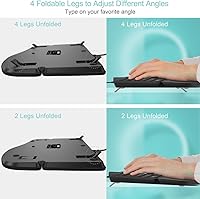
Standard fold-out feet at the rear allow for a modest tilt angle adjustment, which helps users who prefer a slightly raised key position. This is a basic but functional inclusion that most buyers expect at any keyboard price point.
Beyond the rear tilt feet, there is no meaningful adjustability — no tenting, no lateral repositioning of the two halves, and no palm rest height variance. Buyers who specifically need a customizable ergonomic angle will quickly outgrow what this board can offer.
Warranty & After-Sales Support
79%
21%
A 24-month warranty is a genuine differentiator at this price point and signals a reasonable level of manufacturer confidence in the product. Buyers report that Arteck customer support has been responsive when warranty claims arise.
Some buyers note that the claims process requires a fair amount of back-and-forth communication, and replacement timelines can vary. The warranty also does not cover gradual wrist rest degradation, which is one of the more common long-term complaints.

Suitable for:

The Arteck Ergonomic Split USB Keyboard with Wrist Rest is a strong fit for office workers and remote employees who spend the bulk of their day at a keyboard and have started feeling the early signs of wrist or forearm fatigue. It works especially well as a first ergonomic upgrade — the split layout is noticeable enough to shift your arm posture meaningfully, but not so radical that it requires days of retraining. Windows desktop users will find it the most natural fit, as it is plug-and-play with no configuration needed, which also makes it a practical choice in managed corporate environments where installing drivers is restricted. Anyone who works in a dim office or shared home space will appreciate the backlit keys without the noise of a mechanical board. If your priority is reducing daily strain without spending heavily on a fully adjustable ergonomic setup, this wired ergonomic board hits a practical middle ground.
Not suitable for:

The Arteck Ergonomic Split USB Keyboard with Wrist Rest is not the right tool for buyers expecting full ergonomic customization — the split angle is fixed, and there is no tenting, lateral adjustment, or repositioning of the two halves, which limits how well it adapts to different hand sizes and typing postures. Mac users will likely run into remapped or non-functional keys and should look elsewhere for a compatible option. Anyone who already relies on a mechanical keyboard for tactile feedback will find the membrane keys feel flat and uninspiring by comparison. The attached wired cable is also a hard stop for users who need to switch between multiple devices or prefer a clean, cable-free desk setup. Finally, buyers who need a full numpad for heavy data entry work will find the layout insufficient for that kind of workflow.
Specifications

  • Connectivity: Connects via USB-A wired connection with no Bluetooth or wireless option available.
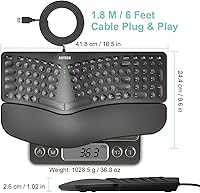
  • Cable Length: The attached USB cable measures 6 feet (1.8 m), providing generous reach for most desktop configurations.
  • Layout: Fixed ergonomic split layout with a set angle between the two key clusters — not adjustable or tented.
  • Key Type: Low-profile membrane keys designed for quiet actuation and reduced finger travel compared to standard dome keyboards.
  • Backlighting: Supports 7 LED backlight colors with 3 selectable brightness levels, controlled directly from the keyboard.
  • Wrist Rest: Integrated cushioned foam wrist and palm rest is built into the keyboard frame and cannot be detached.
  • Dimensions: The keyboard measures 17.2 x 10.91 x 1.38 inches, making it notably wider than a standard full-size keyboard.
  • Weight: Total unit weight is 2.64 pounds, inclusive of the integrated wrist rest and attached cable.
  • Materials: Frame and key caps are constructed from plastic, with the wrist rest pad made from silicone rubber foam.
  • Compatible OS: Officially compatible with Windows operating systems; macOS compatibility is not guaranteed and may result in key mapping issues.
  • Compatible Devices: Designed for use with desktop PCs, laptops, and gaming consoles that support USB-A input.
  • Setup: Fully plug-and-play — no drivers, software installation, or configuration required on compatible Windows devices.
  • Warranty: Covered by a 24-month manufacturer warranty with customer support provided directly by Arteck.
  • Tilt Adjustment: Standard fold-out feet at the rear of the unit allow for a modest upward tilt angle to suit different typing preferences.
  • Brand: Manufactured and sold by Arteck, a consumer peripherals brand focused on affordable keyboards and accessories.

Related Reviews

Arteck HW315
Arteck HW315
74%
83%
Ergonomic Comfort
74%
Wrist Rest Quality
61%
Typing Feel & Key Travel
92%
Battery Life
81%
Wireless Connectivity
More
DeLUX GM901D Wireless Ergonomic Split Keyboard
84%
87%
Comfort and Ergonomics
91%
Multi-Device Connectivity
80%
Typing Experience
75%
Palm Rest Comfort
88%
Ease of Setup
More
NocFree Wireless Ergonomic Split Mechanical Keyboard
84%
89%
Ergonomics & Comfort
85%
Build Quality
91%
Customization Options
80%
Battery Life
88%
Connectivity & Compatibility
More
Macally BTBLERGO2A Bluetooth Ergonomic Split Keyboard
85%
91%
Ergonomics & Comfort
88%
Ease of Use & Setup
90%
Bluetooth Connectivity
87%
Battery Life
85%
Backlit Keys Visibility
More
Perixx PERIBOARD-624B Wireless Ergonomic Split Keyboard
85%
89%
Ergonomics & Comfort
91%
Wireless Connectivity
76%
Key Response & Travel
84%
Build Quality
80%
Typing Experience
More
Perixx Periboard-612B Wireless Ergonomic Split Keyboard
84%
88%
Ergonomics & Comfort
91%
Wireless Connectivity
85%
Ease of Use
76%
Key Travel & Typing Experience
82%
Build Quality
More
Perixx PERIBOARD-535BR Wired Ergonomic Mechanical Split Keyboard
86%
88%
Ergonomics and Comfort
90%
Build Quality
85%
Performance
92%
Key Switch Feel
87%
Macro Functionality
More
Arteck HA305-3B USB Wired Backlit Keyboard
80%
97%
Ease of Setup
83%
Typing Experience
74%
Backlight Quality
71%
Build Quality & Durability
92%
Value for Money
More
Perixx PERIBOARD-636B Wireless Ergonomic Compact USB Keyboard
85%
88%
Ergonomics and Comfort
84%
Typing Experience
80%
Build Quality
90%
Wireless Connectivity
91%
Wrist Rest Comfort
More
GEODMAER Wireless Gaming Keyboard and Mouse with Cooling Gel Wrist Rest
87%
90%
Comfort and Ergonomics
92%
Wireless Connectivity & Stability
88%
Battery Life (Keyboard)
86%
Battery Life (Mouse)
89%
Backlighting Customization
More

FAQ

Not reliably. The Arteck Ergonomic Split USB Keyboard with Wrist Rest is built around Windows key layouts, and several Mac users report remapped or non-functional keys when plugging it in. If you are primarily a macOS user, you would be better served looking for a keyboard explicitly designed for Apple systems.
No — it is entirely plug-and-play on Windows. Just connect the USB cable and start typing. There is no companion app, no firmware update tool, and no configuration step required, which also makes it a practical choice in corporate environments where installing third-party software is restricted.

The integrated foam rest is on the softer side, which many users find comfortable for moderate sessions. That said, a recurring theme in long-term reviews is that the padding compresses over time and loses some of its initial cushion. If you type for six or more hours a day, you may eventually want to supplement it with a firmer external wrist support.

No — the two key clusters are fixed in position and built as a single unit. You cannot widen the gap, tent the halves, or reposition them independently. The ergonomic benefit comes from the preset angle, which works well for most users but does not adapt to individual body proportions the way a fully modular split keyboard would.

It is not designed for gaming. The membrane keys lack the rapid actuation response and tactile feedback that most gamers expect, and there are no dedicated macro keys or anti-ghosting features mentioned. It is built for comfortable office typing, not competitive or fast-paced gaming sessions.

The low-profile membrane design makes this one of the quieter keyboards at its price point. Most users in open offices or on video calls report that it does not create noticeable noise for colleagues. There is a faint resonance when typing firmly near the center of the board, but nothing that would be described as disruptive.

You can cycle through the brightness levels and turn the backlight off entirely using the dedicated backlight control keys. It does not turn off automatically based on inactivity, so you will need to manually adjust it if you prefer working without lighting.

That depends on your setup. At just over 17 inches wide, the integrated wrist rest makes this ergonomic split keyboard noticeably wider than a standard keyboard. On a compact desk or a crowded standing desk surface, it can take up more horizontal space than expected. It is worth measuring your available width before ordering.

The keyboard comes with a 24-month manufacturer warranty, which is a reasonable coverage period at this price level. General buyer feedback indicates that Arteck's customer support is responsive to warranty inquiries, though some users note that the resolution process can involve a few rounds of back-and-forth before a replacement is arranged.

No, this wired ergonomic board does not include a dedicated number pad. The layout prioritizes the ergonomic split design and keeps the footprint focused on the core typing area. If you regularly work with large spreadsheets or do data entry that relies on a numpad, you would need to use a separate external numpad alongside it.