Overview

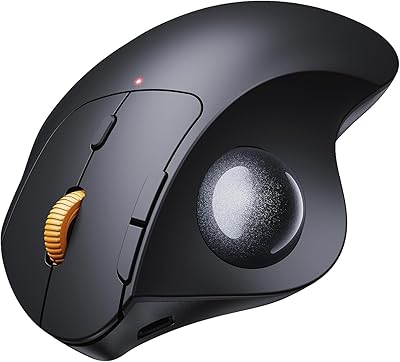
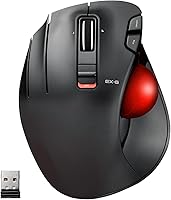
The ELECOM EX-G Left-Handed Wireless Trackball Mouse occupies a rare space in the peripheral market — a thoughtfully designed ergonomic option built exclusively for left-handed users, who are routinely ignored by mainstream manufacturers. It connects via a 2.4 GHz USB receiver, so there are no cables cluttering your desk. The thumb-operated 34mm trackball lets you move the cursor without shifting your entire hand, which matters a lot after a long work session. Sitting at a mid-range price, this left-handed trackball has earned nearly 2,000 ratings on Amazon and currently holds a top-ten spot in its category — solid proof that the demand was always there.
Features & Benefits

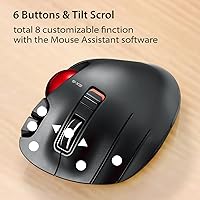
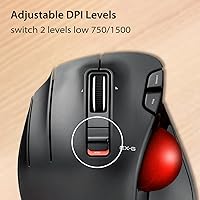
The ELECOM EX-G packs six programmable buttons that can be remapped through ELECOM's free Mouse Assistant software — though most users will never bother installing it and won't miss it. DPI switches between 750 and 1500, which covers the sweet spot for everyday productivity tasks like document editing or web browsing. The red trackball isn't just a style choice; the red surface genuinely helps the optical sensor read movement more accurately. A single AA battery keeps it running, and a small battery indicator light warns you before it dies. The compact body, roughly the size of a large hand, fits comfortably on tighter desks.

Best For

This ergonomic trackball is genuinely purpose-built for left-handed users who have been making do with right-handed peripherals for too long. If you work long hours at a desk and your wrist has started complaining, the stationary-hand design takes a significant load off. It's also a reasonable entry point if you're curious about trackballs but not ready to spend heavily — the learning curve is real, but it typically takes only a week or two before movement starts feeling natural. Works on any surface without a mousepad, and plug-and-play setup means it runs cleanly on Mac and Windows without any driver installation required.

User Feedback

Across nearly 2,000 reviews, the loudest theme is relief — left-handed buyers are simply glad something like this exists. That said, the feedback isn't all positive. Several users point out that the DPI ceiling of 1500 starts to feel restrictive on large or high-resolution monitors, and it's a fair criticism if you're comparing this ergonomic trackball to more advanced alternatives. The tilt scroll function also doesn't work on Windows RT 8.1, which is worth knowing. On the plus side, battery life draws consistent praise, and the indicator light is one of those small details people appreciate only once they've been caught off guard by a dead mouse mid-task.

Pros

  • One of the only ergonomic trackballs on the market designed exclusively for left-handed users.
  • The thumb-controlled trackball keeps your hand stationary, reducing wrist and forearm strain over long sessions.
  • Wireless 2.4 GHz connection via a small USB receiver means no cable drag and a cleaner desk.
  • Plug-and-play setup works out of the box on Windows and macOS without installing any drivers.
  • Six buttons can be remapped through free software for users who want a more personalized workflow.
  • The battery indicator light is a small but genuinely useful feature that prevents mid-task power failures.
  • Compact body works on virtually any surface, including bare wood or glass, with no mousepad needed.
  • At a mid-range price, this left-handed trackball offers solid ergonomic value without a premium price tag.
  • Nearly 2,000 Amazon ratings and a top-ten category ranking reflect consistent, real-world buyer satisfaction.

Cons

  • DPI maxes out at 1500, which feels limiting on large or high-resolution multi-monitor setups.
  • No Bluetooth option means you're always occupying a USB port with the receiver dongle.
  • There is no wired fallback mode if the battery dies unexpectedly during critical work.
  • Tilt scroll functionality is non-functional on Windows RT 8.1, a known compatibility gap.
  • New trackball users should expect a real adjustment period of one to two weeks before movement feels natural.
  • Only two DPI levels with no fine-tuned intermediate settings, which limits precision customization.
  • The ELECOM Mouse Assistant software, while free, requires a separate download and is not pre-installed.
  • Right-handed users or those wanting an ambidextrous design will find no use for this model.

Ratings

The ELECOM EX-G Left-Handed Wireless Trackball Mouse scores were generated by our AI engine after analyzing thousands of verified global buyer reviews, with spam, bot activity, and incentivized feedback actively filtered out before scoring. The results reflect a balanced picture — real strengths celebrated, real frustrations documented — so you can make a confident decision without sifting through noise yourself.

Left-Hand Ergonomics
93%
For left-handed users who have spent years contorting their wrist around right-handed designs, the dedicated ergonomic shell is a genuine relief. The thumb-ball placement and contoured body feel intentional rather than retrofitted, and long work sessions become noticeably less taxing on the wrist and forearm.
The shell fits most adult left hands well, but users with very small hands occasionally report that the body feels slightly oversized and the thumb stretch to the trackball is a touch uncomfortable during extended use.
Tracking Accuracy
81%
19%
The red optical ball delivers reliably smooth and consistent cursor movement for everyday productivity tasks. Users doing document work, web browsing, and general office tasks report that the tracking feels accurate and predictable once the learning curve passes.
At the 1500 DPI ceiling, tracking can feel imprecise during fast, sweeping movements on larger screens. Users who have experience with higher-end trackballs note that the sensor is competent but not exceptional by specialist standards.
Wireless Performance
84%
The 2.4 GHz USB receiver delivers a stable, low-latency connection that most users describe as indistinguishable from wired for day-to-day tasks. There are very few reports of dropouts or interference under normal office and home conditions.
The lack of a Bluetooth option is a real limitation for users with laptops that have limited USB ports or those who frequently switch between devices. Losing the proprietary receiver also renders the mouse non-functional with no straightforward fix.
DPI Range & Customization
58%
42%
The two-step DPI toggle between 750 and 1500 covers the needs of most productivity users reasonably well. The lower setting is genuinely useful for precise cursor placement in spreadsheets or detailed editing work.
The hard cap at 1500 DPI draws consistent criticism from users with 4K monitors or multi-display setups, where covering screen real estate quickly becomes awkward. There are no intermediate settings, so the jump between the two levels can feel abrupt depending on the task.
Build Quality
76%
24%
The mouse feels solidly constructed for its price tier, with no significant flex or creaking in the shell during normal use. Button clicks have a satisfying tactile response, and the scroll wheel feels sturdy rather than cheap.
The plastic finish, while functional, attracts fingerprints and smudges noticeably over time. A small number of users reported scroll wheel wobble after several months of regular use, suggesting long-term durability may vary.
Button Layout
79%
21%
Six buttons is a practical count for a productivity trackball, and the placement makes the most frequently used controls easy to reach without repositioning the hand. The DPI toggle button is conveniently accessible without interrupting workflow.
Users who rely heavily on the programmable button software find the default layout only adequate out of the box. Without installing ELECOM Mouse Assistant, remapping is not possible, which adds a step that not everyone will bother completing.
Software & Programmability
67%
33%
The ELECOM Mouse Assistant software is free, straightforward to use, and genuinely useful for power users who want to assign application shortcuts or macros to the six buttons. Those who invest time in it tend to find it worth the effort.
The software requires a separate manual download from ELECOM's website, which is an extra friction point that casual users frequently skip entirely. The interface itself feels dated, and there is no cloud sync or profile portability between computers.
Battery Life
88%
Battery performance earns consistent praise, with most users reporting several weeks of regular daily use from a single AA battery. The inclusion of a battery level indicator light is a thoughtful touch that prevents the frustration of a mouse dying unexpectedly mid-task.
Running on a AA battery means occasional replacement costs and the minor inconvenience of sourcing batteries. Users who prefer rechargeable peripherals will find the lack of a built-in rechargeable battery a step behind more modern alternatives.
Setup & Compatibility
91%
Plug-and-play setup on both Windows and macOS means the mouse is ready within seconds of inserting the USB receiver. No driver installation is required for basic use, which is a significant convenience advantage for users who dislike software overhead.
Official compatibility stops at Windows and macOS, leaving Chrome OS and Linux users in unofficial territory. The tilt scroll function also breaks entirely on Windows RT 8.1, which is a specific but worth-noting compatibility gap.
Value for Money
82%
18%
At its mid-range price point, this ergonomic trackball offers a level of left-handed specificity that has virtually no direct competition at a comparable cost. For buyers who have been tolerating right-handed mice, the ergonomic payoff relative to price is hard to argue with.
More demanding users may feel the DPI limitations and single-connection-type design are signs of an aging feature set that does not fully justify the price against newer right-handed trackballs offering more advanced specs at similar or lower cost.
Learning Curve
69%
31%
Most users successfully adapt to thumb-trackball navigation within one to two weeks, and many report that the transition from a standard mouse is faster than they expected. The consistent ball size and placement help build muscle memory reliably.
The initial adjustment period is real and can be genuinely frustrating for users with deadline-heavy work who cannot afford a productivity dip. Users switching from finger-operated trackballs rather than standard mice may find the thumb adaptation particularly challenging.
Portability & Desk Footprint
86%
The compact body takes up minimal desk space, and the no-mousepad requirement makes it an easy peripheral to use on cluttered desks, small workstations, or when working from a hotel room or coffee shop with limited surface area.
The USB receiver dongle is small enough to lose easily during travel, and since it is proprietary, losing it is not easily remedied. The mouse itself, while compact, is still a physical object that adds bulk to a travel bag alongside a laptop.
Scroll Wheel Feel
71%
29%
The scroll wheel offers smooth vertical scrolling that most users find precise enough for reading documents and browsing long web pages. The tilt scroll capability adds practical horizontal navigation that is useful in wide spreadsheets or panoramic applications.
Horizontal tilt scrolling is completely non-functional on Windows RT 8.1, limiting utility for that subset of users. Some reviewers also noted that the scroll wheel resistance is on the lighter side, occasionally leading to accidental over-scrolling.

Suitable for:

The ELECOM EX-G Left-Handed Wireless Trackball Mouse was built for a buyer who has spent years settling for right-handed peripherals and is ready to stop. It's an especially strong fit for left-handed desk workers — writers, designers, analysts, or anyone clocking long hours at a computer — who want to take pressure off their wrist without overhauling their entire setup. If you're already feeling early signs of wrist fatigue or repetitive strain, the stationary-hand design is worth serious consideration, since your hand stays planted while your thumb does the navigating. It also works well as a first trackball for curious lefties who want to test the format at a reasonable price before committing to a more advanced model. Plug-and-play compatibility on both Windows and macOS means there's virtually no friction getting started, and the wireless connection keeps things tidy on a crowded desk.

Not suitable for:

The ELECOM EX-G Left-Handed Wireless Trackball Mouse has real limitations that certain buyers should weigh honestly before purchasing. If you work across multiple large monitors or use a high-resolution display, the two-step DPI range topping out at 1500 may feel like a ceiling — power users and anyone accustomed to more granular cursor control will likely find it frustrating. This ergonomic trackball also isn't designed for gaming; the input latency and DPI ceiling put it firmly in the productivity camp, so competitive or fast-paced gaming use is not a realistic application. Users on Windows RT 8.1 should know upfront that the tilt scroll function simply doesn't work on that platform. And if you were hoping for Bluetooth connectivity or a wired backup option, this one offers neither — it's USB receiver only, which can be a problem on tablets or machines with limited ports.
Specifications

  • Hand Orientation: Designed exclusively for left-handed users, with the ergonomic shell and thumb-operated trackball positioned for natural left-hand grip.
  • Connection: Connects wirelessly via a 2.4 GHz USB receiver dongle; no Bluetooth or wired mode is available.
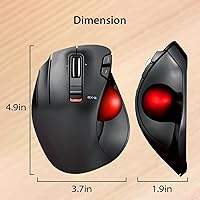
  • Ball Control: The trackball is operated by the thumb and sits on the left side of the device for intuitive left-hand navigation.
  • Ball Size: The trackball measures 34mm in diameter, a standard size that balances precision control and comfortable thumb reach.
  • Ball Color: The ball is red, a color chosen because red-surface tracking delivers improved accuracy with optical sensors compared to other colors.
  • DPI Settings: Cursor sensitivity switches between two levels — 750 DPI for precise, slower movement and 1500 DPI for faster navigation — via a dedicated button.
  • Buttons: Includes 6 programmable buttons that can be remapped using the free ELECOM Mouse Assistant software, available from ELECOM's website.
  • Dimensions: The body measures 3.73 x 4.9 x 1.89 inches, making it compact enough for tight desk setups or travel use.
  • Weight: Weighs 4.5 oz without a battery installed, keeping it light enough for extended daily use without fatigue.
  • Power Source: Runs on a single AA battery, which is included in the box; a battery remaining indicator light is built into the device.
  • Scroll Wheel: Features a tilt scroll wheel that supports both vertical and horizontal scrolling, though horizontal tilt is not functional on Windows RT 8.1.
  • Sensor Type: Uses optical tracking technology to detect ball movement, with the red ball surface further enhancing sensor read accuracy.
  • OS Support: Compatible with Windows Vista through Windows 10 and later, as well as macOS 10.10 and later; plug-and-play with no driver installation required.
  • Software: ELECOM Mouse Assistant is an optional free program that enables button remapping and is available as a separate download from ELECOM's official site.
  • Model Number: The official model number is M-XT4DRBK-G, which can be used to identify replacement parts or confirm compatibility.
  • Release Date: This product was first made available in September 2020 and remains an active listing in ELECOM's peripheral lineup.
  • Battery Indicator: A dedicated light on the device signals when battery charge is running low, helping users avoid unexpected power loss mid-task.
  • Surface Requirement: Requires no mousepad, as the cursor is controlled by the trackball rather than physical mouse movement across a surface.

Related Reviews

Perixx PERIMICE-713L Left-Handed Wireless Vertical Mouse
82%
91%
Ergonomics and Comfort
88%
Connectivity Range
85%
Ease of Use
83%
Adjustable DPI Precision
80%
Build Quality
More
Perixx Perimice-719L Left Handed Wireless Vertical Mouse
84%
88%
Ergonomics & Comfort
85%
DPI Adjustability & Precision
91%
Portability & Size
84%
Silent-Click Feature
79%
Battery Life
More
SABLUTE Wireless Trackball Mouse
74%
83%
Ergonomic Comfort
79%
Adjustable Tilt Base
86%
Multi-Device Connectivity
67%
Trackball Precision & Feel
74%
DPI Range & Customization
More
seenda Wireless Trackball Mouse
78%
88%
Ergonomic Comfort
74%
Trackball Precision
86%
Multi-Device Connectivity
83%
Battery Life
71%
Build Quality
More
PORLEI TM550 Wireless Trackball Mouse
75%
88%
Ergonomic Comfort
84%
Trackball Size & Control
86%
Multi-Device Connectivity
73%
Battery Life
54%
DPI Adjustment Usability
More
ELECOM DEFT PRO Trackball Mouse
74%
83%
Ergonomic Comfort
78%
Tracking Precision
86%
Multi-Device Connectivity
84%
Build Quality
88%
Ball & Bearing Smoothness
More
ELECOM Relacon M-RT1BRXBK Handheld Trackball
75%
83%
Ergonomics & Comfort
71%
Trackball Precision
68%
Bluetooth Connectivity
66%
Button Layout & Customization
61%
Learning Curve
More
ELECOM HUGE Wired Finger Trackball Mouse
80%
91%
Tracking Smoothness
88%
Ergonomic Comfort
63%
Learning Curve
86%
Build Quality
79%
Button Layout & Usability
More
Kensington TB450 Wireless Trackball Mouse
78%
88%
Ergonomic Comfort
71%
Tracking Precision
84%
Wireless Reliability
83%
Multi-Device Switching
93%
Battery Life
More
ProtoArc EM04 Wireless Trackball Mouse
86%
88%
Ergonomics & Comfort
91%
Battery Life
84%
Ease of Use
89%
Connection Versatility
85%
Precision & Control
More

FAQ

It is genuinely designed from the ground up for left-handed use — the contoured shell, thumb rest, and ball placement are all mirrored for a natural left-hand grip. It is not a symmetric ambidextrous mouse with a label change. If you have been using right-handed mice your whole life, the difference in comfort is noticeable fairly quickly.

Most people find the adjustment takes somewhere between one and two weeks of regular use. The first few days can feel awkward, especially with precise movements, but muscle memory builds faster than most expect. Sticking with it through that initial period is worth it if wrist comfort is the goal.

No, it works plug-and-play out of the box on both Windows and macOS without installing anything. The ELECOM Mouse Assistant software is only needed if you want to remap the buttons to custom functions, and plenty of users never bother with it.

For standard office tasks — browsing, documents, email, spreadsheets — the 1500 DPI setting is completely adequate. Where it starts to feel limiting is on large monitors, multi-display setups, or high-resolution screens where you need to cover more screen real estate quickly. If that describes your setup, it is a real trade-off to consider.

The ELECOM EX-G Left-Handed Wireless Trackball Mouse is officially supported on Windows and macOS only. Many users report it works on Chromebooks via the USB receiver since Chrome OS supports standard HID devices, but this is not officially guaranteed. iPad and tablet use is generally not reliable without specific USB adapter support.
Battery life is generally well-regarded by users, with most reporting weeks of regular use from a single AA battery. The built-in indicator light is handy — it warns you before the battery fully dies so you are not caught off guard. Keeping a spare AA nearby is always a good habit with any wireless peripheral.

Yes, the trackball can typically be removed by pushing it out from the underside access hole, which allows you to clean both the ball and the sensor area inside. Dust and debris can accumulate around the sensor rollers over time and affect tracking accuracy, so occasional cleaning is recommended.

It is a reasonable option for graphic designers or photo editors who are left-handed and need to reduce wrist strain. The precision at 750 DPI is decent for detailed work, though professional digital artists who need extremely fine cursor control at varying speeds may find the two-step DPI switching a bit limiting compared to more advanced alternatives.

Unfortunately, losing the USB receiver is a significant problem since the mouse pairs specifically to that dongle and cannot be repaired to a generic receiver. ELECOM does sell replacement receivers in some regions, but availability can vary. It is worth storing the dongle carefully or buying a spare if you travel frequently with the mouse.

For general productivity use, the 2.4 GHz wireless connection is responsive enough that most users notice no perceptible lag. It is not engineered for competitive gaming where milliseconds matter, but for office work, browsing, and design tasks, the wireless performance is perfectly solid in day-to-day use.

Where to Buy