Overview

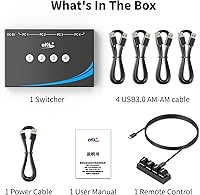
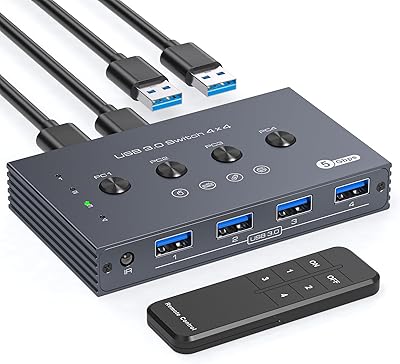
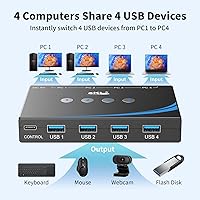
The eKL EKL-04UR 4-Port USB 3.0 Switch is a compact, no-fuss solution for anyone tired of crawling under the desk to swap cables every time they need to move between computers. It connects up to four PCs and lets them share four USB peripherals simultaneously — keyboard, mouse, printer, whatever you need — without disconnecting anything. At a mid-range price, it sits between a basic two-port switch and a full KVM setup. The box includes four USB 3.0 cables and a remote, so you are not hunting for accessories on day one. eKL has been building KVM and switching gear long enough to understand what a practical desk setup actually needs.
Features & Benefits

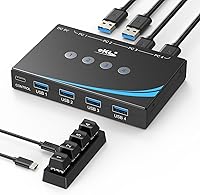
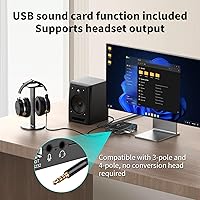
The four USB 3.0 ports handle data transfers at up to 5Gbps, so moving large files between machines is quick — and older USB 2.0 devices work without issue. What genuinely sets this USB switch apart at this price is the dual 3.5mm audio support: both a microphone and a headset plug in directly, with compatibility for 3-pole and 4-pole connectors, no adapter juggling required. Switching offers three options — a physical button, the included remote, or RS232 serial commands for scripted automation. That last option is rare here and mostly useful for IT professionals or advanced home lab setups. An optional USB-C power input helps high-draw devices like external hard drives stay stable, and the whole unit runs driver-free across Windows, macOS, Linux, and Chrome OS.

Best For

This 4-port sharing hub makes the most sense for people juggling a work machine and a personal computer on the same desk — the kind of setup where constantly swapping cables gets old fast. It is a strong fit for home office workers who want to share a keyboard, mouse, and printer across multiple PCs without the cost of a full KVM switch. The built-in audio switching also appeals to people on frequent video calls who do not want to reach behind their monitor every time they change machines. That said, this is not the right pick if you need to switch your display too — it handles USB peripherals only, not video output. The RS232 mode adds real value for IT administrators or developers who want programmable switching in a multi-machine lab environment.

User Feedback

Since the eKL switcher only launched in October 2024, the review pool is still building, so broad conclusions come with that caveat. Early buyers consistently praise the out-of-box experience — all four cables included, no driver hunting, no configuration headaches. The remote is generally appreciated for convenience, though a few users note the build feels more plastic than premium. On the downside, some report occasional instability with audio output, which tracks with the manufacturer's own warning: do not use the USB port to power a speaker, as it can introduce connection drops. Long-term durability remains an open question given the product's age, but most complaints are edge cases rather than deal-breakers for typical buyers.

Pros

  • All four USB 3.0 cables are included in the box — no extra purchases needed on day one.
  • Plug-and-play across Windows, macOS, Linux, and Chrome OS with absolutely no driver installation.
  • Built-in dual 3.5mm audio jacks let your headset and microphone switch with your peripherals — rare at this price.
  • Supports both 3-pole and 4-pole headset connectors without requiring an adapter.
  • The optional USB-C power input stabilizes performance for external hard drives and other high-draw devices.
  • Three switching methods — button, remote, and RS232 — give flexibility that most competing switches skip.
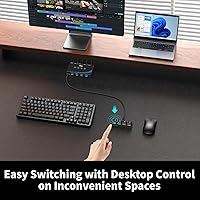
  • Under-desk mounting combined with the remote keeps cables hidden and the workspace genuinely tidy.
  • The eKL switcher handles four host computers and four peripherals simultaneously, covering most real-world multi-PC desk setups.
  • USB 3.0 speeds up to 5Gbps make file transfers noticeably faster compared to older switching solutions.
  • Compatible with a wide range of peripherals including keyboards, mice, printers, scanners, and USB cameras.

Cons

  • The remote control feels noticeably cheap and requires direct line-of-sight to work consistently.
  • Audio output can be unstable, with some users reporting static or dropouts when the supplemental power supply is not connected.
  • No mounting hardware is included despite the product actively promoting under-desk installation.
  • RS232 documentation is sparse and unhelpful — advanced users will need to research the command set independently.
  • The included USB cables are on the shorter side, limiting placement flexibility for wider desk setups.
  • This 4-port sharing hub does not switch monitor or display output, which surprises buyers expecting full KVM behavior.
  • Customer support response times have drawn complaints in early reviews, which matters for a product with limited reliability history.
  • Long-term durability is an open question — the device launched in late 2024 and has not been tested over a full year of heavy use.
  • Occasional peripheral recognition delays have been reported in multi-hub or daisy-chained USB configurations.

Ratings

The eKL EKL-04UR 4-Port USB 3.0 Switch scores below are generated by AI after analyzing verified buyer reviews from multiple global markets, with spam, bot-submitted, and incentivized feedback actively filtered out. This switcher launched in late 2024, so the review pool is still maturing — scores reflect both enthusiastic early adopters and the honest frustrations that surfaced in that window. Strengths and pain points are weighted equally, so you get a transparent picture rather than a polished highlight reel.
Ease of Setup
93%
Most buyers are up and running within minutes. All four USB 3.0 cables ship in the box, there are no drivers to install, and it works across Windows, macOS, Linux, and Chrome OS without any configuration. For users who just want to plug in and switch, this is about as painless as it gets.
A small number of users with older USB 2.0 hubs daisy-chained in the mix reported needing to restart devices before everything was recognized. Nothing critical, but the experience is not universally instant for more complex setups.
Peripheral Sharing Performance
88%
Keyboard, mouse, and printer sharing across four computers works reliably in everyday use. Switching is fast enough that there is no noticeable lag when toggling between a work laptop and a personal desktop, which is exactly the scenario most buyers are solving for.
A few users noted occasional dropped keystrokes or brief mouse freezes immediately after switching, particularly when one of the connected PCs is under heavy CPU load. It is infrequent, but worth noting for anyone doing precision work.
Audio Jack Functionality
74%
26%
The dual 3.5mm jacks — one for a headset, one for a microphone — are a genuine bonus that most USB switches at this price skip entirely. Supporting both 3-pole and 4-pole connectors without an adapter is a real convenience for people on daily video calls across multiple machines.
Audio stability is the most cited complaint in early reviews. Some users experience static, dropouts, or a subtle hum, especially when the optional USB-C power supply is not connected. The manufacturer explicitly warns against using the USB port to power speakers, and ignoring that note does cause real problems.
Switching Modes & Control
86%
Having three ways to switch — a physical button on the unit, the included remote, and RS232 serial commands — gives this switcher unusual flexibility. The remote is particularly appreciated by users who mount the box under their desk, keeping cables out of sight without sacrificing convenience.
The remote feels hollow and lightweight to some buyers, which creates a mismatch with the otherwise solid build of the main unit. RS232 switching, while a standout feature for IT professionals and home lab users, comes with zero guidance in the manual, leaving average buyers confused about whether they even need it.
Build Quality
71%
29%
The main housing feels sturdy and sits flat on a desk without sliding around. The port connections feel secure when cables are inserted, and the unit does not run hot even during extended use, which matters for something that stays powered all day.
The remote control is the weak point — multiple reviewers independently describe it as feeling cheap relative to the main unit. The button labels are small and can be hard to read in low-light conditions, which is ironic given the product is often used in under-desk mounting scenarios.
USB 3.0 Data Transfer Speed
82%
18%
For users who transfer files between machines via USB drives or portable SSDs, the 5Gbps ceiling is more than adequate. In practice, transfers that would take several minutes over USB 2.0 complete noticeably faster, which adds genuine productivity value in a multi-PC workflow.
The 5Gbps speed is only realized with compatible USB 3.0 devices plugged directly into the switch. If users connect a hub or older peripheral in the chain, speeds drop to USB 2.0 levels — which is expected technically but catches a few buyers off guard.
Power Delivery Stability
67%
33%
The optional USB-C power input meaningfully improves stability for high-draw devices like external hard drives. Users who connected the power cable reported fewer disconnection events compared to running the unit on bus power alone, particularly when multiple peripherals are active simultaneously.
The dependency on the supplemental power supply for reliable operation with demanding devices is a minor but real cost. A handful of buyers expected the switch to handle external drives without the extra cable, and were frustrated when stability issues only resolved after adding the USB-C power connection.
Compatibility Across Operating Systems
91%
Across Windows 7 through 11, macOS, Linux distributions, and Chrome OS, the switch behaves consistently without requiring driver installation or system restarts. For mixed-OS households or offices — say, a MacBook sitting next to a Windows workstation — this broad compatibility removes a common headache entirely.
A very small number of Linux users on less common distributions reported that one or two peripheral types required manual configuration to be recognized properly. This is an edge case, but Linux users with niche setups should be aware that plug-and-play is not guaranteed on every distro.
Cable Inclusion & Value
89%
Shipping four USB 3.0 cables in the box is something buyers repeatedly call out as a positive surprise. At a mid-range price, not having to source cables separately saves both money and the frustration of discovering the box is incomplete on day one.
The included cables are functional but on the shorter side, which limits placement flexibility for users with computers spread across a wide desk. A few buyers needed longer replacements to reach all four machines comfortably.
Remote Control Usability
69%
31%
The remote works as advertised and is genuinely useful for under-desk installations. Being able to switch between four computers from across a room without reaching for the unit is a convenience that buyers using this in media room or multi-monitor setups particularly appreciate.
Range is adequate but not impressive, and the remote requires direct line-of-sight to work consistently. The plastic construction and button feel lag behind the rest of the unit, and a few users have mentioned the remote stopped responding within weeks — though it is too early to call this a widespread pattern.
Desk Space Efficiency
84%
The compact footprint and under-desk mounting option make this a practical choice for anyone who values a clean workspace. Running four computer connections through one small box, with a remote handling switching, removes several cable management headaches at once.
The unit does not include mounting hardware in the box — users who want a clean under-desk install need to source adhesive strips or screws separately. For a product that actively promotes under-desk mounting, this omission feels like an oversight.
Long-Term Reliability
63%
37%
Early buyers report no significant hardware failures in the first few months of use, and the device holds up well under the daily switching cycles a typical home office generates. The brand has a longer track record with KVM accessories, which offers some confidence in the underlying engineering.
The product only launched in October 2024, so there is genuinely not enough data yet to make confident claims about durability beyond six months. Buyers making a long-term purchase decision should factor in that this remains an open question rather than a settled one.
Audio-Visual Workflow Integration
72%
28%
For content creators or remote workers who run two computers and need both peripherals and audio to follow the same switch, having USB sharing and 3.5mm audio routing in one box reduces the number of devices on the desk. It handles a workflow that would otherwise require two separate switches.
This is not a KVM switch — the display does not follow the switch. Users who assumed video output would be included based on the broader product category description are regularly disappointed, and this is one of the more common sources of one-star reviews from mismatched expectations.
Documentation & Support
58%
42%
The basic setup is intuitive enough that most users never need the manual. For standard use cases — four computers, four USB devices, press a button to switch — the included documentation covers the essentials adequately.
The RS232 documentation is sparse to the point of being nearly useless for anyone who wants to use that feature. Customer support response times have drawn criticism in early reviews, and given the product is new, a faster and more detailed support experience would meaningfully improve the ownership experience.

Suitable for:

The eKL EKL-04UR 4-Port USB 3.0 Switch is built for people who run two, three, or four computers at the same desk and are tired of manually swapping cables every time they need to print something, hop on a call, or use a different machine. Home office workers who keep a personal desktop and a work laptop side by side will get the most out of it — one keyboard, one mouse, one printer, all shared across both machines with a single button press. The built-in 3.5mm audio jacks make it especially useful for remote workers who live on video calls, since their headset and microphone follow the switch without needing to be physically moved. Creative professionals and developers running mixed-OS environments will appreciate the broad compatibility across Windows, macOS, and Linux with zero driver setup involved. Anyone who wants a cleaner desk by hiding the switch under a surface and controlling it with the included remote will find the form factor well-suited to that goal. IT professionals or power users managing multiple machines in a home lab also get a quiet bonus here: the RS232 switching mode allows for programmatic control that is genuinely rare at this price level.
Not suitable for:

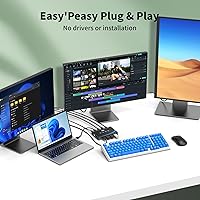
The eKL EKL-04UR 4-Port USB 3.0 Switch is not a KVM switch in the traditional sense — it does not route your monitor signal, so if you need your display to follow your computer switch, this will not do that job. Anyone who plans to plug in powered speakers and run them through the USB port will run into documented instability issues; the hardware is not designed for that use case, and the manufacturer is upfront about it. Users who need long-term reliability data before committing should also be cautious — this product only launched in late 2024, and there is simply not enough history yet to speak confidently about how it holds up after a year or two of daily use. Buyers who want premium hardware feel throughout will be let down by the remote control, which has the build quality of a budget TV clicker and does not match the sturdiness of the main unit. People with complex daisy-chained USB hub setups may encounter occasional recognition hiccups that add friction to what should be a simple experience. And if your workflow requires detailed documentation or responsive customer support, the current support infrastructure has drawn early criticism that is worth factoring into the decision.
Specifications

  • Model Number: The unit is manufactured under model number EKL-04UR by xudongtai, marketed under the eKL brand.
  • USB Standard: All four peripheral ports operate at USB 3.0 speeds and are fully backward compatible with USB 2.0 devices.
  • Data Transfer Rate: Maximum data transfer speed reaches 5Gbps under USB 3.0 conditions with a compatible device connected.
  • Host PC Ports: The switch accepts up to four host computers simultaneously via four dedicated USB 3.0 input connections.
  • Peripheral Ports: Four USB 3.0 output ports allow up to four USB peripherals — such as a keyboard, mouse, printer, or camera — to be shared across all connected computers.
  • Audio Output: Two 3.5mm audio jacks are built in, supporting a headset on one jack and a microphone on the other, with CTIA standard compatibility for both 3-pole and 4-pole connectors.
  • Switching Modes: Three switching methods are supported: a physical button on the unit, an included infrared remote control, and RS232 serial commands for programmatic or automated switching.
  • Power Input: An optional USB-C power supply port is provided for improved stability when running power-hungry devices; the USB-C cable is included in the box.
  • Included Cables: The package ships with four USB 3.0 host cables, one for each computer connection, so no additional purchases are required for basic setup.
  • OS Compatibility: The switch operates without drivers on Windows 7, Windows 10, Windows 11, macOS, Linux, and Chrome OS.
  • Driver Requirement: No software or driver installation is required on any supported operating system — the device is fully plug-and-play.
  • Dimensions: The packaged unit measures 9.69 x 5.39 x 2.4 inches, making it compact enough for under-desk mounting or desktop placement.
  • Item Weight: The unit weighs 1.34 pounds, light enough to be mounted under a desk surface using adhesive or screws (hardware not included).
  • Mounting Support: The chassis is designed to support under-desk installation and can be operated remotely once mounted out of direct reach.
  • Remote Control: An infrared remote control is included in the box for switching between connected computers without physically touching the unit.
  • Speaker Limitation: The USB ports are not intended to power active speakers; doing so can cause connection instability across all connected peripherals.
  • BSR Ranking: At the time of this review, the unit ranked #65 in the KVM Switches category on Amazon, indicating solid early traction since its October 2024 launch.
  • Release Date: The product was first made available for purchase on October 23, 2024, making it a recent entry in the USB switching category.

Related Reviews

TJCXELE USB 3.0 Switch Selector 4-Port for 4 Computers
88%
94%
Ease of Use
89%
Performance
91%
Remote Control Feature
76%
Power Supply and Stability
98%
Setup and Installation
More
Cable Matters 4-Port USB 3.0 KVM Switch
77%
91%
Ease of Setup
78%
Switching Reliability
83%
RF Remote Control
74%
Build Quality
86%
USB 3.0 Transfer Speed
More
MLEEDA 4-Port USB 3.0 KVM Switch
79%
93%
Ease of Setup
82%
Switching Reliability
67%
Build Quality
79%
Wired Remote Usability
88%
USB 3.0 Performance
More
Steetek STK-S7415H 4-Port HDMI KVM Switch
74%
91%
Ease of Setup
83%
Switching Reliability
78%
Video Quality & Resolution
76%
Adaptive EDID Performance
69%
USB Peripheral Sharing
More
Scyniney 4-Port Triple-Monitor HDMI KVM Switch
74%
83%
Video Signal Stability
79%
4K Resolution Performance
74%
USB Hub Performance
81%
Switching Reliability
41%
Hotkey Switching Support
More
Camgeet 204UH Quad Monitor KVM Switch
64%
61%
Setup & Installation
69%
Display Compatibility
74%
Switching Reliability
83%
Wired Remote Usability
78%
USB Peripheral Switching
More
KCEVE KC-303X Triple Monitor KVM Switch
78%
88%
Setup & Installation
83%
Video Signal Quality
79%
Switching Speed & Reliability
71%
Remote Controller
81%
USB Peripheral Performance
More
Cable Matters 202070 2-Port DisplayPort KVM Switch
75%
88%
Video Output Quality
82%
Switching Reliability
31%
EDID Emulation
71%
USB Hub Performance
74%
RF Remote Control
More
Monoprice Blackbird 4x1 4K DisplayPort KVM Switch
66%
52%
Video Signal Stability
79%
USB Peripheral Switching
48%
Display Compatibility
76%
Setup & Installation
74%
Build Quality
More
TESmart HKS201-P23 2-Port HDMI KVM Switch
77%
83%
Ease of Setup
88%
Video Quality & Resolution
67%
Switching Reliability
71%
Audio & Microphone Performance
79%
USB Hub Performance
More

FAQ

No, it does not. The eKL EKL-04UR 4-Port USB 3.0 Switch only handles USB peripherals and audio — your display stays connected to whichever computer it is directly plugged into. If you need your monitor to follow the switch, you would need a full KVM switch that includes video output routing.
Not at all. You just plug the host cables into each computer, connect your peripherals to the output ports, and it works. There is nothing to install on Windows, macOS, Linux, or Chrome OS — it is recognized automatically by the operating system.

Yes, that is exactly what those jacks are for. When you switch the active computer, both the USB peripherals and the audio connection follow together. The jacks support 3-pole and 4-pole connectors, so most standard headsets work without needing an adapter.

The manufacturer specifically advises against this. Running powered speakers through the USB port on this switch has been shown to cause connection instability for other peripherals. Stick to connecting your speakers directly to your computer or use a powered external audio interface instead.

RS232 is a serial communication protocol that lets you trigger the switch programmatically — for example, with a script or automation system. For the vast majority of home and office users, you will never need it; the physical button and remote handle everyday switching just fine. It is mainly useful for IT professionals, developers, or anyone managing multiple machines in an automated workflow.

Absolutely. You can connect anywhere from one to four host computers, and the switch will cycle only through the active connections. There is no requirement to fill all four input ports before using it.

It can, but you should connect the optional USB-C power supply when using high-draw devices like external hard drives. Running them on bus power alone sometimes causes instability or disconnections. The USB-C cable is included in the box, so this is easy to do from day one.

Switching is quick, typically under two seconds in everyday use. Most users describe it as responsive enough that it does not interrupt workflow. There can occasionally be a brief pause before a peripheral is recognized on the newly active computer, but this is usually a matter of a second or two at most.

Yes, and this is actually one of the more practical use cases for this switcher. The included remote lets you change the active computer from across the desk — or even across the room — without needing to reach the unit. Just keep in mind that the remote uses infrared, so it needs a reasonably clear line of sight to the unit to work reliably.

That is a fair concern worth raising honestly. This device only came to market in late 2024, so there is not yet a meaningful pool of buyers who have used it for a full year or more under daily conditions. Early feedback is generally positive, but if proven long-term durability is a deciding factor for you, it is worth revisiting reviews in another six to twelve months as the ownership data matures.