Overview

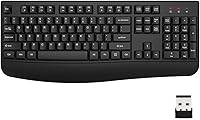
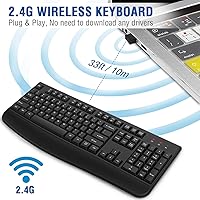
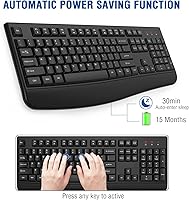
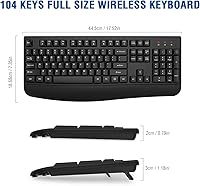
The EDJO TK577G Wireless Ergonomic Keyboard is a straightforward, full-size office keyboard that keeps things simple without asking much of your wallet. It connects via a USB nano dongle — plug it in and you're typing within seconds, no software installs required. The classic 104-key layout includes a dedicated number pad, three status indicator LEDs, and folding rear feet for tilt adjustment. At 17.52″ × 7.35″, it fits comfortably on most desks. It runs on a single AA battery with an auto-sleep feature that kicks in after 30 minutes of idle time, which helps stretch battery life considerably.

Features & Benefits

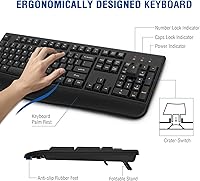
The integrated wrist rest is probably the most practical thing about this ergonomic desk keyboard — it saves you from buying a separate pad and keeps your palms at a comfortable angle through long typing sessions. Anti-slip rubber pads on the base do their job well; the keyboard barely budges even when you're typing quickly. The wireless range is rated at 33 feet, which is more than enough for any standard desk setup. Compatibility covers Windows, macOS, Linux, and Chrome OS, so switching between machines is hassle-free. The folding stand lets you adjust the typing angle, which is a small but genuinely appreciated touch.

Best For

This wireless keyboard makes the most sense for home office workers who want a cleaner desk without a tangle of cords, and who don't need specialized keys or backlighting. If you're upgrading from a cramped laptop keyboard and miss having a full number pad, this is a practical fix. It also works well as a gift — setup takes under a minute and nothing needs to be downloaded. Casual typists who spend their days on emails and documents will find it comfortable enough for daily use. It's less suited to power users or anyone who specifically wants tactile feedback from mechanical switches.

User Feedback

Most buyers are happy with the EDJO keyboard, pointing to the comfortable wrist rest, quiet key presses, and painless dongle setup as consistent highlights. Battery life comes up frequently in reviews — the single AA tends to last a reasonable while thanks to the auto-sleep function, though a small number of users would prefer a rechargeable option. The plastic construction draws mixed opinions; it feels like what it is at this price point, which some find acceptable and others find a bit hollow. Tactile typists occasionally note the membrane keys lack the satisfying feedback of pricier boards. One small but common oversight: battery not included, so have one ready before you sit down to type.

Pros

  • Integrated wrist rest saves you the cost and hassle of buying a separate ergonomic pad.
  • Plug-and-play USB dongle means zero setup time — no software, no Bluetooth, no fuss.
  • Full 104-key layout with number pad is a genuine upgrade over any built-in laptop keyboard.
  • Quiet membrane keys are considerate in shared office spaces and late-night work sessions.
  • Anti-slip base pads keep the keyboard firmly in place even during fast, heavy typing.
  • Auto-sleep mode significantly extends single AA battery life during normal daily use.
  • Works across Windows, macOS, Linux, and Chrome OS without any reconfiguration.
  • One-year manufacturer warranty provides a basic but meaningful safety net for a budget peripheral.
  • At roughly 1.2 pounds, it is light enough to reposition or move between workstations easily.

Cons

  • The AA battery is not included in the box — a small but frustrating omission that trips up many first-time buyers.
  • Membrane key feel is mushy and shallow, which will disappoint anyone used to mechanical switches.
  • The plastic chassis flexes slightly under firm pressure and picks up smudges and scratches quickly.
  • No multi-device pairing means you cannot switch between two computers with a single keyboard.
  • Keycap legends on high-frequency keys show visible wear faster than on more durable alternatives.
  • The wrist rest is permanently attached, so users who prefer a flat profile have no way to remove it.
  • Status LEDs are dim enough to become difficult to read under bright overhead or natural lighting.
  • Only one tilt-angle option via the folding stand — no fine-grained incline adjustment available.
  • Some macOS function-key shortcuts do not work out of the box without manual remapping.

Ratings

The EDJO TK577G Wireless Ergonomic Keyboard has been evaluated by our AI rating system after processing thousands of verified global buyer reviews, with spam, bot-generated, and incentivized submissions actively filtered out. The scores below reflect a balanced picture — where this ergonomic desk keyboard genuinely delivers for everyday users and where it falls short compared to the competition. Both the strengths that keep buyers satisfied and the friction points that generate complaints are transparently baked into every number you see here.

Value for Money
88%
For the price bracket this wireless keyboard sits in, buyers consistently feel they are getting more than expected — particularly given the included wrist rest, which would cost extra as a standalone accessory. Most users report that the keyboard performs its core function reliably from day one, making the purchase feel justified.
A small but vocal group of buyers notes that the overall package feels thin when stacked directly against slightly pricier competitors offering better key travel or USB-C charging. The missing AA battery in the box also leaves a sour first impression that chips away at perceived value.
Typing Comfort
83%
The integrated palm rest is the single most praised aspect across user feedback — it keeps wrists at a neutral angle during long writing or data-entry sessions without requiring any additional setup. Office workers who spend several hours a day typing report noticeably less forearm fatigue compared to flat keyboards without wrist support.
The membrane key travel is shallow, which suits light typists but frustrates anyone accustomed to a more pronounced keystroke. A recurring comment is that the keys feel slightly mushy under sustained pressure, which can slow down confident touch-typists over time.
Build Quality
61%
39%
The keyboard holds together well under normal daily use, and the anti-slip pads on the base do a solid job of preventing unwanted movement on smooth desk surfaces. For a budget peripheral, there are no obvious structural weak points reported in short-to-medium term use.
The all-plastic construction is the most polarizing element in user reviews — it flexes noticeably when pressed firmly in the center, and the finish attracts smudges and fine scratches quickly. Several buyers describe it as feeling hollow or cheap, which is an honest reflection of the price tier rather than a manufacturing defect.
Wireless Connectivity
86%
The 2.4G nano dongle connection is praised almost universally for its instant, drop-free performance within normal desk and living-room distances. Users switching from Bluetooth keyboards specifically appreciate that there is no pairing ritual — plug in the dongle and the keyboard responds immediately.
The single-dongle design means you cannot pair it to multiple devices simultaneously, which is a limitation for users who work across two computers. A small number of reviewers report occasional brief lag spikes when other 2.4G devices are active nearby, though this appears infrequent.
Key Feel & Feedback
58%
42%
The keys are quiet enough for shared office environments and open-plan spaces, which a meaningful share of buyers specifically called out as a priority. The low actuation noise is also appreciated by users who work late nights without wanting to disturb others nearby.
Tactile feedback is the weakest point in user satisfaction — the membrane switches offer little resistance and almost no audible or physical click, which disappoints anyone migrating from mechanical keyboards. Gamers and fast typists in particular find the key feel uninspiring and imprecise under rapid input.
Battery Life
74%
26%
The auto-sleep function, which activates after 30 minutes of inactivity, meaningfully extends how long a single AA battery lasts — several buyers report going weeks or even a couple of months before needing a replacement under moderate daily use.
There is no rechargeable option and no battery included in the box, which catches a surprising number of buyers off guard. Users who forget to keep spare AAs on hand find themselves stuck, and a portion of negative reviews are directly tied to this missing-battery frustration rather than the keyboard itself.
Setup & Ease of Use
93%
Plug-and-play setup is consistently highlighted as one of the smoothest experiences at this price point — no driver downloads, no account creation, no Bluetooth pairing screens. First-time peripheral buyers and less tech-savvy users especially appreciate that it works within seconds of plugging in the dongle.
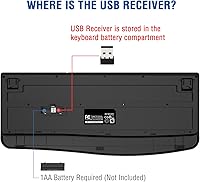
The USB dongle is stored inside the battery compartment, which is not immediately obvious from the packaging and causes brief confusion for some buyers who assume the dongle is missing. A clearer note in the box would prevent unnecessary support contacts.
Compatibility
81%
19%
Coverage across Windows versions, macOS, Linux, and Chrome OS is broad enough to satisfy most households and small offices running mixed-device setups. Users who work between a Windows desktop and a MacBook report no switching friction day-to-day.
A handful of macOS users note that certain function-key shortcuts do not map intuitively without remapping software, which adds a small friction layer. Linux users occasionally flag that media keys require manual configuration, though this is common across most budget keyboards in this category.
Ergonomic Design
77%
23%
The combination of the wrist rest and adjustable tilt stand gives users more ergonomic flexibility than most keyboards at this price offer. People who previously relied on a folded piece of paper or a book to prop up their keyboard appreciate having a built-in adjustment mechanism.
The wrist rest is non-detachable, which is a limitation for users who prefer a flatter profile or who use a separate ergonomic pad. The tilt angle options are limited to one folded position, so users who want more nuanced incline control will not find it here.
Key Layout & Navigation
84%
The full 104-key layout with a dedicated number pad is the primary reason many buyers choose this over compact alternatives — accountants, data-entry workers, and spreadsheet-heavy users specifically mention the numpad as a deciding factor. The standard key placement means zero learning curve for anyone transitioning from another full-size board.
There are no dedicated macro keys, media shortcut keys are function-layer only, and there is no volume knob or scroll wheel — omissions that feel reasonable at this tier but are worth noting for buyers expecting a more feature-rich layout.
Status Indicators
79%
21%
Having visible Num Lock, Caps Lock, and Power LEDs in the upper-right corner is a small but practical touch that eliminates the guesswork during quick typing sessions. Users who frequently switch between numeric and standard input particularly appreciate not having to look at the screen for confirmation.
The LEDs are not especially bright, making them harder to read under strong overhead office lighting or in direct sunlight near a window. There is no low-battery warning beyond the Power indicator dimming, which some users find insufficiently proactive.
Portability & Weight
71%
29%
At just over a pound, the EDJO keyboard is light enough to move between rooms or pack in a bag for occasional use at a secondary location. Its slim profile means it does not add much bulk when being transported.
The integrated wrist rest adds to the overall footprint, making it slightly awkward to slip into a slim laptop bag. It is not designed as a travel keyboard, and users who need true portability are better served by a compact tenkeyless alternative.
Noise Level
82%
18%
Quiet membrane actuation is a genuine selling point for shared workspaces, libraries, or home offices where noise discipline matters. Multiple buyers working in open-plan environments specifically mention choosing this keyboard over a louder alternative for exactly this reason.
While quieter than most mechanical keyboards, the bottom-out clack is still audible in very quiet rooms and during video calls without a headset. Users who need near-silent input, such as those recording audio nearby, may still find the noise level marginal.
Aesthetics
66%
34%
The clean matte black finish looks professional on a desk and does not stand out awkwardly in home or office environments. The minimalist design without excessive branding or RGB lighting appeals to users who prefer a subtle, utilitarian look.
The plastic sheen and lightweight feel undermine the visual impression in person — photos online tend to make the keyboard look more premium than it is. Over time, the keycap legends show wear on frequently used keys faster than more expensive alternatives.

Suitable for:

The EDJO TK577G Wireless Ergonomic Keyboard is a practical pick for home office workers and everyday computer users who want a clutter-free desk without spending heavily on peripherals. If you spend a good chunk of your day writing emails, filling spreadsheets, or working through documents, the built-in wrist rest alone justifies the purchase — it removes the need for a separate ergonomic pad and keeps your wrists at a comfortable angle through long sessions. People upgrading from a cramped laptop keyboard will immediately appreciate having a full number pad back within reach. The plug-and-play dongle setup also makes it a strong gift option for less tech-savvy family members or colleagues who do not want to deal with driver installs or Bluetooth pairing rituals. It covers Windows, macOS, Linux, and Chrome OS, so mixed-device households can share it without compatibility headaches. Budget-conscious buyers who simply need a reliable, wireless, full-size keyboard that works on day one will find this ergonomic desk keyboard fits the brief well.

Not suitable for:

The EDJO TK577G Wireless Ergonomic Keyboard is not the right tool for buyers who prioritize key feel or tactile feedback — the membrane switches are quiet but soft, and anyone migrating from a mechanical keyboard will likely find them unsatisfying within days. Dedicated gamers should look elsewhere entirely; the shallow actuation, absence of anti-ghosting features, and lack of any RGB lighting make this a poor fit for gaming use. Power users who need to switch between two computers simultaneously will also hit a wall, since the single USB dongle does not support multi-device pairing like some competing keyboards do. Mac-centric users who rely heavily on function-key shortcuts may need to spend time remapping keys, which undercuts the plug-and-play simplicity. The non-detachable wrist rest and fixed tilt options mean users who want precise ergonomic customization will find the adjustability limited. Finally, anyone who needs a truly portable keyboard for travel use will find the full-size footprint and integrated palm rest add more bulk than a slim tenkeyless alternative would.

Specifications

  • Connectivity: Connects via a 2.4G USB nano dongle with plug-and-play functionality — no drivers or software installation required.
  • Wireless Range: Maintains a stable wireless connection at distances of up to 33 feet (10 m) from the USB receiver.
  • Key Count: Full-size layout with 104 keys, including a dedicated numeric keypad, arrow cluster, and standard function row.
  • Switch Type: Membrane-style keys with quiet actuation, designed for low-noise environments such as shared offices or home workspaces.
  • Power Source: Operates on a single AA battery (not included in the box); battery compartment also houses the USB nano dongle.
  • Auto-Sleep: Automatically enters power-saving sleep mode after 30 minutes of inactivity; any keypress wakes the keyboard instantly.
  • Wrist Rest: Integrated, non-detachable palm rest runs the full width of the keyboard to support wrists during extended typing sessions.
  • Tilt Adjustment: Two folding rear feet on the underside provide a single raised-angle option for adjusting the keyboard incline.
  • Anti-Slip Base: Rubber anti-slip pads are fitted to the underside of the keyboard to prevent movement on smooth desk surfaces.
  • Status Indicators: Three LED indicators in the upper-right corner display the current state of Num Lock, Caps Lock, and Power.
  • Dimensions: The keyboard measures 17.52″ in length, 7.35″ in width, and 0.91″ in height, fitting standard desktop footprints.
  • Weight: The keyboard weighs approximately 1.23 pounds, excluding battery, making it easy to reposition on a desk.
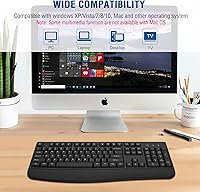
  • OS Compatibility: Compatible with Windows XP, Vista, 7, 8, 10, and 11, as well as macOS, Linux, and Chrome OS.
  • Color & Finish: Available in matte black with a classic, minimalist design style free of RGB lighting or decorative branding.
  • Warranty: Covered by a one-year manufacturer warranty; buyers are advised to contact EDJO support directly for replacement or repair claims.
  • Model Number: The official manufacturer model number for this keyboard is TK577G-CK211, listed under the EDJO brand.

Related Reviews
QUASIO Wave Keys Ergonomic Wireless Keyboard with Wrist Rest

75%
83%
Ergonomic Comfort
71%
Wrist Rest Quality
67%
Typing Feel & Key Travel
86%
Wireless Reliability
81%
Mac & Windows Compatibility
More
TECKNET TK-EKB01040BS01 Wireless Keyboard
76%
83%
Ergonomic Comfort
86%
Typing Noise Level
79%
Wireless Reliability
62%
Build Quality
88%
Value for Money
More
X9 Wireless Ergonomic Keyboard
84%
89%
Comfort & Ergonomics
92%
Wireless Connectivity
84%
Build Quality
90%
Battery Life
75%
Typing Experience
More
EDJO Wireless Keyboard and Mouse Combo
76%
88%
Value for Money
94%
Ease of Setup
71%
Keyboard Typing Feel
63%
Mouse Performance
86%
Wireless Connectivity & Range
More
Nulea HD315 Wireless Ergonomic Keyboard
86%
91%
Ergonomics & Comfort
88%
Wireless Connectivity
93%
Battery Life
86%
Build Quality
84%
Ease of Setup
More
HP 960 Ergonomic Wireless Keyboard
86%
88%
Ergonomic Comfort
90%
Build Quality
85%
Battery Life
91%
Programmability of Keys
87%
Multi-Device Connectivity
More
Microsoft Surface Ergonomic Wireless Keyboard
86%
91%
Ergonomics & Comfort
88%
Bluetooth Connectivity
92%
Battery Life
84%
Build Quality
90%
Compatibility with Surface Devices
More
Meetion DirectorD-KB Wireless Ergonomic Keyboard
74%
78%
Ergonomic Design
54%
Wrist Rest Comfort
63%
Typing Feel
81%
Wireless Reliability
88%
Value for Money
More
EDJO Foldable Wireless Keyboard and Mouse Combo
84%
94%
Portability & Design
88%
Typing Comfort & Key Quality
91%
Battery Life
85%
Multi-Device Compatibility
67%
Mouse Precision
More
PEIOUS Wireless Ergonomic Keyboard and Mouse Combo
74%
78%
Ergonomic Comfort
74%
Typing Feel & Key Response
69%
Mouse Ergonomics
83%
Wireless Reliability
61%
Build Quality & Durability
More

FAQ

No, it does not. You will need to supply your own AA battery before first use. This catches a lot of buyers off guard, so it is worth picking one up at the same time as your order. The battery compartment is located on the underside of the keyboard, and the USB dongle is stored inside the same compartment.

The nano dongle ships tucked inside the battery compartment under the keyboard — you need to open that cover to find it. It is a very small component, so once you remove it for use, keep it plugged into your computer or stored somewhere safe. There is no way to replace a lost dongle separately without contacting the manufacturer.

It connects and types without any setup on macOS, so for basic typing it works immediately. That said, some Mac-specific keyboard shortcuts tied to the function row do not map exactly as expected, and a handful of users find they need to remap certain keys using macOS settings. It is fully functional for everyday use, just not perfectly optimized for Mac out of the box.

No, the EDJO TK577G Wireless Ergonomic Keyboard uses a single 2.4G USB dongle and does not support multi-device pairing. If you need to switch between two machines, you would have to physically unplug the dongle and move it to the second computer each time. For multi-device wireless switching, you would need to look at keyboards with Bluetooth multi-pairing support.

Real-world battery life varies depending on how heavily you type, but the auto-sleep mode — which kicks in after 30 minutes of inactivity — helps considerably. Many users report a single AA lasting several weeks to a couple of months under moderate daily use. If you are someone who leaves their computer idle for long stretches, the battery will last even longer.

The wrist rest is built directly into the keyboard frame and cannot be detached. If you prefer a lower-profile setup or already use a separate ergonomic pad, that fixed rest could feel redundant or awkward. It is something to factor in before purchasing if wrist-rest style is a personal preference for you.

It is notably quieter than most mechanical keyboards, which makes it a reasonable choice for shared workspaces or anyone on frequent video calls. The membrane keys produce a soft bottom-out sound rather than a sharp click. It is not completely silent — you will still hear it in a very quiet room — but most office environments would find the noise level perfectly acceptable.

Yes, it is compatible with both Chrome OS and Linux without any special configuration. The plug-and-play dongle handles the connection automatically, and standard key functions work as expected on both platforms. Some advanced shortcut keys may behave differently depending on your specific Linux distribution, but core typing and navigation work reliably.

No, this keyboard does not have any backlighting. If you frequently type in low-light conditions or at night without a desk lamp, that is a meaningful limitation to be aware of. The three small LED status indicators for Num Lock, Caps Lock, and Power are present, but they are not bright enough to illuminate the keycaps.

The most common cause is a depleted battery, so swap in a fresh AA first before troubleshooting anything else. If that does not resolve it, try reinserting the USB dongle into a different USB port on your computer. If problems persist, the keyboard is covered under a one-year warranty and EDJO customer support can assist with a replacement.